STRIPE CONNECT

Automatically send donations to your campaign creators.

Charitable Stripe Connect is designed to work as a complement to Charitable’s built in Stripe functionality and Ambassadors extensions. It allows people to create campaigns on your website and receive donations into their Stripe account automatically. You can charge a platform fee on every donation.


Stripe Connect is used to power payments for platforms like Kickstarter and Indiegogo. It provides a secure and seamless way to handle multi-party payments and supports sellers/fundraisers in any country where Stripe operates (see countries). With our plugin, you can take advantage of Stripe Connect on your WordPress website.

How does it work?

When you use Charitable Stripe Connect, your website facilitates payments between donors and campaign creators. Instead of all funds raised going into a central account (the default with Charitable Ambassadors), people can create campaigns on your website and connect their own Stripe account. After that, all donations to their campaign are automatically paid to them.

You can also charge a percentage as a platform fee for each donation.

What does the integration look like for campaign creators?
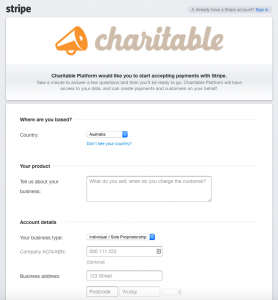
An screenshot of what it looks like for campaign creators when registering their Stripe account
An example of what it looks like for campaign creators when registering their Stripe account Note Instead of the Charitable logo you would upload your platforms logo

When a new campaign creator submits their campaign, they will automatically be redirected to Stripe, where they can register an account or login to their existing account.

Once the campaign creator has connected their Stripe account, they are redirected back to your website.

Charitable Stripe Connect provides a shortcode that can be used to display a user’s Stripe Connect status, including a link to connect their account if they have not already.

The user’s Stripe Connect status is also integrated into the output of the profile form added with [charitable_profile].

Note: If you’re familiar with Stripe Connect you may know that there are several different account type integrations possible. Charitable Stripe Connect currently only supports Standalone account.

Where can I use it?

Stripe Connect is available everywhere that Stripe is. Currently, the following countries support Stripe:

  • Australia
  • Canada
  • Denmark
  • Finland
  • France
  • Ireland
  • Japan
  • Norway
  • Singapore
  • Spain
  • Sweden
  • United Kingdom
  • United States
  • Austria – BETA
  • Belgium- BETA
  • Germany – BETA
  • Hong Kong – BETA
  • Italy – BETA
  • Luxembourg – BETA
  • Netherlands – BETA
  • New Zealand – BETA
  • Portugal – BETA
  • Switzerland – BETA
  • Brazil – PRIVATE BETA
  • Mexico – PRIVATE BETA

Don’t see your country listed? Keep an eye on the Stripe website to find out when Stripe is available in your country.

Requirements

Charitable Stripe Connect is only available as part of our Charitable Pro package.

In order to use it, you will also need to use the following Charitable extensions, both of which are included in Charitable Pro:

Stripe requires a valid SSL certificate to be used on your website.

Documentation

Click here to read our detailed setup documentation.

Frequently Asked Questions

See the list below for our most frequently asked questions. If your question is not listed here, please contact us.

What's New In Charitable

🔔 Subscribe to get our latest updates
📧 Subscribe to Emails

Email Subscription

Join our Newsletter

We won’t spam you. We only send an email when we think it will genuinely help you. Unsubscribe at any time!

Improvement New Security

📣 New Security Features

We’ve introduced a suite of new security tools to give you total control over who accesses your forms, plus a new way to tidy up your database.

Advanced Security Suite

Layered protection: Cloudflare, ReCAPTCHA, IP Controls, and Rate Limiting.

We have overhauled our security settings to stop bots without blocking real donors.

  • 🤖 Flexible Protection: Choose between Google reCAPTCHA v3 or the privacy-first Cloudflare Turnstile to block bots invisible.

  • 🚦 Rate limiting: Stop spam floods by limiting how many submissions an IP address can make in a set timeframe.

  • 🛑 Total control: Use the new IP Blacklist to block bad actors instantly, or the IP Whitelist to let your team bypass checks during testing.

The Clean Donation Tool

Go from “Testing” to “Live” in seconds.

Finished setting up your site and need to get rid of all those test transactions?

  • 🧹 Sweep it clean: Bulk delete test donations and donor records with a single click.

  • 📉 Accurate reporting: Ensure your revenue stats are 100% accurate for launch day.

  • ⚙️ Reset sequences: Automatically resets sequential invoice numbering.

donation form New

🏗️ Visual Donation Form Builder

Building the perfect donation form just got easier. We have completely reimagined how you create forms with a new drag-and-drop interface.

Design Visually, in Real-Time

No coding, no guessing. Just point, click, and build.

Say goodbye to confusing settings pages. You can now edit your form and see exactly what your donors will see, instantly.

  • 🖱️ Drag & Drop: Easily add fields like names, addresses, or file uploads by dragging them exactly where you want them.

  • 🎨 Customize everything: Click any field to tweak labels, placeholders, and requirement settings on the fly.

  • 👁️ Live preview: See your changes immediately as you make them—ensure your form flows perfectly before you hit publish.

Flexible & Powerful

Works with all your existing campaigns.

  • 🧩 Deep customization: Add custom HTML, shortcodes, or CSS classes for advanced branding.

  • ⚙️ Smart fields: Collect exactly what you need with support for dropdowns, checkboxes, dates, and hidden fields.

Leaderboards New

🏆 Donor Leaderboards!

Turn your fundraising into a community event. Recognize your most generous supporters and inspire friendly competition with our new leaderboard tools.

Gamify Your Fundraising

Celebrate your top donors and encourage others to climb the ranks.

Create a public “Hall of Fame” to give your donors the recognition they deserve.

  • 🎨 Two stunning layouts: Choose the List View for a clean, data-rich table or the Card View for a modern, visual grid with avatars.

  • 🥇 Automatic highlights: The top 3 supporters get special Trophy and Crown icons to make them stand out.

  • 🧩 Place it anywhere: Add it to any page using the new Gutenberg Block, or drop it directly into your campaign using the Visual Builder.

Total Customization

You decide what to show and what to hide.

  • ⚙️ Flexible data: Choose to display or hide donation amounts, donor counts, or avatars.

  • 🔄 Lifetime stats: Works seamlessly with Recurring Donations to show a donor’s all-time total impact.

Improvement New templates

🎨 New Templates & List Builder

Launch faster and design better. We’ve added three professional campaign templates and a versatile new content block to help you tell your story.

3 New Campaign Templates

Ready-to-use designs for specific fundraising needs.

Don’t start from scratch. Pick a template tailored to your cause and launch in minutes.

  • 🎄 Holiday Fundraiser: A warm, festive design perfect for year-end giving, toy drives, or food pantries.

  • 🎓 School Fundraiser: Built for PTAs and sports teams. clearly highlights goals like playground upgrades or classroom tech.

  • Church Fundraiser: A trustworthy layout designed for building funds, mission trips, and tithes.

The New “List” Block

Organize your campaign details without writing code.

Make your campaign pages easier to scan and more visually engaging with our new builder block.

  • 📝 Flexible layouts: Choose from 3 distinct styles to display sponsorship levels, donation perks, or project goals.

  • 🎨 Rich customization: Add colorful headlines, support for emojis, and unlimited list items.

  • 👣 Smart footers: Include a built-in footer for extra context or a final Call to Action.