Charitable Documentation

Learn how to make the most of Charitable with clear, step-by-step instructions.

Charitable Stripe 1.4 Upgrade Notes

If you are updating to Charitable Stripe 1.4 from a previous version, there are some changes you should be aware of, particularly if you are using code to customize the plugin’s behaviour.

Things that were removed

charitable_stripe_charge_args filter

The charitable_stripe_charge_args filter was removed in 1.4. In our experience, there were two key ways this filter was used:

To change the statement descriptor.

The statement descriptor can now be customized via the Stripe settings page. Go to Charitable > Settings > Payment Gateways > Stripe and set “Format” to “Set a custom statement descriptor”, then specify your custom statement descriptor in the setting below.

If you would want your statement descriptor to be dynamic (i.e. not the same for every donation), you can use the charitable_stripe_statement_descriptor filter.

To change the metadata that is sent to Stripe.

Changing the metadata can now be done with one of two filters.

Classes

Two classes were removed entirely:

  • Charitable_Stripe_Gateway_Processor_One_Time
  • Charitable_Stripe_Gateway_Processor_Recurring

Both of these classes are no longer required, as the new Charitable_Stripe_Gateway_Processor_Checkout and Charitable_Stripe_Gateway_Processor_Payment_Intents classes now handle all gateway processing.

Filters

Some filters were removed:

  • charitable_stripe_gateway_processor_recurring
  • charitable_stripe_gateway_processor_one_time
  • charitable_stripe_donation_status
  • charitable_stripe_charge_args (replacements mentioned above)

Methods

Some class methods were removed:

  • Charitable_Gateway_Stripe::add_hidden_token_field() was removed and replaced by Charitable_Gateway_Stripe::add_hidden_stripe_account_field().
  • Charitable_Gateway_Stripe::set_submitted_stripe_token() was removed without replacement.
  • Charitable_Gateway_Stripe::redirect_to_donation_form() was removed without replacement.
  • Charitable_Gateway_Stripe::process_donation_legacy() was removed without replacement.

Things that were deprecated

The following methods were deprecated and will be removed in a future version:

  • Charitable_Stripe_Gateway_Processor::create_stripe_customer()
  • Charitable_Stripe_Gateway_Processor::get_saved_stripe_customer_id()
  • Charitable_Stripe_Gateway_Processor::save_stripe_customer_id()
  • Charitable_Stripe_Gateway_Processor::get_stripe_customer_object
  • Charitable_Stripe_Gateway_Processor::get_stripe_customer_card_id()
  • Charitable_Gateway_Stripe::enqueue_scripts()
  • Charitable_Gateway_Stripe::maybe_setup_scripts_in_donation_form()
  • Charitable_Gateway_Stripe::maybe_setup_scripts_in_campaign_loop()
  • Charitable_Gateway_Stripe::require_credit_card_details()
  • Charitable_Gateway_Stripe::validate_donation()

In addition, some class properties were deprecated:

  • Charitable_Stripe_Webhook_Processor::stripe_event
Still have questions? We’re here to help!

Last Modified:

What's New In Charitable

View The Latest Updates
🔔 Subscribe to get our latest updates
📧 Subscribe to Emails

Email Subscription

Join our Newsletter

We won’t spam you. We only send an email when we think it will genuinely help you. Unsubscribe at any time!

Integration page builder

Divi Fans Rejoice! Native Divi 5 Campaign Progress Bar Module!

With our new native Divi 5 module, you can anchor your microsites with real-time fundraising stats directly on the visual canvas. Here’s how it works, and why it’s worth turning on today.

Create campaign updates that are VISUAL AND LIVE. You can also:

📊 Campaign Progress Bar: Drop a live progress bar into any Divi 5 layout and show goal progress in real time.

🎨 Deep styling controls: Easily customize the bar and track color, height, and radius to match your brand perfectly.

👁️ Visual Builder ready: Configure and preview everything directly on the Divi canvas as a first-class module.

🔁 Identical rendering: The same exact engine powers this module, meaning consistent design without legacy shims.

✅ Faster launches: Never leave the Divi 5 interface to configure shortcodes or guess how your goal labels will look.

Learn more here.

Integration page builder

👉🏻 New in Charitable: Native Elementor Widgets for Seamless Campaign Building

With native Elementor widgets, you design donation campaigns right alongside the rest of your page without touching code. Here’s how it works, and why it’s worth turning on today.

Create fundraising pages that are VISUAL, NATIVE, AND SHORTCODE-FREE. You can also:

⚡ Mini Donation: Add a compact, high-converting donation widget with preset amounts and full color control.

⏳ Campaign Countdown: Build urgency for a deadline-driven appeal, complete with optional confetti when the goal is hit.

📣 Donation Feed: Prove momentum by showing visitors the social proof of real people giving right now.

🏆 Donor Leaderboard: Celebrate top supporters with gold, silver, and bronze styling to spark friendly giving.

🖼️ Campaign Showcase: Feature multiple campaigns in a landing page grid or carousel, with search, filters, and badges.

Learn more here.

Addon New

🗒️ Custom Receipts… New Addon!

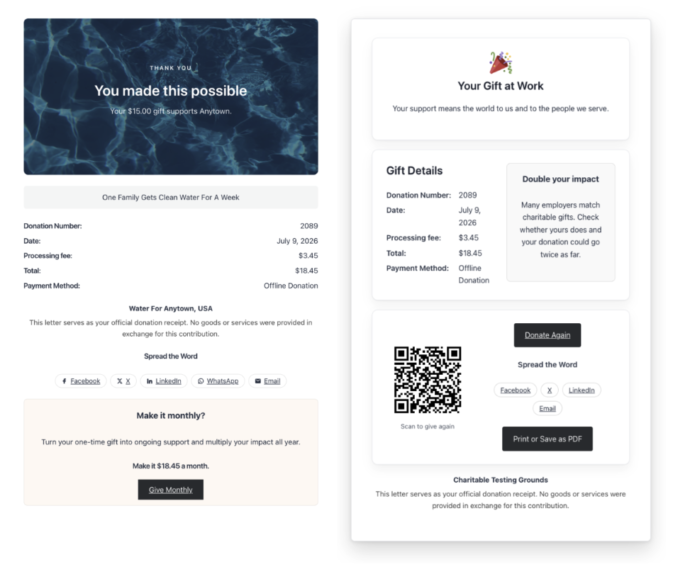
With Custom Receipts, you decide which page your donors see, on every campaign. Here’s how it works, and why it’s worth turning on today.

Left side shows a donation receipt with donation number, date, total, and payment method for a  gift to Anywhere, titled 'One Family Gets Clean Water For A Week.'

Create receipts that are CUSTOM TO THE DONOR OR CAMPAIGN. You can also:

📅 Year-end appeal: Reinforce the goal and invite donors to share while momentum is high.

🎗️ Memorial or tribute campaign: Give a gentle, respectful thank-you that fits the moment.

💎 Major gifts: Show a special message only to donors who give above a threshold.

🔁 Recurring growth: Invite one-time donors to become monthly supporters right on the receipt.

🌍 Global campaigns: Surface a country-specific note, like a Gift Aid reminder, only where it applies.

Learn more here.

New templates

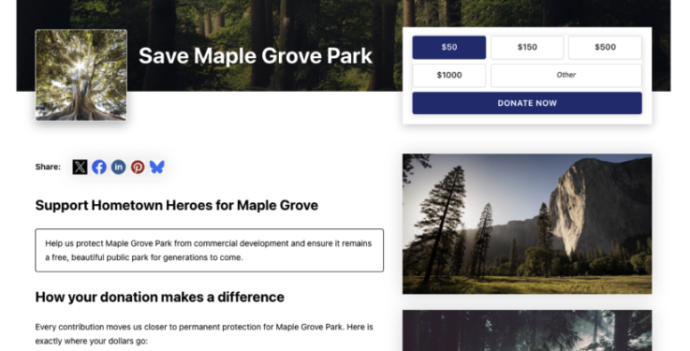
🤩 New Beacon Campaign Templates w/ “Hero” Block!

With the new Beacon Campaign Templates for Charitable Pro, you can launch a stunning, full-width fundraising page that instantly captures visitor attention above the fold.

Fundraising page header for Save Maple Grove Park with a donation widget and a small square photo of a sunlit tree thumbnail on the left.

🔦 Above-the-Fold Impact: Lead with a full-width hero image, your logo, and your goal with a donation widget locked right on top of the banner so your ask and momentum register instantly without scrolling.

📐 Two Flexible Layouts: Choose between a structured two-column layout for side-by-side storytelling and supporting details, or a clean one-column view designed for uninterrupted long-form narratives.

⚡ All-in-One Hero Field: Powered by the new Campaign Hero field, bringing background media, live progress bars, custom donation amounts, and recurring giving tabs together into a single cohesive block that can be dropped into any layout.

🎨 Automatic Theme Matching: The hero banner and donation widget automatically inherit your campaign theme’s button and accent colors, ensuring your entire presentation stays beautifully on-brand without touching a line of CSS.

Learn more here.

donation form Feature New

📝 Donation Form Block: Embed a Working Donation Form Anywhere

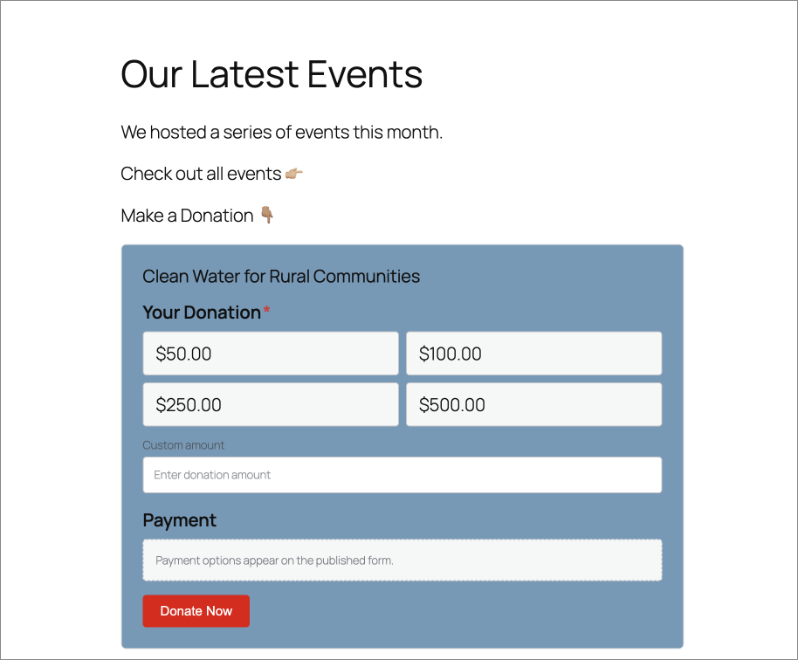
With the new Donation Form Block for Charitable Pro, you can drop a fully working donation form directly onto any page or post in the WordPress block editor. No redirects, no page reloads, and zero friction between reading your story and making a contribution.

📝 Drop Forms Anywhere: Place a working form directly onto your homepage, inside a story-driven blog post, on a dedicated landing page, or within a campaign announcement.

🎯 Dynamic Campaign Binding: Easily choose a specific campaign from the block sidebar or set it to automatically bind to whichever campaign is currently being viewed.

📐 Full vs. Minimal Form Views: Switch between a full layout or a compact minimal view to perfectly fit sidebars, narrow columns, or wide landing pages.

🎨 Scoped No-Code Styling: Customize typography, container spacing, border radius, amount buttons, and accent colors independently for every form instance without touching a line of CSS.

Learn more here.