
Someone sees your campaign on Instagram, taps the link and taps Donate. They are ready to give, and they are holding a phone.
Charitable’s donation forms already resize for small screens. But your theme and your page builder add their own styles on top, and on a phone those styles can push a field off the edge, shrink the Donate button or squeeze the card details into a space that’s hard to tap.
You may never see it, because you check your site on a laptop. Your donors see it on their phones, and many of them simply close the tab.
So we built DonationExpress. On a phone, it opens your campaign’s real donation form in a full-screen sheet that your theme can’t style, so the form looks the same and works the same on every phone. 📱
Here’s What DonationExpress Looks Like
Before we go through the settings, here’s what a donor sees on their phone once it’s turned on. They tap Donate on your campaign page, and the sheet slides up over the page.
Everything in that sheet comes from your own campaign. The campaign name and progress bar sit at the top, and the suggested amounts, fields and payment gateways below them are the ones you already set up.
What’s missing is your theme. No stray margins, no theme fonts fighting the form and no page builder rules reaching in, just a clean form at full width.
Why the Donation Form on a Phone Matters So Much
Most of the ways you ask for money now end on a phone. A post on social media, an email appeal, a text from a volunteer and a paid ad all send people to your site from their pocket.
That first tap on Donate is the point where a person has already decided to give. If the form looks broken at that moment, they start to wonder whether the site is safe, and many abandon the donation form before the gift is made.
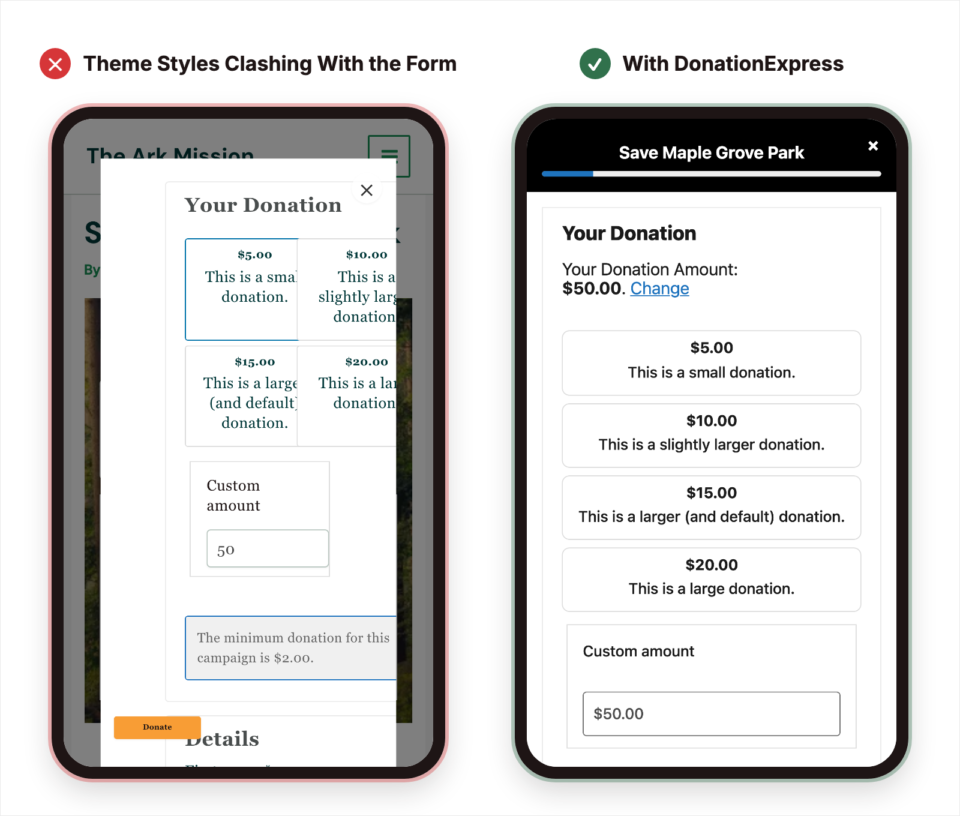
Fixing this used to mean custom CSS for each theme, then fixing it again after every theme update. DonationExpress keeps the theme away from the form completely, so there’s nothing to patch and nothing to keep up with.
DonationExpress is part of the Charitable Pro plugin on every paid plan, Basic plan and higher.
See It in Action
If you’d rather watch than read, here’s the video walkthrough of everything below.
When You’ll Feel the Difference
Every nonprofit with donors on phones gets something from DonationExpress. These are the places you’ll notice it first.
- 📣 Social media campaigns: almost everyone who taps a link on Instagram, Facebook or TikTok is on a phone, so the sheet is the first thing they see.
- ✉️ Email appeals: many donors open your appeal on their phone, and the sheet gives them a form they can finish with one thumb.
- 🎨 Busy themes and page builders: if your theme or builder styles buttons, inputs or popups in a way that looks wrong on a small screen, the sheet steps around it.
- ⏱️ One-day giving events: on Giving Tuesday or a giving day, you can’t afford to test your form on every phone, and the sheet looks the same on all of them.
- 💳 Paid ads: when you run Facebook ads for your nonprofit or pay for every click, a fast, clean form on a phone helps more of those clicks become gifts.
Your Real Form, With Nothing to Rebuild
DonationExpress doesn’t ask you to build a second, mobile-only form. It loads the campaign’s real donation form inside the sheet, so every field, suggested amount and gateway you’ve set up shows up there on its own.
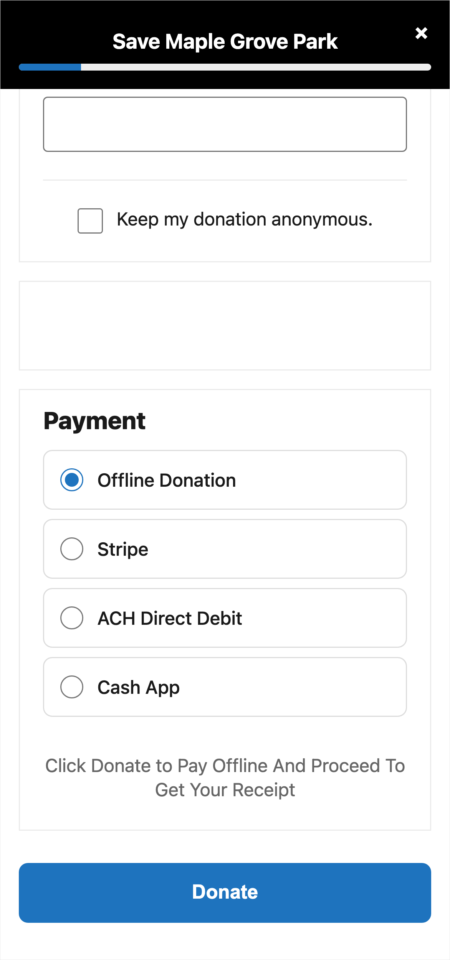
Apple Pay and Google Pay work inside the sheet too. Apple Pay still needs your domain verified with your payment gateway, the same as it does on the normal form.
Because your theme’s scripts and styles don’t load in the sheet, the form also opens quickly. That matters most on a phone with a slow connection.
It Only Changes Things on Phones
DonationExpress only switches on for screens narrower than 768 pixels. On tablets and desktops, your donation forms look exactly the way they do today.
It’s also off by default while it’s in beta. Updating the plugin won’t change anything on your site until you choose to turn it on.
It Picks Up Your Branding on Its Own
The sheet can’t read anything from your theme, so it takes its look from settings you’ve probably filled in already. The Donate button and the progress bar use your donation form highlight color, and your email logo appears at the top of the sheet if you’ve added one.
The one new choice is the corner style. Sharp gives square buttons and inputs, Rounded softens them a little, and Pill makes them fully round.
Pick the one closest to the buttons on the rest of your site, and the sheet will feel like part of it.
A Thank-You Screen That Stays in the Sheet
After the gift goes through, the donor doesn’t get sent back to a themed page. By default they see a clean thank-you screen with a checkmark and a burst of confetti, right inside the sheet.
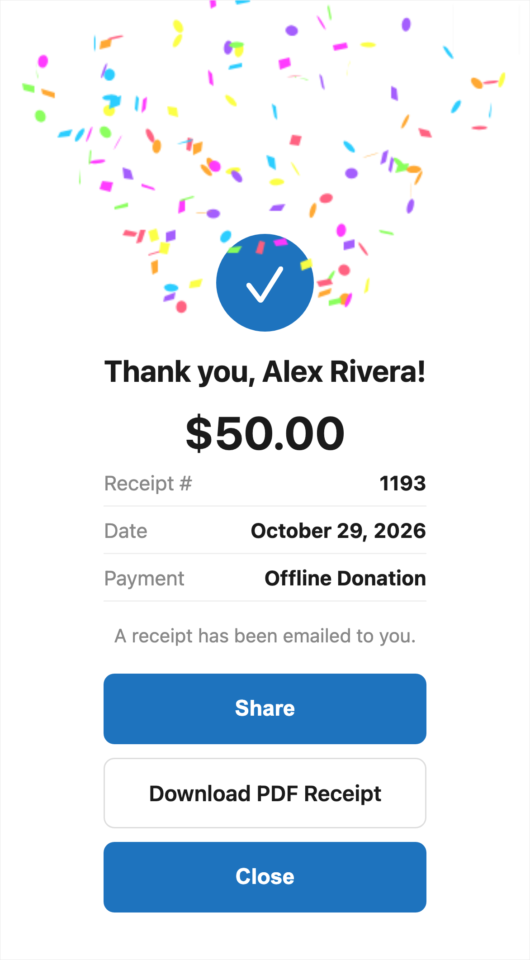
The Share button opens the phone’s own share menu, so a donor can pass your campaign to a friend while they still feel good about giving. If Charitable’s Recurring Donations feature is on and the gift was one-time, a Make It Monthly button reopens the sheet with a monthly gift ready to go.
With Charitable’s PDF Receipts feature on, a Download PDF Receipt button appears as well. You can also choose a Detailed receipt that adds an itemized table, or send donors to your normal receipt page instead.
Turn On DonationExpress in a Few Clicks
There are 3 settings, and they all live on one screen. To get started, head over to Charitable » Settings » General » Donation Form.
Step 1: Find the DonationExpress Settings
Scroll down the Donation Form settings until you reach DonationExpress. At first you’ll only see this one setting, because the other 2 stay hidden while it’s set to Off. Once it’s on, all 3 show together like this.
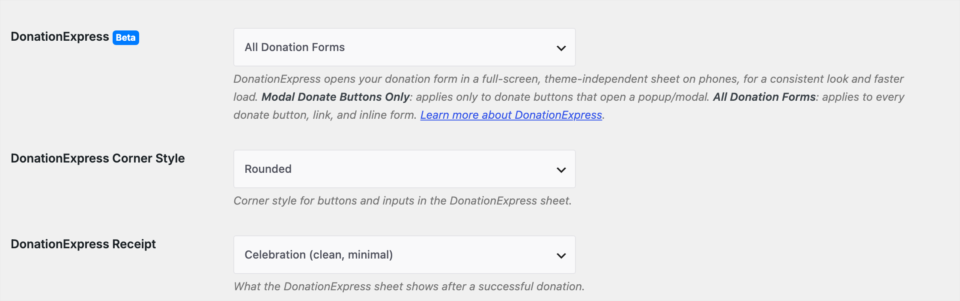
Step 2: Choose Which Donate Buttons Use It
Next, open the DonationExpress setting and pick one of its options. Choose Modal Donate Buttons Only if you only want to fix the popup that opens when someone taps a Donate button.
Choose All Donation Forms if you’d like every donation on a phone to use the sheet, including forms placed directly on a page. If you’re not sure, start here.

Step 3: Pick a Corner Style
Once DonationExpress is on, the DonationExpress Corner Style setting appears. Rounded is the default, and you can switch to Sharp or Pill to match your site.
Step 4: Choose What Donors See After They Give
In DonationExpress Receipt, keep Celebration for the confetti thank-you screen, or pick Detailed or Standard Receipt Page. This setting arrived in Charitable Pro plugin 1.8.17.1, so update first if you don’t see it.
Step 5: Save and Preview It Without a Phone
When you’re done, click Save Changes. Then, while you’re logged in as an administrator, open this address in your browser, with your own campaign ID in place of NN.
https://yoursite.com/wp-admin/?charitable_action=preview-mobile-form&campaign_id=NNYou’ll see the same sheet a donor sees on a phone, at full size on your screen. It’s the quickest way to check your colors, logo and corners.
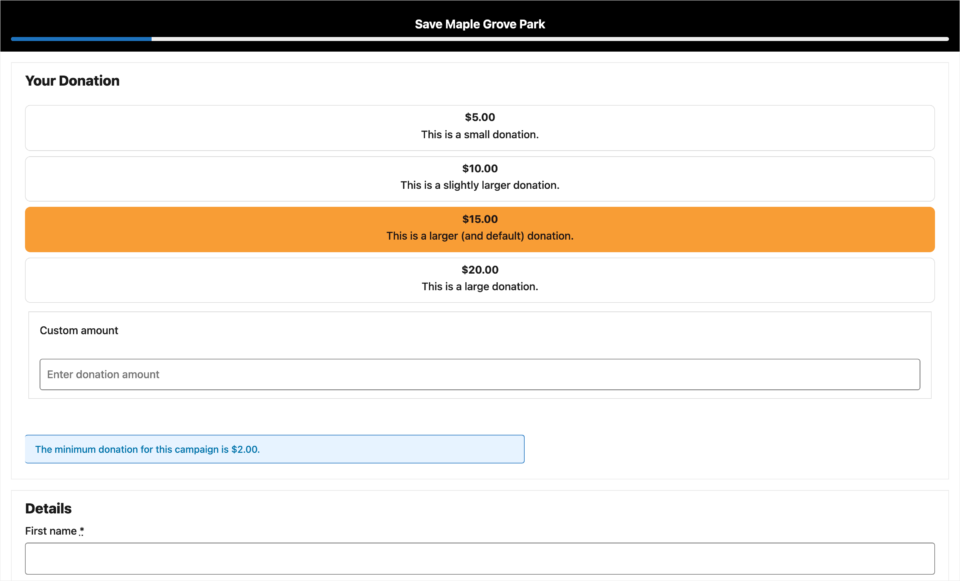
DonationExpress Turned On, From Tap to Thank You
Here’s a campaign on a phone with DonationExpress turned on, from the first tap to the thank-you screen.
With All Donation Forms selected, the campaign page looks the same until the donor taps Donate.
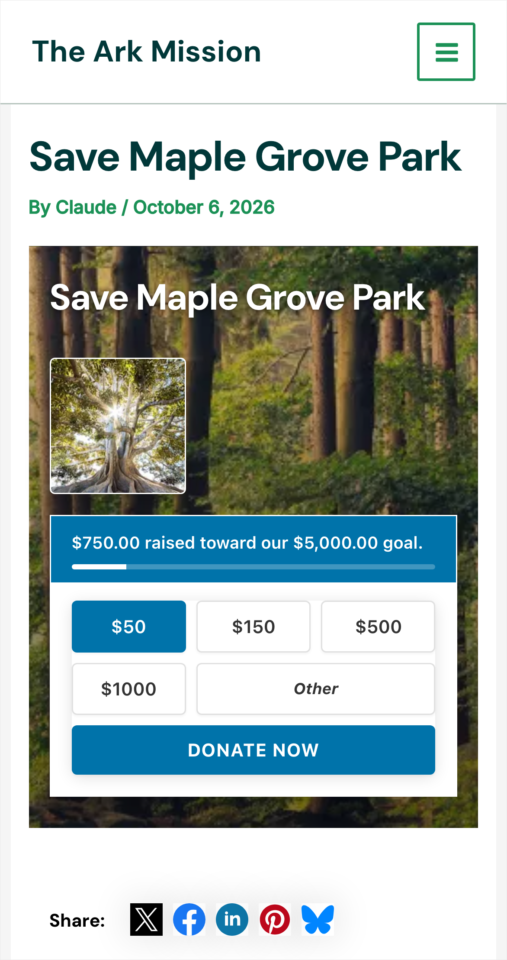
That tap opens the sheet, with the Pill corner style in this example. The donor picks an amount, fills in their details and gives, and the thank-you screen appears in the same place.
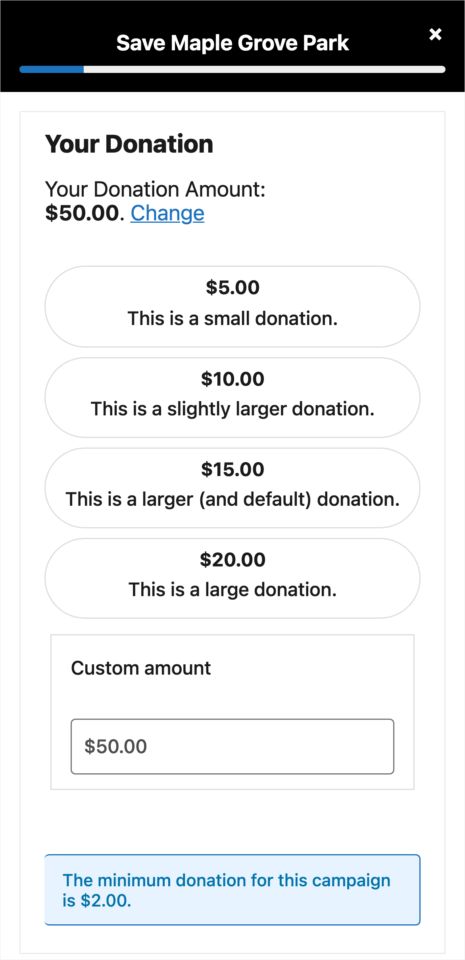
The donor never leaves your site, and they never see a broken layout along the way.
Read the Full DonationExpress Setup Guide →
Beyond the Basics
Choosing Between Modal Buttons Only and All Donation Forms
If you’re happy with how your inline forms already look on phones, Modal Donate Buttons Only leaves them alone and only replaces the popup. All Donation Forms is the better choice when you can’t be sure how every page looks on every phone, because every donation on a small screen goes through the same clean sheet.
Caching and Optimization Plugins
The sheet needs fresh security tokens every time it loads, just like your normal donation and receipt pages. If you use a caching or optimization plugin, exclude the /charitable-give/ path from caching.
For Agencies and Developers
Filters for the Mode, Breakpoint and Branding
Every setting can be overridden with a code snippet. Use charitable_mobile_mode to force off, modal or always on a single page or campaign, and charitable_mobile_form_breakpoint to move the 768 pixel cutoff so small tablets use the sheet too.
charitable_mobile_brand_tokens overrides the accent, logo and radius, and charitable_mobile_asset_is_allowed lets a specific script or style handle into the theme-free document, such as a custom font loader.
Endpoints and Per-Campaign Receipts
The sheet is served from /charitable-give/{campaign_id}/, and the in-sheet receipt from /charitable-give/receipt/{donation_id}/, which returns a 403 to anyone who can’t access that donation. Use charitable_mobile_receipt_style to show a different receipt style on one campaign, and the charitable_mobile_receipt_pdf_url and charitable_mobile_receipt_monthly_url filters to change or hide those buttons.
The full list of helper functions, filters and actions, with code examples, is in the developer reference section of the documentation.
FAQs on DonationExpress
Which plan includes DonationExpress?
DonationExpress is in the Charitable Pro plugin 1.8.17 and later, Basic plan and higher.
Will updating change how my forms look?
No. DonationExpress is in beta and off by default, so nothing changes until you turn it on yourself.
Does it change my forms on tablets and desktops?
No. It only opens on screens narrower than 768 pixels, and a developer can adjust that number with a filter.
Do I need to build a separate mobile form?
No. The sheet shows each campaign’s real donation form, with the same fields, amounts and gateways you already set up.
Do Apple Pay and Google Pay work in the sheet?
Yes. Apple Pay still needs your domain verified with your payment gateway, just as it does for the normal form.
Does it work with caching plugins?
Yes, as long as the /charitable-give/ path is excluded from caching, the same way your donation and receipt pages are.
Get Started With DonationExpress
DonationExpress is available now in the Charitable Pro plugin 1.8.17 and later, Basic plan and higher. Update the plugin, open Charitable » Settings » General » Donation Form and set DonationExpress to All Donation Forms, then open your campaign on a phone and tap Donate.
Read the DonationExpress Documentation →
Not Yet on a Charitable Paid Plan?
Charitable Has 1.2+ Million Downloads!
Trusted by millions to power successful fundraising campaigns. Try Charitable risk-free today.
✅ 14-day money-back guarantee
✅ Transparent pricing
✅ Code-free setup
What’s New in Charitable
We also launched several new features and improvements recently.
🖨️
Printable fundraiser fliers and a recruitment poster your ambassadors print straight from the browser.
💸
Ask a different processing fee for each size of gift, with an optional maximum fee.
🎟️
Sell event tickets through your existing donation forms, with QR check-in at the door.
🤖
Let AI assistants read and manage your Charitable data, with write access off until you turn it on.
🔁
Donors set up monthly gifts on Windcave’s payment page, and Charitable handles every renewal.
We’ve been adding to Charitable constantly, with features and improvements designed to help you raise more and serve your donors better. See everything we’ve shipped at the Charitable Changelog.
Not yet a Charitable Pro user? Sign up today and get up to 50% off on your plan. We’re confident you’ll love raising funds with Charitable. If, for any reason, Charitable is not the right fit for you, we’ll refund your purchase with our 14-day money-back guarantee. Get Charitable Pro Now »
Stay Connected for More Nonprofit Resources
For more tutorials and videos tailored to nonprofits, subscribe to our YouTube channel. We regularly publish expert tips, step-by-step guides on online donations, fundraising strategies, and practical resources to help your organization succeed.
🗞️ Get weekly tips and exclusive guides in your inbox
Join our newsletter →
🎥 Watch step-by-step tutorials and success stories
Subscribe to our YouTube channel →
👩🏽💻 Connect with our community and get daily nonprofit insights
Follow us on LinkedIn →
🥳 Fun reels and non-profit insights
Follow us on Instagram →
👀 Insightful & fun videos to help you grow your cause
Follow us on TikTok→
🌎 Subscribe and follow for general fundraiser tips
Get Fundraiser Tips on TikTok →
Powerful Fundraising Resources
🤖 Use Charitable with Your AI Assistant
⬇️ Download proven strategies, campaign ideas, and expert tools
Get the Fundraising Kit →
💸 Get Free Fundraising Resources
Head to the Charitable Fundraising Hub →
🤔 Got questions about Charitable?
Charitable FAQs →
🏎️ Take Charitable for a spin
Create your Charitable Demo →
Understand non-profit terms and jargon
Non-Profit Glossary →
% Looking for non-profit deals and discounts?
Best Non-Profit Deals and Discounts →








Leave a Reply