
Requires:
- Charitable Pro 1.8.16+
- Charitable Ambassadors 3.4.0+
Most peer-to-peer programs aren’t one-off events – they come back every year. The same walkathon, the same gala, the same giving-day push. The problem is that “coming back” usually means starting over: rebuilding the campaign, re-recruiting last year’s fundraisers from scratch, and quietly losing the monthly donors who were attached to pages that no longer exist.
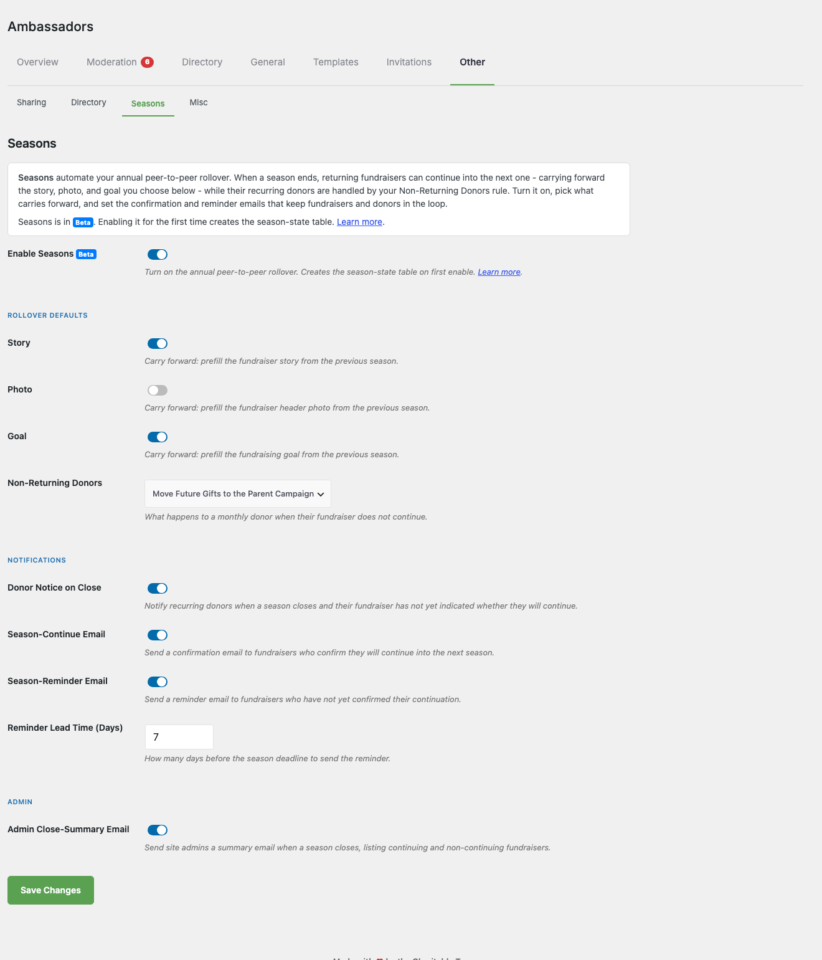
Ambassador Seasons fixes that. It lets you re-run the same campaign year after year while keeping the momentum you already built. When a season ends, your returning fundraisers and teams can continue into the new season in one click. Their page carries forward – story, photo, and goal, whichever you choose – their web address stays the same, their recurring donors move with them, and last year’s page is archived read-only so its history is never lost.
When you’d use it
- An annual event. A yearly 5K, gala, or giving day that runs on the same calendar every year with a familiar roster of fundraisers.
- A campaign with monthly donors. When supporters set up recurring gifts through a fundraiser’s page, you don’t want those gifts stranded when the campaign resets. Seasons moves them to the new season automatically.
- A returning team structure. Company teams, school grades, or chapter groups that come back each year and want to keep their standings and members instead of rebuilding.
Why this matters for your nonprofit
The single biggest lever in peer-to-peer fundraising isn’t acquiring new fundraisers – it’s keeping the ones you already have. A fundraiser who ran a campaign for you last year already knows your cause, already has a network primed to give, and already raised money once. Getting them to come back for a second year is worth several cold recruits, and it costs you almost nothing.
But retention is where most programs quietly leak. The typical pattern looks like this: the event ends, the campaign goes dormant, and eleven months later someone builds a brand-new campaign for next year. Last year’s fundraisers get a generic “we’re back!” email, land on a blank page, and have to re-create everything from memory. Predictably, most of them don’t. The ones who do arrive with less enthusiasm than they left with, because the friction reminded them how much work it is.
Seasons removes that friction entirely. Instead of asking a returning fundraiser to start over, you send them a single “continue” invitation. One click, and their page is back – the story they wrote, the photo they chose, their goal – ready to accept donations under the same link they shared last year. The psychological difference is enormous: continuing something you already built feels like a win, while rebuilding from scratch feels like a chore.
The monthly-donor piece is just as important, and it’s the part most platforms get wrong. When a supporter sets up a recurring gift through a fundraiser’s page, that relationship is valuable and fragile. If the page disappears at season’s end, the gift either fails or gets orphaned, and you’ve lost a donor you worked hard to win. Seasons treats those recurring donors as first-class: when a fundraiser continues, their monthly donors move to the new season’s page automatically. When a fundraiser doesn’t return, you decide up front what happens to their donors, so no recurring gift ever falls through the cracks.
A few practical tips to get the most from Seasons:
- Set your rollover defaults once, before you open the season. Decide what carries forward (story, photo, goal) and what happens to non-returning donors while you’re calm and planning, not in the rush of launch week.
- Give fundraisers a real deadline. The reminder email does its best work when there’s a genuine “continue by” date. A season with an open-ended close tends to drift; a season with a deadline creates the small urgency that gets people to click.
- Lead with last year’s result. When you invite a fundraiser to continue, remind them what they accomplished (“You raised $2,400 last year for 38 kids”). Continuing a success is a much easier yes than starting a blank page.
- Close the season deliberately, not silently. Use the close preview to see exactly who’s continuing and who isn’t before you apply it. That list is also your warm re-engagement list for next time.
Finding it
WordPress Admin > Charitable > Ambassadors > Other > Seasons
Seasons lives on the Other sub-tab of the Ambassadors settings. The first time you visit, you’ll see a short explainer and a single toggle. Everything else stays hidden until you turn the feature on.
Turning it on
Seasons is opt-in and currently marked Beta. Click the Enable Seasons toggle and confirm – enabling it for the first time creates a small custom database table (charitable_ambassadors_season_state) that tracks each season’s rollover state. Turning the feature off later does not delete your campaigns or donations.

Once it’s on, the rest of the settings appear.
Rollover defaults
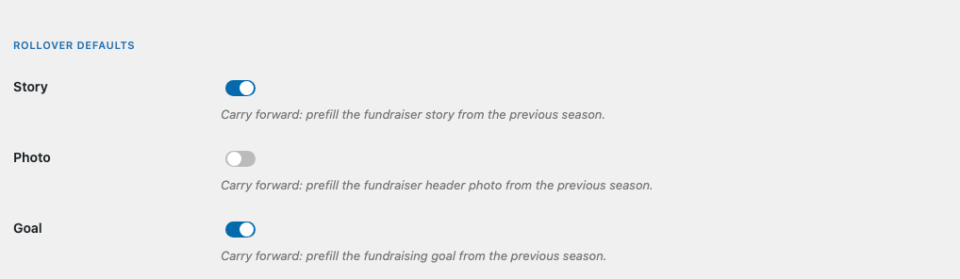
Under Rollover Defaults, three toggles control what gets pre-filled on a fundraiser’s page when they continue into a new season:
- Story – prefill the fundraiser’s story text from the previous season.
- Photo – prefill the fundraiser’s header photo from the previous season.
- Goal – prefill the fundraising goal from the previous season.
All three are on by default. A continuing fundraiser can still edit any of these before they publish – carrying forward just means they start from last year instead of from blank.
Non-returning donors
Not every fundraiser comes back. The Non-Returning Donors setting decides what happens to a recurring (monthly) donor whose fundraiser does not continue into the new season. You have three choices:
- Move Future Gifts to the Parent Campaign (default) – the donor’s monthly gift keeps going, now credited to the parent campaign instead of the retired fundraiser page. The donor keeps giving; you keep the revenue.
- Leave on the Archived Page – the gift stays attached to last year’s archived fundraiser page. Useful if you want the historical record to stay perfectly intact.
- Pause the Subscription – the recurring gift is paused so nothing is charged until you or the donor restart it. The most conservative option.
Whatever you choose here is applied when you close the season, and only to donors whose fundraiser did not return.
Notifications
Seasons can send up to four emails. Each one is a toggle, so you can turn any of them off:
- Season-Continue Email – a confirmation sent to a fundraiser after they confirm they’re continuing.
- Season-Reminder Email – a nudge to fundraisers who haven’t confirmed yet. Use Reminder Lead Time (Days) to set how many days before the season deadline it goes out.
- Donor Notice on Close – notifies recurring donors when a season closes and their fundraiser hasn’t indicated whether they’ll continue.
- Admin Close-Summary Email – sent to your site admins when a season closes, listing who continued and who didn’t.
Setting up next year’s campaign
Each new season is a campaign that points back at the one before it. On the campaign edit screen you’ll find a Season box:
- Enable Seasons for This Campaign – opt this specific campaign into the season chain.
- Predecessor Campaign – the previous season this campaign follows. This is the link that lets fundraisers and donors carry forward.
- Season Label – a short name for the season (a year, a name, or a number). Fundraisers see it in their continue prompts.
- Season Dates – optional Open and Close date/times. Leave them blank to open and close the season manually.
- Carry-Forward Fields – the per-campaign version of the rollover defaults above.
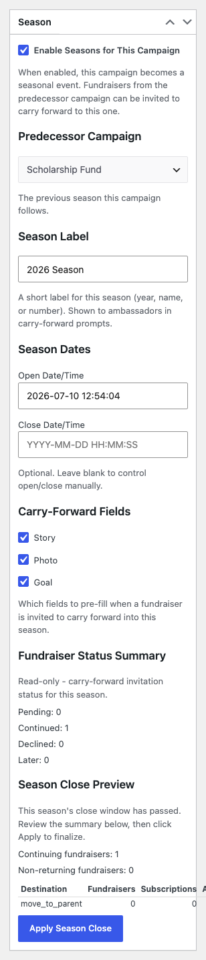
Once the season opens, eligible fundraisers from the predecessor campaign are invited to continue.
What your fundraisers see
A returning fundraiser receives a continue invitation with a personal link. Clicking it takes them to a short confirmation screen that shows what they raised last time and what will carry forward. They can:
- Continue – their page is recreated in the new season with the fields you chose to carry forward, under the same web address. Their recurring donors move with them.
- Continue later – they keep the invitation and can act on it before the deadline; the reminder email will nudge them.
- Decline – they let their page retire at season’s end.
The whole flow is one click for the common case. Nothing is published on their behalf without their confirmation.
Closing a season
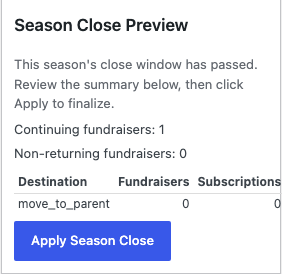
When a season ends, closing it is a reviewed, deliberate step – never a silent bulk action. From the season’s campaign you’ll find a Season Close Preview that shows how many fundraisers are continuing, how many are not, and how many recurring subscriptions are affected, before anything happens.
When the numbers look right, click Apply Season Close. Charitable then archives the non-returning fundraiser pages read-only and applies your Non-Returning Donors rule to their recurring gifts. Continuing fundraisers are unaffected – they’ve already moved forward. If you’ve enabled it, the Admin Close-Summary email lands in your inbox with the full breakdown.
A typical yearly flow
- Plan. Set your Rollover Defaults and Non-Returning Donors policy under Ambassadors > Other > Seasons.
- Create next year’s campaign and point its Predecessor Campaign at last year’s. Give it a Season Label and, optionally, open/close dates.
- Open the season. Returning fundraisers get their continue invitation; reminders go out as the deadline approaches.
- Fundraisers continue in one click – pages and monthly donors carry forward.
- Close the season. Review the preview, apply the close, and last year’s non-returning pages archive cleanly while their donors are handled by your rule.
Developer reference
Requirements
Seasons requires Charitable Pro 1.8.16+ and Charitable Ambassadors 3.4.0+. Enabling the feature creates a custom table {$wpdb->prefix}charitable_ambassadors_season_state; the schema version is tracked in the charitable_ambassadors_seasons_schema_version option, and a lightweight audit trail is kept in the charitable_ambassadors_seasons_log option.
Settings (options)
All settings are stored under charitable_settings['ambassadors'] and read with charitable_get_option( array( 'ambassadors', '<key>' ) ):
| Key | Meaning |
|---|---|
seasons_enabled | Master switch. |
seasons_carry_forward_story / _photo / _goal | Per-field rollover defaults (each a toggle, default on). |
seasons_nonreturning_policy | move_to_parent (default), leave_on_archived, or pause. |
seasons_continue_email_enabled | Send the continue-confirmation email. |
seasons_reminder_email_enabled | Send the reminder email. |
seasons_reminder_days | Days before the deadline to send the reminder. |
seasons_donor_notice_enabled | Notify recurring donors on close. |
seasons_admin_summary_enabled | Send admins the close-summary email. |
The carry-forward set for a specific campaign is read via Charitable_Ambassadors_Season::get_carry_forward(), which returns the enabled subset of ['story','photo','goal'] (per-campaign meta _ambassadors_season_carry_forwardoverrides the global toggles when set).
Actions
Fired during the season lifecycle so you can extend behavior:
charitable_ambassadors_season_closed– after a season close is applied.charitable_ambassadors_fundraiser_continued– a fundraiser continued into the new season.charitable_ambassadors_fundraiser_declined– a fundraiser declined to continue.charitable_ambassadors_team_continued– a team continued into the new season.charitable_ambassadors_recurring_moved– a recurring donation was moved per the non-returning policy.
Filters
charitable_ambassadors_season_close_chunk_size– batch size for processing a close (default 25).charitable_ambassadors_notifications_enabled– master gate for Ambassadors notifications, including season events.charitable_recurring_donations_page_url– the URL used when linking a donor to their recurring donations.
Emails
The four transactional emails are registered with these IDs (override their templates from your-theme/charitable/emails/):
season_continue– continue confirmation to the fundraiser.season_reminder– reminder to fundraisers who haven’t confirmed.season_donor_notice– notice to recurring donors on close.season_admin_summary– close-summary to site admins.
Data model notes
- The season-continue link carries a single-use token stored in user meta; it routes the fundraiser to the confirmation screen but is not itself an authorization gate – the confirmation POST re-verifies ownership and eligibility.
- Continuing a fundraiser deep-clones the predecessor’s builder data (
campaign_settings_v2) to the new page and rewrites it to the new campaign; the parent campaign’s end date is inherited so “days left” stays consistent across the chain.


