
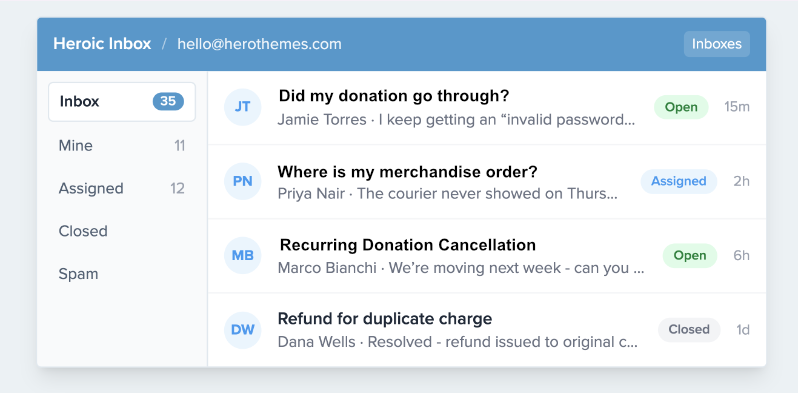
A donor emails your support inbox. The message is short: “Did my donation go through?” You want to help, but you have no idea who you’re talking to.
Are they a first-time giver who gave $10 last week, or someone who has quietly given $50,000 over five years? Did their last payment fail, or was it refunded? Which campaigns do they care about?
None of it is in front of you.
So you leave the inbox, open your Charitable admin, search for their email by hand, read through their donation records, and try to hold it all in your head while you write back. Now do that for every donor email, every day, across the whole team.
This is a problem many non-profits face.
This is also the exact problem Heroic Inbox just solved for non-profits running a support inbox.
Heroic Inbox is a WordPress help desk plugin from Hero Themes. We’ll take a look at what they have to offer.
Their new Charitable integration pulls each donor’s full giving history straight into the support ticket, so your team knows who they’re helping before they type a word. 📬
Here’s What It Looks Like
Before we get into how it works, here’s what a donor’s ticket actually looks like once the integration is switched on. This is a real support conversation, with the donation history panel sitting right in the sidebar where an agent is already reading and typing.
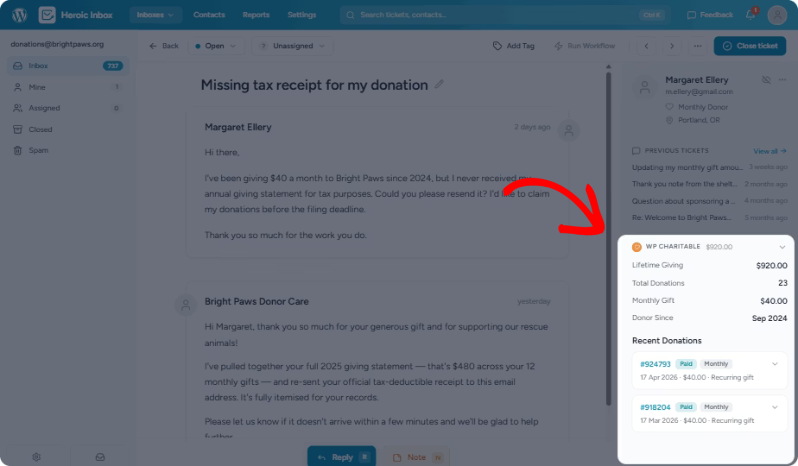
Nobody searched for anything, copied an email address into wp-admin, or opened a second browser tab to get this. The agent just opened the ticket, and the donor’s whole history was already there.
What Hero Themes and Heroic Inbox Actually Are
Hero Themes has spent more than a decade building WordPress tools around customer support and documentation, including Heroic KB, its knowledge base plugin. Over 32,090 teams currently run on their plugins, and Heroic Inbox itself holds a 4.9 out of 5 rating across 300+ reviews.
Heroic Inbox turns your existing support address, whether that’s support@, donate@, or info@, into a shared team inbox you manage from inside wp-admin. It connects to Gmail, Outlook, or plain IMAP, so donors keep emailing the address they already know. Behind the scenes, your team gets one shared view of every message, internal notes, conversation assignments, and collision detection so two agents never reply to the same donor at once.
🏠 Self-hosted: every conversation lives in your own WordPress database, not a third party’s servers.
💵 One flat annual price: unlimited team members on every plan, no per-agent fee.
📥 No new login for donors: they email the address they already have, the same as always.
⚙️ Runs inside wp-admin: no separate app to log into, no extra dashboard to check.
Why Nonprofits Should Care About Heroic Inbox
Most nonprofit support desks aren’t staffed by a dedicated support team. It’s a program director, a volunteer coordinator, or one development staffer, checking a shared inbox between everything else they’re responsible for, often the same person trying to keep up with donor engagement on top of it.
SaaS help desks that charge per agent per month start to look expensive fast when the “agents” are volunteers, and paying $50 a month for every person who might occasionally answer a donor email doesn’t hold up on a nonprofit budget.
Heroic Inbox charges once a year, for the whole team, regardless of how many people touch the inbox.
It also keeps donor emails inside the WordPress site you already run and already trust with donation data, rather than handing that correspondence to another vendor’s cloud.
For an organization that already runs its fundraising on Charitable, staying inside wp-admin instead of adopting a second platform is one fewer login, one fewer bill, and one fewer place donor information has to live.
Know a Major Donor from a First-Timer at a Glance
The top of the donation panel gives an agent the shape of the relationship in one look: lifetime giving across every campaign, the total number of donations, the average gift, and the date someone first gave.
That changes the reply. A supporter who has given for five years gets a warm, familiar response. Someone giving for the first time gets a proper welcome. Either way, nobody is guessing about who’s on the other end of the ticket.
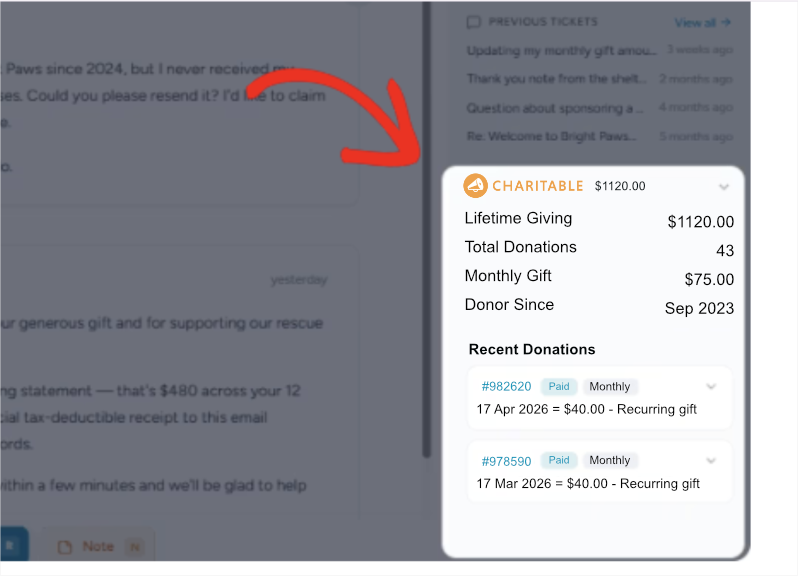
💝 Lifetime giving: total given across every campaign, at the top of the panel.
🔢 Donation count and average gift: the shape of a donor’s giving pattern, without opening the admin.
📅 First donation date: instantly tells an agent whether they’re writing to a new donor or a long-time supporter.
Troubleshoot a Failed Donation Without Leaving the Ticket
Below the summary, the panel lists a donor’s last 10 donations. Each line shows the amount, a status badge (Paid, Pending, Failed, Refunded, or Cancelled), the payment gateway, and which campaign the gift went to. Every entry links straight to its donation record in wp-admin if an agent needs to dig further.
So when a donor writes in saying “my payment didn’t go through,” the answer is usually already on screen: the failed or pending donation, the gateway it used, and the campaign it was meant for. What used to be a five-minute hunt through the admin becomes a glance at the sidebar.
🏷️ Status badges: Paid, Pending, Failed, Refunded, or Cancelled, at a glance for the last 10 gifts.
💳 Payment gateway: shown per donation, so a failed charge is easy to explain.
🔗 Direct links: every entry links to the full donation record in WP Admin.
What This Looks Like in Practice
Say a donor emails at 9:00 pm: “I think I gave twice this month by mistake.” The next morning, an agent opens the ticket, and the sidebar already shows two donations to the spring campaign, one Paid and one Failed. No double charge happened. The agent can say so in the first reply and point to the receipt, without ever opening wp-admin.
Now say that donor happens to be one of the organization’s biggest recurring supporters. The lifetime total sits right at the top of the panel, so the reply can reflect that instead of reading like a form letter. It’s a small detail to build in, but it’s the kind of thing a donor notices, and the kind of thing that shapes whether they give again.
Who This Is For
🎗️ Support teams at charities and nonprofits that run their help desk on WordPress and field donor questions all day.
🏢 Agencies and freelancers who manage support for nonprofit clients and want donor context without standing up a separate CRM.
📣 Fundraising and development staff who want donor conversations to feel personal instead of transactional.
✉️ Anyone running support on a WordPress site where the people writing in are also the people giving.
Getting Started: Turn It On in Under a Minute
There’s no data to export from Charitable and nothing to import into Heroic Inbox. The integration reads live from your existing Charitable donor records, so setup is really just flipping a switch.
Step 1: Make Sure Charitable Is Active
Confirm Charitable is installed and activated on the same site as Heroic Inbox. There’s nothing to sync or import, since the integration reads straight from your existing donor records.
Step 2: Open Heroic Inbox’s Mailbox Settings
In Heroic Inbox Pro, go to Heroic Inbox » Mailboxes and open the mailbox where you want the donor panel to appear.
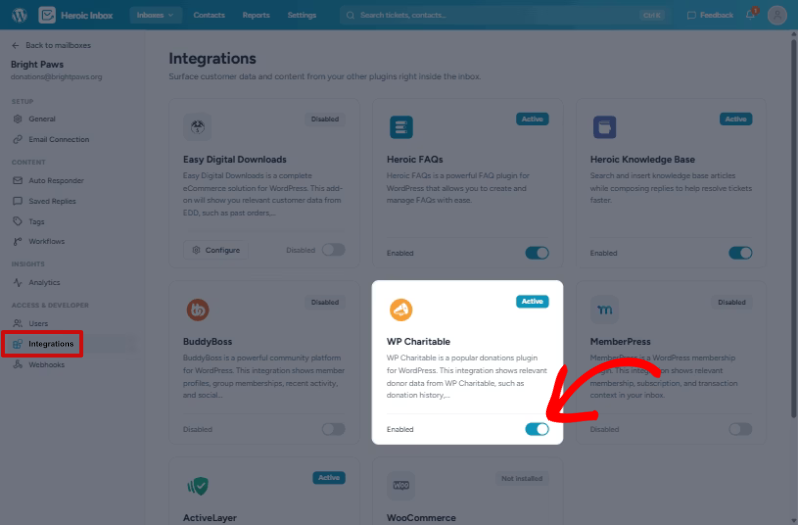
Step 3: Leave It on Where It Helps
The panel is enabled by default. Keep it on for any mailbox that handles donor email, and switch it off for mailboxes that don’t. That’s the whole setup. The next time a donor writes in, their giving history is already waiting in the sidebar.
If you’re already running Heroic Inbox Pro with Charitable active, this is likely on right now without you having done anything at all.
See Heroic Inbox Plans and Pricing →
Why You’ll Love This
⚡ Zero setup per donor: matching happens automatically by email address, reading live from your existing Charitable data.
👀 Faster, more accurate replies: an agent sees the failed payment, the campaign, and the gateway before they type a word.
🤝 Warmer donor relationships: a five-year supporter and a first-time giver get replies that actually reflect who they are.
💰 Budget-friendly: one flat annual fee for the whole team, not a per-agent SaaS bill.
🔒 Nothing new to secure: donor data never leaves your own WordPress database.
Frequently Asked Questions
Does this require Charitable Pro?
No. The integration works with any active installation of Charitable, free or Pro. What it does require is Heroic Inbox Pro on the help desk side.
Do I need to set anything up per donor or contact?
No. Heroic Inbox matches a ticket to a donor by email address automatically. There are no records to maintain.
What happens if the person emailing isn’t a donor?
The donation panel simply doesn’t appear. It only shows up when there’s a matching donor record.
Can I turn the panel off for certain mailboxes?
Yes. It’s enabled by default, but you can switch it off per mailbox under Heroic Inbox » Mailboxes for any inbox that doesn’t handle donor email.
Does this replace Charitable’s own donor records or reports?
No. It’s additive. Your Charitable admin works exactly as it always has; the integration just surfaces that same data inside the support ticket so your team doesn’t have to go looking for it.
Does Heroic Inbox integrate with anything else besides Charitable?
Yes. The same Customer Context feature also pulls in order and subscription history from WooCommerce and Easy Digital Downloads, and member activity from BuddyBoss, all included with Heroic Inbox Pro.
Get Started with the Heroic Inbox Integration
The Charitable integration is live now in Heroic Inbox Pro. If you’re already running Pro with Charitable active, open a donor ticket and the giving history is right there in the sidebar. If you’re not on Pro yet, the integration comes with it, alongside the rest of what Pro adds to a support workflow.
Not Yet a Charitable Pro User?
Not yet on Charitable Pro?
You can get up to 50% off when you sign up for or upgrade to Charitable Pro. We want to ensure that you can try the advanced fundraising features like Recurring Donations, Donation Recovery, and more at a significantly reduced cost.
Join over a million satisfied Charitable Pro users today. Every purchase comes with a 14-day money-back guarantee, ensuring you’re supported every step of the way.
If you have any questions or need assistance, our support team is ready to help you make the most of these new features.
What’s New in Charitable
We also launched several powerful features and improvements recently:
📱
Mollie One-Tap Wallet Checkout
Donors on mobile can check out instantly with Apple Pay or Google Pay through Mollie.
🤝
New moderation and directory screens let you manage every campaign creator and ambassador in one place.
⚡
Accept donations in India via UPI, QR codes, and major international currencies.
🔔
Built-in push notifications for donation thank-yous, campaign launches, and goal milestones.
🛡️
Real-time bot detection that flags attacks and blocks bad actors before they hit your donation forms.
🧤
White Glove Migration for GiveWP
Charitable’s team handles your full migration from GiveWP, data and all.
We’ve been adding to Charitable constantly, features and improvements designed to help you raise more and serve your donors better. See everything we’ve shipped at the Charitable Changelog.
Charitable Has 1.2+ Million Downloads!
Trusted by millions to power successful fundraising campaigns. Try Charitable risk-free today.
✅ 14-day money-back guarantee
✅ Transparent pricing
✅ Code-free setup
Not yet a Charitable Pro user? Sign up today and get up to 50% off on your plan. We’re confident you’ll love raising funds with Charitable. If, for any reason, Charitable is not the right fit for you, we’ll refund your purchase with our 14-day money-back guarantee. Get Charitable Pro Now »
If you have questions about the integration or need a hand getting your first mailbox set up, our support team is happy to help.
Stay Connected for More Nonprofit Resources
For more tutorials and videos tailored to nonprofits, subscribe to our YouTube channel. We regularly publish expert tips, step-by-step guides on online donations, fundraising strategies, and practical resources to help your organization succeed.
🗞️ Get weekly tips and exclusive guides in your inbox
Join our newsletter →
🎥 Watch step-by-step tutorials and success stories
Subscribe to our YouTube channel →
👩🏽💻 Connect with our community and get daily nonprofit insights
Follow us on LinkedIn →
🥳 Fun reels and non-profit insights
Follow us on Instagram →
👀 Insightful & fun videos to help you grow your cause
Follow us on TikTok→
🌎 Subscribe and follow for general fundraiser tips
Get Fundraiser Tips on TikTok →
Powerful Fundraising Resources
🤖 Use Charitable with Your AI Assistant
⬇️ Download proven strategies, campaign ideas, and expert tools
Get the Fundraising Kit →
💸 Get Free Fundraising Resources
Head to the Charitable Fundraising Hub →
🤔 Got questions about Charitable?
Charitable FAQs →
🏎️ Take Charitable for a spin
Create your Charitable Demo →
Understand non-profit terms and jargon
Non-Profit Glossary →
% Looking for non-profit deals and discounts?
Best Non-Profit Deals and Discounts →








Leave a Reply