
Charitable Razorpay lets your nonprofit accept donations through Razorpay, the leading Indian payment gateway, with built-in support for UPI and campaign QR codes. It is purpose-built for organizations serving Indian donors while still supporting international currencies for global campaigns.
Available as a free addon. Requires Charitable Pro 1.8.13.5 or later. The 1.0.0-beta-1 release is currently in beta exclusively to those who have the Charitable Pro (plugin) and the Pro plan, and your feedback during this period helps shape the general release.
Key Features
- Accept Razorpay donations in live and test modes from a single settings panel
- Offer UPI as a first-class payment method on the donation form for INR campaigns
- Generate per-campaign QR codes that donors scan to give from any UPI app
- Process recurring donations through the Charitable Recurring addon
- Handle refunds directly from the Charitable donation record
- Verify payments through Razorpay webhooks with HMAC signature checking
- Brand the Razorpay popup with your own image and theme color
- Support eight currencies: INR, USD, EUR, GBP, SGD, AED, CAD, AUD
Why Use Charitable Razorpay?
Razorpay is the dominant gateway for charities and donors in India, and UPI now drives the majority of digital donations there. With Charitable Razorpay, you can capture UPI gifts, scan-to-give QR donations, and credit and debit card payments without bolting on a third-party plugin or sending donors to an external checkout. Webhook-driven status updates mean your dashboard reflects the truth at Razorpay, even when a donor closes the browser before the redirect.
Requirements
- Charitable Pro 1.8.13.5 or later
- WordPress 6.2 or later
- PHP 7.4 or later
- A Razorpay merchant account (live and/or test mode)
- For recurring donations: the Charitable Recurring addon
Getting Started
Activation
Upload and activate the Charitable Razorpay plugin from Plugins » Add New.
Go to Charitable » Settings » Payment Gateways.
Click Enable Gateway next to Razorpay. We recommend turning on test mode while you set this up. This will ensure that live transactions don’t go through while you aren’t ready for them.
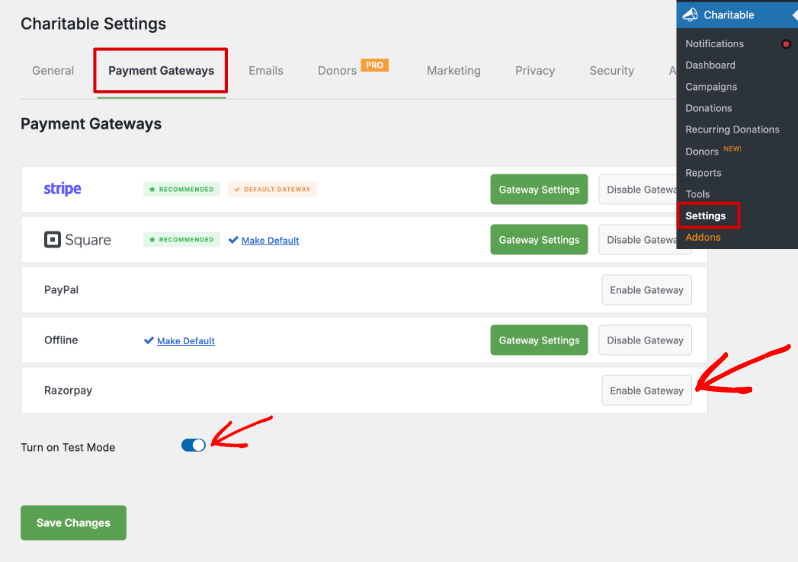
When you activate the gateway, you’ll see a new Gateway Settings button. This takes you to the settings page where you can enter your API credentials. You can either use your live keys or test keys.
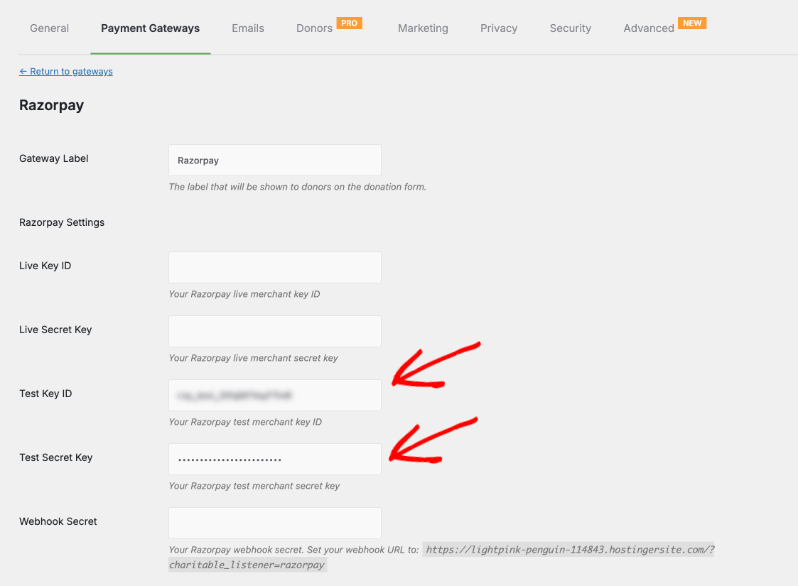
Configuration
- In your Razorpay dashboard, generate API keys for live mode (and test mode if you want to test first).
- Paste the Live Key ID and Live Secret Key into the Razorpay settings tab in Charitable.
- In Razorpay, create a webhook pointing to the URL shown in the Webhook Secret help text on the same settings tab. Copy the webhook secret back into Charitable.
- Save settings. Submit a small test donation in test mode to confirm the round trip is healthy.
How donors see Razorpay on the donation form
On your campaign page, when a donor clicks to donate, they should now see Razorpay as an option in your donation form.
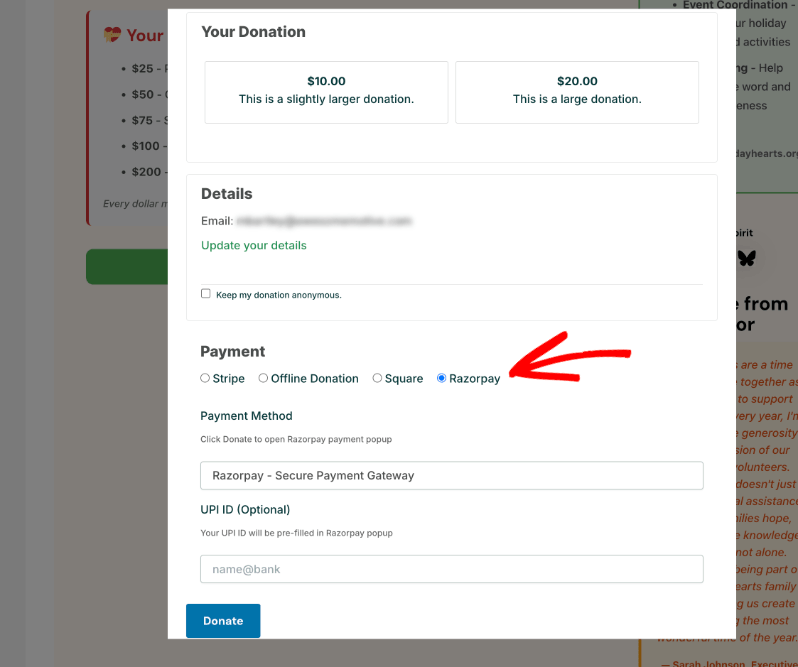
They can either add in their UPI ID on this form whcih will then be prefilled in the Razorpay payment form.
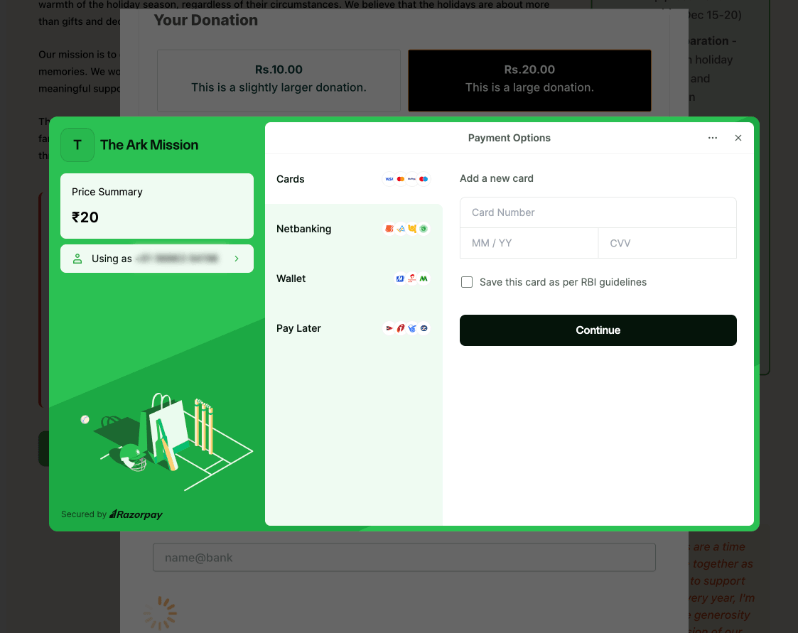
When a donor clicks the Donate button, Charitable opens the Razorpay popup with the donation amount, donor name and email pre-filled, and your branded image and theme color.
Cards, netbanking, wallet, Pay Later, and UPI options appear in the popup based on what is enabled in your Razorpay merchant account.
QR codes on campaign pages
If you enable QR Code Generation, every published campaign gets a scannable QR code rendered on the campaign page (and a smaller version in the campaign sidebar layout). The QR encodes a UPI deep link to your merchant ID, with the campaign goal amount pre-filled when QR Code Amount Pre-fill is enabled. Donors can scan with any UPI app to send a gift directly to your account.
You can enable this in the same Charitable » Settings » Payment Gateways » Gateway Settings page for Razorpay.
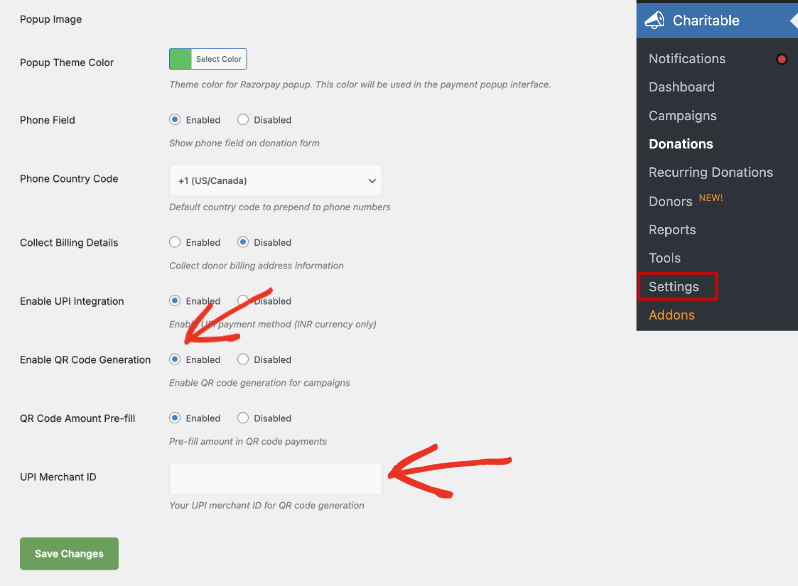
That’s it! You’re all set to accept donations with Razorpay.
Viewing Razorpay Transactions in Charitable
Once donations come in through the Razorpay gateway, you can view them under Charitable » Donations. Here, you’ll see a list of donations along with the amount donated, campaign, date, and payment status. In the Amount Donated column, you’ll see the payment gateway used.
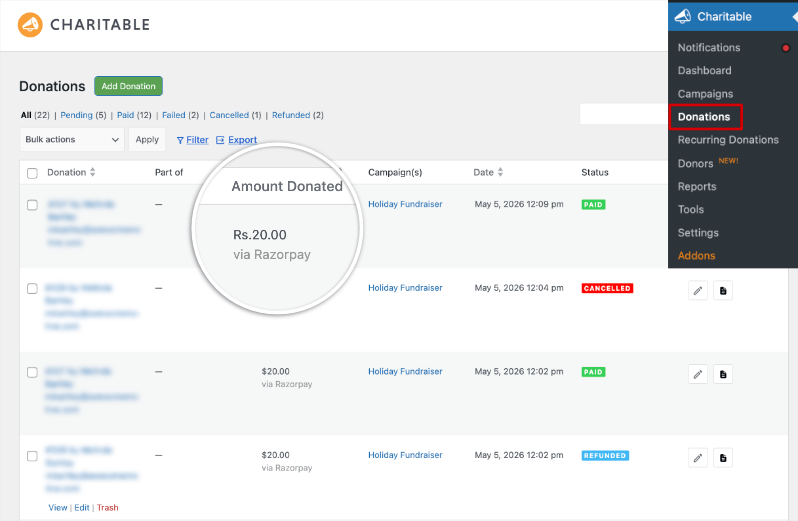
You can choose to view or edit any record here. Inside, you’ll also see details of the Razorpay payment record
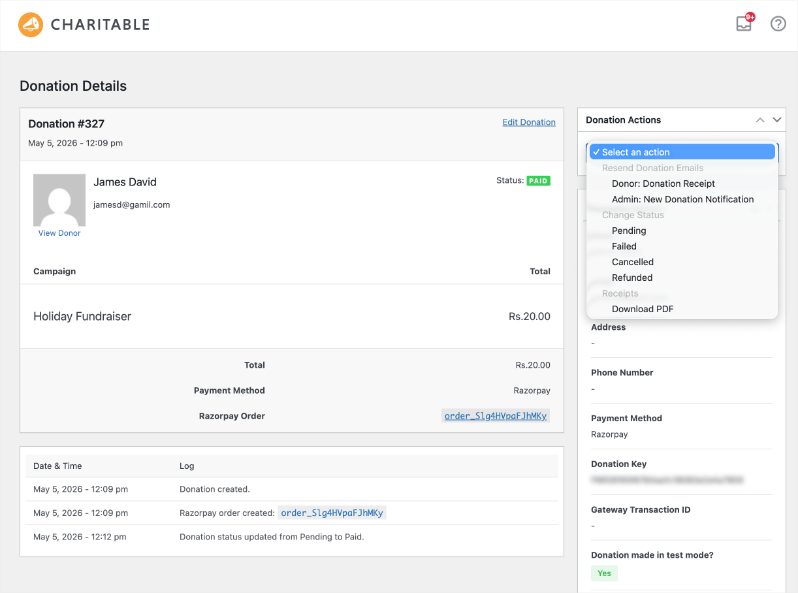
Below, we’ll discuss more configuraiton options available to you when you enable Razorpay.
Configuration Options Available for Razorpay
The Razorpay settings live at Charitable » Settings » Payment Gateways » Razorpay.
API & Webhook Credentials
| Setting | Type | Default | Description |
|---|---|---|---|
| Live Key ID | text | — | Your Razorpay live merchant key ID. |
| Live Secret Key | password | — | Your Razorpay live merchant secret key. |
| Test Key ID | text | — | Your Razorpay test merchant key ID. |
| Test Secret Key | password | — | Your Razorpay test merchant secret key. Used when Charitable test mode is on. |
| Webhook Secret | password | — | The shared secret you create in the Razorpay webhook configuration. Without it, payment confirmations and subscription updates are silently rejected. |
Donor Experience
| Setting | Type | Default | Description |
|---|---|---|---|
| Popup Image | image | — | Image displayed at the top of the Razorpay popup. 80x80px recommended. |
| Popup Theme Color | color picker | #2bc253 | Accent color used inside the Razorpay popup interface. |
| Phone Field | radio | Enabled | Show a phone number field on the donation form. |
| Phone Country Code | select | +1 | Default country code prepended to the phone field. Includes +1, +91, +44, +61, +65, +971, +33, +49, +81, +86. |
| Collect Billing Details | radio | Disabled | Collect donor billing address information alongside payment. |
UPI & QR Codes
| Setting | Type | Default | Description |
|---|---|---|---|
| Enable UPI Integration | radio | Enabled | Adds the UPI payment method to the donation form for INR campaigns. |
| Enable QR Code Generation | radio | Enabled | Renders a scannable QR code on each campaign’s public page. |
| QR Code Amount Pre-fill | radio | Enabled | Includes the campaign’s goal amount in the QR code so the donor’s UPI app opens with that value. |
| UPI Merchant ID | text | — | Your registered UPI merchant ID (VPA). Required for QR code generation. |
Customization
Template Overrides
The two front-end templates can be overridden by copying them into your theme:
templates/donation-form/upi-fields.php→your-theme/charitable/donation-form/upi-fields.phptemplates/qr-code/qr-code-display.php→your-theme/charitable/qr-code/qr-code-display.php
Currency Handling
Razorpay supports INR, USD, EUR, GBP, SGD, AED, CAD, AUD. If your Charitable currency is set to anything outside that list, the integration falls back to INR. UPI and QR-code features are restricted to INR campaigns by Razorpay policy.
Troubleshooting Guide for Razorpay + Charitable
The Razorpay tab is missing from Payment Gateways
Confirm the addon is activated under Plugins. If it is, deactivate and reactivate it. The tab is registered on the Charitable bootstrap, so a fresh activation forces it to appear.
Donations complete in the popup but stay “Pending” in Charitable
The webhook is not reaching your site, or the webhook secret is missing. Check that the webhook URL in your Razorpay dashboard matches the one shown in the Razorpay settings help text, and that the Webhook Secret field is filled in. Make a 1 INR test donation and watch the Charitable → Tools → Logs tab to confirm the webhook arrived.
UPI fields don’t appear on the donation form
UPI is restricted to INR campaigns. Check that Charitable → Settings → General → Currency is set to Indian Rupee, and that Enable UPI Integration is on.
QR code is missing from the campaign page
Check that Enable QR Code Generation is on, that UPI Merchant ID has a valid VPA, and that the campaign currency is INR.
Refunds don’t sync back to Razorpay
Refunds initiated inside Charitable are sent to Razorpay through the API. Refunds issued in the Razorpay dashboard come back through the webhook. If a dashboard-initiated refund is not reflected, the webhook is the issue (see the second troubleshooting entry above).
Developer Resources
Hooks & Filters
charitable_razorpay_start(action) — Fires once after the Razorpay addon has finished loading. Useful for hooking in additional integrations.charitable_razorpay_languages_directory(filter) — Filters the directory used to load translation files.charitable_payment_gateway_supports(filter) — Charitable core filter; the addon hooks into this to declare recurring-donation support.
AJAX Endpoints
The addon registers several internal AJAX actions for the donation flow. They are not public API and are documented here for transparency:
charitable_razorpay_create_order— Creates a Razorpay order before payment.charitable_razorpay_verify_payment— Verifies the signature returned by the popup.charitable_razorpay_process_upi— Processes a direct UPI submission from the form.charitable_razorpay_generate_qr— Generates a campaign QR code on demand.charitable_razorpay_download_qr— Returns a downloadable PNG of the campaign QR code.
Webhook URL
The webhook URL Charitable expects Razorpay to call is shown inline in the Webhook Secret help text. It uses Charitable’s standard listener pattern: https://your-site.com/?charitable_listener=razorpay.
How To Share Questions and Feedback
We’re always improving, and your experience with our latest features helps us get it right. It only takes a minute.
Charitable Has 1+ Million Downloads!
Trusted by millions to power successful fundraising campaigns. Try Charitable risk-free today.
✅ 14-day money-back guarantee
✅ Transparent pricing
✅ Code-free setup
Stay Connected for More Nonprofit Resources
For more tutorials and videos tailored to nonprofits, subscribe to our YouTube channel. We regularly publish expert tips, step-by-step guides on online donations, fundraising strategies, and practical resources to help your organization succeed.
🗞️ Get weekly tips and exclusive guides in your inbox
Join our newsletter →
🎥 Watch step-by-step tutorials and success stories
Subscribe to our YouTube channel →
👩🏽💻 Connect with our community and get daily nonprofit insights
Follow us on LinkedIn →
🥳 Fun reels and non-profit insights
Follow us on Instagram →
👀 Insightful & fun videos to help you grow your cause
Follow us on TikTok→
🌎 Subscribe and follow for general fundraiser tips
Get Fundraiser Tips on TikTok →
Powerful Fundraising Resources
🤖 Use Charitable with Your AI Assistant
⬇️ Download proven strategies, campaign ideas, and expert tools
Get the Fundraising Kit →
💸 Get Free Fundraising Resources
Head to the Charitable Fundraising Hub →
🤔 Got questions about Charitable?
Charitable FAQs →
🏎️ Take Charitable for a spin
Create your Charitable Demo →
Understand non-profit terms and jargon
Non-Profit Glossary →
% Looking for non-profit deals and discounts?
Best Non-Profit Deals and Discounts →



