
Charitable Blog

Everything you need to know about Charitable and our team.

Introducing donation recovery

Win Back Abandoned Donations Automatically with Charitable’s New Donation Recovery Feature

Last updated on

  • By

Between 50 and 70 percent of donors who start a donation form never finish it.

Not because they changed their minds. Because life interrupted — a phone call, a slow connection, a browser tab they forgot to come back to. The intent was there. The donation was almost there. And then it was gone.

Until now, recovering those donors meant setting up third-party abandonment tools, connecting your donation platform to an external email service, and hoping the handoff worked. Most organizations never bother. The revenue just disappears.

Charitable Pro’s new Donation Recovery feature changes that. It automatically captures donor intent, detects abandonment, and sends a personalized reminder email — with a direct link back to their pre-filled form — built right into Charitable! No third-party tools. No developer. No ongoing maintenance.


How It Works
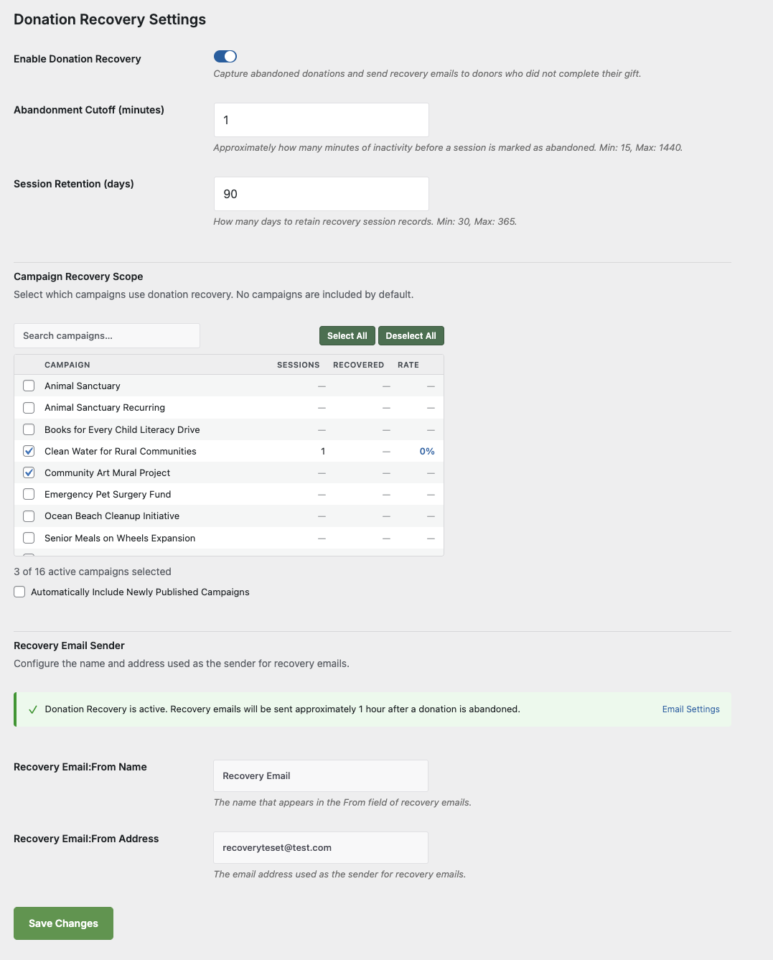
When a donor visits a donation form for a recovery-enabled campaign, a lightweight background tracker captures their email address, name, and donation amount as they type. If they leave without completing the donation, Charitable detects the abandoned session and sends a recovery email approximately one hour later.

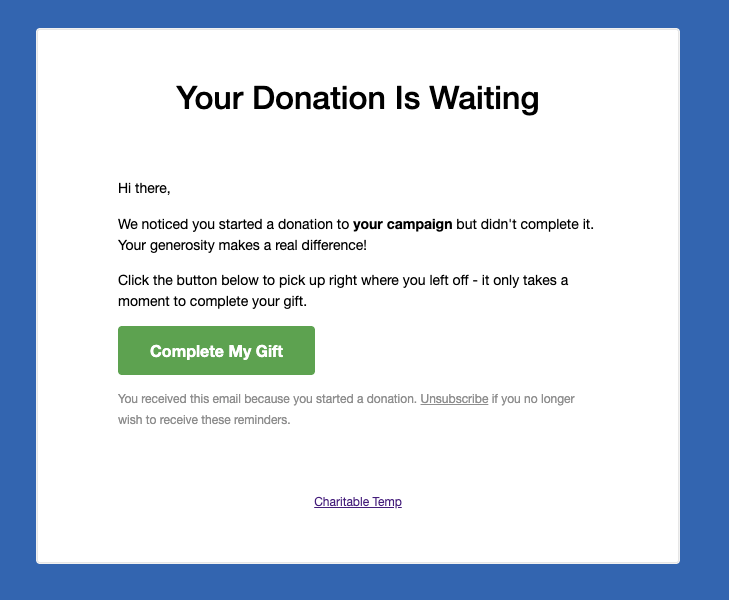
The email includes a personalized Complete My Gift button. When the donor clicks it, they return to the exact page where they started — with their information already filled in. Completing the gift takes seconds.

You enable it once. After that, Charitable handles everything in the background.


Built for the Whole Team — Not Just Developers

Every part of Donation Recovery was built to be usable without technical help.

Setup takes under two minutes. Go to Charitable → Settings → General → Donation Recovery, check Enable Donation Recovery, select your campaigns, and save. That’s it.

Choose exactly which campaigns participate. The Campaign Recovery Scope panel lists every published campaign along with its tracked sessions, recovered donations, and recovery rate. Check the ones you want — or enable automatic inclusion for any newly published campaigns.

Customize the recovery email. The default template is ready to use out of the box, but you can override it in your theme to match your organization’s branding and voice exactly.

Unsubscribe is built in. Every recovery email includes a one-click unsubscribe link. Donors who opt out are added to a suppression list automatically — no manual management required.


A Recovery Report Built In

Donation Recovery comes with its own dedicated reports tab at Charitable → Reports → Donation Recovery.

You can see at a glance how many sessions were tracked, how many were abandoned, how many donors came back, your overall recovery rate, and the total revenue recovered. Filter by date range — Last 7 days, Last 30 days, Last 90 days, or a custom range — and drill down into the full sessions table to see individual donor details and statuses.

A recovery summary also surfaces directly on the Reports Overview tab, so your recovered revenue is always visible alongside your total donation numbers.

[screenshot: donation-recovery-reports.png — The Donation Recovery reports tab showing stats tiles, sessions table, and per-campaign breakdown]


What the Donor Experiences
When a donor clicks the recovery link in their email, they land back on the original donation page — not your homepage, not a generic donations page, but the specific page they were on when they filled out the form. Their email address, name, and donation amount are already filled in. If they had selected a preset amount, that radio button is pre-selected.

There is no starting over. No hunting for the right campaign. One click, then a few seconds to confirm payment details and submit.

This frictionless return path is the reason recovery works. The donor’s intent was already there. You’re just removing every barrier between that intent and a completed donation.


Available Now in Charitable Pro 1.8.13.5

Donation Recovery is available on the Pro and Elite plans of Charitable Pro, starting with version 1.8.13.5.

If you’re already on Pro or Elite, update to the latest version and head to Charitable → Settings → General → Donation Recovery to turn it on.

If you’re on Charitable Lite or a lower paid tier, this is a strong reason to upgrade. Charitable Pro starts at $199/year and comes with a 14-day, no-questions-asked money-back guarantee.

Get Charitable Pro →

Read the Donation Recovery Documentation →


Set It Up in Under Two Minutes

  1. Update Charitable Pro to version 1.8.13.5 or later
  2. Go to Charitable → Settings → General → Donation Recovery
  3. Check Enable Donation Recovery
  4. Select the campaigns you want to track under Campaign Recovery Scope
  5. Click Save Settings

Charitable takes it from there.

author avatar
David Bisset Project Manager
David is the project manager of Charitable since 2022. David works with several non-profits (one operated by his wife) along with managing and developing features, support, and marketing for Charitable. Has been with WordPress since 2006 and has been lead organizer of multiple conferences, events, and meetups.

Disclosure: Our content is reader-supported. This means if you click on some of our links, then we may earn a commission. We only recommend products that we believe will add value to our readers.

Leave a Reply

Your email address will not be published. Required fields are marked *

Get free tips and resources right in your inbox, along with 60,000+ others

Join our Newsletter

We won’t spam you. We only send an email when we think it will genuinely help you. Unsubscribe at any time!

Featured Video:

Watch more videos on our YouTube channel.

What's New In Charitable

View The Latest Updates
🔔 Subscribe to get our latest updates
📧 Subscribe to Emails

Email Subscription

Join our Newsletter

We won’t spam you. We only send an email when we think it will genuinely help you. Unsubscribe at any time!

New templates

🤩 New Beacon Campaign Templates w/ “Hero” Block!

With the new Beacon Campaign Templates for Charitable Pro, you can launch a stunning, full-width fundraising page that instantly captures visitor attention above the fold.

Fundraising page header for Save Maple Grove Park with a donation widget and a small square photo of a sunlit tree thumbnail on the left.

🔦 Above-the-Fold Impact: Lead with a full-width hero image, your logo, and your goal with a donation widget locked right on top of the banner so your ask and momentum register instantly without scrolling.

📐 Two Flexible Layouts: Choose between a structured two-column layout for side-by-side storytelling and supporting details, or a clean one-column view designed for uninterrupted long-form narratives.

⚡ All-in-One Hero Field: Powered by the new Campaign Hero field, bringing background media, live progress bars, custom donation amounts, and recurring giving tabs together into a single cohesive block that can be dropped into any layout.

🎨 Automatic Theme Matching: The hero banner and donation widget automatically inherit your campaign theme’s button and accent colors, ensuring your entire presentation stays beautifully on-brand without touching a line of CSS.

Learn more here.

author avatar
David Bisset Project Manager
David is the project manager of Charitable since 2022. David works with several non-profits (one operated by his wife) along with managing and developing features, support, and marketing for Charitable. Has been with WordPress since 2006 and has been lead organizer of multiple conferences, events, and meetups.
donation form Feature New

📝 Donation Form Block: Embed a Working Donation Form Anywhere

With the new Donation Form Block for Charitable Pro, you can drop a fully working donation form directly onto any page or post in the WordPress block editor. No redirects, no page reloads, and zero friction between reading your story and making a contribution.

📝 Drop Forms Anywhere: Place a working form directly onto your homepage, inside a story-driven blog post, on a dedicated landing page, or within a campaign announcement.

🎯 Dynamic Campaign Binding: Easily choose a specific campaign from the block sidebar or set it to automatically bind to whichever campaign is currently being viewed.

📐 Full vs. Minimal Form Views: Switch between a full layout or a compact minimal view to perfectly fit sidebars, narrow columns, or wide landing pages.

🎨 Scoped No-Code Styling: Customize typography, container spacing, border radius, amount buttons, and accent colors independently for every form instance without touching a line of CSS.

Learn more here.

author avatar
David Bisset Project Manager
David is the project manager of Charitable since 2022. David works with several non-profits (one operated by his wife) along with managing and developing features, support, and marketing for Charitable. Has been with WordPress since 2006 and has been lead organizer of multiple conferences, events, and meetups.
ambassadors New

👤 Creator Profiles: Put a Face to Every Peer-to-Peer Campaign

Ambassadors 3.3.0 now provies Creator Profiles — giving your supporters a permanent, shareable public home that turns one-time fundraisers into ongoing relationships.

👤 Public Creator Pages: Give every fundraiser an instant, clean landing page at /creator/their-name/ to showcase their custom avatar, bio, and a browsable grid of their campaigns.

📊 Proof of Impact: Boost donor trust by displaying site-wide milestones on the profile—like total funds raised and total donor counts.

💳 Interactive Hover Cards: When donors hover over a creator’s name on a campaign page, a compact card expands with their bio and social handles right at the moment of decision.

📍 Responsible Location Sharing: Allow creators to safely show local supporters where they are based using only city, state, and country details.

🛠️ Self-Serve Customization: Fundraisers can update their own profiles and link up to six social networks directly from the My Campaigns hub, saving you admin time.

Ready to empower your advocates? Update to Ambassadors 3.3.0 and turn on “Enable Public Creator Page” today!

author avatar
David Bisset Project Manager
David is the project manager of Charitable since 2022. David works with several non-profits (one operated by his wife) along with managing and developing features, support, and marketing for Charitable. Has been with WordPress since 2006 and has been lead organizer of multiple conferences, events, and meetups.
Improvement Payments

📱 Turn Mobile Scrollers Into Donors: Meet Charitable’s Mollie Upgrade

Losing mobile supporters because they hate typing out long card numbers on their phones? Charitable’s updated Mollie integration features:

⚡ One-Tap Wallet Checkout: Enable donors to complete their gifts instantly using Apple Pay or Google Pay with a simple face scan, fingerprint, or tap.

💰 No Extra PCI Burden: Skip complex domain verification and security compliance since all wallet transactions run safely through Mollie’s hosted checkout.

🛠️ Custom Cancel Routing: Keep the experience predictable by automatically sending donors who back out to your cancellation page, or use developer filters to route them to a custom page.

Visit this page to learn more.

author avatar
David Bisset Project Manager
David is the project manager of Charitable since 2022. David works with several non-profits (one operated by his wife) along with managing and developing features, support, and marketing for Charitable. Has been with WordPress since 2006 and has been lead organizer of multiple conferences, events, and meetups.
ambassadors improved New

Moderation and Directory Screens In Ambassadors 3.0

Ambassadors 3.0 has new features: moderation and directory screens… now easily see those who are earning donations on your peer to peer network – including campaign creators that might need to be verified – all in one place. Generate reports, email ambassadors and campaign creators directly and more.

🚀 See when campaign creators and ambassadors have updated their campaigns, what donors/donation they have brought in and more.

🎉 Manually add ambassadors and campaign creators, and approve them in one-click!

Visit this page to learn more.

author avatar
David Bisset Project Manager
David is the project manager of Charitable since 2022. David works with several non-profits (one operated by his wife) along with managing and developing features, support, and marketing for Charitable. Has been with WordPress since 2006 and has been lead organizer of multiple conferences, events, and meetups.






