
Conversion Tracking sends native Meta Pixel, TikTok Pixel, and Google Tag Manager dataLayer events from your campaign pages, donation forms, and receipt pages. Every event carries full donation context, including amount, currency, campaign name, donation type, and payment method, so your ad platforms can optimize spend based on real fundraising outcomes.
Available with Charitable Pro 1.8.13.5+ or later on Pro, Agency, and Elite license plans.
Key Features
- Fire Meta Pixel
PurchaseandDonateevents on every confirmed donation - Fire TikTok Pixel
CompletePaymentevents with full donation value and currency - Push rich donation data to
window.dataLayerfor Google Tag Manager and GA4 - Track campaign page views and donation form opens as top-of-funnel events
- Include donation amount, currency, campaign name, donation type, and payment method in every conversion
- Respect visitor consent via the WP Consent API, with a filter hook for custom consent managers
- Prevent duplicate conversions on receipt page refreshes using tab-scoped session tracking
- Review tracking status for every donation inside the WordPress admin
Why Use Conversion Tracking?
Nonprofits running paid ads on Meta, TikTok, or through Google Tag Manager need accurate conversion attribution to optimize ad spend and prove ROI. Generic pixel plugins fire empty events that only tell the ad platform a “conversion” happened. Charitable Conversion Tracking sends the donation amount, currency, and campaign context that Meta and TikTok algorithms actually use to find more donors who will give. Your acquisition cost per donor drops. Your campaigns learn faster.
Requirements
- Charitable Pro 1.8.13 or later
- A Charitable Pro, Agency, or Elite license plan
- WordPress 5.0 or later
- PHP 7.2 or later
- Optional: WP Consent API and a compatible consent management plugin, if you want pixels gated by visitor consent
Getting Started
Activation
- Download the Conversion Tracking addon from your Charitable account dashboard.
- In WordPress, go to Plugins > Add New > Upload Plugin and upload the ZIP file.
- Activate Charitable – Conversion Tracking.
- Go to Charitable > Settings > Advanced > Conversion Tracking to enter your pixel IDs.
Enter Your Pixel IDs
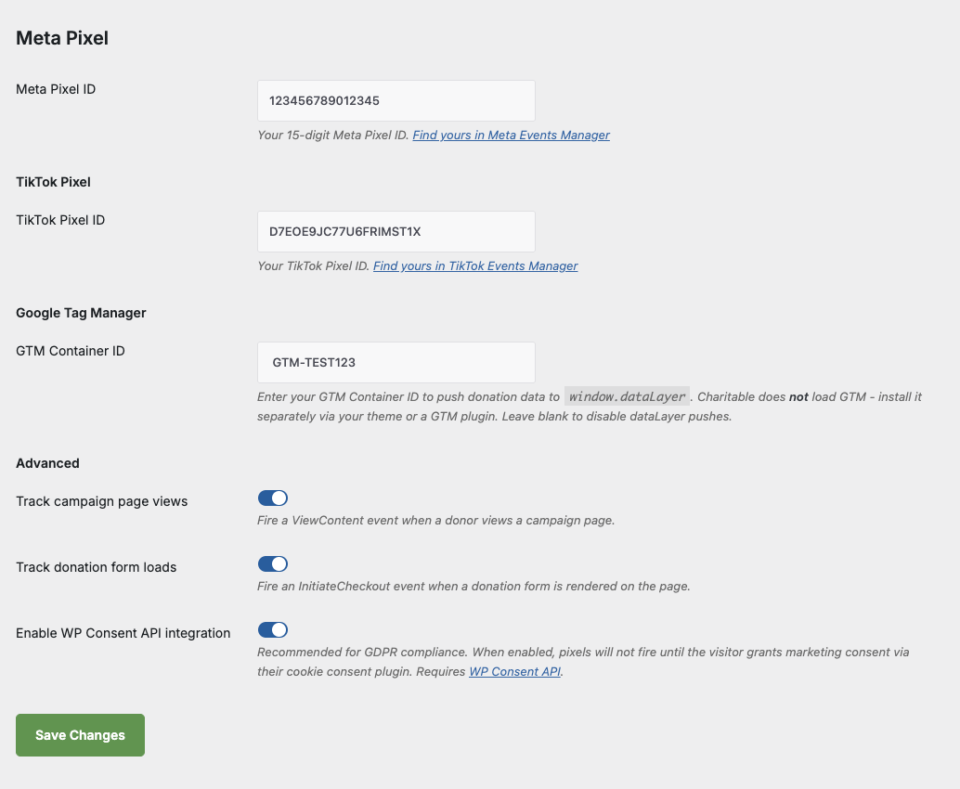
Each platform has a single ID field. Leaving a field empty disables that platform. No separate on/off toggle is needed.
Usage
Conversion Tracking runs automatically once pixel IDs are entered. There is no block or shortcode to place. The addon listens on three moments across your site:
- Campaign page view. Fires when a visitor loads a single campaign page.
- Donation form rendered. Fires when a donation form is displayed on any page.
- Donation confirmed. Fires on the receipt page after a successful donation, for all gateways including Stripe, PayPal, Square, Braintree, Mollie, and Offline.
Configuration Options
Platform IDs
| Parameter | Type | Default | Description |
|---|---|---|---|
meta_pixel_id | string | empty | Your 15-digit Meta Pixel ID. Example: 123456789012345 |
tiktok_pixel_id | string | empty | Your TikTok Pixel ID. Example: CXXXXXXXXXXXXXXX |
gtm_container_id | string | empty | Your GTM Container ID. Charitable pushes dataLayer events but does not load GTM itself. Install GTM through your theme or a separate plugin. Example: GTM-XXXXXXX |
Tracking Behavior
| Parameter | Type | Default | Description |
|---|---|---|---|
pixel_track_campaign_views | checkbox | on | Fire ViewContent and charitable_campaign_viewevents when a visitor loads a campaign page |
pixel_track_form_opens | checkbox | on | Fire InitiateCheckout and charitable_initiate_checkout events when a donation form is rendered |
pixel_consent_integration | checkbox | on | Check wp_has_consent( 'marketing' ) before firing any pixel |
Event Reference
| Moment | Meta Pixel | TikTok Pixel | GTM dataLayer Event |
|---|---|---|---|
| Campaign page view | ViewContent | ViewContent | charitable_campaign_view |
| Donation form rendered | InitiateCheckout | InitiateCheckout | charitable_initiate_checkout |
| Donation confirmed | Purchase and Donate | CompletePayment | charitable_donation_complete |
dataLayer Payload on Donation Complete
window.dataLayer.push({
  event: 'charitable_donation_complete',
  donationId: 8937,
  value: 28.87,
  currency: 'USD',
  campaignId: 7952,
  campaignName: 'Clean Water for Rural Communities',
  donationType: 'one-time',
  paymentMethod: 'stripe'
});
Customization
Multiple Campaigns in One Donation
When a donation covers more than one campaign, Conversion Tracking uses the campaign with the largest donation amount as the attribution target. The total value is the sum across all campaigns. Use the charitable_pixel_primary_campaign filter to override this selection.
Donation Statuses That Fire Conversions
By default, Conversion Tracking fires pixels for donations with charitable-completed, charitable-preapproved, and charitable-pending statuses. Use the charitable_pixel_fire_statuses filter to add or remove statuses.
Troubleshooting
No pixel events appear in Meta Events Manager or TikTok Events Manager
Check that the pixel ID field is populated for that platform and that your visitor has granted marketing consent (or that pixel_consent_integration is disabled). Open your browser DevTools Network tab on the receipt page and filter for fbevents.js or analytics.tiktok.com to confirm the pixel library loads.
GTM dataLayer events fire but GTM tags do not
Charitable pushes events to window.dataLayer but does not install the GTM container itself. Install GTM through your theme header or a dedicated GTM plugin. Confirm the container ID in GTM matches the ID entered in Conversion Tracking settings.
Receipt page events do not fire
Check the donation status. Offline donations that sit in charitable-pending without being manually approved will not fire pixels. Also confirm the donation passed through the receipt page rather than a custom thank-you redirect, since Conversion Tracking relies on the charitable_donation_receipt_page hook.
Conversion tracked twice when visitor refreshes receipt page
Conversion Tracking uses sessionStorage keyed by donation ID to prevent re-firing in the same browser tab. Opening the receipt URL in a new tab counts as a new session and will fire once, which is the expected behavior.
License inactive banner appears in admin
Confirm Charitable Pro is installed and activated, your license is on the Pro, Agency, or Elite plan, and the license has been entered and activated in Charitable > Settings > Licenses. Expired licenses have a 30-day grace period before delivery is blocked.
Developer Resources
Hooks and Filters
charitable_pixel_fire_statuses— array of donation statuses that allow pixels to firecharitable_pixel_primary_campaign— override the campaign chosen for multi-campaign donationscharitable_pixel_consent_granted— fallback consent check when WP Consent API is unavailablecharitable_ajax_donation_response— added to Charitable Pro core; lets addons enrich the AJAX donation response for future Conversions API work
Donation Meta Keys
_charitable_pixel_tracking_status—tracked,consent_blocked,status_blocked,license_blocked, ornot_configured_charitable_pixel_tracked_at— Unix timestamp of the tracking event_charitable_pixel_platforms— array of platforms that fired, e.g.,['meta', 'tiktok', 'gtm']_charitable_pixel_event_id— unique event ID reserved for future Meta Conversions API deduplication
Consent Integration
Conversion Tracking reads consent through the WP Consent API when available:
if ( function_exists( 'wp_has_consent' ) ) {
    return (bool) wp_has_consent( 'marketing' );
}
return (bool) apply_filters( 'charitable_pixel_consent_granted', true, 'marketing' );
Sites without a consent manager fire pixels by default. Sites with a compatible consent plugin (CookieYes, Complianz, and others that implement the WP Consent API) have consent respected automatically.





