
If you’re asking this question, you’re not alone. Pretty much everyone I talk to is wondering the same thing.
But here’s what’s interesting: We’ve been here before.
Let me take you back to the 1980s…
When ATMs were first introduced, people worried – Will this replace human connection? Will people stop visiting banks? Will jobs disappear?
The fear seemed justified. But that didn’t happen. 🤷🏽
Instead, ATMs made banking more efficient. Banks opened more branches in underserved communities.
Tellers shifted from counting cash to helping customers solve real problems, like setting up small business accounts or explaining loan options.
🔄 The same pattern repeated with computers, email, online banking.
Each time, the technology freed up capacity to do more meaningful work.
Too long to read? ▶️ Watch on YouTube: How Nonprofits and Charities Can Start Using AI Practically
We’ve Had This Fear Before
The anxiety you’re feeling about AI? It’s natural because it’s unknown territory. We’re all learning what it’s about together.
Back when computers were making an entrance into homes, a 1983 publication Personal Computing by Charles Rubin put it perfectly:
“Perhaps we’re led to believe that anyone who doesn’t have a keen interest in and desire to use a personal computer must be sick… The most important thing to remember about computerphobia is that it’s a natural reaction to something unfamiliar.
If you’re trying to use a personal computer or are considering using one, remember: Allow yourself to be a little ignorant for a while. Plan to spend some time learning; give the computer a chance to prove itself before you decide you can’t use it; take things a step at a time; make sure you read the documentation carefully; and finally, don’t forget that you’re in charge, not the computer.”
– Personal Computing, 1983
Those words hold true for AI now. History repeats itself.

But Computers Weren’t the First “Scary” Technology
Go back even further to the 1920s and 1930s, when radio was becoming mainstream.
Many feared they would destroy family privacy and intimacy by bringing in external, commercial voices. The entertainment industry feared that free radio broadcasts would cause a decline in attendance at live performances and reduce the sales of records.
But the fears went even deeper than that.
People blamed radio waves for physical ailments – headaches, stomachaches, and mysterious illnesses in both humans and animals. Some farmers claimed their cows stopped producing milk because of radio interference. Others insisted that radio waves were causing insomnia and nervous disorders.
There were genuine health panics about this invisible technology literally making people sick.
What actually happened?
Radio didn’t empty the churches and cinema halls. Instead, it helped religious leaders reach people who couldn’t physically attend – the elderly, the sick, those in rural areas. The radio became another form of education, entertainment, and advertisment. It opened up a whole set of new jobs.
And radio waves? They weren’t causing mysterious illnesses. The fear was real, but the danger wasn’t.
Remember the Calculator Wars?
In the 1980s, when pocket calculators became affordable, teachers and parents were up in arms.
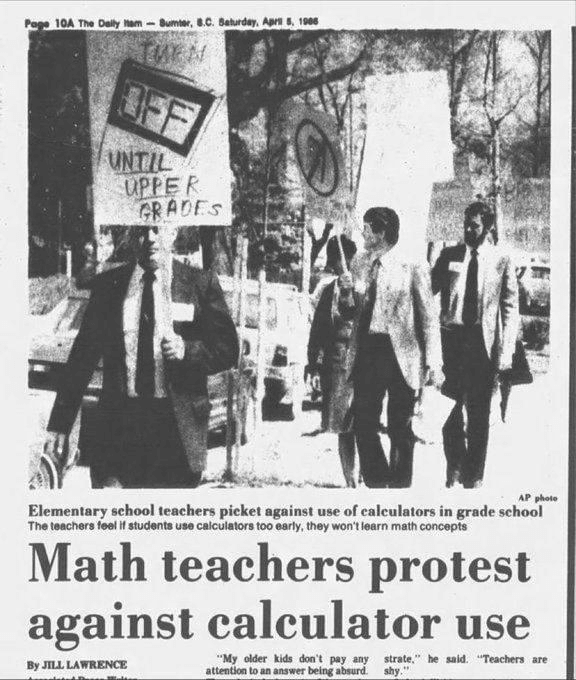
“Children won’t learn basic math concepts!”
“They’ll become dependent on machines for simple arithmetic!”
“Mental math skills will disappear entirely!”
Schools banned calculators from classrooms. Some districts prohibited them completely, fearing they would create a generation that couldn’t add, subtract, multiply, or divide without electronic help.
All of their points were valid. Most schools today allow calculators to be used in high school.
Younger students still learn basic math concepts. Calculators in higher classes freed students from tedious computation so they could focus on understanding mathematical thinking and problem-solving.
Instead of spending 30 minutes doing long division by hand, students could spend that time learning how to apply math to real-world problems. They moved from being human calculators to being mathematical thinkers.
Today? Calculators are standard in math classes. Because once you understand the concepts, the tool helps you go further faster.
Think about email. Remember when people complained it was too impersonal? Would it kill real communication? Now it’s just… email. A tool. Neither good nor bad on its own.
The pattern is always the same:
- New technology arrives
- People fear it will eliminate jobs, destroy human connection, or make us “less than”
- We adapt and find that it actually frees us to do more meaningful work
- The technology becomes invisible – just part of how we operate
AI Is Following the Exact Same Pattern
The fear is natural. The uncertainty is real.
But here’s what we know from history: Technology doesn’t replace human connection and meaningful work. It replaces tedious tasks that were keeping us from human connection and meaningful work.
- ATMs didn’t eliminate bank tellers – they eliminated the tedious task of counting cash all day, so tellers could actually help people with their financial goals.
- Computers didn’t eliminate office workers – they eliminated retyping entire documents for every revision, so people could focus on the quality of their ideas.
- Calculators didn’t eliminate math skills – they eliminated tedious computation, so students could focus on mathematical thinking and real-world problem-solving.
- Email didn’t eliminate communication – it eliminated waiting days for a letter to arrive, so conversations could happen faster.
AI won’t eliminate the heart of nonprofit work – serving your community, building relationships, and making real change happen.
But it can eliminate spending three hours formatting a grant proposal, or manually updating donor records, or writing the same thank-you email template for the hundredth time.
AI is powerful, but it still needs human judgment, human creativity, and human direction. The machine can find patterns, but humans decide what those patterns mean and how to use them for good.
The question isn’t whether AI will change how nonprofits work. It will.
The question is: Will you adapt and use it to amplify your impact, or will you let fear keep you stuck in inefficiency while your mission suffers?
But Let’s Be Honest: Technology Isn’t Always Benign
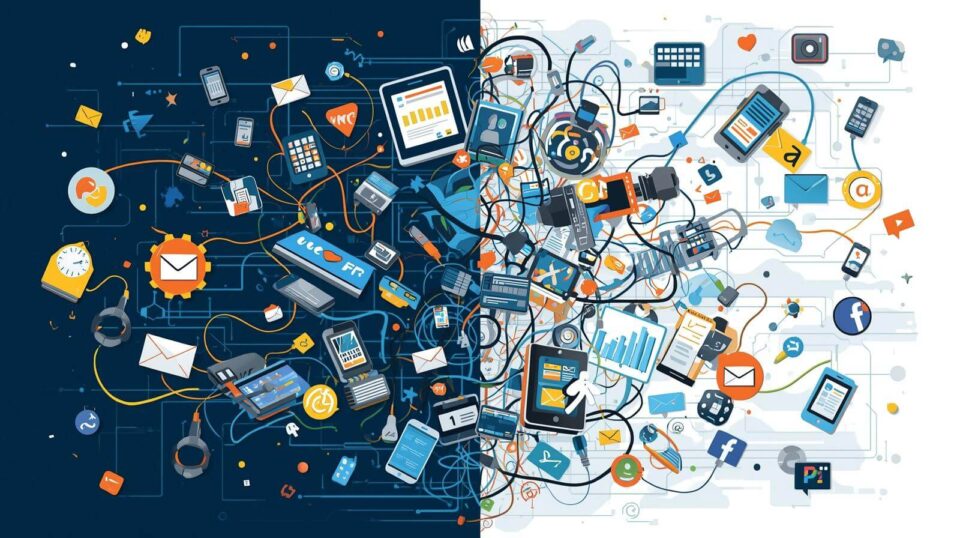
History also teaches us that not every fear about technology was unfounded.
Social media was supposed to connect us. And it did – but it also created echo chambers, spread misinformation, and contributed to mental health crises, especially among young people. Studies now link excessive social media use to anxiety, depression, and decreased attention spans.
Email gave us instant communication, but it also created an “always-on” work culture where people feel pressured to respond at all hours. The boundary between work and personal life blurred, contributing to burnout.
Smartphones put the world’s information in our pockets, but they also created addiction-like behaviors. We check them an average of 96 times per day. Family dinners are interrupted. Conversations are fragmented. Genuine presence has become rare.
Automation did eliminate certain jobs and entire communities built around manufacturing were devastated when factories closed. The promise of “retraining” didn’t always materialize for workers in their 50s who’d spent their entire careers doing one type of work.
The internet democratized information, but it also made privacy nearly extinct. Our data is harvested, sold, and used in ways we don’t fully understand or consent to.
The Technology Wasn’t the Problem – How We Used It Was
Here’s the critical lesson: Technology amplifies human choices.
Social media became toxic not because the technology itself was evil, but because platforms optimized for engagement over well-being. Outrage and division kept people scrolling – and scrolling meant more ad revenue.
Email became overwhelming because we chose to be available 24/7. We didn’t set boundaries. Organizations didn’t establish healthy communication norms.
Smartphones became addictive because they were deliberately designed that way – using psychological tricks to keep us coming back for “just one more” notification.
The same will be true for AI.
AI can help your nonprofit serve more people, raise more funds, and free your team from soul-crushing administrative work.
Or AI can be used to generate soulless, generic content that alienates your donors. It can perpetuate biases in your programs if you’re not careful about the data it learns from. It can create a disconnect between your organization and your community if you use it to replace genuine human interaction rather than enhance it.
This Is Why We Must Be Vigilant About How We Use It
AI is a tool. Like any tool, it can be used well or poorly.
The difference between AI that helps your nonprofit thrive and AI that makes your work feel hollow comes down to intentionality.
Ask yourself:
- Am I using AI to free up time for more human connection, or to avoid human connection?
- Am I using AI to enhance my voice and message, or to replace my authentic voice entirely?
- Am I reviewing and personalizing what AI produces, or am I just hitting “generate” and moving on?
- Am I thinking about the biases that might exist in AI outputs, or am I accepting everything at face value?
- Am I transparent with donors and stakeholders when AI plays a role in my communications?
The nonprofits that will succeed with AI are the ones who use it as a springboard for more meaningful work – not as a replacement for it.
Use AI to draft the grant proposal, then add your organization’s unique story and passion.
Use AI to generate social media ideas, then infuse them with your authentic voice and real photos from your programs.
Use AI to analyze donor data, then use those insights to have more meaningful conversations with supporters.
The moment you let AI do everything, the moment you remove human judgment, creativity, and heart from the equation – that’s when technology likely becomes a problem.
So while much of this article was written by me – a human, AI tools helped with research, polishing it up, cleaning up grammatical errors, and also creating some of the images you see here to make it visually appealing.
History’s Real Lesson: Humans Must Stay in Charge
Remember that quote from 1983 about computers? The last line was the most important:
“Don’t forget that you’re in charge, not the computer.”
That’s still true today.
AI should serve your mission. It should amplify your impact. It should give you back time and energy.
But you – with your empathy, your understanding of your community’s needs, your passion for your cause – you must remain in the driver’s seat.
That’s not just a nice sentiment. It’s a necessity. Because AI without human oversight isn’t just ineffective – it can be actively harmful.
What This Means for Your Nonprofit
Let’s get real for a moment.
You’re already stretched thin. Maybe it’s just you and a small team trying to do everything – run programs, write grants, manage donors, update your website, post on social media, respond to emails, track volunteers, and actually serve your community.
You probably started your nonprofit work because you cared deeply about a cause. You wanted to make a difference.
But somewhere along the way, you became buried in administrative tasks. Spreadsheets. Donor databases. Email campaigns. Grant applications with specific formatting requirements. Social media algorithms demanding constant content.
The mission work you’re passionate about? It’s happening in the margins – squeezed between all the administrative “stuff” that keeps the organization running.
This is where AI changes everything.
AI Does What ATMs Did for Banks
Remember how ATMs freed bank tellers from counting cash all day so they could actually help customers with meaningful financial decisions?
AI does the same thing for nonprofit work.
It takes the repetitive, time-consuming tasks off your plate so you can move up to higher-value work – the work that actually requires your human judgment, creativity, empathy, and expertise.
Here’s what that looks like in practice:
Instead of spending 2 hours drafting individual thank-you emails to donors, AI helps you create personalized templates in 15 minutes, giving you 1 hour and 45 minutes back to actually call your major donors and build relationships.
Instead of spending an entire afternoon reformatting a grant proposal to meet specific requirements, AI handles the formatting while you focus on crafting a compelling narrative about your impact.
Instead of staring at a blank screen trying to write social media captions for the week, AI gives you starting points that you can personalize – cutting your content creation time in half.
You Don’t Need to Be a Tech Expert
Here’s the good news: You don’t need to code AI or buy expensive software.
There are plenty of free tools with simple, straightforward instructions. Tools that were designed for people who aren’t developers or data scientists.
This accessibility means:
- You can send more donor appeals without hiring additional staff
- You can host better events without overwhelming your small team
- You can raise more money with the same budget
- You can serve more people in your community without burning out
The barrier to entry isn’t technical knowledge anymore. It’s simply the willingness to try.
Not sure which tool to pick?
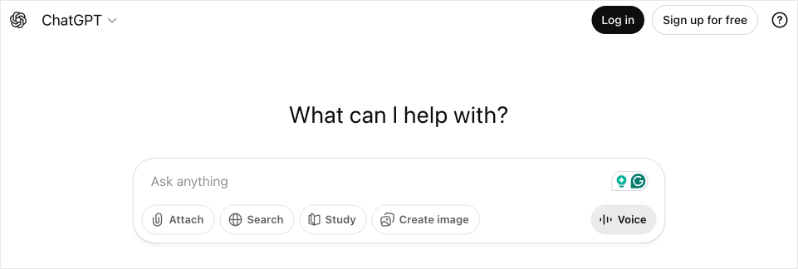
Here are just a few examples of what’s available:
- ChatGPT can help you draft grant proposals, donor emails, and social media content
- Canva’s AI features can create professional graphics and presentations in minutes
- Grammarly uses AI to polish your writing and ensure your message is clear
- Zapier can automate repetitive tasks between different apps you already use
- Microsoft Copilot can help you organize data, create reports, and streamline administrative work
And that’s just scratching the surface. For a comprehensive breakdown of the best AI tools for nonprofits – including what each one does and how to use them – check out our complete guide: Best AI Tools for Nonprofits.
Real Impact for Nonprofits
I’ve personally saved hours every week on administrative tasks by using AI tools. Tasks that used to take an afternoon now take 20 minutes.
That time went back into the work that matters – strategy, relationships, program development, and actually serving our mission.
And I’m not unique. Nonprofits across the country are discovering that AI isn’t about replacing the heart of their work. It’s about protecting it – by eliminating the administrative burden that was drowning them.
If you’re not sure where to start, I’ve put together a complete guide filled with explanations, practical tips, and free tools you can start using today:
✨ Read the full guide here: Ultimate Guide to AI for Nonprofits ✨
This isn’t about jumping on a trend. It’s about giving yourself the capacity to do the work you got into this field to do in the first place.
💰 Bonus: Many tech companies offer special nonprofit pricing and discounts. Check out our Nonprofit Deals and Discounts page to find savings on tools you’re already considering – AI and beyond.
See How AI is changing SEO for non-profits – what we’re observing and what to do about it »
A Word From the Team Behind This Guide
At Charitable, we understand the challenges nonprofits face because we’ve built our entire platform around solving them.
Charitable is a WordPress donation plugin designed specifically for nonprofits like yours. It’s designed for small grassroots organization as well as large non profits managing multiple fundraising campaigns,
The plugin makes it incredibly simple to accept donations, engage donors, and grow your impact – without needing to be a tech expert.
Here’s what makes Charitable different:
- Easy to set up: Create beautiful donation forms in minutes, not hours
- Flexible fundraising: Run peer-to-peer campaigns, crowdfunding, recurring donations, and more
- Donor-friendly: Simple, secure checkout that doesn’t send donors to confusing third-party pages
- Built for nonprofits: Features like donation receipts, donor management, and campaign goals are included
- Affordable: Because we believe powerful fundraising tools shouldn’t break your budget
The team behind Charitable isn’t just building software – we’re committed to helping nonprofits thrive in an increasingly digital world. That’s why we create resources like this AI guide, our deals and discounts page, and ongoing educational content.
Charitable handles the technical fundraising stuff so you can focus on your mission. And now, with AI tools in your toolkit too, you have even more capacity to make the impact you’ve always dreamed of.
Ready to simplify your fundraising?
We’re confident you’ll love Charitable that we offer a 14-day money-back guarantee. If for any reason it’s not the right fit, we’ll refund you – no questions asked.
Charitable Has 1+ Million Downloads!
Trusted by millions to power successful fundraising campaigns. Try Charitable risk-free today.
✅ 14-day money-back guarantee
✅ Transparent pricing
✅ Code-free setup
Stay Connected for More Nonprofit Resources
For more tutorials and videos tailored to nonprofits, subscribe to our YouTube channel. We regularly publish expert tips, step-by-step guides on online donations, fundraising strategies, and practical resources to help your organization succeed.
🗞️ Get weekly tips and exclusive guides in your inbox
Join our newsletter →
🎥 Watch step-by-step tutorials and success stories
Subscribe to our YouTube channel →
👩🏽💻 Connect with our community and get daily nonprofit insights
Follow us on LinkedIn →
🥳 Fun reels and non-profit insights
Follow us on Instagram →
👀 Insightful & fun videos to help you grow your cause
Follow us on TikTok→
🌎 Subscribe and follow for general fundraiser tips
Get Fundraiser Tips on TikTok →
Powerful Fundraising Resources
🤖 Use Charitable with Your AI Assistant
⬇️ Download proven strategies, campaign ideas, and expert tools
Get the Fundraising Kit →
💸 Get Free Fundraising Resources
Head to the Charitable Fundraising Hub →
🤔 Got questions about Charitable?
Charitable FAQs →
🏎️ Take Charitable for a spin
Create your Charitable Demo →
Understand non-profit terms and jargon
Non-Profit Glossary →
% Looking for non-profit deals and discounts?
Best Non-Profit Deals and Discounts →







Leave a Reply