
The Campaign Selector feature allows donors to choose which campaign receives their donation directly from any donation form, creating a seamless multi-campaign donation experience without requiring page navigation.
Table of Contents
Getting Started
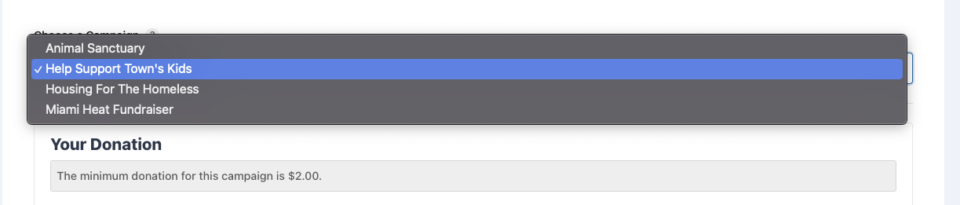
The Campaign Selector transforms your donation forms by adding an intelligent dropdown that lets donors seamlessly switch between active campaigns. When a donor selects a different campaign, the form dynamically updates via AJAX to show the appropriate donation amounts, form fields, and campaign-specific messaging.
Key Benefits
- Improved donor experience: No need to navigate between campaign pages.
- Higher conversion rates: Reduces friction in the donation process.
- Smart campaign management: Automatically excludes ended or fully-funded campaigns.
- Personalized experience: Remembers donor’s last campaign selection.
- Universal compatibility: Designed to work with all form types and payment gateways.
Requirements
- Charitable Pro: Version 1.8.12 or higher
- WordPress: Version 6.2 or higher
- PHP: Version 7.4 or higher
- Multiple active campaigns: At least 2 campaigns for the selector to appear
Enabling the Campaign Selector
- In Charitable Pro: Navigate to Charitable Settings → General → Donation Form in your WordPress admin
- Scroll to the Campaign Selector section
- Check Enable Campaign Selector to activate the feature
- Configure your preferences using the options below
- Click Save Changes
Configuration Options
Basic Settings
Dropdown Label
- Default: “Choose a Campaign”
- Purpose: Text displayed above the campaign selector dropdown
- Example: “Select the cause you’d like to support”
Tooltip Text
- Purpose: Helper text displayed when donors hover over the information icon
- Example: “Choose which campaign should receive your donation”
- Note: Leave blank to hide the tooltip icon
Display Control
Display Campaign Selector On
Choose where the campaign selector should appear:
- All Campaigns (Default): Shows selector on every campaign’s donation form
- Selected Campaigns Only: Limit display to specific campaigns
Selected Campaigns for Display
When “Selected Campaigns Only” is chosen: – Select which campaigns should show the campaign selector – Use Ctrl/Cmd+Click to select multiple campaigns – Only donors viewing these campaigns will see the selector
Note: Ambassador Campaigns
The Campaign Selector may not function as expected with Ambassador campaigns. Native Ambassador campaign support is on the roadmap for this feature.
Dropdown Content
Dropdown Source
Control which campaigns appear in the selector dropdown:
- All Active Campaigns (Default): Includes all eligible campaigns automatically
- Selected Campaigns Only: Manually choose which campaigns to include
Selected Campaigns for Dropdown
When “Selected Campaigns Only” is chosen: – Manually select campaigns to include in dropdown – Allows for curated campaign selection – Useful for featuring specific campaigns or causes
Organization Options
Group by Category
- Purpose: Organizes campaigns by their assigned categories in the dropdown
- Benefit: Helps donors navigate large numbers of campaigns
Exclude Campaign Types
Fine-tune which campaigns appear by excluding:
- Ended Campaigns: Campaigns past their end date
- Fully Funded Campaigns: Campaigns that have reached their goal
Memory & Persistence
Remember Campaign Selection
Control how the selector remembers donor preferences:
- Remember for 7 Days (Default): Stores selection in browser for one week
- Remember for This Session: Stores selection until browser/tab is closed
- Don’t Remember: Always shows default selection
Advanced Features
AJAX Form Loading
The Campaign Selector uses AJAX technology to provide seamless form switching:
- Instant Updates: Forms load without page refresh
- Loading Indicators: Visual feedback during form transitions
- Payment Gateway Compatibility: Automatically reinitializes Stripe, PayPal, and other gateways
- Form State Preservation: Maintains donor information when possible
Smart Campaign Filtering
The feature automatically filters campaigns based on intelligent criteria:
- Excludes P2P Campaigns: Ambassador and peer-to-peer campaigns are hidden
- Date-Based Filtering: Respects campaign start and end dates
- Goal-Based Filtering: Can exclude fully-funded campaigns
- Status Checks: Only includes published, active campaigns
Context-Aware Behavior
The selector adapts its behavior based on context:
- Campaign-Specific Pages: Respects the current campaign context
- Embedded Forms: Works seamlessly with shortcodes and widgets
- Modal Forms: Compatible with popup and overlay donation forms
- Multi-Step Forms: Maintains campaign selection throughout the process
Implementation Examples
Basic Implementation
The campaign selector automatically appears when:
1. Feature is enabled in settings
2. Multiple eligible campaigns exist
3. Current page/form meets display criteria
Customizing the Template
You can override the default template by copying /wp-content/plugins/charitable-pro/templates/donation-form/campaign-selector.php to your active theme’s /charitable/donation-form/ directory.
Useful Functions
// Check if campaign selector should display
if ( charitable_get_option( 'campaign_selector_enabled' ) ) {
    // Custom logic here
}

// Get campaigns that appear in selector
$campaigns = charitable_get_campaign_selector_campaigns();

// Check if current campaign/page should show selector
$should_display = charitable_campaign_selector_should_display( $campaign_id );
Troubleshooting
Campaign Selector Not Appearing
Possible Causes:
– Feature not enabled in settings
– Only one campaign available
– Current campaign excluded from display settings –
All campaigns ended or fully funded
Solutions:
1. Verify feature is enabled in settings.
2. Ensure at least 2 eligible campaigns exist
3. Check display settings for current campaign
4. Review campaign exclusion settings
AJAX Loading Issues
Symptoms:
– Forms don’t update when selecting campaigns
– JavaScript errors in browser console
– Loading indicator doesn’t disappear
Solutions:
1. Clear browser and plugin caches
2. Disable conflicting JavaScript plugins temporarily
3. Check for theme compatibility issues
4. Verify WordPress and plugin versions meet requirements
Payment Gateway Problems
Symptoms:
– Payment buttons don’t work after campaign switch
– Stripe/PayPal errors after form update
Solutions:
1. Ensure payment gateways are configured correctly
2. Check gateway compatibility with AJAX loading
3. Clear payment gateway caches
4. Switch to a non-modal donation form with the selector option off to see if the issue remains.
5. Contact support for gateway-specific issues
Performance Considerations
For sites with many campaigns:
– Consider using “Selected Campaigns Only” for dropdown source
– Enable category grouping for better organization
– Monitor page load times with large campaign lists
– Consider caching solutions for high-traffic sites
Developer Resources
Hooks and Filters
// Filter available campaigns for selector
add_filter( 'charitable_campaign_selector_campaigns', 'custom_filter_campaigns' );

// Modify selector display conditions
add_filter( 'charitable_campaign_selector_should_display', 'custom_display_logic', 10, 2 );

// Customize AJAX response data
add_filter( 'charitable_campaign_selector_ajax_response', 'custom_ajax_data' );
CSS Customization
Target these classes for custom styling:
/* Main container */
.charitable-campaign-selector {}

/* Dropdown styling */
.charitable-campaign-selector select {}

/* Loading state */
.charitable-campaign-selector.loading {}

/* Tooltip styling */
.charitable-campaign-selector-tooltip {}
For additional support with the Campaign Selector feature, please visit our support documentation or contact our team.




