

We’re excited to spotlight a small but game-changing update in Charitable: full integration with WordPress 6.9’s new Command Palette!
If you’re a keyboard warrior managing donations, campaigns, and reports, this lets you jump to Charitable screens in seconds—no mouse required. It’s built right into WordPress core, and Charitable Pro now adds our most-used actions for lightning-fast navigation.
Available today in the latest Charitable Pro 1.8.11.5+ (requires WordPress 6.9+).
Skip the Menu Navigation, Get Things Done Faster
How many times do you click through WordPress admin menus to create a new campaign or check your latest donations? With Command Palette integration, you can skip the menu and find what you need with keyboard shortcuts.
To open the Command Palette, press Cmd + K on Mac or Ctrl + K on Windows. Then type something like ‘pages’. You’ll see a list of options that you can choose from. Select the one you want and hit Enter to go straight there.
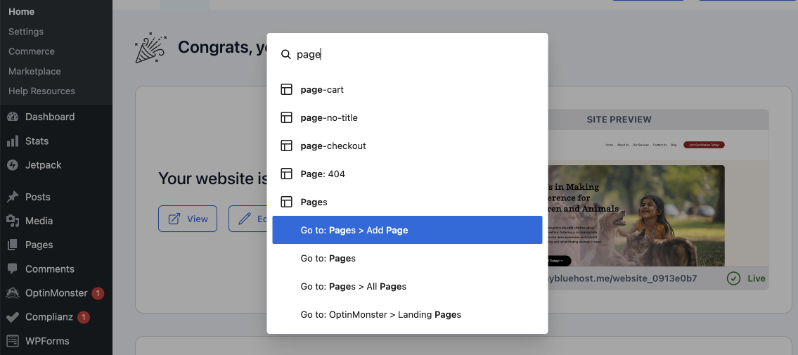
This makes it much faster and easier to navigate through your WordPress admin panel.
At Charitable, we’ve hopped on board, too!
We’ve integrated Charitable options into this Command Palette.
So now, instead of navigating to the menu with your mouse, you can hit Cmd + K on Mac or Ctrl + K on Windows.
Type ‘charitable’ and you’ll see options like ‘Create New Donation’ or your dashboard.
The best way to learn about this new feature is by watching it in action. I’ve made a video for you here:
See It In Action: New Charitable Options Available in the Command Palette
7 Essential Commands at Your Fingertips
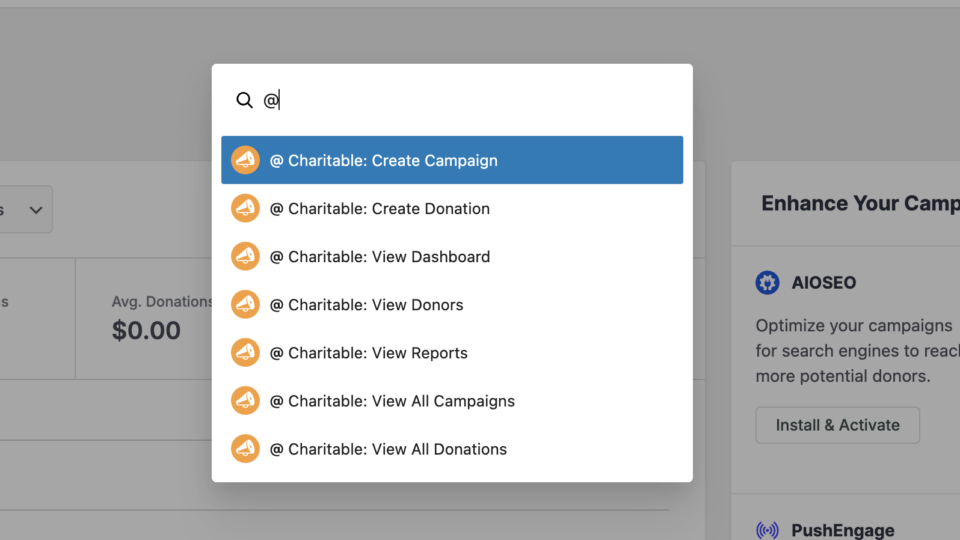
We’ve carefully selected the most frequently used Charitable admin functions and made them available through the Command Palette.
- Create Campaign – Jump straight to the campaign builder
- Create Donation – Add donations manually in seconds
- View Dashboard – Access your fundraising overview
- View Donors – Review donor information and history
- View Reports – Check your fundraising analytics
- View All Campaigns – Manage your campaign list
- View All Donations – Monitor donation activity
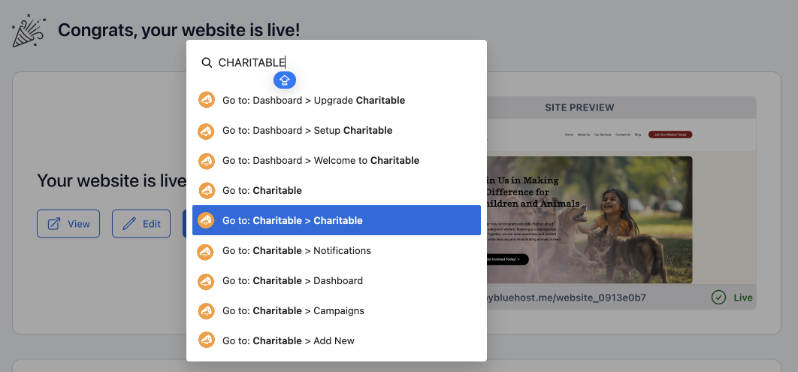
Here are a few tips for you.
- Fuzzy search works!: You don’t have to type in the perfect spelling needed. Type “Dontae” and you’ll see Charitable donation options.
- Universal access: Works from any WordPress screen, not just Charitable.
- No mouse needed: Use the down arrow to select, hit Enter. That’s it.
- Quick Charitable access: Cmd/Ctrl+K then @ (Shift+2) shows our commands instantly
Built for Your Team’s Workflow
Different team members need different access levels. Command Palette integration respects your existing WordPress permissions, so staff members only see the commands they’re authorized to use.
- Volunteer coordinators can create campaigns but not access reports
- Finance team members get full access to donations and reporting
- Administrators see every available command
Want More Awesome Features Like This?
For even more powerful tools to boost your fundraising, consider updating to Charitable Pro. You’ll get access to features like:
- Customizable Forms
- Templates + Visual Builder
- Donation Management
- Readymade Reports
- PDF Receipts
- Custom Emails
- Donor Dashboard
- Comments & Leaderboards
- Recurring Donations
- Fee Relief
- Email Integrations
- Peer-to-Peer & Crowdfunding
…and so much more! Ready to give Charitable Pro a try?
Sign up today and get up to 50% off on your plan. We’re confident you’ll love raising funds with Charitable. If for any reason Charitable is not the right fit for you, we’ll refund your purchase with our 14-day money back guarantee
Charitable Has 1+ Million Downloads!
Trusted by millions to power successful fundraising campaigns. Try Charitable risk-free today.
✅ 14-day money-back guarantee
✅ Transparent pricing
✅ Code-free setup
Stay Connected for More Nonprofit Resources
For more tutorials and videos tailored to nonprofits, subscribe to our YouTube channel. We regularly publish expert tips, step-by-step guides on migrations like this GiveWP to Charitable switch, fundraising strategies, and practical resources to help your organization succeed.
🗞️ Get weekly tips and exclusive guides in your inbox
Join our newsletter →
🎥 Watch step-by-step tutorials and success stories
Subscribe to our YouTube channel →
👩🏽💻 Connect with our community and get daily nonprofit insights
Follow us on LinkedIn →
🥳 Fun reels and non-profit insights
Follow us on Instagram →
👀 Insightful & fun videos to help you grow your cause
Follow us on TikTok→
🌎 Subscribe and follow for general fundraiser tips
Get Fundraiser Tips on TikTok →
We’d Love to Hear From You!
The security tools in Charitable Pro 1.8.11 are part of our commitment to democratizing fundraising technology. Our goal is simple: we want you to focus on your mission, not on cleaning up spam donations.
How are these new features working for you? We are dedicated to evolving Charitable based on your real-world needs. Whether you have feedback on the new Command Palette integration or ideas for what we should tackle next, please reach out. Your input directly shapes our roadmap for 2026.







Leave a Reply