
We’re excited to introduce a brand new Donor Dashboard designed to transform how your supporters interact with your organization. Built from the ground up in Charitable Pro, this powerful self-service portal gives your donors complete control over their giving journey.
We’ve created a secure, personalized space where donors can manage their information, view their impact, and access important documents. Whether you’re running a small nonprofit or a large charitable organization, the Donor Dashboard adapts to your needs while maintaining simplicity and ease of use.
The new Donor Dashboard is available in all Charitable Pro plans. Learn more about Charitable Pro here »
What’s New?
We’ve been working hard to create a better experience for your donors. The new Donor Dashboard gives them a dedicated space to manage their giving journey and stay connected with your cause.
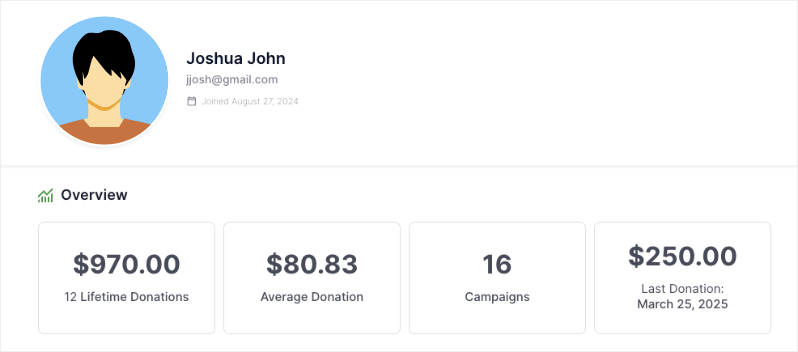
Every time a donor logs in, they’ll have access to their personalized dashboard that shows their impact, donation history, and profile information like this:
Here are a few highlights of the new Donor Dashboard:
- 📊 Impact Overview: Donors can see their lifetime contributions, average donations, and number of supported campaigns at a glance.
- 🧾 Self-Service Records: Download donation receipts, access annual reports, and view complete giving history anytime.
- 👤 Profile Management: Update contact information, manage multiple addresses, and customize communication preferences easily.
- 💳 Donation Control: View all donations, manage recurring contributions, and track campaign support in one place.
- 🔐 Secure Access: Private, password-protected portal for each donor to manage their giving journey.
- 📱 Mobile-Friendly: Access the dashboard from any device with a responsive, user-friendly design.
All these features work together to create an engaging donor experience while reducing administrative work for your team.
A Better Experience for Your Donors
The new dashboard includes five powerful tabs designed to give donors complete control over their giving journey:
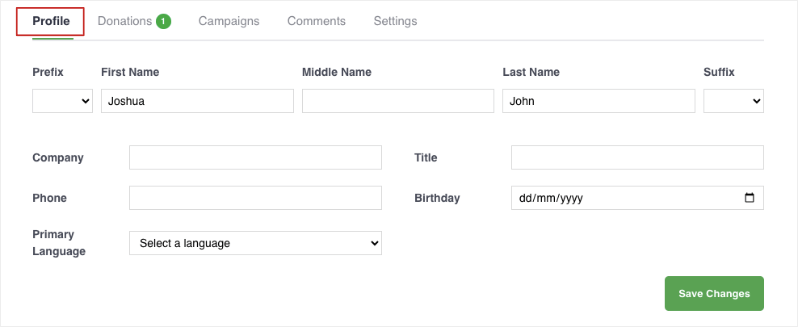
Profile Donors: can easily update their contact info, addresses, and communication preferences in one place.
Donations: Complete donation history with downloadable receipts and recurring donation management.
Campaigns: Track supported campaigns and monitor fundraising progress.
Comments: View comments they’ve made on campaigns along with the comment status.
Powerful Controls for Administrators
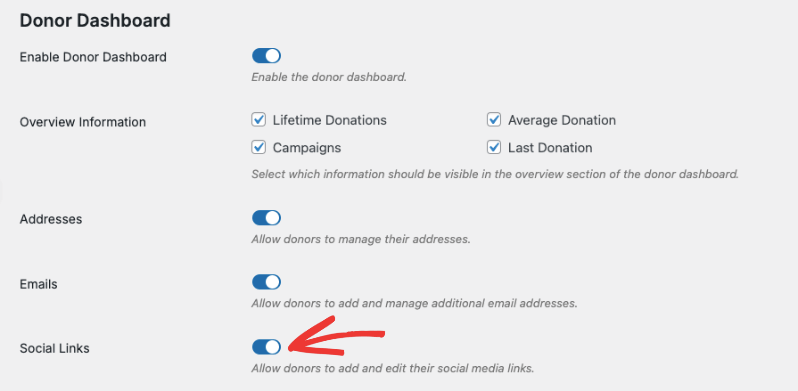
As an administrator, you get complete control over the dashboard experience. You can enable the dashboard with just a single click:
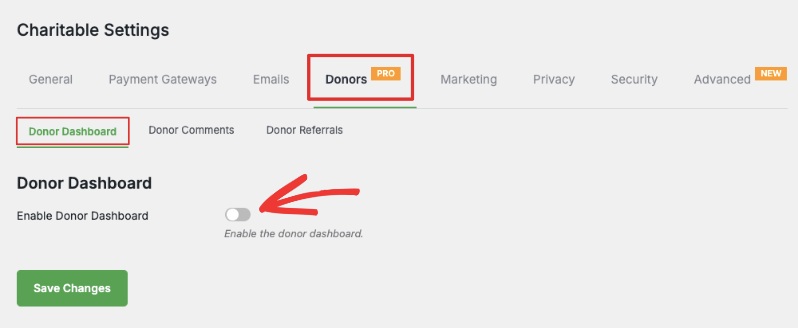
Then you can customize fields, enable features, and choose what information appears – all without touching any code. You can simply turn fields on and off by clicking the toggle button.
How to Get Started
The Donor Dashboard is available now in all Charitable Pro plans. Here’s how to activate it:
- Update to the latest version of Charitable Pro
- Go to Charitable » Settings » Donor Dashboard
- Enable the dashboard with one click
- Customize your settings
Follow the step by step instructions here: How to Use the Donor Dashboard »
Who Needs the Donor Dashboard?
The Donor Dashboard is perfect for:
- Nonprofits looking to provide a better donor experience
- Organizations that want to reduce administrative work
- Charities seeking to increase donor retention
- Fundraisers who want to give donors more control over their giving
- Any organization using Charitable Pro for fundraising
How To Get Started
The Donor Dashboard is included with Charitable Pro. Here’s how to get started:
For Existing Charitable Pro Customers:
- Download the latest version from your account’s Downloads page
- Update your plugin in WordPress
- Visit Charitable » Settings » Donors » Donor Dashboard to configure your settings
For New Customers:
- Visit our plans page to choose the right Charitable Pro package
- Install and activate the plugin
- Enter your license key to unlock all features
- Configure your Donor Dashboard settings
Need help getting started? Check out our complete guide to setting up the Donor Dashboard »







Leave a Reply