

Charitable Blog

Everything you need to know about Charitable and our team.

Introducing Updated Dashboard And New Reporting Features

Introducing Updated Dashboard And New Reporting Features!

Last updated on

  • By

We are proud to release and updated dashboard and a new “reports” tab with Charitable v1.8.1!

Get A Better Idea Of How Your Campaigns And Donations Are Doing

One of the most requested features recently has been for Charitable users to be able to get a better understanding of how their various campaigns are doing, quickly and easily. Charitable 1.8.1 has introducing two features that is aimed to help users with this: (1) an improved admin dashboard and (2) a reports with various reports for both Lite and Pro users.

New Dashboard!
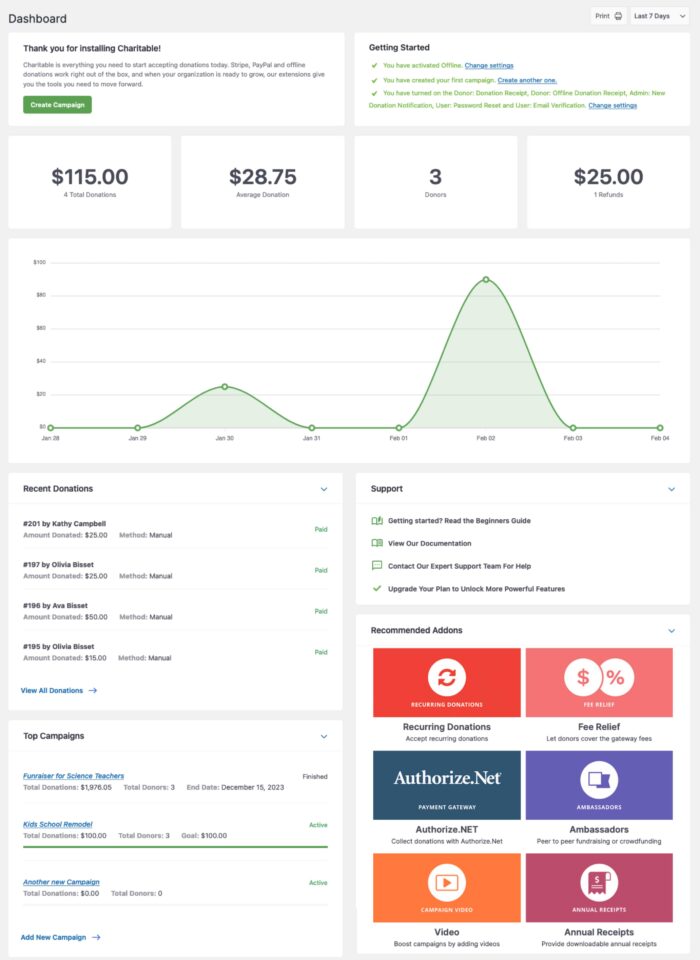
New Dashboard
In Charitable 181 a new dashboard gives you a way to better understand your campaigns and donations at a glance

Charitable has replaced it’s “welcome” dashboard with a screen that allows you at a glance to see various helpful things:

Here’s some of the common blocks you’ll have available to you:

Quick Top Overview – See how much money your donations have brought in, the average amount of the donation, the number of donors, and the amount of refunds within the time frame. The default time frame is 7 days but you can adjust this view to 14 or 30 days.

Interactive Graph – See visually how many donations you got represented in an easy to view timeline.

Recent Donations – View recent donations and a brief summary on each one (the campaign, method, and amount).

Top Campaigns – Keep an eye on your most active campaigns with total donations, total donors, and the overall progress.

You also have the ability to print the dashboard area (also allowing many browsers to print/download to PDF). Last but not least we have provided helpful support and documentation links here on this dashboard and will update these sections as new versions of Charitable roll out.

New Reporting Section!
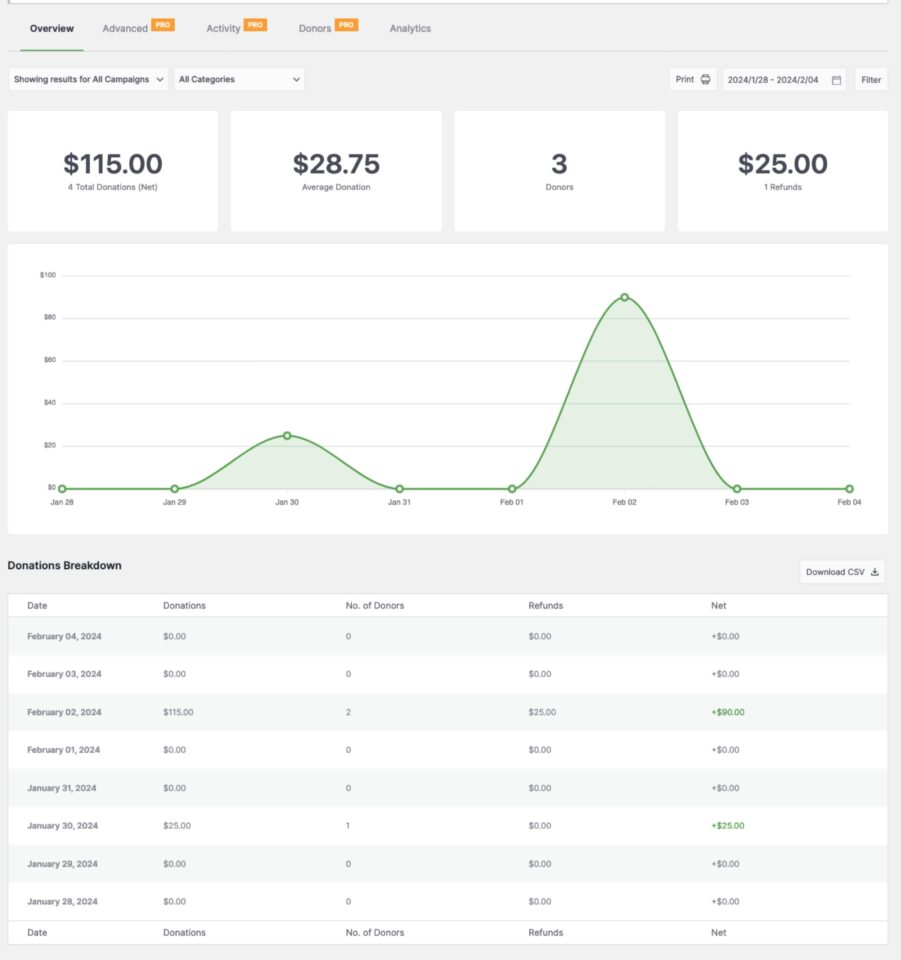
New Reporting Section (Overview)
In Charitable 181 the reporting overview section includes a donation breakdown to give you a better idea of how overall your campaigns are doing on a daily basis

One of the most popular requests has been improved reporting and the creation of the reporting tab in Charitable 1.8.1 is a response to your feedback and we can’t wait to continue to improve this for you!

An overview page offers some features of the new dashboard but goes further offering:

Donations Breakdown – See day by day your total donations and refunds and the ability to download a CSV file.

Activity – A new concept for Charitable is keeping track of actions that you and donors are doing throughout the campaigns. In 1.8.1 you can see various actions related to donations and campaigns (look for more activities coming in future updates).

Top Donors – See the top donors for the time period in the report. This allows you to potentially reach out to these donors to thank them or further communicate.

Payment Methods – Get an idea of what your most popular payment methods, including manual or offline donations.

Expanded Features for Pro Users

Along with this update, Charitable has introduced additional reporting for Pro users.

Advanced – This section overs reports that give more detail and deeper insights into your campaigns. The initial offering in this section is the “LYBUNT and SYBUNT” report. LYBUNT stands for Last Year But Unfortunately Not This Year, meaning the donor supported your organization during the last fiscal year but did not return to donate again this year. SYBUNT stands for Some Year But Unfortunately Not This Year. These reports are popular among nonprofits looking to nurture the donors they have.

Activity – This page gives you a “heads up” timeline in chronological order of what is happening on your site, allowing you to quickly see if a particular campaign is suddenly receiving donations or is getting popular – allowing you to act accordingly.. Watch this tab to see more activities being shown from our addons and third party plugins in the future!

Donors – Charitable offers three simple but important reports for Pro users in this section: Top Donors, First Time Donors, and Recurring Donors.
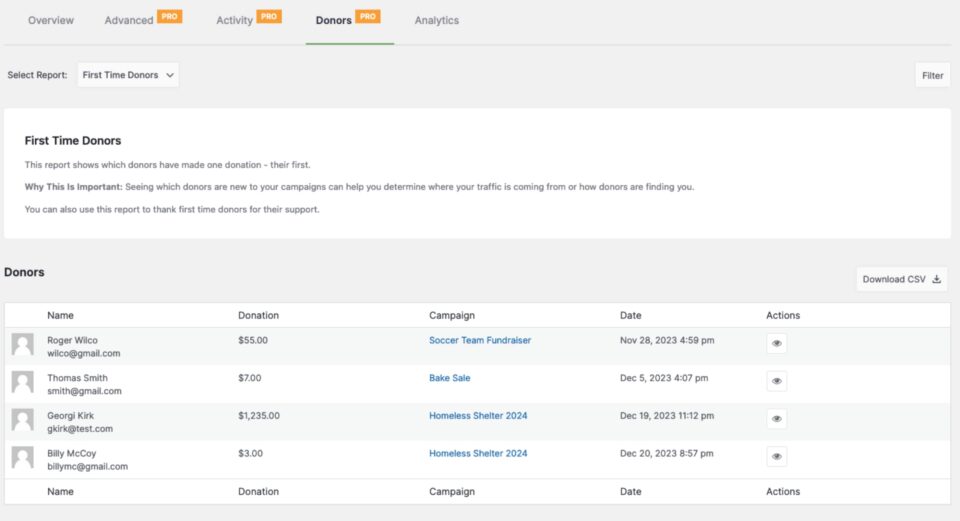
First Time Donors Report
The First Time Donor report is available for Pro users and allows you to easily see which donors are new to your campaigns You can use this to help you determine where your traffic is coming from or thank first time donors for their support

More Enhancements Coming Soon!

We are already working on updating several of our most popular addons to hook into these screens. We are looking forward to bringing new reports and features to addons like Recurring Donations, Ambassadors, and Simple Updates. We appreciate your patience as we get these completed and let us know if there’s an addon or third party plugin you would like included into the dashboard or a report.

Give it a try!

We invite you to give the dashboard and reporting tools a try. Let us know what you think and what you feel we could add in terms of new reports and new integrations. We understand so many people use Charitable differently that we want to see more feedback from real world users. We will be making adjustments and making updates to it to make these new items in 1.8.1 better and more useful. You can always reach out to us for feedback and questions.

author avatar
David Bisset Project Manager
David is the project manager of Charitable since 2022. David works with several non-profits (one operated by his wife) along with managing and developing features, support, and marketing for Charitable. Has been with WordPress since 2006 and has been lead organizer of multiple conferences, events, and meetups.

Disclosure: Our content is reader-supported. This means if you click on some of our links, then we may earn a commission. We only recommend products that we believe will add value to our readers.

Get free tips and resources right in your inbox, along with 60,000+ others

Join our Newsletter

We won’t spam you. We only send an email when we think it will genuinely help you. Unsubscribe at any time!

Featured Video:

Watch more videos on our YouTube channel.

What's New In Charitable

🔔 Subscribe to get our latest updates
📧 Subscribe to Emails

Email Subscription

Join our Newsletter

We won’t spam you. We only send an email when we think it will genuinely help you. Unsubscribe at any time!

Integration New

Add Image Galleries to Fundraising Campaigns With Envira Gallery

Showcase the impact of your mission like never before. We are excited to announce our brand-new integration with Envira Gallery, the best WordPress gallery plugin, designed to help you tell your story through powerful, high-performance visuals.

The Ultimate Storytelling Experience

A picture is worth a thousand words – and now, it’s worth even more for your fundraising. Connect your visual impact directly to your cause by creating stunning, responsive galleries that engage donors and drive contributions.

🖼️ Visual Impact: Easily create beautiful, fast-loading galleries to show your nonprofit’s work in action, from field reports to event highlights.

🔗 Seamless Connection: Link gallery images directly to your fundraising campaigns, making it effortless for inspired visitors to go from viewing a photo to making a donation.

📱 Perfectly Responsive: Whether your donors are on a phone, tablet, or desktop, your galleries will look professional and load lightning-fast, ensuring a smooth experience on every device.

author avatar
David Bisset Project Manager
David is the project manager of Charitable since 2022. David works with several non-profits (one operated by his wife) along with managing and developing features, support, and marketing for Charitable. Has been with WordPress since 2006 and has been lead organizer of multiple conferences, events, and meetups.
Integration New

👉🏻 New Divi Integration In Charitable Pro

Bring the power of Charitable directly into your favorite page builder and maintain total creative control with our brand-new Divi integration.

The Ultimate Design Experience

No more switching back and forth or relying on complex shortcodes. Use dedicated Divi modules to build, style, and launch high-converting donation pages without ever leaving the Divi Builder.

⚡ Native Divi Modules: Effortlessly drag and drop your donation forms, progress bars, and campaign details exactly where you want them.

⚙️ Visual Customization: Tweak colors, fonts, and spacing using Divi’s familiar design settings to ensure your fundraiser matches your brand perfectly.

🚀 Live Visual Editing: See your changes in real-time. What you see in the builder is exactly what your donors will see, ensuring a seamless giving experience every time.

author avatar
David Bisset Project Manager
David is the project manager of Charitable since 2022. David works with several non-profits (one operated by his wife) along with managing and developing features, support, and marketing for Charitable. Has been with WordPress since 2006 and has been lead organizer of multiple conferences, events, and meetups.
donation form New

👉🏻 New Campaign Selector For Donation Forms

Take your campaign management to the next level. Find the perfect fundraiser for any page and stay in your creative flow with our new Campaign Selector integration.

The Ultimate Selection Tool

No more hunting for IDs or creating one page for every donation form. Use the new Campaign Selector to allow users to switch to a campaign with no code.

⚡ Instant Search: Quickly find any campaign leaving your page or post.

⚙️ Editor Agnostic: Whether you’re using the Block Editor, Elementor, or WPBakery, selecting your campaigns is now a unified experience.

🚀 Real-Time Previews: See exactly which campaign you’ve selected instantly, ensuring your donors always see the right cause.

author avatar
David Bisset Project Manager
David is the project manager of Charitable since 2022. David works with several non-profits (one operated by his wife) along with managing and developing features, support, and marketing for Charitable. Has been with WordPress since 2006 and has been lead organizer of multiple conferences, events, and meetups.
Integration New

WordPress Command Palette Integration

Take your fundraising workflow to the next level. Speed up your site management and stay in your creative flow with our new WordPress Command Palette integration.

Supercharge Your Workflow
Navigate your fundraising dashboard faster than ever.

The Ultimate Keyboard Shortcut Hit Cmd + K (or Ctrl + K) to launch the Command Palette and manage your campaigns instantly.

⚡ Instant Navigation: Jump directly to your Campaigns, Donations, or Settings from anywhere in the editor.

➕ Quick Create: Start a new fundraising campaign or add a manual donation with a single command.

Efficiency Redefined
The tools you need, exactly when you need them.

⚙️ Contextual Actions: See relevant Charitable commands based on whether you’re editing a page or viewing your reports.

🚀 Seamless Integration: Built directly into the WordPress core experience for a lightweight, native feel.

author avatar
David Bisset Project Manager
David is the project manager of Charitable since 2022. David works with several non-profits (one operated by his wife) along with managing and developing features, support, and marketing for Charitable. Has been with WordPress since 2006 and has been lead organizer of multiple conferences, events, and meetups.
Improvement New Security

📣 New Security Features

We’ve introduced a suite of new security tools to give you total control over who accesses your forms, plus a new way to tidy up your database.

Advanced Security Suite

Layered protection: Cloudflare, ReCAPTCHA, IP Controls, and Rate Limiting.

We have overhauled our security settings to stop bots without blocking real donors.

  • 🤖 Flexible Protection: Choose between Google reCAPTCHA v3 or the privacy-first Cloudflare Turnstile to block bots invisible.

  • 🚦 Rate limiting: Stop spam floods by limiting how many submissions an IP address can make in a set timeframe.

  • 🛑 Total control: Use the new IP Blacklist to block bad actors instantly, or the IP Whitelist to let your team bypass checks during testing.

The Clean Donation Tool

Go from “Testing” to “Live” in seconds.

Finished setting up your site and need to get rid of all those test transactions?

  • 🧹 Sweep it clean: Bulk delete test donations and donor records with a single click.

  • 📉 Accurate reporting: Ensure your revenue stats are 100% accurate for launch day.

  • ⚙️ Reset sequences: Automatically resets sequential invoice numbering.

author avatar
David Bisset Project Manager
David is the project manager of Charitable since 2022. David works with several non-profits (one operated by his wife) along with managing and developing features, support, and marketing for Charitable. Has been with WordPress since 2006 and has been lead organizer of multiple conferences, events, and meetups.



