

Charitable Blog

Everything you need to know about Charitable and our team.

Presenting The New WPCharitable Campaign Visual Builder

Presenting The New WPCharitable Campaign Visual Builder!

Last updated on

  • By

Welcome to a new era of effortless and captivating fundraising with Charitable v1.8.0!

Creating campaign pages has never been this fast or easy!

Our team is thrilled to introduce an innovative feature that will revolutionize the way you craft and showcase your campaigns. At Charitable, we understand the heart and soul of any successful fundraising lies in its presentation, and with this new tool, we’re putting the power of creativity and customization directly into your hands. Add text, photos, donation buttons, a bio, progress bar and more to customize each of your campaigns uniquely for maximum effectiveness.

Drag and Drop Blocks

Charitable offers default blocks in the core plugin – from high recommended blocks we feel everyone should probably have on a campaign page… to some great standard ones to take advantage of. Our pro fields – some included in our adds with our paid plans – offer even greater potential and creativity.

Here’s some of the common blocks you’ll have available to you:
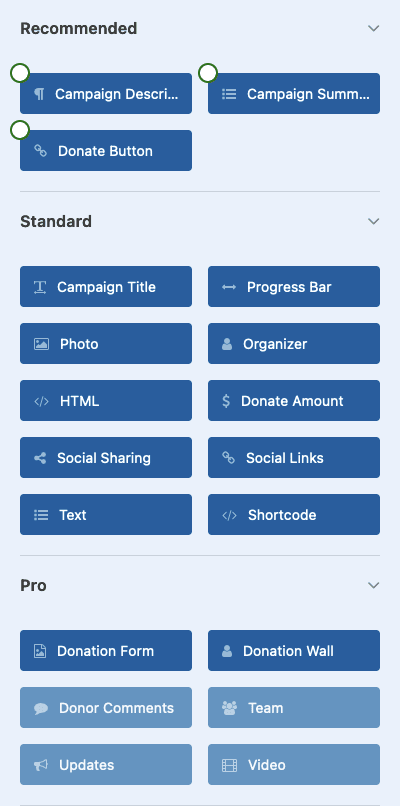
Campaign Title – Show the campaign title (perhaps in a header area if your theme doesn’t show the campaign title on the page) in your campaign. Automatically changes if you update the title anywhere in Charitable.

Campaign Description – Update your campaign description using this block. We’ve combined all description fields into one easy to use and understand area, and you can use this to go into some detail about the campaign. Place it in a tab or up front and visible at the top of the page.

Donate Button – Add a donate button with any custom label.

Progress Bar – Add a progress bar that can also show how much has been donated and what your campaign goal is (if applicable).

Photo – Upload and/or add a photo easily through the WordPress Media library.

Organizer – Add a campaign organizer (author) with their name, title, picture, and a customizable description.

HTML – Add an area of customizable HTML.

Donate Amount – Add ability for a user to select a default or custom donation amount before they donate.

Social Sharing – Add social sharing links (Twitter, Facebook, etc.) right on your campaign page.

Social Links – Link to other social networks (like maybe your company’s or campaign’s Twitter, Instagram, LinkedIn, TikTok, or Mastodon account).

Text – Add generic text (with a headline) for when you want to add statements, testimonials or other kinds of text on your page.

Campaign Summary – Shows current contribution totals to your campaign.

Shortcode – Insert a shortcode into your campaign page.

Donation Form – Insert the entire form into your campaign page.

Donation Wall – Add a donation wall (similar to our donation wall shortcode) into your campaign page.

Other addons: We are adding compatibly from other Charitable addons into the builder. For example, the Video Addon when activated can currently add a video block which gives you the ability to add a video easily anywhere in your campaign page. With each Charitable update we hope to keep adding and tweaking the addons to make adding functionality and abilities as quick and easy as possible.

Start From Scratch From Simple Layouts…
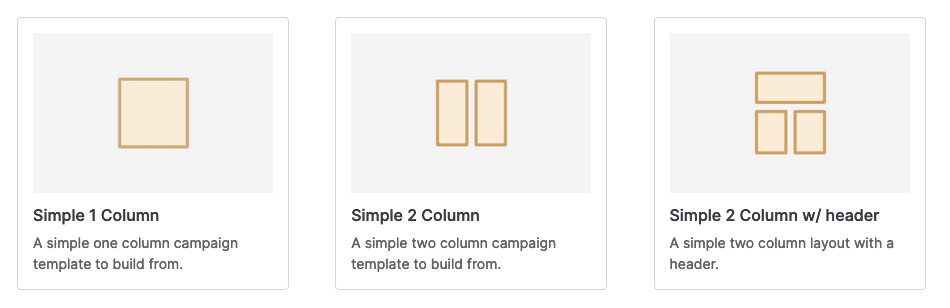
You can build a simple custom campaign page in a few minutes!

Building and customizing a simple campaign page in minutes.

Building a custom campaign page is now faster because we take care of the overall layout and block for you. Just select a simple template and start picking what blocks you’ll want on your page… and then drag and drop them over. Customize headlines, colors, alignment, and even add a custom CSS class where you need it. We have made it so creating a campaign page from scratch is easy but not overwhelming.

Creating and publishing a custom campaign page can happen in 5 minutes or less!

…or choose from an existing template for your campaign.
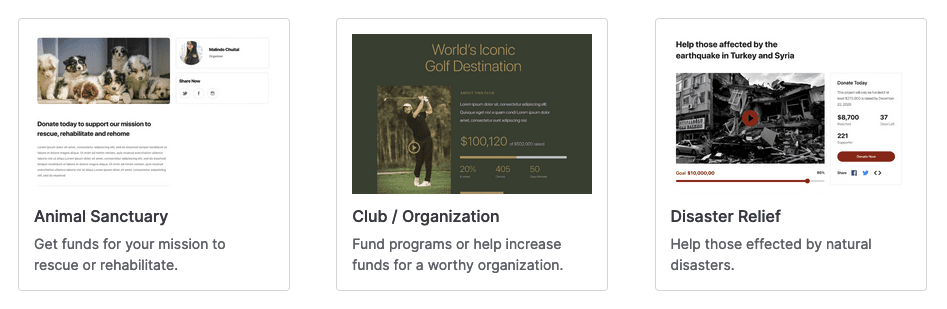
You could have a quality campaign page up in about 60 seconds!

Using an existing template to quickly create a professional campaign.

On the other hand, if you want to have a professional look from the start – you can choose from a pre-made template and literally have a polished campaign page up in about 60 seconds! Charitable v1.8.0 comes with nine templates for various types of campaigns, but you can edit these to match what your needs.

Expanded Features for Enhanced Efficiency

Along with this update, Charitable has provided some useful tools and options to give you the control you want from your campaigns after they are created. We have provided easier methods to embed a single campaign into your site (via shortcode or with the new embed wizard). You can also now change the publish status quicker and easier as well – with more enhancements coming in future updates.

Give it a try!

We invite you to give the campaign builder a try for new campaigns (for existing campaigns we have our legacy campaign builder so you can continue to edit and maintain your current campaigns quickly just like before).

Let us know what you think and what you feel we could add in terms of templates and new integrations. This is a new feature for admins creating new campaigns at this time (Ambassadors creating campaigns on the front-end will be as they have always been). We will be making updates to it to make it better. You can always reach out to us for feedback and questions.

You can download the zip file on WordPress.org.

author avatar
David Bisset Project Manager
David is the project manager of Charitable since 2022. David works with several non-profits (one operated by his wife) along with managing and developing features, support, and marketing for Charitable. Has been with WordPress since 2006 and has been lead organizer of multiple conferences, events, and meetups.

Disclosure: Our content is reader-supported. This means if you click on some of our links, then we may earn a commission. We only recommend products that we believe will add value to our readers.

Leave a Reply

Your email address will not be published. Required fields are marked *

Get free tips and resources right in your inbox, along with 60,000+ others

Join our Newsletter

We won’t spam you. We only send an email when we think it will genuinely help you. Unsubscribe at any time!

Featured Video:

Watch more videos on our YouTube channel.

What's New In Charitable

View The Latest Updates
🔔 Subscribe to get our latest updates
📧 Subscribe to Emails

Email Subscription

Join our Newsletter

We won’t spam you. We only send an email when we think it will genuinely help you. Unsubscribe at any time!

Donations Improvement

📊 Your Pro Dashboard Can Now Compare, Export, and Score!

Most fundraising dashboards only tell you how much you have raised. Charitable Pro 1.8.19 rebuilds the dashboard and the Reports Overview around the harder questions: whether anything is broken, whether this period beat the last one, and which single change would make the most difference today. Why this is important:

  • 📈 Every figure has a trend: Pick a period and the tiles and the chart move together, with each total shown against the previous period.
  • 🗓️ Charts that stay readable: Short ranges group donations day by day, while longer ranges group by week or month, so a full year reads as a curve instead of a flat line.
  • 🔀 Compare any 2 periods: Not just consecutive ones, so you can ask how this December did against last December. That matters because fundraising is seasonal.
  • 📤 Export the whole summary: Send the full overview out as CSV or PDF, ready for a board pack or a funder report.
  • 🎯 Score your setup for free: Have your fundraising setup scored, so the one change worth making next is the one you can see.

Check out our announcement here.

author avatar
David Bisset Project Manager
David is the project manager of Charitable since 2022. David works with several non-profits (one operated by his wife) along with managing and developing features, support, and marketing for Charitable. Has been with WordPress since 2006 and has been lead organizer of multiple conferences, events, and meetups.
Feature New

🎟️ Introducing Charitable Events: Sell Tickets Inside Your Campaigns!

Most nonprofits sell event tickets in one tool and collect donations in another, which leaves two sets of reports and a manual match at the end of the year. Charitable Events brings both together, selling tickets through the same donation forms and payment gateways you already run in Charitable. Why this is important:

  • 🎟️ Every ticket is a donation: Ticket sales run through the gateway you already use and count toward the campaign goal, with everything managed under Charitable » Events.
  • 📱 QR check-in from any phone: Each attendee gets their own QR code on the receipt, and volunteers scan at the door through a check-in link that needs no WordPress account.
  • 🧾 Receipts ready for tax time: Give each ticket type a fair market value, and Charitable puts the correct tax-deductible amount on every donor receipt.
  • 📋 Attendee details at checkout: Ask every guest for a meal choice, shirt size, or access needs, with a separate attendee record created for each ticket.
  • 🗓️ Blocks and calendars included: Three editor blocks plus Sugar Calendar and The Events Calendar support put your events where supporters already look.

Check out our announcement here.

author avatar
David Bisset Project Manager
David is the project manager of Charitable since 2022. David works with several non-profits (one operated by his wife) along with managing and developing features, support, and marketing for Charitable. Has been with WordPress since 2006 and has been lead organizer of multiple conferences, events, and meetups.
ai New

🚀 Unleash AI Power in Charitable!

Your AI assistant can now build, edit, and manage your Charitable fundraising campaigns directly — just by asking. With Charitable Pro adding write support for the WordPress Abilities API, tools like ChatGPT, Claude, and Cursor can handle full administrative actions safely through MCP. Why this is important:

  • 🤖 Campaign creation in plain language: Prompt your assistant with a goal like “Set up a fundraiser for the shelter with a $5,000 goal”, and it builds a real draft campaign complete with suggested donation tiers.
  • 🎨 Instant donation form tweaks: Add custom fields, change button colors, or reorder elements without diving into form settings.
  • 📝 Offline gift logging: Tell your assistant about cash or check gifts, and it will match donor emails and record transactions into your history.
  • 🛡️ Safety and control by default: Write access stays strictly off until turned on in Charitable » Tools » AI MCP, keeping read-only reporting safe by default.
  • 📜 Full audit logging: Every change made by an AI assistant is tracked under Charitable » Tools » Logs, so you always know who (or what) updated your site.

Check out our announcement here.

author avatar
David Bisset Project Manager
David is the project manager of Charitable since 2022. David works with several non-profits (one operated by his wife) along with managing and developing features, support, and marketing for Charitable. Has been with WordPress since 2006 and has been lead organizer of multiple conferences, events, and meetups.
Improvement Payments

💰 Accept Recurring Donations with Windcave and Charitable

A donor sets their gift up once on Windcave’s secure payment page, and Charitable bills every renewal after that on schedule. Why this is important:

🏦 Organizations banked in New Zealand or Australia: monthly giving on the gateway your bank already set you up with, with no second processor to onboard.
⛪ Churches taking regular tithes and offerings: congregants set their own schedule once, which is the simplest way to launch recurring church giving without a separate platform.
🌏 Groups with donors in several currencies: Windcave handles more than 20, so a supporter can give in the currency they actually hold.
📅 Operating funds rather than one-time campaigns: switch on Recurring Only mode and the one-off option disappears, so every gift to that campaign is a subscription.
🧾 Teams with no developer on staff: 3 sets of credentials pasted into a settings page, and no code anywhere.

Check out our announcement here.

author avatar
David Bisset Project Manager
David is the project manager of Charitable since 2022. David works with several non-profits (one operated by his wife) along with managing and developing features, support, and marketing for Charitable. Has been with WordPress since 2006 and has been lead organizer of multiple conferences, events, and meetups.
automation update

⚡ Visual Automation Builder: Drag and Drop With No Code!

Charitable Automation Connect 2.3.0 introduces the Visual Automation Builder, a full-screen canvas that lays each automation out as a flow of connected cards: a trigger, optional conditions, and a list of actions that run in order.

🧩 Many actions, one trigger: Tag a donor, send an email, add a note, and fire a webhook from a single event, dragged into any order.

✉️ Act inside Charitable: New Send Email, Tag Donor, and Add Donor Note actions run with no external service required.

🔤 Merge tags: Personalize emails and notes with live fields like {first_name}, {total}, and {campaign_name}.

🔁 Apply to existing donors: Run Tag Donor and Add Donor Note against the donors you already have.

🖥️ Canvas or Simple: Switch views anytime, and automations built before 2.3.0 keep working unchanged.

Read more here.

author avatar
David Bisset Project Manager
David is the project manager of Charitable since 2022. David works with several non-profits (one operated by his wife) along with managing and developing features, support, and marketing for Charitable. Has been with WordPress since 2006 and has been lead organizer of multiple conferences, events, and meetups.





