
Charitable Blog

Everything you need to know about Charitable and our team.

Newsletter Connect 2.0: User Privacy, Field Mapping & ActiveCampaign

Last updated on

  • By

Charitable Newsletter Connect 2.0 is out today, with a host of improvements. Besides featuring a deep integration with Charitable’s Contact Consent feature, the update also adds a powerful new field mapping tool and support for ActiveCampaign.

Powerful Field Mapping

In MailChimp, they’re called merge fields. In MailerLite, they’re referred to as subscriber fields. In Campaign Monitor and other providers, they’re referred to as custom fields.

No matter what they’re called, the concept is the same: they’re fields in your email marketing provider that can be used to store additional information about your donors.

All the email marketing providers that Charitable supports allow you to create your own custom fields, but until now there has never been an easy way to populate these fields based on the information someone provides when they donate.
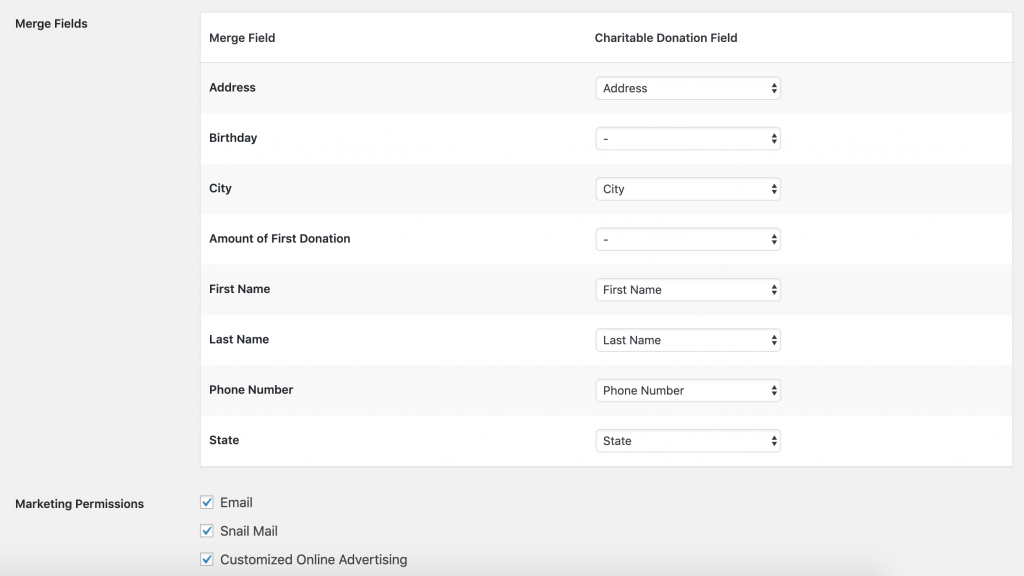
Map your MailChimp merge fields to Charitable donation fields

Newsletter Connect 2.0 changes that, adding a simple, intuitive way for you to map your Charitable donation fields to your newsletter provider’s custom fields. It’s an incredibly powerful feature that opens up new opportunities for segmenting your newsletter list based on the information you’re collecting in your donation forms.

If you have added fields to your donation form using the Donation Fields API, you’ll be glad to know that these can also be easily connected.

Integration with Contact Consent

Last year we introduced Charitable’s Contact Consent feature, which allows donors to opt-in to receiving your organization’s ongoing marketing. With today’s update, Contact Consent is now deeply integrated with Newsletter Connect. That means that when your donor gives their contact consent, they are automatically added to the mailing list you have connected.

Of course, if donors later decide to opt out of contact consent via their profile, Newsletter Connect makes sure that when they do this they are also unsubscribed from any mailing lists they are subscribed to.

ActiveCampaign

Last but not least, we included support for ActiveCampaign, a popular email marketing and automation platform.

That brings our total number of supported providers to seven:

  • ActiveCampaign
  • Campaign Monitor
  • MailChimp
  • MailerLite
  • MailPoet 2
  • MailPoet 3
  • Mailster

We’re always on the lookout for more great newsletter providers to support, so if yours isn’t on the list, be sure to get in touch.

Changelog

  • Integrate newsletter signup with the Contact Consent feature built into Charitable. Newsletter Connect leverages this field and makes it more powerful, automatically adding donors who agree to be contacted to your mailing lists.
  • User Privacy: Added tools for exporting and erasing personal data. These are built on top of WordPress’ core user privacy tools.
  • MailChimp: Added list-specific settings for marketing permissions and merge fields. You can now specify how donation fields in Charitable should map to MailChimp’s merge fields.
  • MailChimp: Fixed a bug preventing all lists from being displayed if you have more than ten lists.
  • Campaign Monitor: Specify how donation fields in Charitable should map to Campaign Monitor’s custom fields.
  • Campaign Monitor: Added support for Campaign Monitor’s “Consent to Track” field.
  • MailerLite: Specify how donation fields in Charitable should map to MailerLite’s subscriber fields.
  • MailPoet 3: Specify how donation fields in Charitable should map to MailPoet’s custom fields.
  • Mailster: Specify how donation fields in Charitable should map to Mailster’s custom fields.
  • ActiveCampaign: Support added!
  • Removed unused Charitable_Newsletter_Connect_Campaign class.
author avatar
Eric Daams

Disclosure: Our content is reader-supported. This means if you click on some of our links, then we may earn a commission. We only recommend products that we believe will add value to our readers.

Leave a Reply

Your email address will not be published. Required fields are marked *

Get free tips and resources right in your inbox, along with 60,000+ others

Join our Newsletter

We won’t spam you. We only send an email when we think it will genuinely help you. Unsubscribe at any time!

Featured Video:

Watch more videos on our YouTube channel.

What's New In Charitable

🔔 Subscribe to get our latest updates
📧 Subscribe to Emails

Email Subscription

Join our Newsletter

We won’t spam you. We only send an email when we think it will genuinely help you. Unsubscribe at any time!

Integration New

Build Beautiful Fundraising Pages Visually with WPBakery Integration

We are excited to announce our brand-new integration with WPBakery, one of the most popular WordPress page builders, designed to help you create stunning layouts for your campaigns without touching a single line of code.

The Ultimate Design Experience

Designing your nonprofit’s website should be as simple as your mission is powerful. Now, you can bring Charitable functionality directly into your WPBakery workflow, using native elements to build high-converting donation pages and campaign grids in seconds.

🖱️ Drag-and-Drop Building: Easily add donation forms, campaign progress bars, and “Donate Now” buttons to your layouts using the WPBakery elements you already know and love.

🎨 Total Creative Control: Customize the look and feel of your fundraising elements using WPBakery’s native design options. Adjust margins, padding, and borders to ensure your campaigns fit perfectly with your site’s branding.

📱 Seamlessly Responsive: Every element is built to be fully responsive and mobile-friendly, ensuring your donors have a smooth, professional experience whether they are giving from a phone, tablet, or desktop.

author avatar
Eric Daams
Integration New

🖼️ Add Image Galleries to Fundraising Campaigns With Envira Gallery

Showcase the impact of your mission like never before. We are excited to announce our brand-new integration with Envira Gallery, the best WordPress gallery plugin, designed to help you tell your story through powerful, high-performance visuals.

The Ultimate Storytelling Experience

A picture is worth a thousand words – and now, it’s worth even more for your fundraising. Connect your visual impact directly to your cause by creating stunning, responsive galleries that engage donors and drive contributions.

🖼️ Visual Impact: Easily create beautiful, fast-loading galleries to show your nonprofit’s work in action, from field reports to event highlights.

🔗 Seamless Connection: Link gallery images directly to your fundraising campaigns, making it effortless for inspired visitors to go from viewing a photo to making a donation.

📱 Perfectly Responsive: Whether your donors are on a phone, tablet, or desktop, your galleries will look professional and load lightning-fast, ensuring a smooth experience on every device.

author avatar
Eric Daams
Integration New

👉🏻 New Divi Integration In Charitable Pro

Bring the power of Charitable directly into your favorite page builder and maintain total creative control with our brand-new Divi integration.

The Ultimate Design Experience

No more switching back and forth or relying on complex shortcodes. Use dedicated Divi modules to build, style, and launch high-converting donation pages without ever leaving the Divi Builder.

⚡ Native Divi Modules: Effortlessly drag and drop your donation forms, progress bars, and campaign details exactly where you want them.

⚙️ Visual Customization: Tweak colors, fonts, and spacing using Divi’s familiar design settings to ensure your fundraiser matches your brand perfectly.

🚀 Live Visual Editing: See your changes in real-time. What you see in the builder is exactly what your donors will see, ensuring a seamless giving experience every time.

author avatar
Eric Daams
donation form New

👉🏻 New Campaign Selector For Donation Forms

Take your campaign management to the next level. Find the perfect fundraiser for any page and stay in your creative flow with our new Campaign Selector integration.

The Ultimate Selection Tool

No more hunting for IDs or creating one page for every donation form. Use the new Campaign Selector to allow users to switch to a campaign with no code.

⚡ Instant Search: Quickly find any campaign leaving your page or post.

⚙️ Editor Agnostic: Whether you’re using the Block Editor, Elementor, or WPBakery, selecting your campaigns is now a unified experience.

🚀 Real-Time Previews: See exactly which campaign you’ve selected instantly, ensuring your donors always see the right cause.

author avatar
Eric Daams
Integration New

WordPress Command Palette Integration

Take your fundraising workflow to the next level. Speed up your site management and stay in your creative flow with our new WordPress Command Palette integration.

Supercharge Your Workflow
Navigate your fundraising dashboard faster than ever.

The Ultimate Keyboard Shortcut Hit Cmd + K (or Ctrl + K) to launch the Command Palette and manage your campaigns instantly.

⚡ Instant Navigation: Jump directly to your Campaigns, Donations, or Settings from anywhere in the editor.

➕ Quick Create: Start a new fundraising campaign or add a manual donation with a single command.

Efficiency Redefined
The tools you need, exactly when you need them.

⚙️ Contextual Actions: See relevant Charitable commands based on whether you’re editing a page or viewing your reports.

🚀 Seamless Integration: Built directly into the WordPress core experience for a lightweight, native feel.

author avatar
Eric Daams





