
At Charitable, our mission is to provide your donors with the smoothest and most seamless donation experience possible.
We understand that even the smallest amount of friction can prevent a potential gift, which is why we’re excited to introduce the next step in our evolution: ensuring donors can give without leaving the page.
🎉 The Modal Donate Button!
Your donors remain exactly where they are – on your site, immersed in your story, and engaged with your cause. This improvement minimizes distractions and allows every generous impulse to translate directly into real-world impact.
Small reductions in friction compound over time. A smoother path means more gifts completed, more campaigns funded, more people you can serve.
Meet the Modal Donate Button
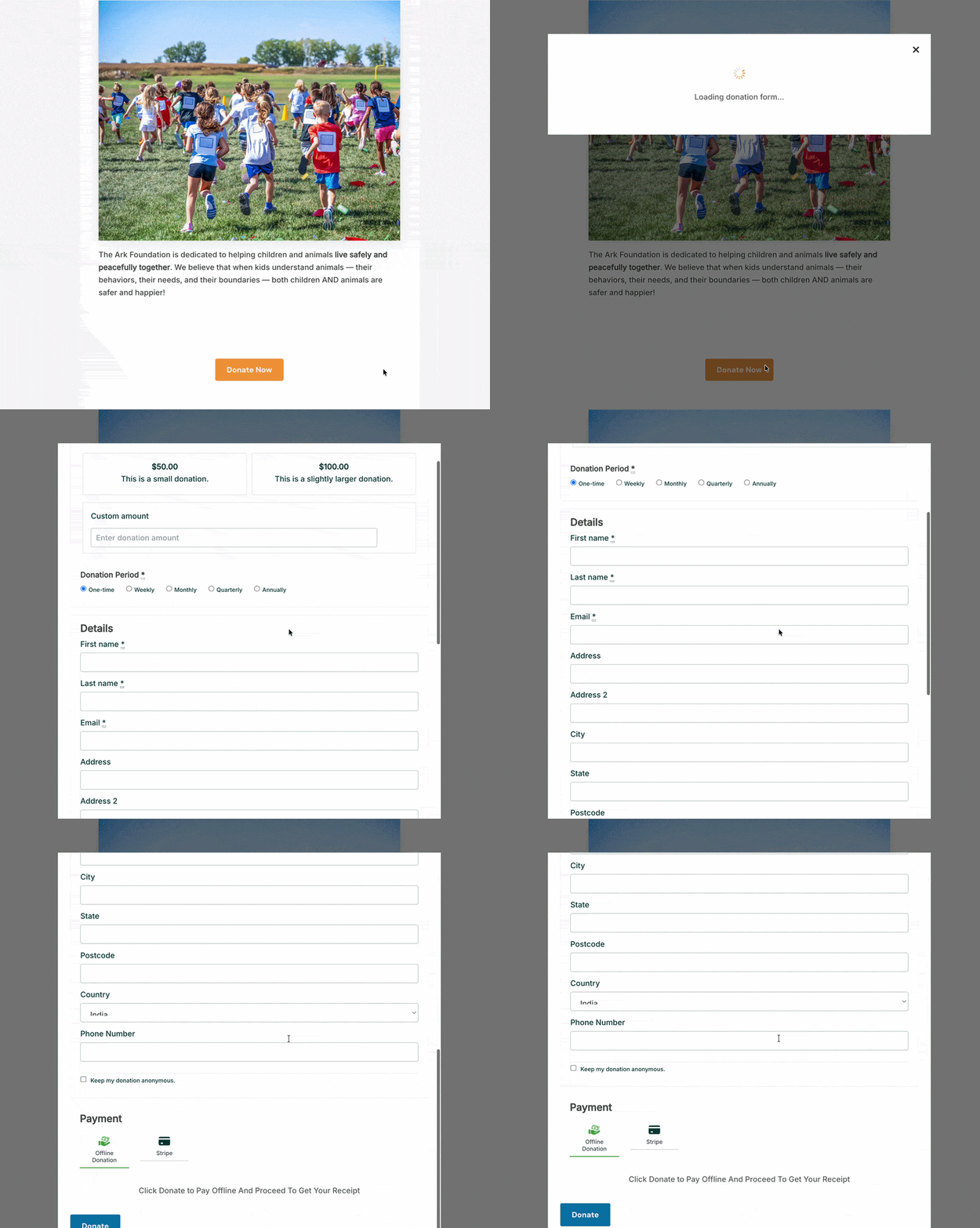
The Modal Donate Button is a new block for the WordPress Block Editor. Drop it onto any page or post, and when a visitor clicks it, your donation form appears right there as a modal overlay, with no new page load, no redirect, and no break in the experience the donor was already in.
Donations that don’t take your donors anywhere but forward.
Here’s what that means for your fundraising in practice.
Why It Changes the Experience
When someone is engaged with your content, they’re in a state of mind that’s ready to act. They’ve read your appeal, connected with your cause, felt something. Sending them away to a different URL at that moment introduces a small but real pause: a moment where they have to re-orient, process an entirely new page, and recommit to the action they were already ready to take. Some donors make that transition without hesitation. Others don’t.
The Modal Donate Button closes that gap. The donor clicks, the form appears on the same screen, they complete their gift, and the page is still right there when the modal closes. It’s one continuous experience instead of a two-step journey.
Here’s a concrete example. A church publishes a weekly recap of Sunday’s sermon. The post ends with a call to give. With the Modal Donate Button in place, clicking “Give Now” opens the donation form directly on that blog post, without navigating the congregant anywhere new. They fill it out in under a minute, close the modal, and they’re back to reading. They never lost the thread.
The same pattern works for a school PTA running a year-end drive, an animal shelter sharing an adoption success story, or a nonprofit adding a give button directly into the hero section of their homepage. The button goes where your donors already are, and the form follows. That’s the whole idea.
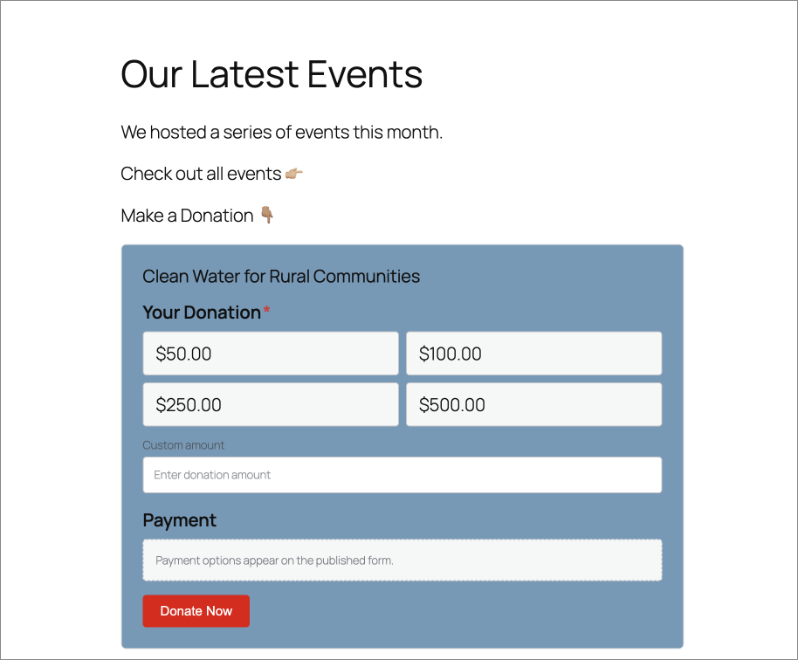
See it in action:
What the Modal Donate Button Can Do
Here’s a look at what you can configure, most of it in under a minute:
- Place it anywhere on your site. Header, footer, sidebar, blog posts, campaign pages. Any page where you can add a WordPress block, you can add this button. It’s not limited to dedicated donation pages.
- Choose which campaign it supports. A simple dropdown in the block settings lets you select the campaign tied to this button. Each button is connected to one campaign, so donors always know exactly where their gift is going.
- Set your own button text. The default label is “Donate Now,” but you can write anything that fits the context: “Support Our Work,” “Give Today,” “Help Us Reach Our Goal,” or whatever suits the page it lives on.
- Pick the button action. Open a modal popup directly on the page, or send donors to the full campaign page. Both options are available and configurable per button.
- Control the modal header. Display the campaign title and featured image at the top of the modal for visual context and reinforcement, or keep the header empty for a minimal, distraction-free look.
- Style it to match your site. Adjust background color, text color, hover effects, padding, size, and custom CSS classes. The button should look like it was built for your site, not dropped in from somewhere else.
How to Set It Up
You don’t need a developer to get this live. Here’s all it takes:
Open any page or post in the WordPress Block Editor. Click the + icon to add a new block and search for “Modal Donate Button.” Click to insert it.
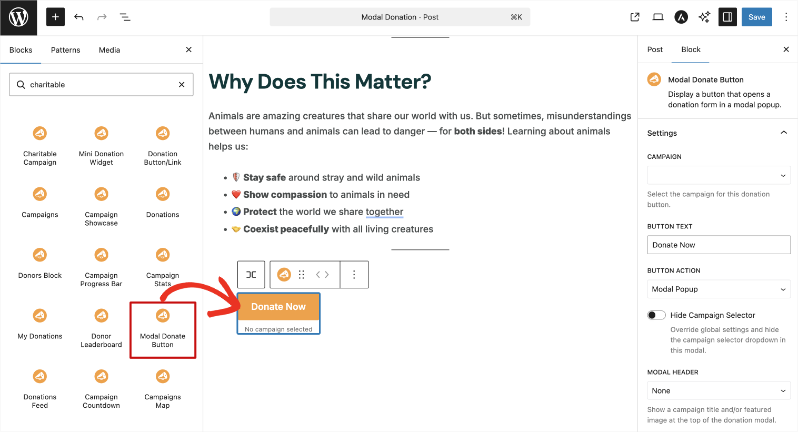
In the block settings panel on the right, use the Campaign dropdown to select which campaign this button supports.
In the Button Text field, enter your preferred label, or leave the default “Donate Now” as-is.
Under Button Action, choose Modal Popup to open the form as an overlay on the current page, or Direct Link to navigate donors to the campaign page.
Under Modal Header, choose whether to display the campaign title and image or keep the header empty.
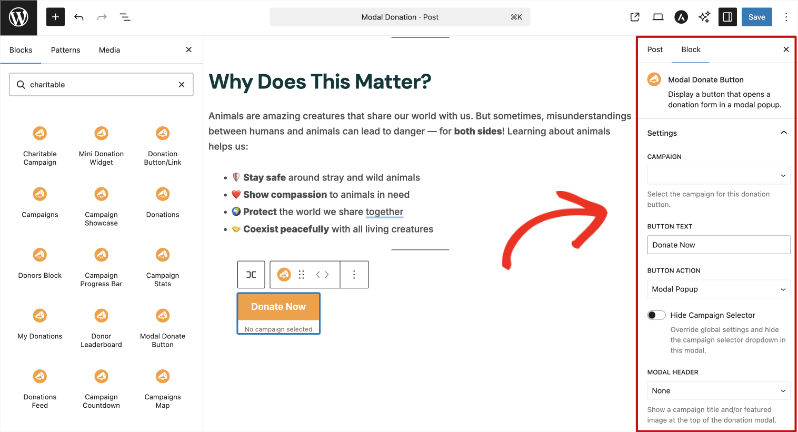
Use the Color, Size and Spacing, and Advanced panels to style the button to fit your site’s design.
Click Update or Publish to save.
That’s it. From inserting the block to having a live, styled donate button on your page, the whole process takes less than a minute. No code. No developer needed.
Why You’ll Love This
The setup is fast. The impact isn’t.
- 🎯 Donors stay in the moment. No redirect means no broken intent. The decision to give stays active from the first click all the way through to the confirmation screen.
- ⚡ Works on any page, not just campaign pages. Your homepage, your blog posts, your event recaps, your sidebar. Any page can now be a place to give.
- 🎨 Fully branded. Complete styling control means the button fits your site design without any extra CSS work on your end.
- 📱 Fully responsive. The modal works on phones, tablets, and desktops without any extra configuration.
- ⏱️ Live in under a minute. No developer required. No code. Just a block and a few settings.
Get the Modal Donate Button with Charitable Pro
The Modal Donate Button is available on all Charitable Pro plans, starting at $69/year for a single site. Every plan comes with a 14-day, no-questions-asked money-back guarantee. If it’s not the right fit, you get a full refund.
Already on Charitable Pro? The block is ready to use right now. Open the Block Editor on any page or post and search for “Modal Donate Button.” It’s there.
Not yet on a paid plan? This is a good time to upgrade. You’ll get the Modal Donate Button plus everything else included in your plan tier, with no risk to try it.
Start Removing Friction Today
The Modal Donate Button is one of those changes that’s hard to notice when it’s working well, because the giving experience just feels right. It’s a small addition with a real effect on how smoothly donors can follow through.
Already on Charitable Pro?
Visit the Modal Donate Button documentation to get started. Questions? Our support team is here to help.
Stay Connected for More Nonprofit Resources
For more tutorials and videos tailored to nonprofits, subscribe to our YouTube channel. We regularly publish expert tips, step-by-step guides on online donations, fundraising strategies, and practical resources to help your organization succeed.
🗞️ Get weekly tips and exclusive guides in your inbox
Join our newsletter →
🎥 Watch step-by-step tutorials and success stories
Subscribe to our YouTube channel →
👩🏽💻 Connect with our community and get daily nonprofit insights
Follow us on LinkedIn →
🥳 Fun reels and non-profit insights
Follow us on Instagram →
👀 Insightful & fun videos to help you grow your cause
Follow us on TikTok→
🌎 Subscribe and follow for general fundraiser tips
Get Fundraiser Tips on TikTok →
Powerful Fundraising Resources
⬇️ Download proven strategies, campaign ideas, and expert tools
Get the Fundraising Kit →
💸 Get Free Fundraising Resources
Head to the Charitable Fundraising Hub →
🤔 Got questions about Charitable?
Charitable FAQs →
🏎️ Take Charitable for a spin
Create your Charitable Demo →
Understand non-profit terms and jargon
Non-Profit Glossary →
% Looking for non-profit deals and discounts?
Best Non-Profit Deals and Discounts →



Leave a Reply