
You set up Google Analytics, connected it to Charitable, and felt good about having data.
- Then a donor completed a PayPal Standard transaction.
- Or an admin marked an offline check as Paid three days after it arrived.
- Or a Stripe webhook confirmed a subscription renewal overnight while no browser was involved.
Those donations never reached Google Analytics.
You’ve been making fundraising decisions on incomplete data, and you may not have known it.
The gap isn’t a configuration problem.
Browser-side tracking and it has a hard limitation: it can only see what happens in a browser.
For any donation that gets confirmed off-site or server-to-server, there’s nothing for a tracking snippet to catch.
Introducing the Updated Google Analytics Addon
The Google Analytics addon for Charitable has been rebuilt from the ground up. Starting with Charitable Pro 1.8.13, it adds server-side tracking, full Google Consent Mode v2 support, UTM attribution, and a rebuilt event model that matches what GA4 was actually designed to receive.
Complete donation data. Every gateway. Every confirmation method.
Here’s what changes in practice.
How It Works
The updated addon fires a server-side purchase event directly to GA4 using the Measurement Protocol the moment a donation status changes to Paid.
No browser required.
- If a donor completes a PayPal Standard transaction off-site, you see it in GA4.
- If a donor mails in a check and an admin marks it Paid from the WordPress dashboard, you see it.
- If a Stripe webhook confirms a renewal at 2 a.m., you see it.
The addon also prevents double-counting.
If a donation completes on-site (the browser fires the event) and a webhook later confirms it (the server fires again), only one purchase event reaches GA4. The deduplication is built in.
Here’s what that means for a real organization.
A school runs a spring scholarship campaign. 40% of donations come through PayPal Standard.
With the previous addon, those donors simply disappeared from Google Analytics.
The development director couldn’t tell whether her email newsletter or her social posts drove more PayPal completions, so she kept funding both, unsure what was working.
With server-side tracking, every PayPal confirmation lands in GA4 with the donor’s UTM source attached.
She can now see that email drives three times more completed donations than social. She shifts her effort, and the fall campaign raises significantly more.
On the privacy side, the addon ships with full Google Consent Mode v2 support. Google began enforcing this for EEA traffic in March 2024.
The consent signals fire in the page head before gtag.js loads, and the addon integrates with Cookiebot, CookieYes, Complianz, Iubenda, and OneTrust through the WP Consent API.
Donor IP addresses are always anonymized before anything is sent to Google. None of this requires extra configuration; it’s built into how the addon works by default.
What the Google Analytics Addon Can Do
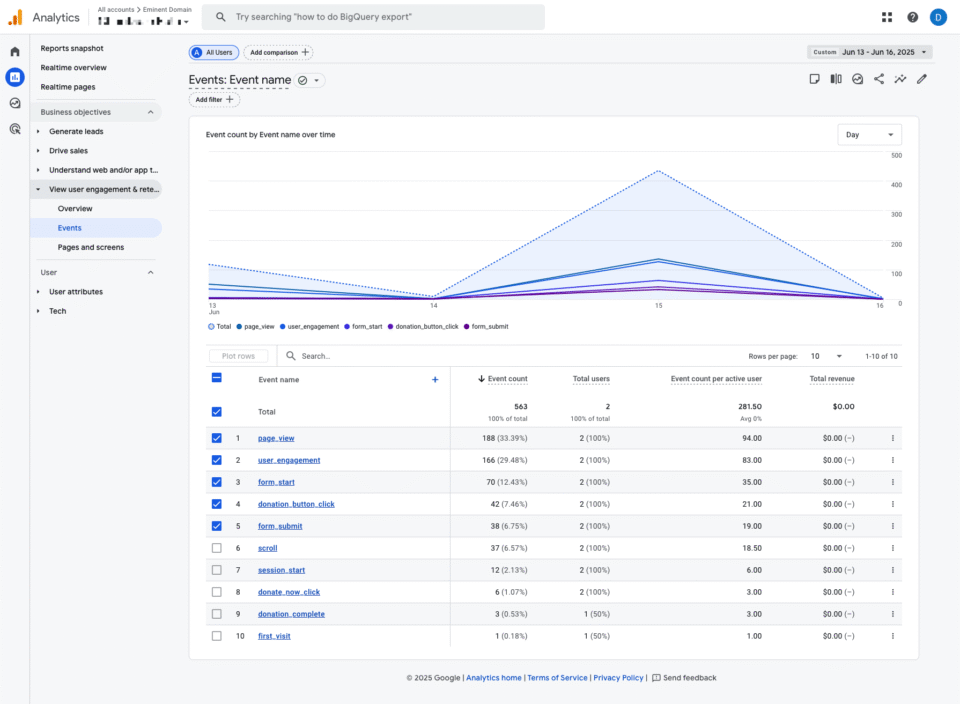
Here’s a look at everything the updated addon brings to your site, most of it active the moment you save your settings.
- Server-side donation tracking – Sends a confirmed
purchaseevent to GA4 the moment a donation reaches Paid status, regardless of the payment gateway or whether the donor’s browser is still open. PayPal Standard, Stripe webhooks, and admin-confirmed offline donations all count. - UTM attribution on every donation – Captures UTM parameters from the donor’s arrival URL in a 30-day first-party cookie, attaches them to the donation record, and forwards them to GA4. See exactly which email, social post, or ad drove each completed donation, not just each page visit.
- GA4 ecommerce event format – Tracks donations as
purchaseevents with transaction ID, value, currency, and the campaign as a line item. Refunds fire a matchingrefundevent, keeping your GA4 revenue totals accurate automatically. - Google Consent Mode v2 – Fires all four required consent signals before gtag.js loads. Without it, denied EEA users disappear from GA4 entirely. With it, GA4 still receives modeled conversions and cookieless pings. Works with Cookiebot, CookieYes, Complianz, Iubenda, and OneTrust through the WP Consent API.
- Google Analytics panel on each donation – Every donation record in your WordPress admin shows a collapsible Google Analytics panel with the donor’s UTM source data, GA4 client ID and session ID, consent state at the time of donation, and a timestamp for every event fired.
- Hashed donor identity – Donor emails are normalized and SHA-256-hashed before becoming the GA4 user ID, enabling cross-device session stitching without exposing PII to your reports.
- Role-based tracking exclusion – Skip tracking for Administrators, Editors, or any WordPress role you choose. Your own testing won’t inflate your reports.
- Test connection button – Send a test event directly from Charitable settings and confirm your setup in GA4’s DebugView within seconds. If something is misconfigured, you’ll see a specific error message rather than just silence.
- Site Kit and MonsterInsights compatibility – The addon auto-detects both plugins and defers gtag.js loading to them, preventing double-loading without any manual configuration.
Getting Set Up
Here’s all it takes to get running. No developer needed.
Go to Plugins » Installed Plugins in your WordPress admin and update if needed. (Update to Charitable Pro 1.8.13 or higher)
Go to Charitable » Addons, find Google Analytics, and click Install and Activate.
Sign in to Google Analytics and go to Admin » Data Streams. Select your web stream and Find your GA4 Measurement ID. The Measurement ID starts with G- and appears in the upper right corner of the stream details.
Go to Charitable » Settings » Advanced and paste the ID into the Google Analytics field. Click Save Changes.

Back in GA4, go to Admin » Data Streams » Measurement Protocol API Secrets and click Create.
Copy the secret value and paste it into the GA4 Measurement Protocol API Secret field in Charitable settings. Save again. This enables server-side tracking (recommended).
Now, it’s time to test your connection. On the same settings screen, click Send Test Event to GA4. Open GA4 » Admin » DebugView and watch for the test event to appear. It usually shows up within 30 seconds. A green checkmark in Charitable confirms success.
That’s the full setup. Standard reports in GA4 (like Ecommerce Purchases and Traffic Acquisition) start populating within 24 to 48 hours. Realtime and DebugView update within about 30 seconds.
Why You’ll Love This
The setup takes less than five minutes. What you get back from it doesn’t stop paying off.
- 📊 See what’s actually driving donations – UTM attribution connects your email campaigns, social posts, and ads directly to completed donations, not just to page views.
- 🔒 Privacy compliance out of the box – Consent Mode v2, IP anonymization, and WP Consent API integration work without any extra configuration, covering you for EEA requirements by default.
- 🔄 Accurate revenue totals, automatically – Refunds fire a matching event in GA4, so your reported revenue stays correct without manual corrections.
- 🧪 Verify before you go live – The test connection button gives you a real confirmation that data is flowing, not just an assumption based on saved settings.
- 👤 Clean data from day one – Role exclusions keep administrator and editor activity out of your donor reports, so the numbers you’re reading actually reflect donor behavior.
Available on Charitable Pro
The Google Analytics addon is included in the Charitable Pro plan, starting at $199/year for a single site. That includes priority support, peer-to-peer fundraising, automations, and everything in the Basic and Plus tiers. If you need to run it on up to five sites, the Elite plan is $299/year.
Every plan comes with a 14-day money-back guarantee. No questions asked.
Start Tracking Every Donation
Donation tracking that accounts for every payment gateway, every confirmation method, and every attribution window gives you the kind of data that makes every other marketing decision sharper.
If you’re already on Charitable Pro 1.8.13 or higher, install the updated addon and follow the setup steps above, or read the full documentation for advanced options including developer filters, UTM first-touch attribution, and custom event parameters.
Questions? The support team is available from your account dashboard.
Stay Connected for More Nonprofit Resources
For more tutorials and videos tailored to nonprofits, subscribe to our YouTube channel. We regularly publish expert tips, step-by-step guides on online donations, fundraising strategies, and practical resources to help your organization succeed.
🗞️ Get weekly tips and exclusive guides in your inbox
Join our newsletter →
🎥 Watch step-by-step tutorials and success stories
Subscribe to our YouTube channel →
👩🏽💻 Connect with our community and get daily nonprofit insights
Follow us on LinkedIn →
🥳 Fun reels and non-profit insights
Follow us on Instagram →
👀 Insightful & fun videos to help you grow your cause
Follow us on TikTok→
🌎 Subscribe and follow for general fundraiser tips
Get Fundraiser Tips on TikTok →
Powerful Fundraising Resources
🤖 Use Charitable with Your AI Assistant
⬇️ Download proven strategies, campaign ideas, and expert tools
Get the Fundraising Kit →
💸 Get Free Fundraising Resources
Head to the Charitable Fundraising Hub →
🤔 Got questions about Charitable?
Charitable FAQs →
🏎️ Take Charitable for a spin
Create your Charitable Demo →
Understand non-profit terms and jargon
Non-Profit Glossary →
% Looking for non-profit deals and discounts?
Best Non-Profit Deals and Discounts →








Leave a Reply