

Charitable Blog

Everything you need to know about Charitable and our team.

Introducing campaign showcase

Campaigns Showcase: Interactive Fundraising Displays for Your Cause

Last updated on

  • By

You built the campaign. Now give it the display it deserves. Beautiful, interactive, no developer needed, and yes – it actually fits your budget.


Let’s be real for a second.

Large nonprofits have something most smaller organizations don’t – dedicated developers, big budgets, and the resources to build polished, interactive fundraising pages that stop visitors in their tracks and turn them into donors.

You’ve been making do with less. A static list of campaigns. No filtering. No search. No way for a donor to quickly find the cause that moves them. Just a page they land on, scroll through, and too often, leave without giving.

That ends today.

Introducing Campaign Showcase

Campaign Showcase is the newest feature in Charitable Pro 1.8.13, and it’s the one we’re most excited about. It’s a fully interactive campaign display that lets your visitors search, filter, and sort through your campaigns – right on the page, without a single page reload.

It looks like something a developer built. It isn’t. You can set it up yourself, today, without touching a line of code.

Drop it on any page as a Gutenberg block or a classic shortcode, configure it from the sidebar, and your campaigns come to life in a dynamic, AJAX-powered grid or carousel. That’s it.
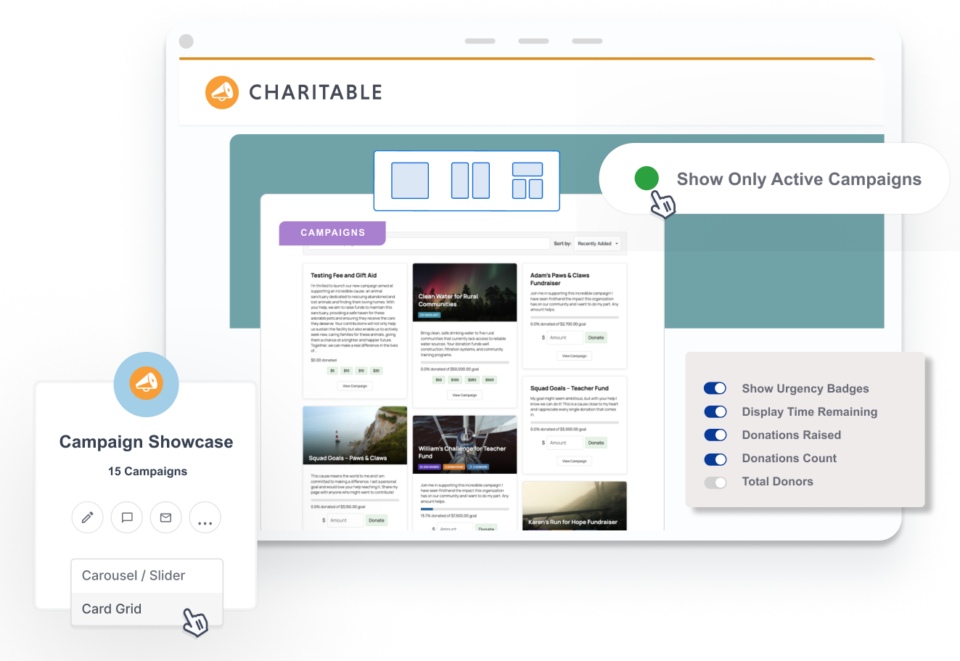
Campaign showcase

Why It Matters For Your Non Profit

Here’s what we know about donors: they give when something connects. When they find the campaign that speaks to them, when they can see the urgency, when the path to giving is clear and easy.

A flat, static list doesn’t do any of that. It puts the work on the donor – and most of them won’t do it.

Campaign Showcase flips that. It gives your donors an experience that feels modern, intuitive, and trustworthy – the kind of experience that used to cost thousands of dollars to build.
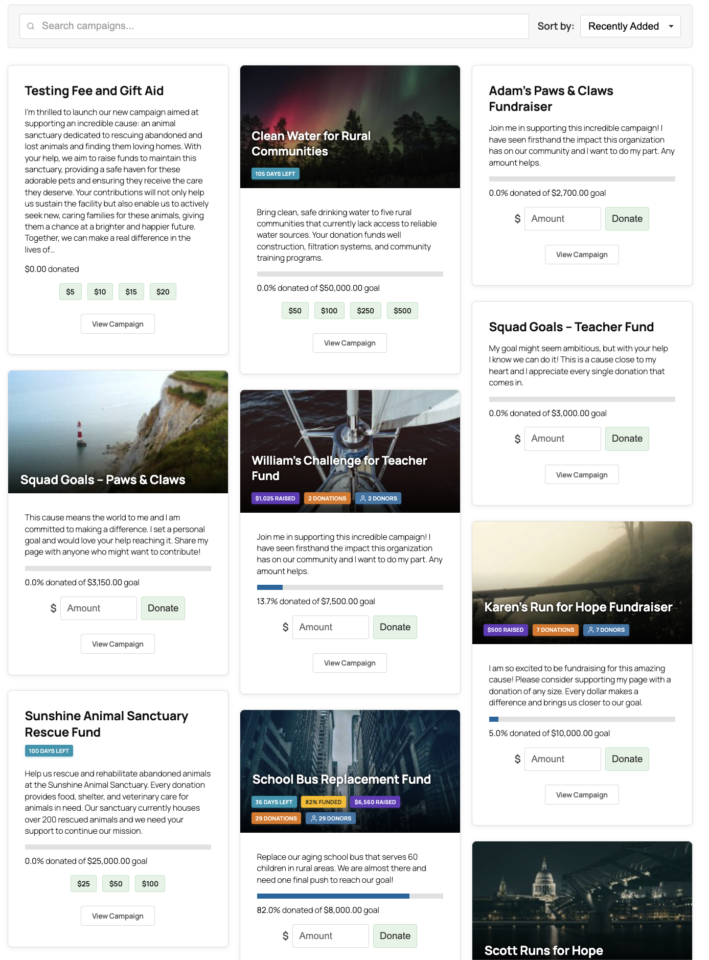
Now it’s built right into Charitable Pro, ready to go the moment you update.

What Campaign Showcase Can Do

Here’s a closer look at what’s included and what it means for your fundraising:

  • Multiple layouts: Choose between a card grid and a carousel or slider layout. The carousel supports configurable visible slides, optional autoplay, and navigation arrow positioning. Whether you have 3 campaigns or 30, there’s a layout that works.
  • Search, sort, and filter: Turn on a search bar, a sort dropdown, and category or tag filter pills, all from the block sidebar. Donors can find exactly what they’re looking for instantly, without leaving the page. Less friction means more giving.
  • Urgency badges: Show time remaining, funding status, total raised, donation count, or donor count right on each campaign card. Give your donors the context they need to act – and act now.
  • Quick donate buttons: Display pre-selected donation amount buttons directly on each campaign card. When combined with the modal donate feature, visitors can pick an amount and open the donation form in a single click. That’s a powerful moment and it happens fast.
  • Full styling control: Colors, font sizes, spacing, borders, card radius, all configurable directly in the block, no CSS required. Every instance on your page can be styled independently to match your brand.
  • Ambassadors and Peer-to-Peer support: Running a peer-to-peer fundraising campaign with our Ambassadors extension? Campaign Showcase has built-in support for showing fundraiser counts, aggregated stats, and Start Fundraising buttons. Your community of fundraisers finally gets the display they deserve too.

All these settings can be found under the Block tab of the WordPress editor menu on the right. You never have to use any coding, though we’ve included an option for Custom CSS for advanced users.
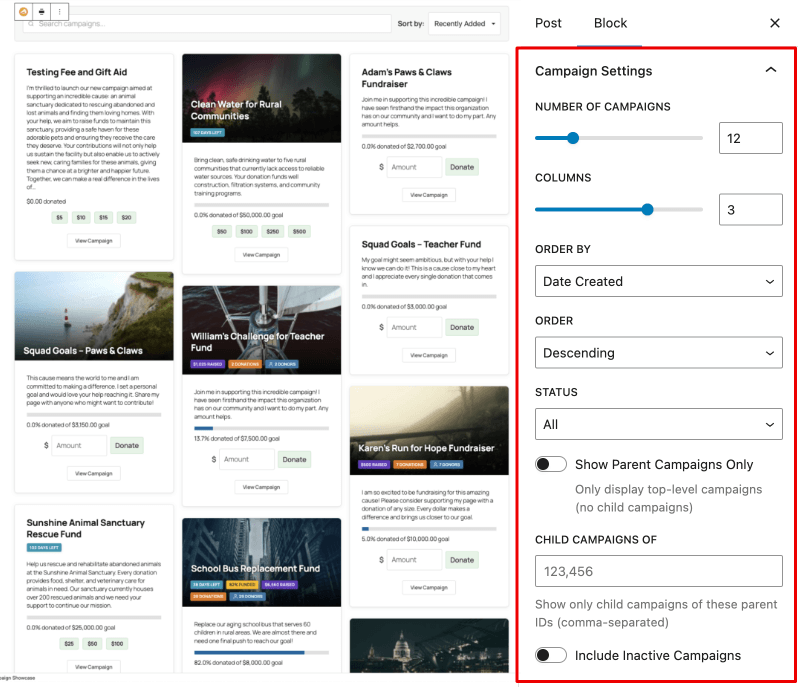
Block settings in campaign showcase

Already comfortable with shortcodes? You’re covered.

Everything available in the block is also available as a shortcode parameter. If you’ve been using the classic [campaigns] shortcode, this is the same foundation – just significantly more powerful. Here’s a quick example of what’s possible:

[campaigns layout="card" columns="3" button="modal" show_search="true" show_filters="true" show_badges="true"]

We have full documentation covering every parameter – layouts, badges, quick donate, carousel, colors, typography, spacing, filters, and developer hooks – over in our Campaign Showcase documentation.

Why You’ll Love Campaigns Showcase

  • No Code Needed: Configure everything effortlessly via the block’s sidebar.
  • Instant Feedback: Live preview feature facilitates immediate edits and adjustments.
  • Seamless Experience: AJAX-powered controls ensure smooth filtering, sorting, and pagination, all without refreshing the page.
  • Versatile Styles: Switch between carousel and grid views with ease and adapt styling to match your brand.
  • Enhanced Engagement: Visitors enjoy a rich, interactive experience, encouraging exploration and donations. 🎯💰
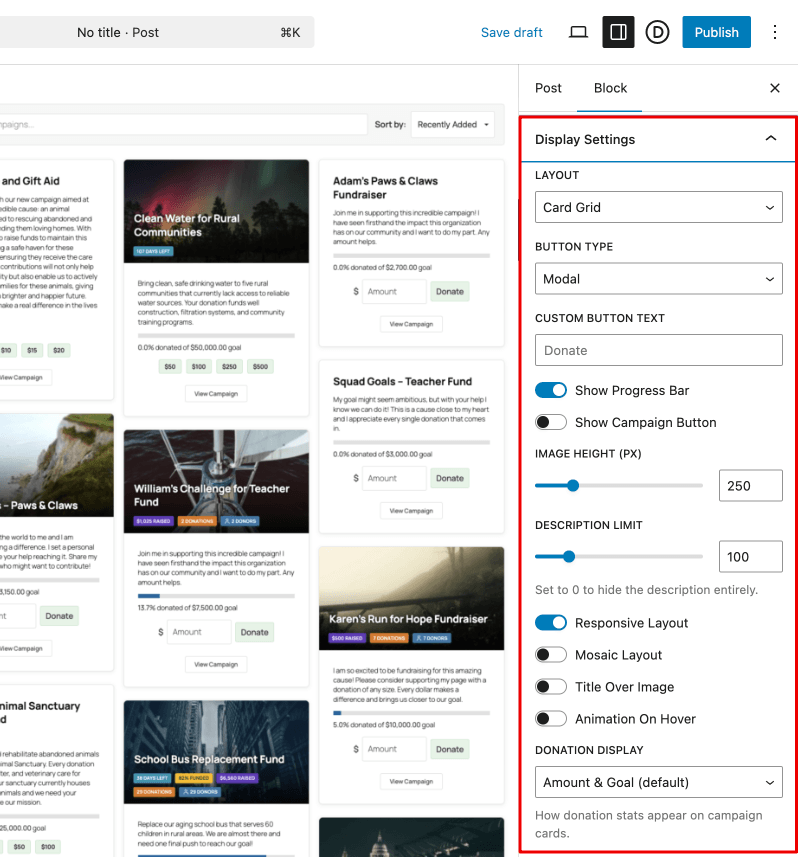
Display settings in campaign showcase

How to Get Started

Campaign Showcase is available now in Charitable Pro 1.8.13. If you’re already on Charitable Pro, head to your WordPress dashboard, go to the Plugins, and update to the latest version of Charitable.

  1. Add the Block: Navigate to your WordPress editor and drop the Campaigns Showcase block onto any page.
  2. Configure Settings: Use the sidebar to adjust layout, activate search and filters, and apply styling.
  3. Preview Changes: Use the live preview to ensure your setup looks perfect before publishing.
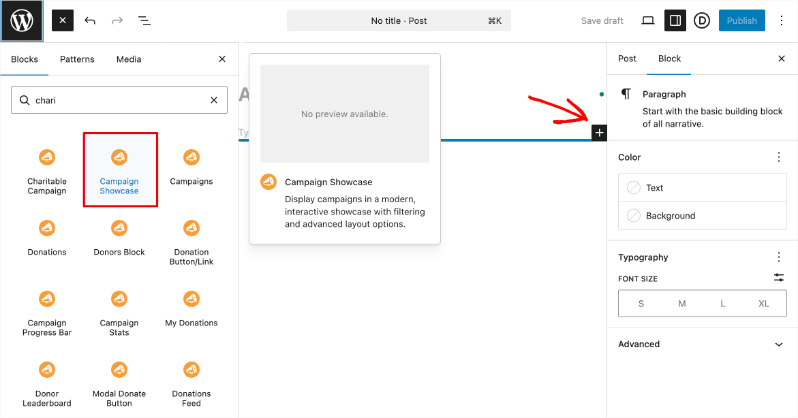
Campaign showcase block

For shortcode users, see our full documentation to explore all available parameters and customize your [campaigns] shortcode to your specific needs.

If you’re not yet on Charitable Pro, this is the moment.

Right now, you can get up to 50% off Charitable Pro. Get recurring donations, donation management, a donor dashboard, peer-to-peer fundraising, fee relief, and now Campaign Showcase – everything you need to run a more effective, more engaging fundraising operation, all in one place.

Not sure if it’s right for you? We offer a 14-day money back guarantee, no questions asked.

Your campaigns deserve better than a static list. Give them the display they’ve always deserved.

Frequently Asked Questions

Do I need coding knowledge to use Campaigns Showcase?
No coding is necessary. The block’s sidebar makes configuration straightforward.

Is there an impact on page speed with AJAX features?
Not at all. AJAX ensures operations occur smoothly without reloading, maintaining a fast user experience.

Can I use Campaigns Showcase with peer-to-peer campaigning?
Yes, it supports peer-to-peer features with our Ambassadors extension, enhancing your fundraising strategies.

Can I style Campaign Showcase to match my brand? 

Absolutely. You have full control over colors, typography, spacing, borders, and card radius – all configurable directly in the block sidebar. Every instance on your page can be styled independently, so each display can look exactly how you want it.

What editor does Campaign Showcase work with? 

Campaign Showcase is built for the WordPress block editor (Gutenberg) and also fully supports shortcodes, so however you prefer to build your pages, you’re covered.

Get Started Today!

Explore the full potential of Campaigns Showcase and transform your fundraising approach today. Log in to your WordPress dashboard, update to Charitable Pro 1.8.13, and begin creating dynamic campaign displays now.

Not on Charitable Pro yet? Sign up today and get ready to harness this powerful feature to engage and inspire your donors like never before. 💪

Need help or have questions? Our support team is here to assist you every step of the way. Contact us and we’ll get you sorted!

🔗 Explore the Plans | Try Campaigns Showcase Now 🎉

author avatar
David Bisset Project Manager
David is the project manager of Charitable since 2022. David works with several non-profits (one operated by his wife) along with managing and developing features, support, and marketing for Charitable. Has been with WordPress since 2006 and has been lead organizer of multiple conferences, events, and meetups.

Disclosure: Our content is reader-supported. This means if you click on some of our links, then we may earn a commission. We only recommend products that we believe will add value to our readers.

Leave a Reply

Your email address will not be published. Required fields are marked *

Get free tips and resources right in your inbox, along with 60,000+ others

Join our Newsletter

We won’t spam you. We only send an email when we think it will genuinely help you. Unsubscribe at any time!

Featured Video:

Watch more videos on our YouTube channel.

What's New In Charitable

View The Latest Updates
🔔 Subscribe to get our latest updates
📧 Subscribe to Emails

Email Subscription

Join our Newsletter

We won’t spam you. We only send an email when we think it will genuinely help you. Unsubscribe at any time!

Improvement Migrations

↔️ Importing From GiveWP, Donorbox, GiveButter… even CSV!

Whether you’re migrating from another platform or consolidating your records, moving your data to Charitable is now faster and more flexible than ever. We’ve streamlined the process so you can bring over your entire fundraising history in just a few clicks.

🔄 Native GiveWP, Donorbox, & GiveButter Support: Switching from a major platform? Our dedicated migration tools handle the heavy lifting, automatically mapping your donors and donations directly into Charitable—no technical skills required.

📂 Universal CSV Import: Moving from a custom system or a specialized CRM? If you can export it to a CSV, you can import it here. Our smart mapping tool lets you align your columns to Charitable fields like names, emails, phone numbers, and addresses in seconds.

Instant Donor Profiles & Custom Tags: Automatically create rich donor profiles and bring in custom tags to keep your data organized. Segment and engage your supporters from day one with a clean, professional database structure.


Ready to make the switch?

Check out our GiveWP Migration Guide

Learn more about our Import Tools

author avatar
David Bisset Project Manager
David is the project manager of Charitable since 2022. David works with several non-profits (one operated by his wife) along with managing and developing features, support, and marketing for Charitable. Has been with WordPress since 2006 and has been lead organizer of multiple conferences, events, and meetups.
Improvement Payments

💳 New Braintree Features For Your European Donors

With the release of Braintree addon version 1.3.0, you can now empower your European donors with the payment methods they trust and prefer, making giving seamless for international supporters.

🌍 Six New European Payment Methods: Support popular local options like iDEAL (Netherlands), Bancontact (Belgium), BLIK (Poland), and more to meet donors where they are.

⚡ Frictionless Donor Experience: These bank-based methods allow donors to authenticate directly with their own bank in a secure popup… no credit card numbers required.

⚙️ Automatic Currency Sync: No complex setup needed. The builder automatically displays the correct payment buttons based on your site’s currency (EUR or PLN), ensuring a relevant experience for every visitor.

author avatar
David Bisset Project Manager
David is the project manager of Charitable since 2022. David works with several non-profits (one operated by his wife) along with managing and developing features, support, and marketing for Charitable. Has been with WordPress since 2006 and has been lead organizer of multiple conferences, events, and meetups.
Campaigns New

🖼️ Campaign Featured Images: Pro-Level Visuals Made Simple

With the new Campaign Featured Image setting in our visual builder, you now have a single, dedicated place to manage how your fundraisers look across your entire site and beyond.

🖼️ One Image, Everywhere: Set a primary thumbnail that automatically syncs to campaign grids, lists, and shortcodes—no more relying on layout order.

📱 Social Sharing Optimized: Easily upload images at the perfect size to ensure your campaigns look stunning and professional when shared on social media.

🔍 SEO & Accessibility Ready: Add custom alt text directly within the builder to improve search rankings and ensure your mission is accessible to every supporter.

author avatar
David Bisset Project Manager
David is the project manager of Charitable since 2022. David works with several non-profits (one operated by his wife) along with managing and developing features, support, and marketing for Charitable. Has been with WordPress since 2006 and has been lead organizer of multiple conferences, events, and meetups.
Improvement receipts

🗓️ Annual Receipts 2.0: Send Year-End Receipts to Every Donor in Minutes

You can now send annual receipts in minutes with a few clicks to all your donors.

📧 One-Click Bulk Send Wizard that guides you to sending to hundreds of donors simultaneously directly from your WordPress dashboard.

🔍 Smart “Dry Run” Mode: See exactly who will receive a receipt and who will be skipped (and why) before a single email leaves your server.

🛡️ SMTP-Aware & Limit Protection: Charitable now detects your email setup and automatically adjusts batch sizes and pauses for daily limits to ensure your emails land in inboxes.

✅ Complete Audit Trail: Dedicated system log and on the individual donor’s profile, giving you a clear history for every fiscal year.

Stop dreading tax season and start spending that time on your mission. Update to Annual Receipts 2.0 and automate your year-end reporting today.

author avatar
David Bisset Project Manager
David is the project manager of Charitable since 2022. David works with several non-profits (one operated by his wife) along with managing and developing features, support, and marketing for Charitable. Has been with WordPress since 2006 and has been lead organizer of multiple conferences, events, and meetups.
Addon Donations Improvement

🎈Recurring Donations 2.0: Smarter Automation, Better Recovery, and More Control

We’ve completely rebuilt our Recurring Donations system to help you grow your reliable income stream while giving you (and your donors) more powerful tools than ever before.

What’s New:

🔒 Recurring-Only Campaigns: You can toggle “Recurring Only” mode in the campaign builder to hide the one-time option entirely, ensuring your supporters stay focused on long-term commitment.

📧 Automatic Payment Recovery: Our new Payment Failed Email fires automatically the moment a subscription fails.

🛠️ Self-Service Donor Control:The new Cancel Subscription Button appears directly in the donor dashboard, allowing supporters to pause or end their recurring gifts on their own terms—reducing your admin burden and payment disputes.

📊 Real-Time Revenue Insights: Track your growth, monitor active subscriptions, and see exactly how much predictable support is coming in each month at a glance.

Our new Recurring Donations addon gives you the professional-grade tools you need to grow your mission.

author avatar
David Bisset Project Manager
David is the project manager of Charitable since 2022. David works with several non-profits (one operated by his wife) along with managing and developing features, support, and marketing for Charitable. Has been with WordPress since 2006 and has been lead organizer of multiple conferences, events, and meetups.



