
Black Friday isn’t just about snagging deals on gadgets and clothes — it’s also a powerful moment for nonprofits and fundraisers to make a real difference. If you’re thinking about launching a Black Friday donation campaign, you’re in the right place.
I know it can feel a bit overwhelming to plan and execute a successful fundraiser during such a busy time, but with Charitable, it’s easier than you might think.
In this guide, I’ll walk you through simple, step-by-step tips to help you set up your Black Friday donation campaign quickly and effectively. I’m here to help you turn the biggest shopping day of the year into the biggest day for your cause.
Ready? Let’s get started!
Looking for great black friday deals for non-profits? Check out this Deals Page »
Why Black Friday is a Great Time for Fundraising
You might be wondering, why focus on Black Friday for donations? Well, it’s more than just a shopping frenzy. People are already in giving mode—whether it’s buying gifts or hunting for deals, their hearts are open to generosity. Plus, many nonprofits see a boost at this time because donors feel inspired to contribute beyond just spending.
Using Charitable, you can tap into this energy by creating a campaign that stands out and encourages people to support your cause right when their spirits are high. It’s about making it easy for them to give, standing out from the noise, and showing why your cause matters now more than ever.
Step 1: Install Charitable and Get Ready to Fundraise
Before you launch your Black Friday campaign, you need to have Charitable installed on your WordPress site. If you haven’t done this yet, it’s super easy.
Charitable has a powerful pro version packed with features like recurring donations, peer-to-peer fundraising, comprehensive donor management, and more. To install Charitable Pro, head over to the Charitable website, select your plan, and complete your purchase.
Then you’ll get a plugin file to download and a license key to copy.
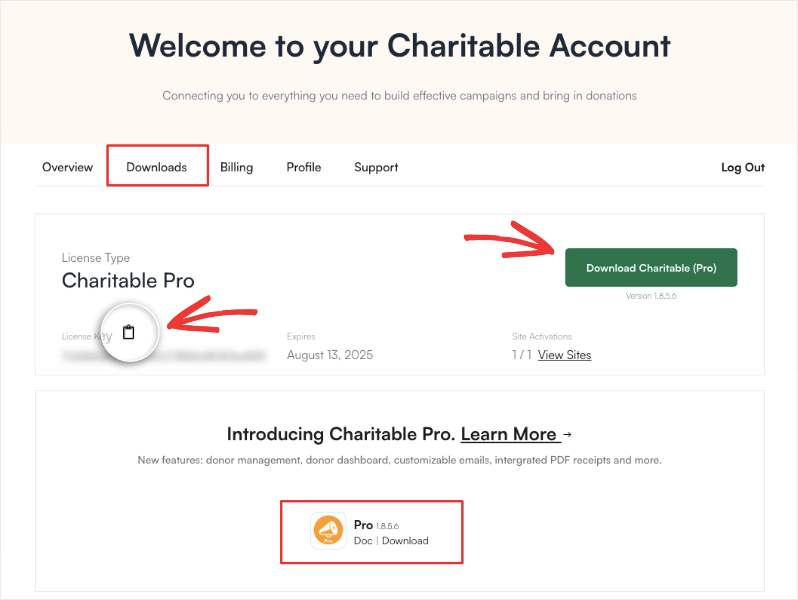
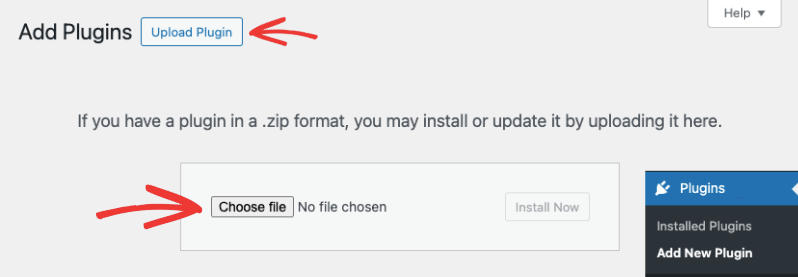
You can install the plugin file on your WordPress site by heading over to Plugins » Add New » Upload Plugin. Here, select the plugin file you downloaded to your computer and click on Install Now.
Once it’s installed and activated, go to the Charitable » Settings page and paste your license key here.
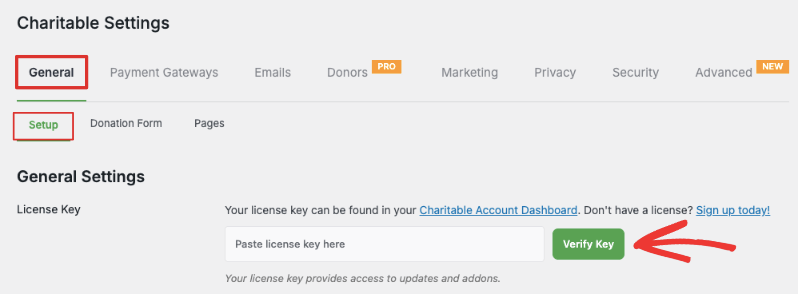
Once your Charitable license is verified, you’re ready to create your first fundraising campaign. The plugin is designed to be user-friendly, so even if you’re new to WordPress or fundraising plugins, you’ll find it straightforward to set up your campaign.
Not ready for Charitable Pro? Try Charitable Lite. It’s free and gives you the essentials you need to start fundraising. See the difference between Charitable Pro vs Lite »
Just go to your WordPress dashboard, head to Plugins » Add New, and search for “Charitable.” Click “Install Now” and then “Activate.”
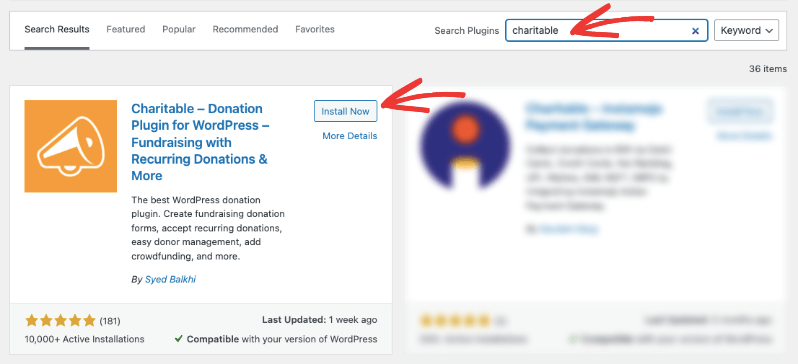
After installing, take a quick tour of the dashboard to familiarize yourself with the main features like campaign creation, donation management, and reporting. Now you’re all set for the next steps to launch your Black Friday donation campaign!
Step 2: Create Your Black Friday Campaign
Now that Charitable is installed, it’s time to create your actual Black Friday donation campaign. In your WordPress dashboard, go to Charitable » Add New.
Start by giving your campaign a memorable name that clearly connects to Black Friday, such as “Black Friday Giving Challenge” or “Biggest Donation Day.” This helps your campaign stand out and feel timely.
Then you can browse through the library and select a template or a layout to get started.
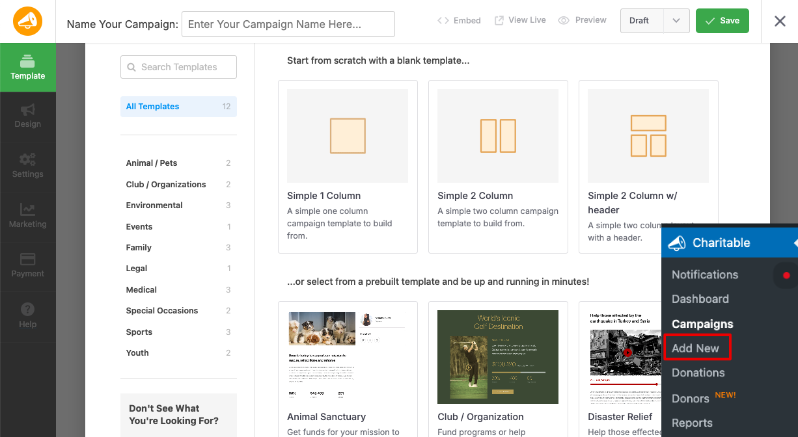
When you choose a template, the drag and drop builder will open. You’ll see a preview of your campaign on the right, along with an editing taskbar on the right.
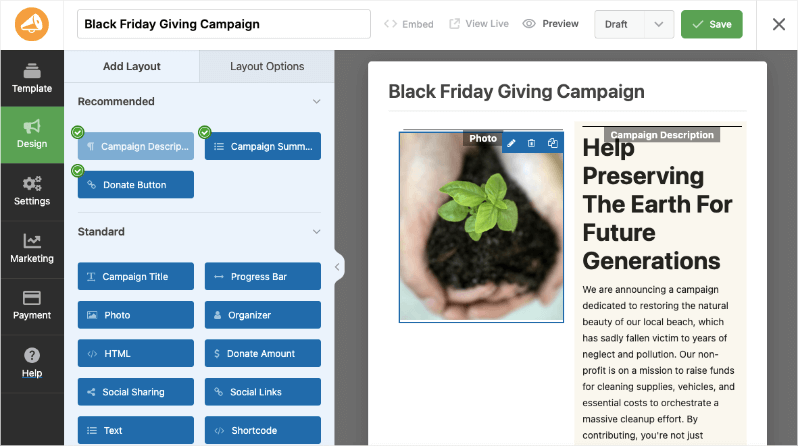
You can drag and drop new fields into the live preview. It’s that simple. You can add a progress bar, organizer name, photos, social links, and so much more.
You can even add social sharing icons to encourage donors to immediately share their gift on social media with one-click sharing buttons. This creates organic promotion and helps your campaign gain viral momentum.
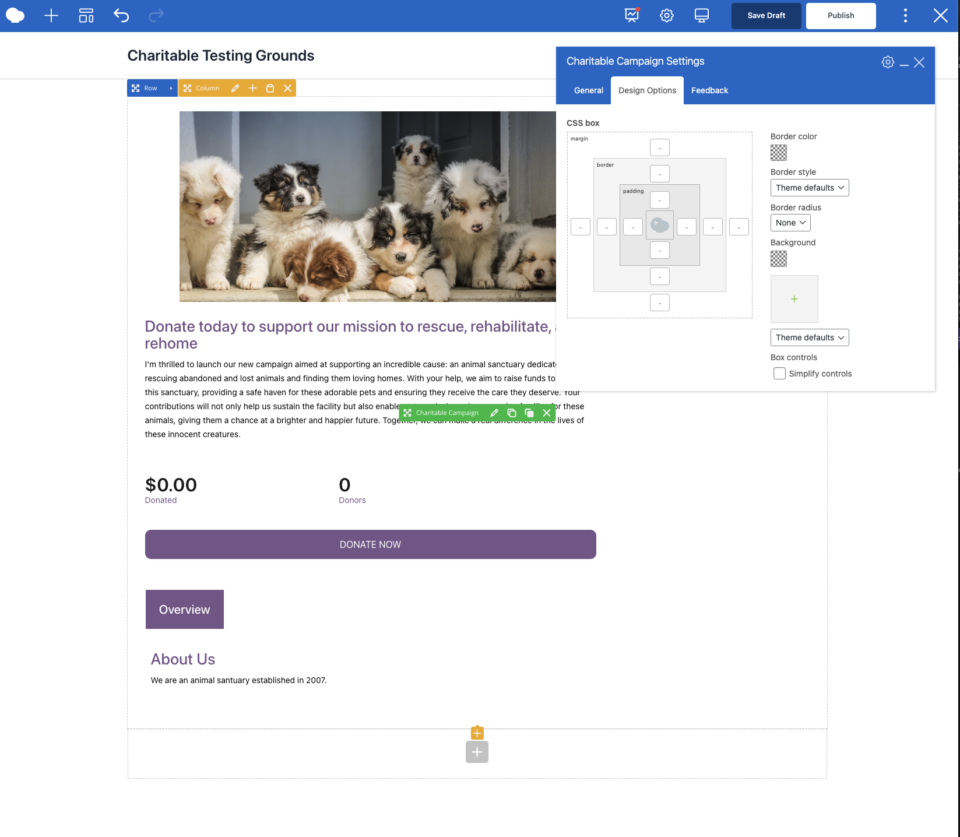
Next, write a simple but heartfelt campaign description. Explain what the donations will fund and why supporting your cause on Black Friday makes a difference. Keep your language clear and relatable—think about what your donors want to hear. You can change the text simply by selecting it and then entering the text you want.
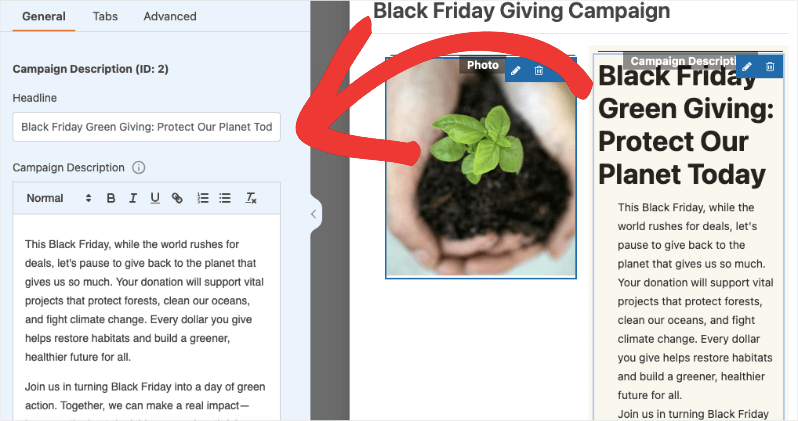
You can also change the image by selecting it in the live preview and then uploading your own image to replace the placeholder
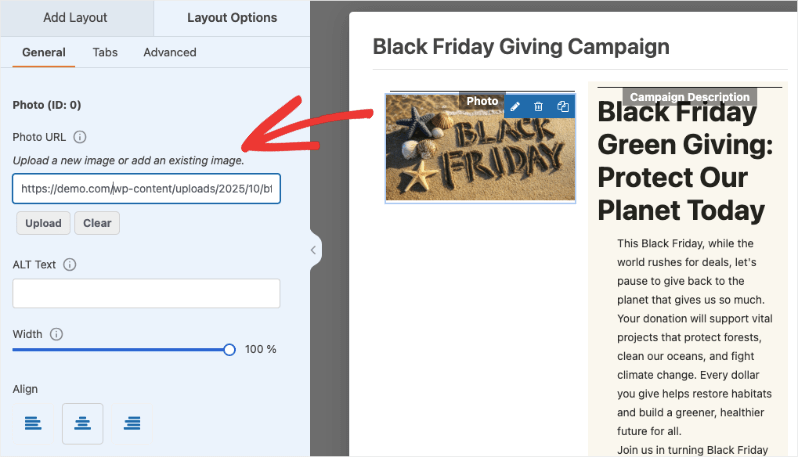
The builder is so easy to use. I would recommend exploring the different options on your own to customize your campaign.
Step 4: Set Fundraising Goals & Deadlines
Having a clear fundraising goal and deadline is key to motivating donors and creating a sense of urgency. Decide on a realistic but inspiring target for how much you want to raise during your Black Friday campaign. This goal gives your supporters something to rally around and helps you measure success.
Go to the Settings tab in the far-left menu. In the General Settings tab, you can enter the total amount you want to raise (e.g., $30,000).
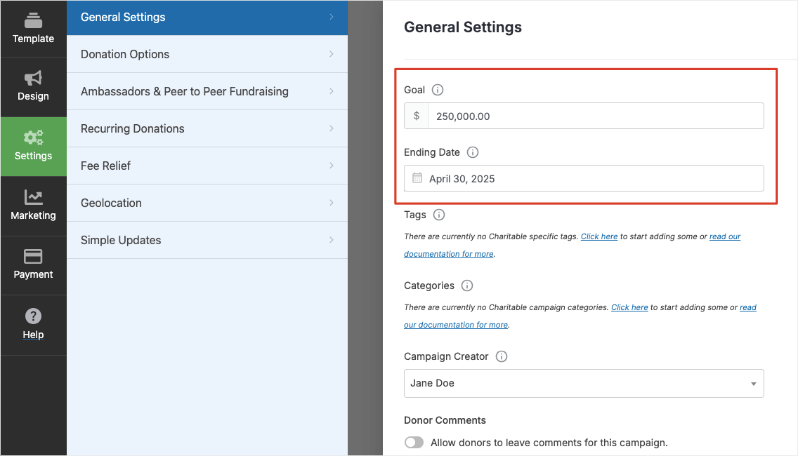
Below the goal field, there’s an Ending Date option. Choose the date and time by which you want the campaign to end. For example, you might start your campaign a day or two before Black Friday and end it a day or two after to capture early and late donors.
Now there are a few more things I want to show you to optimize your campaign and workflow.
Step 5: Optimize Your Campaign
Charitable is designed to help you make the most of Black Friday’s unique fundraising potential with powerful features and add-ons tailored to maximize donations.
First, suggested amounts guide donors toward meaningful gifts without overwhelming them.
In the Settings » Donation Options tab, set suggested donation amounts that fit well with the Black Friday spirit—think bold and motivating figures that encourage donors to give generously during this key giving moment.
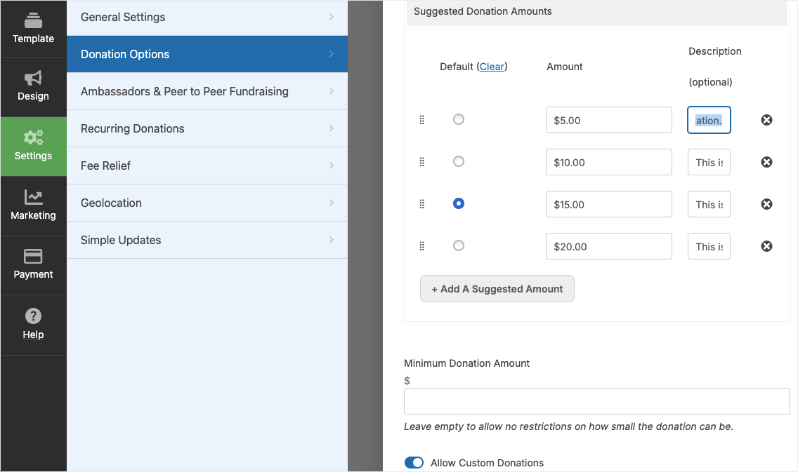
Charitable also offers these powerful features to boost your Black Friday campaign:
- Recurring Donations: Encourage donors to turn their Black Friday gift into ongoing support by choosing weekly, monthly, quarterly, or annual contributions.
- Peer-to-Peer Fundraising: Let your supporters create their own Black Friday campaigns to amplify your reach and impact.
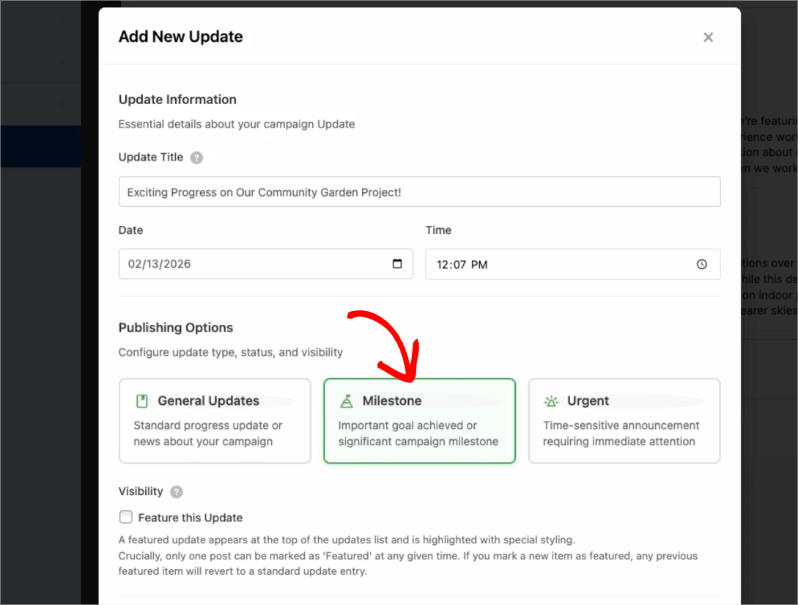
- Simple Updates: Keep donors engaged with live updates that show progress and highlight milestones throughout the Black Friday campaign.
- Geolocation: Use geotags and Google Maps to showcase all your campaigns and build local community support.
- Fee Relief: Ask donors to cover transaction fees so 100% of their Black Friday donation goes directly to your cause.
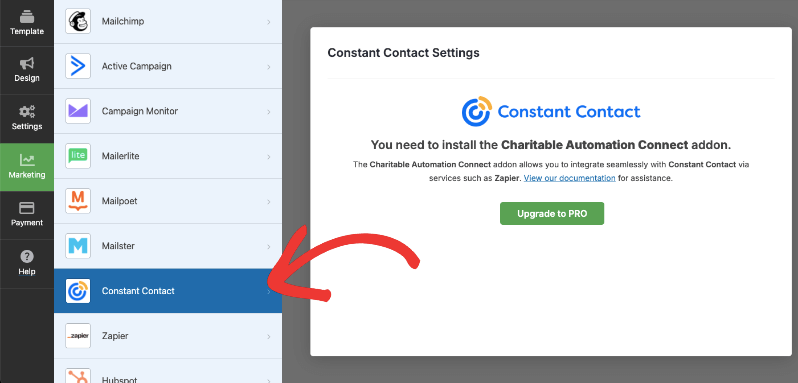
In the Marketing tab, connect your campaign to your preferred email marketing service like Constant Contact or Mailchimp. This helps you send timely Black Friday appeals and thank-you messages seamlessly.
Under the Payment tab, choose your payment provider to make donating as smooth as possible for supporters during the busy Black Friday period.
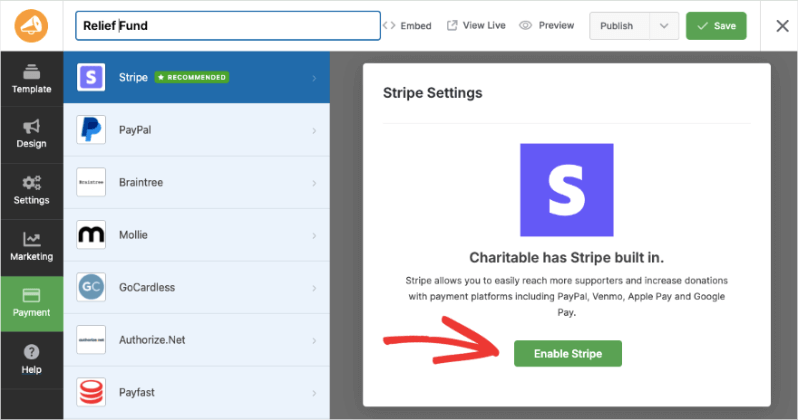
Learn how to integrate your payment gateway here »
Once you’ve configured these settings, your Black Friday campaign is good to go!
Step 6: Publish Your Campaign
When you’re ready, at the top-right corner of the builder, save your changes, use the dropdown menu to select “Publish” button and save it again.
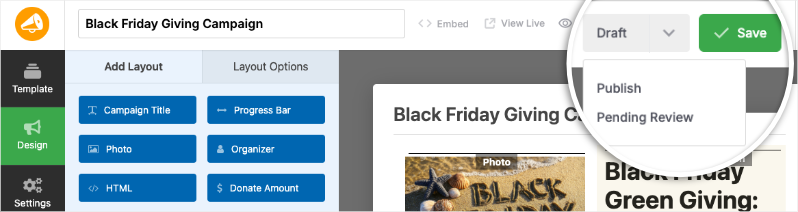
Your Black Friday campaign is now live and ready to receive donations. You can add your campaign to any page or post using the readymade blocks available in the Gutenberg or block editor. You can also use campaign shortcodes to embed the campaign anywhere you need.
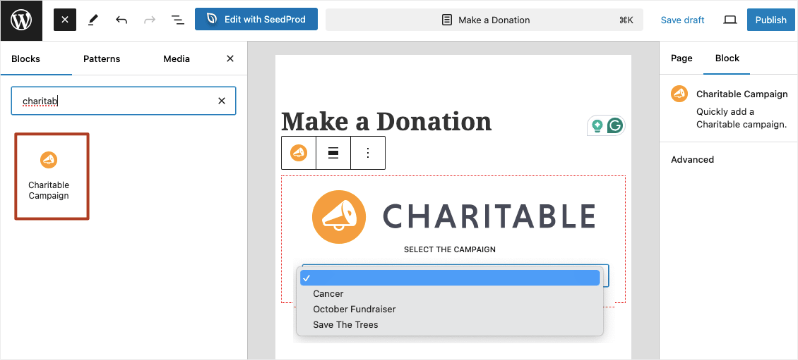
That’s it! Now that your Black Friday campaign is live, you can start receiving donations. Like this, you can also create campaigns for Giving Tuesday and other holidays. Check out our Ultimate Nonprofit Playbook to Maximize Year-End Fundraising.
If you liked this tutorial, subscribe to our YouTube channel for more step-by-step video tutorials and success stories
Tracking Black Friday Success
To understand how well your Black Friday fundraising efforts are performing, it’s essential to track your campaign’s progress and analyze the results. You can view all your donation records under Charitable » Donations.
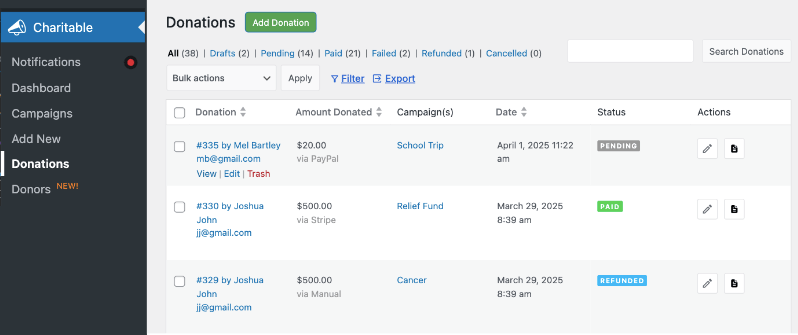
Charitable also makes this easy with built-in reporting tools:
- Top Donors: Identify your most generous supporters to recognize and engage them personally, increasing their loyalty.
- Recurring Donors: Track who is contributing regularly, which is crucial for building a steady income beyond the Black Friday spike.
- Average Donation Amount: See the typical gift size to help you adjust suggested donations and appeals for maximum impact.
- Total Donations: Monitor cumulative funds raised throughout the campaign to stay on target with your fundraising goals.
- Refunds: Keep an eye on any refunded donations to maintain accurate financial records.
- Donations Breakdown: Get insights into donations by campaign, date, or donor segments for a clearer understanding of what’s driving your results.
- Payment Methods: Review which payment gateways your donors prefer, helping you optimize checkout options.
- Real-Time Activity: Follow donations as they happen, allowing you to share live updates and create excitement during the campaign.
- LYBUNT and SYBUNT Reports: Use “Last Year But Unfortunately Not This” (LYBUNT) and “Some Year But Unfortunately Not This” (SYBUNT) reports to re-engage previous donors who haven’t given this campaign year, a great strategy around Black Friday for donor retention.
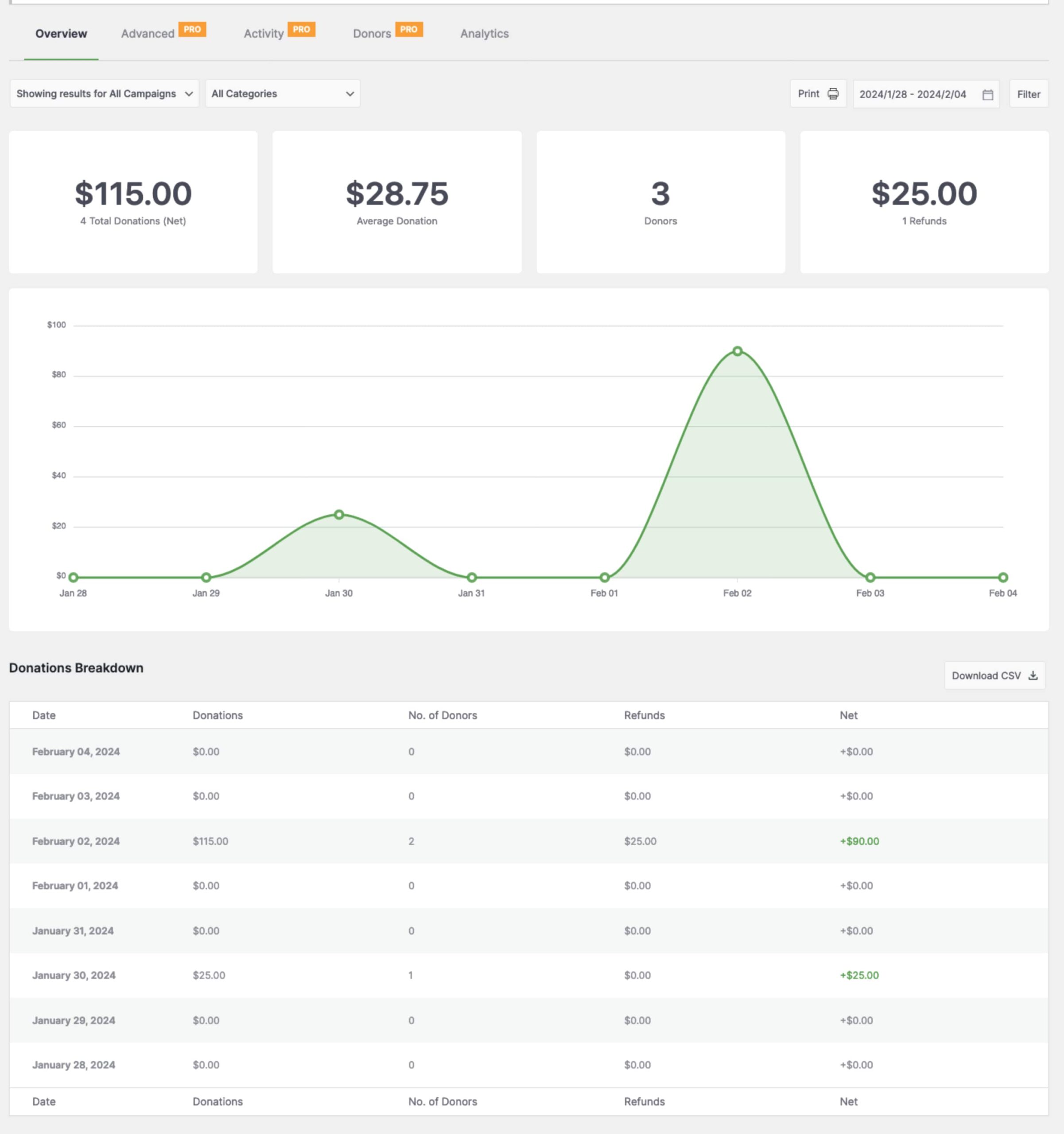
While Charitable covers these core fundraising insights, for deeper analytics—like traffic sources or donor journey tracking—you can integrate Charitable with tools like Google Analytics or email marketing platforms.
Using these reports, you can not only celebrate milestones but also tailor your outreach, motivate recurring gifts, and plan even more successful Black Friday campaigns in the future.
Bonus: Recently Gave Notifications to Boost Donations
One powerful way to increase donations during your Black Friday campaign is by showing real-time social proof that others are giving right now. Charitable’s DonorTrust feature does exactly that by displaying live, non-intrusive notifications on your website whenever someone makes a donation.

These popups build instant trust and encourage more generosity by showing visitors that your cause is actively supported. Seeing recent donations helps reduce hesitation and makes potential donors feel part of a giving community.
Setup is a breeze — with a 1-click enable option and no coding required. Once activated, notifications run automatically, working quietly in the background to inspire more supporters to give during your Black Friday campaign.
DonorTrust is available as part of Charitable Pro (Plus plan or higher), designed to help you turn every donation into a real-time marketing tool that builds trust, drives urgency, and ultimately boosts your fundraising success.
If you like this guide, stay connected with us for more tips, tutorials, and updates, join our newsletter – You’ll get weekly tips and exclusive guides in your inbox.
If you’re looking for great deals for non-profits on tools & software, head to Best Non-Profit Deals & Discounts »




Leave a Reply