Documentation Category: Extensions

  • How to Setup and Use DonorTrust Real-Time Notifications

    DonorTrust shows recent donations made on your website in real-time. This is a great way to build trust and encourage more people to give to your cause! Why it Works: People are more likely to trust what others are doing. When visitors see that others are donating, they’re more likely to trust your organization and donate…

  • Connect Charitable to Google Analytics 4

    Charitable lets you connect your donation campaigns to Google Analytics, enabling you to track donation performance and gain valuable insights into your fundraising efforts. By integrating Google Analytics, you can monitor key metrics, understand donor behavior, and optimize your campaigns for increased impact. Prerequisites If you have not already set up Google Analytics and connected…

  • Setting Up Square Webhooks

    Would you like Charitable to receive real-time updates when a payment is completed or refunded through Square? With Square webhooks enabled, your forms can stay in sync with Square so payment statuses are always up to date. This guide will show you how to easily connect Square webhooks with Charitable, ensuring your website stays in…

  • Spam Blocker

    While this plugin is in beta, we are building detailed documentation and will update this page when this is completed.

  • Square

    While this plugin is in beta, we are building detailed documentation and will update this page when this is completed.

  • Charitable PDF Receipts

    Charitable makes it easy to set up customized PDF receipts that you and your donor can generate and download instantly. Donors can also choose to send the donation receipts to their email right after they make a contribution. This guide will show you how to customize your receipts and configure settings to exactly what you…

  • How to Connect Charitable to GoCardless

    GoCardless is a payment processor laser-focused on providing affordable card-free payments through bank transfers and Direct Debit. The result is payments with radically lower fees than normal card payments. Paid Extension The GoCardless integration is available in Charitable Pro. Get it today with a 14-day money back guarantee. How to install and activate the GoCardless…

  • Charitable Payrexx

    Accepting donations with Payrexx is now as easy as it can be. You’re just a few clicks away from configuring Payrexx on your donation site so that you can maximize both local and international donations. Note: Before we start, be sure to install Charitable on your WordPress site. Then you can install and activate the…

  • Charitable Paystack

    Paystack is a leading payment processor in Africa, supporting card and EFT payments with a secure, hosted payment page. Installation Installing Charitable Paystack is the same as installing any other Charitable extension. If you’re not sure how to do that, we recommend first reading our guide to installing Charitable extensions. Activate the gateway After you…

  • Charitable Mollie

    Mollie is a popular European payment processor offering leading local payment methods, including Apple Pay, credit card, PayPal, iDEAL, Sofort, SEPA, Bancontact, Cartes Bancaires, EPS, PostePay and more. How to install and activate the Mollie plugin Charitable Mollie is a plugin and can be installed the same way as any other Charitable extension. Here’s a…

  • Charitable Windcave

    Windcave is a payment gateway available in New Zealand, Australia, North America, Asia, the UK and Europe, supporting payments in more than 20 currencies. Installation Installing Charitable Windcave is the same as installing any other Charitable extension. If you’re not sure how to do that, we recommend first reading our guide to installing Charitable extensions.…

  • Authorize.Net Troubleshooting

    This page outlines some common issues our customers run into with Authorize.Net, apart from problems relating to webhooks. If you getting an error related to webhooks not being set up, see our Authorize.Net Webhooks Troubleshooting guide instead. ERROR: E00114 Invalid OTS Token The OTS Token error is related to some internal processes in the Authorize.Net…

  • Charitable Stripe 1.4 Upgrade Notes

    If you are updating to Charitable Stripe 1.4 from a previous version, there are some changes you should be aware of, particularly if you are using code to customize the plugin’s behaviour. Things that were removed charitable_stripe_charge_args filter The charitable_stripe_charge_args filter was removed in 1.4. In our experience, there were two key ways this filter…

  • Authorize.Net Webhooks Troubleshooting

    Charitable uses webhooks from Authorize.Net to process recurring donation renewals, payment status changes and other events. When you add your Authorize.Net API Login ID and Transaction Key, Charitable will attempt to create a webhook endpoint automatically, through an API request to Authorize.Net. If you encounter an error indicating that Charitable was not able to create…

  • Charitable Braintree

    Braintree is a payment service created by PayPal that allows you to accept donations securely on your website, while giving your donors the flexibility of paying via PayPal, Venmo (in the US), credit or debit cards, or digital wallets such as Google Pay and Apple Pay. Installation Installing Charitable Braintree is the same as installing…

What's New In Charitable

🔔 Subscribe to get our latest updates
📧 Subscribe to Emails

Email Subscription

Join our Newsletter

We won’t spam you. We only send an email when we think it will genuinely help you. Unsubscribe at any time!

Integration New

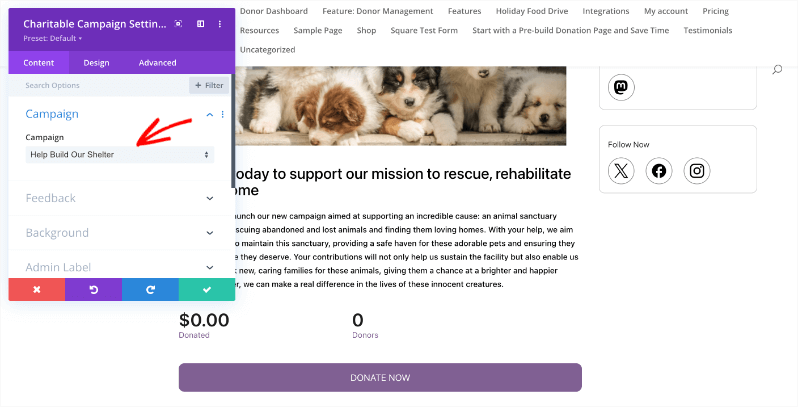
👉🏻 New Divi Integration In Charitable Pro

Bring the power of Charitable directly into your favorite page builder and maintain total creative control with our brand-new Divi integration.
The Ultimate Design Experience

No more switching back and forth or relying on complex shortcodes. Use dedicated Divi modules to build, style, and launch high-converting donation pages without ever leaving the Divi Builder.

⚡ Native Divi Modules: Effortlessly drag and drop your donation forms, progress bars, and campaign details exactly where you want them.

⚙️ Visual Customization: Tweak colors, fonts, and spacing using Divi’s familiar design settings to ensure your fundraiser matches your brand perfectly.

🚀 Live Visual Editing: See your changes in real-time. What you see in the builder is exactly what your donors will see, ensuring a seamless giving experience every time.
donation form New

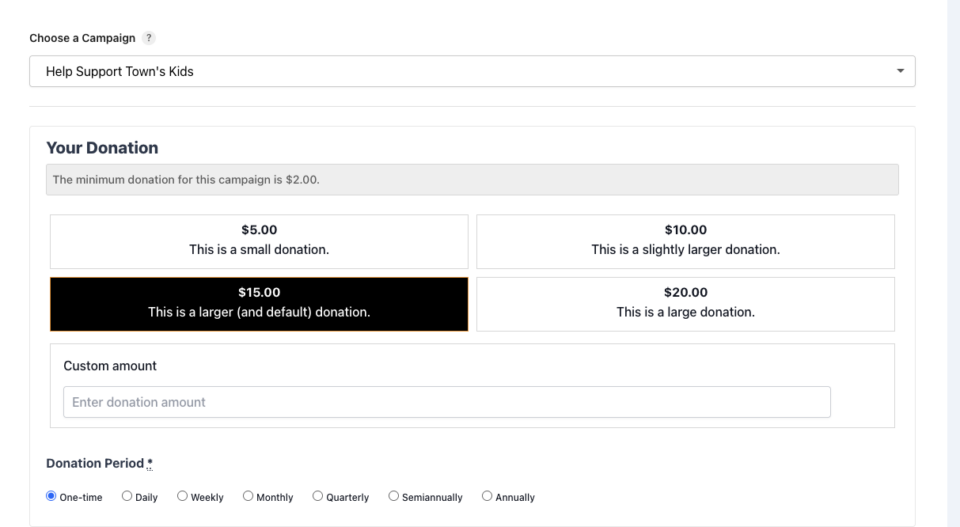
👉🏻 New Campaign Selector For Donation Forms

Take your campaign management to the next level. Find the perfect fundraiser for any page and stay in your creative flow with our new Campaign Selector integration.

The Ultimate Selection Tool

No more hunting for IDs or creating one page for every donation form. Use the new Campaign Selector to allow users to switch to a campaign with no code.

⚡ Instant Search: Quickly find any campaign leaving your page or post.

⚙️ Editor Agnostic: Whether you’re using the Block Editor, Elementor, or WPBakery, selecting your campaigns is now a unified experience.

🚀 Real-Time Previews: See exactly which campaign you’ve selected instantly, ensuring your donors always see the right cause.

Integration New

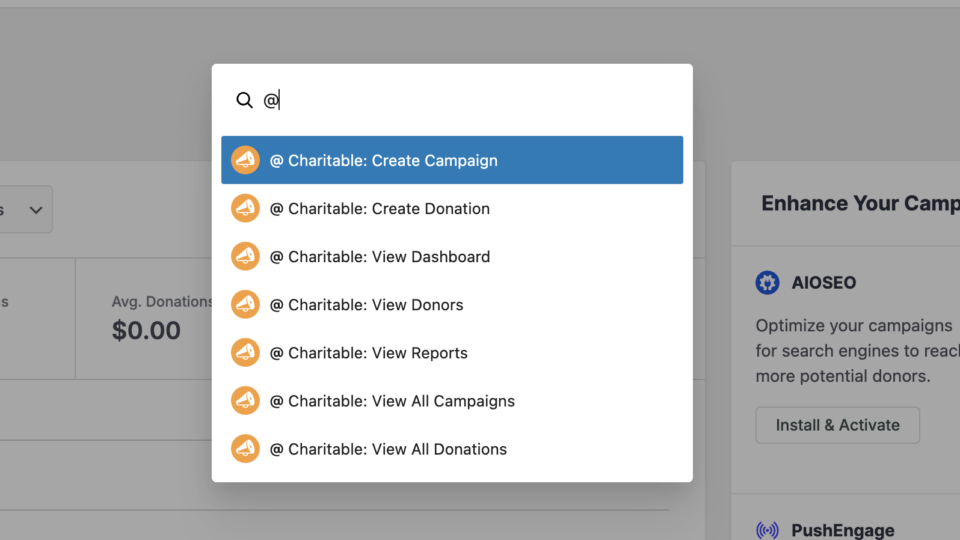
WordPress Command Palette Integration

Take your fundraising workflow to the next level. Speed up your site management and stay in your creative flow with our new WordPress Command Palette integration.

Supercharge Your Workflow
Navigate your fundraising dashboard faster than ever.

The Ultimate Keyboard Shortcut Hit Cmd + K (or Ctrl + K) to launch the Command Palette and manage your campaigns instantly.

⚡ Instant Navigation: Jump directly to your Campaigns, Donations, or Settings from anywhere in the editor.

➕ Quick Create: Start a new fundraising campaign or add a manual donation with a single command.

Efficiency Redefined
The tools you need, exactly when you need them.

⚙️ Contextual Actions: See relevant Charitable commands based on whether you’re editing a page or viewing your reports.

🚀 Seamless Integration: Built directly into the WordPress core experience for a lightweight, native feel.

Improvement New Security

📣 New Security Features

We’ve introduced a suite of new security tools to give you total control over who accesses your forms, plus a new way to tidy up your database.

Advanced Security Suite

Layered protection: Cloudflare, ReCAPTCHA, IP Controls, and Rate Limiting.

We have overhauled our security settings to stop bots without blocking real donors.

  • 🤖 Flexible Protection: Choose between Google reCAPTCHA v3 or the privacy-first Cloudflare Turnstile to block bots invisible.

  • 🚦 Rate limiting: Stop spam floods by limiting how many submissions an IP address can make in a set timeframe.

  • 🛑 Total control: Use the new IP Blacklist to block bad actors instantly, or the IP Whitelist to let your team bypass checks during testing.

The Clean Donation Tool

Go from “Testing” to “Live” in seconds.

Finished setting up your site and need to get rid of all those test transactions?

  • 🧹 Sweep it clean: Bulk delete test donations and donor records with a single click.

  • 📉 Accurate reporting: Ensure your revenue stats are 100% accurate for launch day.

  • ⚙️ Reset sequences: Automatically resets sequential invoice numbering.

donation form New

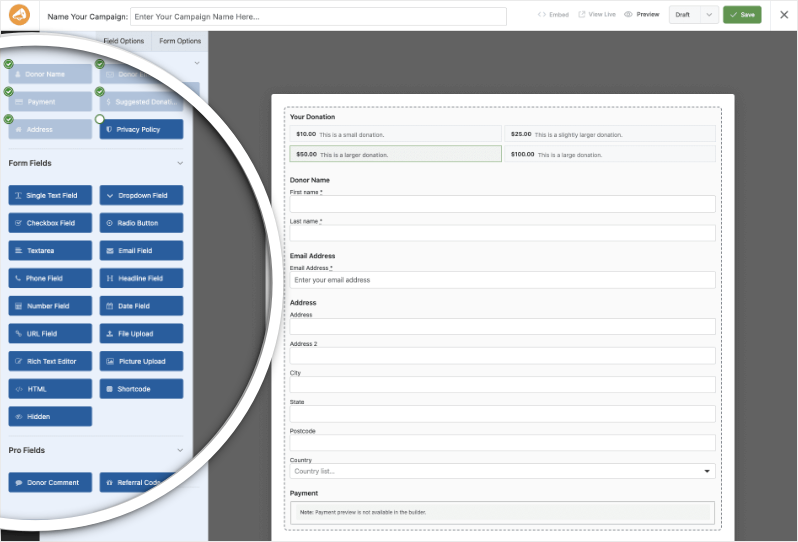
🏗️ Visual Donation Form Builder

Building the perfect donation form just got easier. We have completely reimagined how you create forms with a new drag-and-drop interface.

Design Visually, in Real-Time

No coding, no guessing. Just point, click, and build.

Say goodbye to confusing settings pages. You can now edit your form and see exactly what your donors will see, instantly.

  • 🖱️ Drag & Drop: Easily add fields like names, addresses, or file uploads by dragging them exactly where you want them.

  • 🎨 Customize everything: Click any field to tweak labels, placeholders, and requirement settings on the fly.

  • 👁️ Live preview: See your changes immediately as you make them—ensure your form flows perfectly before you hit publish.

Flexible & Powerful

Works with all your existing campaigns.

  • 🧩 Deep customization: Add custom HTML, shortcodes, or CSS classes for advanced branding.

  • ⚙️ Smart fields: Collect exactly what you need with support for dropdowns, checkboxes, dates, and hidden fields.