

A donation ‘Thank You’ email can be really easy to miss. However, these seemingly simple thank-you letters to donors are more like a donor retention hack. When done right, they can be very effective at converting one-time donors into repeat donors or donors for life. Although you have some flexibility when it comes to the content, you must optimize your message so it inspires the recipients to donate even more.
Now, you send a ‘Thank You’ email for obvious reasons. Mainly, you want your message to express gratitude for the donations made. But it can do more. You can actually use it to prompt readers to do even more for your cause and campaigns that they care about.
In this tutorial, we’ll show you a number of best practices to make your donation ‘Thank You’ more effective. We’ll also provide some examples and templates to give you some inspiration. But before that, let’s take a quick look at a donation ‘Thank You’ email infrastructure.
Your Donation ‘Thank You’ Email Infrastructure
Your first task is to decide how you will send your ‘Thank You’ emails. There are two options: Use your email client or opt for a dedicated email marketing app. Here’s a rundown on both:
- Your email client. It’s familiar, straightforward, and doesn’t need much setup. This is typically you copying/pasting a template and sending it each time you receive a donation. As you can tell, if you deal with a high volume of donations – as a thriving nonprofit should – you’ll find this to be an unworkable solution. However, you can set up limited automation for it. This can save you considerable time and effort.
- Email marketing software. Alternatively, you can use a dedicated email communications/marketing app such as MailChimp, MailPoet, ActiveCampaign, and more. These apps include all the functionalities you need to send beautiful and automated thank-you emails.
There’s also a third option actually!
With the Charitable plugin, you can send instant email receipts to your donors. With some customization, you can adapt these to be a ‘Thank You’ email notification too. Just how cool is that!
In general, each donation ‘Thank You’ email that you send should have the same template and format. For example: Your template should be branded. This means you should make your email consistent with your brand colors, typography choices, copy, voice, and tone.
You must also use images in your template because images help readers connect better. It’s best when you use real visuals — in-situ stills of your work, the beneficiaries a donation will go towards, and more.
Let’s now get to the copy part — the heart of your donation ‘Thank You’ email.
Composing Your Donation ‘Thank You’ Email
Your subject line is the first thing the reader will see after they receive your donation email, so you’ll want to make sure it can grab attention. The goal is to get the reader to open the email in the first place. Emails within the nonprofit space only have a 25 percent open rate, so you’ll need to maximize your chances.
There are different approaches you can take but keep these pointers in mind:
- Include a personal touch (more of this in a minute).
- Keep the subject line short but informative.
- Don’t give too much away, but offer enough to help the reader understand what the email is about.
‘Power words’ can help pique curiosity in the subject lines. Consider the following examples that combine all of these elements:
{name}, thank you! Discover the impact of your donation.
Learn how your generous gift helps those who need it in {city}.
While we’re on the subject, we should talk some more about personalization – it’s a concept you’ll want to use often in the nonprofit space.
The Importance of Personalization
Dale Carnegie’s books and courses teach one aspect of social connection really well… that people like to hear their own name. It’s almost their favorite thing. So it’s no wonder that one of the most common email personalization tactics is to use the recipient’s name.
Now, there’s nothing wrong with a simple “Hello!” or “Dear Donor!” in the salutation when opening an email (or in the subject line). But including a name makes the whole email more personal. If you combine this with informal or business informal language, you can write in a conversational tone:
…{name}, we have to tell you how much we value your recent donation to our current campaign…
…what will you do, {name}? Residents in {country} need life-saving medicine, and your input can help save lives…
However, in order to include a personalized name, you need to ask for it. This is no problem in theory, although studies show that the more fields a person has to fill out, the less they will complete the form.
Writing Your ‘Thank You’ Email
The bulk of your donation ‘Thank You’ email work will go toward getting this copy done. After all, a donation ‘Thank You’ email wouldn’t be much without that “thanks!” There are three key aspects to get this right:
- Include sincere appreciation for the donation or interest you received for your campaign.
- State how the donation (or potential) donation will help those who need it.
- Use an informal – or at least a conversational – tone.
We’d also suggest that you keep your email short, although this will depend on your campaign, nonprofit organization, the nature of the donation, and the amount of the donation. For a real-life case that ticks all of these boxes, check out this classic Charity: Water mail:
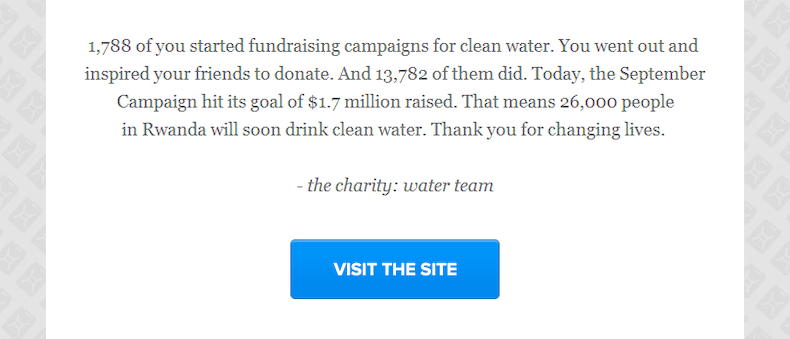
This is a great ‘Thank You’ template for your own emails. Notice how it uses social proof too.
Here’s a sample ‘Thank You’ letter based on it (using animal shelter as the cause):
Hello {donor name},
Due to your generous donation, we are one step closer to our goal of {campaign goal}. We couldn’t do this without support from you. So from all of us at {nonprofit}, thank you.
You’re one of {number} donors helping animals find new homes. So far, your support has already helped rehabilitate {X} animals. Your donation gives our team the resources to vet potential new forever homes for our furry friends and also provide medical assistance to them.
Once again, thank you for your support!
You’ll notice how we included the number of donors, which is essential to creating a sense of community and working together. Speaking of which, there is more you can do to help spread word about your cause.
Asking Donors to Help Promote Your Campaign
If you go to the effort to send out a donation ‘Thank You’ email, it makes sense to try and get some extra publicity. Your email is a good opportunity to ask the reader to promote your cause/campaign. There are two main benefits:
1. You can encourage donations from a reader’s friends and social contacts.
2. Those who can’t provide monetary support can still help by publicizing your cause through social media. This can be a straightforward element of your email template. For example:
While we’re here, we’d appreciate you telling others about our current drive through Facebook and Instagram.
Make sure you tell others about how you helped us. Give us a social shoutout on Facebook, Twitter, and Instagram!
Each of these should include links to the relevant social media channels. Using this as a ‘P.S.’ can also work.
Other Inclusions
There are a few other elements too that you’ll want to include in your email template that aren’t “‘marquee features,” but can help you connect better with the recipients. For example:
- Include your contact information, such as an email address, phone number, and registered address. This helps the reader contact you if they need to. It’s good within your footer or at the end of the email body.
- Make sure you include a receipt for the donation if it’s relevant and necessary. This is for the donor’s records and serves as a reminder of why they get the email.
The Charitable plugin lets you send receipts after every donation you receive. This is perfect, because you can customize the content to read as a ‘Thank You’ message too, without extra work.
Ending Your Email
Once you have a subject line, some suitable body copy, and some of the other elements we just covered, you can finish up your email.
In some cases, the identity of the sender is anonymous, such as with Charity: Water. However, for most nonprofit organizations, you’ll want to include a staff member in a leadership position or a specific person who deals with the public to sign off your email.
It doesn’t have to be a complex sign-off. This is good enough:
Thanks again for your support,
Jane Faversham, Executive Director, HollyPals Pet Sanctuary
As long as the signature includes a salutation, name, job title, and your organization’s name, you’ll do enough to remind the reader of who you are.
Also ensure that the email address you send from is of a monitored inbox. This means you’ll want to forgo [email protected] or [email protected] and instead set up a dedicated inbox for the sender.
Send Your Donation ‘Thank You’ Email
Once your template is ready, you’re good to start sending it. While we can’t tell you how to send your email (as every platform differs), we can offer a pointer or two on how to set things up. Here’s what you should remember:
- Make sure you set up your email template, so it sends after every donation.
- There should be a way to personalize the template and have it autofill from your contact list. However, remember to only use placeholders that you have information for, or the recipients will see weird tags.
- You can consider setting up multiple email templates to send to your different audience segments. This concept is beyond the scope of the article, but it’s a great way to customize/personalize emails.
Charitable’s email notification features can help you out here. With Charitable, you’re able to add campaign-specific content to your donation receipt emails. This turns a generic transactional email into a full-fledged and personalized ‘Thank You’ email notification!
How Charitable Can Help You Say “Thank You” to Your Donors
Charitable is a complete nonprofit solution for WordPress websites. The Charitable WordPress donation plugin gives you all the core features you need to take and process donations on your site.
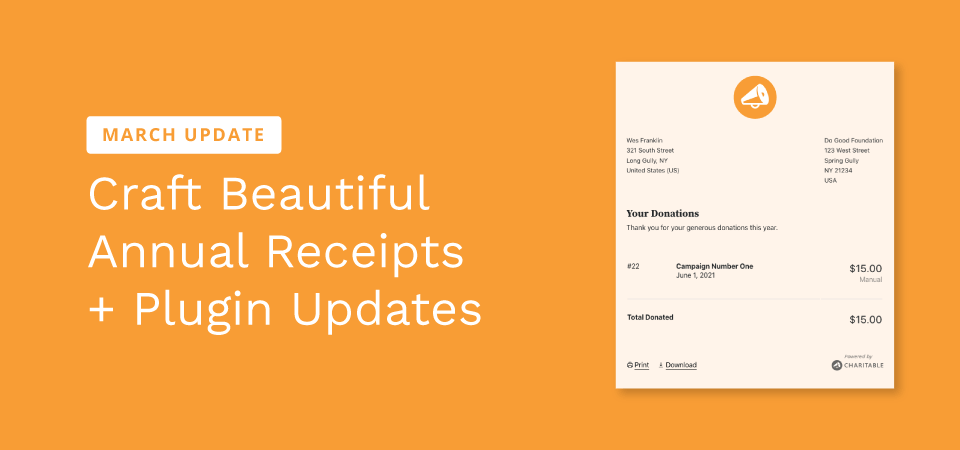
Charitable gives your nonprofit organization website all the functionalities it needs to power its day-to-day ops:
- You have a quick, fuss-free way to implement a complex and powerful donation infrastructure on your WordPress website.
- Each donation form is compatible with privacy regulations across the globe, including the GDPR.
- You’re able to carry out donor management using the familiarity of the WordPress admin screen.
You’ll also find a number of premium upgrades to help enhance the experience. For example, you can connect your preferred email marketing platform to Charitable. In addition, you can also connect it with your Easy Digital Downloads account. You also get support for a number of payment gateways. Extensions also allow the ability to implement fee relief, automatic and recurring donations, crowdfunding functionality, and the possibility to set up a peer-to-peer fundraising network. Combined, all of these could see you send out more ‘Thank You’ emails than ever before, as your donations will skyrocket!
Most of the Charitable plugin’s functionalities ship with the Essentials or Growth plans. From $119 per year, you can grow your own online donation fundraising without a third-party or intermediary. Higher-tiered plans also let you activate Charitable on multiple sites.
Conclusion
Sending a donation ‘Thank You’ email is a great way to connect with and engage both first-time donors and those donating regularly. You can even send thank you emails to people who subscribe to your cause, even if they haven’t turned donors, yet.
But as you just saw, thank-you messages need to do more than just read well and sound genuine. Nonprofit thank-you letters shouldn’t just help your donors feel more connected with your nonprofit and contribute more but also encourage them to get you new donors by helping you reach more people. Hopefully, the tips you just read are all you need to take your donor thank-you letters from good to great. For more letter examples, check out some of these.
If you use the Charitable WordPress donation plugin, you can simply enable email receipts that double up as ‘Thank You’ notifications. You can make Charitable’s email features 10X more powerful with our Newsletter Connect extension. Depending on the email marketing platform you use, this can unlock several more features.
And, of course, along with this feature, you get all the functionalities you need to power your nonprofit. You can use a payment gateway of your choice. Charitable supports Stripe, Braintree, Authorize.Net, and more. You can even set up and accept automatic and recurring donors to your campaigns. It’s also possible to offer fee relief and Gift Aid support.
If you like the idea of what Charitable can do for you, check out the available plans, and sign up for an account. Each purchase comes with a 30-day money-back guarantee – no questions asked.







Leave a Reply