
There’s no denying how social media can help make or break your fundraising efforts. This is especially true for some of the bigger platforms such as Facebook. A savvy nonprofit will lean on and leverage the millions of Facebook users in order to boost a campaign.
However, the huge user base isn’t the only benefit for running a Facebook advertising campaign. That audience can become a marketing arm for you too, and could help you reach more potential donors without any extra work on your part.
In this tutorial, we’re going to go through the entire process of creating Facebook Ads for nonprofits. In fact, let’s jump right into things with the most important step: planning your ads.
Planning Your Facebook Campaign: 6 Key Questions
Over the course of this tutorial, we’re going to show you how creating Facebook ads for nonprofits is straightforward. However, it will require some planning and forethought.
The next few sections will discuss what you should think about and have in place before you begin. Once we cover this, we’ll then look at the process of creating a nonprofit’s Facebook ad, and measuring its success.
1. What Is the Focus of Your Facebook Ad Campaign?
The answer to this question should go deeper than: “To get donations from users”. Of course, this is the key goal, but consider where you’ll channel the donations once you receive them.
For this question, first nail down the following considerations:
- Is this a general fundraising drive, or do you have a specific reason or campaign in mind?
- Do you have a donation goal to reach, or does the campaign have an open end?
Both of these may seem simplistic and easy to skip over, but they can form the backbone of every decision you make during the campaign. Once you have both your reason and goal set, you can begin to look into how you’ll collect donations from users.
2. How Are You Going to Collect Donations?
For this part of the plan, think about your method of collection. This could be through Facebook itself, through a redirection to a landing page on your website, and all manner of other setups.
If you choose to collect donations through Facebook, you’ll need to enroll for Facebook Payments, and check your eligibility. However, if you want to collect donations through your website, it also needs some additional functionality. This is something we’ll discuss in more detail later.
Facebook Ads Manager uses three main objectives to help you define your process of fundraising:
- Awareness. For our purposes, we’re going to make visitors aware of our campaign through Facebook advertisements. However, you can choose whether you’ll target a broad cross-section of users, or a defined slice of them.
- Consideration. This is how Facebook defines the method through which you’ll solicit donations, and also ties into your goal. For example, you can look to drive app installs, video views, lead generation, or traffic to your page and primary website.
- Conversion. This considers how you’ll convert users to donate, whether that’s through simple conversions, visits to an online store, or through product and catalog sales.
The aspect of awareness ties into your target audience, because you’ll need to know who to serve your eventual ads to. We’ll look at this next.
3. Who is the Target Audience for Your Facebook Ad Campaign?
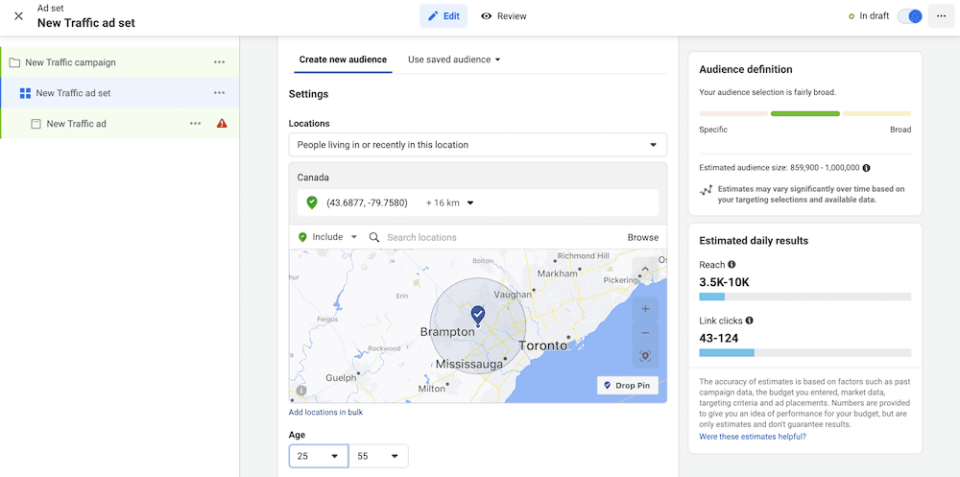
For lots of nonprofits, you may already know who your target audience is. This can be as simple as it sounds, in that you’ll need a rough idea of the age range and location for your proposed audience.
While you can dig into concepts such as ‘target personas’ here, you might not need to. Facebook offers a simple set of parameters here:
- Location. This is where the user states their primary location to be.
- Age. You’ll define a range here, and a narrow one is often more optimal.
- Gender. Here, you’ll define whether you want to target male-presenting people, female-presenting, or all users.
- Language. It makes sense that if you wish to target a specific language, your ad will need to serve that market.
Most of the answers here are intuitive. For example, a cat sanctuary in the US will likely want to target local, English-speaking female-presenting users around 25–55. This is a generalization of course, but you’ll need to create definitions in order to run successful ads. Broad is often not better, although you could look to run multiple ads for different audience groups.
4. Where Will You Run Your Facebook Ads?
Speaking of which, you can also choose where you run your Facebook ad. Often, you get two choices:
- Let Facebook decide the onsite placement.
- Handle the ad placement yourself.
The option you choose here is subjective. However, we’d argue that taking control of placement is a good idea if you have a defined vision.
On the flip side, Facebook will have knowledge of optimal locations on its pages. After all, it will need to benefit from your ads too, so offering poor locations is not in its best interests – nor yours.
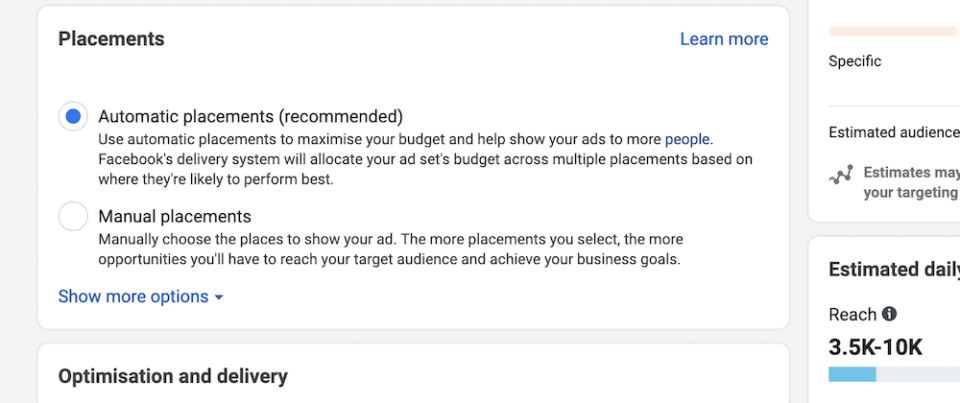
As a further consideration, your budget might also determine your placement strategy. Taking charge of this could see your costs rise through non-optimal placement, although Facebook’s automated option could put your budget down its list of priorities.
5. How Much Can You Spend on Your Facebook Ads?
Given that we’re talking about money, it’s a good time to think about your budget and ‘ad spend’. This might be something you already have in mind, but it’s also worth considering your monetary resources within the context of how Facebook uses it.
Facebook lets you set either a daily or lifetime budget, and you don’t have to worry about overspending. If you exhaust the budget you set within Facebook, your ad will cease to run.
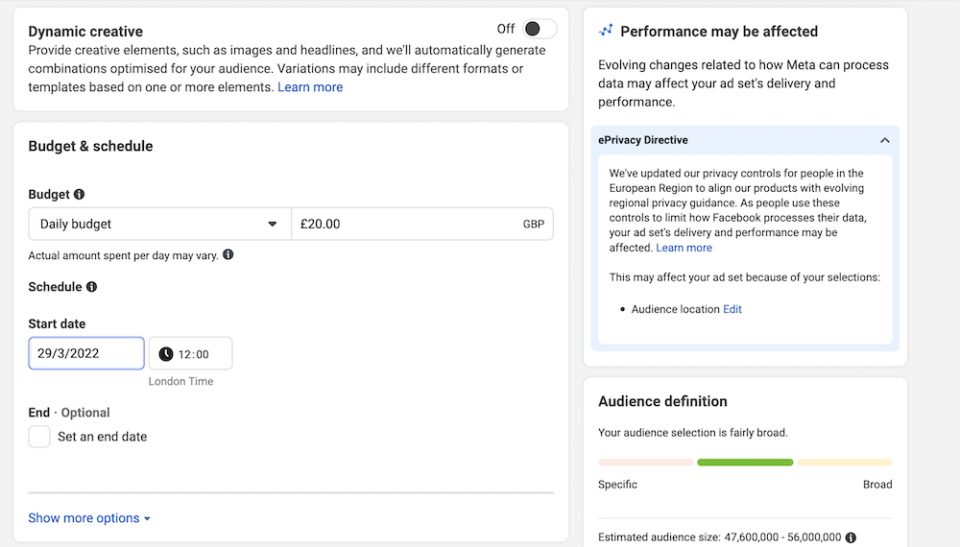
Again, this aspect is going to depend on your nonprofit, resources, campaign goal, and almost every other element combined. If you have a small budget (as it is for many nonprofits) you might want to set a lifetime budget here. However, you’ll likely have more control over your campaign’s reach using a daily budget.
Regardless, you’ll want to set an end date, even for a perpetual campaign drive. This gives you some ‘break points’ to analyze your campaign and make tweaks for the future.
6. What Format Will Your Facebook Ads Take?
A Facebook ad has a number of different formats to choose from. For example, you can opt for a single image, use Stories, Messenger, showcase a small video, and more. They will all display with the newsfeed of the users you target.
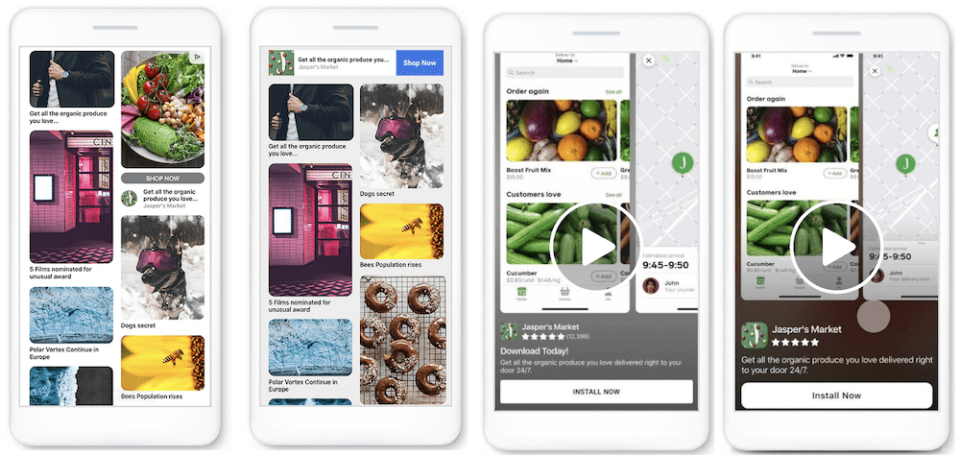
There’s a temptation to try and spread your campaign across all of the available formats, but variety is always good, there are drawbacks to consider:
- You might not have the digital marketing budget to cover every format in an optimized way.
- Some formats might suit your target audience better than others.
We’d suggest you pick no more than two formats for your campaign, and create ad copy around them. This might seem counter-intuitive, but it will give your fundraiser some focus. Regardless of the formats you choose, make sure you nail the following:
- Pare down your copy into short, digestible insights. You won’t have much time to capture attention or get your point across.
- Use images that grab attention, and can invoke a reader to want to click for more information.
- Use a bold Call To Action (CTA) to give users clear guidance on how to donate.
With these tips in mind, you’ll be ready to fire up Facebook Ads Manager and design your new campaign.
How to Create a Facebook Ad Campaign in Facebook Ads Manager
Before you begin, you’ll need an active Facebook page for your business, and an account. Once you have these in place, head to the dedicated page for Facebook Ads, and click ‘Create an Ad’ from the drop-down menu. This should bring you to the Facebook Ads Manager dashboard:
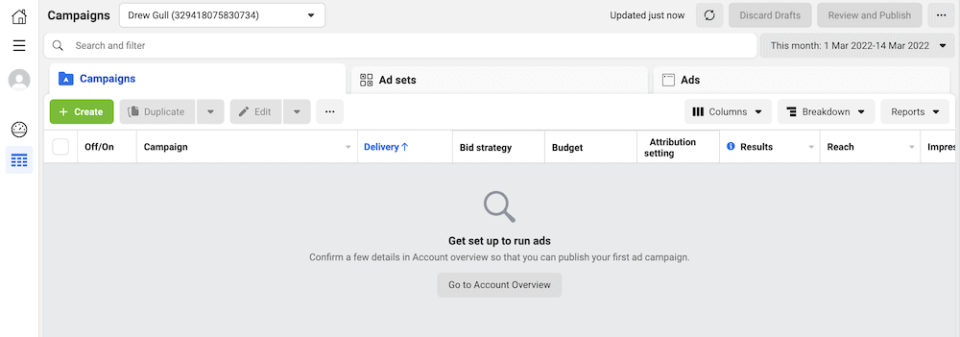
Here, you can click any of the buttons that reference creating an ad to start the process. The first task is to choose your objective:
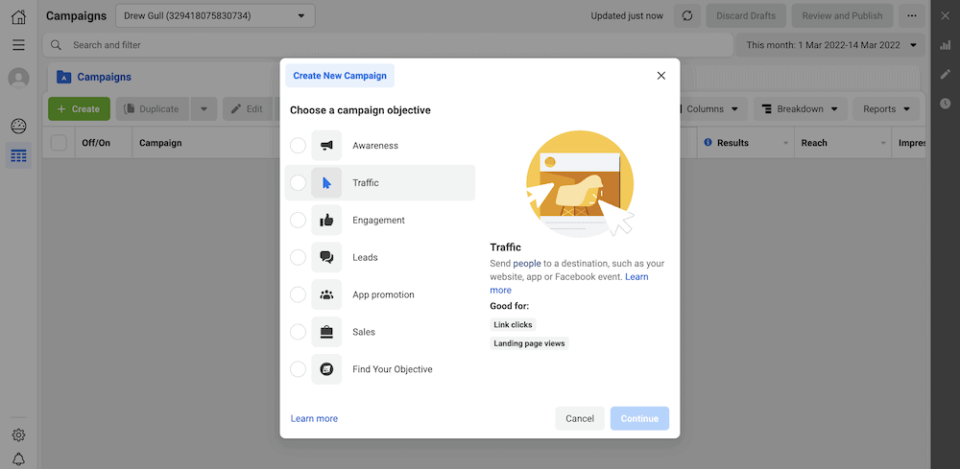
This will bring you to the new campaign screen, where you’ll choose a name, then continue to choose an ad name:
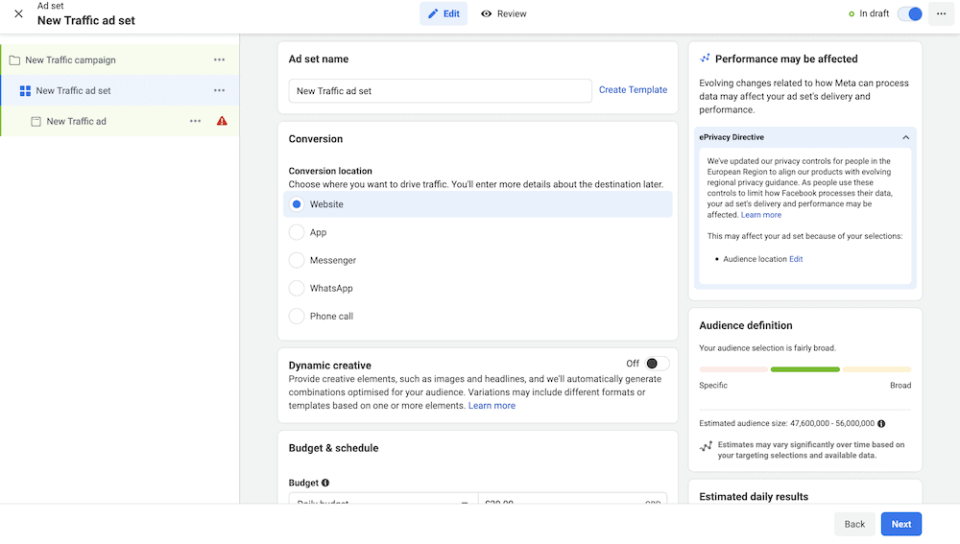
From here, you’ll choose a conversion type and budget, then look to define and refine your audience. You can go into extra depth here, including dropping a pin on exact locations to create a custom audience:
The next set of options lets you set up your ad’s format and creative aspects such as a title and CTA:
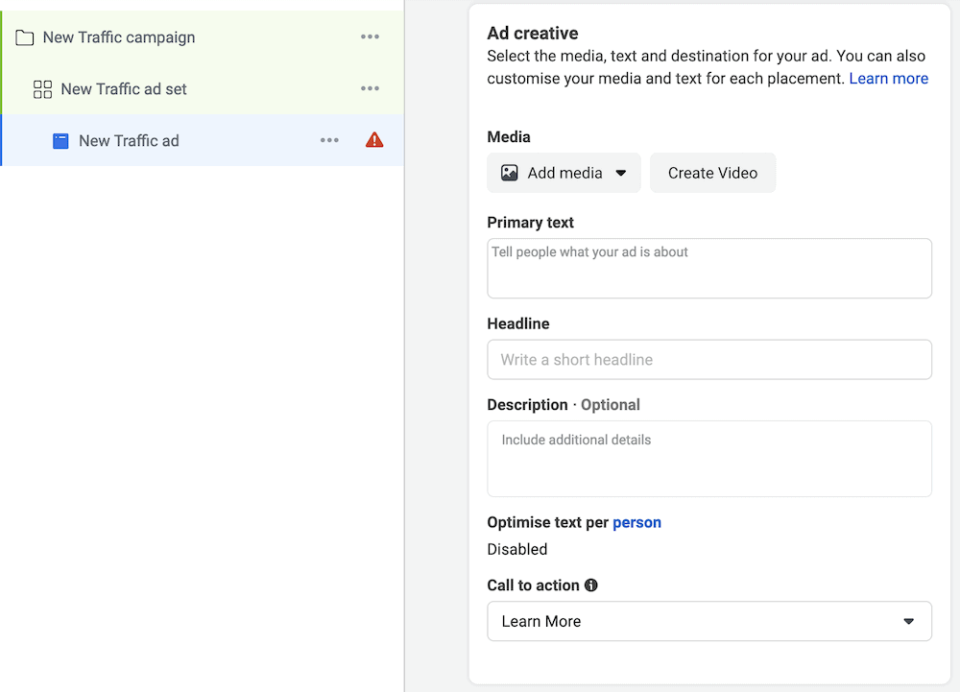
However, to see how these look on the screen, you’ll want to head to the final page.
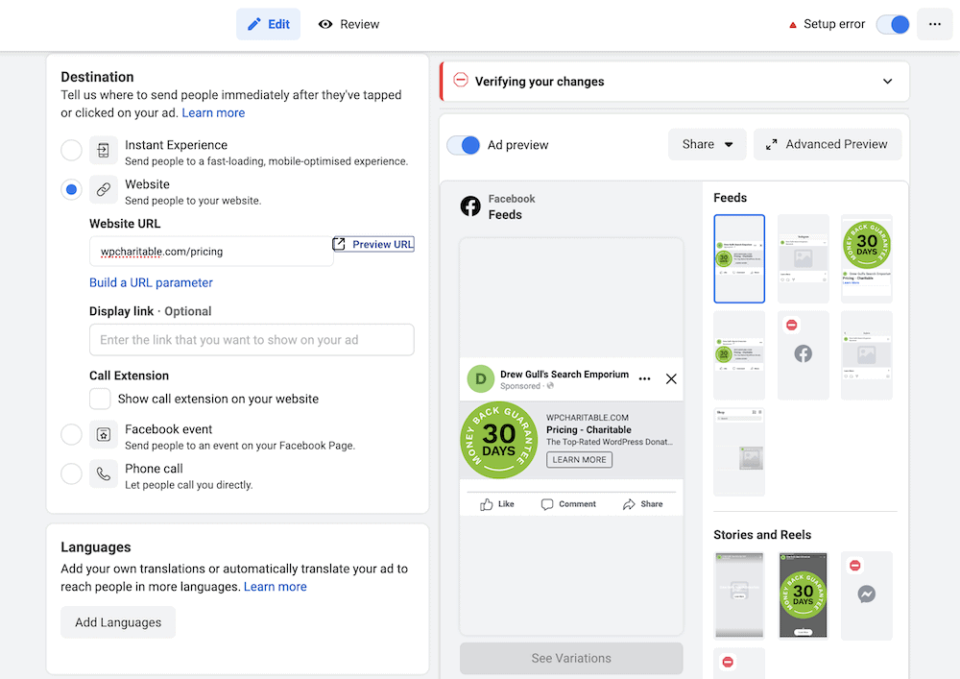
This is where you’ll set a destination for the user. You’ll determine this from your planning stage, and whether you want to direct users to an external website to collect donations.
How to Measure the Success of Your Facebook Ad Campaign
Once you launch your campaign and begin to see some action, you’ll likely want to determine how optimal it is. You can do this using the various metrics within Facebook Ads Manager:
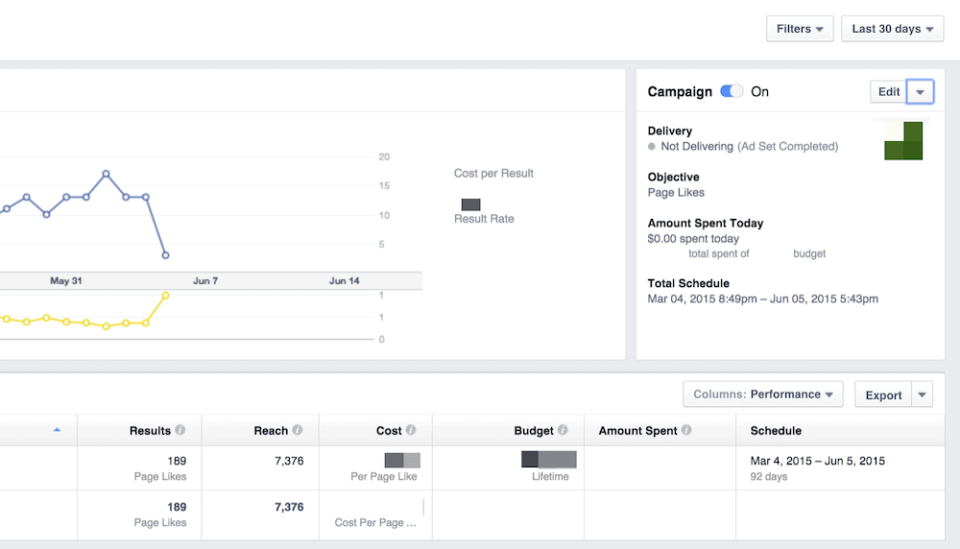
With this information, you can tweak your campaigns and boost your conversion rate. The goal is to lower the resultant ‘Cost-Per-Click’ (CPC), and you can do this in a few different ways:
- If you refine your demographic, you might see less organic reach. However, with more defined targeting, you could boost the quality of those conversions. For your nonprofit, this equals more donations.
- A different format for your campaigns could make the difference. Video is often more lucrative than images, for example.
- You might decide to alter the location of your ads, or let Facebook make the decision if you chose to control that aspect.
At this point, you might want to alter the copy and media you use, given that you’ve looked at all of the other factors. In some cases, your visuals can mean the difference between success and failure for your campaign.
From here, you have everything you need to run a successful fundraising campaign for your nonprofit organization within Facebook Ads Manager. However, it’s worth coming back to an element we talk about earlier in the article: Where you direct your users.
How Charitable Can Help Get Users From Facebook to Your Website
If you choose to direct users to your website to donate, you’ll need a way to implement that functionality. Charitable is a top WordPress donation plugin that helps visitors give money to your cause.
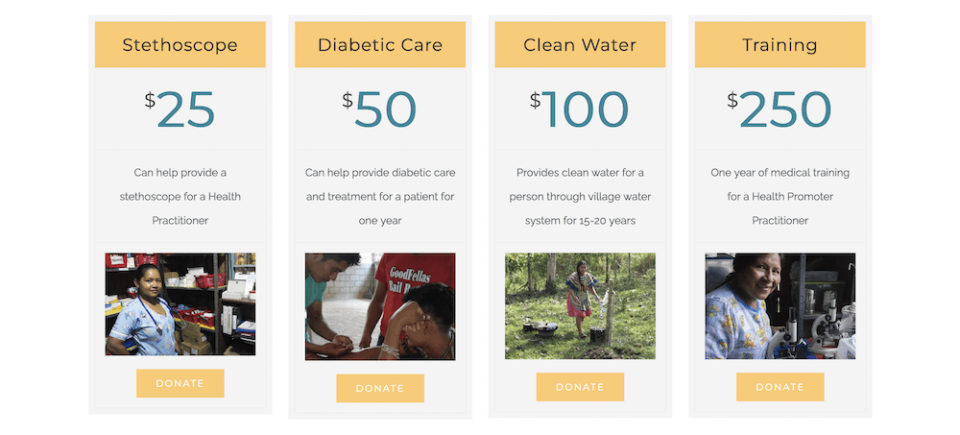
It provides a number of powerful features:
- A user-friendly interface to help you create fundraising campaigns within five minutes.
- Donation forms that comply with modern privacy laws such as the General Data Protection Regulation (GDPR).
- Campaign and plugin management through the familiar WordPress dashboard.
- A selection of payment gateways, such as PayPal, Stripe, Braintree, Authorize.net, and more.
- Connections to a number of other services and solutions. For example, you can connect to email marketing services such as MailChimp, file storage and delivery such as Easy Digital Downloads, and others.
- You’re able to set up peer-to-peer fundraising, recurring donations, subscribers, automatic crowdfunding, and myriad other formats.
Charitable also offers a risk-free money-back guarantee for every plan. At $119, the Essentials tier contains almost every feature Charitable offers. However, the Growth plan includes fee relief, Gift Aid, and more.
Conclusion
Facebook ads can help a nonprofit reach more people, and earn a greater number of donations. However, you won’t want to keep those new supporters on the social media platform forever. A better approach is to send them from Facebook to your own website. This way, you can better control how a user donates to your nonprofit.
A WordPress website is a fantastic way to capture donations for your cause. Regardless of whether you are eligible to ask for donations through Facebook, your own website won’t have those restrictions. What’s more, you can boost your brand awareness through your own website.
While you might see a lower number of conversions, you’ll have a greater number of quality ‘conversions’ in the form of donors. Charitable can be an integral cog in the wheel. The Essential and Growth plans let you implement a number of key features:
- A number of payment gateways to choose from, such as Stripe, Braintree, Authorize.net, and more.
- The ability to place donation forms almost anywhere on your website.
- A way to connect donors to your newsletter accounts to send them further details on campaigns and your nonprofit.
- The option to set up recurring and anonymous donations.
- Fee relief, Gift Aid support, and more.
There’s a Charitable pricing plan for almost all nonprofits. What’s more, you get a 30-day money-back guarantee on all purchases!





Leave a Reply