
The Donations Feed displays a live, scrollable list of recent donations on any page or post – helping you build transparency, inspire visitors, and create social proof for your campaigns. It is available on Charitable Pro plugin 1.8.13+.
Available as both a shortcode and a Gutenberg block, the Donations Feed is fully customizable: choose between a list/table view or a card grid, control exactly which donor information is shown, apply color theming, and enable AJAX pagination – all without touching a line of code.
Table of Contents
Key Features
First, you get two types of views – the list view and table view with column headers, and a responsive card grid -switch with a single setting.
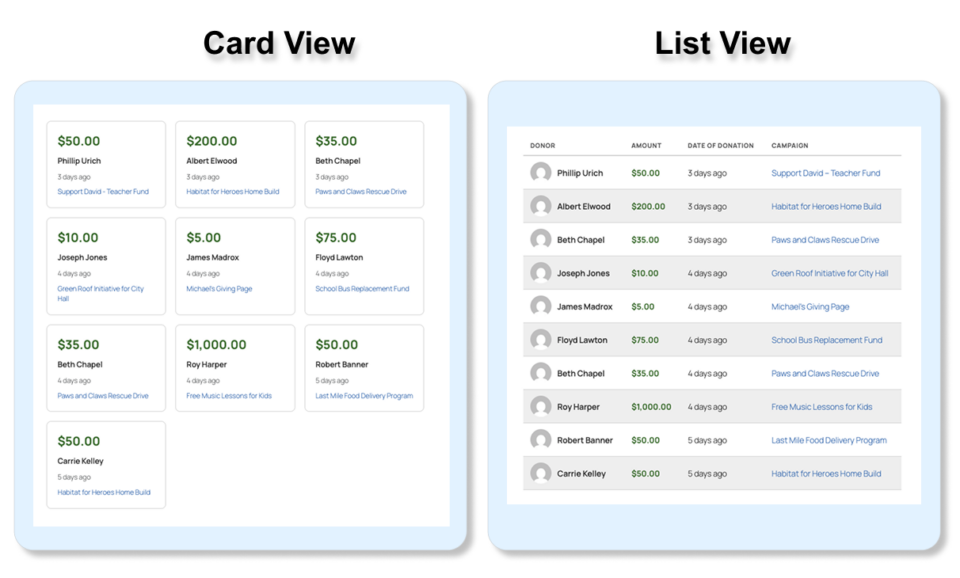
Other features include:
- Flexible Display Options: Show or hide avatars, first name, last name, donation amount, date, comment, campaign name, and donor location independently.
- Smart Filtering: Filter by campaign, date range (including custom from/to dates), minimum amount, donor name search, or a specific list of donation IDs.
- Donor Grouping: Optionally collapse multiple donations from the same donor into a single entry showing their total, with a “Total” badge.
- AJAX Pagination: Numbered pages or a Load More button – both fully AJAX-driven without page reloads.
- Show Table Header Toggle: Optionally hide the column header row in list view for a cleaner embedded look.
- Color Theming: Seven independent color controls (primary/accent, amount, border, alternate row background, hover background, header text, secondary text).
- Font Size and Card Alignment: Per-block font size scaling and left/center/right card alignment for the card grid.
- Donor Location: Display city, state, and/or country beneath the donor name – each field individually toggled.
- Anonymous Donation Support: Anonymous donations show a placeholder name and avatar;
include_anonymouscontrols whether they appear at all. - Developer Filter Hooks: Nine
apply_filters()hooks throughout the query, data, display, and output pipeline for full customization by developers.
Why Use a Donations Feed?
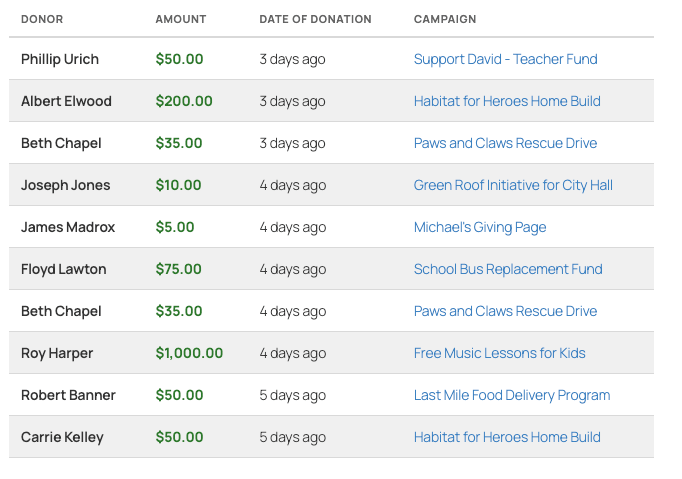
A Donations Feed shows visitors that real people are giving – right now. This kind of social proof can meaningfully increase conversions on campaign and fundraising pages.
- Transparency: Let supporters see the impact of the community around them.
- Social Proof: Seeing a stream of recent donations encourages hesitant visitors to give.
- Recognition: Donors appreciate knowing their contribution was acknowledged publicly.
- Engagement: A live feed on a homepage or campaign page keeps content feeling fresh and active.
- Trust: Visible donor activity signals that your organization is active and well-supported.
Use Cases
- Display recent donations on a campaign-specific page to show momentum.
- Embed a site-wide feed on the homepage to celebrate your entire donor community.
- Show a filtered feed of donations above a certain amount to highlight major gifts.
- Use the card view in a sidebar or widget area for a compact “donor wall” effect.
- Use
donation_idsto hand-pick specific donations for a curated showcase. - Use
groupby_donorto create a simplified donor roll that shows totals rather than individual transactions. - Display the feed anonymized (with
show_first_name=0 show_last_name=0) for privacy-conscious campaigns.
See It In Action
A video will be posted here soon – check back shortly!
Getting Started
Requirements
- Charitable Pro (version 1.8.13 or later)
- WordPress 6.2 or later
- PHP 7.4 or later
Activation
The Donations Feed shortcode and block are automatically available as soon as Charitable Pro is activated – no additional steps required. The shortcode tag is [charitable_donations_feed] and the block appears in the block editor under the Widgets category as Donations Feed.
Usage Methods
Shortcode
Add the shortcode to any page, post, widget, or template file:
[charitable_donations_feed]This renders the feed with all default settings – list view, 10 most recent donations, all fields shown.
Basic example with common options:
[charitable_donations_feed view="card" number="12" cards_per_row="4" orderby="amount"]Filtering to a specific campaign:
[charitable_donations_feed campaign="42" number="5" show_campaign="0"]Using in a PHP template:
echo do_shortcode( '[charitable_donations_feed view="list" number="20" pagination="on"]' );WordPress Gutenberg Block
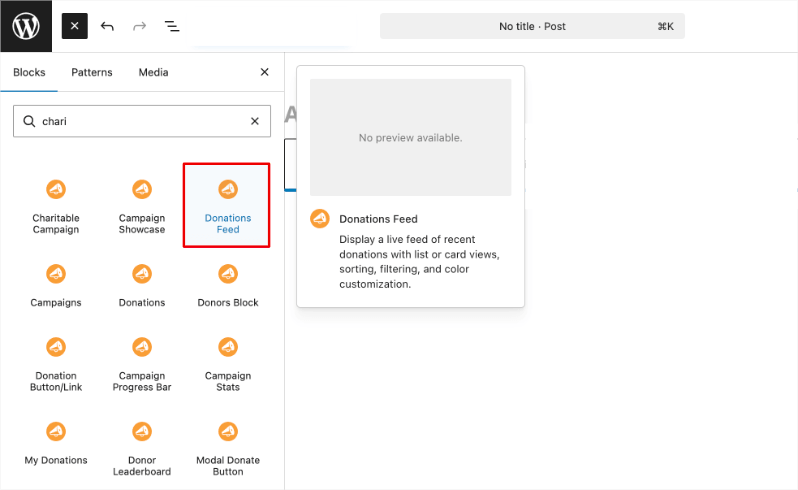
- Open the WordPress block editor on any page or post.
- Click the + inserter and search for Donations Feed.
- Click the block to insert it. A live server-side preview renders immediately.
- Open the block settings sidebar (right panel) to configure all options:
- Content panel – View type, title, description, number of donations, and cards per row (card view only).
- Filters panel – Campaign, sort by, order, date range, minimum amount, donor name search, and specific donation IDs.
- Display Fields panel – Toggle visibility of table header, avatar, first/last name, amount, date, comments, campaign name, location (with city/state/country sub-toggles).
- Pagination panel – Enable pagination and choose between numbered pages or a Load More button.
- Styling panel – Alternate row colors, font size, and card alignment.
- Colors panel – Seven individual color pickers for full theme control.
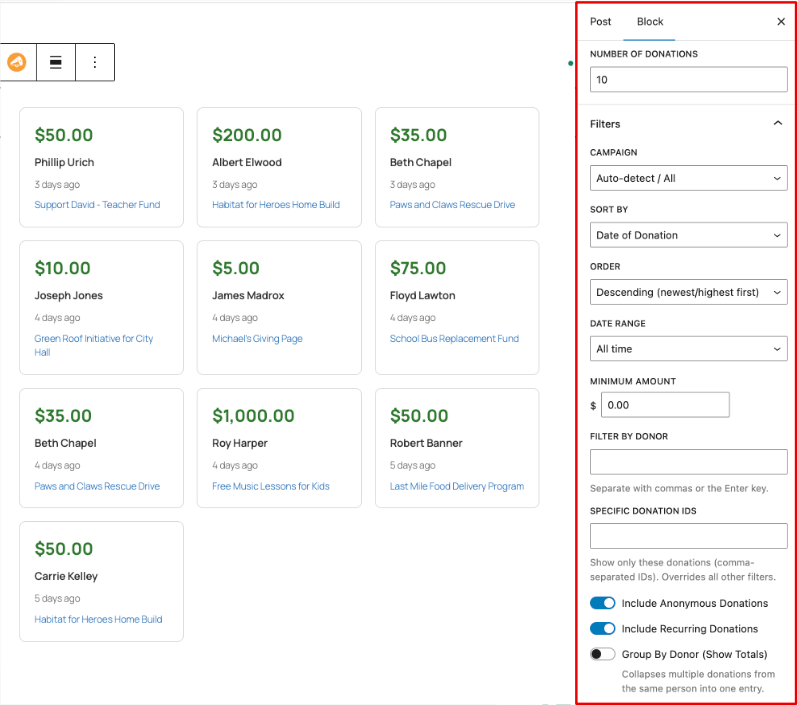
The block preview updates in real time as you change settings in the sidebar.
Complete Parameter Reference
Note: All boolean parameters accept
1/0,true/false,yes/no, oron/off.
Core Parameters
view
- Type: String
- Default:
list - Options:
list|card - Description: Controls the overall layout.
listrenders a responsive table with column headers.cardrenders a CSS grid of individual donation cards. - Example:
view="card"
number
- Type: Integer
- Default:
10 - Description: The maximum number of donations to display per page. When pagination is enabled, this is the number shown per page.
- Example:
number="20"
cards per row
- Type: Integer
- Default:
3 - Description: Only applies when
view="card". Sets the number of columns in the card grid. On tablet screens (≤900px), the grid automatically collapses to 2 columns; on mobile (≤480px) it collapses to 1. - Example:
cards_per_row="4"
card_alignment
- Type: String
- Default:
left - Options:
left|center|right - Description: Only applies when
view="card". Aligns the text and inline elements within each card. - Example:
card_alignment="center"
font_size
- Type: Integer
- Default:
14 - Description: Sets the base font size in pixels for all text within the feed. Child elements sized in
emunits scale proportionally. - Example:
font_size="16"
Filter Parameters
campaign
- Type: String (numeric ID)
- Default: (auto-detect)
- Description: Filter donations to a single campaign by its WordPress post ID. When used on a campaign page, the campaign is auto-detected and this parameter can be omitted. Pass an empty string for all campaigns.
- Example:
campaign="42"
orderby
- Type: String
- Default:
date - Options:
date|amount|first_name|last_name|campaign_name - Description: The field used to sort the donation results.
- Example:
orderby="amount"
order
- Type: String
- Default:
DESC - Options:
DESC|ASC - Description: Sort direction.
DESCshows newest/highest first;ASCshows oldest/lowest first. - Example:
order="ASC"
date_range
- Type: String
- Default:
all_time - Options:
all_time|last_7_days|last_30_days|last_year|custom - Description: Limits results to donations within a time window. Use
customwithdate_fromanddate_toto specify an exact range. - Example:
date_range="last_30_days"
date_from
- Type: String (YYYY-MM-DD)
- Default: (empty)
- Description: Start date for a custom date range. Only used when
date_range="custom". - Example:
date_from="2025-01-01"
date_to
- Type: String (YYYY-MM-DD)
- Default: (empty)
- Description: End date for a custom date range. Only used when
date_range="custom". - Example:
date_to="2025-12-31"
minimum_amount
- Type: Float
- Default:
0 - Description: Only show donations at or above this amount. Useful for highlighting significant contributions. Set to
0to include all amounts. - Example:
minimum_amount="25"
include_anonymous
- Type: Boolean
- Default:
1 - Description: Whether to include donations marked as anonymous. When enabled, anonymous donors are displayed with a placeholder name (“Anonymous”) and a generic avatar.
- Example:
include_anonymous="0"
include_recurring
- Type: Boolean
- Default:
1 - Description: Whether to include recurring donation payments in the feed.
- Example:
include_recurring="0"
groupby_donor
- Type: Boolean
- Default:
0 - Description: When enabled, collapses multiple donations from the same donor into a single entry displaying their cumulative total. A “Total” badge is shown on grouped entries. Useful for creating a donor roll rather than a transaction log.
- Example:
groupby_donor="1"
donor_search
- Type: String
- Default: (empty)
- Description: Filter results to a specific donor by name (partial match on first name, last name, or full name). If a numeric value is provided, it is treated as a donor ID for an exact match.
- Example:
donor_search="Jane"ordonor_search="42"
donation_ids
- Type: String (comma-separated integers)
- Default: (empty)
- Description: Show only the specific donation IDs listed. This overrides all other filter parameters (campaign, date range, minimum amount, etc.) – only the listed donations appear.
- Example:
donation_ids="101,205,308"
Display Parameters
show_header
- Type: Boolean
- Default:
1 - Description: Show or hide the column header row (DONOR, AMOUNT, DATE OF DONATION, COMMENT) in list view. Has no effect in card view.
- Example:
show_header="0"
show_avatar
- Type: Boolean
- Default:
1 - Description: Show or hide the donor’s Gravatar/profile avatar. Anonymous donors show a generic silhouette avatar.
- Example:
show_avatar="0"
showfirstname
- Type: Boolean
- Default:
1 - Description: Show or hide the donor’s first name. Can be used independently of
show_last_nameto display only a first name for privacy. - Example:
show_first_name="0"
showlastname
- Type: Boolean
- Default:
1 - Description: Show or hide the donor’s last name. Combine with
show_first_name="0"to hide all name information. - Example:
show_last_name="0"
show_amount
- Type: Boolean
- Default:
1 - Description: Show or hide the donation amount. Formatted using the site’s active currency settings.
- Example:
show_amount="0"
show_date
- Type: Boolean
- Default:
1 - Description: Show or hide the donation date. Displayed as a relative time (e.g., “3 days ago”) with the full date/time shown on hover as a tooltip.
- Example:
show_date="0"
show_comment
- Type: Boolean
- Default:
1 - Description: Show or hide donor comments. When a comment exceeds
comment_words, it is truncated with a “Read more” toggle (no page reload). - Example:
show_comment="0"
comment_words
- Type: Integer
- Default:
20 - Description: Maximum number of words to show before truncating a donor comment with a “Read more” link. Only applies when
show_comment="1". - Example:
comment_words="30"
show_campaign
- Type: Boolean
- Default:
0 - Description: Show or hide the campaign name for each donation. Useful when displaying a site-wide feed spanning multiple campaigns. Position is controlled by
campaign_display. - Example:
show_campaign="1"
campaign_display
- Type: String
- Default:
column - Options:
column|inline - Description: Only applies when
show_campaign="1"in list view.columnadds a dedicated Campaign column to the table.inlinedisplays the campaign name below the donor name in smaller text. - Example:
campaign_display="inline"
show_location
- Type: Boolean
- Default:
0 - Description: Show or hide the donor’s primary address location (city, state, and/or country) below their name. The location is pulled from the donor’s primary address on file. Use
show_city,show_state, andshow_countryto control individual components. - Example:
show_location="1"
show_city
- Type: Boolean
- Default:
1 - Description: Show or hide the city portion of the donor’s location. Only applies when
show_location="1". - Example:
show_city="0"
show_state
- Type: Boolean
- Default:
1 - Description: Show or hide the state/province portion of the donor’s location. Only applies when
show_location="1". - Example:
show_state="0"
show_country
- Type: Boolean
- Default:
1 - Description: Show or hide the country portion of the donor’s location. Only applies when
show_location="1". Useful for single-country organizations where country is redundant. - Example:
show_country="0"
Pagination Parameters
pagination
- Type: Boolean
- Default:
0(off) - Description: Enable AJAX-driven pagination. When enabled, use
pagination_typeto choose between numbered pages and a Load More button. - Example:
pagination="1"
pagination_type
- Type: String
- Default:
pages - Options:
pages|load_more - Description: Only applies when
pagination="1".pagesshows numbered page links with Previous/Next and a “Showing X to Y of Z donations” summary.load_moreshows a single button that appends the next batch of results below the existing list. - Example:
pagination_type="load_more"
Title and Text Parameters
title
- Type: String
- Default: (empty)
- Description: Optional heading displayed above the feed. Rendered as an
<h2>element with thecharitable-donations-feed-titleclass. - Example:
title="Recent Donations"
description
- Type: String
- Default: (empty)
- Description: Optional subheading or introductory text displayed below the title and above the feed.
- Example:
description="Thank you to everyone who has contributed!"
css_class
- Type: String
- Default: (empty)
- Description: One or more additional CSS classes added to the outermost wrapper
<div>. Use to apply custom styling from your theme. - Example:
css_class="my-feed sidebar-feed"
Styling Parameters
alt_rows
- Type: Boolean
- Default:
1(on) - Description: Enable alternating row background colors in list view. The alternate background color is controlled by the
color_bg_altparameter or CSS variable. - Example:
alt_rows="0"
Color Customization Parameters
All color parameters accept any valid CSS color value: hex (#3A81C1), rgb(), hsl(), or named colors. Pass an empty string to use the default.
color_primary
- Type: String (CSS color)
- Default:
#3A81C1 - Description: Primary/accent color. Used for pagination button backgrounds, campaign links, and the “Read more” link color.
- Example:
color_primary="#e05c1a"
color_amount
- Type: String (CSS color)
- Default:
#2c7a2c - Description: Color of the donation amount text (green by default to convey positive value).
- Example:
color_amount="#1a6e8e"
color_border
- Type: String (CSS color)
- Default:
#d9d9d9 - Description: Color of row dividers, card borders, and pagination button borders.
- Example:
color_border="#cccccc"
colorbgalt
- Type: String (CSS color)
- Default:
#f0f0f0 - Description: Background color of alternating rows (list view) or the grouped badge background.
- Example:
color_bg_alt="#f5f0e8"
colorbghover
- Type: String (CSS color)
- Default:
#f5f5f5 - Description: Background color applied when hovering over a row (list view) or a card (card view).
- Example:
color_bg_hover="#eaf4fb"
colortextheader
- Type: String (CSS color)
- Default:
#636364 - Description: Color of the column header labels (DONOR, AMOUNT, etc.) and any sub-labels using
font-size: 11px. - Example:
color_text_header="#444444"
colortextinfo
- Type: String (CSS color)
- Default:
#797b7c - Description: Color of secondary text – relative dates, donor location, campaign name in inline mode, and comment text.
- Example:
color_text_info="#888888"
Examples
Basic – All Defaults
[charitable_donations_feed]Shows the 10 most recent donations from all campaigns, list view, all fields visible, no pagination.
Card Grid for a Campaign Page
[charitable_donations_feed view="card" cards_per_row="3" card_alignment="center" number="9"]Highlight Major Donors
[charitable_donations_feed minimum_amount="100" orderby="amount" order="DESC" number="5" title="Our Champions" description="These donors have gone above and beyond."]Anonymous-Friendly with First Name Only
[charitable_donations_feed show_last_name="0" include_anonymous="1" show_comment="0" number="15"]Donor Roll (Grouped Totals)
[charitable_donations_feed groupby_donor="1" orderby="amount" number="20" show_date="0" show_comment="0" title="Our Donors"]Collapses all donations per person into one entry showing their cumulative total, sorted from highest to lowest.
Load More Pagination, Last 30 Days
[charitable_donations_feed pagination="1" pagination_type="load_more" number="10" date_range="last_30_days"]Campaign-Specific Feed with Location
[charitable_donations_feed campaign="88" show_location="1" show_city="1" show_state="1" show_country="0" show_campaign="0"]Curated Showcase of Specific Donations
[charitable_donations_feed donation_ids="101,205,308,412" show_header="0" view="card" cards_per_row="4"]Custom Color Theme
[charitable_donations_feed color_primary="#c0392b" color_amount="#c0392b" color_border="#f0c0bb" color_bg_alt="#fdf5f5" color_bg_hover="#fce8e8"]Customization
Template Overrides
The Donations Feed uses two template files that can be overridden from your active theme:
Plugin template locations:charitable-pro/templates/donations-feed/donations-feed-list.php (list view) charitable-pro/templates/donations-feed/donations-feed-cards.php (card view)
To override, copy to your theme:your-theme/charitable/donations-feed/donations-feed-list.php your-theme/charitable/donations-feed/donations-feed-cards.php
Variables available inside templates:
| Variable | Type | Description |
|---|---|---|
$donations | array | Array of donation data arrays (see below) |
$total_count | int | Total number of matching donations (for pagination math) |
$args | array | Normalized shortcode/block arguments |
Keys available in each $donation array:
| Key | Description |
|---|---|
donation_id | WordPress post ID of the donation |
donor_id | Charitable donor ID |
name | Display name (pre-formatted, respects anonymous setting) |
raw_first_name | First name (raw, for conditional display) |
raw_last_name | Last name (raw, for conditional display) |
amount | Donation amount (float) |
date | Donation date in GMT (Y-m-d H:i:s) |
comment | Donor comment (raw text) |
avatar_html | Full <img> HTML for the donor avatar |
is_anonymous | Boolean – whether the donation is anonymous |
is_grouped | Boolean – whether this is a grouped total entry |
campaign_name | Campaign title |
campaign_link | URL to the campaign page |
location | Array with keys city, state, country |
CSS Customization
The feed uses namespaced BEM-style classes. Key classes:
Wrapper:css .charitable-donations-feed /* outermost wrapper (all views) */ .charitable-donations-feed-list /* list view modifier */ .charitable-donations-feed-cards /* card view modifier */ .charitable-donations-feed-alt-rows /* alternate row modifier (list view) */
List View:css .charitable-donations-feed-table /* the <table> element */ .charitable-donations-feed-col-donor /* donor column th/td */ .charitable-donations-feed-col-amount /* amount column th/td */ .charitable-donations-feed-col-date /* date column th/td */ .charitable-donations-feed-col-campaign /* campaign column th/td */ .charitable-donations-feed-col-comment /* comment column th/td */ .charitable-donations-feed-row /* each <tr> */ .charitable-donations-feed-donor-info /* flex container: avatar + name */ .charitable-donations-feed-donor-name /* donor name text */ .charitable-donations-feed-donor-location /* city/state/country line */
Card View:css .charitable-donations-feed-cards-grid /* CSS grid container */ .charitable-donations-feed-card /* individual card */ .charitable-donations-feed-card-amount /* amount hero in card */ .charitable-donations-feed-card-donor /* donor row in card */ .charitable-donations-feed-card-date /* date in card */ .charitable-donations-feed-card-campaign /* campaign name in card */ .charitable-donations-feed-card-comment /* comment block in card */
Example : add a left border accent to cards:css .charitable-donations-feed-card { border-left: 4px solid #3A81C1; }
CSS Variables
All visual defaults are controlled by CSS custom properties on the .charitable-donations-feed wrapper. Override them globally or scope them to a specific instance using its unique id.
| Variable | Default | Controls |
|---|---|---|
--charitable-df-primary | #3A81C1 | Accent color (links, buttons) |
--charitable-df-amount | #2c7a2c | Donation amount text |
--charitable-df-border | #d9d9d9 | Row dividers, card borders |
--charitable-df-bg-alt | #f0f0f0 | Alternate row background |
--charitable-df-bg-hover | #f5f5f5 | Row/card hover background |
--charitable-df-text-header | #636364 | Column header labels |
--charitable-df-text-info | #797b7c | Secondary/meta text |
--charitable-df-font-size | 14px | Base font size |
--charitable-df-cards-per-row | 3 | Card grid columns |
Global override example:css .charitable-donations-feed { --charitable-df-primary: #c0392b; --charitable-df-amount: #c0392b; --charitable-df-border: #f0c0bb; }
Instance-specific override (use the block’s Custom CSS Class field or a unique wrapper): “`css
my-homepage-feed {
--charitable-df-font-size: 16px;
--charitable-df-bg-alt: transparent;
} “`
WordPress Filters and Hooks
The Donations Feed exposes nine filter hooks for developers who need to customize query logic, modify donation data before rendering, or alter the output HTML.
charitable_donations_feed_query_args
Filters the normalized arguments array immediately after shortcode/block attributes are parsed and validated. Use this to override any setting programmatically – for example, to force a campaign or minimum amount on all feed instances.
Parameters:
| Parameter | Type | Description |
|---|---|---|
$args | array | The full normalized arguments array |
Example:
// Always force-enable groupby_donor for all feeds.
add_filter( 'charitable_donations_feed_query_args', function( $args ) {
    $args['groupby_donor'] = true;
    return $args;
} );
charitable_donations_feed_where_clauses
Filters the SQL WHERE clauses array before the database query is executed. Each element in the array is a complete SQL fragment (safe, already prepared). Use this to add custom conditions – for example, to restrict results to a specific donor segment.
Parameters:
| Parameter | Type | Description |
|---|---|---|
$where | array | Array of SQL WHERE clause strings |
$args | array | The normalized arguments array |
Example:
// Exclude donations with a specific meta value.
add_filter( 'charitable_donations_feed_where_clauses', function( $where, $args ) {
    global $wpdb;
    $where[] = $wpdb->prepare(
        "d.donation_id NOT IN ( SELECT donation_id FROM {$wpdb->postmeta} WHERE meta_key = '_hide_from_feed' AND meta_value = '1' )"
    );
    return $where;
}, 10, 2 );
charitable_donations_feed_donation_data
Filters the data array for a single donation immediately after it is built from the database row. Use this to append custom fields, modify display values, or attach external data to each entry.
Parameters:
| Parameter | Type | Description |
|---|---|---|
$data | array | The donation data array (see template variables above) |
$row | object | The raw database row object |
Example:
// Add a custom badge field based on donation amount.
add_filter( 'charitable_donations_feed_donation_data', function( $data, $row ) {
    $data['badge'] = $data['amount'] >= 500 ? 'Major Donor' : '';
    return $data;
}, 10, 2 );
charitable_donations_feed_donations
Filters the complete array of donation data after all rows have been processed. Use this to re-sort, de-duplicate, or truncate the final result set before it is passed to the template.
Parameters:
| Parameter | Type | Description |
|---|---|---|
$donations | array | Array of all donation data arrays for this page |
$args | array | The normalized arguments array |
Example:
// Shuffle the donations for a randomized display.
add_filter( 'charitable_donations_feed_donations', function( $donations, $args ) {
    if ( ! empty( $args['randomize'] ) ) {
        shuffle( $donations );
    }
    return $donations;
}, 10, 2 );
charitable_donations_feed_display_name
Filters the display name string for a donor before it is placed into the donation data array. Use this to customize how names appear – for example, to use initials, a username, or a custom format.
Parameters:
| Parameter | Type | Description |
|---|---|---|
$name | string | The formatted display name |
$donor_id | int | The Charitable donor ID |
$donation_id | int | The WordPress donation post ID |
$anonymous | bool | Whether the donation is anonymous |
Example:
// Show only first name + last initial.
add_filter( 'charitable_donations_feed_display_name', function( $name, $donor_id, $donation_id, $anonymous ) {
    if ( $anonymous ) {
        return $name;
    }
    $parts = explode( ' ', $name, 2 );
    if ( isset( $parts[1] ) ) {
        return $parts[0] . ' ' . substr( $parts[1], 0, 1 ) . '.';
    }
    return $name;
}, 10, 4 );
charitable_donations_feed_avatar_html
Filters the complete <img> HTML string for a donor’s avatar. Use this to swap in a custom image, add CSS classes, or replace the avatar with a different element entirely.
Parameters:
| Parameter | Type | Description |
|---|---|---|
$html | string | The full <img> HTML |
$donor_id | int | The Charitable donor ID |
$donation_id | int | The WordPress donation post ID |
$size | int | Requested avatar size in pixels |
Example:
// Replace the avatar with a custom icon for VIP donors.
add_filter( 'charitable_donations_feed_avatar_html', function( $html, $donor_id, $donation_id, $size ) {
    if ( charitable_is_vip_donor( $donor_id ) ) {
        return '<img src="' . esc_url( get_stylesheet_directory_uri() . '/images/vip-badge.png' ) . '" width="' . $size . '" height="' . $size . '" class="charitable-donations-feed-avatar-img vip" alt="VIP Donor" />';
    }
    return $html;
}, 10, 4 );
charitable_donations_feed_donor_location
Filters the location data array for a donor before it is attached to the donation entry. Use this to override location values, translate country codes to names, or add fallback values.
Parameters:
| Parameter | Type | Description |
|---|---|---|
$location | array | Array with keys city, state, country |
$donor_id | int | The Charitable donor ID |
Example:
// Convert country codes to full names using a lookup.
add_filter( 'charitable_donations_feed_donor_location', function( $location, $donor_id ) {
    $country_names = array( 'US' => 'United States', 'CA' => 'Canada', 'GB' => 'United Kingdom' );
    if ( isset( $country_names[ $location['country'] ] ) ) {
        $location['country'] = $country_names[ $location['country'] ];
    }
    return $location;
}, 10, 2 );
charitable_donations_feed_args
Filters the final arguments array immediately before the database query runs, after all normalization and backward-compatibility processing. This is the last opportunity to modify arguments before they affect the query.
Parameters:
| Parameter | Type | Description |
|---|---|---|
$args | array | The fully normalized arguments array |
Example:
// Programmatically restrict feeds on a specific page to the last 30 days.
add_filter( 'charitable_donations_feed_args', function( $args ) {
    if ( is_page( 'donate' ) && 'all_time' === $args['date_range'] ) {
        $args['date_range'] = 'last_30_days';
    }
    return $args;
} );
charitable_donations_feed_css_variables
Filters the inline CSS variable string injected into the feed’s style attribute. Use this to append additional CSS custom properties or override existing ones programmatically.
Parameters:
| Parameter | Type | Description |
|---|---|---|
$css_string | string | The inline CSS variable declarations (e.g., --charitable-df-primary: #c00;) |
$args | array | The normalized arguments array |
Example:
// Automatically match the primary color to the active campaign's accent color.
add_filter( 'charitable_donations_feed_css_variables', function( $css_string, $args ) {
    if ( ! empty( $args['campaign'] ) ) {
        $accent = get_post_meta( $args['campaign'], '_campaign_accent_color', true );
        if ( $accent ) {
            $css_string .= ' --charitable-df-primary: ' . sanitize_hex_color( $accent ) . ';';
        }
    }
    return $css_string;
}, 10, 2 );
Troubleshooting
Feed shows no donations
- Confirm at least one donation with
Status: Completedexists in your database. - Check that the
campaignparameter (if set) matches a valid campaign post ID. - If using
donation_ids, verify the IDs are comma-separated integers with no spaces. - If using
minimum_amount, check whether any donations meet the threshold. - If using a custom
date_range="custom", ensuredate_fromanddate_toare inYYYY-MM-DDformat.
Donor names are cut off in list view
- This is typically caused by a theme stylesheet overriding the
white-space: nowraprule on the donor column. Add the following to your theme CSS:.charitable-donations-feed-list .charitable-donations-feed-donor-info { width: max-content; }
Pagination does not work
- Ensure
pagination="on"(or toggle it on in the block settings). - For the Load More button, verify that the
charitable_donations_feed_ajaxaction is not blocked by a security plugin or firewall. - Check your browser console for JavaScript errors that may indicate the
charitable_donations_feedJS object is not defined on the page.
Card view does not respect cards_per_row
- This setting is injected as a CSS custom property (
--charitable-df-cards-per-row). If a theme has agrid-template-columnsrule targeting.charitable-donations-feed-cards-grid, it may override the variable. Inspect with browser DevTools and add a more-specific rule if needed.
Location is empty even though the donor has an address
- The location feature reads the donor’s primary address from
charitable_donormeta. If the donor completed a donation without entering address fields, the address will be empty. Location fields are optional in the donation form by default.
FAQs
Can I show the feed for multiple specific campaigns at once? Not directly – the campaign parameter accepts a single campaign ID. Use donation_ids to hand-pick donations from multiple campaigns, or omit campaign entirely to show all campaigns and use show_campaign="1" to display the campaign name alongside each entry.
Does the Donations Feed show real-time donations without a page refresh? The feed is not a live WebSocket stream – it reflects the state of the database at page load (or pagination request). For a “near real-time” experience, use a short page cache TTL or disable page caching on pages with the feed.
Can I use the Donations Feed in a sidebar widget? Yes. Use the Shortcode widget (built into WordPress) or any widget that supports shortcodes. The card view at cards_per_row="1" works well in a narrow sidebar.
Does groupby_donor work with the donor search filter? Yes. When groupby_donor is enabled, the donor search still filters by name/donor ID, but the amount shown is the donor’s total across all matched donations.
Can I use the shortcode inside a page builder (Elementor, Divi, WPBakery)? Yes. Charitable Pro includes native integrations for Elementor and Divi. For WPBakery or other builders, use a shortcode element/module and paste the shortcode directly.
Will anonymous donations show any information? When include_anonymous="1" (the default), anonymous donations appear with the placeholder name “Anonymous” and a generic silhouette avatar. All other fields (amount, date, comment) display normally. Set include_anonymous="0" to exclude them entirely.
Additional Resources
- Donor Leaderboard Documentation – Related feature: ranked donor display with trophy icons.
- Charitable Template System – How to override templates from your theme.
- Charitable CSS Customization – General guide to styling Charitable output.
Changelog
| Version | Changes |
|---|---|
| 1.8.13 | Initial release of the Donations Feed shortcode and Gutenberg block. |


