
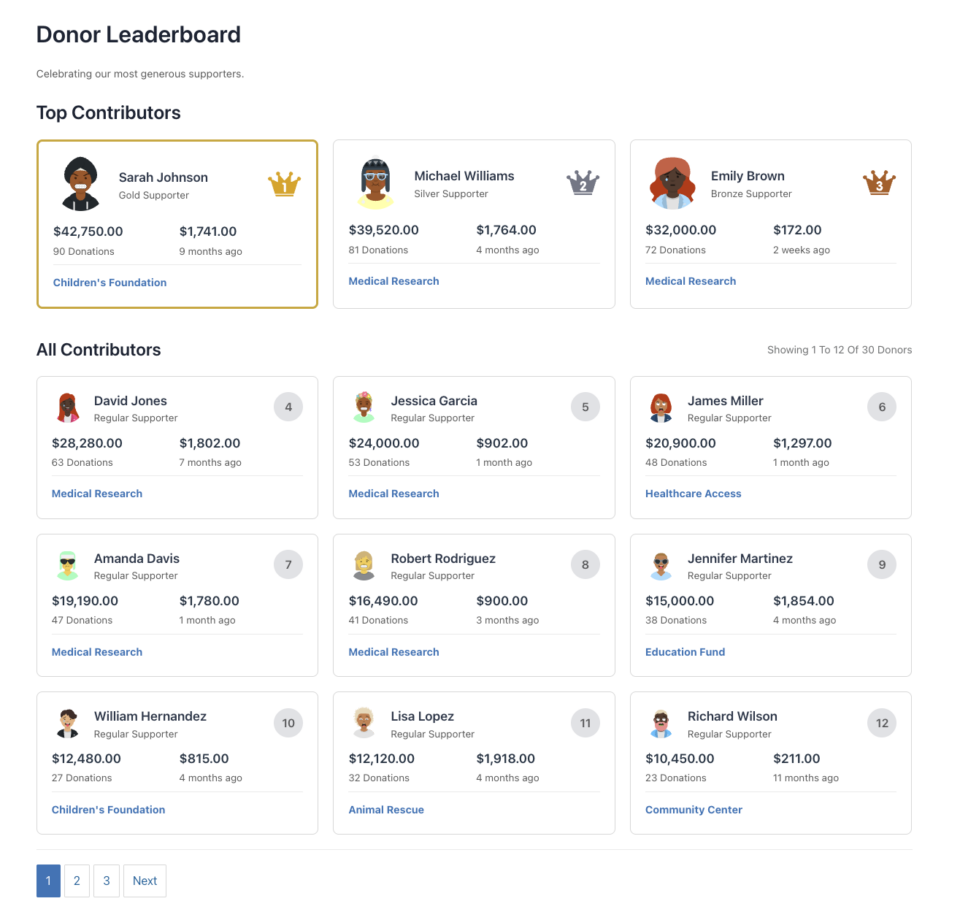
The Donor Leaderboard feature in Charitable Pro allows you to display a ranked list of your top donors, celebrating their generosity and encouraging others to contribute. This feature provides multiple ways to showcase donor achievements, from simple shortcodes to full Gutenberg block integration and seamless campaign builder support.
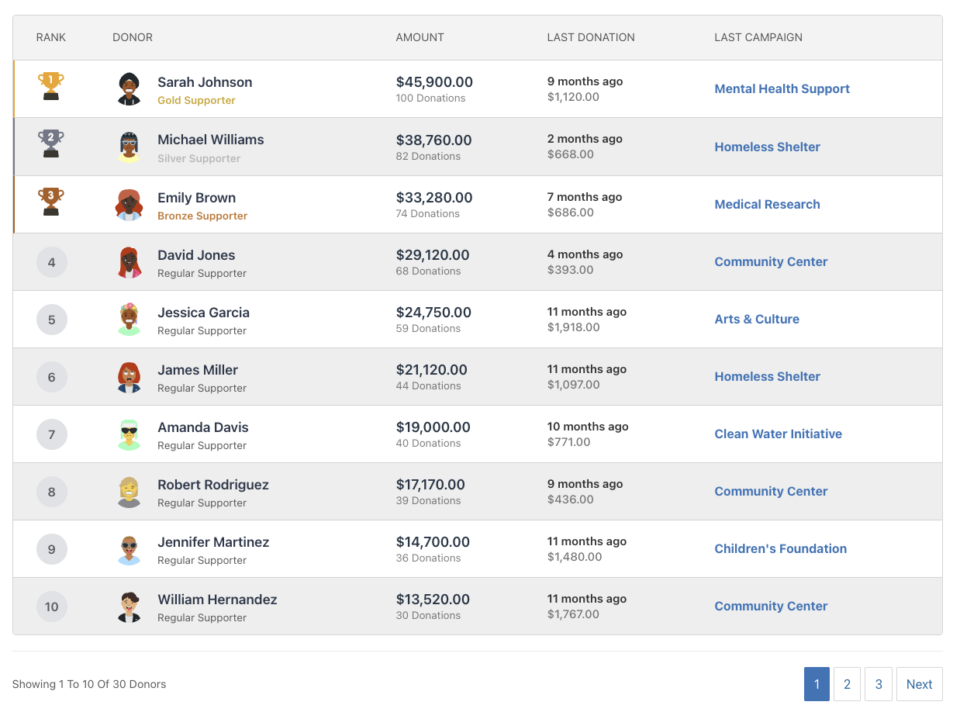
Table of Contents
Key Features
- Two View Types: List/Table view and Card view
- Flexible Display Options: Show or hide avatars, amounts, donation counts, last donation info, and more
- Campaign-Specific or Site-Wide: Display donors for a specific campaign or across all campaigns
- Pagination Support: Handle large donor lists with AJAX-powered pagination
- Customizable Styling: Override colors, icons, and titles to match your brand
- Recurring Donation Support: Include lifetime totals from recurring donations
- Team Integration: Support for Charitable Ambassadors team-based fundraising
- Responsive Design: Mobile-friendly layouts that adapt to any screen size
- Admin Notifications: Helpful messages for administrators when no data is available
Why Use a Donor Leaderboard?
A donor leaderboard serves multiple important purposes:
- Recognition: Publicly acknowledge and celebrate your most generous supporters
- Engagement: Create a sense of community and friendly competition
- Transparency: Show donors how their contributions compare to others
- Motivation: Encourage additional donations by showcasing top contributors
- Gamification: Add an element of achievement and status to giving
Use Cases
- Campaign Pages: Display top donors for a specific fundraising campaign
- Homepage: Show site-wide top contributors
- Thank You Pages: Recognize donors after they complete a donation
- Annual Reports: Highlight top supporters for the year
- Event Pages: Show leaderboards for event-based fundraising
- Team Fundraising: Display team member rankings (with Charitable Ambassadors)
See It In Action
Getting Started
Requirements
- Charitable Pro plugin (version 1.8.9.3 or later)
- WordPress 5.0 or later (for Gutenberg block support)
- PHP 7.4 or later
Activation
The Donor Leaderboard feature is included in Charitable Pro and is automatically available once the plugin is activated. No additional setup is required.
Usage Methods
The Donor Leaderboard can be added to your site in three ways:
Shortcode
The most flexible method, allowing you to add leaderboards anywhere shortcodes are supported.
Basic Usage:
[charitable_donor_leaderboard]
With Parameters:
[charitable_donor_leaderboard view="card" number="12" campaign="123"]
Where to Use Shortcodes
- Page/Post Content: Add directly in the WordPress editor
- Widgets: Use in Text widgets or HTML widgets
- Theme Templates: Add via PHP:
<?php echo do_shortcode('[charitable_donor_leaderboard]'); ?> - Page Builders: Most page builders support shortcodes
- Custom Code: Use in any PHP template file
Shortcode Tag
The shortcode tag is: charitable_donor_leaderboard
Note: For backward compatibility, the old tag charitable_leaderboard may still work, but charitable_donor_leaderboard is the recommended tag going forward.
WordPress Gutenberg Block
The Donor Leaderboard is available as a native WordPress block, making it easy to add and configure through the block editor.
Adding the Block
- Open the page or post editor in WordPress
- Click the + button to add a new block
- Search for “Donor Leaderboard” or “Leaderboard”
- Click on the Donor Leaderboard block to insert it
Block Settings
The block provides a visual interface to configure all leaderboard settings:
- View Type: Toggle between List and Card views
- Campaign: Select a specific campaign or “All Campaigns”
- Number of Donors: Set how many donors to display
- Display Options: Toggle visibility of avatars, amounts, counts, etc.
- Styling: Customize colors, icons, and titles
- Advanced: Set date ranges, minimum amounts, and more
Block Preview
The block editor shows a live preview of your leaderboard with placeholder data, allowing you to see how it will look before publishing.
Campaign Builder Field
The Donor Leaderboard can be added directly to campaign pages using the Visual Campaign Builder.
Adding to a Campaign
- Edit your campaign in WordPress
- Navigate to the Campaign Builder tab
- Click Add Fields in the left sidebar
- Find Leaderboard in the Pro Fields section (after Team field)
- Click to add the field to your campaign
Field Configuration
The Campaign Builder provides a settings panel for the leaderboard field:
- View Type: List or Card view
- Number of Donors: How many to display
- Pagination: Enable or disable pagination
- Display Settings: Control what information is shown
- Title Settings: Customize or hide titles
- Layout: Adjust width and alignment
Automatic Campaign Context
When used in the Campaign Builder, the leaderboard automatically defaults to showing donors for the current campaign. This can be overridden if needed.
Complete Parameter Reference
Core Parameters
view
- Type: String
- Default:
list - Options:
list|card - Description: Determines the display format
list: Table/List view with columnscard: Card-based grid layout with top 3 featured
- Example:
view="card"
campaign
- Type: String/Integer
- Default:
all - Options:
all|current| Campaign ID (integer) - Description: Which campaign’s donors to display
all: All campaigns site-widecurrent: Current campaign (useful in campaign builder)123: Specific campaign ID
- Example:
campaign="123"orcampaign="current"
number
- Type: Integer
- Default:
10(list view) |12(card view) - Description: Number of donors to display per page
- Note: Card view defaults to 12 (top 3 + 9 grid) if not specified
- Example:
number="20"
pagination
- Type: String/Boolean
- Default:
on - Options:
on|off|1|0|true|false - Description: Enable or disable pagination
- Example:
pagination="off"
paged
- Type: Integer
- Default: Auto-detected from URL
- Description: Current page number (usually auto-set, but can be manually specified)
- Example:
paged="2"
Filtering Parameters
minimum_amount
- Type: Float
- Default:
1 - Description: Minimum total donation amount to appear on leaderboard
- Example:
minimum_amount="50"
include_anonymous
- Type: Integer/Boolean
- Default:
0(false) - Options:
0|1|true|false - Description: Include anonymous donors in the leaderboard
- Example:
include_anonymous="1"
date_range
- Type: String
- Default:
all_time - Options:
all_time|this_year|this_month|this_week|custom - Description: Time period for donations
- Note: Use with
date_fromanddate_tofor custom ranges - Example:
date_range="this_year"
date_from
- Type: String (YYYY-MM-DD)
- Default:
"" - Description: Start date for custom date range
- Example:
date_from="2024-01-01"
date_to
- Type: String (YYYY-MM-DD)
- Default:
"" - Description: End date for custom date range
- Example:
date_to="2024-12-31"
Recurring Donation Parameters
include_recurring
- Type: Integer/Boolean
- Default:
1(true) - Options:
0|1|true|false - Description: Include recurring donations in totals
- Example:
include_recurring="1"
recurring_lifetime
- Type: Integer/Boolean
- Default:
1(true) - Options:
0|1|true|false - Description: Include lifetime totals from recurring donations
- Example:
recurring_lifetime="1"
recurring_status
- Type: String
- Default:
all - Options:
all|active|cancelled|completed - Description: Which recurring donation statuses to include
- Example:
recurring_status="active"
Team/Ambassador Parameters
Requires Charitable Ambassadors extension
team_id
- Type: Integer
- Default:
0 - Description: Show only donors from a specific team
- Example:
team_id="5"
parent_campaign
- Type: Integer
- Default:
0 - Description: Parent campaign ID for team-based campaigns
- Example:
parent_campaign="100"
team_members_only
- Type: Integer/Boolean
- Default:
0(false) - Options:
0|1|true|false - Description: Show only team members (not individual donors)
- Example:
team_members_only="1"
Display Parameters
show_avatar
- Type: Integer/Boolean
- Default:
1(true) - Options:
0|1|true|false - Description: Display donor avatars
- Example:
show_avatar="0"
show_name
- Type: Integer/Boolean
- Default:
1(true) - Options:
0|1|true|false - Description: Display donor names
- Note: Always shown, but can be hidden via CSS
- Example:
show_name="1"
show_amount
- Type: Integer/Boolean
- Default:
1(true) - Options:
0|1|true|false - Description: Display total donation amounts
- Example:
show_amount="1"
show_donation_count
- Type: Integer/Boolean
- Default:
1(true) - Options:
0|1|true|false - Description: Display number of donations
- Example:
show_donation_count="1"
show_last_donation
- Type: Integer/Boolean
- Default:
1(true) - Options:
0|1|true|false - Description: Display last donation date and amount
- Example:
show_last_donation="0"
show_last_campaign
- Type: Integer/Boolean
- Default:
1(true) - Options:
0|1|true|false - Description: Display last campaign donated to
- Example:
show_last_campaign="1"
show_supporter_level
- Type: Integer/Boolean
- Default:
1(true) - Options:
0|1|true|false - Description: Display supporter level (Gold, Silver, Bronze, Regular)
- Example:
show_supporter_level="1"
Sorting Parameters
orderby
- Type: String
- Default:
amount - Options:
amount|date|name - Description: How to sort donors
amount: By total donation amount (default)date: By most recent donationname: Alphabetically by donor name
- Example:
orderby="date"
order
- Type: String
- Default:
DESC - Options:
DESC|ASC - Description: Sort order (descending or ascending)
- Example:
order="ASC"
Title and Text Parameters
title
- Type: String
- Default:
"Donor Leaderboard" - Description: Main title/heading for the leaderboard
- Note: Leave blank to hide the title
- Example:
title="Our Top Supporters"ortitle=""to hide
description
- Type: String
- Default:
"Celebrating our most generous supporters." - Description: Subtitle/description text below the title
- Note: Leave blank to hide the description
- Example:
description="Thank you to everyone who contributed!"ordescription=""to hide
top_contributors_title
- Type: String
- Default:
"Top Contributors" - Description: Title for top 3 section (card view only)
- Note: Leave blank to hide
- Example:
top_contributors_title="Hall of Fame"
all_contributors_title
- Type: String
- Default:
"All Contributors" - Description: Title for remaining donors section (card view only)
- Note: Leave blank to hide
- Example:
all_contributors_title="All Supporters"
Styling Parameters
css_class
- Type: String
- Default:
"" - Description: Additional CSS classes to add to the leaderboard container
- Example:
css_class="my-custom-class another-class"
alt_rows
- Type: String/Boolean
- Default:
on - Options:
on|off|1|0|true|false - Description: Enable alternating row colors (list view)
- Example:
alt_rows="off"
cards_per_row
- Type: Integer
- Default:
3 - Description: Number of cards per row (card view only)
- Example:
cards_per_row="4"
Custom Icon Parameters
trophy_1st
- Type: String (URL)
- Default:
""(uses default SVG) - Description: Custom image URL for 1st place trophy (list view)
- Example:
trophy_1st="https://example.com/custom-trophy-1st.png"
trophy_2nd
- Type: String (URL)
- Default:
""(uses default SVG) - Description: Custom image URL for 2nd place trophy (list view)
- Example:
trophy_2nd="https://example.com/custom-trophy-2nd.png"
trophy_3rd
- Type: String (URL)
- Default:
""(uses default SVG) - Description: Custom image URL for 3rd place trophy (list view)
- Example:
trophy_3rd="https://example.com/custom-trophy-3rd.png"
crown_1st
- Type: String (URL)
- Default:
""(uses default SVG) - Description: Custom image URL for 1st place crown (card view)
- Example:
crown_1st="https://example.com/custom-crown-1st.png"
crown_2nd
- Type: String (URL)
- Default:
""(uses default SVG) - Description: Custom image URL for 2nd place crown (card view)
- Example:
crown_2nd="https://example.com/custom-crown-2nd.png"
crown_3rd
- Type: String (URL)
- Default:
""(uses default SVG) - Description: Custom image URL for 3rd place crown (card view)
- Example:
crown_3rd="https://example.com/custom-crown-3rd.png"
Color Customization Parameters
All color parameters accept hex color codes (with or without #).
color_primary
- Type: String (hex color)
- Default:
#3A81C1 - Description: Primary color for pagination active state and links
- Example:
color_primary="#FF5733"
color_rank_gold
- Type: String (hex color)
- Default:
#f1ac2c - Description: Border color for 1st place rank
- Example:
color_rank_gold="#FFD700"
color_rank_silver
- Type: String (hex color)
- Default:
#7e8491 - Description: Border color for 2nd place rank
- Example:
color_rank_silver="#C0C0C0"
color_rank_bronze
- Type: String (hex color)
- Default:
#b76626 - Description: Border color for 3rd place rank
- Example:
color_rank_bronze="#CD7F32"
color_text_header
- Type: String (hex color)
- Default:
#636364 - Description: Color for table header text
- Example:
color_text_header="#333333"
color_text_info
- Type: String (hex color)
- Default:
#797b7c - Description: Color for info text (e.g., “Showing X to Y”)
- Example:
color_text_info="#666666"
color_border
- Type: String (hex color)
- Default:
#d9d9d9 - Description: Border color for tables and cards
- Example:
color_border="#CCCCCC"
color_bg_rank
- Type: String (hex color)
- Default:
#e5e6e9 - Description: Background color for rank number circles
- Example:
color_bg_rank="#F0F0F0"
color_bg_alt
- Type: String (hex color)
- Default:
#f0f0f0 - Description: Background color for alternating rows
- Example:
color_bg_alt="#F5F5F5"
color_bg_hover
- Type: String (hex color)
- Default:
#f0f0f0 - Description: Background color for card hover state
- Example:
color_bg_hover="#FAFAFA"
Examples
Basic Examples
Simple Leaderboard
[charitable_donor_leaderboard]
Displays the default leaderboard with 10 donors in list view.
Card View
[charitable_donor_leaderboard view="card"]Displays 12 donors in card view format.
Campaign-Specific
[charitable_donor_leaderboard campaign="123"]
Shows top donors for campaign ID 123.
Current Campaign
[charitable_donor_leaderboard campaign="current"]
Shows donors for the current campaign (useful in campaign templates).
Advanced Examples
Top 20 Donors, No Pagination
[charitable_donor_leaderboard number="20" pagination="off"]
This Year’s Top Donors
[charitable_donor_leaderboard date_range="this_year" orderby="amount" order="DESC"]
Custom Date Range
[charitable_donor_leaderboard date_range="custom" date_from="2024-01-01" date_to="2024-12-31"]
Minimum $100 Donations
[charitable_donor_leaderboard minimum_amount="100"]
Custom Styling
[charitable_donor_leaderboard
    title="Our Generous Supporters"
    description="Thank you for your contributions!"
    color_primary="#FF5733"
    color_rank_gold="#FFD700"
    css_class="my-leaderboard"]
Card View with Custom Titles
[charitable_donor_leaderboard
    view="card"
    top_contributors_title="Hall of Fame"
    all_contributors_title="All Supporters"
    cards_per_row="4"]
Hide Specific Columns
[charitable_donor_leaderboard
    show_last_donation="0"
    show_last_campaign="0"
    show_supporter_level="0"]
Custom Icons
[charitable_donor_leaderboard
    trophy_1st="https://example.com/gold-trophy.png"
    trophy_2nd="https://example.com/silver-trophy.png"
    trophy_3rd="https://example.com/bronze-trophy.png"]
Team Leaderboard (Requires Ambassadors)
[charitable_donor_leaderboard
    team_id="5"
    team_members_only="1"]
Recurring Donations Only
[charitable_donor_leaderboard
    include_recurring="1"
    recurring_status="active"]
Real-World Use Cases
Homepage Leaderboard
[charitable_donor_leaderboard
    view="card"
    number="12"
    title="Our Top Supporters"
    description="Celebrating those who make our mission possible"]
Campaign Page Leaderboard
[charitable_donor_leaderboard
    campaign="current"
    view="list"
    number="10"
    title="Campaign Leaders"]
Annual Report Section
[charitable_donor_leaderboard
    date_range="this_year"
    number="50"
    pagination="on"
    title="2024 Top Donors"]
Minimal Leaderboard (No Extras)
[charitable_donor_leaderboard
    show_avatar="0"
    show_donation_count="0"
    show_last_donation="0"
    show_last_campaign="0"
    show_supporter_level="0"
    title=""
    description=""]
Customization
Template Overrides
To customize the leaderboard appearance, copy templates to your theme:
your-theme/
└── charitable/
    └── leaderboard/
        ├── leaderboard-list.php
        └── leaderboard-cards.php
Template Locations:
- List view:
charitable-pro/templates/leaderboard/leaderboard-list.php - Card view:
charitable-pro/templates/leaderboard/leaderboard-cards.php
Template Variables Available:
$donors: Array of donor objects with donation data$total_donors: Total number of donors matching criteria$args: All shortcode parameters
CSS Customization
The leaderboard includes comprehensive CSS classes for styling:
Main Container Classes
.charitable-leaderboard: Main wrapper.charitable-leaderboard-list: List/table view.charitable-leaderboard-cards: Card view.charitable-leaderboard-alt-rows: When alternating rows enabled
List View Classes
.charitable-leaderboard-table: Table element.charitable-leaderboard-rank: Rank column.charitable-leaderboard-donor: Donor column.charitable-leaderboard-amount: Amount column.charitable-leaderboard-last-donation: Last donation column.charitable-leaderboard-last-campaign: Last campaign column
Card View Classes
.charitable-leaderboard-card: Individual card.charitable-leaderboard-card-top: Top 3 cards container.charitable-leaderboard-card-all: Remaining cards container.charitable-leaderboard-card-avatar: Avatar image.charitable-leaderboard-card-info: Donor information.charitable-leaderboard-card-stats: Statistics section
Custom CSS Example
/* Custom leaderboard styling */
.charitable-leaderboard {
    margin: 40px 0;
}

.charitable-leaderboard-title {
    font-size: 2em;
    color: #333;
}

.charitable-leaderboard-table {
    border: 2px solid #000;
}

.charitable-leaderboard-card {
    box-shadow: 0 4px 6px rgba(0,0,0,0.1);
}
CSS Variables
The leaderboard uses CSS custom properties (variables) for color customization. These are automatically generated from shortcode parameters:
--charitable-lb-primary: #3A81C1;
--charitable-lb-rank-gold: #f1ac2c;
--charitable-lb-rank-silver: #7e8491;
--charitable-lb-rank-bronze: #b76626;
--charitable-lb-text-header: #636364;
--charitable-lb-text-info: #797b7c;
--charitable-lb-border: #d9d9d9;
--charitable-lb-bg-rank: #e5e6e9;
--charitable-lb-bg-alt: #f0f0f0;
--charitable-lb-bg-hover: #f0f0f0;
--charitable-lb-cards-per-row: 3; /* Card view only */
You can override these in your theme’s CSS:
.charitable-leaderboard {
    --charitable-lb-primary: #FF5733;
    --charitable-lb-rank-gold: #FFD700;
}
WordPress Filters and Hooks
Filters
charitable_donor_leaderboard_shortcode
Filter the complete leaderboard shortcode output.
Parameters:
$content(string): The HTML output$args(array): All shortcode parameters
Example:
add_filter( 'charitable_donor_leaderboard_shortcode', 'my_custom_leaderboard_wrapper', 10, 2 );

function my_custom_leaderboard_wrapper( $content, $args ) {
    // Add custom wrapper
    $wrapper = '<div class="my-custom-leaderboard-wrapper">';
    $wrapper .= $content;
    $wrapper .= '</div>';

    return $wrapper;
}
charitable_leaderboard_supporter_level_labels
Filter the supporter level labels (Gold, Silver, Bronze, Regular).
Parameters:
$labels(array): Array of level labelsgold=> “Gold Supporter”silver=> “Silver Supporter”bronze=> “Bronze Supporter”regular=> “Regular Supporter”
$level(string): Current level being displayed
Example:
add_filter( 'charitable_leaderboard_supporter_level_labels', 'custom_supporter_labels', 10, 2 );

function custom_supporter_labels( $labels, $level ) {
    // Change labels
    $labels['gold'] = __( 'Platinum Member', 'textdomain' );
    $labels['silver'] = __( 'Gold Member', 'textdomain' );
    $labels['bronze'] = __( 'Silver Member', 'textdomain' );
    $labels['regular'] = __( 'Friend', 'textdomain' );

    return $labels;
}
charitable_campaign_builder_leaderboard_field_display
Filter the campaign builder field output.
Parameters:
$html(string): The HTML output$campaign_data(array): Campaign data and settings
Example:
add_filter( 'charitable_campaign_builder_leaderboard_field_display', 'custom_campaign_leaderboard', 10, 2 );

function custom_campaign_leaderboard( $html, $campaign_data ) {
    // Add custom content before leaderboard
    $custom_html = '<div class="campaign-leaderboard-intro">';
    $custom_html .= '<p>Check out our top supporters!</p>';
    $custom_html .= '</div>';

    return $custom_html . $html;
}
Actions
Currently, there are no specific actions for the leaderboard feature, but you can use standard WordPress hooks:
wp_enqueue_scripts (for custom scripts)
add_action( 'wp_enqueue_scripts', 'my_leaderboard_scripts' );

function my_leaderboard_scripts() {
    if ( has_shortcode( get_post()->post_content, 'charitable_donor_leaderboard' ) ) {
        wp_enqueue_script( 'my-custom-leaderboard-js', 'path/to/script.js', array( 'jquery' ) );
    }
}
Troubleshooting
Leaderboard Not Showing
Problem: Leaderboard displays but shows no donors.
Solutions:
- Check if you have any donations in your database
- Verify the campaign ID is correct (if using
campaignparameter) - Check
minimum_amountparameter – it might be too high - Ensure
include_anonymousis set correctly if you have anonymous donations - Check date range filters – they might exclude all donations
- If you’re an admin, you’ll see a message explaining why it’s empty
Pagination Not Working
Problem: Pagination links don’t work or show errors.
Solutions:
- Ensure AJAX is enabled (should be by default)
- Check browser console for JavaScript errors
- Verify nonce is being passed correctly
- Check that
pagination="on"is set - Ensure jQuery is loaded on the page
Styling Issues
Problem: Leaderboard doesn’t match your theme.
Solutions:
- Add custom CSS to override default styles
- Use
css_classparameter to add your own classes - Check for theme CSS conflicts (use browser inspector)
- Override templates in your theme directory
Performance Issues
Problem: Leaderboard loads slowly.
Solutions:
- Enable caching (leaderboard uses WordPress transients)
- Reduce
numberparameter if showing too many donors - Use date range filters to limit query scope
- Clear leaderboard cache: Settings > Advanced > Clear Cache
- Consider using pagination for large donor lists
Currency Formatting
Problem: Currency amounts don’t display correctly.
Solutions:
- Check Charitable currency settings: Settings > General
- Ensure currency symbol and format are set correctly
- The leaderboard uses
charitable_format_money()function
Recurring Donations Not Showing
Problem: Recurring donation totals not included.
Solutions:
- Ensure
include_recurring="1"is set - Check
recurring_statusparameter - Verify Charitable Recurring extension is active
- Check that recurring donations exist in database
FAQs
Can I use multiple leaderboards on one page?
Yes! You can add multiple leaderboards with different parameters on the same page.
Does the leaderboard work with page builders?
Yes, the shortcode works with most page builders (Elementor, Beaver Builder, Divi, etc.). The Gutenberg block works natively in the block editor.
Can I customize the supporter levels?
Yes, use the charitable_leaderboard_supporter_level_labels filter to change the labels.
How are donors ranked?
By default, donors are ranked by total donation amount (descending). You can change this with the orderby parameter.
What happens if there are ties?
Donors with the same total amount are ranked by donation date (most recent first), then alphabetically.
Can I show only active recurring donors?
Yes, use include_recurring="1" recurring_status="active".
How do I clear the leaderboard cache?
Go to Settings > Advanced > Misc, and click “Clear Cache”. This will clear all leaderboard transients.
Can I use custom images for trophies/crowns?
Yes, use the trophy_1st, trophy_2nd, trophy_3rd, crown_1st, crown_2nd, and crown_3rd parameters with image URLs.
Does the leaderboard work on mobile?
Yes, the leaderboard is fully responsive. List view converts to a card-like layout on mobile devices.
Can I hide the leaderboard for non-admins when empty?
Yes, this is the default behavior. Only administrators see a message when there’s no data. Regular users see nothing.
How do I integrate with Charitable Ambassadors teams?
Use the team_id and team_members_only parameters. Requires the Charitable Ambassadors extension.
Can I filter by donation status?
The leaderboard automatically excludes failed and refunded donations. Only completed donations are included.
How often is the leaderboard cached?
Leaderboard queries are cached for 24 hours by default. Cache is cleared when donations are made or when manually cleared.
Additional Resources
Support
- Documentation: Charitable Documentation
- Support Forums: WP Charitable Support
Related Features
- Donor Wall: Similar feature for displaying recent donors
- Campaign Builder: Visual campaign page builder
- Charitable Ambassadors: Team fundraising and peer-to-peer campaigns
- Charitable Recurring: Recurring donation support
Changelog
Version 1.8.9.3
- Initial release of Donor Leaderboard feature
- Shortcode support
- Gutenberg block integration
- Campaign Builder field
- List and Card view types
- Full parameter customization
- AJAX pagination
- Recurring donation support
- Team/Ambassador integration
- Custom styling options
Last Updated: 2024





