
If you’ve been building your nonprofit website with Divi and wished for a seamless way to add donation functionality, this update is for you.
We’re excited to announce native Divi integration for Charitable!
Starting with Charitable Pro 1.8.12, you can now create stunning campaign pages, embed donation forms, and add donate buttons – all from within Divi’s Visual Builder.
Not yet a Charitable Pro user? Sign up today and get up to 50% off on your plan. We’re confident you’ll love raising funds with Charitable. If, for any reason, Charitable is not the right fit for you, we’ll refund your purchase with our 14-day money-back guarantee. Get Charitable Pro Now »
Why Divi Integration?
Divi is one of the most popular WordPress page builders, powering millions of websites, including countless nonprofit organizations. Until now, adding Charitable campaigns to Divi-built pages required workarounds like shortcode modules or custom code.
We heard your feedback loud and clear. You wanted:
- Native modules that feel like part of Divi
- Live previews while building your pages
- Full styling controls that match Divi’s design system
- A simple, intuitive experience
That’s exactly what we’ve built.
Four Purpose-Built Modules
We know that building a fundraising site requires more than just functionality; it needs to look professional and trustworthy. That is why the new integration includes four modules designed specifically for fundraising.
We wanted to make sure your workflow remains uninterrupted, so we made these modules incredibly easy to find.
All four modules are grouped under their own Charitable category in the module selector, complete with the Charitable logo. No more searching through dozens of generic modules to find what you need – just look for Charitable, and you are ready to go.
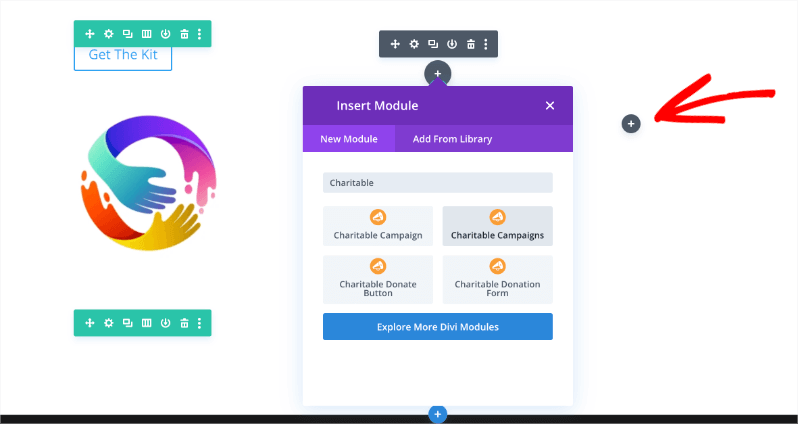
To get started, all you have to do is open the Divi page builder on any post or page.
Simply click on the gray plus sign to open the Modules menu. From there, you can search for “Charitable,” and you will see the readymade modules available for immediate use.
Here is a look at the four new modules you can use to build your site:
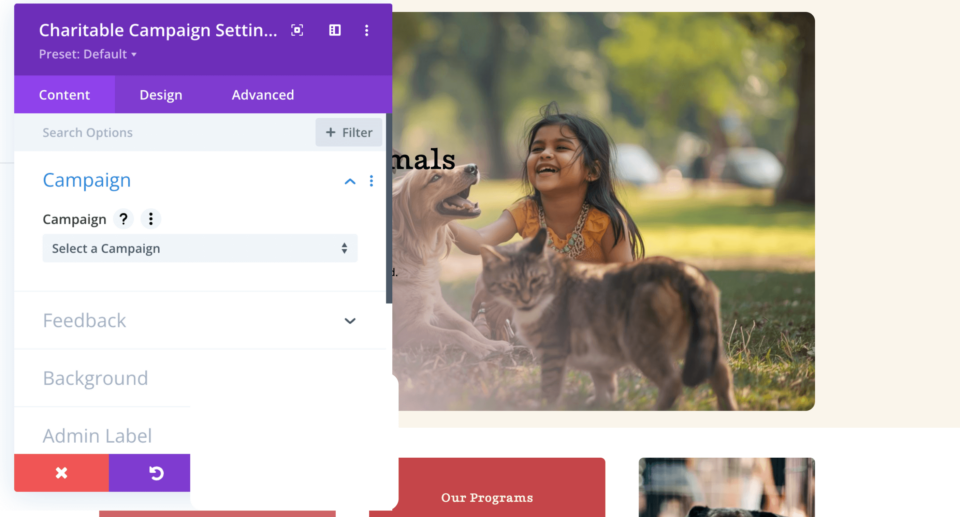
Charitable Campaign
This module allows you to display a single campaign complete with the title, description, progress bar, and donation statistics.
It is perfect for featuring your primary fundraising initiative on your homepage or creating dedicated campaign landing pages that highlight a specific cause.
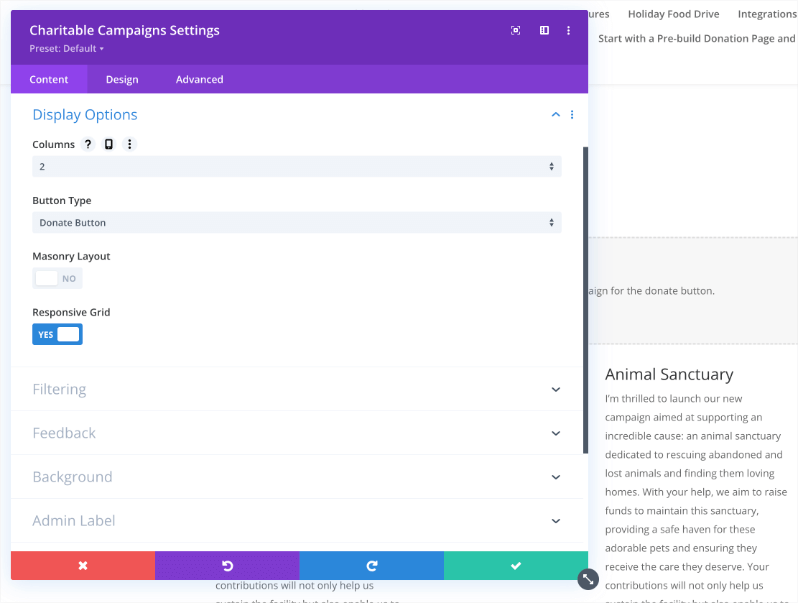
Charitable Campaigns
Want to showcase multiple causes at once? This module lets you show a grid of multiple campaigns with flexible layout options.
You can choose from 1 to 4 columns, filter the results by category or tag, and control the sort order. Plus, the responsive column controls let you optimize the layout for every device, ensuring your grid looks great on mobile phones and tablets.
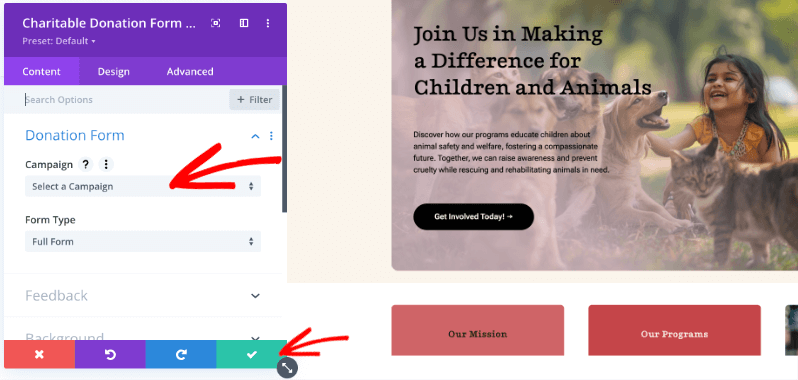
Charitable Donation Form
With this module, you can embed a complete donation form anywhere on your site.
You can select the specific campaign and choose between full or minimal form styles. This allows your visitors to donate immediately without leaving the page, which can significantly boost your conversion rates.
Charitable Donate Button
Sometimes you just need a simple call to action. This module lets you add donation buttons throughout your site.
You can customize the button text, choose between button or link styles, and use Divi’s full button styling system to match your brand perfectly.
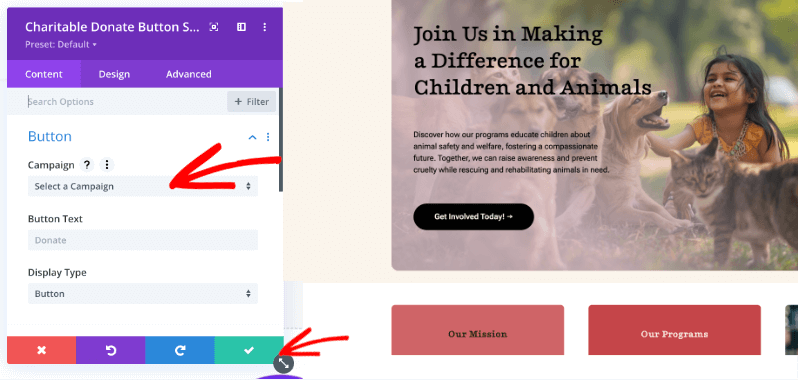
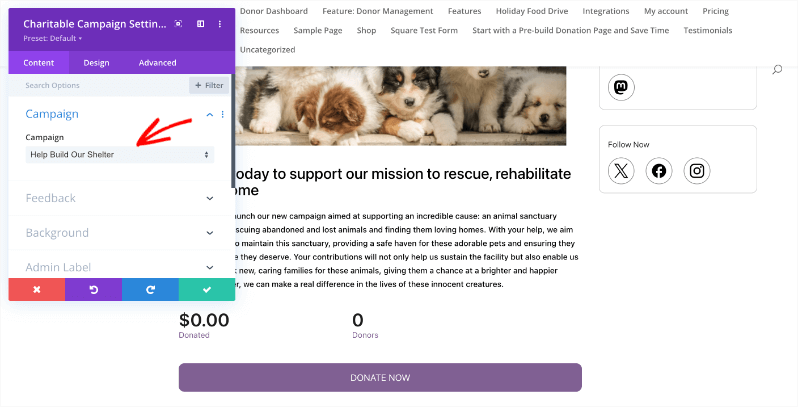
Once you have configured the module to your liking, make sure you click on the Green Tick button to add the module to your page and save your changes.
Full Styling Control
These aren’t just basic shortcode wrappers. Each module integrates with Divi’s design system, giving you access to:
- Typography controls for titles, body text, labels, and statistics
- Background options including colors, gradients, and images
- Border and shadow effects for depth and visual interest
- Spacing controls for precise margin and padding adjustments
- Button styling with hover states for donate buttons
- Responsive settings to optimize for desktop, tablet, and phone
Live Preview in the Visual Builder
See your campaigns come to life as you build. The Campaign and Campaigns modules render live previews right in the Visual Builder, so you can fine-tune your layout without constantly switching to the frontend.
Getting Started
Using the new Divi modules is straightforward:
- Update to Charitable Pro 1.8.12 (or later)
- Open any page with the Divi Visual Builder
- Add a module and look for the Charitable category
- Select a module and configure your settings
- Style to match your site using the Design tab
That’s it! Your donation functionality is now seamlessly integrated with your Divi design.
What’s Next?
We’re committed to making Charitable work beautifully with the tools you already use. This Divi integration joins our existing support for Elementor and WPBakery, ensuring you have options no matter which page builder you prefer.
Have feedback on the Divi integration? Each module includes a Feedback section where you can share your thoughts directly with our team. We’d love to hear what’s working well and what you’d like to see improved.
Try It Today
The Divi integration is available now in Charitable Pro 1.8.12. Update your plugin and start building beautiful donation pages with the power of Divi and Charitable together.
Read the full documentation on Divi + Charitable →
Not yet a Charitable Pro user? Sign up today and get up to 50% off on your plan. We’re confident you’ll love raising funds with Charitable. If for any reason Charitable is not the right fit for you, we’ll refund your purchase with our 14-day money-back guarantee.
Charitable Has 1+ Million Downloads!
Trusted by millions to power successful fundraising campaigns. Try Charitable risk-free today.
✅ 14-day money-back guarantee
✅ Transparent pricing
✅ Code-free setup
Stay Connected for More Nonprofit Resources
For more tutorials and videos tailored to nonprofits, subscribe to our YouTube channel. We regularly publish expert tips, step-by-step guides on online donations, fundraising strategies, and practical resources to help your organization succeed.
🗞️ Get weekly tips and exclusive guides in your inbox
Join our newsletter →
🎥 Watch step-by-step tutorials and success stories
Subscribe to our YouTube channel →
👩🏽💻 Connect with our community and get daily nonprofit insights
Follow us on LinkedIn →
🥳 Fun reels and non-profit insights
Follow us on Instagram →
👀 Insightful & fun videos to help you grow your cause
Follow us on TikTok→
🌎 Subscribe and follow for general fundraiser tips
Get Fundraiser Tips on TikTok →
Powerful Fundraising Resources
🤖 Use Charitable with Your AI Assistant
⬇️ Download proven strategies, campaign ideas, and expert tools
Get the Fundraising Kit →
💸 Get Free Fundraising Resources
Head to the Charitable Fundraising Hub →
🤔 Got questions about Charitable?
Charitable FAQs →
🏎️ Take Charitable for a spin
Create your Charitable Demo →
Understand non-profit terms and jargon
Non-Profit Glossary →
% Looking for non-profit deals and discounts?
Best Non-Profit Deals and Discounts →









Leave a Reply