
Sometimes, creating the perfect donation form feels harder than it should be. You know what information you need from donors but getting the form to look right, flow naturally, and match your campaign’s style can take too much time and trial and error.
We’ve built something that truly puts you in the driver’s seat.
We’re beyond excited to introduce the brand-new ✨ Donation Form Visual Builder ✨ in Charitable!
It lets you design donation forms visually, right inside Charitable. You can drag and drop fields, adjust layouts, and instantly see what your donors will see – no coding, no guessing.
Every field is flexible, from basic details like donor names and payment info to advanced options like custom messages, file uploads, and picture submissions. And now, with added settings for alignment, styling, and even custom CSS, you get full creative control without leaving your dashboard.
Our goal was simple: make it easier for you to build donation forms that not only work great but look great too – so you can focus on what really matters, your mission.
Want to see it in action? Watch the video below:
The Campaign Builder Vs The New Donation Form Builder
Charitable already comes with a visual campaign builder. This lets you create stunning fundraiser campaigns like the one below:
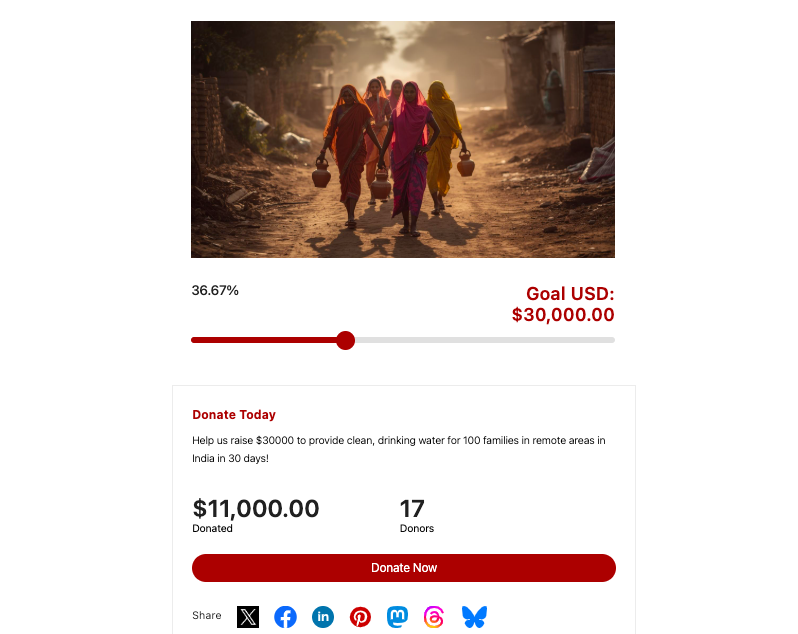
You can create a campaign like this by just dragging and dropping the fields you want. It’s so easy to use, anyone can do it. No coding needed!
You can choose a template or layout and use the builder to customize it. Here’s what the campaign builder looks like:
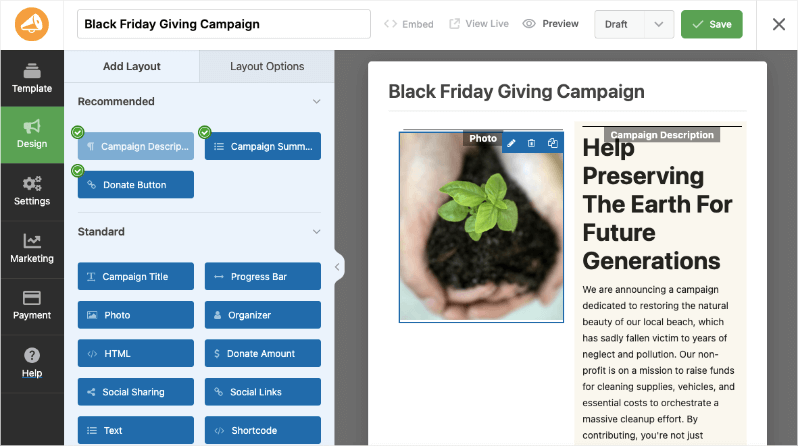
Everything can be edited by just pointing and clicking.
Now, once your campaign is live, when a donor views it and clicks to donate, they’ll be taken to the donation form. They can fill out their details and make the payment. It would look something like this:
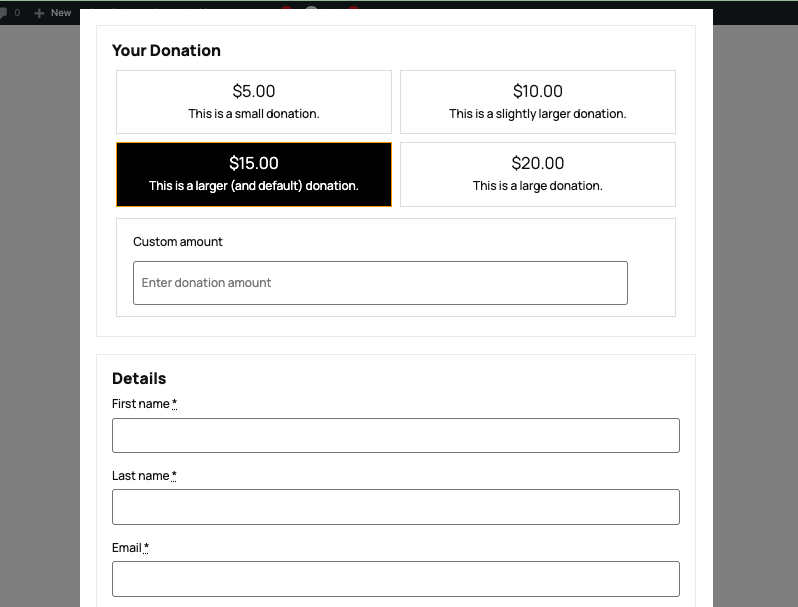
The customization options on this donation form have been limited, and we wanted to change that. We want to make it as simple as possible for you to customize this form the way you want.
We know our users love the visual campaign builder, so we’ve taken the same concept and introduced it to our donation forms as well. So now you can customize your donation form as well with a visual preview that you can edit.
✨ Introducing The Visual Donation Form Builder
Creating your donation forms just got a whole lot easier and way more flexible. Instead of tweaking the form through settings, you can actually see and customize every part of your form as you go.
When you edit a campaign with Charitable, you’ll see a new tab called “Form”. Here, you can customize your donation form visually.
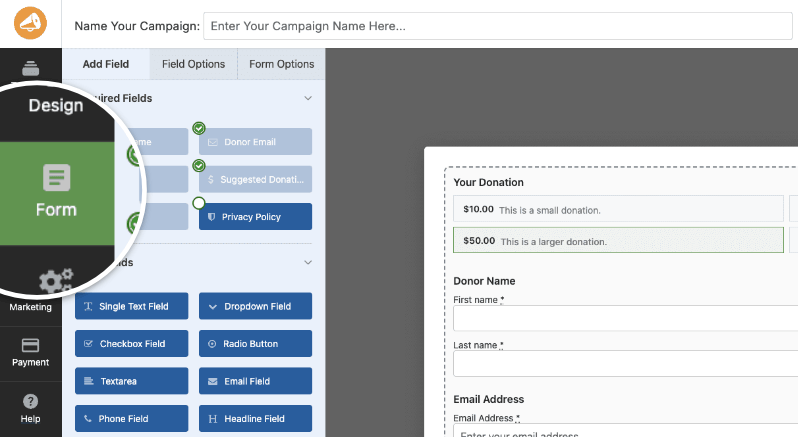
Just drag the fields you want into the form, arrange them in any order, and click to update settings.
What you see here is what your donors will see, no more switching between the settings page, or guessing how things will look live.
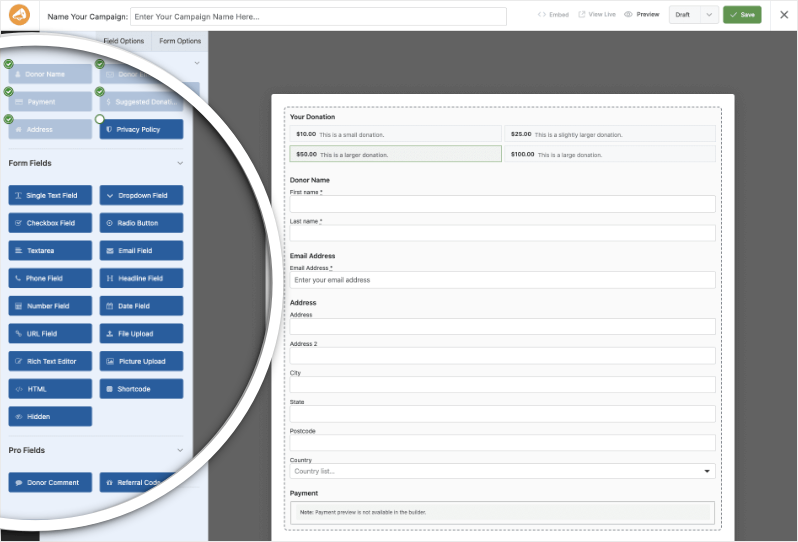
We hope you’ll love this new feature! Here are the highlights:
- Customize!: Customize visual style of the form and donation button and further customize by adding custom CSS for a truly branded experience
- Drag & Drop Everything: Build your perfect form by simply dragging fields into place. Required donor info, address, custom questions, file uploads, dates, and more – add whatever you need, wherever you want it.
- Customize Every Detail: Click any field to fine-tune labels, add instructions, set placeholders, make fields required, or tweak the alignment without touching any code. If you know CSS, you can add custom classes for even more control.
- Live Preview: See your form as it would appear to your donors so you have your forms set up to flow smoothly.
- Works With All Your Campaigns: The visual builder works with new and existing campaigns.
- Easy Integrations: Connect your donation forms to popular payment gateways (like Stripe or PayPal), sync donors to your email marketing tools, or automate updates with Zapier. Everything happens right within Charitable – no plugins, no headaches.
How the Visual Donation Form Builder Helps You Raise More, Faster
🚀 The real power of the new Donation Form Visual Builder is its flexibility to fit your needs, whether you’re running a simple fundraiser or a complex campaign. Here’s how different users will find it helpful:
Quick Setup for Beginners: If you’re new to donation forms or short on time, the drag-and-drop builder makes creating your form fast and simple. Just add the basics, tweak labels, and launch a clean, professional form in minutes – no coding or guesswork needed.
Custom Campaigns for Complex Needs: Need more than just name and payment fields? You can add dropdowns, checkboxes, file uploads, and more. For example, use the Calendar Date field to gather event sign-ups. Custom HTML and Shortcode fields let you create unique experiences tailored to your campaign.
Engage Your Donors: Pro features like Donor Comments and Referral Codes let donors share their stories or invite others to support your cause. This builds connection and trust, turning one-time gifts into ongoing support.
Better Data Collection & Management: You control every form field – making them required, setting default values, adjusting alignments—to collect exactly what you need while guiding donors smoothly. Hidden fields can help with advanced tracking, invisible to donors but valuable to you.
Keep Your Brand Front and Center: Style your forms to match your campaign’s look and message. When your forms feel consistent, donors trust you more and are more likely to give.
With full control over every part of your donation form, the Visual Builder helps reduce donor friction, collect vital info, and boost your fundraising results, all while saving you time and effort.
Ready to Start Building Better Donation Forms?
The new Visual Form Builder is available now in Charitable Pro.
⬆️ Update your Charitable Pro plugin to the latest version and open any campaign to start designing your form with the new drag-and-drop interface.
No complicated setup, no extra purchases needed. Whether you want to quickly launch a simple donation page or craft a detailed, interactive form, the builder gives you all the tools right at your fingertips.
Need more help? See our Donation Form Builder Documentation »
❓Not yet a Charitable Pro user? Sign up today and get up to 50% off on your plan.
We’re confident you’ll love raising funds with Charitable. If for any reason Charitable is not the right fit for you, we’ll refund your purchase with our 14-day money back guarantee
We’d love to hear how you’re using these new features! Stay connected with us:
- Join our newsletter – Get weekly tips and exclusive guides in your inbox
- Subscribe to our YouTube channel – Watch step-by-step tutorials and success stories
- Follow us on LinkedIn – Connect with our community and get daily nonprofit insights
- Follow us on Instagram – Fun reels and non-profit insights
- Follow us on TikTok – Insightful & fun videos to help you grow your cause
- Get Fundraiser Tips on TikTok – Subscribe and follow for general fundraiser tips.
Your feedback keeps Charitable moving forward. Let’s keep building better fundraising tools—together.







Leave a Reply