
Charitable Documentation

Learn how to make the most of Charitable with clear, step-by-step instructions.

How to Use Charitable Simple Updates

Simple Updates lets you easily share important information about your campaign’s progress, express gratitude to your supporters, provide transparency about how funds are being utilized, and keep everyone informed about developments related to your cause.

These updates appear directly on your campaign page, ensuring that both existing donors and potential contributors can stay informed about your mission’s impact.

This guide shows you how to use Simple Updates in your Charitable campaigns.

Prerequisites

  • Charitable Pro plugin installed and activated on your WordPress site
  • Simple Updates is included in all Charitable Pro plans. You need to be on the Basic plan or higher.

In This Guide

Step 1: Adding the Simple Updates Block

First, open Charitable in your WordPress dashboard and create a campaign »

Inside the campaign builder, you’ll see a preview of your campaign on the right, along with a menu of blocks on the left.

Choose the Updates block and drag and drop it into your campaign where you would like it to appear.
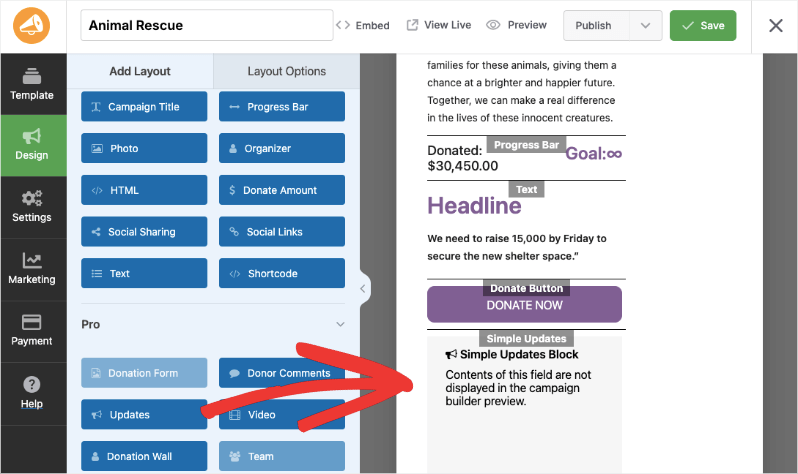
add campaign updates

Hit the Save button at the top right corner of the screen.

Step 2: Adding Your Message

From the menu on the left, open the Settings tab. You’ll see a list of sub-tabs, including General Settings, Donation Options, and Geolocation.

Open the Simple Updates tab. Here, there’s a text box where you can enter your message.
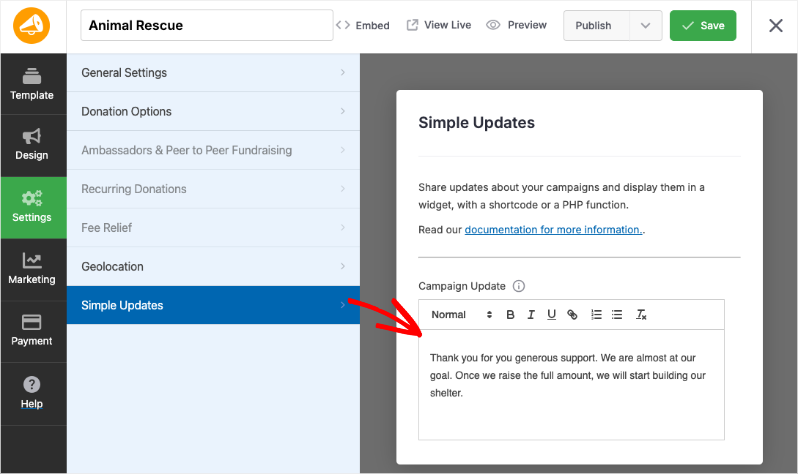
enter update messages

Simple Updates provides a rich text editor that allows you to format your messages with:

  • Bold text for emphasis
  • Italic text for stylistic emphasis
  • Underlined text for highlighting
  • Bullet points for organizing information
  • URL links to direct supporters to relevant resources or additional information

This formatting flexibility ensures your updates are visually appealing and easy to read, helping you communicate effectively with your donors and supporters.

When you’re done, hit the Save button at the top.

Now visit your live campaign and you’ll see the update appear there.

Display updates with a shortcode

You can also add the Updates to any content area using the [campaign_updates] shortcode. In this example, we have added a shortcode block to the campaign:
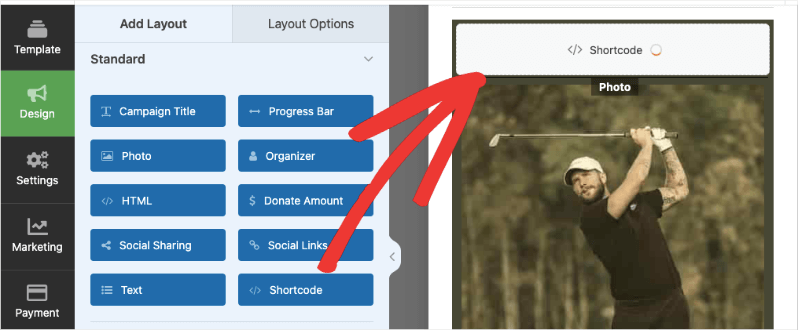
Shortcode block in campaign

When you click on the block, the Layout Options tab will open for the shortcode block. You can add a headline, the shortcode, and any CSS Class if you’d like.
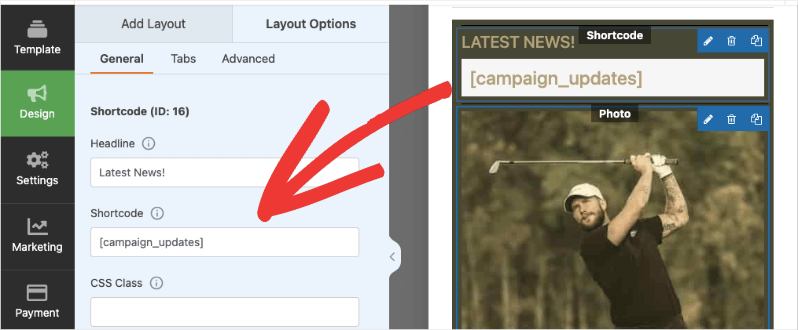
Simple updates shortcode


You can also add a campaign ID to the shortcode as a parameter, which allows you to display a specific campaign’s updates. This is useful when displaying the updates on a separate page or post. For example:

You can also add campaign specific IDs to your simple updates if you’re adding it anywhere else on your site:

[campaign_updates campaign_id=16]

You can find the ID of your campaign by looking at the URL of the page where you edit it.

https://demosite.com/wp-admin/?page=charitable-campaign-builder&campaign_id=16.

The campaign ID is also available in the Charitable » Campaigns tab. Hover your cursor over the campaign name and the ID will appear.
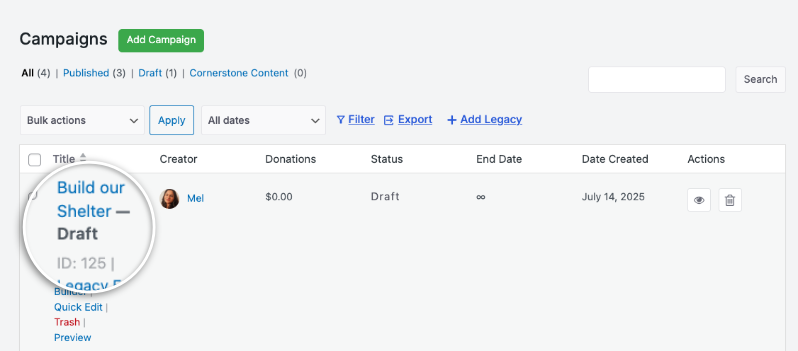
campaign ID

Integrate it with a PHP function

If you’re comfortable writing a little PHP, you can integrate updates with a simple PHP function.

$campaign_id = 11;

charitable_simple_updates_template_campaign_updates( 11 );

This function will display the updates — you do not need to use echo or print to render them.

FAQs on Simple Updates

Do I need to install any additional plugins to accept donations? 

No! Charitable’s Simple Updates work right out of the box. No additional plugins required.

Can I add updates to the campaign after it’s published? 

Yes! You can edit campaign updates at any time. Changes are saved when you click the Save button.

I made changes to the settings, but they’re not showing up. What should I do? 

Always click “Save Changes” after making any modifications. If changes still don’t appear, try clearing your website cache if you’re using a caching plugin.

Can I customize the appearance of my donation forms? 

Yes. You can customize colors, form templates (standard or minimal), and field display options. For more advanced customization, check the documentation for custom CSS and code snippets.

What’s the difference between Charitable Lite and Pro? 

Charitable Lite is free but includes a 3% transaction fee. Pro plans eliminate this fee and include advanced features like recurring donations, donor management, peer-to-peer fundraising, and more payment gateways.

See Charitable Lite vs Pro »

Where can I get support if I have issues?

  • Free users: Use the WordPress.org support forums
  • Pro users: Contact support directly for priority assistance
  • Documentation: Check the comprehensive documentation library
  • CommunityJoin the newsletter and follow social channels for tips and updates

Are there video tutorials available? 

Yes! Subscribe to the Charitable YouTube channel for step-by-step tutorials and success stories.

Are in need of support? Have a question? If you are a lite/free user of Charitable, you can reach out to our team on the WordPress.org support forums and our team will respond in a timely fashion. If you have an active license, feel free to reach out us directly for priority support.

Still have questions? We’re here to help!

Last Modified:

What's New In Charitable

View The Latest Updates
🔔 Subscribe to get our latest updates
📧 Subscribe to Emails

Email Subscription

Join our Newsletter

We won’t spam you. We only send an email when we think it will genuinely help you. Unsubscribe at any time!

Improvement receipts

🗓️ Annual Receipts 2.0: Send Year-End Receipts to Every Donor in Minutes

You can now send annual receipts in minutes with a few clicks to all your donors.

📧 One-Click Bulk Send Wizard that guides you to sending to hundreds of donors simultaneously directly from your WordPress dashboard.

🔍 Smart “Dry Run” Mode: See exactly who will receive a receipt and who will be skipped (and why) before a single email leaves your server.

🛡️ SMTP-Aware & Limit Protection: Charitable now detects your email setup and automatically adjusts batch sizes and pauses for daily limits to ensure your emails land in inboxes.

✅ Complete Audit Trail: Dedicated system log and on the individual donor’s profile, giving you a clear history for every fiscal year.

Stop dreading tax season and start spending that time on your mission. Update to Annual Receipts 2.0 and automate your year-end reporting today.

Addon Donations Improvement

🎈Recurring Donations 2.0: Smarter Automation, Better Recovery, and More Control

We’ve completely rebuilt our Recurring Donations system to help you grow your reliable income stream while giving you (and your donors) more powerful tools than ever before.

What’s New:

🔒 Recurring-Only Campaigns: You can toggle “Recurring Only” mode in the campaign builder to hide the one-time option entirely, ensuring your supporters stay focused on long-term commitment.

📧 Automatic Payment Recovery: Our new Payment Failed Email fires automatically the moment a subscription fails.

🛠️ Self-Service Donor Control:The new Cancel Subscription Button appears directly in the donor dashboard, allowing supporters to pause or end their recurring gifts on their own terms—reducing your admin burden and payment disputes.

📊 Real-Time Revenue Insights: Track your growth, monitor active subscriptions, and see exactly how much predictable support is coming in each month at a glance.

Our new Recurring Donations addon gives you the professional-grade tools you need to grow your mission.

Campaigns New

🧡 Modal Donate Button: Turn Any Click into a Contribution

Instead of redirecting users to a new URL, the lightweight Modal Donation Button allows donors to complete their gift in a sleek, focused popup, keeping them engaged with your content while they support your cause.

What’s New:

  • Zero-Friction Giving: Open your donation form in a responsive modal overlay. Donors stay on the same page, reducing drop-off.

  • 🖱️ Place it Anywhere: Use the dedicated WordPress block or a simple shortcode to drop a donate button into sidebars, footers, or even mid-sentence in your storytelling.

  • 🎨 Full Design Control: Match your brand perfectly with customizable background colors, hover effects, border radius, and font sizes—all without touching a single line of CSS.

Whether you need a simple “Donate Now” link or a high-converting popup button, the Modal Donate Button gives you the flexibility to raise more with less effort.

donation form Donations New

💵 Mini Donation Widget: Show The Impact Of Every Dollar!

Not every donor who wants to give will navigate to your campaign page. Meet them exactly where they are by placing a fully functional giving experience directly on any page or post.

💬 Show the impact of every dollar: Attach custom messages to each preset amount so donors understand exactly what their gift provides.
🔄 Monthly and one-time giving: Supports a tabbed interface with independent amounts and impact statements for recurring giving programs.
🎨 Match your brand: Easily set accent colors and control size or alignment to fit the widget naturally into your layout without CSS.
⚡ Reduce donor friction: Open the donation form in a modal overlay to keep donors on the page and reduce drop-off.

Donations Live New

👉🏻 Showcase Real Momentum with the Donations Feed

Give your donors a reason to trust. Our new feed lets you display a living, breathing record of people showing up for your cause.

🤝 Build instant trust: Overcome donor hesitation by showing a proven track record of community support.
💬 Highlight donor stories: Display real donor comments and locations to show the human side of your fundraising.
🛠️ Drop it anywhere: Easily add the block to your homepage, campaign pages, or confirmation screens in seconds.
📈 Curate your feed: Group multiple donations from the same person or sort by highest amounts to encourage larger gifts.

