
Requires: Charitable Pro 1.8.16+ Charitable Ambassadors 3.5.0+
Asking somebody to choose a password is the point where a lot of would-be fundraisers give up. They came to raise fifty dollars for a cause they care about, and the form is asking them to invent and remember a credential for a website they may never visit again.
Passwordless accounts remove that step. The create-fundraiser form stops asking for a password. Your fundraiser gets one email, clicks the link in it once, and lands on My Campaigns already signed in. Their account is created at the moment they click.

What this is, and what it is not
It is worth being precise, because “passwordless” means different things on different platforms.
- A real WordPress account is still created. It simply never has a password the person had to choose. That account is what lets them own and edit their fundraiser page afterwards.
- It covers fundraisers, not donors and not administrators. Donors never needed an account. Your own admin login is untouched.
- It is not a replacement for working email. The entire flow is an email arriving. If your site cannot send mail reliably, nobody gets in, which is why the feature ships with its own delivery checks.
- It is not all or nothing. Any single campaign can override the site setting in either direction.
Turning it on
Go to Charitable > Ambassadors > Templates > Submit Form and tick Passwordless Accounts.
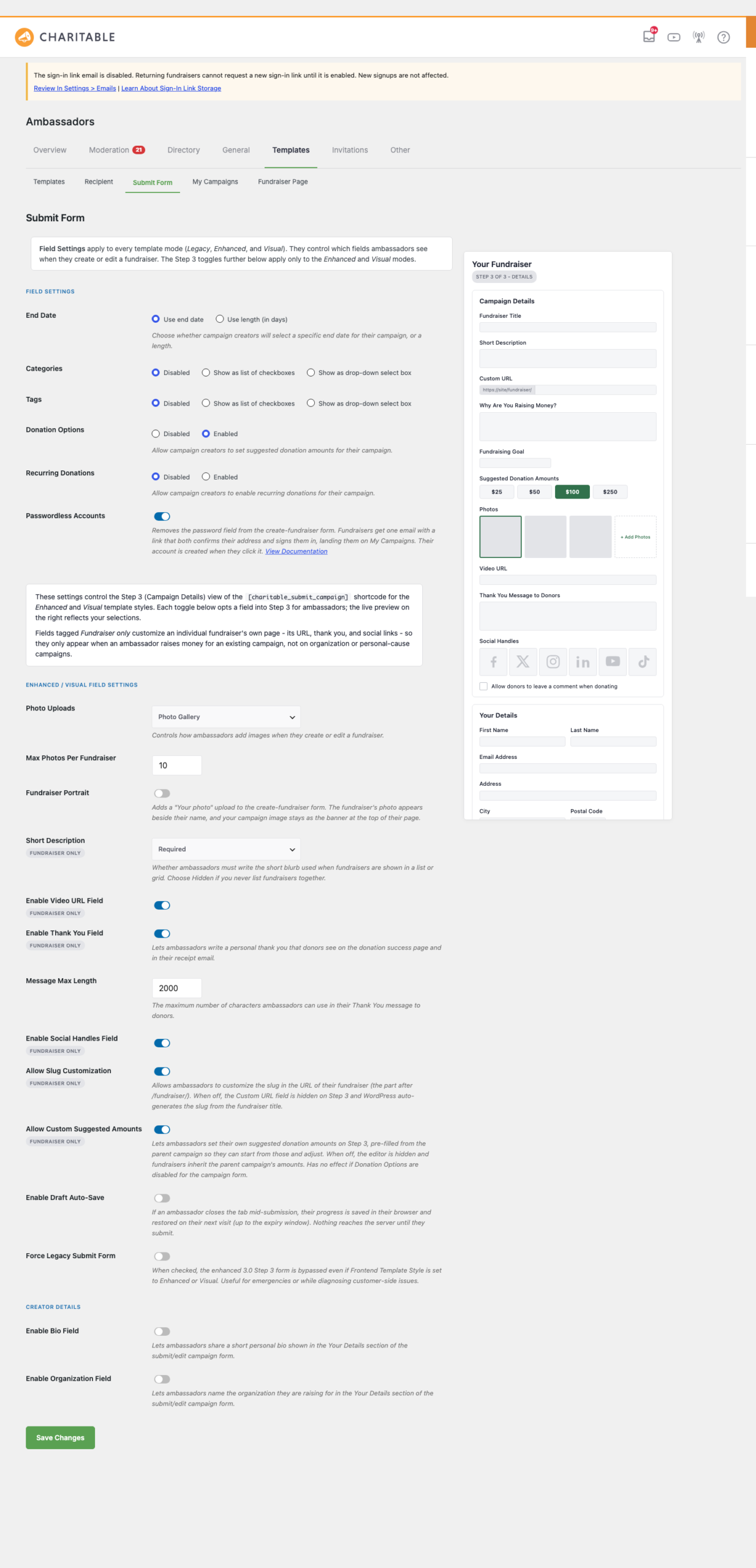
The first time you enable it, Ambassadors creates one small database table to hold sign-in links. That is the only thing enabling it changes on your site, and it is explained in full on How Sign-In Link Data Is Stored.
What your fundraiser sees
- They fill in the create-fundraiser form. There is no password field.
- They get a “check your email” screen telling them what happens next.
- The email arrives. It has one link.
- They click it, and land on My Campaigns, signed in, with their fundraiser page ready.
What happens to the page at step 4 depends on your own moderation setting. If the parent campaign requires approval, clicking the link moves the fundraiser into your moderation queue. If the campaign approves submissions automatically, the page goes live straight away.
That matters for what you tell your supporters: with moderation on, the honest message is “we will review it shortly”, not “your page is live”.
Setting it per campaign
Most sites want one answer for the whole site, but not all of them. A school might want passwordless for families and real accounts for staff.
Edit any peer-to-peer parent campaign and open the Peer to Peer Fundraising panel. You get three choices:
- Use the site default (the label tells you what that currently is)
- On – no password field
- Off – fundraisers create a real account

Seeing who has not clicked yet
The one question every organiser asks is “did my fundraiser actually get in?”. Charitable > Ambassadors > Directory > Awaiting Sign-In answers it.
It lists everyone who submitted a fundraiser but has not yet clicked their link, with the campaign they signed up for and a Resend button for each one.
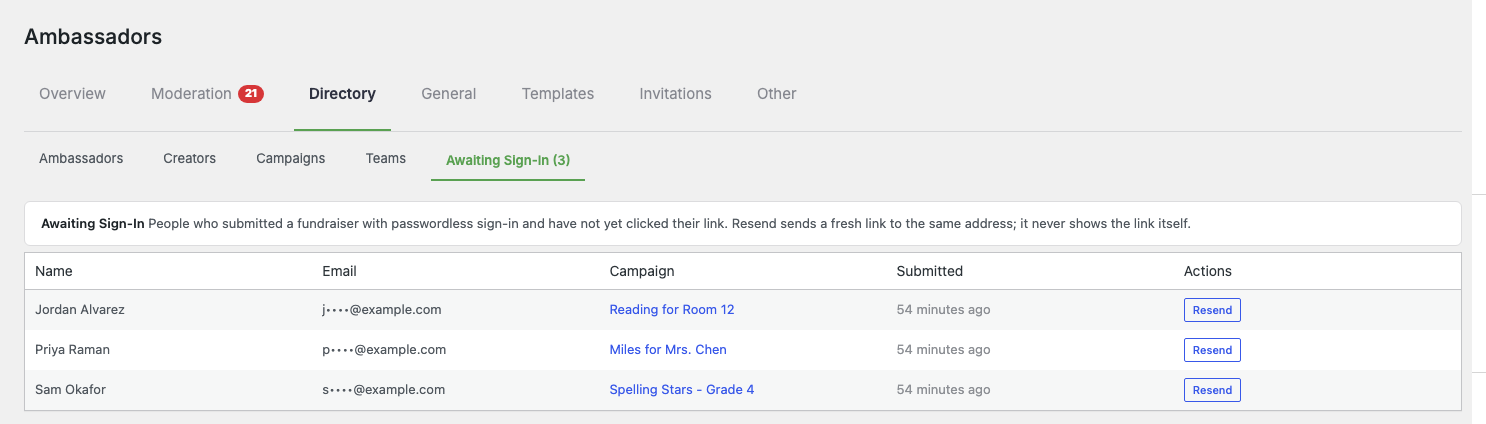
Two things to know about this screen:
- Email addresses are partly hidden by default, shown as
s****@example.com. The mask is a fixed width, so it never hints at how long the address is. Developers can switch this off, see the reference below. - Resending cancels the previous link. Only one live link exists per person at a time. If somebody asks for a new one, any earlier link stops working.
The two emails
Passwordless adds two transactional emails, both under Charitable > Settings > Emails:
| When it sends | |
|---|---|
| Creator: Finish Your Fundraiser | A new fundraiser submits for the first time |
| Creator: Sign-In Link | A returning fundraiser asks to sign in again |
Both are editable like every other Charitable email. The first one carries the only link that can complete a signup, so it is sent whether or not your stored email settings predate this feature.
Delivery health
Because the whole feature depends on email, the Submit Form screen warns you when something would stop a fundraiser getting in. The checks you are most likely to see:
| Warning | What it means |
|---|---|
| The sign-in link email is disabled | Returning fundraisers cannot request a new link. New signups still work. |
| Its database table is missing | Signups and sign-ins both fail. See the storage page. |
| Links are outstanding | A count of links sent but not yet clicked. Informational, not a problem. |
| Cache compatibility is off | Sign-in links may not work behind some caches. |

Tips worth keeping in mind
- Test with an address you can actually read. The flow is only as good as your mail delivery, and the fastest way to find a mail problem is to walk the flow yourself once.
- Sign-in links expire. They are single use and time limited. Somebody who leaves the email for a fortnight will need a fresh one, which the Resend button handles.
- Clicking the link is what completes it. Opening the email is not enough, and neither is a preview. That is deliberate, see below.
- Watch Awaiting Sign-In in the first week of a campaign. A cluster of people who never clicked usually means a deliverability problem, not disinterest.
Troubleshooting
“The email never arrived.” Check spam first, then your site’s mail delivery generally. The Submit Form warnings will tell you if the email itself is switched off. If other Charitable emails are also missing, the problem is mail configuration, not this feature.
“The link says it has already been used.” Either it genuinely has, or a newer link was issued and cancelled it. Resend from Awaiting Sign-In and ask them to use the newest email.
“Somebody signed up but nothing is in my moderation queue.” Check Awaiting Sign-In. If they are listed there, they have not clicked yet, so the fundraiser is still waiting on them rather than on you.
“I need to see the full email address.” Masking is on by default. A developer can switch it off with the filter below.
Developer reference
The flow
A submission issues a single-use token, which is emailed as a link. Opening the link renders a page; submitting that page is what redeems the token, creates or resolves the account, claims the draft fundraiser, and signs the person in. The two-step shape exists so an email scanner or link preview cannot consume the link before the human clicks it.
Tokens are 256 bits of CSPRNG output, stored as an HMAC-SHA256 hash keyed on wp_salt(), never in plaintext. Redemption is a single conditional UPDATE, so a scanner prefetch and a human click cannot both succeed.
Capabilities
An account created this way gets the campaign_creator role, which carries edit_campaigns and read and nothing else. There is deliberately no filter to change that.
Filters
| Filter | Purpose |
|---|---|
charitable_ambassadors_awaiting_mask_email |
Return false to show full addresses in the Awaiting Sign-In view. Masked by default. |
charitable_ambassadors_passwordless_storage_docs_url |
The documentation URL linked from the settings help text and the self-check notices. |
// Show full addresses in Awaiting Sign-In to anyone who can open that screen.
add_filter( 'charitable_ambassadors_awaiting_mask_email', '__return_false' );
Actions
| Action | Fires |
|---|---|
charitable_ambassadors_passwordless_redeemed |
After a token is redeemed and the account resolved. Receives the user id, purpose and campaign id. |
Templates
Both public screens are overridable in your theme:
your-theme/charitable/charitable-ambassadors/passwordless/redeem.php
your-theme/charitable/charitable-ambassadors/passwordless/notice.php
Rate limiting
Link issuance is limited per email address, not per IP. That is deliberate: a whole roster behind one office or school network shares an address, and an IP ceiling would lock out legitimate families. Brute force is handled by the token entropy rather than by throttling.





