
Running a nonprofit means every dollar counts, including the ones that quietly disappear to payment processing fees. When a donor gives $100 through Stripe or PayPal, the gateway takes its cut before that money ever reaches your account. You know it’s happening.
But until you log into your gateway dashboard separately, pull a transaction report, and cross-reference each entry against your Charitable donation records, you don’t know the exact number. Not even close.
Charitable now shows you gateway processing fees right inside your WordPress dashboard!
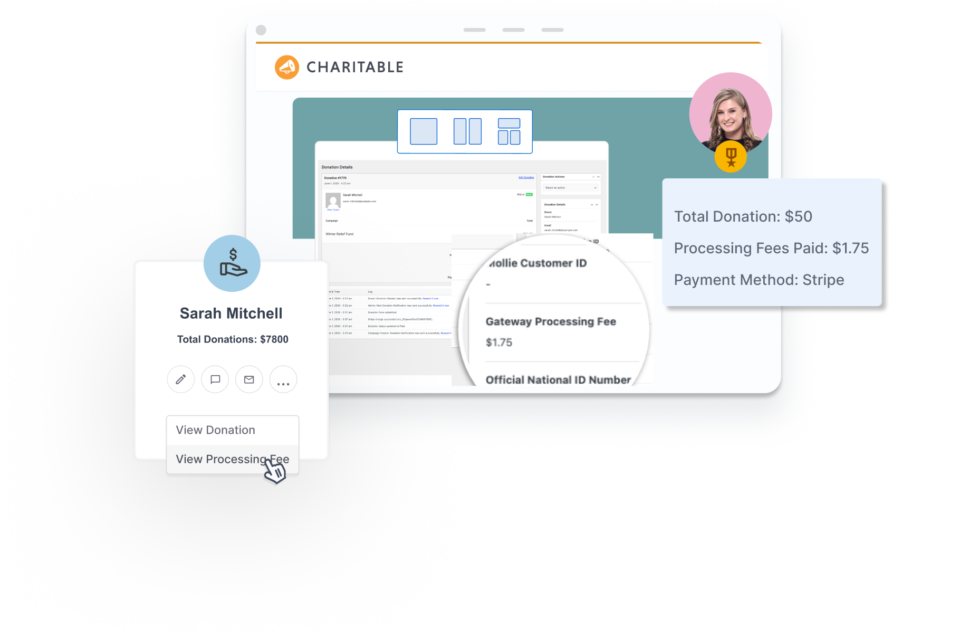
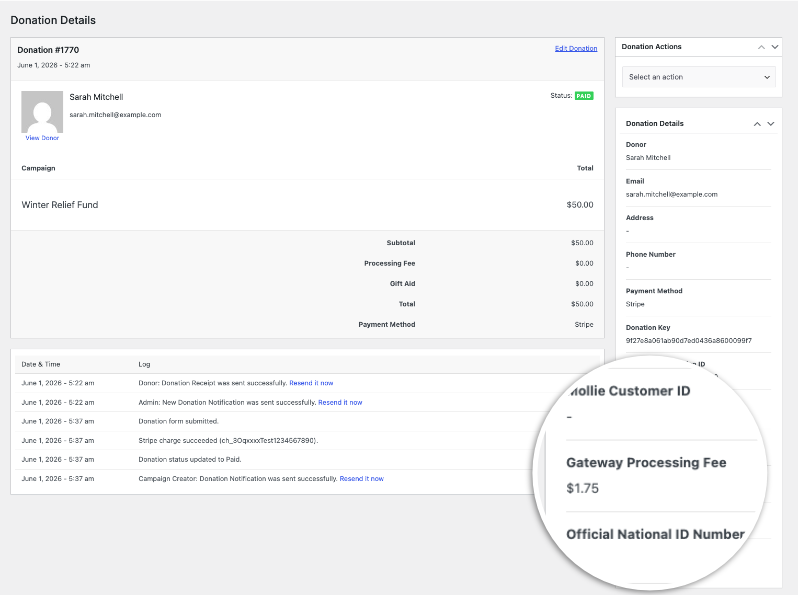
Every individual donation record displays the exact processing fee charged for that transaction – right where you’re already looking, no extra steps, no cross-referencing, no math required.
You open a donation. You see what came in. You see what the gateway took. You see what you kept.
Introducing Gateway Processing Fee Tracking
Gateway Processing Fee Tracking, new in Charitable Pro, automatically records the actual processing fee charged against each donation at the moment the payment clears. This works for the following gateways:
No manual entry, no additional API calls, no logging into a separate dashboard to track down the number.
Your gross, your fees, and your net: all inside WordPress where you already manage everything else.
Here’s how it works in practice.
How It Works
Fee tracking is designed to be passive. It reads the processing fee from data the gateway already sends when confirming a payment, with no additional requests to Stripe or PayPal’s APIs and no configuration beyond enabling the feature. There’s no extra load on your site and no new webhooks to set up beyond what Charitable already requires.
🛠️ The technical details: For Stripe, the fee is read from the balance_transaction.fee field on the charge object when Charitable’s webhook processes the payment confirmation. The amount is converted from cents to a decimal figure before being stored.
For PayPal, the fee arrives in the IPN notification payload as mc_fee, already formatted as a decimal, and is stored as-is.
In both cases, the fee is written once and never overwritten. If PayPal retries an IPN notification or Stripe fires a duplicate webhook event, the original value is preserved. Your donation records stay accurate regardless of what happens on the gateway side after that first confirmation.
Here’s what that means in practice: a small education nonprofit processes around 200 donations a month, split across Stripe and PayPal.
With fee tracking enabled, the processing fee is stored on every new donation record inside WordPress and included as a dedicated column in every CSV export.
Reconciliation that used to take the better part of a morning now takes about 15 minutes.
The data you need is already there, correctly formatted, and ready to go.
For organizations managing lean operations, that’s not a minor convenience. It’s real administrative time returned to the team.
What Gateway Fee Tracking Can Do
Here’s a quick look at everything this feature handles automatically:
- Captures the exact fee per donation: The actual processing fee reported by Stripe or PayPal is stored on the donation record at the moment of payment confirmation. No rounding, no estimates, no averages based on typical rates.
- Displays the fee on the donation admin page: Open any Stripe or PayPal donation in your WordPress dashboard under Donations and you’ll find a Gateway Processing Fee row in the donation meta section, formatted in the donation’s currency.
- Adds a dedicated fee column to CSV exports: When tracking is enabled, every donation export includes a Gateway Processing Fee column alongside your other donation data. Pull an export and the full picture is already there for your bookkeeper, auditor, or grant officer — no extra steps.
- Calculates net amounts per donation: A built-in helper function computes the true net received per donation, accounting for the gateway processing fee and any Stripe Connect application fee if applicable. Developers building custom reports or integrations can call
charitable_gateway_fees_get_net_amount( $donation )to retrieve it as a formatted currency string. - Handles Stripe Connect correctly: For Stripe Connect accounts, the platform application fee is tracked separately and factored into net calculations alongside the processing fee. Both amounts are stored independently for accurate, auditable reporting.
- Protects against duplicate data: Once a fee is recorded on a donation, it isn’t overwritten. Idempotent storage means retried webhooks and IPN notifications can’t corrupt or replace the original value.
Getting Started with Fee Tracking
Fee tracking is off by default. Here’s all it takes to enable it:
- Update Charitable Pro to version 1.8.13 or higher. Go to Plugins in your WordPress dashboard, check your Charitable Pro version, and run the update if needed.
- Add the following line to your theme’s
functions.phpfile or a site-specific plugin:
add_filter( 'charitable_show_gateway_processing_fee', '__return_true' );That’s the full setup. Save the file and Charitable starts recording the processing fee on all new Stripe and PayPal donations automatically. There’s nothing else to configure in the WordPress admin.
Before enabling, confirm two prerequisites:
- Stripe users: Fee capture requires the Stripe webhook to be active and delivering
charge.succeededorpayment_intent.succeededevents with the balance transaction expanded. If you set up Stripe through Charitable’s standard flow, this is already in place. - PayPal users: Fee capture depends on PayPal IPN delivering notifications correctly. If you’re unsure whether IPN is active, check your PayPal account settings or review the Charitable PayPal setup documentation.
One important note: fee data is captured going forward only. Donations processed before you add the filter are not retroactively updated, so the fee field will be empty on older records.
To turn off fee tracking, remove the snippet or replace it with:
add_filter( 'charitable_show_gateway_processing_fee', '__return_false' );Disabling tracking stops new fees from being recorded. It does not delete fee data already stored on existing donations.
Not code savvy? Worried about breaking your site? Need help with adding code to your site that doesn’t require you to manually tweak files?
I recommend checking out WPCode »
It makes it easy and safe to add custom WordPress features through code snippets. You can safely create custom code snippets by simply filling a form without having to worry about the code.
It also comes with safe error handling. This helps you prevent common code errors when adding custom snippets to ensure you never break your site.
Why You’ll Love Gateway Fee Tracking
The setup is a single line of code. The payoff is every month, forever.
- 📊 No more cross-referencing your gateway dashboard; the exact processing fee is stored on every donation record inside WordPress, right where you do everything else.
- 💸 True net per donation, calculated for you; the net amount helper accounts for the gateway fee and any Stripe Connect application fee, so you always know what you actually received.
- 📁 Export-ready for accounting and grant reporting; the fee column is included automatically in every CSV export, formatted and ready for your bookkeeper or auditor without any extra steps.
- 🔒 Duplicate-safe by design; idempotent storage ensures that retried webhooks or IPN notifications cannot overwrite fee data once it has been recorded.
- ⚙️ Works with your existing Stripe and PayPal setup; no new webhooks, no changes to your gateway configuration, and no performance overhead on your site.
Get Gateway Fee Tracking with Charitable Pro
Gateway Processing Fee Tracking is available on all Charitable Pro plans: Basic, Plus, Pro, and Elite. Plans start at $69/year, and every plan includes a 14-day, 100% money-back guarantee. No risk, no questions asked.
Not yet on Charitable Pro? Compare all plans and pricing to find the right fit for your organization.
Ready to Enable It?
Knowing your exact net per donation is one of those small operational wins that quietly improves everything: budget planning, grant reporting, and the end-of-month reconciliation your team has been doing by hand. Already on Charitable Pro 1.8.13 or higher?
Head to the Gateway Processing Fee Tracking documentation to get the setup snippet and full developer reference.
Questions? Our support team is here to help.
Stay Connected for More Nonprofit Resources
For more tutorials and videos tailored to nonprofits, subscribe to our YouTube channel. We regularly publish expert tips, step-by-step guides on online donations, fundraising strategies, and practical resources to help your organization succeed.
🗞️ Get weekly tips and exclusive guides in your inbox
Join our newsletter →
🎥 Watch step-by-step tutorials and success stories
Subscribe to our YouTube channel →
👩🏽💻 Connect with our community and get daily nonprofit insights
Follow us on LinkedIn →
🥳 Fun reels and non-profit insights
Follow us on Instagram →
👀 Insightful & fun videos to help you grow your cause
Follow us on TikTok→
🌎 Subscribe and follow for general fundraiser tips
Get Fundraiser Tips on TikTok →
Powerful Fundraising Resources
⬇️ Download proven strategies, campaign ideas, and expert tools
Get the Fundraising Kit →
💸 Get Free Fundraising Resources
Head to the Charitable Fundraising Hub →
🤔 Got questions about Charitable?
Charitable FAQs →
🏎️ Take Charitable for a spin
Create your Charitable Demo →
Understand non-profit terms and jargon
Non-Profit Glossary →
% Looking for non-profit deals and discounts?
Best Non-Profit Deals and Discounts →







Leave a Reply