
Charitable Blog

Everything you need to know about Charitable and our team.

Add Image Galleries to Fundraising Campaigns With Envira Gallery

Add Image Galleries to Fundraising Campaigns With Envira Gallery

Last updated on

  • By

Working with nonprofits and fundraisers for so many years, we know one thing for certain: donors want to see impact.

They don’t just want to read about what you’re doing. They want to see the faces you’re helping, the projects you’re building, the communities you’re transforming. They want proof that their hard-earned money will make a real difference.

That’s why we built the Envira Gallery Integration for Charitable Pro.

Now you can showcase your impact with stunning image galleries right inside your campaigns – no technical headaches, no workarounds. Just powerful visual storytelling that:

  • Builds instant trust (donors see your work in action)
  • Boosts engagement (captivating images keep visitors on your page)
  • Increases donations (when people see impact, they’re inspired to give)

It’s social proof that works. And it takes just minutes to set up.

What’s New?

In Charitable Pro 1.8.12, you can connect to Envira Gallery to showcase beautiful image galleries inside your donation campaigns. It’s easy to connect with just a few clicks – no coding needed.

Once connected, you can:

  • Embed beautiful galleries directly into campaigns: Choose from any Envira gallery you’ve created and drop it right into your campaign page
  • Full customization control: Adjust layouts, add CSS classes, and style your galleries to match your brand perfectly
  • Works with Envira Lite or Pro: Already using Envira? You’re ready to go. New to it? The free Lite version works great.

If you’re new to Envira Gallery, it’s hands down the best gallery plugin for WordPress. Just upload your images, arrange them how you want, and publish beautiful galleries that look professional on any device.

There’s a variety of pre-built layouts and templates to choose from, you can explore demo galleries on their website to find the perfect style for your needs – whether you want classic grid layouts, masonry styles, justified galleries, or something more creative.
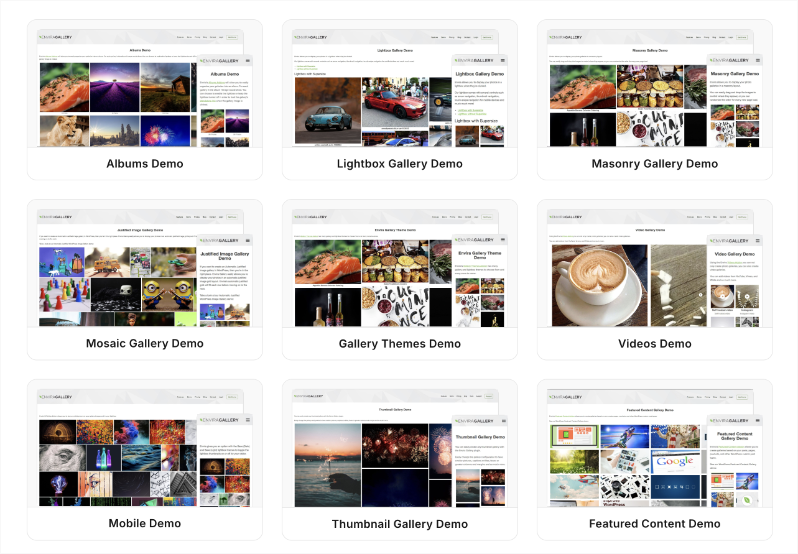
Envira demo

What sets Envira Gallery apart is its focus on performance – your galleries will load fast and look gorgeous, giving your visitors a smooth browsing experience while you get a powerful tool that’s actually easy to use.

Get Envira Gallery »

How It Works 🚀

We’ve made this integration incredibly simple. Envira Gallery is built into Charitable Pro, so you don’t need to carry out any steps to integrate the two. Simply make sure you have Envira Gallery active on your site. Here’s how it works step by step:

1. Install Envira Gallery and Create a Gallery

Grab either Envira Gallery Lite (free) or Envira Pro from your WordPress dashboard. Upload photos that show your work in action. Pick a layout that fits your story (grid, masonry, slideshow) and save it.

2. Add It to Your Campaign

Now, create or edit a Charitable campaign. Inside the campaign builder, you’ll see the Envira Gallery block under the Pro section. Drag and drop it into your campaign to where you want your gallery displayed.
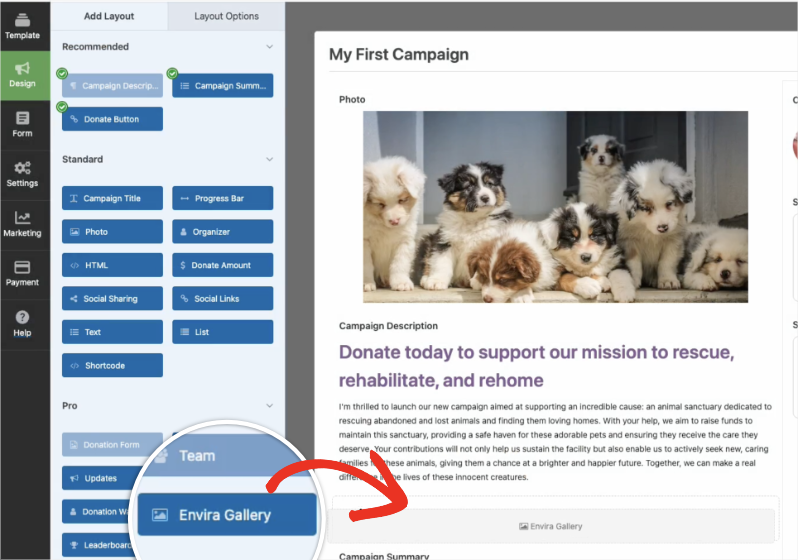
Envira Gallery

Once the Envira Gallery block is added, you’ll see the block settings open on the left. Here, you can use the dropdown menu to select the gallery you want to display.
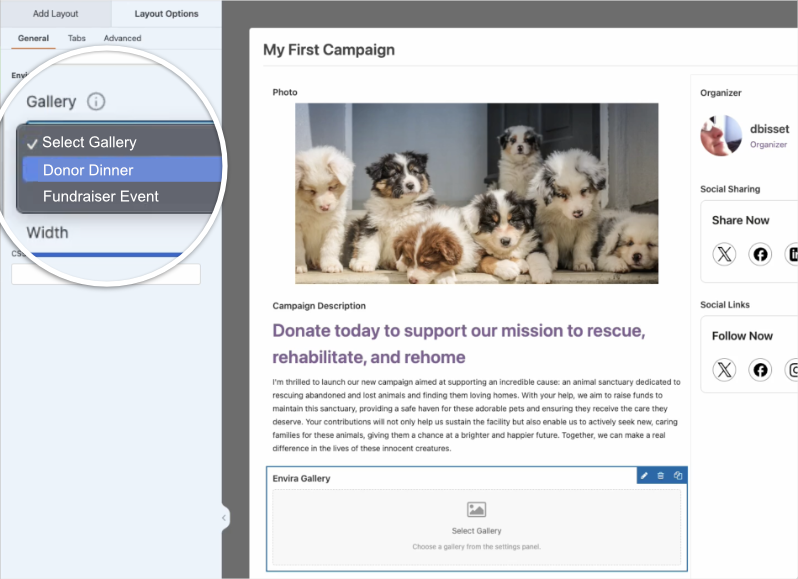
Select Envira Gallery Widget

Now, a preview of your gallery will appear. You’ll be able to view how your gallery looks when you preview your campaign, or once it’s live.
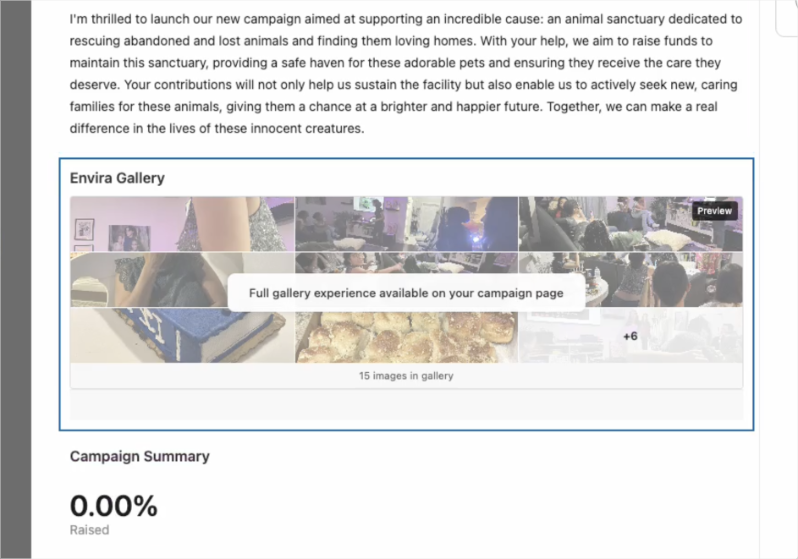
Envira Gallery in campaign

3. Customize Your Gallery

In the Envira Gallery block settings, you can add a headline, select your gallery, and adjust the width. You also have options to tweak the gallery using CSS.
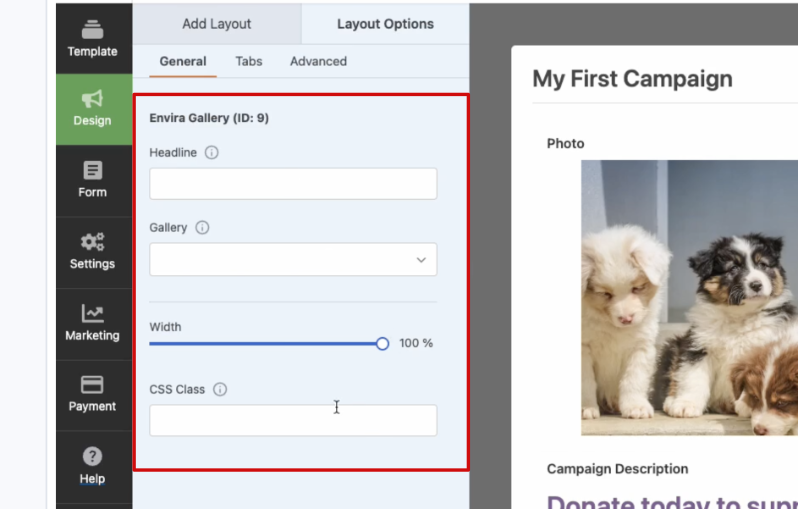
Envira options

That’s it! It’s that easy.

It’s time to stop telling donors what you do. Show them.

Ready to Enhance Your Campaigns?

Upgrade to Charitable Pro 1.8.12 and start adding powerful visual proof to your campaigns today.

Not yet on Charitable Pro?

Sign up today and get up to 50% off on your plan. We’re confident you’ll love raising funds with Charitable. If, for any reason, Charitable is not the right fit for you, we’ll refund your purchase with our 14-day money-back guarantee.

Envira Gallery is the latest addition to our Integrations. Charitable also works beautifully with your favorite page builder:

Check out all Integrations here »

Don’t see the integration you want? Let us know what you need →

Stay Connected for More Nonprofit Resources

For more tutorials and videos tailored to nonprofits, subscribe to our YouTube channel. We regularly publish expert tips, step-by-step guides on migrations like this GiveWP to Charitable switch, fundraising strategies, and practical resources to help your organization succeed.

🗞️ Get weekly tips and exclusive guides in your inbox
Join our newsletter →  

🎥 Watch step-by-step tutorials and success stories
Subscribe to our YouTube channel →  

👩🏽‍💻 Connect with our community and get daily nonprofit insights
Follow us on LinkedIn →

🥳 Fun reels and non-profit insights
Follow us on Instagram → 

👀 Insightful & fun videos to help you grow your cause
Follow us on TikTok→  

🌎 Subscribe and follow for general fundraiser tips
Get Fundraiser Tips on TikTok → 

author avatar
David Bisset Project Manager
David is the project manager of Charitable since 2022. David works with several non-profits (one operated by his wife) along with managing and developing features, support, and marketing for Charitable. Has been with WordPress since 2006 and has been lead organizer of multiple conferences, events, and meetups.

Disclosure: Our content is reader-supported. This means if you click on some of our links, then we may earn a commission. We only recommend products that we believe will add value to our readers.

Get free tips and resources right in your inbox, along with 60,000+ others

Join our Newsletter

We won’t spam you. We only send an email when we think it will genuinely help you. Unsubscribe at any time!

Featured Video:

Watch more videos on our YouTube channel.

What's New In Charitable

View The Latest Updates
🔔 Subscribe to get our latest updates
📧 Subscribe to Emails

Email Subscription

Join our Newsletter

We won’t spam you. We only send an email when we think it will genuinely help you. Unsubscribe at any time!

Campaigns New

🧡 Modal Donate Button: Turn Any Click into a Contribution

Instead of redirecting users to a new URL, the lightweight Modal Donation Button allows donors to complete their gift in a sleek, focused popup, keeping them engaged with your content while they support your cause.

What’s New:

  • Zero-Friction Giving: Open your donation form in a responsive modal overlay. Donors stay on the same page, reducing drop-off.

  • 🖱️ Place it Anywhere: Use the dedicated WordPress block or a simple shortcode to drop a donate button into sidebars, footers, or even mid-sentence in your storytelling.

  • 🎨 Full Design Control: Match your brand perfectly with customizable background colors, hover effects, border radius, and font sizes—all without touching a single line of CSS.

Whether you need a simple “Donate Now” link or a high-converting popup button, the Modal Donate Button gives you the flexibility to raise more with less effort.

author avatar
David Bisset Project Manager
David is the project manager of Charitable since 2022. David works with several non-profits (one operated by his wife) along with managing and developing features, support, and marketing for Charitable. Has been with WordPress since 2006 and has been lead organizer of multiple conferences, events, and meetups.
donation form Donations New

💵 Mini Donation Widget: Show The Impact Of Every Dollar!

Not every donor who wants to give will navigate to your campaign page. Meet them exactly where they are by placing a fully functional giving experience directly on any page or post.

💬 Show the impact of every dollar: Attach custom messages to each preset amount so donors understand exactly what their gift provides.
🔄 Monthly and one-time giving: Supports a tabbed interface with independent amounts and impact statements for recurring giving programs.
🎨 Match your brand: Easily set accent colors and control size or alignment to fit the widget naturally into your layout without CSS.
⚡ Reduce donor friction: Open the donation form in a modal overlay to keep donors on the page and reduce drop-off.

author avatar
David Bisset Project Manager
David is the project manager of Charitable since 2022. David works with several non-profits (one operated by his wife) along with managing and developing features, support, and marketing for Charitable. Has been with WordPress since 2006 and has been lead organizer of multiple conferences, events, and meetups.
Donations Live New

👉🏻 Showcase Real Momentum with the Donations Feed

Give your donors a reason to trust. Our new feed lets you display a living, breathing record of people showing up for your cause.

🤝 Build instant trust: Overcome donor hesitation by showing a proven track record of community support.
💬 Highlight donor stories: Display real donor comments and locations to show the human side of your fundraising.
🛠️ Drop it anywhere: Easily add the block to your homepage, campaign pages, or confirmation screens in seconds.
📈 Curate your feed: Group multiple donations from the same person or sort by highest amounts to encourage larger gifts.

author avatar
David Bisset Project Manager
David is the project manager of Charitable since 2022. David works with several non-profits (one operated by his wife) along with managing and developing features, support, and marketing for Charitable. Has been with WordPress since 2006 and has been lead organizer of multiple conferences, events, and meetups.
Campaigns New

🎨 Campaign Showcase: Pro Level Display, No Coding Needed.

Display your causes with style and make it easier than ever for donors to find the right campaign. We are excited to announce the brand-new Campaign Showcase, a powerful, no-code tool designed to help you create beautiful, high-converting campaign grids and carousels.

The Ultimate Discovery Experience

Your mission deserves to be seen. With the Campaign Showcase, you can move beyond simple lists and create dynamic displays that highlight your most urgent needs, helping donors connect with the causes they care about most.

⚡ No-Code Customization: Effortlessly change layouts, columns, and styles with a single click. Whether you want a clean grid or an interactive carousel, you can match your organization’s look without any CSS or JavaScript.

🎯 Advanced Search & Filter: Empower your supporters with real-time filtering. Donors can quickly sort through campaigns by tags, popularity, or “ending soon,” making it easy to find exactly where their help is needed.

💰 Quick Donate Integration: Boost your conversions with instant giving. The Showcase allows donors to contribute via a modal popup directly from the display, featuring pre-selected amounts for a faster, friction-free experience.

author avatar
David Bisset Project Manager
David is the project manager of Charitable since 2022. David works with several non-profits (one operated by his wife) along with managing and developing features, support, and marketing for Charitable. Has been with WordPress since 2006 and has been lead organizer of multiple conferences, events, and meetups.
Addon New

🤯 New Addon: Campaign Updates

Keep your supporters informed and engaged with every step of your progress! Share the ongoing impact of your mission and build lasting trust with your donor community!

The Ultimate Engagement Tool

Fundraising is a journey, not a one-time event. Now, you can easily provide real-time updates directly on your campaign pages, ensuring your donors stay connected to the causes they care about most.

📣 Easy Storytelling: Quickly post text updates, milestones, or field reports to show exactly how donations are being put to work, keeping the momentum alive throughout your fundraiser.

🏗️ Visual Builder Integration: Seamlessly add the Updates block anywhere on your page using our drag-and-drop builder, or use a simple shortcode to display news in widgets and sidebars.

📩 Build Donor Trust: By consistently sharing progress and success stories, you create a transparent giving experience that encourages recurring support and deeper community involvement.

author avatar
David Bisset Project Manager
David is the project manager of Charitable since 2022. David works with several non-profits (one operated by his wife) along with managing and developing features, support, and marketing for Charitable. Has been with WordPress since 2006 and has been lead organizer of multiple conferences, events, and meetups.




