
Charitable Blog

Everything you need to know about Charitable and our team.

Import Donors in Minutes with Charitable Pro’s New CSV Importer

Import Donors in Minutes with the New CSV Importer in Charitable Pro 1.8.8.8

Last updated on

  • By

We’re excited to announce that Charitable Pro 1.8.8.8, which brings a new feature to give you more control and flexibility in managing your fundraising!

If you want to migrate from another fundraising platform, upgrade from spreadsheets, or simply organize your supporter list for the first time, this update gives you the flexibility to move your donors into Charitable in minutes.

No complicated integrations. No manual re-entry. Just a clean, efficient way to bring your community together under one powerful fundraising platform.

In this update, we’ve focused on one goal: making your transition effortless—so you can spend less time on data management and more time on what truly matters, raising funds for your cause.

Introducing Donor CSV Import

We know that many organizations join Charitable after using other fundraising tools, spreadsheets, or custom donor systems. You’ve already built relationships and a solid base of supporters, and we want to help you carry that history forward.

Our new CSV Importer makes it easier than ever to import donor data from virtually any platform and start managing all your supporters right inside Charitable.

Instead of building unique tools for every donor management system out there, we decided to embrace a universal solution: the CSV (Comma-Separated Values) format. Nearly every platform can export data as a CSV file, making it the perfect bridge to bring your supporters into Charitable.

How to Use the Donor CSV Importer

Getting started with the Donor CSV Importer is simple and takes just a few minutes. Here’s how you can bring your existing supporters into Charitable:

Step 1: Prepare Your CSV File
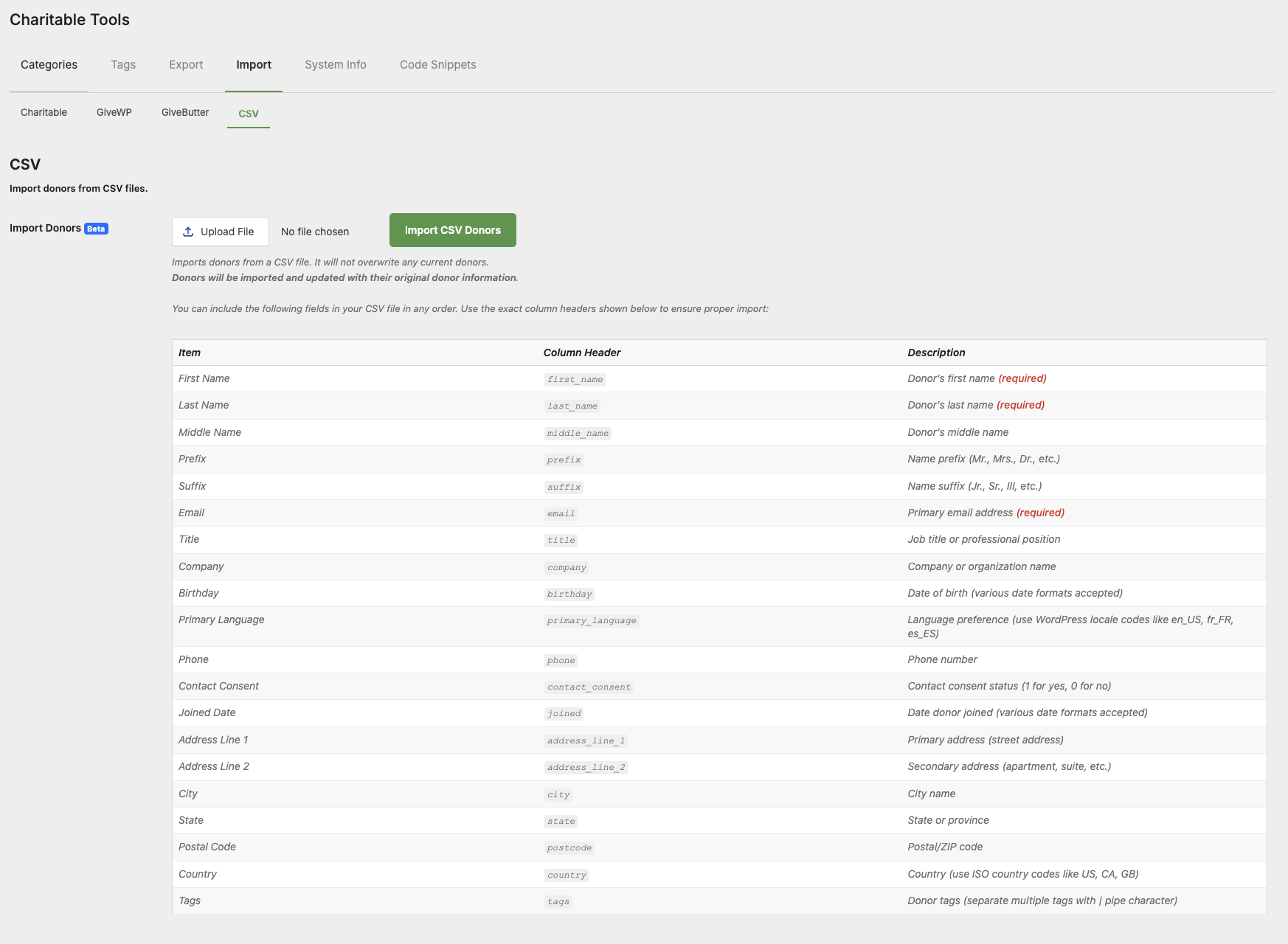
Export your donor data from your previous system or spreadsheet in .CSV format. You can include as much information as you’d like—names, contact info, addresses, and any custom tags that help you identify donor segments.

Step 2: Access the Import Tool

In your WordPress dashboard, go to Charitable » Tools » Import » CSV.
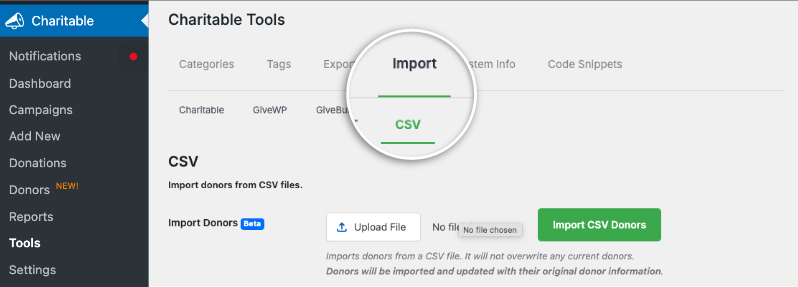
Charitable import csv

Step 3: Upload and Map Your Fields

Upload your CSV file, then map each column to the corresponding Charitable donor field. This ensures your data lands in exactly the right place for each supporter record.
Step 4: Review and Import

Before finalizing, double-check your mappings and preview a few sample entries. Then hit Import Donors—Charitable will instantly populate your donor profiles.

Step 5: Start Using Your New Donor Data

Once imported, all your supporters will appear right inside your Charitable Donors dashboard. You can tag, segment, and connect with them immediately to start building or expanding your campaigns.

🎥 Want to see it in action? Watch our quick video walkthrough:

Why You’ll Love the New Donor CSV Importer

The new Donor CSV Importer is designed to help you at different stages of your fundraising journey.

  • Universal Flexibility: Move your donors from virtually any platform – whether it’s another plugin, a custom-built system, or even a simple spreadsheet.
  • Create Rich Donor Profiles Instantly: Go beyond the basics by importing a wide variety of information. You can include first and last names, emails, phone numbers, company details, full addresses, and even custom tags to segment your donors from the very beginning.
  • Save Time and Effort: Avoid tedious manual data entry. The CSV importer ensures you can get up and running quickly without losing valuable, pre-existing donor information.
  • A Clean, Organized Start: This importer focuses on “pure donor importing,” meaning it brings in your supporter profiles without donation history. That gives you a clean slate to manage your existing donors or sync new donation data later—perfect for nonprofits consolidating lists or migrating gradually.

This tool is designed for a variety of situations. The most common use case is when you’re migrating from another fundraising platform and want to bring your existing donor database with you.

It’s also perfect if you’re just starting with a formal donor management system for the first time and have your contacts stored in a spreadsheet or email list.

As I mentioned, the tool performs a “pure donor import,” meaning it creates the donor profiles without any associated donation history, giving you a clean slate.

This is ideal if you want to import your donors first and handle their donation records separately, or if you simply need to consolidate a list of supporters to begin your fundraising efforts in Charitable. It’s a great way to get all your people in one place before you launch your first campaign.

Ready to Bring Your Donors Home?

With the new Donor CSV Importer in Charitable Pro 1.8.8.8, bringing your supporters into your fundraising platform has never been easier. Whether you’re migrating from another tool, combining multiple lists, or finally getting all your data in one place, this update is built to save you time and give you greater control over your donor management.

If you’re already using Charitable Pro, you can access the importer right now from your WordPress dashboard under Charitable → Tools → Import → Donor CSV.

Not using Pro yet? There’s never been a better time to upgrade and experience a faster, more flexible fundraising workflow.

👉 Update to Charitable Pro 1.8.8.8 today and start importing your donors with ease!

Not yet a Charitable Pro user? Now’s the perfect time to upgrade—click below to grab 50% off and unlock the full power of Charitable Pro.

Stay Connected With Us

We’re always innovating—adding new features, enhancements, and tools to make your fundraising even more powerful.

We also want to see you succeed. That’s why we regularly share guides, videos, and real-world strategies to help you make the most of Charitable, discover what’s working for other nonprofits, and avoid what isn’t.

For more of these insights and updates, follow us and stay connected:

If you like this guide, stay connected with us for more tips, tutorials, and updates:

Here’s to raising more, growing your impact, and making every campaign count.

author avatar
David Bisset Project Manager
David is the project manager of Charitable since 2022. David works with several non-profits (one operated by his wife) along with managing and developing features, support, and marketing for Charitable. Has been with WordPress since 2006 and has been lead organizer of multiple conferences, events, and meetups.

Disclosure: Our content is reader-supported. This means if you click on some of our links, then we may earn a commission. We only recommend products that we believe will add value to our readers.

Leave a Reply

Your email address will not be published. Required fields are marked *

Get free tips and resources right in your inbox, along with 60,000+ others

Join our Newsletter

We won’t spam you. We only send an email when we think it will genuinely help you. Unsubscribe at any time!

Featured Video:

Watch more videos on our YouTube channel.

What's New In Charitable

View The Latest Updates
🔔 Subscribe to get our latest updates
📧 Subscribe to Emails

Email Subscription

Join our Newsletter

We won’t spam you. We only send an email when we think it will genuinely help you. Unsubscribe at any time!

Improvement receipts

🗓️ Annual Receipts 2.0: Send Year-End Receipts to Every Donor in Minutes

You can now send annual receipts in minutes with a few clicks to all your donors.

📧 One-Click Bulk Send Wizard that guides you to sending to hundreds of donors simultaneously directly from your WordPress dashboard.

🔍 Smart “Dry Run” Mode: See exactly who will receive a receipt and who will be skipped (and why) before a single email leaves your server.

🛡️ SMTP-Aware & Limit Protection: Charitable now detects your email setup and automatically adjusts batch sizes and pauses for daily limits to ensure your emails land in inboxes.

✅ Complete Audit Trail: Dedicated system log and on the individual donor’s profile, giving you a clear history for every fiscal year.

Stop dreading tax season and start spending that time on your mission. Update to Annual Receipts 2.0 and automate your year-end reporting today.

author avatar
David Bisset Project Manager
David is the project manager of Charitable since 2022. David works with several non-profits (one operated by his wife) along with managing and developing features, support, and marketing for Charitable. Has been with WordPress since 2006 and has been lead organizer of multiple conferences, events, and meetups.
Addon Donations Improvement

🎈Recurring Donations 2.0: Smarter Automation, Better Recovery, and More Control

We’ve completely rebuilt our Recurring Donations system to help you grow your reliable income stream while giving you (and your donors) more powerful tools than ever before.

What’s New:

🔒 Recurring-Only Campaigns: You can toggle “Recurring Only” mode in the campaign builder to hide the one-time option entirely, ensuring your supporters stay focused on long-term commitment.

📧 Automatic Payment Recovery: Our new Payment Failed Email fires automatically the moment a subscription fails.

🛠️ Self-Service Donor Control:The new Cancel Subscription Button appears directly in the donor dashboard, allowing supporters to pause or end their recurring gifts on their own terms—reducing your admin burden and payment disputes.

📊 Real-Time Revenue Insights: Track your growth, monitor active subscriptions, and see exactly how much predictable support is coming in each month at a glance.

Our new Recurring Donations addon gives you the professional-grade tools you need to grow your mission.

author avatar
David Bisset Project Manager
David is the project manager of Charitable since 2022. David works with several non-profits (one operated by his wife) along with managing and developing features, support, and marketing for Charitable. Has been with WordPress since 2006 and has been lead organizer of multiple conferences, events, and meetups.
Campaigns New

🧡 Modal Donate Button: Turn Any Click into a Contribution

Instead of redirecting users to a new URL, the lightweight Modal Donation Button allows donors to complete their gift in a sleek, focused popup, keeping them engaged with your content while they support your cause.

What’s New:

  • Zero-Friction Giving: Open your donation form in a responsive modal overlay. Donors stay on the same page, reducing drop-off.

  • 🖱️ Place it Anywhere: Use the dedicated WordPress block or a simple shortcode to drop a donate button into sidebars, footers, or even mid-sentence in your storytelling.

  • 🎨 Full Design Control: Match your brand perfectly with customizable background colors, hover effects, border radius, and font sizes—all without touching a single line of CSS.

Whether you need a simple “Donate Now” link or a high-converting popup button, the Modal Donate Button gives you the flexibility to raise more with less effort.

author avatar
David Bisset Project Manager
David is the project manager of Charitable since 2022. David works with several non-profits (one operated by his wife) along with managing and developing features, support, and marketing for Charitable. Has been with WordPress since 2006 and has been lead organizer of multiple conferences, events, and meetups.
donation form Donations New

💵 Mini Donation Widget: Show The Impact Of Every Dollar!

Not every donor who wants to give will navigate to your campaign page. Meet them exactly where they are by placing a fully functional giving experience directly on any page or post.

💬 Show the impact of every dollar: Attach custom messages to each preset amount so donors understand exactly what their gift provides.
🔄 Monthly and one-time giving: Supports a tabbed interface with independent amounts and impact statements for recurring giving programs.
🎨 Match your brand: Easily set accent colors and control size or alignment to fit the widget naturally into your layout without CSS.
⚡ Reduce donor friction: Open the donation form in a modal overlay to keep donors on the page and reduce drop-off.

author avatar
David Bisset Project Manager
David is the project manager of Charitable since 2022. David works with several non-profits (one operated by his wife) along with managing and developing features, support, and marketing for Charitable. Has been with WordPress since 2006 and has been lead organizer of multiple conferences, events, and meetups.
Donations Live New

👉🏻 Showcase Real Momentum with the Donations Feed

Give your donors a reason to trust. Our new feed lets you display a living, breathing record of people showing up for your cause.

🤝 Build instant trust: Overcome donor hesitation by showing a proven track record of community support.
💬 Highlight donor stories: Display real donor comments and locations to show the human side of your fundraising.
🛠️ Drop it anywhere: Easily add the block to your homepage, campaign pages, or confirmation screens in seconds.
📈 Curate your feed: Group multiple donations from the same person or sort by highest amounts to encourage larger gifts.

author avatar
David Bisset Project Manager
David is the project manager of Charitable since 2022. David works with several non-profits (one operated by his wife) along with managing and developing features, support, and marketing for Charitable. Has been with WordPress since 2006 and has been lead organizer of multiple conferences, events, and meetups.



