
Charitable Pro version 1.8.8.6 introduced new “Field and Profile Sync Settings” to improve how you collect and manage donor information. These settings help you customize registration fields, manage user profile details, and keep donor data consistent between the front end and WordPress admin.
How To Access The Misc Tab
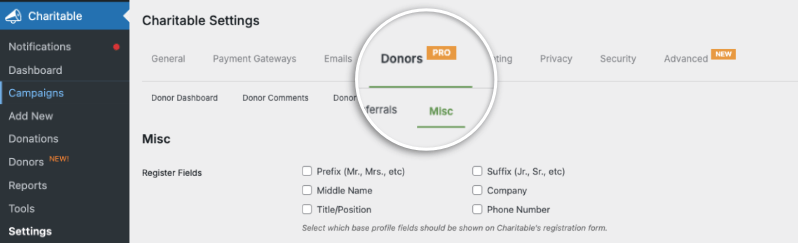
You can access these settings in your WordPress dashboard by heading to Charitable » Settings Page. Then open the Donors » Misc tab.
Fields Available
In this tab, you’ll see fields neatly categorized into Register, User Profile, and Sync with Profile.
Register Fields
The Register Fields setting lets you choose which base profile fields appear on Charitable’s registration form.

If you collect extra details from new supporters at sign‑up—like prefix, middle name, company, title, or phone—you can enable those here.
Only the fields you select will be shown, helping you balance the amount of information you request with the simplicity of your registration experience.
This setting is ideal if you want richer donor data from the very beginning.
For example, organizations that send formal letters might enable prefix/suffix, while those focused on quick signups may only request a phone number.
Adjusting these options does not change WordPress’s default registration form; it specifically controls Charitable’s own registration flow.
User Profile Fields
The User Profile Fields setting controls which Charitable fields appear on the WordPress user profile page (Users » All Users » Edit).
Turning fields on here makes them visible and editable to site admins (and users, if they have access to their profile screen).
Typical fields include prefix, suffix, middle name, company, title/position, phone, birthday, and primary language.

This is especially helpful for teams that maintain donor information from the WordPress admin.
By exposing only the fields you care about, you keep the profile screen clean and relevant.
These fields are the same “base” fields used by Charitable’s donor features, so enabling them here makes it easier to keep donor info accurate from inside WordPress.
Sync With Profile
When enabled, Sync With Profile keeps Charitable’s donor fields and WordPress’s user profile fields aligned.

If a donor updates their profile through the [charitable_donor_dashboard] shortcode (front end), the corresponding values in their WordPress user profile are updated automatically.
If an admin updates those fields in Users » Profile (back end), the changes flow back to the donor’s dashboard data. This reduces duplicate data entry and keeps your donor records consistent.
This setting is designed for sites using both the Donor Dashboard and the WordPress user system. It works alongside the [charitable_profile] shortcode, which surfaces user profile information, ensuring both shortcodes reflect the same data.
Only the overlapping fields managed by Charitable are synchronized. It won’t affect unrelated WordPress profile data or custom fields added by other plugins unless they map to the same Charitable fields.
Example: A donor changes their phone number in the Donor Dashboard. With Sync enabled, that new phone number also updates on their WordPress user profile.
Later, an admin corrects the donor’s company name from the WordPress profile screen.
That update then appears in the donor’s profile inside the Donor Dashboard —no double‑editing required.
Frequently Asked Questions
What are Register Fields in Charitable Pro?
Register Fields let nonprofits pick which donor details to ask for during signup, like prefix, company, phone, or title. This helps get better donor info from the start while keeping signup easy.
Do Register Fields change the WordPress registration form?
No. Register Fields only affect Charitable’s own registration and donor forms. The normal WordPress signup form stays the same.
Can donor info be changed after signing up?
Yes. Donors and admins can update these details anytime in the donor dashboard or WordPress profiles, so info stays correct.
Why add extra fields like phone or company?
More info helps send targeted messages, recognize donors personally, and get better reports for fundraising.
Will too many questions scare donors away?
Maybe. It’s smart to only ask for the info you really need to keep signup fast and simple.
What does Sync With Profile do?
It keeps donor info up to date between the donor dashboard and WordPress profiles automatically, so no double work.
Do Register Fields work with custom fields from other plugins?
Only fields that match Charitable’s default fields sync automatically. Other plugin fields stay separate.
Should formal nonprofits use prefix and suffix fields?
Yes. These help make donor messages and letters more personal and polite.
How do I keep the signup form simple?
Turn on just the main fields you need, like email and phone, for a quick and easy signup.
If you want to get the most out of Charitable and fully use all its features, stay connected with us for the latest tips and updates:
- Join our newsletter – Get weekly tips and exclusive guides in your inbox
- Subscribe to our YouTube channel – Watch step-by-step tutorials and success stories
- Follow us on LinkedIn – Connect with our community and get daily nonprofit insights
- Follow us on Instagram – Fun reels and non-profit insights
- Follow us on TikTok – Insightful & fun videos to help you grow your cause
- Get Fundraiser Tips on TikTok – Subscribe and follow for general fundraiser tips.


