Charitable Blog

Everything you need to know about Charitable and our team.

Introducing Elementor widgets

Introducing Charitable (1.8.6): Elementor Widgets, Reply To, and New Splash Screen.

Last updated on

  • By

We’ve been working hard behind the scenes, and we’re excited to share what we’ve been cooking up. If you’ve ever wished creating donation pages could be easier, or wanted to connect more personally with your donors – this update is going to make your day! We are proud to announce version 1.8.6 of our Charitable (Lite) plugin and our Charitable Pro plugin. Both share some great new features, with additional features just for our Charitable Pro users!

🚀 Updated PDF Receipts Template w/ QR Code

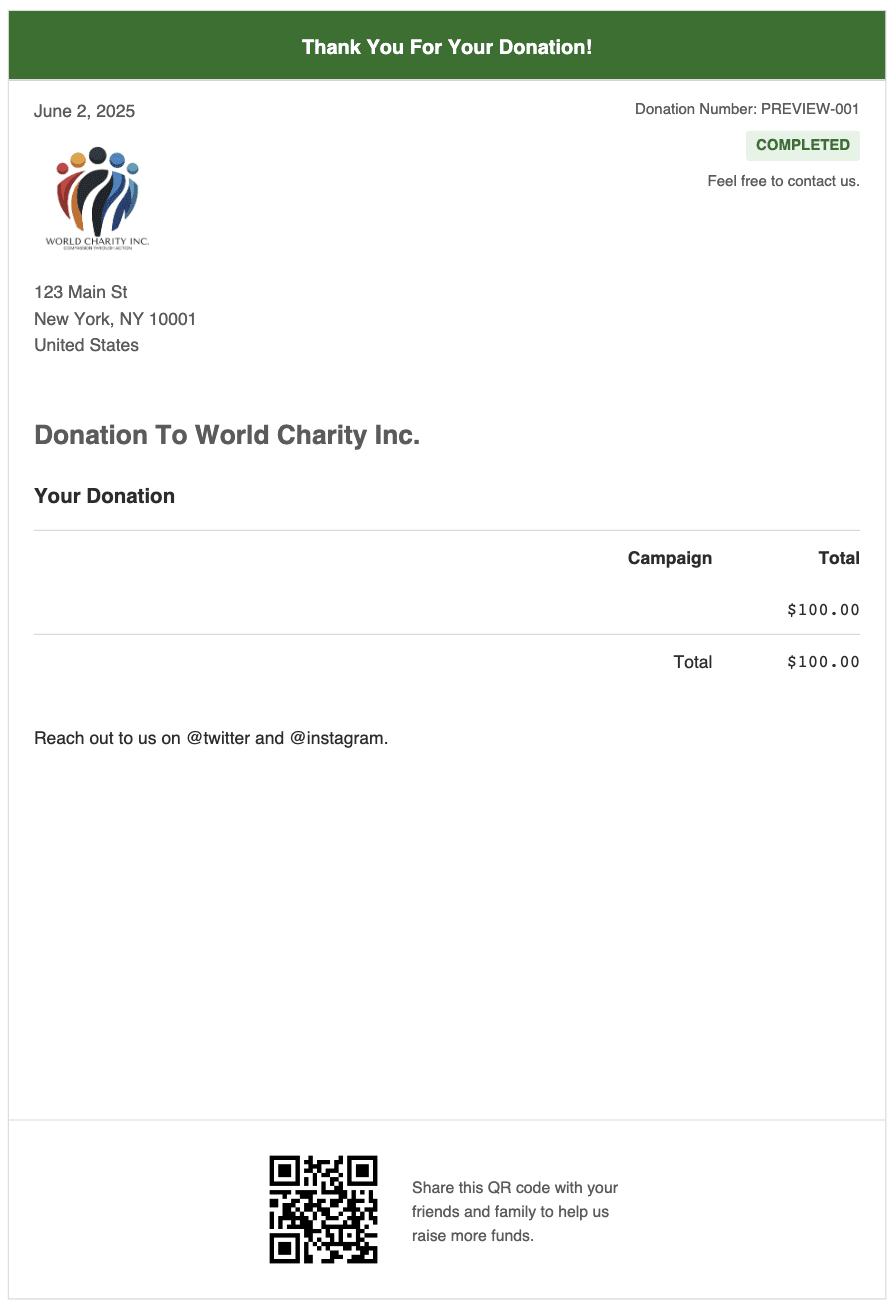
For Charitable Pro plugin users, this update brings something just for you – we have updated the look of the template for PDF Receipts and added a customizable “Thank You” header to make sure you thank your donors!

In addition, we have added the ability to add a QR code that links to the campaign’s official page so donors can scan and share with more potential donors. No coding needed. Just enable this in the PDF Receipts setting and customize the message…. that’s all you need to do!

Want to see the PDF Receipts in action? Watch the PDF Receipt Video »
✨ New Elementor Widgets for Charitable

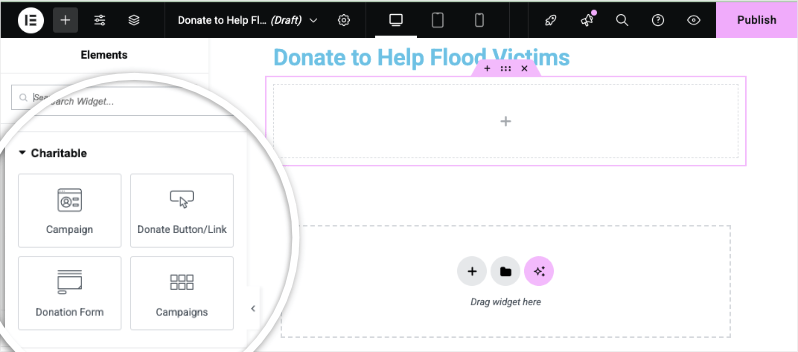
We know many of you love building with Elementor (we do too!) so we’ve created something special just for you. Building beautiful donation pages just got incredibly easy! When you create pages with the Elementor page builder, you’ll now find four ready-made Charitable widgets that seamlessly integrate with your design:

  1. Campaigns
  2. Donate Button
  3. Donation Form
  4. Campaigns (Gallery style)
Charitable Elementor widgets

Want to see these new Elementor widgets in action? Check out our video walkthrough »

To add any of these widgets to your page, you simply drag and drop it into your design. Let’s take a look at how each one works.

1. Campaigns Widget

The Campaigns widget lets you showcase individual campaigns with all their compelling details.

Just drag the widget onto your page, and a dropdown menu appears in the left taskbar. Select your campaign, and boom – you’ll see a live preview right in the builder!
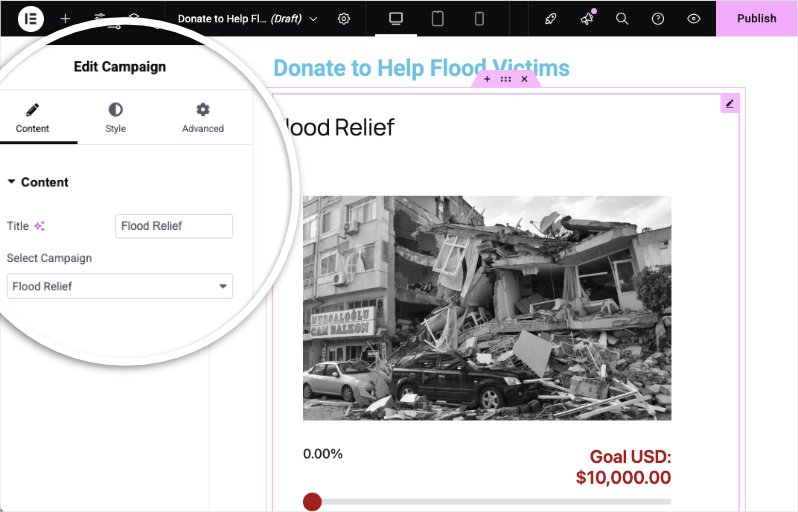
Charitable campaign Elementor widget

Now you can preview, save, and publish with ease.

Why you’ll love this feature?

No more copying and pasting shortcodes or wrestling with layouts. Your campaign information displays beautifully and updates automatically as donations come in. Perfect for featuring your current fundraising initiative on your homepage or creating dedicated campaign landing pages.

2. Donate Button Widget

Sometimes you just need a clear call-to-action, and that’s exactly what this widget delivers.
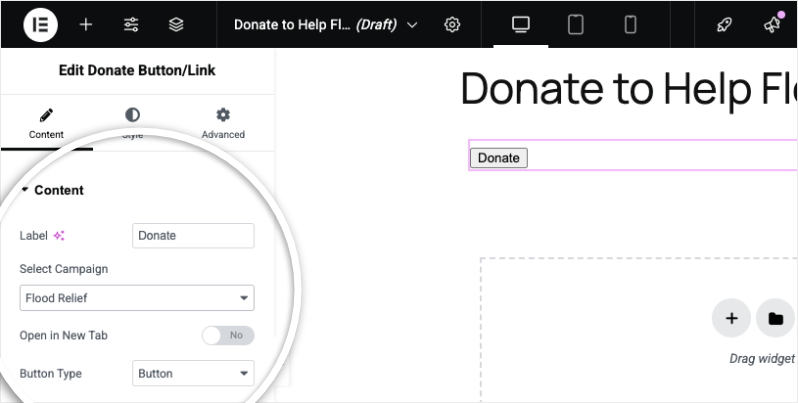
Donate button Elementor widget

When you add the “Donate” button, first, you need to select the campaign from the dropdown menu. Then, you can choose whether to display it as a styled button or a simple text link.

We’ve also added an option to open the campaign in a new tab.

The button can be styled as you would style any other Elementor button.

This Donate button widget is perfect for adding donation CTAs throughout your site – in your header, sidebar, or at the end of blog posts. Wherever you want to inspire giving!

3. Donation Form Widget

Want to show just your donation form on your page? This widget lets you do that with just a click.

While you can’t preview the form directly in the Elementor builder (due to how forms work), just hit the preview button or publish to see it live.
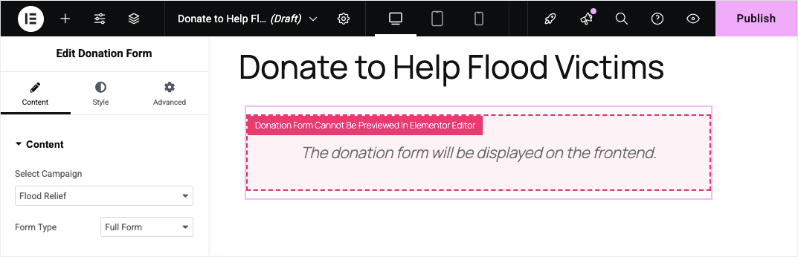
Donation form Elementor widget

Your donation forms now match your site’s aesthetic perfectly. No more jarring transitions or design mismatches when someone decides to give!

4. Campaigns Gallery Widget

This widget lets you showcase your campaigns in a beautiful gallery showcasing multiple causes in an organized grid.
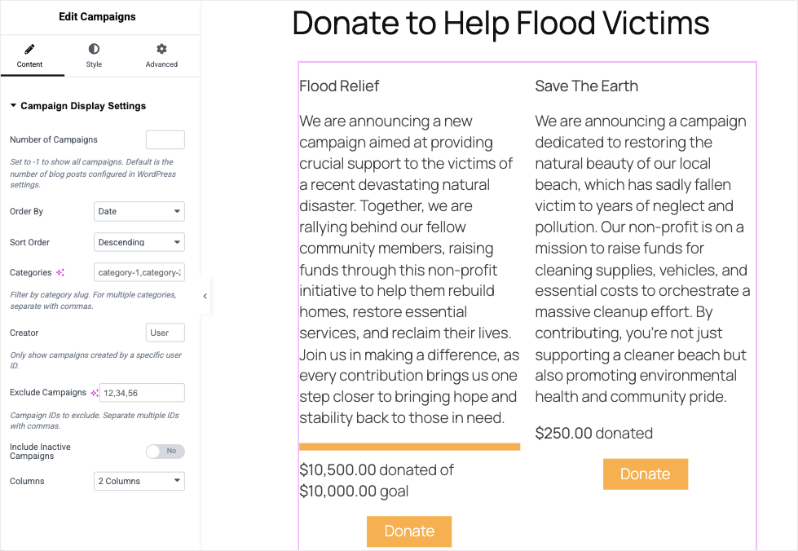
Campaigns block

You get granular control over the gallery, including:

  • How many campaigns to display
  • Order by Date, Popularity, Ending Soon, Title or Random
  • Sort by ascending or descending order
  • Add categories
  • Show campaigns created by a specific users
  • Exclude specific campaigns if needed
  • Include/Exclude inactive campaigns
  • Column layout (2, 3, 4 columns – whatever works!)

This widget will help you create a “Ways to Give” page or showcase all your current initiatives. Donors can browse and choose the cause that speaks to them most!

The best part? Everything works right out of the box. If you’re already comfortable with Elementor, you’ll feel right at home. Just drag, drop, customize, and publish!

Ready to get started? See How to Use Elementor Widgets »

📧 Game-Changing Email Features: Actually Reply to Your Donors!

Okay, this one’s huge. We’ve all been there – a generous donor makes a contribution, you get the notification email, and you want to say thanks personally. But hitting “reply” just… didn’t work. Well, we fixed that!

The New “Reply to Donor” Feature

We’ve added this smart feature to both New Donation Notifications and Offline Donation Notifications. Watch how this new feature works in our ‘Reply To’ Video Walkthrough »
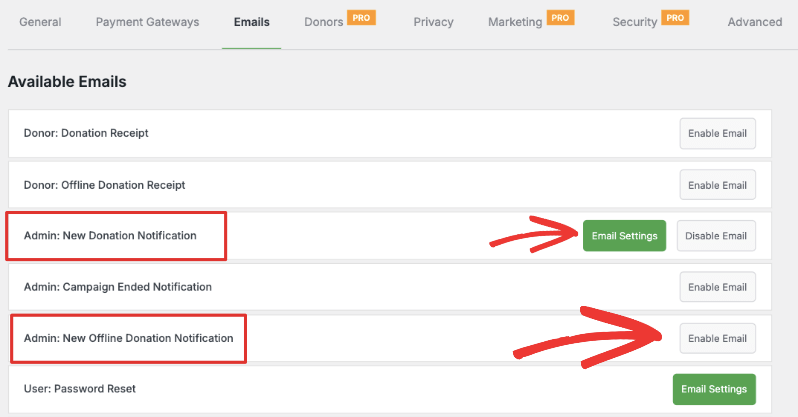
Admin new donor notification

Here’s why it’s a game-changer:

Before: 😔

  • You’d get a notification about a donation
  • You’d have to copy the donor’s email
  • Open a new email
  • Paste their address
  • Write your thank you

Now: 🎉

  • Toggle on “Reply to Donor” in your email settings
  • When a donation notification arrives, just hit reply
  • The donor’s email automatically fills in
  • Type your personal thank you message
  • Hit send – done!

You’ll find this switch inside the Settings » Emails page in your Charitable dashboard. It’s just a click and you’re all set.
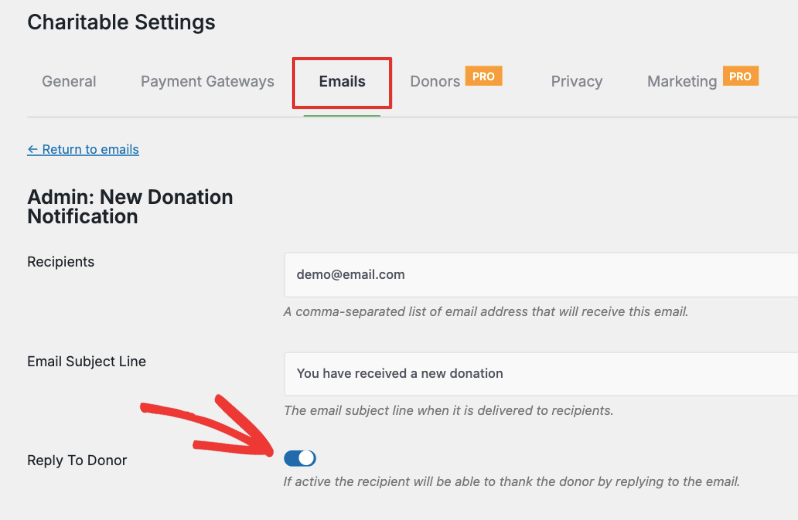
Email reply to

Why this matters? Building relationships with donors is crucial, and nothing beats a personal thank you. This feature removes all the friction, making it super easy to show your appreciation. It happens right in your regular email client – no need to log into WordPress or navigate anywhere else.

🚀 A Warmer Welcome with Our New Splash Screen

Nobody likes updating plugins and wondering “Wait, what changed?” That’s why we’ve created a beautiful new splash screen in Charitable (Lite) plugin for major Charitable updates.
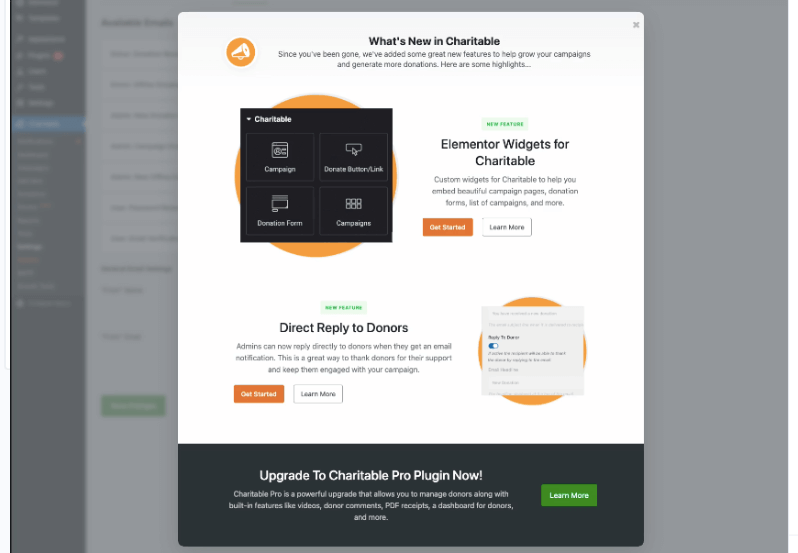
Splash screen in Charitable

What you’ll see:

  • A friendly welcome highlighting all the new features
  • Clear explanations of what’s new and improved
  • Quick tips to help you get the most out of the updates
  • Links to helpful resources if you want to dive deeper

The splash page will walk you through everything that’s new – because nobody should have to hunt for release notes to understand what they just installed!

A Few More Surprises!

The Charitable Pro plugin also includes several new exciting features that we are introducing as beta features, including abilities to export/import Charitable donors along with importing data from other plugins and services. In addition, we are introducing exciting payment options for Stripe users. Watch for more news on these and feel free to try these features for yourself!

Ready to Try Everything Out?

These features are available right now in the latest version of Charitable. Whether you’re looking to create more beautiful donation pages with Elementor, or you want to build stronger relationships with your donors through better communication, this update has you covered.

Quick Start Guide:

  1. Update to the latest version of Charitable
  2. Open Elementor and look for the new Charitable widgets in your widget panel
  3. Head to your email settings to enable “Reply to Donor”
  4. Start creating and connecting!

Got questions? Need a hand getting started? See our documentation:

We can’t wait to see the amazing donation pages you create and the relationships you build with these new tools. Happy fundraising!

author avatar
David Bisset Project Manager
David is the project manager of Charitable since 2022. David works with several non-profits (one operated by his wife) along with managing and developing features, support, and marketing for Charitable. Has been with WordPress since 2006 and has been lead organizer of multiple conferences, events, and meetups.

Disclosure: Our content is reader-supported. This means if you click on some of our links, then we may earn a commission. We only recommend products that we believe will add value to our readers.

Leave a Reply

Your email address will not be published. Required fields are marked *

Get free tips and resources right in your inbox, along with 60,000+ others

Join our Newsletter

We won’t spam you. We only send an email when we think it will genuinely help you. Unsubscribe at any time!

Featured Video:

Watch more videos on our YouTube channel.

What's New In Charitable

🔔 Subscribe to get our latest updates
📧 Subscribe to Emails

Email Subscription

Join our Newsletter

We won’t spam you. We only send an email when we think it will genuinely help you. Unsubscribe at any time!

Improvement New Security

📣 New Security Features

We’ve introduced a suite of new security tools to give you total control over who accesses your forms, plus a new way to tidy up your database.

Advanced Security Suite

Layered protection: Cloudflare, ReCAPTCHA, IP Controls, and Rate Limiting.

We have overhauled our security settings to stop bots without blocking real donors.

  • 🤖 Flexible Protection: Choose between Google reCAPTCHA v3 or the privacy-first Cloudflare Turnstile to block bots invisible.

  • 🚦 Rate limiting: Stop spam floods by limiting how many submissions an IP address can make in a set timeframe.

  • 🛑 Total control: Use the new IP Blacklist to block bad actors instantly, or the IP Whitelist to let your team bypass checks during testing.

The Clean Donation Tool

Go from “Testing” to “Live” in seconds.

Finished setting up your site and need to get rid of all those test transactions?

  • 🧹 Sweep it clean: Bulk delete test donations and donor records with a single click.

  • 📉 Accurate reporting: Ensure your revenue stats are 100% accurate for launch day.

  • ⚙️ Reset sequences: Automatically resets sequential invoice numbering.

.aioseo-author-bio-compact { display: flex; gap: 40px; padding: 12px; text-align: left; border: 1px solid black; border-radius: 5px; color: #111111; background-color: #FFFFFF; } .aioseo-author-bio-compact-left { flex: 0 0 120px; } .aioseo-author-bio-compact-right { flex: 1 1 auto; } .aioseo-author-bio-compact-left .aioseo-author-bio-compact-image { width: 120px; height: 120px; border-radius: 5px; } .aioseo-author-bio-compact-right .aioseo-author-bio-compact-header { display: flex; align-items: center; } .aioseo-author-bio-compact-right .aioseo-author-bio-compact-header .author-name { font-size: 22px; font-weight: 600; } .aioseo-author-bio-compact-right .aioseo-author-bio-compact-header .author-job-title { margin-left: 12px; padding-left: 12px; font-size: 18px; border-left: 1px solid gray; } .aioseo-author-bio-compact-right .aioseo-author-bio-compact-main { margin: 12px 0; font-size: 18px; } .aioseo-author-bio-compact-right .aioseo-author-bio-compact-main > p:last-of-type { display: inline; } .aioseo-author-bio-compact-right .aioseo-author-bio-compact-main .author-bio-link { display: inline-flex; } .aioseo-author-bio-compact-right .aioseo-author-bio-compact-main .author-bio-link a { display: flex; align-items: center; } .aioseo-author-bio-compact-right .aioseo-author-bio-compact-main .author-bio-link a svg { fill: black; } .aioseo-author-bio-compact-right .aioseo-author-bio-compact-footer .author-expertises { display: flex; flex-wrap: wrap; gap: 10px; } .aioseo-author-bio-compact-right .aioseo-author-bio-compact-footer .author-expertises .author-expertise { padding: 4px 8px; font-size: 14px; border-radius: 4px; background-color: #DCDDE1; color: inherit; } .aioseo-author-bio-compact-right .aioseo-author-bio-compact-footer .author-socials { margin-top: 12px; display: flex; gap: 6px; } .aioseo-author-bio-compact-right .aioseo-author-bio-compact-footer .author-socials .aioseo-social-icon-tumblrUrl { margin-left: -2px; } .aioseo-author-bio-compact-site-editor-disclaimer { color: black; margin-bottom: 12px; font-style: italic; } @media screen and (max-width: 430px ) { .aioseo-author-bio-compact { flex-direction: column; gap: 20px; } .aioseo-author-bio-compact-left .aioseo-author-bio-compact-image { display: block; margin: 0 auto; width: 160px; height: 160px; } .aioseo-author-bio-compact-right { text-align: center; } .aioseo-author-bio-compact-right .aioseo-author-bio-compact-header { justify-content: center; } .aioseo-author-bio-compact-right .aioseo-author-bio-compact-footer .author-socials { justify-content: center; } }
author avatar
David Bisset Project Manager
David is the project manager of Charitable since 2022. David works with several non-profits (one operated by his wife) along with managing and developing features, support, and marketing for Charitable. Has been with WordPress since 2006 and has been lead organizer of multiple conferences, events, and meetups.
donation form New

🏗️ Visual Donation Form Builder

Building the perfect donation form just got easier. We have completely reimagined how you create forms with a new drag-and-drop interface.

Design Visually, in Real-Time

No coding, no guessing. Just point, click, and build.

Say goodbye to confusing settings pages. You can now edit your form and see exactly what your donors will see, instantly.

  • 🖱️ Drag & Drop: Easily add fields like names, addresses, or file uploads by dragging them exactly where you want them.

  • 🎨 Customize everything: Click any field to tweak labels, placeholders, and requirement settings on the fly.

  • 👁️ Live preview: See your changes immediately as you make them—ensure your form flows perfectly before you hit publish.

Flexible & Powerful

Works with all your existing campaigns.

  • 🧩 Deep customization: Add custom HTML, shortcodes, or CSS classes for advanced branding.

  • ⚙️ Smart fields: Collect exactly what you need with support for dropdowns, checkboxes, dates, and hidden fields.

.aioseo-author-bio-compact { display: flex; gap: 40px; padding: 12px; text-align: left; border: 1px solid black; border-radius: 5px; color: #111111; background-color: #FFFFFF; } .aioseo-author-bio-compact-left { flex: 0 0 120px; } .aioseo-author-bio-compact-right { flex: 1 1 auto; } .aioseo-author-bio-compact-left .aioseo-author-bio-compact-image { width: 120px; height: 120px; border-radius: 5px; } .aioseo-author-bio-compact-right .aioseo-author-bio-compact-header { display: flex; align-items: center; } .aioseo-author-bio-compact-right .aioseo-author-bio-compact-header .author-name { font-size: 22px; font-weight: 600; } .aioseo-author-bio-compact-right .aioseo-author-bio-compact-header .author-job-title { margin-left: 12px; padding-left: 12px; font-size: 18px; border-left: 1px solid gray; } .aioseo-author-bio-compact-right .aioseo-author-bio-compact-main { margin: 12px 0; font-size: 18px; } .aioseo-author-bio-compact-right .aioseo-author-bio-compact-main > p:last-of-type { display: inline; } .aioseo-author-bio-compact-right .aioseo-author-bio-compact-main .author-bio-link { display: inline-flex; } .aioseo-author-bio-compact-right .aioseo-author-bio-compact-main .author-bio-link a { display: flex; align-items: center; } .aioseo-author-bio-compact-right .aioseo-author-bio-compact-main .author-bio-link a svg { fill: black; } .aioseo-author-bio-compact-right .aioseo-author-bio-compact-footer .author-expertises { display: flex; flex-wrap: wrap; gap: 10px; } .aioseo-author-bio-compact-right .aioseo-author-bio-compact-footer .author-expertises .author-expertise { padding: 4px 8px; font-size: 14px; border-radius: 4px; background-color: #DCDDE1; color: inherit; } .aioseo-author-bio-compact-right .aioseo-author-bio-compact-footer .author-socials { margin-top: 12px; display: flex; gap: 6px; } .aioseo-author-bio-compact-right .aioseo-author-bio-compact-footer .author-socials .aioseo-social-icon-tumblrUrl { margin-left: -2px; } .aioseo-author-bio-compact-site-editor-disclaimer { color: black; margin-bottom: 12px; font-style: italic; } @media screen and (max-width: 430px ) { .aioseo-author-bio-compact { flex-direction: column; gap: 20px; } .aioseo-author-bio-compact-left .aioseo-author-bio-compact-image { display: block; margin: 0 auto; width: 160px; height: 160px; } .aioseo-author-bio-compact-right { text-align: center; } .aioseo-author-bio-compact-right .aioseo-author-bio-compact-header { justify-content: center; } .aioseo-author-bio-compact-right .aioseo-author-bio-compact-footer .author-socials { justify-content: center; } }

author avatar
David Bisset Project Manager
David is the project manager of Charitable since 2022. David works with several non-profits (one operated by his wife) along with managing and developing features, support, and marketing for Charitable. Has been with WordPress since 2006 and has been lead organizer of multiple conferences, events, and meetups.
Leaderboards New

🏆 Donor Leaderboards!

Turn your fundraising into a community event. Recognize your most generous supporters and inspire friendly competition with our new leaderboard tools.

Gamify Your Fundraising

Celebrate your top donors and encourage others to climb the ranks.

Create a public “Hall of Fame” to give your donors the recognition they deserve.

  • 🎨 Two stunning layouts: Choose the List View for a clean, data-rich table or the Card View for a modern, visual grid with avatars.

  • 🥇 Automatic highlights: The top 3 supporters get special Trophy and Crown icons to make them stand out.

  • 🧩 Place it anywhere: Add it to any page using the new Gutenberg Block, or drop it directly into your campaign using the Visual Builder.

Total Customization

You decide what to show and what to hide.

  • ⚙️ Flexible data: Choose to display or hide donation amounts, donor counts, or avatars.

  • 🔄 Lifetime stats: Works seamlessly with Recurring Donations to show a donor’s all-time total impact.

.aioseo-author-bio-compact { display: flex; gap: 40px; padding: 12px; text-align: left; border: 1px solid black; border-radius: 5px; color: #111111; background-color: #FFFFFF; } .aioseo-author-bio-compact-left { flex: 0 0 120px; } .aioseo-author-bio-compact-right { flex: 1 1 auto; } .aioseo-author-bio-compact-left .aioseo-author-bio-compact-image { width: 120px; height: 120px; border-radius: 5px; } .aioseo-author-bio-compact-right .aioseo-author-bio-compact-header { display: flex; align-items: center; } .aioseo-author-bio-compact-right .aioseo-author-bio-compact-header .author-name { font-size: 22px; font-weight: 600; } .aioseo-author-bio-compact-right .aioseo-author-bio-compact-header .author-job-title { margin-left: 12px; padding-left: 12px; font-size: 18px; border-left: 1px solid gray; } .aioseo-author-bio-compact-right .aioseo-author-bio-compact-main { margin: 12px 0; font-size: 18px; } .aioseo-author-bio-compact-right .aioseo-author-bio-compact-main > p:last-of-type { display: inline; } .aioseo-author-bio-compact-right .aioseo-author-bio-compact-main .author-bio-link { display: inline-flex; } .aioseo-author-bio-compact-right .aioseo-author-bio-compact-main .author-bio-link a { display: flex; align-items: center; } .aioseo-author-bio-compact-right .aioseo-author-bio-compact-main .author-bio-link a svg { fill: black; } .aioseo-author-bio-compact-right .aioseo-author-bio-compact-footer .author-expertises { display: flex; flex-wrap: wrap; gap: 10px; } .aioseo-author-bio-compact-right .aioseo-author-bio-compact-footer .author-expertises .author-expertise { padding: 4px 8px; font-size: 14px; border-radius: 4px; background-color: #DCDDE1; color: inherit; } .aioseo-author-bio-compact-right .aioseo-author-bio-compact-footer .author-socials { margin-top: 12px; display: flex; gap: 6px; } .aioseo-author-bio-compact-right .aioseo-author-bio-compact-footer .author-socials .aioseo-social-icon-tumblrUrl { margin-left: -2px; } .aioseo-author-bio-compact-site-editor-disclaimer { color: black; margin-bottom: 12px; font-style: italic; } @media screen and (max-width: 430px ) { .aioseo-author-bio-compact { flex-direction: column; gap: 20px; } .aioseo-author-bio-compact-left .aioseo-author-bio-compact-image { display: block; margin: 0 auto; width: 160px; height: 160px; } .aioseo-author-bio-compact-right { text-align: center; } .aioseo-author-bio-compact-right .aioseo-author-bio-compact-header { justify-content: center; } .aioseo-author-bio-compact-right .aioseo-author-bio-compact-footer .author-socials { justify-content: center; } }
author avatar
David Bisset Project Manager
David is the project manager of Charitable since 2022. David works with several non-profits (one operated by his wife) along with managing and developing features, support, and marketing for Charitable. Has been with WordPress since 2006 and has been lead organizer of multiple conferences, events, and meetups.
Improvement New templates

🎨 New Templates & List Builder

Launch faster and design better. We’ve added three professional campaign templates and a versatile new content block to help you tell your story.

3 New Campaign Templates

Ready-to-use designs for specific fundraising needs.

Don’t start from scratch. Pick a template tailored to your cause and launch in minutes.

  • 🎄 Holiday Fundraiser: A warm, festive design perfect for year-end giving, toy drives, or food pantries.

  • 🎓 School Fundraiser: Built for PTAs and sports teams. clearly highlights goals like playground upgrades or classroom tech.

  • Church Fundraiser: A trustworthy layout designed for building funds, mission trips, and tithes.

The New “List” Block

Organize your campaign details without writing code.

Make your campaign pages easier to scan and more visually engaging with our new builder block.

  • 📝 Flexible layouts: Choose from 3 distinct styles to display sponsorship levels, donation perks, or project goals.

  • 🎨 Rich customization: Add colorful headlines, support for emojis, and unlimited list items.

  • 👣 Smart footers: Include a built-in footer for extra context or a final Call to Action.

.aioseo-author-bio-compact { display: flex; gap: 40px; padding: 12px; text-align: left; border: 1px solid black; border-radius: 5px; color: #111111; background-color: #FFFFFF; } .aioseo-author-bio-compact-left { flex: 0 0 120px; } .aioseo-author-bio-compact-right { flex: 1 1 auto; } .aioseo-author-bio-compact-left .aioseo-author-bio-compact-image { width: 120px; height: 120px; border-radius: 5px; } .aioseo-author-bio-compact-right .aioseo-author-bio-compact-header { display: flex; align-items: center; } .aioseo-author-bio-compact-right .aioseo-author-bio-compact-header .author-name { font-size: 22px; font-weight: 600; } .aioseo-author-bio-compact-right .aioseo-author-bio-compact-header .author-job-title { margin-left: 12px; padding-left: 12px; font-size: 18px; border-left: 1px solid gray; } .aioseo-author-bio-compact-right .aioseo-author-bio-compact-main { margin: 12px 0; font-size: 18px; } .aioseo-author-bio-compact-right .aioseo-author-bio-compact-main > p:last-of-type { display: inline; } .aioseo-author-bio-compact-right .aioseo-author-bio-compact-main .author-bio-link { display: inline-flex; } .aioseo-author-bio-compact-right .aioseo-author-bio-compact-main .author-bio-link a { display: flex; align-items: center; } .aioseo-author-bio-compact-right .aioseo-author-bio-compact-main .author-bio-link a svg { fill: black; } .aioseo-author-bio-compact-right .aioseo-author-bio-compact-footer .author-expertises { display: flex; flex-wrap: wrap; gap: 10px; } .aioseo-author-bio-compact-right .aioseo-author-bio-compact-footer .author-expertises .author-expertise { padding: 4px 8px; font-size: 14px; border-radius: 4px; background-color: #DCDDE1; color: inherit; } .aioseo-author-bio-compact-right .aioseo-author-bio-compact-footer .author-socials { margin-top: 12px; display: flex; gap: 6px; } .aioseo-author-bio-compact-right .aioseo-author-bio-compact-footer .author-socials .aioseo-social-icon-tumblrUrl { margin-left: -2px; } .aioseo-author-bio-compact-site-editor-disclaimer { color: black; margin-bottom: 12px; font-style: italic; } @media screen and (max-width: 430px ) { .aioseo-author-bio-compact { flex-direction: column; gap: 20px; } .aioseo-author-bio-compact-left .aioseo-author-bio-compact-image { display: block; margin: 0 auto; width: 160px; height: 160px; } .aioseo-author-bio-compact-right { text-align: center; } .aioseo-author-bio-compact-right .aioseo-author-bio-compact-header { justify-content: center; } .aioseo-author-bio-compact-right .aioseo-author-bio-compact-footer .author-socials { justify-content: center; } }
author avatar
David Bisset Project Manager
David is the project manager of Charitable since 2022. David works with several non-profits (one operated by his wife) along with managing and developing features, support, and marketing for Charitable. Has been with WordPress since 2006 and has been lead organizer of multiple conferences, events, and meetups.