
We are thrilled to announce a powerful new integration included in Charitable Pro: Native WPBakery Page Builder Support!
You can now build your donation forms and campaigns in seconds AND place them in your layouts quickly – all without coding.
This new feature is designed to help you build stunning fundraising pages, donation forms, and campaign grids using the WPBakery drag-and-drop visual editor you already know and love.
By bringing Charitable directly into WPBakery, we’ve made it easier than ever to design your non-profit’s website without touching a single line of code or memorizing shortcodes.
The WPBakery integration is available today in Charitable Pro.
Drag, Drop, and Donate
For years, WPBakery has been a go-to page builder for WordPress users who want flexibility and control. Now, Charitable fits right into that workflow.
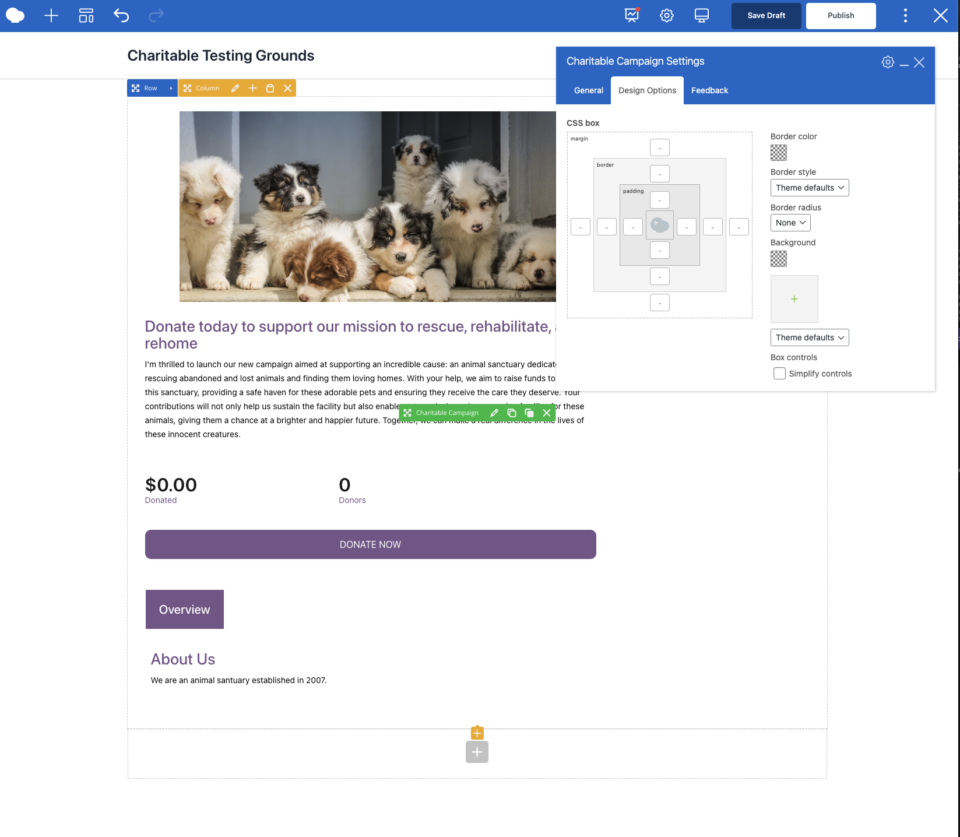
Instead of copying and pasting shortcodes, you can now find a dedicated “Charitable” category right inside the WPBakery element picker. Just drag the element you need onto your page, tweak the settings visually, and publish.
With the new WPBakery integration, you can:
- Visually build your campaign pages and donation forms.
- Instant previews of your campaign grids and buttons in the backend editor.
- Style everything using WPBakery’s native Design Options (margins, borders, padding).
- Filter and sort campaigns with easy dropdown menus.
See it in action below:
Four Powerful New Elements
We know that every fundraising site has different needs. That’s why we’ve included four distinct elements to give you complete control over your layout.
1. Charitable Campaign: Display a single campaign with all its details – description, progress bar, and stats. It’s perfect for highlighting a featured cause on your homepage or building a custom landing page for a specific project.
2. Charitable Donation Form: Embed a complete donation form directly onto any page. Whether you are using our new Visual Form Builder or legacy forms, you can drop a donation form anywhere to maximize conversions.
3. Charitable Campaigns (Grid/List): Need to show a list of your latest causes? This element lets you display a grid or list of multiple campaigns. You get full control over how many to show, the number of columns, and which information (like “Donate” buttons or “Read More” links) appears on the cards.
4. Charitable Donate Button: Sometimes simple is best. Add a standalone “Donate” button or link anywhere on your site – sidebars, headers, or call-to-action sections – that links directly to a specific campaign’s donation page.
Powerful Filtering and Customization
This integration isn’t just about placing elements; it’s about giving you control over the data you display. The new elements come with robust settings built right in:
- Smart Filtering: Easily show campaigns from specific categories, tags, or even exclude specific campaigns by ID.
- Flexible Sorting: Order your campaigns by “Newest,” “Most Popular,” “Ending Soon,” or “Amount Raised.”
- Design Control: Use WPBakery’s built-in Design Options tab to add custom margins, padding, borders, and background colors to any Charitable element.
- Responsive Ready: All elements are designed to look great on desktops, tablets, and mobile devices automatically.
Get the WPBakery Integration Today
The new WPBakery integration is available today in Charitable Pro version 1.8.10.5 and later.
We’re excited to see how you use these visual tools to create more engaging fundraising pages and raise more for your cause. To learn about every available setting, you can check out the new documentation.
Read the full WPBakery + Charitable integration documentation »
Not yet a Charitable Pro user? Sign up today and get up to 50% off on your plan. We’re confident you’ll love raising funds with Charitable. If for any reason Charitable is not the right fit for you, we’ll refund your purchase with our 14-day money back guarantee.
We’d love to hear how you’re using these new features!
We’re committed to continuously improving our WPBakery integration – shaped by your needs and ideas.
If you’re using the WPBakery integration, you’ll now find a built-in feedback form where you can share your thoughts and tell us what you’d love to see next. Your input directly guides our development roadmap for 2026.
We’re also exploring new integrations to make Charitable even more flexible for your fundraising setup. More advancements are already on the way, and your feedback helps us decide which tools to connect with next.
Thank you for helping us make Charitable better for every nonprofit that relies on it.
Stay connected with us:
- Join our newsletter – Get weekly tips and exclusive guides in your inbox
- Subscribe to our YouTube channel – Watch step-by-step tutorials and success stories
- Follow us on LinkedIn – Connect with our community and get daily nonprofit insights
- Follow us on Instagram – Fun reels and non-profit insights
- Follow us on TikTok – Insightful & fun videos to help you grow your cause
- Get Fundraiser Tips on TikTok – Subscribe and follow for general fundraiser tips.
Your feedback keeps Charitable moving forward. Let’s keep building better fundraising tools – together.





Leave a Reply