The Mini Donation Widget is a compact, embeddable donation form that lets visitors give to a specific campaign directly from any page or post. No full campaign page required.
Add it to your homepage, a landing page, a sidebar, or a blog post and turn any content into a fundraising opportunity. Available in Charitable Pro 1.8.13.1+.
Not yet a Charitable Pro user? Sign up today and get up to 50% off on your plan. We’re confident you’ll love raising funds with Charitable. If, for any reason, Charitable is not the right fit for you, we’ll refund your purchase with our 14-day money-back guarantee. Get Charitable Pro Now »
What’s in this Guide
Key Features
The Mini Donation Widget is built to make giving fast, flexible, and friction-free. Whether you’re embedding it on your homepage, a blog post, or a landing page, every feature is designed to reduce barriers and keep donors focused on giving. Here’s what it brings to your fundraising pages:
- Place a donation widget anywhere using a Gutenberg block or shortcode
- Display preset donation amount buttons for one-time and monthly giving
- Show impact statements that update as donors select different amounts
- Optional Monthly / Give Once tabs when used with Charitable Recurring
- CTA button opens a modal or redirects to the campaign donation page
- “Other” amount input for custom giving
- Set a custom accent color, width, alignment, and widget title
- Template override support for full HTML control
Together, these features give you a fully capable donation experience in a compact, embeddable package. No dedicated campaign page required, no extra navigation, and no unnecessary friction – just a clean, focused giving experience that works wherever your audience already is.
Why Use the Mini Donation Widget?
Most donation plugins require donors to navigate to a dedicated campaign page before they can give. The Mini Donation Widget removes that barrier by embedding a complete giving experience exactly where your audience is already engaged: on your homepage, in a blog post, or alongside compelling content. It keeps the giving process fast, focused, and friction-free.
See It In Action
Requirements
- Charitable Pro 1.8.13.1 or later
- For the Monthly/Give Once recurring tab: the Charitable Recurring addon must be active
Getting Started
Adding the Block
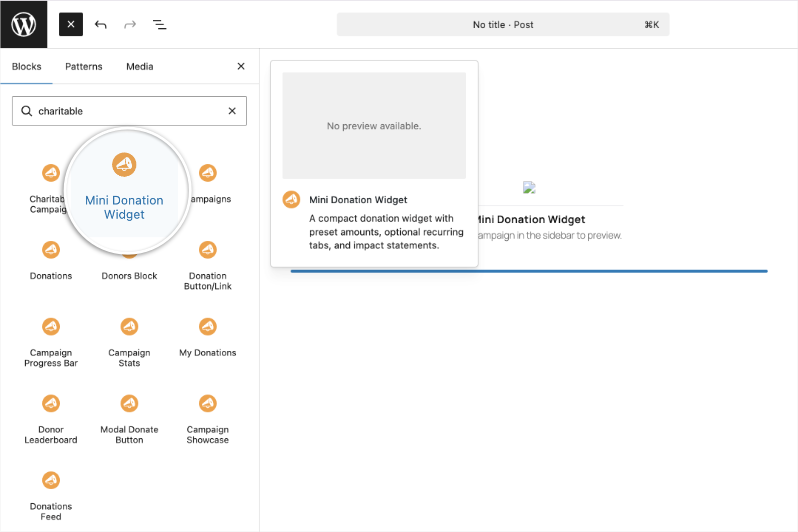
- Open any page or post in the WordPress block editor.
- Click + to add a new block and search for Mini Donation Widget.
- Select a campaign from the Campaign dropdown in the block settings panel.
- Configure your preferred amounts, CTA mode, and styling options in the sidebar.
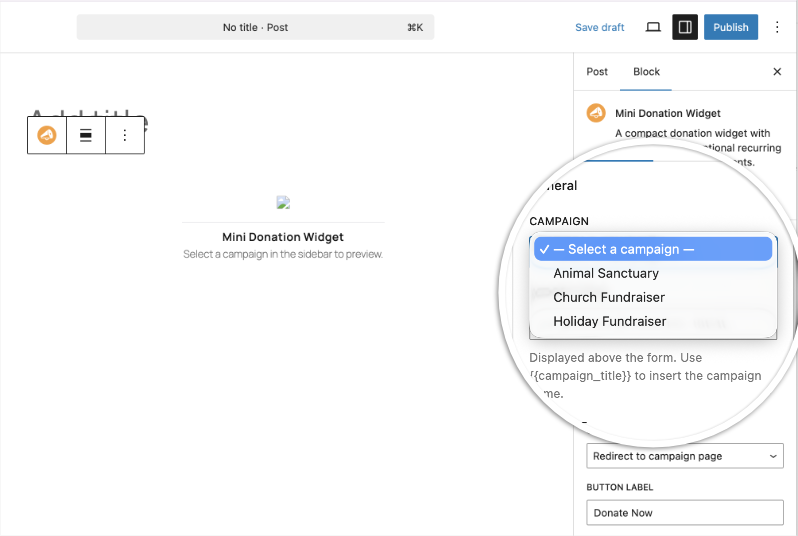
Using the Shortcode
Add [charitable_mini_widget campaign_id="123"] to any page, post, widget area, or template that supports shortcodes. Replace 123 with your campaign’s post ID.
Configuration Options / Parameter Reference
Core Parameters
| Parameter | Type | Default | Description |
|---|---|---|---|
campaign_id | integer | (required) | The post ID of the campaign to donate to. |
cta_mode | string | redirect | How the donate button behaves. redirect sends the donor to the campaign donation page; modal opens the form in a popup. |
cta_label | string | Donate Now | The text label on the donate button. |
Recurring / Tab Parameters
| Parameter | Type | Default | Description |
|---|---|---|---|
recurring | boolean | false | Set to true to show Monthly and Give Once tabs. Requires Charitable Recurring. |
monthly_label | string | Monthly | Custom label for the monthly tab. |
give_once_label | string | Give Once | Custom label for the one-time tab. |
Amount Parameters
| Parameter | Type | Default | Description |
|---|---|---|---|
monthly_amounts | string | 10,25,50,100 | Comma-separated preset amounts for the monthly tab. |
monthly_default | string | 25 | The pre-selected monthly amount. Must be in monthly_amounts. |
monthly_show_other | boolean | false | Show an “Other” button allowing a custom monthly amount. |
onetime_amounts | string | 25,50,100,250 | Comma-separated preset amounts for the one-time tab. |
onetime_default | string | 50 | The pre-selected one-time amount. Must be in onetime_amounts. |
onetime_show_other | boolean | false | Show an “Other” button allowing a custom one-time amount. |
Impact Statement Parameters
Per-amount impact statements update dynamically as donors click different amount buttons.
| Parameter | Type | Default | Description |
|---|---|---|---|
monthly_impact_{amount} | string | (empty) | Impact text shown when the given monthly amount is selected. Example: monthly_impact_25="feeds a family for a month" |
onetime_impact_{amount} | string | (empty) | Impact text shown when the given one-time amount is selected. Example: onetime_impact_100="covers school supplies for 10 kids" |
Validation Parameters
| Parameter | Type | Default | Description |
|---|---|---|---|
min_amount | number | (none) | Minimum allowed custom amount when “Other” is enabled. |
max_amount | number | (none) | Maximum allowed custom amount when “Other” is enabled. |
Display Parameters
| Parameter | Type | Default | Description |
|---|---|---|---|
show_currency | boolean | false | Show the ISO currency code (e.g., USD) next to preset amounts. |
accent_color | string | (theme default) | Hex color for button and accent styling, e.g., #e63946. |
widget_align | string | center | Widget alignment: left, center, or right. |
widget_width | string | (auto) | Max-width CSS value for the widget container, e.g., 400px or 100%. |
widget_title | string | (none) | Optional heading above the widget. Use {{campaign_title}} to insert the campaign name dynamically. |
impact_align | string | (none) | Text alignment for impact statements: left, center, or right. |
class | string | (none) | Extra CSS class(es) added to the widget wrapper element. |
Shortcode Example
[charitable_mini_widget
  campaign_id="42"
  cta_mode="modal"
  recurring="true"
  monthly_amounts="10,25,50,100"
  monthly_default="25"
  monthly_impact_10="provides clean water for a week"
  monthly_impact_25="feeds a family for a month"
  monthly_impact_50="sponsors a child's education"
  monthly_impact_100="funds a medical checkup"
  monthly_show_other="true"
  onetime_amounts="25,50,100,250"
  onetime_default="50"
  widget_title="Support {{campaign_title}}"
  accent_color="#e63946"
  widget_width="420px"
  widget_align="center"
]
Customization
CSS Variable
Override the accent color globally or per instance using the CSS custom property:
.charitable-mini-widget {
    --charitable-mini-widget-accent: #e63946;
}
Template Override
To customize the widget HTML, copy the template to your theme:
yourtheme/charitable-pro/shortcodes/mini-widget.phpTroubleshooting
The widget is not appearing on the front end
Confirm the campaign_id is set and corresponds to a published campaign. Editors will see an error message if the ID is missing or invalid; visitors will see nothing. Check that Charitable Pro 1.8.13.1 or later is active.
The Monthly tab is not showing
The recurring tab only appears when the recurring parameter is set to true and the Charitable Recurring addon is installed and active. If Recurring is not active, the widget silently falls back to one-time mode.
Impact statements are not updating when I click an amount
Verify that the amount in your monthly_impact_{amount} or onetime_impact_{amount} keys exactly matches the value in monthly_amounts or onetime_amounts (including decimal precision). impact_50 and impact_50.00 are treated as different keys.
The widget shows a placeholder box in Divi or WPBakery
This is expected behavior in visual page builder preview mode. The widget renders correctly on the published front end.
The CTA button is not opening a modal
Ensure cta_mode is set to modal. Modal mode requires the Charitable modal/donate button functionality included in Charitable Pro.
Developer Resources
Hooks & Filters
charitable_mini_widget_shortcode_output: Filters the final HTML output of the widget. Receives the HTML string and the parsed$argsarray.
CSS Classes
| Class | Element |
|---|---|
.charitable-mini-widget | Root wrapper |
.charitable-mini-widget__title | Optional widget title |
.charitable-mini-widget__tabs | Monthly/Give Once tab bar |
.charitable-mini-widget__tab--active | Currently active tab |
.charitable-mini-widget__amounts | Amount button group |
.charitable-mini-widget__amount--selected | Currently selected amount button |
.charitable-mini-widget__amount--other | “Other” amount button |
.charitable-mini-widget__impact | Impact statement area |
.charitable-mini-widget__cta | Donate button |
Template Override
Copy charitable-pro/shortcodes/mini-widget.php to yourtheme/charitable-pro/shortcodes/mini-widget.php to fully customize the widget markup.
Additional Resources
- Campaign Donate Button: single-click donate button without preset amounts
- Charitable Recurring: required for the monthly/give-once tabs
- Campaign Showcase: display multiple campaigns in a grid or carousel
- Donation Forms: full-featured inline donation forms
Not yet a Charitable Pro user? Sign up today and get up to 50% off on your plan. We’re confident you’ll love raising funds with Charitable. If, for any reason, Charitable is not the right fit for you, we’ll refund your purchase with our 14-day money-back guarantee.
Stay Connected for More Nonprofit Resources
For more tutorials and videos tailored to nonprofits, subscribe to our YouTube channel. We regularly publish expert tips, step-by-step guides on migrations like this GiveWP to Charitable switch, fundraising strategies, and practical resources to help your organization succeed.
🗞️ Get weekly tips and exclusive guides in your inbox
Join our newsletter →
🎥 Watch step-by-step tutorials and success stories
Subscribe to our YouTube channel →
👩🏽💻 Connect with our community and get daily nonprofit insights
Follow us on LinkedIn →
🥳 Fun reels and non-profit insights
Follow us on Instagram →
👀 Insightful & fun videos to help you grow your cause
Follow us on TikTok→
🌎 Subscribe and follow for general fundraiser tips
Get Fundraiser Tips on TikTok →