
Migrar de GiveWP a Charitable es un proceso sencillo que te ayuda a mover tus donantes, campañas y donaciones sin perder ningún dato importante.
Si te cambias a Charitable, puedes traer fácilmente tus registros utilizando la herramienta de importación integrada.
En este tutorial, te guiaremos paso a paso, desde la exportación de tus datos de GiveWP hasta su importación en Charitable. Si tienes GiveWP activo en tu sitio, solo necesitas hacer clic en unos pocos botones ¡y listo!
No necesitas ninguna habilidad técnica especial para seguir este tutorial, solo unos minutos y acceso a tu panel de WordPress.
¿Todavía no estás seguro de si cambiarte a Charitable? Consulta GiveWP vs Charitable »
Antes de empezar
Antes de migrar desde GiveWP, es una buena idea asegurarse de que todo está respaldado y listo para funcionar. Necesitarás acceso a tu panel de WordPress, donde están instalados tanto GiveWP como Charitable.
Esto es lo que debes comprobar antes de empezar:
- Haz una copia de seguridad de tu sitio. Mantén siempre una copia de seguridad reciente de tu sitio y base de datos de WordPress. Esto asegura que puedas restaurar tus datos si algo sale mal. ¿Necesitas una solución de copia de seguridad gratuita? Prueba Duplicator.
- Confirma tus datos. Asegúrate de que tus campañas, donaciones y registros de donantes de GiveWP estén completos y actualizados.
- Inicia sesión como administrador. Necesitarás acceso de administrador para exportar datos de GiveWP e importarlos en Charitable.
- Instala y activa Charitable. Si aún no lo has hecho, instala Charitable y asegúrate de que esté activo. Consulta Cómo instalar el plugin Charitable »
- Conoce qué se puede importar. La herramienta de importación de Charitable te permite mover donantes, donaciones y campañas de GiveWP.
Una vez que hayas comprobado estos puntos, estarás listo para migrar de GiveWP a Charitable. Hay dos métodos que puedes usar:
- Migración automática
- Importación manual de CSV
1. Migración automática de GiveWP a Charitable
Nota: Las funciones beta de importación en vivo de GiveWP ahora solo serán visibles cuando:
define( ‘CHARITABLE_GIVEWP_IMPORT_DEBUG’, true );
Ver: Modo de depuración de Charitable
Si tienes GiveWP activado en tu sitio, puedes importar elementos con solo un clic. No tienes que descargar y subir ningún archivo a Charitable. Este es el método más fácil para migrar desde GiveWP.
Primero, ve a tu panel de WordPress. Aquí, en el menú de la izquierda, selecciona la pestaña Charitable » Herramientas » Importar. Aquí, elige la opción GiveWP.
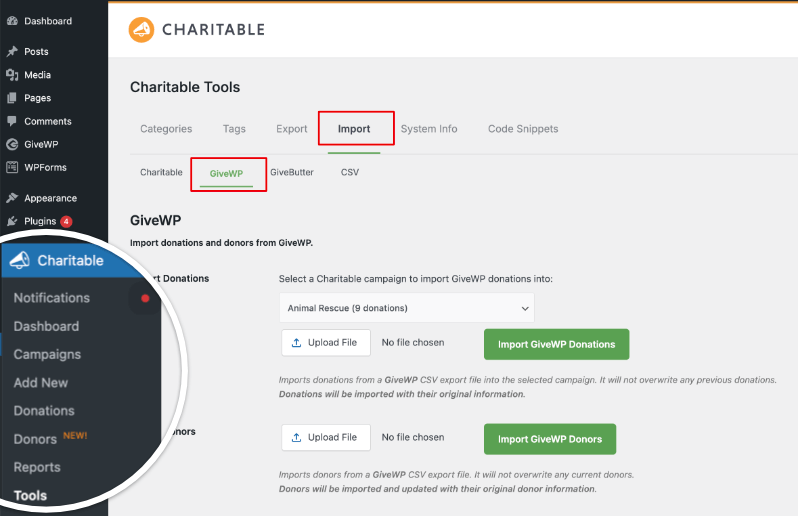
En esta página, verás opciones para subir archivos de GiveWP. Podemos omitir esto si estás usando el método automático.
Desplázate hacia abajo en esta página y verás opciones para:
- Importar campañas
- Donaciones únicas
- Donaciones recurrentes
- Donantes.
Importar campañas
Bajo esta opción, simplemente puedes seleccionar la campaña que deseas importar del menú desplegable disponible y hacer clic en el botón “Importar campaña de GiveWP”.
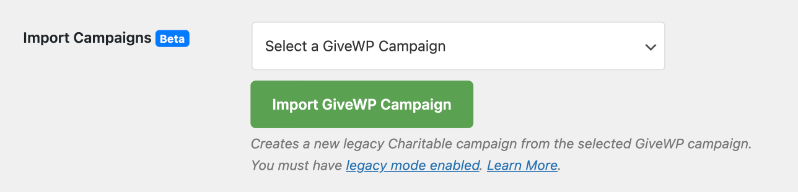
Esto creará una nueva campaña heredada de Charitable.
Nota: Esta función requiere que el Modo Legado esté activado. Por defecto, Charitable activa las campañas heredadas. Si se ha desactivado en tu sitio, puedes encontrar esta opción en Charitable » Configuración » Avanzado » Varios. Ver Campañas Heredadas para más detalles »
Importar donaciones únicas
Antes de empezar, para que la función de donaciones únicas funcione, necesitas el complemento Alivio de Comisiones. Puedes activarlo en Charitable » Complementos. Ver cómo instalar y activar complementos »
Una vez hecho esto, puedes importar tus donaciones de GiveWP haciendo clic en el botón “Importar Donaciones Únicas”.

Esto buscará específicamente los registros de donaciones únicas y los importará a Charitable. Ignorará los registros de donaciones marcados como recurrentes.
Importar donaciones recurrentes
Para donaciones recurrentes, necesitas tener activado el complemento de Donaciones Recurrentes.
Ver cómo instalar y activar complementos »
Charitable detectará y obtendrá automáticamente todos los registros de donaciones marcados como “recurrentes”.

Cuando hagas clic en el botón “Importar Donaciones Recurrentes”, Charitable se sincronizará con GiveWP, recopilará tus datos y los importará a Charitable. Eso es todo.
Importar donantes
Para importar tus registros de donantes, puedes usar esta opción. Con GiveWP activo en tu sitio, Charitable detectará automáticamente los registros de donantes.
Una vez que hagas clic en “Importar Donantes de GiveWP”, Charitable comenzará automáticamente a importar los registros de donantes que tengas en GiveWP.
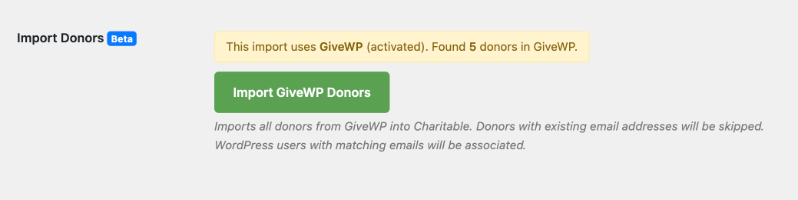
Si la dirección de correo electrónico de un donante ya está detectada en Charitable, Charitable la omitirá.
Además, si tienes un usuario de WordPress en tu sitio con un correo electrónico coincidente, Charitable asociará el registro del donante a ese usuario de WordPress.
Eso es todo. Así de fácil es migrar de GiveWP a Charitable. Ahora estás listo para empezar a crear tus campañas con Charitable y gestionarlo todo con facilidad.
2. Migra manualmente desde GiveWP usando la importación CSV
Charitable también te permite migrar desde cualquier plataforma (incluido GiveWP) utilizando opciones de importación CSV. Sigue los pasos a continuación:
Paso 1: Exporta tus datos desde GiveWP
En esta sección, exportarás tus datos clave de donaciones de GiveWP a archivos CSV que podrás importar más tarde a Charitable. GiveWP incluye herramientas integradas para exportar donaciones y donantes como archivos CSV.
Inicia sesión en tu panel de WordPress como administrador. Ve a Donaciones » Herramientas » Exportaciones.
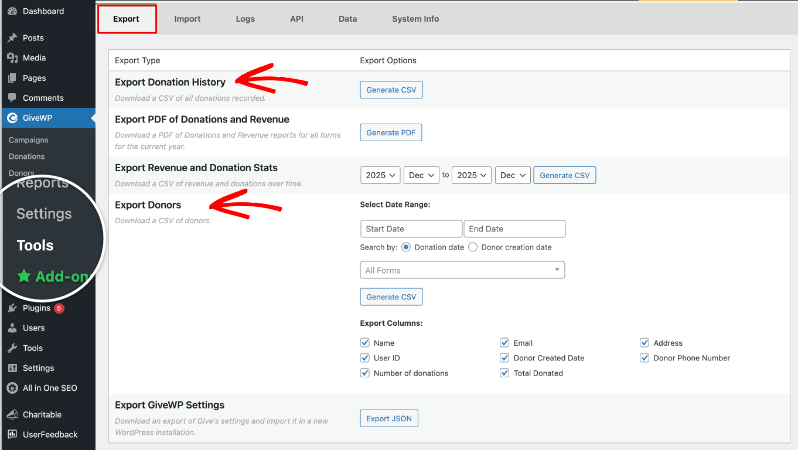
En esta pantalla, verás varias opciones de exportación para donaciones, donantes e ingresos.
Exportar historial de donaciones
En la pestaña Exportar, busca Exportar Historial de Donaciones. Al hacer clic en “Generar CSV”, se abrirá una nueva página donde podrás elegir tus filtros, como el rango de fechas o el formulario de donación específico, o dejarlos configurados para exportar todas las donaciones.

Haz clic en Generar CSV para descargar un archivo CSV de tu historial de donaciones a tu ordenador.
Exportar donantes
De vuelta en Donaciones » Herramientas » Exportaciones, busca Exportar Donantes. Elige el rango de fechas y, opcionalmente, un formulario específico si solo quieres donantes de ciertas campañas.
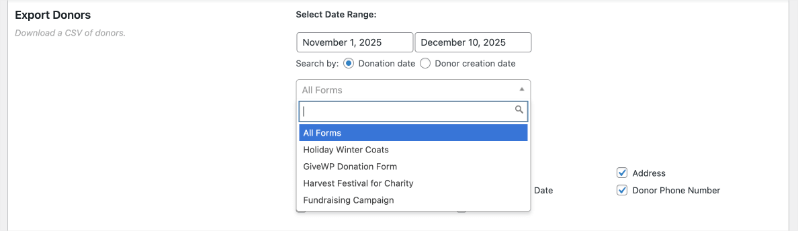
Decide qué campos de donante incluir, como nombre, correo electrónico, dirección, número de donaciones y total donado.
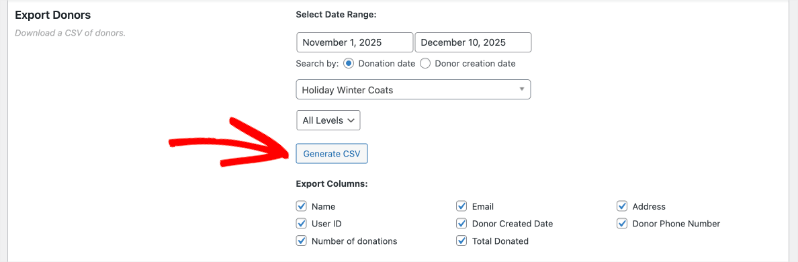
Haz clic en Generar CSV para descargar tu archivo CSV de donantes.
Te recomendamos guardar estos archivos en una carpeta separada en tu ordenador para que sea más fácil encontrarlos cuando estés listo para importarlos en Charitable.
Exporta cualquier informe adicional que necesites
- Si quieres un resumen de ingresos y donaciones por fecha, también puedes usar Exportar estadísticas de ingresos y donaciones en la misma pestaña de Exportaciones.
- Este informe no se puede importar a Charitable, pero puede ser útil para sus registros o conciliación.
Una vez que hayas descargado tus archivos CSV de donaciones y donantes, guárdalos en un lugar seguro en tu ordenador. Utilizarás estos archivos en los siguientes pasos al importar en Charitable.
Paso 2: Prepara tus archivos CSV
Antes de importar en Charitable, tómate un momento para abrir y revisar los archivos CSV que exportaste de GiveWP. Esto ayuda a evitar errores durante la importación y facilita la correspondencia de tus datos con Charitable correctamente.
- Abre cada archivo CSV en una herramienta de hoja de cálculo como Excel, Google Sheets o Numbers para que los datos sean fáciles de escanear.
- Comprueba que los encabezados de las columnas sean claros y que cada fila de datos esté en la columna correcta, sin celdas desplazadas ni caracteres extraños.
A continuación, asegúrate de que tu archivo esté guardado correctamente y listo para su carga.
- Confirma que el formato del archivo sea .csv y no otro formato como .xls o .xlsx.
- Si realizas alguna edición, vuelve a guardar el archivo como CSV para mantener la compatibilidad con la herramienta de importación de Charitable.
No tienes que renombrar cada columna para que coincida exactamente con Charitable, ya que asignarás cada columna al campo correcto durante el paso de importación.
Paso 3: Importa tus datos a Charitable
Ahora estás listo para importar tus datos de GiveWP a Charitable utilizando la herramienta de importación en tu panel de WordPress. Este proceso utiliza los archivos CSV que acabas de revisar y te permite asignar cada columna a los campos correctos en Charitable.
Inicia sesión en tu panel de WordPress como administrador.
Ve a Charitable » Herramientas » Importar.
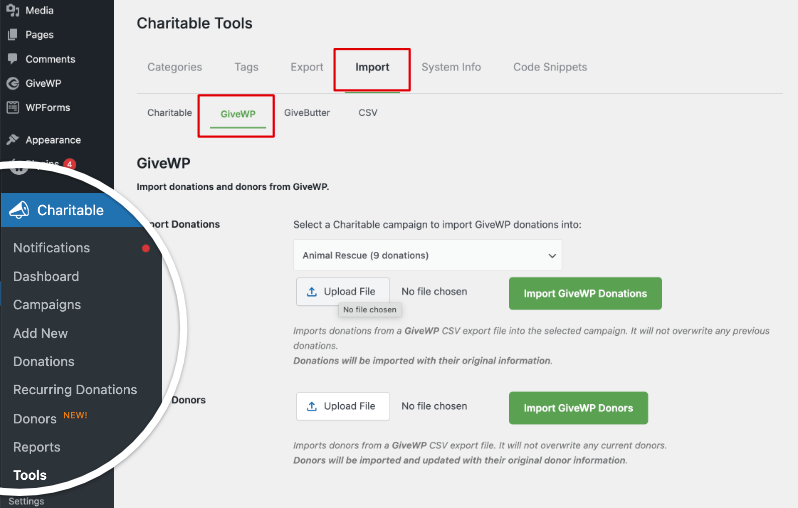
En esta pantalla, verás un menú con opciones que incluyen Charitable, GiveWP, GiveButter y CSV. Abre la pestaña GiveWP.
Aquí, verás opciones para cargar un archivo CSV y elegir qué tipo de datos estás importando, como donantes o donaciones.
Paso 4: Sube tu archivo CSV en Charitable
Puedes importar Donaciones a campañas específicas dentro de Charitable. Elige tu campaña y luego haz clic en el botón Cargar archivo para seleccionar el archivo de donaciones en tu ordenador.
Luego elige el botón Importar donaciones de GiveWP para importar tus registros de donaciones.

Las donaciones se transferirán de GiveWP con toda su información original. Charitable no sobrescribirá ninguna donación anterior.
A continuación, también puedes importar Donantes. Utiliza el botón Cargar archivo para elegir el archivo de donantes que exportaste de GiveWP.

Haz clic en el botón Importar donantes de GiveWP y Charitable hará el resto. Una vez que la importación se complete, verás un mensaje de confirmación indicando cuántos registros se importaron correctamente.
Después de que finalice la importación, es importante comprobar que todo se vea bien en Charitable.
- Vaya a Charitable » Donaciones para revisar sus donaciones importadas y confirmar que las cantidades, fechas y campañas son correctas.
- Vaya a Charitable » Donantes y Charitable » Campañas para comprobar que los nombres de los donantes, correos electrónicos y títulos de las campañas aparecen como se espera.
Si algo no parece correcto, como donantes ausentes o cantidades incorrectas, compare algunos registros en Charitable con su archivo CSV original de GiveWP para ver si una columna se ha asignado al campo incorrecto durante la importación.
Paso 5: Limpieza y pruebas
Una vez que esté satisfecho con sus datos migrados, puede hacer una limpieza rápida y una prueba final.
- Realice una pequeña donación de prueba en su sitio para confirmar que Charitable está registrando las nuevas donaciones correctamente.
- Cuando esté seguro de que todo funciona y sus datos están seguros en Charitable, puede desactivar o eliminar GiveWP si ya no lo necesita en su sitio de WordPress.
Próximos pasos en Charitable
Una vez que sus datos estén seguros en Charitable, estará listo para comenzar a usar sus nuevas herramientas de donación para aumentar su recaudación de fondos. Charitable le ofrece campañas flexibles, gestión de donantes sencilla y potentes opciones para recopilar y rastrear donaciones en su panel de WordPress.
Aquí tiene una guía rápida para Empezar con Charitable, así como para Crear su primera campaña »
Aquí hay algunas cosas útiles que puede hacer a continuación:
- Cree o modifique sus campañas en Charitable » Campañas para que coincidan con sus apelaciones y objetivos actuales.
- Añada sus formularios de donación a páginas clave de su sitio para que los visitantes puedan donar de forma rápida y sencilla.
- Explore funciones como paneles de donantes, donaciones recurrentes y recibos por correo electrónico para ofrecer a los patrocinadores una experiencia de donación fluida.
Con sus datos de GiveWP migrados y Charitable configurado, puede centrarse en lo más importante: aumentar el apoyo a su misión.
GiveWP vs Charitable – Preguntas frecuentes
¿Tiene alguna pregunta sobre Charitable vs GiveWP? Consulte la lista a continuación para ver nuestras preguntas más frecuentes. Si su pregunta no aparece aquí, por favor contáctenos.
¿Qué diferencia a Charitable de GiveWP?
Charitable está creado por un equipo que comprende las dificultades y necesidades de las organizaciones sin ánimo de lucro como la tuya. Hemos diseñado específicamente el plugin para satisfacer las necesidades diarias de las organizaciones sin ánimo de lucro, proporcionando todas las herramientas esenciales de recaudación de fondos en una sola plataforma, sin costes ocultos, complementos confusos o límites artificiales. Estas son las principales diferencias:
- Precios asequibles – Charitable cuesta significativamente menos que GiveWP, a partir de solo 69 $ durante todo el año.
- Generoso plan gratuito – Todo lo que necesitas para empezar a recaudar fondos está incluido de forma gratuita y puedes mejorar a medida que creces
- Más opciones de pago – Amplia gama de integraciones de pasarelas de pago, incluidos proveedores globales y locales
- Planes Todo Incluido – No se necesitan complementos costosos; las funciones vienen de serie
¿Hay algún límite en el número de campañas o formularios de donación con Charitable?
No. Charitable le permite crear campañas y formularios de donaciones ilimitados desde el primer día, sin actualizaciones de pago ni restricciones.
¿Puedo gestionar donaciones recurrentes con Charitable?
¡Sí! Charitable incluye sólidas funciones de donaciones recurrentes para que sus patrocinadores puedan contribuir semanalmente, mensualmente o según un calendario personalizado, lo que le ayuda a lograr unos ingresos fiables y constantes. Necesita un plan Plus que cuesta solo 99 $ al año, lo cual es una ganga en comparación con el precio de GiveWP de 349 $ al año.
¿Cuál es la diferencia de precio entre Charitable y GiveWP?
GiveWP es 3,5 veces más caro en comparación con Charitable.
Charitable comienza en solo 69 $ al año para funciones esenciales como formularios de donaciones ilimitados, gestión completa de donaciones, informes, recibos en PDF y correos electrónicos. GiveWP comienza en 149 $ al año para funciones similares.
Para funciones avanzadas, GiveWP cuesta 349 $ al año. Obtendrá las mismas funciones y más en el plan Charitable Pro por solo 199 $ al año.
¿Charitable se integra con mis herramientas y servicios favoritos?
Charitable funciona perfectamente con muchas plataformas populares, incluidas MailChimp, ActiveCampaign, Constant Contact, HubSpot, MailPoet, Zapier y más.
¿Es fácil de configurar y usar Charitable?
Sí. Charitable está diseñado para que sea fácil de usar para cualquier persona: sin necesidad de codificación y fácil para principiantes. Hemos incluido un asistente de configuración que te guía a través del proceso para que puedas configurar y lanzar tu primera campaña en minutos, ¡no en horas ni en días!
¿Qué tipo de soporte ofrece Charitable?
Los usuarios de Lite pueden publicar preguntas en el foro de soporte de WordPress. Los clientes del plugin Charitable Pro pueden contactarnos a través del canal de soporte. Recibirás soporte amigable y receptivo de un equipo con experiencia en ayudar a las organizaciones benéficas a tener éxito. Estamos aquí para responder preguntas y resolver cualquier problema rápidamente.
¿Charitable seguirá recibiendo nuevas funciones y actualizaciones?
Sí. En Charitable, siempre estamos escuchando y buscando activamente tus comentarios para mejorar aún más nuestra plataforma. Estamos innovando constantemente: agregando nuevas funciones, mejorando las herramientas existentes y actualizando regularmente nuestro plugin para garantizar la compatibilidad con las actualizaciones de WordPress. Cada mejora y mejora de seguridad está impulsada por comentarios reales de organizaciones sin fines de lucro como la tuya.
Más información
Aquí tienes algunas de las guías "cómo hacer" y artículos de ayuda más populares para nuevos usuarios:
- Configuración de pasarelas de pago
- Crear y editar donaciones en el panel de WordPress
- Cómo usar el sistema de gestión de donantes
- Conectar con Google Analytics
- Problemas con correos electrónicos de donación que no se envían
- Reenviar correos electrónicos de donación desde el panel
- Widgets y Shortcodes
¿Quieres más consejos sobre recaudación de fondos y asesoramiento para organizaciones sin fines de lucro?
Compartimos regularmente guías prácticas, estrategias probadas y consejos de expertos para ayudarte a recaudar más fondos y construir relaciones más sólidas con los donantes. Únete a miles de organizaciones sin fines de lucro que reciben nuestro mejor contenido directamente:
- Únase a nuestro boletín – Reciba consejos semanales y guías exclusivas en su bandeja de entrada
- Suscríbase a nuestro canal de YouTube – Vea tutoriales paso a paso e historias de éxito
- Síganos en LinkedIn – Conéctese con nuestra comunidad y obtenga información diaria sobre organizaciones sin fines de lucro
- Síganos en TikTok – Vídeos informativos y divertidos para ayudarle a hacer crecer su causa
- Síguenos en Instagram – Reels divertidos con ideas y consejos para organizaciones sin ánimo de lucro
Sin relleno, solo consejos prácticos de personas que entienden los desafíos que enfrentas cada día.


