
Online fundraising should feel simple for your donors and stress-free for your team. The reality is, the wrong donation form plugin can slow your site down, break at the worst possible moment, or make it way too hard for someone who actually wants to give.
Over the last few years, I’ve tested a lot of different donation setups across real nonprofit sites.
I’ve wrestled with confusing form builders, plugins that suddenly stopped working after an update, and tools that made basic things like recurring donations or donor export way more complicated than they needed to be.
That trial-and-error is exactly why I’m so opinionated now about which donation form plugins are actually worth your time in 2026.
In this post, I’ll walk through the donation form plugins that have consistently performed well in real campaigns: Charitable, WPForms, WP Simple Pay, Formidable Forms, and a couple of others that are still worth a look.
Many of these plugins offer exclusive discounts for non-profit organizations which I’ll link to so that you get the best deal.
You’ll see where each one shines, where it falls short, and how they actually feel to use when you’re under pressure to launch a campaign.
I’ll also share how tools like OptinMonster can help you grab the attention of potential donors at just the right moment and send them straight to your best-converting forms.
Why Donation Forms Matter
Your donation form is the make-or-break moment in every campaign – it’s where good intentions turn into actual revenue or fizzle out. I’ve launched dozens of drives where a solid form doubled gifts from the same traffic, while weak ones left money on the table during peak times like Giving Tuesday.
According to Amra and Elma, once donors start entering info, conversion rates soar to over 50%.
So get this right, and it handles everything from one-time gifts to recurring supporters without extra headaches.
Key Features You Need
Focus on these essentials I’ve learned from testing across sites:
- Form templates: Pre‑built donation layouts (general fund, emergency appeal, sponsorship, membership) so you’re never starting from a blank screen.
- Visual drag‑and‑drop builder: Rearrange fields, add sections, and tweak labels without touching code, which is essential when non‑technical staff need to make changes.
- Custom fields: Ability to add extra questions (e.g. “What inspired your gift?”, “Fund designation”, “Company name for matching gifts”) in a structured way that still reports cleanly.
- Conditional logic: Show or hide fields based on choices (for example, show “in honor of” fields only when someone selects a tribute gift).
- Recurring donations: Easy checkboxes for monthly giving. I’ve seen this boost lifetime value by keeping donors engaged long-term.
- Multiple payment options: Stripe and PayPal at minimum; one-click options save drop-offs during mobile rushes.
- Mobile-first design: Forms that look great on phones, since most traffic hits there now.
- Donor data capture: Names, emails, and custom fields for thank-yous and follow-ups, without overwhelming the page.
- Campaign integration: Shortcodes or embeds that play nice with pages, plus reporting for quick exports.
- Built‑in privacy compliance: Easy ways to add consent checkboxes, privacy policy links, and comply with GDPR/CCPA-style requirements without hacking the form.
Another feature that really helps optimize your forms is the ability to keep donors on your own domain and page (no jarring redirects), so the experience feels professional and safe. When the entire giving experience happens on a page that visually matches your site, donors are less likely to feel suspicious or confused and more likely to complete their gift.
With this in mind, let’s take a look at the best donation form builder solutions for you non-profit website.
Reviewing The Best Donation Form Builder Plugins
1. Charitable: The Full Nonprofit Suite (Why It’s My Go-To)
Charitable isn’t just another donation plugin, it’s the complete fundraising system I’ve relied on for years across dozens of nonprofit sites, from small local charities to multi-chapter organizations running year-round campaigns.
I’ve tested pretty much every major WordPress donation tool out there: GiveWP for peer-to-peer events, Donorbox for quick embeds, even standalone Stripe plugins like WP Simple Pay. They all had their moments, but nothing matched Charitable’s balance of power, reliability, and zero platform lock-in.
No transaction fees on top of your gateway costs, no forcing donors onto a third-party site, and donor data stays right in your WordPress dashboard.
Charitable always wins because it scales from a simple “Donate” button to full-blown crowdfunding without breaking a sweat.
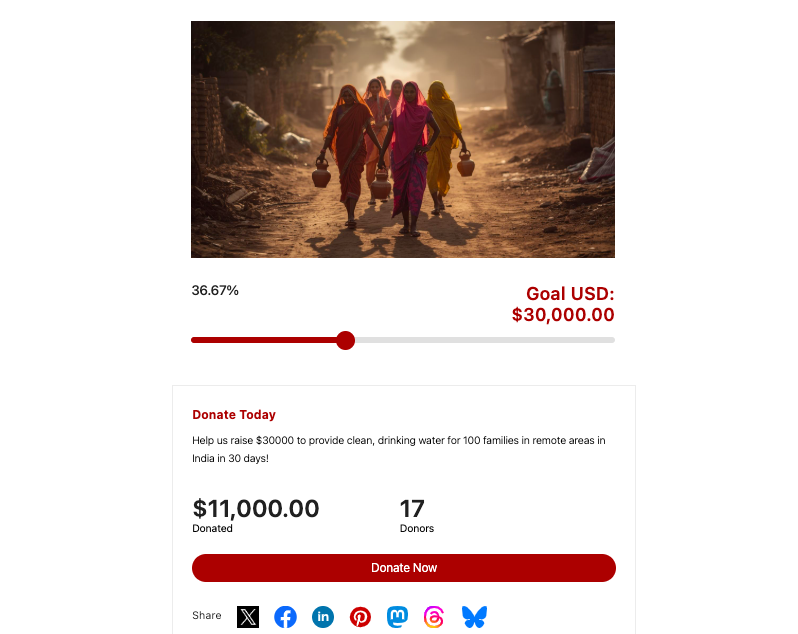
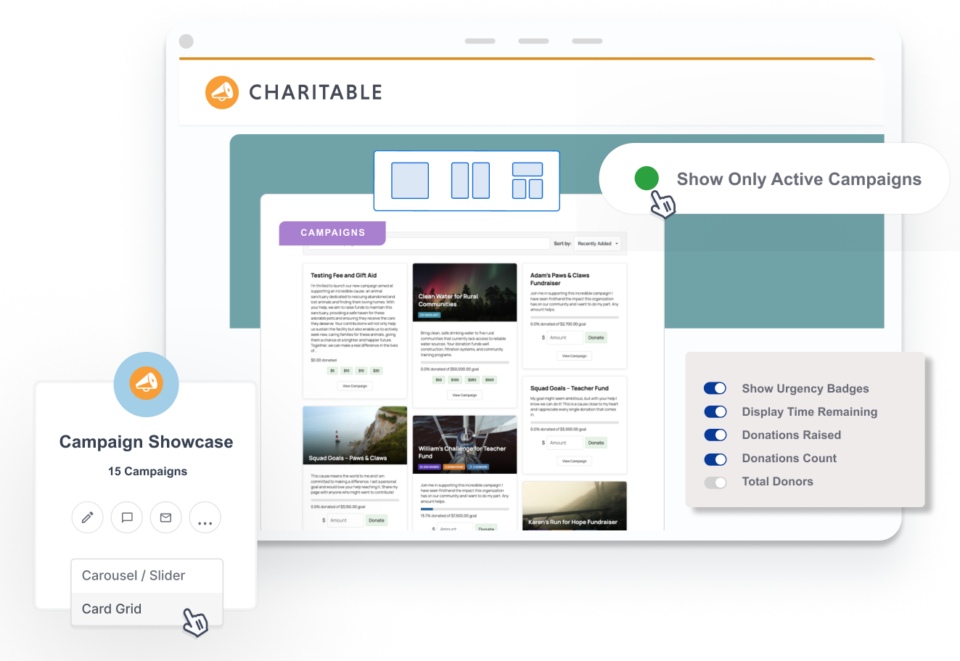
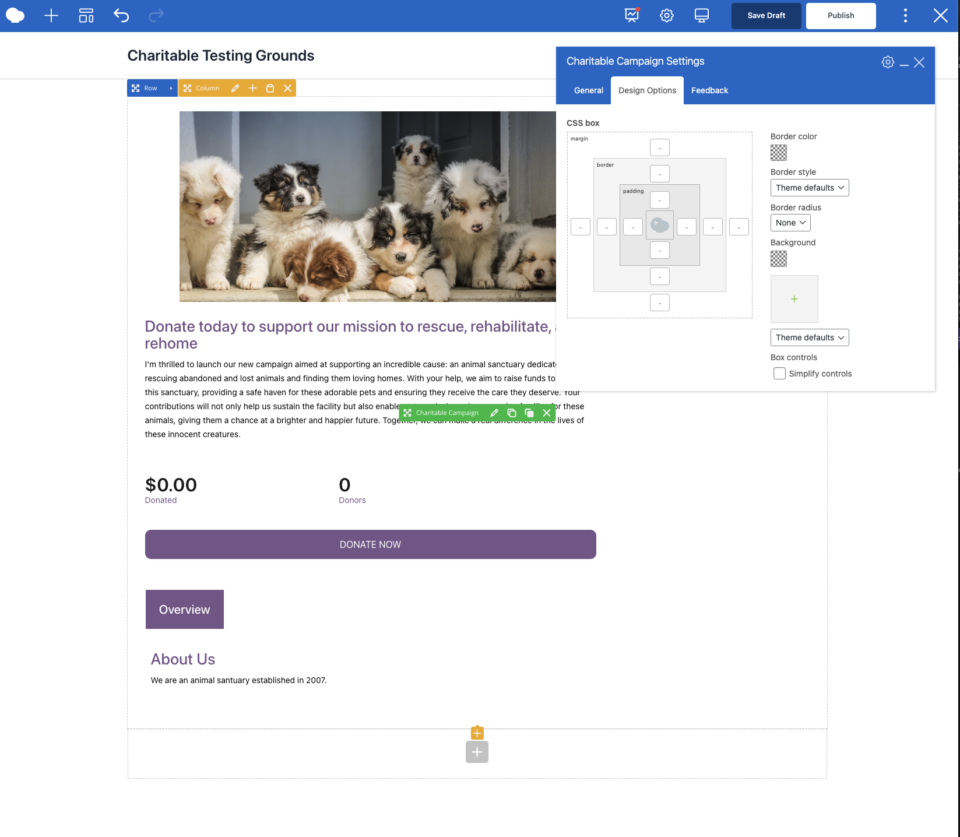
To create a fundraiser campaign, there’s no coding needed. Just pick a layout, tweak the colors to match your brand, and embed it via shortcode or a Gutenberg block anywhere on your site. You can create stunning campaigns like this:
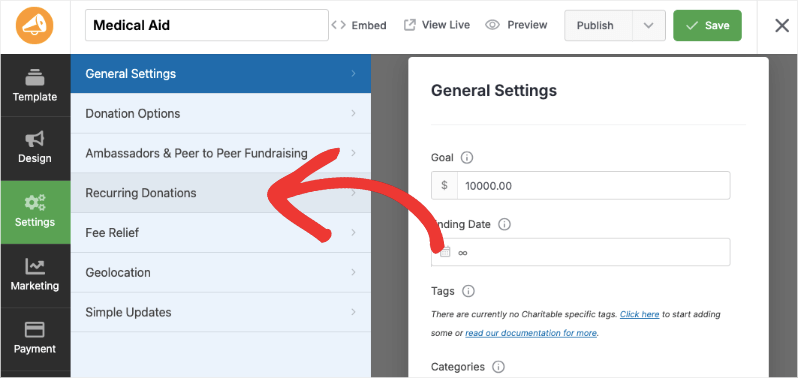
Recurring donations? One checkbox, and it handles monthly, quarterly, or annual plans seamlessly across Stripe, PayPal, and even offline checks. See how easy it is: Charitable’s Recurring Donations »
What sets it apart is how it feels purpose-built for nonprofits. Early on, I ran Giving Tuesday campaigns with other plugins, but donor walls and progress thermometers required endless add-ons that slowed sites down.
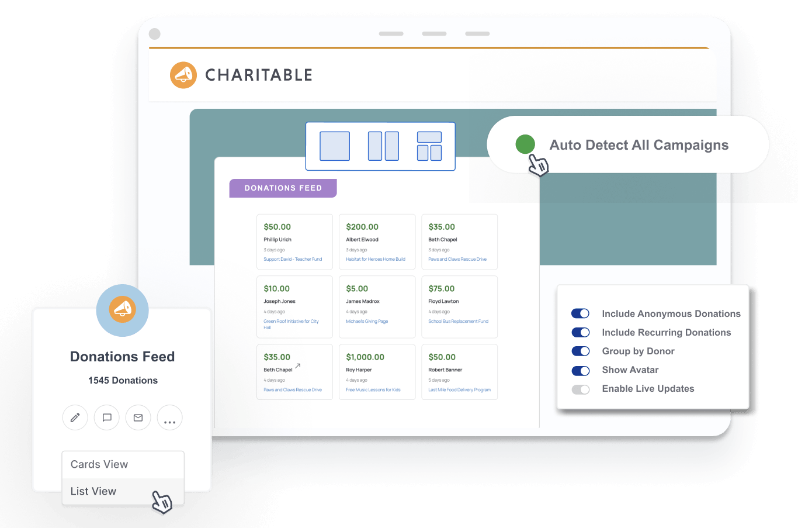
Charitable bakes those in natively. I’ve set up live donor comments and donor walls in under an hour that update in real-time, showing names and photos (with opt-in privacy) to build community momentum.
Charitable Features
Here are the highlights that make Charitable #1:
- Unlimited campaigns
- Fundraising campaign templates
- Visual campaign builder
- Full donation management
- Auto-generated receipts
- In-depth fundraising reporting
- Donor dashboard
- Leaderboards
- Fundraising goals
- Recurring donations
- Fee relief
- Annual receipts
- Gift Aid
- Anonymous donations
- Peer-to-Peer fundraising
- Crowdfunding
- Ambassadors
- Donations teams
- Google Analytics
- Email marketing integrations
- Automated workflows
There’s no need to pay for add-ons and extensions. Based on the tier you choose, you get everything included in your plan and you’re free to enable/disable the features you need, when you need it!
Charitable Pricing and Getting Started
Core plugin is free forever, with plans for the Pro plugin starting at $69/year. This unlocks advanced reports, peer-to-peer fundraising, and premium integrations.
That’s cheaper than most competitors for way more features.
There’s a 14-day money-back guarantee so you can try Charitable Pro risk-free today.
Charitable Setup
Setup takes 20-30 minutes: install, connect Stripe/PayPal, pick a template, and launch.
Migration from GiveWP or others? There are built-in tools to import your data easily, including donation records, donor profiles, and campaigns. See How to Switch to Charitable »
Charitable Drawbacks
Downsides? If you only need bare-bones one-time payments, something simpler like WPForms might feel lighter. But for any nonprofit serious about growth, Charitable’s the one that never lets you down when the stakes are high.
2. WPForms: Drag-and-Drop Simplicity

WPForms shines as the easiest entry point for nonprofits that need reliable donation forms without a steep learning curve.
WPForms hits that sweet spot: intuitive drag-and-drop that even non-tech team members can handle. The highlight is that it has a solid payment integration that lets you accept donations using a simple form – without a complicated setup.
It’s not a dedicated nonprofit suite like Charitable, but for straightforward one-time or recurring gifts.
I’ve built volunteer sign-ups, event registrations, and contact pages that handle hundreds of submissions without a hitch. For volunteer coordination, drag in fields for skills, availability, T-shirt sizes, and waivers.
The forms support images too so you can make your donation appeals more impactful.
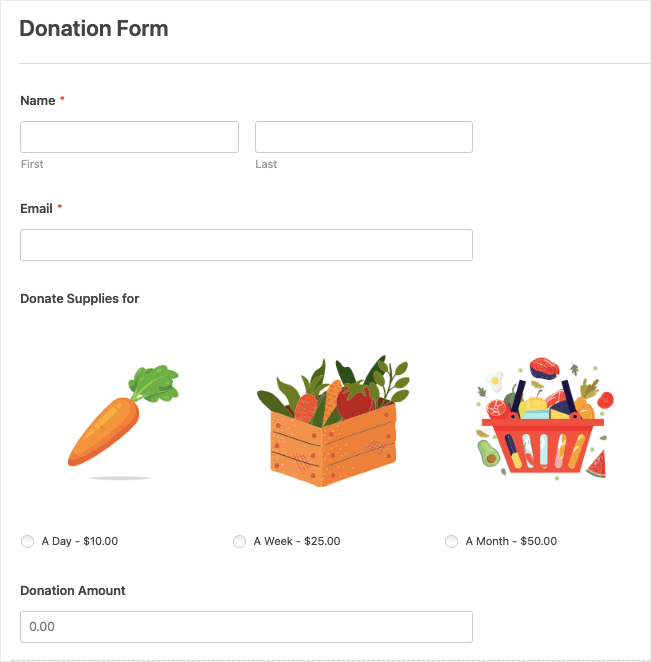
A feature I love is the conditional logic. You can display form fields based on the response of the user. This helps shorten forms and also personalize it according to their answer.
Another feature is the multi-step form. This lets you have more detailed forms displayed in short pages so that it doesn’t overwhelm the donor.
Now with AI in the mix, it’s really never been easier to create a form. WPForm’s AI builder lets you enter your prompt – basically, you just have to tell it what you want – and it will build a form for you.
What I love is that the form is customizable, so even if AI created the form with one or two things different from what you wanted, you can quickly edit and fix it. Overall, this feature will save you a ton of time and effort.
WPForms Features
Here are the highlights that make WPForms a go-to for simple setups:
- Drag-and-drop form builder
- 2,000+ templates including donation-specific layouts
- Payment integrations (Stripe, PayPal, Authorize.net)
- One-time and recurring gifts
- Conditional logic to show/hide fields dynamically
- Custom fields for donor info, fund selection, or tribute messages
- reCAPTCHA and honeypot spam protection
- GDPR compliance checkboxes
- Email notifications
- Integrations with Mailchimp, ActiveCampaign, and Zapier
- Form abandonment recovery (saves partial entries)
- Mobile-responsive designs
- CSV exports of entries with all custom data
- Entry management dashboard for viewing/tracking donations
There’s no need for separate add-ons for most basics. Pro unlocks payments and logic in one affordable package!
WPForms Pricing and Getting Started
Free Lite version for basic forms; Pro plans start at $49.50/year (Basic, 1 site) up to $299+/year (Agency, unlimited sites). Elite adds SMS, conversations, and advanced approvals. Great value compared to Gravity Forms’ higher tiers.
👉🏼 Grab an exclusive discount on WPForms for non-profits »
WPForms Setup
Setup takes 5-10 minutes. There’s a setup wizard and a guided tour that helps you get started. It’s quite straightforward. You pick a template and then customize it using the visual builder. Then you can add the form anywhere on your site using shortcodes or Gutenberg blocks. See WPForms Documentation.
WPForms Drawbacks
It has a solid free plugin, but entry management is in the paid version. So you won’t have a donation database unless you subscribe. It’s an amazing form plugin, but specifically for non-profits, it lacks native donor CRM, campaign goals, or peer-to-peer tools.
3. WP Simple Pay: Lightning-Fast Stripe Payments
WP Simple Pay is the no-nonsense choice for nonprofits that want dead-simple donation forms focused purely on collecting money via Stripe.
After battling bloated plugins that required endless configuration, WP Simple Pay stripped everything down to essentials: drag-and-drop builder, on-site Stripe forms, and recurring options without the overhead.
It’s Stripe-only (no PayPal), but that laser focus means rock-solid reliability – no gateway conflicts or update-breaking bugs I’ve hit elsewhere. Perfect for orgs already using Stripe or those prioritizing speed over bells and whistles.
You won’t get features like a donor database or campaigns, just pure payments that export cleanly to CSV for your CRM.
The builder lets you add custom fields (email, note, frequency), set one-time/recurring, and style to match your site – all without code.
WP Simple Pay Features
Here are the highlights that make WP Simple Pay a top pick:
- Drag-and-drop form builder
- Payment templates for donations, subscriptions, and products
- Native Stripe integration
- One-time, recurring (weekly/monthly/yearly), and trials
- On-site payment forms (no redirects) with embedded Stripe Elements
- PCI compliance
- Suggested/custom amounts
- Fee recovery (donors cover 3% Stripe fee)
- Coupons/discounts
- Custom fields for donor info, messaging, or segmentation
- Per-form emails with personalized confirmations and receipts
- Activity reports and CSV exports from the WordPress dashboard
- Integrations with Zapier, email tools, popups (OptinMonster), and analytics
- Mobile-optimized
- Spam protection
- GDPR-ready consent options
- Nonprofit discount (65% off licenses)
Everything’s included by tier -no surprise add-ons eating into your budget!
WP Simple Pay Pricing and Getting Started
Free Lite for basic Stripe Checkout (off-site); Pro plans start at $49.50/year (Personal, 1 site) up to $299.50/year (Elite, unlimited sites). There’s an exclusive discount for non-profits »
WP Simple Pay Setup
Set up is simple – staying true to the plugin’s name. They have a friendly support team as well, so you can connect with them if you have any issues. See WP Simple Pay Docs.
WP Simple Pay Drawbacks
Stripe-only (no PayPal/Authorize.net). If you switch gateways, you have to switch away from WP Simple Pay. Similar to WPForms, this is a simple payment form. You won’t get fundraising campaigns, peer-to-peer, donor walls, or goals. Ideal for simple/quick needs.
4. Formidable Forms: Advanced Logic for Complex Needs
Formidable Forms is the powerhouse for nonprofits needing highly customized donation forms with calculations, multi-step flows, and data-driven views.
It works great for slightly complicated forms like a scholarship fund, where donors pick tiers with exact impact breakdowns.
Formidable comes with a drag-and-drop builder and conditional logic. It’s a great plugin to build forms that calculate matching gifts, show real-time totals, or display donor directories without extra plugins.
It’s versatile beyond donations, too – event registrations, quizzes, directories – but shines for intricate fundraising where logic rules.
If you’re looking to create forms such as “your $X funds Y scholarships,” Formidable is the best. You can connect to Stripe for one-time and recurring donations. PDF receipts are sent on autopilot.
You can also layer fields dynamically (hide address for PayPal-only), embed progress bars, and create public Views pulling form data into leaderboards or counters.
Formidable Forms Features
Here are the highlights that make Formidable Forms unbeatable for advanced setups:
- Drag-and-drop builder
- Donation templates (church, school, general funds)
- Multi-gateway payments (Stripe, PayPal, Authorize.net, Square, WooCommerce)
- Advanced conditional logic, calculations, and multi-step forms
- Custom fields
- Repeating sections for pledges
- File uploads
- Views for dynamic displays: goal trackers, donor walls, reports/graphs
- PDF receipts
- Email integrations (Mailchimp, ActiveCampaign), Zapier
- GDPR/CCPA compliance, spam protection
- Mobile-responsive
- Entry management with searches and exports
- Custom dashboards
- Goal tracking
- Recurring donations
- Visual form styler
Pro unlocks everything – no tiered add-ons; scale as needed!
Formidable Forms Pricing and Getting Started
Free Lite for basics; Pro starts at $39.50/year (Basic, 1 site) up to $299.50/year (Elite, unlimited).
Formidable Forms Setup
Set up isn’t as easy as other plugins on this list. It is a comprehensive builder, so there’s a slight learning curve to it. See Formidable Docs.
Formidable Forms Drawbacks
There’s a steeper learning curve for beginners. Its conditional logic is great, but Formidable may be too much if you just want a simple donation form.
It’s also heavier on resources than WP Simple Pay. The Views feature that I love requires the Pro plugin.
5. GiveWP: Popular Free Option

GiveWP remains wildly popular among WordPress nonprofits as the longstanding free donation plugin. I’ve started with it on many sites over the years, and tons of organizations still swear by it for basic campaigns like annual appeals or tithes. It offers solid core features without platform fees, which drew me in initially for budget setups before I hit its bugs and performance issues.
My roadblock with the Give plugin is the pricing and the addon system.
The bundles are expensive. The Basic plan starts at $149 per year. If you want recurring donations and other essential features, it’s $349 per year.
What really was the final straw was that manual entries are on the Pro plugin. Or you can purchase the addon for $79 per year. Manual entries are a feature that all non-profits need. You will, at some point, need to enter a donation you received offline or through a different channel.
I started searching for other solutions and found that this feature is included in the free version of Charitable.
When I compared Give’s features to Charitable Pro, I get access to so many more features with Charitable for $199 per year (plus they offer it for $99 for the first year). Charitable also gives you PayPal, Stripe, Square, Authorize.net, and Offline Donations on the basic plan – and that’s just $69 per year.
Plus, Charitable lets you build your campaigns visually. You can edit the frontend design – a feature that’s lacking in Give. So after much research, I made the switch away from GiveWP.
My final take is that while Give covers essentials like goals, recurring donations, and donor profiles, real-world use was buggy, along with a pricing maze where key features are hidden behind $79+ addons.
Many nonprofits stick with it out of habit, but I’ve seen waves switch to smoother alternatives like Charitable.
It’s on this list for its popularity and feature set, but not my #1 recommendation.
GiveWP Features
Here are the highlights that make GiveWP a popular free foundation:
- Core free: One-time/recurring donations, progress goals/thermometers, multi-gateways (Stripe, PayPal, offline)
- Basic donor database with profiles, notes, and email logs
- Shortcodes/blocks for forms
- Mobile-responsive out of box
- Auto-receipts, tax notes,
- Currency switcher
- Custom fields
- Addons for peer-to-peer, auctions, text-to-give, memberships (mix free/paid)
- Zapier and email integrations
- GDPR checkboxes
- CSV/PDF exports
- Reporting dashboard with basic trends/top donors
GiveWP Pricing and Getting Started
100% free core. The premium plugin costs between $149 to $499 per year.
GiveWP Setup
The setup is easy. You’ll be asked what you want to build and some details about your campaign. Give will then create the campaign for you.
GiveWP Drawbacks
GiveWP is popular, but it has some big problems that I’ve run into myself and seen other nonprofits complain about on forums. Updates often break forms and even crash websites right in the middle of a campaign. This forces you to roll back changes or apply custom fixes just to keep things running.
The pricing gets complicated too. You start with a free core plugin, but add-ons add up fast – often $499 for everything you need. This creates a “plugin soup” that slows down your site unless you add heavy caching.
6. Donorbox: Easy Embeds (Most Expensive)

Donorbox offers quick, embeddable donation forms for WordPress sites via a simple plugin. It’s on this list for being a popular option.
The reason it is so popular is its free plan, but here’s the catch – the free plan charges a 2.95% to 3.95% platform fee on every transaction.
When non-profits choose plans like this, more often than not, they don’t calculate the actual fee. If you receive a total of $10,000 in donations, you’ll pay $295 in platform fees (and that’s not including the transaction fees from your payment provider). You also don’t get recurring donations or branded receipts.
Now with plugins like Charitable and Give, it just makes more sense to sign up for the Pro plugin because it costs about $69 – $499 per year – and the platform fee on every transaction goes away.
Not with Donorbox. They charge $150 per month! That’s $1800 per year + reduced fees between 1.75% and 2% on every transaction. Unless you need Crypto and stock donations support, you don’t need to spend so much to collect donations online.
With Donorbox, you can create event ticketing, membership options, and your donation forms load on their domain. So it’s lightweight on your site, but it can cause privacy issues since donor information is hosted with a third-party.
But being honest, you can set up event ticketing and memberships with other plugins that are still much more affordable than Donorbox’s pricing.
Donorbox Features
Here are the highlights that draw nonprofits in:
- Allows only 5-30 team members
- Unlimited and customizable
- Donation forms
- Donation pages
- Crowdfunding campaigns
- Peer-to-peer campaigns
- Event ticketing
- Reporting
- Receipt whitelabeling
- Zapier & API
- Crypto and stock donations
Core free for low volume; extras as paid add-ons!
Donorbox Pricing and Getting Started
Free plan with 2.95% to 3.95% fees on every transaction. Paid plans start at $1800 per year + 1.75 to 2% on every transaction.
Donorbox Setup
It’s a quick 5-10 minutes. After you sign up, install the WordPress plugin. Toen you can create a form on the Donorbox dashboard, and embed it with an iframe/shortcode.
Donorbox Drawbacks
Donorbox has some drawbacks that become clear after using it for a while. The fees add up quickly because you pay a 1.75% platform fee on top of Stripe or PayPal charges. This hits small donations the hardest.
Support is slow too. It is email-only with no live chat, so you wait days for answers during busy campaigns. Priority support is available only on the Premium plan that comes with custom pricing
Key features like text-to-give cost extra in add-ons that start at $19 per month.
You also get limited branding and customization on the free plan. Resending receipts is not easy, and there are no automatic year-end reports. The hosted forms can feel disconnected from your site’s brand.
I personally recommend a self-hosted option like Charitable. You are in full control of your data, your donations, and you get to add your own brand and logo.
That’s the list of the best plugins to build donation forms fast and easily. Below is a table so you can see an overview of what we just reviewed.
Quick Comparison Table
| Plugin | Best For | Pricing (Starting) | Key Strength | Main Drawback |
|---|---|---|---|---|
| Charitable | Full campaigns & donor mgmt | $69/yr Pro | All-in-one nonprofit suite | Slight learning curve for newbies |
| WPForms | Simple drag-drop forms | $49.50/yr | Multipurpose + AI Builder | No native CRM |
| WP Simple Pay | Fast Stripe payments | $39.50/yr | Simple Donation Form | Stripe-only |
| Formidable | Complex logic/calculations | $49.50/yr | Advanced customization | Steeper curve |
| GiveWP | Free basics | $149/yr | Popular & open-source | Buggy updates, addon costs |
| Donorbox | Quick embeds | $1800/yr + 1.75% fee | Easy pop-ups | Expensive |
Next, I’ll give you a few tips on optimizing your form to capture as many contributions as you can.
How to Optimize Your Donation Form
Once those pieces are in place, optimization is about making the form faster, clearer, and more aligned with donor intent:
- Simplify fields: Start with the minimum required to process the gift and send a receipt; move anything else to a follow‑up survey or email.
- Use suggested amounts: Offer 3-5 preset amounts plus an “other” field, and tailor the labels to impact (“$50 provides…”) to guide decisions.
- Clarify recurring options: Make it crystal clear when a gift is monthly vs one‑time, and reassure donors they can change or cancel easily.
- Reduce distractions: Keep navigation, popups, and competing calls to action off the actual donation page.
- Test variations: Try different button copy (“Donate now” vs “Complete my gift”), layouts, and suggested amounts, and keep what performs best.
These are the levers that, in practice, have the biggest effect on whether visitors become donors and whether one‑time donors come back again.
Bonus: Maximizing Your Donations with OptinMonster
OptinMonster is a tool I’ve used and found incredibly powerful for boosting conversions on nonprofit sites. When you pair it with a strong donation plugin like Charitable or WPForms, it helps you catch people at exactly the right moments and gently nudge them toward giving.

The biggest win for me has been exit-intent campaigns. When someone moves their mouse to close the tab or hit the back button, OptinMonster can show a targeted message like “Before you go, would you consider giving to support X?” with a single button that takes them straight to your donation form. I’ve seen this recover donations from visitors who were otherwise about to leave without taking action.

It’s also great for building warm traffic before the ask. You can use slide-ins or ribbons to invite people to join your email list, download an impact report, or sign up for an event.
Later, you send them to your donation forms when they know and trust your work. Because you can control where and when these campaigns appear, it doesn’t feel like random pop-ups – it feels like timely, relevant prompts that support your fundraising instead of getting in the way.
Final Recommendation
Charitable stands out as the top choice for most nonprofits in 2026. It handles campaigns, recurring gifts, and donor tracking in one reliable package without extra fees.
Start with Charitable’s free version: install from your WordPress dashboard, connect to Stripe, and launch a form in 5 minutes.
Haven’t set up your non-profit website yet? Follow our step-by-step guide here » How to Create a Nonprofit Charity Website using WordPress or watch the tutorial below.
I hope you found this guide helpful. You may also want to read our other resources:
- 30+ Proven Ways to Raise Money Online for Your Nonprofit Charity
- AI for Non-Profits: The Ultimate Guide (Strategies, Tools, Free Courses)
- Why Data-Driven Fundraising Beats Gut Instinct Every Time (+ How to Track Data)
Next, I’ll answer frequently asked questions.
FAQs: Best Donation Form Plugins for Nonprofits
Which donation plugin is best for most nonprofits?
For most nonprofits, Charitable is the best long-term choice. It gives you full fundraising campaigns, recurring donations, donor management, and reporting without extra transaction fees or a huge stack of paid add-ons. It’s built specifically for nonprofits, so you’re not forcing a generic form tool into a fundraising workflow.
Do I need more than one plugin?
Usually, no. One good donation plugin (like Charitable) is enough for most nonprofits. You only add extra tools, like OptinMonster, if you want to improve conversions or grow your email list.
Can I start for free and upgrade later?
Yes. Charitable, WPForms, WP Simple Pay, Formidable Forms, GiveWP, and Donorbox all have free or low-cost entry points. A common path is: start with a free/core version, validate your campaigns, then upgrade to a Pro plan when you need recurring gifts, advanced reporting, or integrations.
Do I need a developer to set these up?
For most plugins on this list, no. Charitable, WPForms, WP Simple Pay, and Formidable Forms include visual builders, templates, and shortcodes/blocks so non-technical staff can create and embed forms themselves. You might only need a developer if you want heavy custom styling or complex automation.
Can I accept recurring donations with these plugins?
Yes. Charitable, WPForms (with the right add-ons), WP Simple Pay, Formidable Forms, GiveWP, and Donorbox all support recurring donations in some form. The main difference is how easy they make it to manage those recurring donors and report on them inside WordPress.
How does OptinMonster fit into this list?
OptinMonster isn’t a donation plugin; it’s a conversion tool that sends more people to your donation forms at the right time. You can trigger pop-ups, slide-ins, and exit-intent campaigns that link directly to your Charitable, WPForms, or other donation pages, which can significantly increase the number of visitors who actually complete a gift.
Need help with fundraising? Get our Ultimate Fundraising Kit. It’s completely free and packed with tips, proven strategies, campaign ideas, recommended tools, and free resources.
Stay Connected for More Nonprofit Resources
For more tutorials and videos tailored to nonprofits, subscribe to our YouTube channel. We regularly publish expert tips, step-by-step guides on migrations like this GiveWP to Charitable switch, fundraising strategies, and practical resources to help your organization succeed.
🗞️ Get weekly tips and exclusive guides in your inbox
Join our newsletter →
🎥 Watch step-by-step tutorials and success stories
Subscribe to our YouTube channel →
👩🏽💻 Connect with our community and get daily nonprofit insights
Follow us on LinkedIn →
🥳 Fun reels and non-profit insights
Follow us on Instagram →
👀 Insightful & fun videos to help you grow your cause
Follow us on TikTok→
🌎 Subscribe and follow for general fundraiser tips
Get Fundraiser Tips on TikTok →
Charitable Has 1+ Million Downloads!
Trusted by millions to power successful fundraising campaigns. Try Charitable risk-free today.
✅ 14-day money-back guarantee
✅ Transparent pricing
✅ Code-free setup



Leave a Reply