
We’ve been working hard to make your donation forms cleaner, more secure, and easier to manage.
Introducing Charitable Pro 1.8.11 with new CAPTCHA options, IP controls, rate limiting, and a simple tool to remove unwanted donations right from the tools menu.
Now you can choose Google reCAPTCHA v3 for invisible bot protection or Cloudflare Turnstile for a free, privacy-friendly alternative. Add trusted IPs to a whitelist to skip checks entirely, or blacklist troublemakers to block them outright. Rate limiting stops form spam across donations, registrations, and more by tracking submissions per IP, with automatic log cleanup to keep your database light.
Plus, the new donation cleaning tool lets you wipe pending or failed entries by type and date range, perfect for ditching test donations or past spam. Gift Aid users get a handy new column in donor exports marking eligibility based on real donations. Update to 1.8.11 today and spend less time on cleanup, more time on your cause.
Let’s explore the new update. Here’s what’s new:
New CAPTCHA Options
Choose the CAPTCHA option that works seamlessly for your donors and fits your setup. This will help keep spam away while letting real supporters donate without hassle, boosting your donation form conversions and saving you cleanup time.
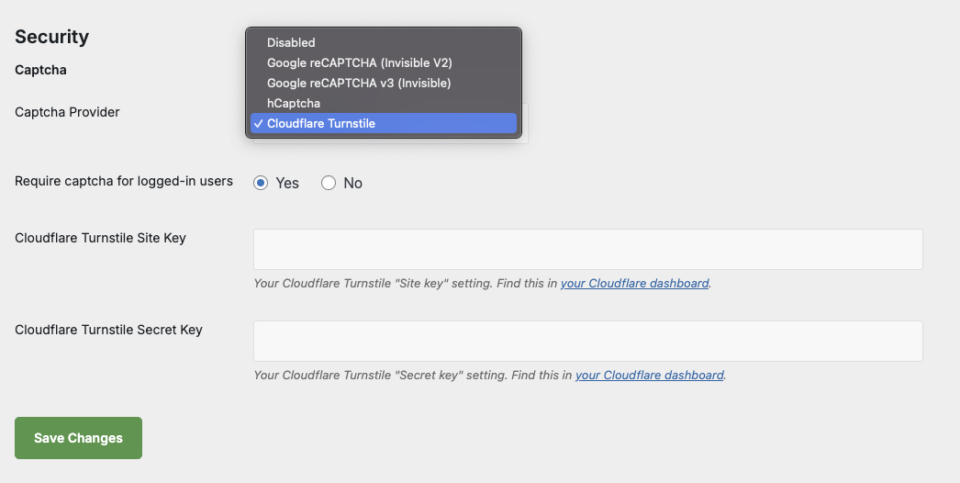
The new update adds two new different CAPTCHA providers, giving you the freedom to choose what works best for your donors:
- Google reCAPTCHA v3 (Invisible): Our recommended option. It analyzes user behavior in the background to assign a “risk score,” blocking bots without ever interrupting the user.
- Cloudflare Turnstile: A free, privacy-focused alternative from a trusted source that is very easy to enable (Cloudflare also provided additional protections much of which is included in their free plan).
IP Whitelisting / Blacklisting
You can take full control of your donation forms with straightforward IP management.
Add your trusted office IP, team addresses, or partner IPs to the whitelist, and they will skip CAPTCHA checks and rate limits entirely, keeping your testing and internal work smooth.
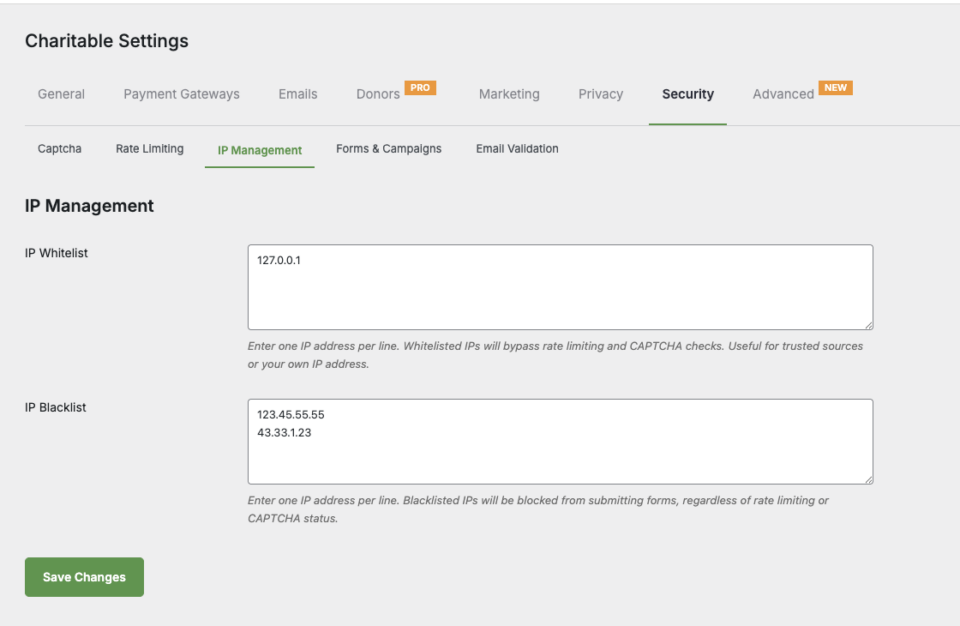
The IP Whitelist lets you bypass rate limiting and CAPTCHA checks for trusted sources – perfect for your own IP address or known partners.
The IP Blacklist provides an immediate block for problematic IPs, preventing form submissions regardless of other security settings.
Both lists support IPv4 and IPv6 addresses, and you can add multiple IPs (one per line) for flexible management.
This works alongside rate limiting and CAPTCHA for layered protection.
Rate Limiting
Rate limiting stops bots from flooding your forms with fake submissions, saving you hours of cleanup. You stay safe from automated spam attacks on donations, registrations, or password resets without blocking real donors. Plus, it keeps your database clean by auto-deleting old logs, so everything runs faster and leaner.
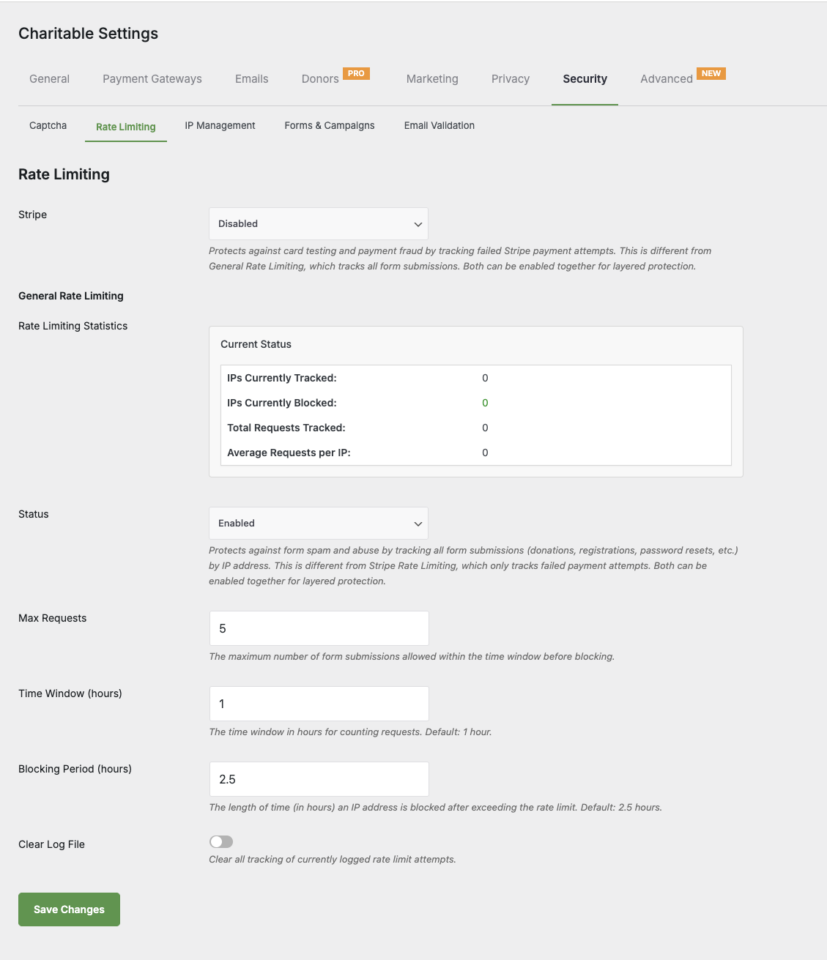
Now in Charitable Pro, you can protect your donation forms from spam and abuse with General Rate Limiting. This tracks all form submissions (donations, registrations, password resets, and more) by IP address, providing a first line of defense against automated attacks.
You can set the maximum number of form submissions allowed within the time window before blocking and define the time window and blocking period. Charitable Pro will even automatically clean up expired rate-limiting logs, keeping your database lean and ensuring only relevant blocking data is retained.
New Donation Cleanup Tool
Charitable Pro has a new tool to allow you to remove any unwanted pending or failed donations.
We noticed that fake donations from spam bots or testing gone wrong fill your dashboard with noise, skew your analytics, and force you to manually delete one by one.
That’s why we built this tool, which fixes that pain instantly. You pick pending or failed donations, set a date range, and wipe them all out in bulk.
Now your donor lists look sharp, reports tell the real story, and you save hours for actual fundraising work.
You will find this in the Tools » Misc tab.
Here, you can select the type of donation you want to remove along with a date range. This tool can help if you have experienced past issues with fake donations or just want to get rid of test donations.
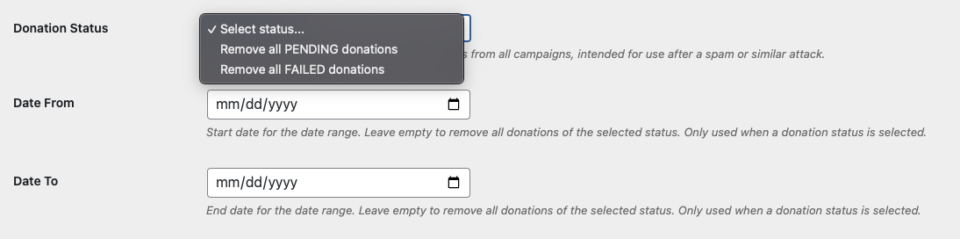
We hope this makes your donation management easier. Your records stay clean, reports are accurate, and you focus on real donors instead of cleanup headaches.
Gift Aid
For those using the Gift Aid addon, your donor export CSV now includes a dedicated “Gift Aid” column. This feature automatically marks donors as “Yes” or “No” based on their history of valid, completed donations – making it easier than ever to identify eligible supporters for tax purposes and communication.
Get The New Features Today
These features are available today in Charitable Pro version 1.8.11 and later. Make sure you update your plugin to the latest version in your WordPress dashboard.
Not using Charitable yet? Check out Charitable Lite for free, which has basic security protections built in. It has all the essentials that you need. Sign up for free and explore Charitable Lite now.
What More Secure Features? Upgrade to Charitable Pro!
For even more robust protection, consider updating to Charitable Pro, which offers advanced rate limiting, expanded CAPTCHA options, IP address blacklisting/whitelisting, dedicated rate limiting for Stripe, and more comprehensive security features that go far beyond what the legacy Spam Blocker addon provides – all built directly into the plugin.
Added to that, you’ll also get access to premium features:
- Customizable Forms
- Templates + Visual Builder
- Donation Management
- Readymade Reports
- PDF Receipts & Custom Emails
- Donor Dashboard
- Comments & Leaderboards
- Recurring Donations
- Fee Relief
- Email Integrations
- Peer-to-Peer & Crowdfunding
…and so much more! Ready to give Charitable Pro a try?
Sign up today and get up to 50% off on your plan. We’re confident you’ll love raising funds with Charitable. If for any reason Charitable is not the right fit for you, we’ll refund your purchase with our 14-day money back guarantee
Stay Connected for More Nonprofit Resources
For more tutorials and videos tailored to nonprofits, subscribe to our YouTube channel. We regularly publish expert tips, step-by-step guides on migrations like this GiveWP to Charitable switch, fundraising strategies, and practical resources to help your organization succeed.
🗞️ Get weekly tips and exclusive guides in your inbox
Join our newsletter →
🎥 Watch step-by-step tutorials and success stories
Subscribe to our YouTube channel →
👩🏽💻 Connect with our community and get daily nonprofit insights
Follow us on LinkedIn →
🥳 Fun reels and non-profit insights
Follow us on Instagram →
👀 Insightful & fun videos to help you grow your cause
Follow us on TikTok→
🌎 Subscribe and follow for general fundraiser tips
Get Fundraiser Tips on TikTok →
We’d Love to Hear From You!
The security tools in Charitable Pro 1.8.11 are part of our commitment to democratizing fundraising technology. Our goal is simple: we want you to focus on your mission, not on cleaning up spam donations.
How are these new features working for you? We are dedicated to evolving Charitable based on your real-world needs. Whether you have feedback on the new security settings or ideas for what we should tackle next, please reach out. Your input directly shapes our roadmap for 2026.





Leave a Reply