
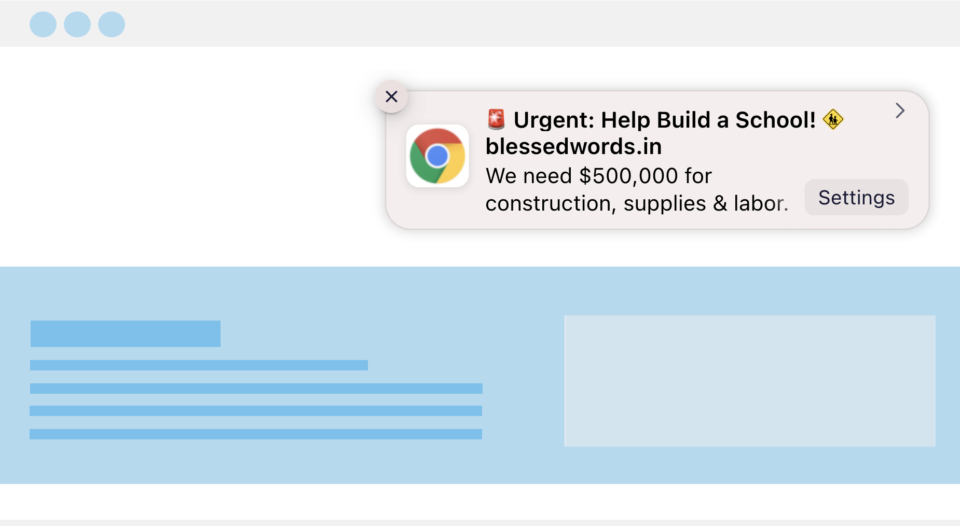
Et si vous pouviez contacter vos donateurs sans adresse e-mail ni numéro de téléphone ? Et si vous pouviez déclencher un message pour les atteindre au moment précis, à la seconde où une donation arrive, à l'heure où une campagne est sur le point de se terminer, et qu'il s'affiche directement sur leur écran ? Il suffit de quelques minutes pour le configurer.
Les notifications push sont également peu coûteuses, et ce n'est pas une note de bas de page, c'est tout l'intérêt. Il n'y a pas de frais par message qui grignotent votre budget comme avec les SMS. C'est important car notre objectif chez Charitable est de nous assurer que chaque bonne cause, grande ou petite, puisse collecter les fonds dont elle a besoin, où qu'elle opère dans le monde.
Dans ce guide, je vais vous expliquer exactement comment configurer cela. Pas de code. Pas de développeur. Juste quelques clics dans WordPress.
Et comme le canal est presque gratuit à utiliser, vous n'êtes pas obligé d'envoyer des demandes de dons encore et encore comme vous pourriez le faire sur une plateforme payante où chaque message coûte quelque chose. Vous pouvez envoyer des mises à jour, des remerciements, des histoires d'impact, et plus encore, sans voir votre budget diminuer à chaque envoi. Moins de demandes forcées signifie moins de fatigue des donateurs, et j'ai inclus un ensemble complet de messages d'exemple plus loin dans ce guide pour que vous ne partiez pas d'une page blanche.
Tout d'abord, examinons rapidement ce que sont les notifications push, comment elles fonctionnent et comment vous pouvez les utiliser. Ensuite, je vous guiderai à travers la configuration, étape par étape.
Dans ce guide
- Que sont les notifications push et pourquoi votre organisation à but non lucratif devrait-elle les utiliser ?
- Ce dont vous aurez besoin avant de commencer
- Comment configurer PushEngage avec Charitable (étape par étape)
- 10 exemples de notifications que vous pouvez envoyer cette semaine
- FAQ
Que sont les notifications push et pourquoi votre organisation à but non lucratif devrait-elle les utiliser ?
Une notification push web est une petite alerte pop-up qui s'affiche sur le bureau ou le téléphone d'un visiteur après qu'il a cliqué sur « Autoriser » sur votre site, même s'il n'est pas sur votre site web à ce moment-là. Pensez-y comme à un SMS, mais gratuit, et sans jamais avoir besoin d'un numéro de téléphone.
Pour une organisation à but non lucratif, cela en fait l'un des canaux les plus faciles à ajouter à ce que vous faites déjà :
- C'est gratuit. Il n'y a pas de frais par message comme pour les SMS, et aucune dépense publicitaire nécessaire pour atteindre les personnes qui ont déjà consenti. Il existe des options gratuites pour les logiciels de notification push, mais si vous souhaitez des fonctionnalités avancées, les applications premium restent abordables !
- Il ne concurrence pas une boîte de réception surchargée. Votre notification s'affiche directement à l'écran, pas enfouie sous vingt autres e-mails.
- Aucune donnée personnelle requise. Les donateurs consentent en un clic. Pas d'adresse e-mail, pas de numéro de téléphone, rien à taper.
- Il atteint les gens même lorsqu'ils ne sont pas sur votre site. Une fois qu'une personne a consenti, vous pouvez la contacter des jours ou des semaines plus tard.
L'outil qui rend cela possible est PushEngage. C'est lui qui gère l'invite « Autoriser les notifications ? » sur votre site et qui garde une trace de tous ceux qui disent oui. Une fois que vous avez cela en place, la question suivante est de savoir ce dont vous avez réellement besoin avant de l'activer.
En savoir plus sur les fonctionnalités de PushEngage dans Charitable »
Ce dont vous aurez besoin avant de commencer
Cette configuration utilise deux éléments qui fonctionnent ensemble :
- Plugin PushEngage – gère l'invite d'opt-in sur votre site et stocke votre liste d'abonnés. Cette partie est gratuite, quoi qu'il arrive.

- Charitable – gère le côté campagne : quand une notification doit être envoyée, ce qu'elle dit et à quelle campagne elle est liée. Si vous utilisez Charitable Lite, vous pouvez toujours installer PushEngage et créer une liste d'abonnés. Pour recevoir des notifications qui se déclenchent automatiquement sur l'activité réelle des donateurs, comme un remerciement dès que quelqu'un fait un don, vous aurez besoin de Charitable Pro.
Si vous n'avez pas encore Charitable Pro, vous pouvez commencer avec un plan et être opérationnel en quelques minutes, avec une garantie de remboursement de 14 jours si ce n'est pas la bonne solution.
Ce tutoriel suppose que vous avez installé Charitable sur votre site. Si vous ne l'avez pas encore installé, suivez ce guide : Comment installer Charitable »
Maintenant, installons PushEngage.
Comment configurer PushEngage avec Charitable (étape par étape)
Aucun code n'est requis. Vous travaillerez entièrement dans votre tableau de bord WordPress et le constructeur de campagnes Charitable.
Étape 1 : Installer le plugin gratuit PushEngage
Allez dans Plugins » Ajouter un nouveau dans votre tableau de bord WordPress, recherchez « PushEngage », puis cliquez sur Installer, puis sur Activer.
Cela prend moins d'une minute et ne nécessite rien de plus qu'une connexion WordPress.
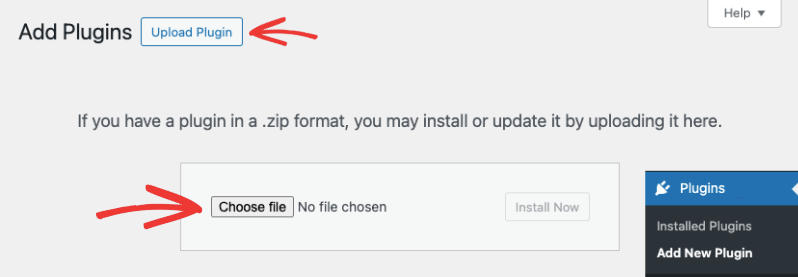
Si vous vous êtes inscrit à un compte PushEngage, vous recevrez un fichier de plugin à télécharger. Vous devez le téléverser sous Plugins » Ajouter un nouveau » Téléverser un plugin.
C'est tout. Assurez-vous que le plugin est activé sur votre site.
Étape 3 : Configurer PushEngage dans Charitable
Dans le Constructeur de campagnes de Charitable, dans la barre latérale gauche, cliquez sur Marketing, puis choisissez PushEngage dans la liste des intégrations.
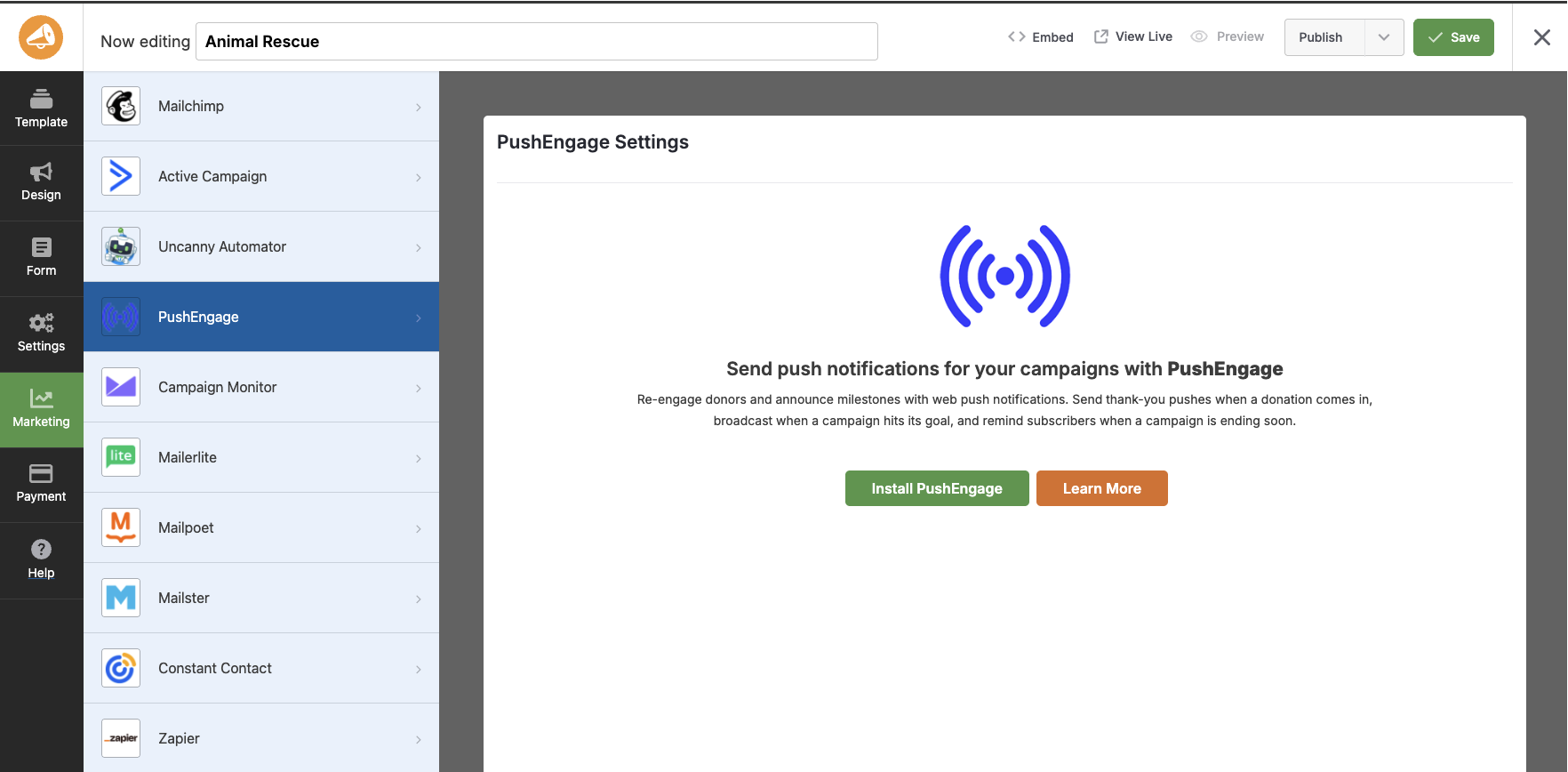
Si vous n'avez pas encore connecté votre compte, vous verrez un bouton Installer PushEngage ici.
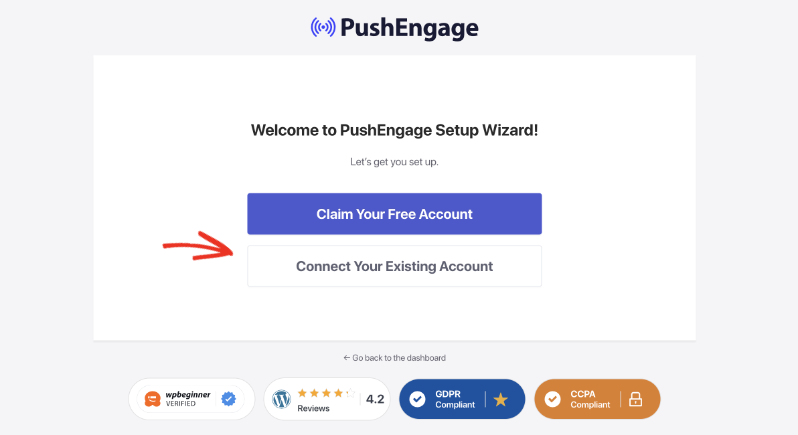
Cliquez dessus et suivez les instructions à l'écran, et vous pourrez connecter votre compte à l'aide de l'assistant PushEngage.
Cela vous guidera dans la création d'un compte gratuit (ou la connexion si vous en avez déjà un) et sa connexion à votre site.
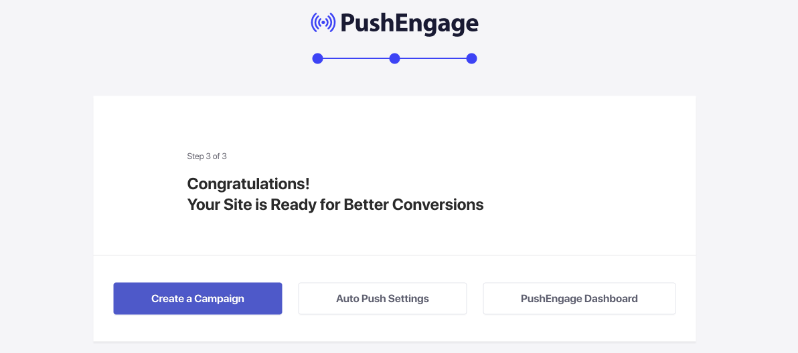
Une fois connecté à votre compte, vous verrez cet écran de félicitations.
Étape 4 : Activer vos déclencheurs
Maintenant, dans votre administration WordPress, allez dans Charitable » Campagnes et ouvrez n'importe quelle campagne.
Vous verrez quatre déclencheurs que vous pouvez activer pour cette campagne.
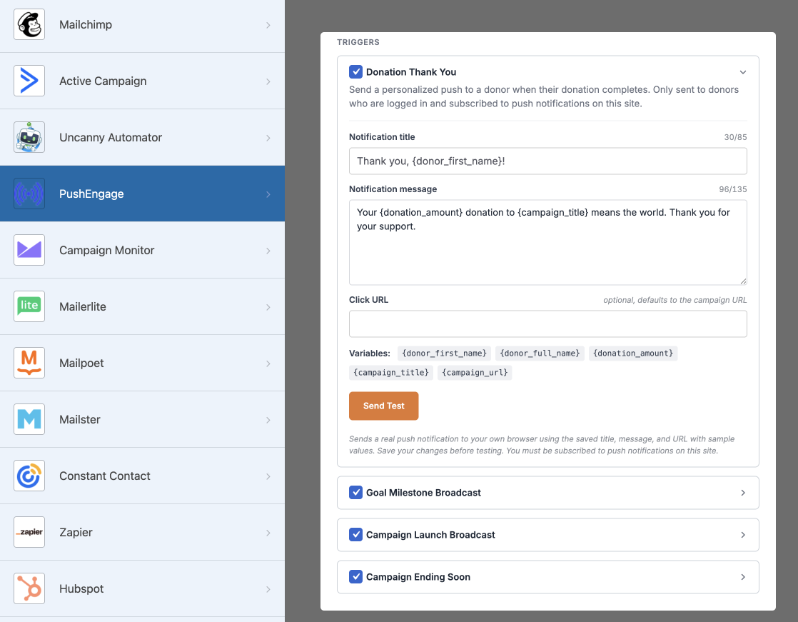
Activez ceux qui conviennent :
- Remerciement pour le don – s'envoie automatiquement à un donateur au moment où son don est finalisé.
- Jalon de l'objectif – diffuse à votre liste d'abonnés lorsque la campagne franchit 50 %, 75 % et 100 % de son objectif.
- Lancement de la campagne – annonce cette campagne à tous ceux qui se sont inscrits sur votre site.
- Bientôt la fin – rappelle à votre liste que la campagne est sur le point de se terminer.
Vous n’avez pas besoin d’activer les quatre immédiatement. Si c’est votre première fois, « Remerciements pour le don » et « Jalon de l’objectif » sont les plus faciles pour commencer, car ce sont ceux auxquels les donateurs répondent le plus.
Étape 5 : Rédigez votre message
Chaque déclencheur a son propre titre et champ de message modifiables.
Vous pouvez insérer des espaces réservés pour le nom du donateur, le titre de la campagne, le montant collecté et la progression vers l’objectif, de sorte qu’un message comme
« Merci, {donor_name} ! Vous venez de nous aider à collecter {amount_raised} pour {campaign_title} »
Le code entre accolades {} se remplit automatiquement pour chaque donateur, sans que vous ayez à l’écrire manuellement à chaque fois.
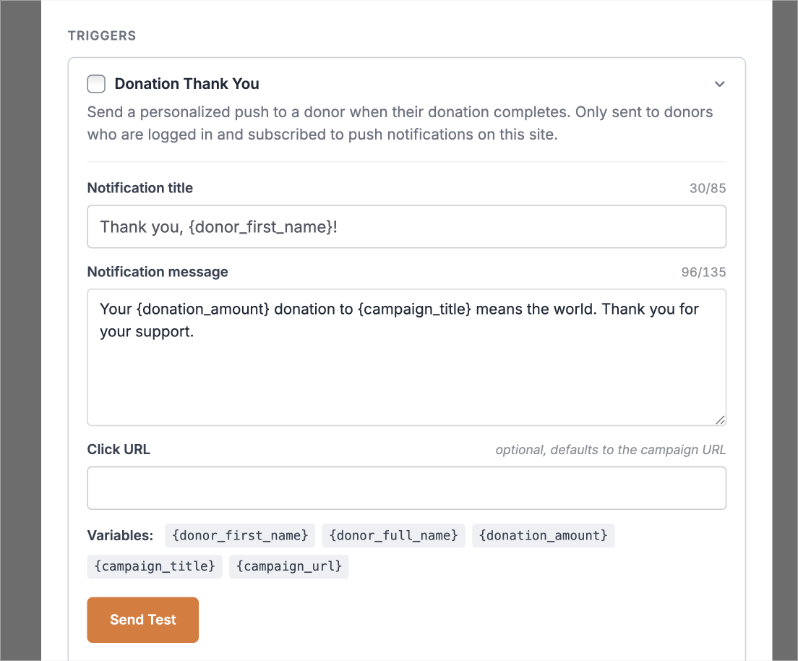
Ajoutez un lien pour que les gens atterrissent quelque part d’utile, comme la page de la campagne ou un message de remerciement.
Étape 6 : Prévisualisez et envoyez un test
En bas de la page, vous verrez un aperçu de votre notification.
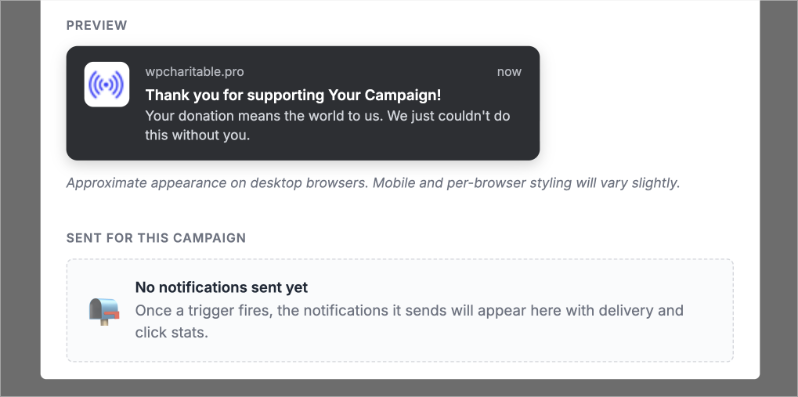
Avant de publier, cliquez sur Envoyer un test. Cela vous montre exactement à quoi ressemblera la notification dans un navigateur, afin que vous puissiez corriger les fautes de frappe ou un lien brisé avant qu’il n’atteigne un seul abonné.
Étape 7 : Enregistrez et publiez
Assurez-vous d’enregistrer vos modifications dans le constructeur Charitable.
C’est tout. Vos déclencheurs sont actifs, et à partir de maintenant, Charitable et PushEngage s’occupent de l’envoi pour vous. Vous n’avez pas besoin de vous souvenir d’envoyer quoi que ce soit manuellement.
À partir de là, vous pouvez continuer à créer et envoyer des notifications push à l’intérieur de PushEngage.
La seule chose qui reste est de décider quoi dire réellement. Cette partie bloque plus les gens que la configuration, alors voici 10 exemples que vous pouvez adapter dès maintenant.
10 exemples de notifications que vous pouvez envoyer cette semaine
Une règle rapide avant la liste : ne faites pas de chaque notification une demande. Mélangez des remerciements et des mises à jour avec vos demandes de dons, sinon les donateurs commenceront à vous ignorer. Voici un mélange simple pour commencer.
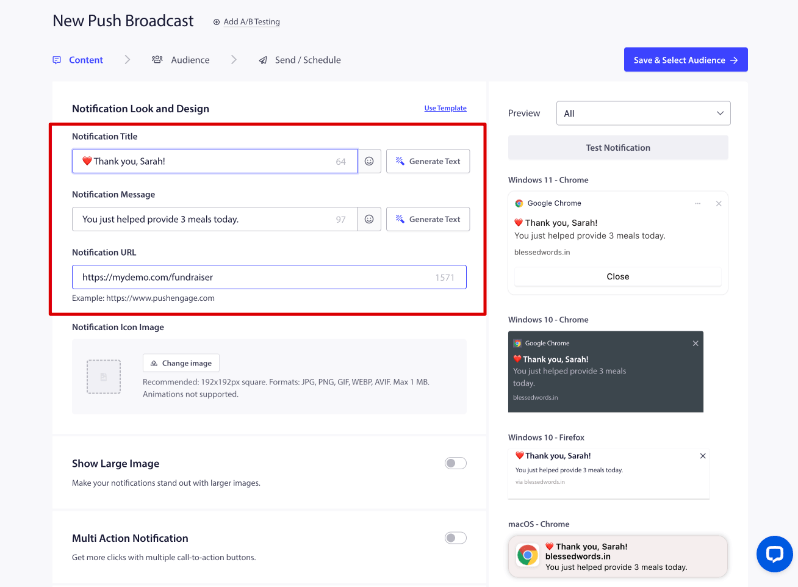
Messages de remerciement
- « Merci, Sarah ! Votre don vient d’aider à fournir 3 repas aujourd’hui. » (CTA : Voir votre impact)
- « Nous avons reçu votre don ! Voici ce qu’il fait déjà pour aider. »
Mises à jour de campagne
- « Nous sommes à 75 % de notre objectif ! Il ne reste que 2 500 $ à collecter. »
- « 32 donateurs se sont joints aujourd’hui. Merci de faire partie de cela. »
- « Cette campagne se termine dans 48 heures. »
Demandes de dons
- « Nous sommes à 1 000 $ de la fin de ce projet. Pouvez-vous aider à combler l’écart ?»
- « Votre don sera égalé aujourd’hui, dollar pour dollar. »
Impact et histoire
- « Grâce à des supporters comme vous, nous avons maintenant fourni 8 400 repas. »
- « Rencontrez Ravi, l’un des enfants que votre dernier don aide. »
Remarquez le schéma : deux remerciements, trois mises à jour, deux demandes et deux histoires d’impact. C’est un mélange plus sain que cinq demandes d’affilée, et c’est le moyen le plus simple de garder votre liste engagée au lieu de vous ignorer.
FAQ
Ai-je besoin d’un développeur pour configurer cela ?
Non. Tout ce qui précède se passe dans votre tableau de bord WordPress et le Constructeur de Campagnes Charitable. Aucun code n'est impliqué.
PushEngage est-il vraiment gratuit ?
Oui, le plugin PushEngage est gratuit à installer et à utiliser pour votre invite d'opt-in et votre liste de abonnés. Les déclencheurs automatiques de Charitable qui connectent les notifications à l'activité réelle des donateurs, comme le Remerciement pour un don et le Jalon de l'objectif, font partie de Charitable Pro.
Est-ce que cela fonctionnera si je n'ai pas encore de liste d'e-mails ?
Oui. C'est d'ailleurs le but. Les abonnés aux notifications push s'inscrivent en un seul clic, sans avoir besoin d'adresse e-mail ou de numéro de téléphone, donc cela fonctionne même si vous n'avez pas du tout de liste d'e-mails.
Combien de notifications dois-je envoyer ?
Il n'y a pas de nombre fixe, mais essayez d'équilibrer les demandes avec les mises à jour et les remerciements plutôt que d'envoyer une demande à chaque fois. Un mélange approximatif d'une demande pour deux ou trois messages non-demande permet de maintenir l'engagement de votre liste sans l'épuiser.
Puis-je l'utiliser pour plus que des campagnes de dons ?
Les quatre déclencheurs intégrés de Charitable sont axés sur les campagnes, mais le tableau de bord de PushEngage vous permet d'envoyer des notifications ponctuelles supplémentaires à votre liste complète, vous pouvez donc également couvrir des choses comme les inscriptions de bénévoles ou les rappels d'événements une fois que vous êtes à l'aise avec les bases.
Une fois votre premier déclencheur en ligne, le plus grand avantage est de le laisser fonctionner pendant quelques semaines et d'observer à quoi les donateurs réagissent. Vous saurez rapidement quels messages génèrent des clics et lesquels n'en génèrent pas, et vous pourrez ajuster à partir de là.
Charitable a plus d'un million de téléchargements !
Faites confiance à des millions de personnes pour mener à bien vos campagnes de collecte de fonds. Essayez Charitable sans risque dès aujourd'hui.
✅ Garantie de remboursement de 14 jours
✅ Tarification transparente
✅ Configuration sans code
Recevez des conseils et des ressources gratuits directement dans votre boîte de réception, avec plus de 60 000 autres personnes. Abonnez-vous à la newsletter Charitable →
Restez connecté pour plus de ressources pour les organisations à but non lucratif
Pour plus de tutoriels et de vidéos adaptés aux organisations à but non lucratif, abonnez-vous à notre chaîne YouTube. Nous publions régulièrement des conseils d'experts, des guides étape par étape sur les dons en ligne, des stratégies de collecte de fonds et des ressources pratiques pour aider votre organisation à réussir.
🗞️ Recevez des conseils hebdomadaires et des guides exclusifs dans votre boîte de réception
Rejoignez notre newsletter →
🎥 Regardez des tutoriels étape par étape et des histoires de réussite
Abonnez-vous à notre chaîne YouTube →
👩🏽💻 Connectez-vous avec notre communauté et obtenez des informations quotidiennes sur les organisations à but non lucratif
Suivez-nous sur LinkedIn →
🥳 Reels amusants et informations sur les organisations à but non lucratif
Suivez-nous sur Instagram →
👀 Vidéos perspicaces et amusantes pour vous aider à développer votre cause
Suivez-nous sur TikTok→
🌎 Abonnez-vous et suivez pour des conseils généraux sur la collecte de fonds
Obtenez des conseils sur la collecte de fonds sur TikTok →
Ressources puissantes pour la collecte de fonds
🤖 Utilisez Charitable avec votre assistant IA
⬇️ Téléchargez des stratégies éprouvées, des idées de campagnes et des outils d'experts
Obtenez le kit de collecte de fonds →
💸 Obtenez des ressources gratuites pour la collecte de fonds
Rendez-vous sur le Hub de collecte de fonds Charitable →
🤔 Des questions sur Charitable ?
FAQ Charitable →
🏎️ Essayez Charitable
Créez votre démo Charitable →
Comprendre les termes et le jargon des organisations à but non lucratif
Glossaire des organisations à but non lucratif→
% Vous recherchez des offres et des réductions pour les organisations à but non lucratif ?
Meilleures offres et réductions pour les organisations à but non lucratif →







Laisser un commentaire