
Was wäre, wenn Sie Ihre Spender erreichen könnten, ohne eine E-Mail-Adresse oder Telefonnummer zu haben? Was wäre, wenn Sie eine Nachricht auslösen könnten, die sie genau im richtigen Moment erreicht, in der Sekunde, in der eine Spende eingeht, in der Stunde, in der eine Kampagne kurz vor dem Abschluss steht, und sie direkt auf ihrem Bildschirm angezeigt wird? Alles, was Sie brauchen, sind ein paar Minuten für die Einrichtung.
Push-Benachrichtigungen sind auch kostengünstig, und das ist kein Nebensatz, sondern der Kernpunkt. Es gibt keine Gebühr pro Nachricht, die Ihr Budget belastet, wie bei SMS. Das ist wichtig, denn unser Ziel bei Charitable ist es, sicherzustellen, dass jeder gute Zweck, ob groß oder klein, die Mittel aufbringen kann, die er benötigt, unabhängig davon, wo auf der Welt er tätig ist.
In diesem Leitfaden führe ich Sie genau durch die Einrichtung. Keine Programmierung. Kein Entwickler. Nur ein paar Klicks in WordPress.
Und da der Kanal fast kostenlos betrieben werden kann, sind Sie nicht gezwungen, immer wieder Spendenaufrufe zu senden, wie Sie es vielleicht auf einer kostenpflichtigen Plattform tun, wo jede Nachricht etwas kostet. Sie können Updates, Danksagungen, Erfolgsgeschichten und mehr senden, ohne dass Ihr Budget schrumpft, jedes Mal, wenn Sie auf Senden klicken. Weniger erzwungene Anfragen bedeuten weniger Spenderermüdung, und ich habe später in diesem Leitfaden eine vollständige Sammlung von Beispielnachrichten beigefügt, damit Sie nicht bei Null anfangen müssen.
Zuerst behandeln wir kurz, was Push-Benachrichtigungen sind, wie sie funktionieren und wie Sie sie nutzen können. Dann führe ich Sie Schritt für Schritt durch die Einrichtung.
In dieser Anleitung
- Was sind Push-Benachrichtigungen und warum sollte Ihre gemeinnützige Organisation sie nutzen?
- Was Sie vor dem Start benötigen
- So richten Sie PushEngage mit Charitable ein (Schritt für Schritt)
- 10 Beispielbenachrichtigungen, die Sie diese Woche senden können
- FAQ
Was sind Push-Benachrichtigungen und warum sollte Ihre gemeinnützige Organisation sie nutzen?
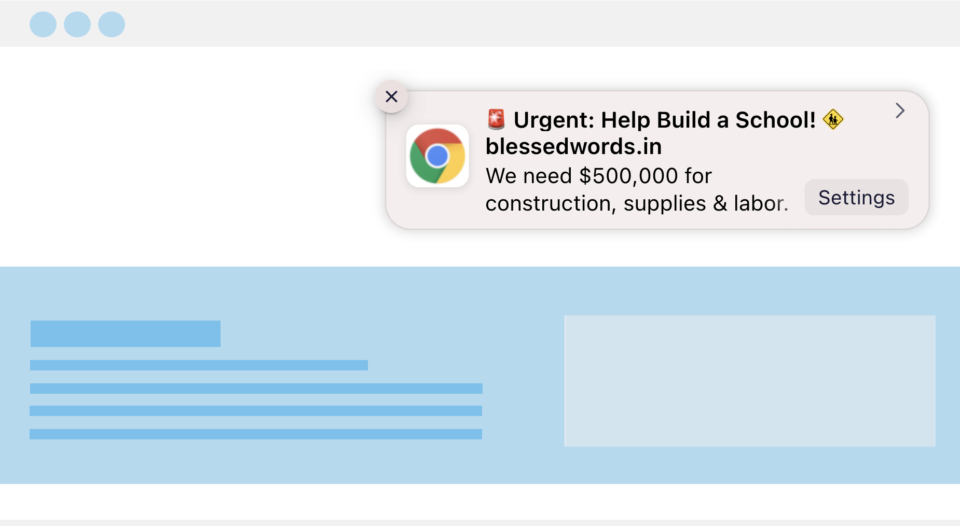
Eine Web-Push-Benachrichtigung ist eine kleine Pop-up-Warnung, die auf dem Desktop oder Telefon eines Besuchers angezeigt wird, nachdem er auf Ihrer Website auf „Zulassen“ geklickt hat, auch wenn er sich zu diesem Zeitpunkt nicht auf Ihrer Website befindet. Stellen Sie es sich wie eine Textnachricht vor, aber kostenlos und ohne jemals eine Telefonnummer zu benötigen.
Für eine gemeinnützige Organisation macht dies es zu einem der einfachsten Kanäle, die Sie zusätzlich zu dem, was Sie bereits tun, nutzen können:
- Es ist kostenlos. Es gibt keine Gebühr pro Nachricht wie bei SMS und keine Werbeausgaben, um die Personen zu erreichen, die sich bereits angemeldet haben. Es gibt kostenlose Optionen für Push-Benachrichtigungssoftware, aber wenn Sie erweiterte Funktionen wünschen, sind die Premium-Apps immer noch erschwinglich!
- Es konkurriert nicht mit einem überfüllten Posteingang. Ihre Benachrichtigung wird direkt auf dem Bildschirm angezeigt, nicht unter zwanzig anderen E-Mails vergraben.
- Keine persönlichen Daten erforderlich. Spender melden sich mit einem Klick an. Keine E-Mail-Adresse, keine Telefonnummer, nichts zum Eintippen.
- Es erreicht Personen, auch wenn sie nicht auf Ihrer Website sind. Sobald sich jemand angemeldet hat, können Sie ihn Tage oder Wochen später erreichen.
Das Werkzeug, das dies ermöglicht, ist PushEngage. Es ist das, was die Aufforderung „Benachrichtigungen zulassen?“ auf Ihrer Website handhabt und alle verfolgt, die Ja sagen. Sobald Sie dies eingerichtet haben, stellt sich die nächste Frage, was Sie tatsächlich benötigen, bevor Sie es einschalten.
Lesen Sie mehr über die PushEngage-Funktion in Charitable »
Was Sie vor dem Start benötigen
Dieses Setup verwendet zwei Komponenten, die zusammenarbeiten:
- PushEngage-Plugin – kümmert sich um die Opt-in-Aufforderung auf Ihrer Website und speichert Ihre Abonnentenliste. Dieser Teil ist kostenlos, egal was passiert.

- Charitable – kümmert sich um die Kampagnenseite: wann eine Benachrichtigung gesendet werden soll, was sie enthält und an welche Kampagne sie gebunden ist. Wenn Sie Charitable Lite verwenden, können Sie PushEngage trotzdem installieren und eine Abonnentenliste erstellen. Um Benachrichtigungen zu erhalten, die automatisch auf Spenderaktivitäten reagieren, wie z. B. eine Dankesnachricht, sobald jemand spendet, benötigen Sie Charitable Pro.
Wenn Sie Charitable Pro noch nicht haben, können Sie mit einem Plan beginnen und in wenigen Minuten einsatzbereit sein, mit einer 14-tägigen Geld-zurück-Garantie, falls es nicht das Richtige für Sie ist.
Dieses Tutorial setzt voraus, dass Sie Charitable auf Ihrer Website installiert haben. Wenn Sie es noch nicht installiert haben, folgen Sie dieser Anleitung: So installieren Sie Charitable »
Lassen Sie uns nun PushEngage installieren.
So richten Sie PushEngage mit Charitable ein (Schritt für Schritt)
Keiner davon erfordert Code. Sie arbeiten ausschließlich in Ihrem WordPress-Dashboard und dem Charitable Campaign Builder.
Schritt 1: Installieren Sie das kostenlose PushEngage-Plugin
Gehen Sie in Ihrem WordPress-Dashboard zu Plugins » Neues Plugin hinzufügen, suchen Sie nach „PushEngage“ und klicken Sie auf Installieren, dann auf Aktivieren.
Dies dauert weniger als eine Minute und erfordert nichts weiter als einen WordPress-Login.
Wenn Sie sich für ein PushEngage-Konto angemeldet haben, erhalten Sie eine Plugin-Datei zum Herunterladen. Sie müssen diese unter Plugins » Neues Plugin hinzufügen » Plugin hochladen hochladen.
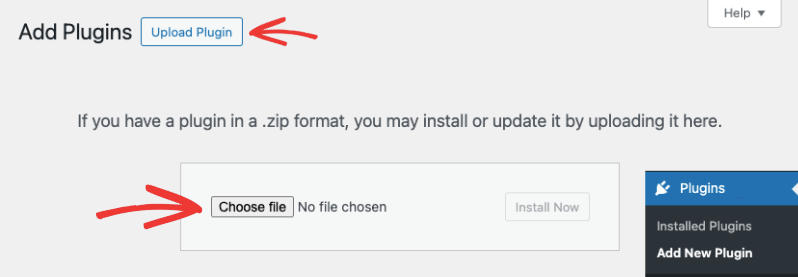
Das war's. Stellen Sie sicher, dass das Plugin auf Ihrer Website aktiviert ist.
Schritt 3: Richten Sie PushEngage in Charitable ein
Klicken Sie im Charitable Campaign Builder in der linken Seitenleiste auf Marketing und wählen Sie dann PushEngage aus der Liste der Integrationen aus.
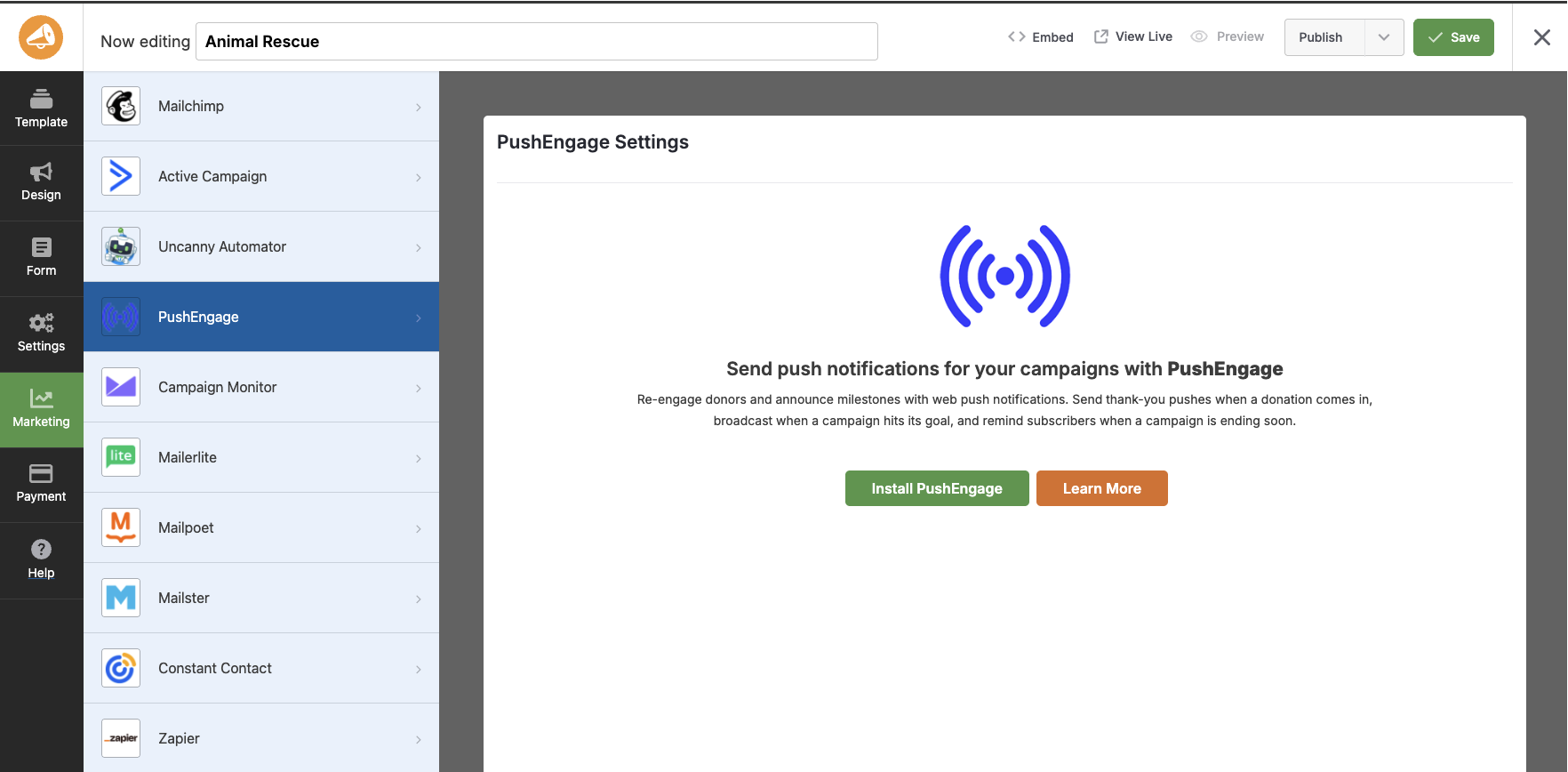
Wenn Sie Ihr Konto noch nicht verbunden haben, sehen Sie hier eine Schaltfläche PushEngage installieren.
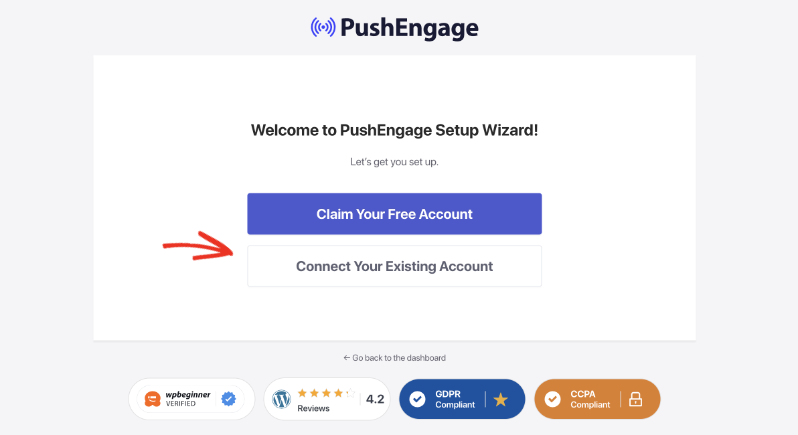
Klicken Sie darauf und folgen Sie den Anweisungen auf dem Bildschirm. Sie können Ihr Konto mit dem PushEngage-Assistenten verbinden.
Dies führt Sie durch die Erstellung eines kostenlosen Kontos (oder die Anmeldung, falls Sie bereits eines haben) und die Verbindung mit Ihrer Website.
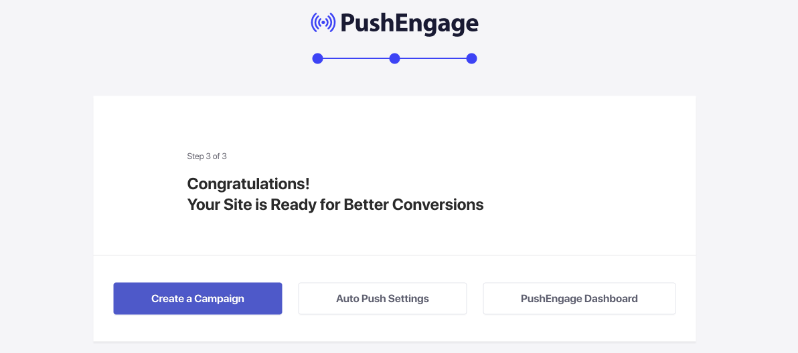
Sobald Sie sich in Ihrem Konto angemeldet haben, sehen Sie diesen Glückwunsch-Bildschirm.
Schritt 4: Aktivieren Sie Ihre Trigger
Gehen Sie nun in Ihrem WordPress-Admin zu Charitable » Kampagnen und öffnen Sie eine beliebige Kampagne.
Sie sehen vier Trigger, die Sie für diese Kampagne aktivieren können.
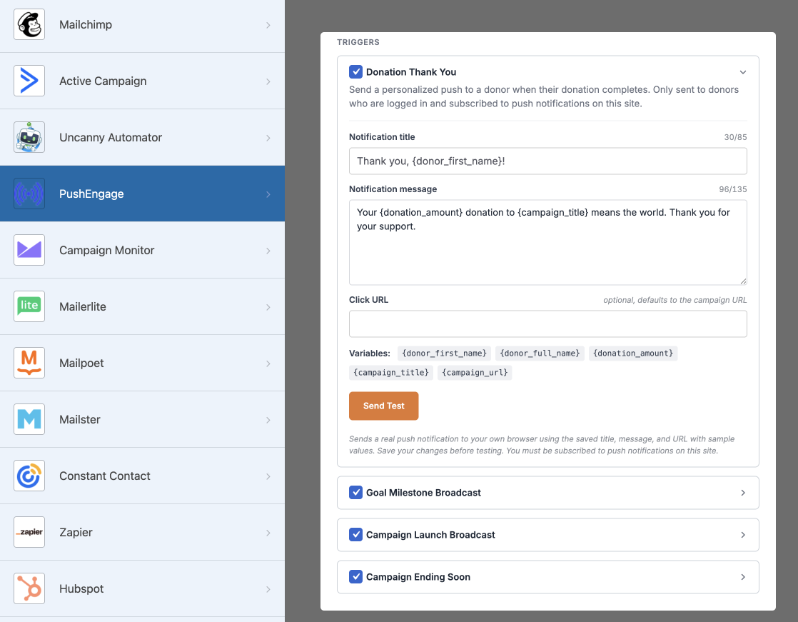
Aktivieren Sie die, die passen:
- Spenden-Dankeschön – wird automatisch an einen Spender gesendet, sobald seine Spende abgeschlossen ist.
- Ziel-Meilenstein – wird an Ihre Abonnentenliste gesendet, wenn die Kampagne 50 %, 75 % und 100 % ihres Ziels erreicht.
- Kampagnenstart – kündigt diese Kampagne allen an, die sich auf Ihrer Website angemeldet haben.
- Endet bald – erinnert Ihre Liste daran, dass die Kampagne bald endet.
Sie müssen nicht sofort alle vier aktivieren. Wenn dies Ihr erstes Mal ist, sind „Spenden-Dankeschön“ und „Ziel-Meilenstein“ der einfachste Einstieg, da Spender auf diese am ehesten reagieren.
Schritt 5: Nachricht schreiben
Jeder Trigger hat seinen eigenen bearbeitbaren Titel und Nachrichtenfeld.
Sie können Platzhalter für den Namen des Spenders, den Kampagnentitel, den gesammelten Betrag und den Fortschritt in Richtung Ziel einfügen, sodass eine Nachricht wie
„Danke, {donor_name}! Sie haben uns gerade geholfen, {amount_raised} für {campaign_title} zu erreichen“
Der Code innerhalb von {} füllt sich automatisch für jeden Spender aus, ohne dass Sie ihn jedes Mal von Hand schreiben müssen.
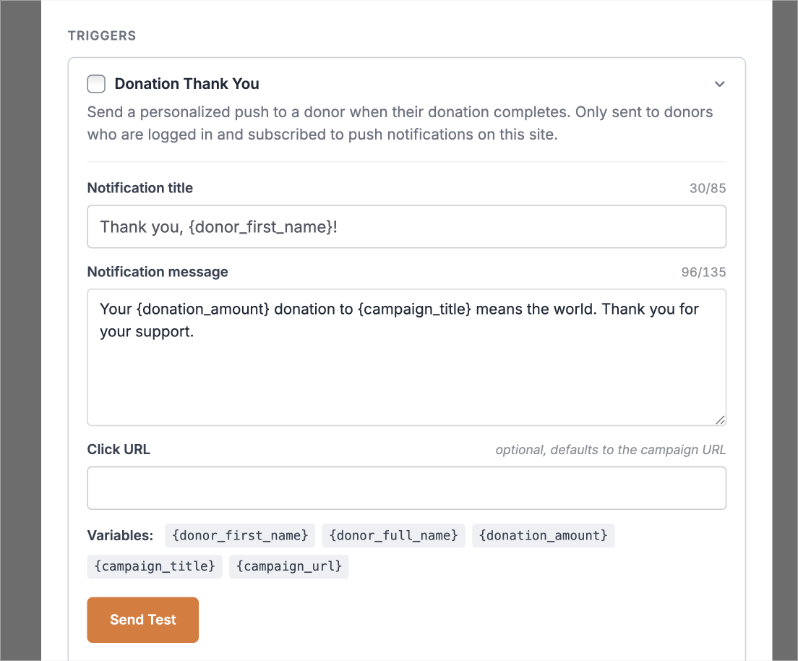
Fügen Sie einen Link hinzu, damit die Leute auf einer nützlichen Seite landen, z. B. auf der Kampagnenseite oder einem Dankes-Post.
Schritt 6: Vorschau und Test senden
Unten auf der Seite sehen Sie eine Vorschau Ihrer Benachrichtigung.
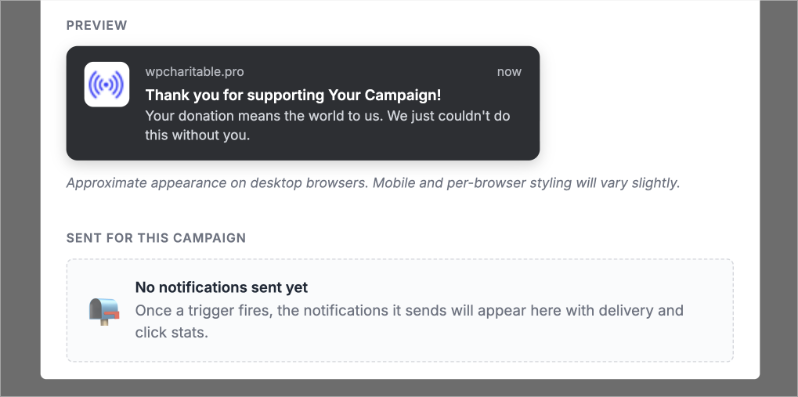
Klicken Sie vor der Veröffentlichung auf Test senden. Dies zeigt Ihnen genau, wie die Benachrichtigung in einem Browser aussehen wird, sodass Sie Tippfehler oder einen defekten Link erkennen können, bevor er einen einzigen Abonnenten erreicht.
Schritt 7: Speichern und veröffentlichen
Stellen Sie sicher, dass Sie Ihre Änderungen im Charitable Builder speichern.
Das ist alles. Ihre Trigger sind live und von nun an kümmern sich Charitable und PushEngage um den Versand. Sie müssen nicht daran denken, etwas manuell zu senden.
Von hier aus können Sie auch weiterhin Push-Benachrichtigungen innerhalb von PushEngage erstellen und senden.
Das Einzige, was noch zu tun ist, ist zu entscheiden, was Sie tatsächlich sagen wollen. Dieser Teil bereitet den Leuten mehr Schwierigkeiten als die Einrichtung, daher hier 10 Beispiele, die Sie sofort anpassen können.
10 Beispielbenachrichtigungen, die Sie diese Woche senden können
Eine kurze Regel vor der Liste: Machen Sie nicht jede Benachrichtigung zu einer Bitte. Mischen Sie Danksagungen und Updates mit Ihren Spendenanfragen, sonst fangen die Spender an, Sie auszublenden. Hier ist eine einfache Mischung für den Anfang.
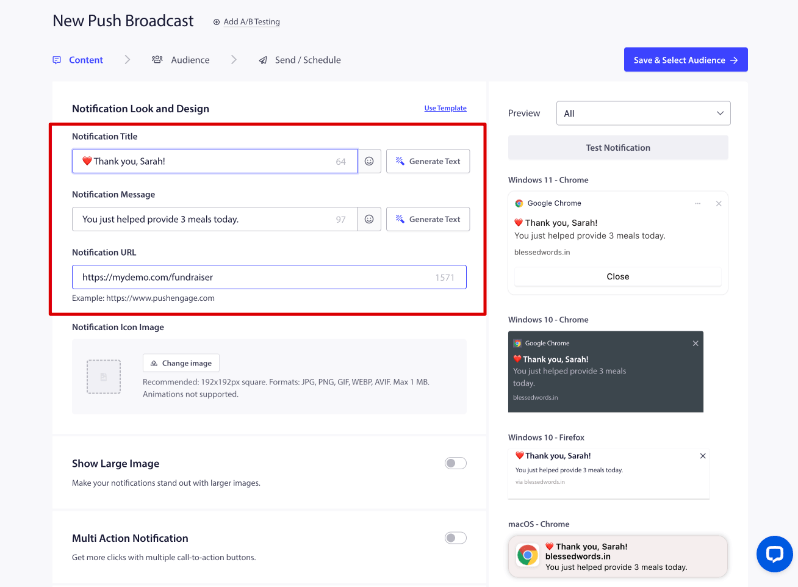
Dankesnachrichten
- „Danke, Sarah! Ihre Spende hat heute 3 Mahlzeiten ermöglicht.“ (CTA: Sehen Sie Ihre Wirkung)
- „Wir haben Ihre Spende erhalten! Hier ist, was sie bereits bewirkt.“
Kampagnen-Updates
- „Wir sind zu 75 % auf dem Weg zu unserem Ziel! Nur noch 2.500 $ übrig.“
- „Heute sind 32 Spender dazugekommen. Danke, dass Sie Teil davon sind.“
- „Diese Kampagne endet in 48 Stunden.“
Spendenanfragen
- „Wir sind 1.000 $ davon entfernt, dieses Projekt abzuschließen. Können Sie helfen, die Lücke zu schließen?“
- „Ihre Spende wird heute verdoppelt, Dollar für Dollar.“
Wirkung und Geschichte
- „Dank Unterstützern wie Ihnen haben wir jetzt 8.400 Mahlzeiten bereitgestellt.“
- „Lernen Sie Ravi kennen, eines der Kinder, denen Ihre letzte Spende hilft.“
Beachten Sie das Muster: zwei Danksagungen, drei Updates, zwei Anfragen und zwei Wirkungsgeschichten. Das ist eine gesündere Mischung als fünf Anfragen hintereinander, und es ist der einfachste Weg, Ihre Liste engagiert zu halten, anstatt dass sie Sie ausblendet.
FAQ
Brauche ich einen Entwickler, um das einzurichten?
Nein. Alles oben Genannte geschieht innerhalb Ihres WordPress-Dashboards und des Charitable Campaign Builders. Es ist kein Code erforderlich.
Ist PushEngage wirklich kostenlos?
Ja, das PushEngage-Plugin selbst ist kostenlos zu installieren und zu verwenden für Ihr Opt-in-Formular und Ihre Abonnentenliste. Die automatischen Trigger innerhalb von Charitable, die Benachrichtigungen mit echten Spenderaktivitäten verbinden, wie z. B. Spenden-Dankeschön und Zielerreichung, sind Teil von Charitable Pro.
Funktioniert das auch, wenn ich noch keine E-Mail-Liste habe?
Ja. Das ist sogar der Sinn der Sache. Push-Benachrichtigungsabonnenten melden sich mit einem einzigen Klick an, ohne E-Mail-Adresse oder Telefonnummer, sodass dies auch funktioniert, wenn Sie gar keine E-Mail-Liste haben.
Wie viele Benachrichtigungen sollte ich senden?
Es gibt keine feste Anzahl, aber versuchen Sie, Anfragen mit Updates und Dankeschöns auszubalancieren, anstatt jedes Mal eine Anfrage zu senden. Eine grobe Mischung aus einer Anfrage für alle zwei oder drei Nicht-Anfrage-Nachrichten hält Ihre Liste engagiert, ohne sie zu ermüden.
Kann ich das auch für andere Kampagnen als Spendenkampagnen nutzen?
Die vier integrierten Charitable-Trigger konzentrieren sich auf Kampagnen, aber das eigene Dashboard von PushEngage ermöglicht es Ihnen, zusätzliche einmalige Benachrichtigungen an Ihre gesamte Liste zu senden. So können Sie auch Dinge wie Freiwilligenanmeldungen oder Veranstaltungserinnerungen abdecken, sobald Sie sich mit den Grundlagen vertraut gemacht haben.
Sobald Ihr erster Trigger live ist, ist der größte Gewinn, ihn einfach ein paar Wochen laufen zu lassen und zu beobachten, worauf die Spender reagieren. Sie werden schnell wissen, welche Nachrichten Klicks erhalten und welche nicht, und können von dort aus Anpassungen vornehmen.
Charitable hat über 1 Million Downloads!
Millionen vertrauen auf Charitable für erfolgreiche Spendenkampagnen. Probieren Sie Charitable noch heute risikofrei aus.
✅ 14-tägige Geld-zurück-Garantie
✅ Transparente Preisgestaltung
✅ Einrichtung ohne Code
Erhalten Sie kostenlose Tipps und Ressourcen direkt in Ihren Posteingang, zusammen mit über 60.000 anderen. Abonnieren Sie den Charitable-Newsletter →
Bleiben Sie verbunden für weitere Ressourcen für gemeinnützige Organisationen
Für weitere Tutorials und Videos, die auf gemeinnützige Organisationen zugeschnitten sind, abonnieren Sie unseren YouTube-Kanal. Wir veröffentlichen regelmäßig Expertentipps, Schritt-für-Schritt-Anleitungen zu Online-Spenden, Fundraising-Strategien und praktische Ressourcen, die Ihrer Organisation zum Erfolg verhelfen.
🗞️ Erhalten Sie wöchentliche Tipps und exklusive Anleitungen in Ihrem Posteingang
Melden Sie sich für unseren Newsletter an →
🎥 Sehen Sie sich Schritt-für-Schritt-Tutorials und Erfolgsgeschichten an
Abonnieren Sie unseren YouTube-Kanal →
👩🏽💻 Vernetzen Sie sich mit unserer Community und erhalten Sie tägliche Einblicke in gemeinnützige Organisationen
Folgen Sie uns auf LinkedIn →
🥳 Lustige Reels und Einblicke in gemeinnützige Organisationen
Folgen Sie uns auf Instagram →
👀 Aufschlussreiche & unterhaltsame Videos, die Ihnen helfen, Ihre Sache voranzubringen
Folgen Sie uns auf TikTok→
🌎 Abonnieren und folgen Sie uns für allgemeine Fundraising-Tipps
Holen Sie sich Fundraising-Tipps auf TikTok →
Leistungsstarke Fundraising-Ressourcen
🤖 Nutzen Sie Charitable mit Ihrem KI-Assistenten
Erfahren Sie mehr über Charitable + KI →
⬇️ Laden Sie bewährte Strategien, Kampagnenideen und Experten-Tools herunter
Holen Sie sich das Fundraising-Kit →
💸 Holen Sie sich kostenlose Fundraising-Ressourcen
Besuchen Sie den Charitable Fundraising Hub →
🤔 Haben Sie Fragen zu Charitable?
Charitable FAQs →
🏎️ Probieren Sie Charitable aus
Erstellen Sie Ihre Charitable Demo →
Verstehen Sie Begriffe und Jargon von gemeinnützigen Organisationen
Glossar für gemeinnützige Organisationen→
% Suchen Sie nach Angeboten und Rabatten für gemeinnützige Organisationen?
Beste Angebote und Rabatte für gemeinnützige Organisationen →







Hinterlassen Sie eine Antwort