
Möchten Sie Ihre Spendedaten an Ihr CRM, E-Mail-Tool, Ihre Tabellenkalkulation oder Ihre Chat-App senden, sobald eine Spende eingeht? Zapier verbindet Charitable mit Tausenden von Apps, sodass neue Spenden, wiederkehrende Verlängerungen, Spenderanmeldungen und Kampagnenmeilensteine jeweils einen Workflow in jedem Dienst auslösen können, den Sie bereits verwenden.
Diese Anleitung führt Sie durch die Schritte zur Verbindung von Charitable mit Zapier und zum Erstellen Ihres ersten Zaps.
Hinweis: Die Zapier-Integration von Charitable erfordert Charitable Pro und das Addon Automation Connect (Pro-Plan oder höher).
Stellen Sie vor Beginn sicher, dass Charitable Pro auf Ihrer Website installiert und aktiviert ist.
Generieren eines API-Schlüssels
Die Zapier-Integration wird über das Charitable Automation Connect Addon bereitgestellt. Weitere allgemeine Installationsschritte finden Sie unter Erweiterungen installieren, falls Sie es noch nicht aktiviert haben.
Zapier verbindet sich mit Ihrer Charitable-Website über einen API-Schlüssel – eine lange, eindeutige Zeichenfolge, die beweist, dass Zapier Ihre Spendeninformationen lesen und auf Ereignisse lauschen darf. Jeder Schlüssel gehört zu einem WordPress-Benutzer, und Sie können mehrere aktive Schlüssel gleichzeitig haben, wobei ein Schlüssel pro Integration gilt.
Gehen Sie im WordPress-Admin zu Charitable » Automation und wechseln Sie zur Registerkarte API-Schlüssel.
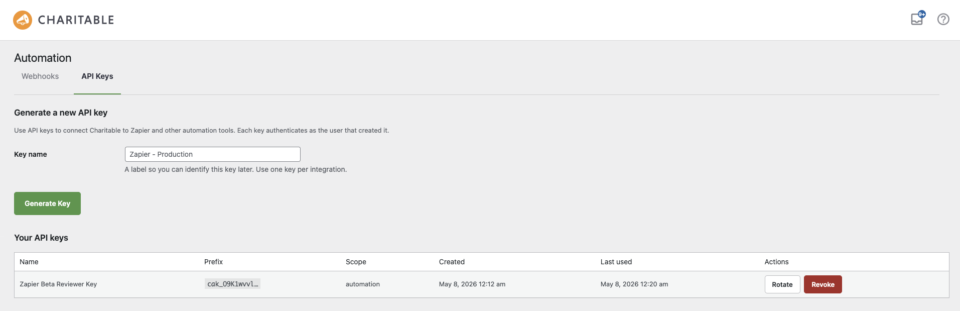
Geben Sie im Feld Schlüsselname oben auf der Seite eine Bezeichnung ein, die erklärt, wo der Schlüssel verwendet wird – zum Beispiel „Zapier Produktion“ oder „Zapier – Prüfer“. Die Bezeichnung ist nur intern, wird niemals mit Zapier geteilt und ist für Spender nicht sichtbar. Wenn Sie bereit sind, klicken Sie auf Schlüssel generieren.
Der neue Schlüssel erscheint in der Tabelle Ihre API-Schlüssel unten, und der vollständige Klartextwert wird einmal oben auf der Seite angezeigt.
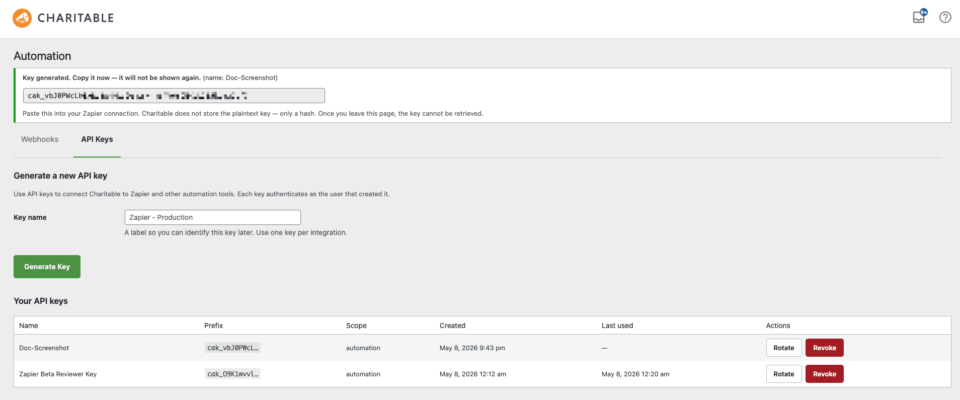
Hinweis: Kopieren Sie den Schlüssel sofort. Der Klartextwert wird nur einmal angezeigt und kann später nicht mehr abgerufen werden. Wenn Sie ihn verlieren, generieren Sie einen neuen Schlüssel und aktualisieren Sie Zapier mit dem neuen Wert.
Charitable mit Zapier verbinden
Mit Ihrem API-Schlüssel in der Hand findet der nächste Schritt innerhalb von Zapier statt.
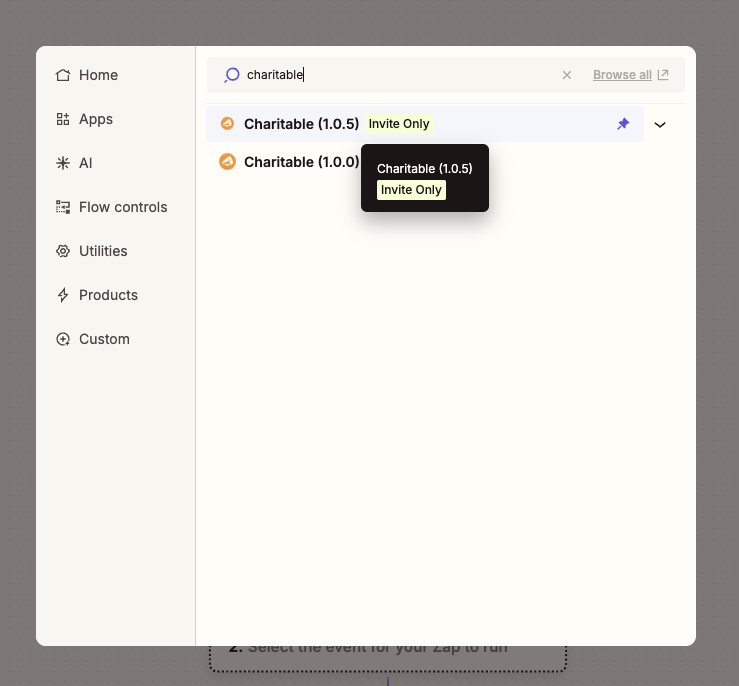
Suchen Sie im Zap-Editor im App-Auswahlfeld nach Charitable und wählen Sie es aus. Zapier fordert Sie zur Eingabe von zwei Informationen auf.
- Website-URL – die Adresse Ihrer Charitable-Website, zum Beispiel
https://example.org. Fügen Sie keinen abschließenden Schrägstrich hinzu. Zapier hängt den Rest des Pfades automatisch an. - API-Schlüssel – fügen Sie die
cak_…Zeichenfolge ein, die Sie im vorherigen Schritt generiert haben.
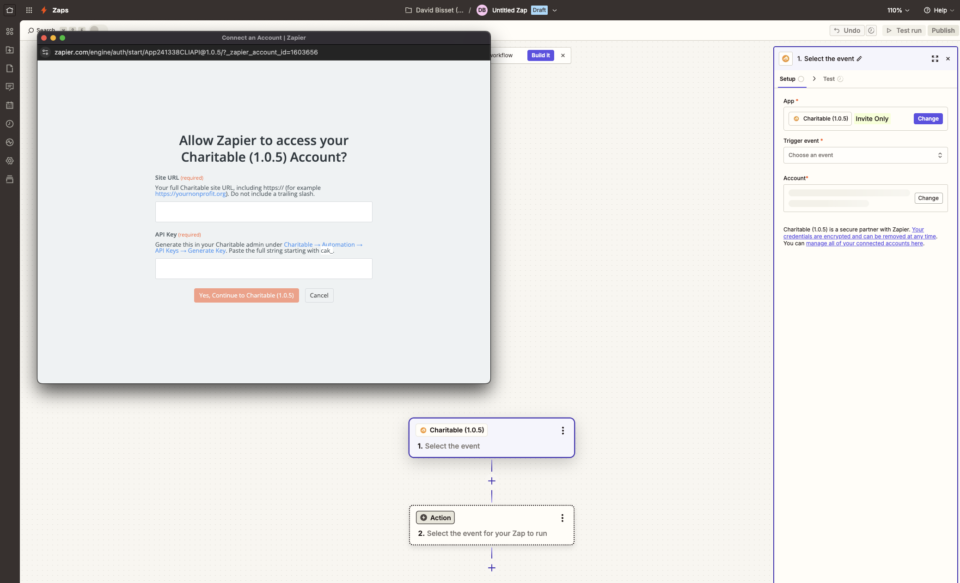
Nach der Bestätigung sendet Zapier eine Testanfrage an Ihre Website. Eine grüne Erfolgsmeldung bedeutet, dass die Verbindung funktioniert und Zapier nun Ihre Spenden, Spender und Kampagnen sehen kann.
Hinweis: Wenn Ihre Website SSL erzwingt, muss die Website-URL mit https:// beginnen. Eine Diskrepanz zwischen dem URL-Schema und der tatsächlichen Konfiguration der Website ist die häufigste Ursache für Verbindungsfehler.
Auslöserereignisse
Ein Trigger ist etwas, das auf Ihrer Charitable-Website passiert und einen Zap startet. Charitable bietet zehn Trigger-Ereignisse.
- Neue Spende – wird in dem Moment ausgelöst, in dem eine neue Spendenzeile auf Ihrer Website erstellt wird, unabhängig vom Zahlungsstatus. Wählen Sie dies, wenn Sie jeden Versuch protokollieren möchten, einschließlich ausstehender.
- Spende abgeschlossen – wird ausgelöst, wenn eine Spende von ihrem Zahlungs-Gateway als abgeschlossen markiert wird. Wählen Sie dies für Dankes-Sequenzen und Spendenquittungen.
- Spende zurückerstattet – wird ausgelöst, wenn eine Spende ganz oder teilweise zurückerstattet wird. Nützlich für die Abstimmung der Buchhaltung und Spender-Workflow.
- Neues wiederkehrendes Abonnement – wird ausgelöst, wenn ein Spender einen neuen wiederkehrenden Spendenplan einrichtet. Wählen Sie dies, um wiederkehrende Spender in eine separate CRM-Liste aufzunehmen.
- Wiederkehrende Spende erneuert – wird jedes Mal ausgelöst, wenn eine wiederkehrende Spende erfolgreich abgerechnet wird. Wählen Sie dies für E-Mails zur Bestätigung der Erneuerung oder zur Protokollierung jeder Erneuerung im CRM.
- Wiederkehrendes Abonnement gekündigt – wird ausgelöst, wenn ein wiederkehrender Plan gekündigt wird, entweder vom Spender oder von einem Administrator. Wählen Sie dies für Re-Engagement-Kampagnen und zur Aktualisierung von CRM-Lebenszyklusphasen.
- Wiederkehrende Zahlung fehlgeschlagen – wird ausgelöst, wenn eine geplante wiederkehrende Abbuchung fehlschlägt. Wählen Sie dies für Mahnverfahren und Spender-Wiederherstellungsalarme.
- Kampagnenziel erreicht – wird beim ersten Mal ausgelöst, wenn die Spenden einer Kampagne ihr Ziel überschreiten. Das Ereignis wird einmal pro Kampagne aufgezeichnet, sodass es sich nie wiederholt. Wählen Sie dies für Feiernachrichten an Ihr Team oder Ihren Vorstand.
- Kampagne beendet – wird ausgelöst, wenn eine Kampagne ihr Enddatum erreicht. Wählen Sie dies, um Berichte zum Ende der Kampagne und Abschlusskommunikationen auszulösen.
- Erstmaliger Spender – wird ausgelöst, wenn die allererste abgeschlossene Spende eines Spenders aufgezeichnet wird. Wählen Sie dies für Willkommens-Sequenzen und die Betreuung von erstmaligen Spendern.
Alle Trigger werden sofort ausgelöst, sobald das Ereignis auf Ihrer Website eintritt – es gibt keine Abfragungsverzögerung. Jeder Trigger kann im Zap-Editor auch auf eine bestimmte Kampagne beschränkt werden, sodass der Zap nur für diese eine Kampagne ausgeführt wird. Für erweiterte Filterung – nach Zahlungs-Gateway, Spendenbetrag, Spender-E-Mail oder einem anderen Payload-Feld – fügen Sie direkt nach dem Trigger einen Schritt Nach Zapier filtern hinzu.
Aktions- und Suchschritte
Eine Aktion ist etwas, das Zapier am Ende eines Zaps auf Ihrer Charitable-Website ausführt. Eine Suche ist eine Aktion, die Daten abruft und sie an spätere Schritte weitergibt. Charitable bietet jeweils zwei davon.
- Spender erstellen (Aktion) – fügt einen neuen Spenderdatensatz zu Charitable hinzu. Wenn bereits ein Spender mit derselben E-Mail-Adresse existiert, wird stattdessen der vorhandene Datensatz zurückgegeben, sodass dieser Schritt wiederholt sicher verwendet werden kann, ohne Duplikate zu erstellen.
- Spender aktualisieren (Aktion) – aktualisiert einen vorhandenen Spender per E-Mail oder Spender-ID. Nur die von Ihnen angegebenen Felder werden geändert; alles andere bleibt unverändert.
- Spender per E-Mail finden (suchen) – sucht einen Spender von Charitable anhand der E-Mail und gibt dessen vollständigen Datensatz zurück. Der Zap kann so konfiguriert werden, dass er anhält oder fortfährt, wenn keine Übereinstimmung gefunden wird.
- Kampagne finden (suchen) – sucht eine Kampagne anhand des Slugs oder der ID und gibt den vollständigen Datensatz zurück, einschließlich des aktuellen Spendenbetrags und Ziels.
Erstellen und Testen Ihres ersten Zaps
Der schnellste Weg, die End-to-End-Funktionalität der Integration zu bestätigen, ist die Erstellung eines kleinen Zaps und die Beobachtung seiner Ausführung.
Wählen Sie im Zap-Editor Neue Spende als Trigger aus und wählen Sie Ihr verbundenes Charitable-Konto. Zapier ruft eine aktuelle, echte Spende von Ihrer Website ab, damit Sie Felder anhand der tatsächlichen Datenstruktur und nicht anhand synthetischer Beispiele zuordnen können.
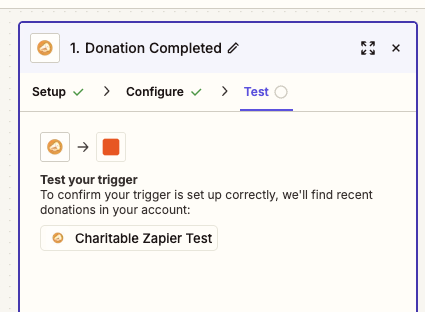
Wählen Sie für den Aktionsschritt einen Dienst aus, den Sie bereits verwenden – E-Mail von Zapier, Slack, Google Tabellen oder Ihr CRM. Ordnen Sie den Spendernamen und den Spendenbetrag den Feldern der Aktion zu und veröffentlichen Sie dann den Zap.
Sobald der Zap aktiviert ist, tätigen Sie eine kleine Testspende auf Ihrer Website. Eine Spende von 1 € über Ihre übliche Zahlungsmethode ist in Ordnung. Innerhalb weniger Sekunden empfängt Zapier das Ereignis und die Aktion wird ausgeführt.
Wenn etwas nicht wie erwartet funktioniert, zeigt der Tab Zap-Verlauf in Zapier die exakte Nutzlast an, die Charitable gesendet hat, sowie alle Fehler aus dem Aktionsschritt, was die Erkennung einer fehlenden Feldzuordnung oder eines falsch benannten Werts erleichtert.
Fehlerbehebung
Zapier meldet „Authentifizierung fehlgeschlagen“, wenn ich die Verbindung speichere
Das bedeutet, dass Zapier einen HTTP-Fehler von Ihrer Website erhalten hat. Bestätigen Sie, dass der API-Schlüssel die vollständige cak_… -Zeichenfolge ist – er ist länger als die meisten kurzen Schlüssel, die Sie möglicherweise gewohnt sind. Die Website-URL muss auf das Stammverzeichnis der WordPress-Installation zeigen, nicht auf ein Unterverzeichnis oder eine CDN-Domain. Wenn Ihre Website SSL erzwingt, muss die URL mit https:// beginnen.
Mein Zap wird nicht ausgelöst, wenn eine Spende getätigt wird
Bestätigen Sie zuerst, dass der Zap im Zap-Dashboard veröffentlicht und aktiviert ist. Entwürfe von Zaps empfangen keine Ereignisse. Wenn er veröffentlicht ist, öffnen Sie den Tab Zap-Verlauf in Zapier – Ereignisse, die Charitable gesendet hat, werden dort mit ihrer vollständigen Nutzlast angezeigt. Wenn im Verlauf nichts angezeigt wird, blockiert Ihre Website möglicherweise ausgehende HTTPS-Aufrufe. Häufige Ursachen sind aggressive Sicherheit-Plugins, Anforderungs-Firewalls oder Staging-Umgebungen, in denen ausgehender Datenverkehr eingeschränkt ist.
Der Trigger-Setup-Bildschirm zeigt synthetische Beispiele anstelle meiner echten Spenden
Das Trigger-Setup ruft Ihre drei neuesten übereinstimmenden Datensätze ab, damit Sie Felder anhand echter Strukturen zuordnen können. Wenn nur synthetische Beispiele angezeigt werden, hat Ihre Website noch keine aktuellen Datensätze dieses Typs. Machen Sie eine kleine Testspende und klicken Sie dann im Zap-Editor auf Neue Datensätze finden, um die Liste zu aktualisieren.
Ich habe meinen API-Schlüssel geändert und jetzt funktioniert nichts mehr
API-Schlüssel sind an die Zapier-Verbindung gebunden, nicht an einzelne Zaps. Wenn Sie einen Schlüssel neu generieren, empfangen alle Zaps mit dem alten Schlüssel keine Ereignisse mehr. Die schnellste Lösung ist, die Liste der Zapier-Verbindungen zu öffnen, die bestehende Charitable-Verbindung zu bearbeiten und den neuen cak_… -Wert einzufügen – das aktualisiert alle Zaps, die diese Verbindung nutzen, auf einmal.
Das war's! Charitable ist jetzt mit Zapier verbunden und Sie können Spenden-, Spender- und Kampagnenereignisse in Tausende von Apps weiterleiten, die Zapier unterstützt. Sehen Sie sich als Nächstes Filtern von Charitable Zaps nach Kampagne an, um einzelne Zaps einzugrenzen, und die Charitable Zapier Feldreferenz für die vollständige Liste der Felder, die jeder Trigger sendet.
FAQ
Kann ich mehrere Zapier-Konten gleichzeitig verbunden haben?
Ja. Jede Zapier-Verbindung verwendet einen API-Schlüssel, und Sie können so viele Schlüssel generieren, wie Sie benötigen, unter Charitable » Automation » API Keys. Ein separater Schlüssel pro Integration erleichtert den Widerruf des Zugriffs für ein einzelnes Tool, ohne die anderen zu beeinträchtigen.
Lösen Trigger für Spenden aus, die vor der Installation des Add-ons getätigt wurden?
Nein. Trigger lösen nur bei Ereignissen aus, die auftreten, nachdem ein Zap veröffentlicht und aktiv ist. Um historische Daten zu migrieren, exportieren Sie sie aus Charitable » Donations und importieren Sie sie direkt in Ihre Ziel-App.
Sieht Zapier die Zahlungs Kartendetails meiner Spender?
Nein. Charitable speichert niemals Kartennummern, und die Daten, die Zapier empfängt, enthalten nur Spenderprofilfelder, Spendenbeträge, Kampagnendetails und Gateway-Transaktions-IDs.
Kann ich Zapier in einem Multisite-Netzwerk verwenden?
Ja, aber jede Website im Netzwerk benötigt eine eigene Charitable Pro-Lizenz, das Automation Connect-Add-on und einen API-Schlüssel. Zapier-Verbindungen sind pro Website, nicht pro Netzwerk.
Wie widerrufe ich einen Schlüssel, ohne alles zu unterbrechen?
In der Tabelle Ihre API-Schlüssel auf der Registerkarte Charitable » Automation » API Keys hat jeder Schlüssel eine Aktion Widerrufen auf Zeilenebene. Das Widerrufen eines Schlüssels wird sofort wirksam und stoppt alle Zaps, die diesen Schlüssel verwenden. Generieren Sie zuerst einen Ersatz, aktualisieren Sie die Zapier-Verbindung und widerrufen Sie dann den alten, um Ausfallzeiten zu vermeiden.



