Charitable Blog

Everything you need to know about Charitable and our team.

One year in review

Charitable: Year One in Review

Last updated on

  • By

One year ago today, we released version 1.0 of Charitable on WordPress. As we turn a new page, I wanted to take some time to reflect on and share our experiences over this past year.

The Background Story

The team behind Charitable consists of me, Eric, and Wes. We’ve been friends since the 90s; we were groomsmen in each other’s weddings; and we created our business together in 2013. Wes is the one who makes things look good; I type all the code.

Before Charitable, we had already launched a few other products, most of which were sold through the Envato Marketplace. One of those was a WordPress theme called Franklin. It was a crowdfunding theme, built on top of a plugin created by the talented guys from Astoundify. Things got complicated when the plugin, which had been acquired by IgnitionDeck, disappeared from the WordPress repository, but our experience with Franklin was a catalyst for the development of Charitable.

Supporting Franklin showed us that there was a genuine lack of good fundraising solutions in the WordPress space. People liked the way the Astoundify plugin extended Easy Digital Downloads. Most other WordPress donation plugins at that time were fairly simplistic in nature, and many only allowed you to accept donations with PayPal, so the huge selection of payment gateways and other Easy Digital Downloads add-ons was a major drawcard.

Commit #1 for Charitable was made on June 24, 2014. We were aiming for a private beta launch by September or October that year. October came and went. 2014 came and went. Development was still happening, just not at the pace I was hoping. But we were talking to non-profits about their experiences with other fundraising platforms and plugins, and we were learning a lot.

We finally had a private beta ready to go by June 2015 — more than a year after development started. That private beta period helped us refine many aspects of Charitable and the extensions (Ambassadors, Simple Updates, Anonymous Donations and User Avatar were all in beta at the same time). Two months later, we finally pushed version 1.0.0 of Charitable to WordPress.

Early Challenges

Another new WordPress donation plugin launched last year and made a huge impression on many people: Give. It launched in April, while I was still thick in the development of Charitable.

I’ll be honest: That was really hard for me personally. Part of the appeal of developing Charitable was that there just weren’t any great WordPress donation plugins around. With Give on the scene, that was no longer the case. I felt like somebody had yanked the rug from under me, and we’d be playing second fiddle.

That wasn’t the only challenge. When we first added Charitable to the WordPress repository, downloads were slow to take off. I remember checking in a couple times a day, seeing maybe one or two extra downloads and wondering how we were ever going to build a viable product out of this. It felt like it took forever just to reach 20+ active users. One day, we ticked up to 30+ active users. The next day, we’d dropped back to 20+ active users!

Sales also took a while to really get going. We had retired nearly all of our products on the Envato Marketplaces at the end of August last year (here’s why), which meant we’d lost a significant chunk of monthly revenue. I was hoping that Charitable would start to claw back some of that, but that September, we made a grand total of $98 in Charitable sales.

Looking back, I realize that the major challenge for me during those months was personal. Creating and releasing a product is exhilarating, but it can also make you vulnerable. Charitable is something I care about a lot, something I’ve poured myself into — sticking it up on the internet for anyone to download feels risky. What if people hate it? What if no one uses it? What if no one else ever cares about it as much as I do?

Redefining Success

Slowly, our number of active users started to grow. So did sales. In October, we made just under $500; the next month, that was up to a little more than $1300.

Also encouraging were the reviews that started to come in. After reading so many plugin developers’ stories about unfair 1-star reviews on their plugins, I was nervous about the kinds of reviews we would get. But as reviews for Charitable came in, people were always really positive about the plugin.

We found ways to set Charitable apart. We focused on peer to peer fundraising. We expanded our payment gateway support (here, here and here). We started selling our Plus and Pro packages as Pay What You Want products.

Of course, even when you start to get positive reviews and more sales, it’s not a cure for doubt or disappointment. If you spend all your time comparing yourself against others, you will never be happy. I can’t count the number of times I’ve told my seven-year old son that. I’ve spent the last year reminding myself of it too.

It reminds me of Pippin Williamson, who created Easy Digital Downloads, Restrict Content Pro and Affiliate WP. I could look at the $576,000 that Pippin and his team earned with Easy Digital Downloads in 2015 and feel envious. But read Pippin’s 4-year anniversary post for Easy Digital Downloads and you’ll see that he could feel exactly the same way about others who have enjoyed even greater success than he has:

A bold face lie would be to tell you that I’ve never felt down or burdened when looking at the success of others.

As we turn the page on our first year, I can’t help but define the past year as a success. On the revenue front, we earned $20,000. Sales have been on a steady incline since we started.

We have gone from a having just one developer working on Charitable to a point where our last major included several significant contributions by other developers.

And those positive reviews keep coming in. One year on, Charitable has had 46 reviews — all of them 5-star.

Interacting with users through our private support channel has also been a really positive part of the last year. We’ve been proud to be able to help hundreds of users use Charitable, and the feedback we have received has been consistently positive. We received this note from a new user just yesterday:

The plugin is awesome, really nice work.  I used to work at a SaaS fundraising startup that was very similar to this, so I understand the immense value of everything you’ve written. I really like your model of offering the individual plugins but also rolling them up into packages that are far more attractive. To get all of this for <$300 is pretty amazing.

Most meaningful of all has been seeing how Charitable has been used. Here are just a few organizations that are using Charitable:

  • Big Hearts 2 Little Hearts work to lengthen and improve the lives of babies born with heart defects.
  • The Himalayan Institute support projects providing health services, public libraries, and sustainable employment opportunities in Cameroon, India and Mexico.
  • Charity Ball provides quality soccer balls to children in poverty-stricken communities around the world.
  • Fishing to End Hunger is an annual fishing tournament in Brainerd, Minnesota raising money for Kids Against Hunger.
  • edfurther is a crowdfunding platform for college scholarships.
  • The 2016 Special Olympics D.C. Polar Plunge was a fundraising event earlier this year that helped raise $145,000 for athletes in the Special Olympics.
  • The Philanthropy Project empowers youth to create fundraising campaigns for organizations they care about.

The time and effort that goes into creating Charitable isn’t about making a plugin for the sake of making a plugin; it’s about creating a tool. To see that tool playing a small part in helping organizations make an impact on the world is inspiring and humbling.

I can’t wait to see where the next 12 months of Charitable’s journey takes us.

author avatar
Eric Daams

Disclosure: Our content is reader-supported. This means if you click on some of our links, then we may earn a commission. We only recommend products that we believe will add value to our readers.

13 responses to “Charitable: Year One in Review”

  1. Charitable is a nice slick plugin, and its future is bright as long as the team behind it is committed to make it as great at it seems.

    I recommended it to several clients and they are VERY happy with that decision. Some of them where almost convinced to use IgnitionDeck, (I would NEVER recommend that one, even with premium support), and now they are doing great with Charitable.

    Thanks Eric and Wes! Kudos to you, guys!

    1. ericnicolaas Avatar
      ericnicolaas

      Thanks for the kind comment Joan, and thank you for recommending Charitable to your clients!

  2. Karl and Joice Franklin Avatar
    Karl and Joice Franklin

    Congrats! Thank you for sharing your journey, the ups and downs. May there be increasing ups as the Lord blesses your vision and caring. Thanks for blessing us!

    1. ericnicolaas Avatar
      ericnicolaas

      Thanks Karl and Joice!

  3. Matt Cromwell Avatar
    Matt Cromwell

    I’m one of the authors and creators of Give, and Head of Support. We really respect all that you’ve done and are doing. Keep up the good work!

    1. ericnicolaas Avatar
      ericnicolaas

      Thanks Matt! And the feeling is likewise; you have all done an incredible job with developing & supporting Give over the past year and a bit.

  4. Nice to know the back story and struggle you’ve went through. Creating a plugin and making a business out of it is hard and takes patience and time, a lot. Been there, done that, still doing it. Best of luck in the coming days.

  5. I’d love to know how you spread the word. Was there a marketing budget? Did you try to partner with people or organizations? Did you advertise?

    Thanks for the great article!

    Corey

    1. ericnicolaas Avatar
      ericnicolaas

      We tried a few different advertising channels: Adwords, Facebook and Twitter. We haven’t had a whole lot of success with any of them, though I’ll admit we’re far from being expert marketers. We’re bootstrapping this whole thing, so our budget is inherently constrained.

      Honestly, the single biggest way in which growth has happened is through having Charitable available on WordPress.org.

  6. Jeremy Peskin Avatar
    Jeremy Peskin

    Great post and great product. Matchme couldn’t have raised nearly $500,000 in matching campaign donations for some great non-profits without it!

    1. ericnicolaas Avatar
      ericnicolaas

      That’s phenomenal Jeremy! So exciting to see the success and impact you’re having with Matchme.

  7. Arpit Bansal Avatar
    Arpit Bansal

    HI,
    Good to see your journey,
    Are there any more recent examples of organizations using charitable plugin and any related success stories from them.
    i was planning for ignitiondeck but then i found yours so i need to be quite sure am at the better side.
    also ignitiondeck has many themes but i guess you only go with one.
    we are looking forward to create a website like gofundme.com , is it possible?

    1. ericnicolaas Avatar
      ericnicolaas

      Hi Arpit,

      You can create a fundraising platform similar to Go Fund Me with Charitable. https://www.wpcharitable.com/create-a-fundraising-platform-with-wordpress/ provides a really good overview of how that pieces together.

      Cheers,
      Eric

Leave a Reply

Your email address will not be published. Required fields are marked *

Get free tips and resources right in your inbox, along with 60,000+ others

Join our Newsletter

We won’t spam you. We only send an email when we think it will genuinely help you. Unsubscribe at any time!

Featured Video:

Watch more videos on our YouTube channel.

What's New In Charitable

View The Latest Updates
🔔 Subscribe to get our latest updates
📧 Subscribe to Emails

Email Subscription

Join our Newsletter

We won’t spam you. We only send an email when we think it will genuinely help you. Unsubscribe at any time!

ambassadors New

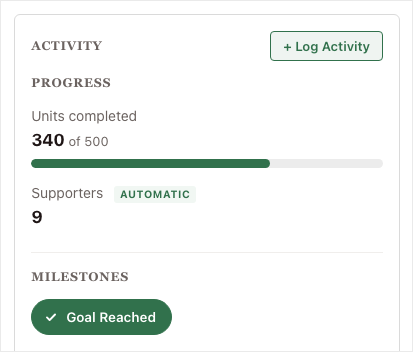
🏃 Introducing Activity: Show Progress on More Than Money!

Most peer-to-peer fundraisers are about more than the money. A read-a-thon is about minutes read, a walkathon is about miles walked, and a food drive is about meals packed. Activity for Charitable Ambassadors lets your fundraisers show that effort right beside the dollars they raise. Why this is important:

  • 🎯 Progress on what you actually count: A progress bar shows each thing you count against its own target, sitting right beside the money raised.
  • 🏅 Milestones for the yes or no things: A milestone badge marks the efforts that are simply done or not done, with no number to chase.
  • ✍️ Fundraisers log their own numbers: Your supporters enter their totals from their own pages, so the effort stops living in a spreadsheet, a comment, or nowhere at all.
  • 🤖 Some numbers count themselves: An AUTOMATIC tag appears wherever the site worked the figure out from completed donations, so you can see at a glance what nobody typed in.
  • 🧩 Set it up once, use it anywhere: You decide what gets counted one time, then choose which campaigns count it. Available now in Charitable Ambassadors 3.4.7, with no new plugin and no developer.

Check out our announcement here.

author avatar
Eric Daams
ambassadors New

🖨️ Introducing Fliers and Posters: Raise Money Away From the Screen!

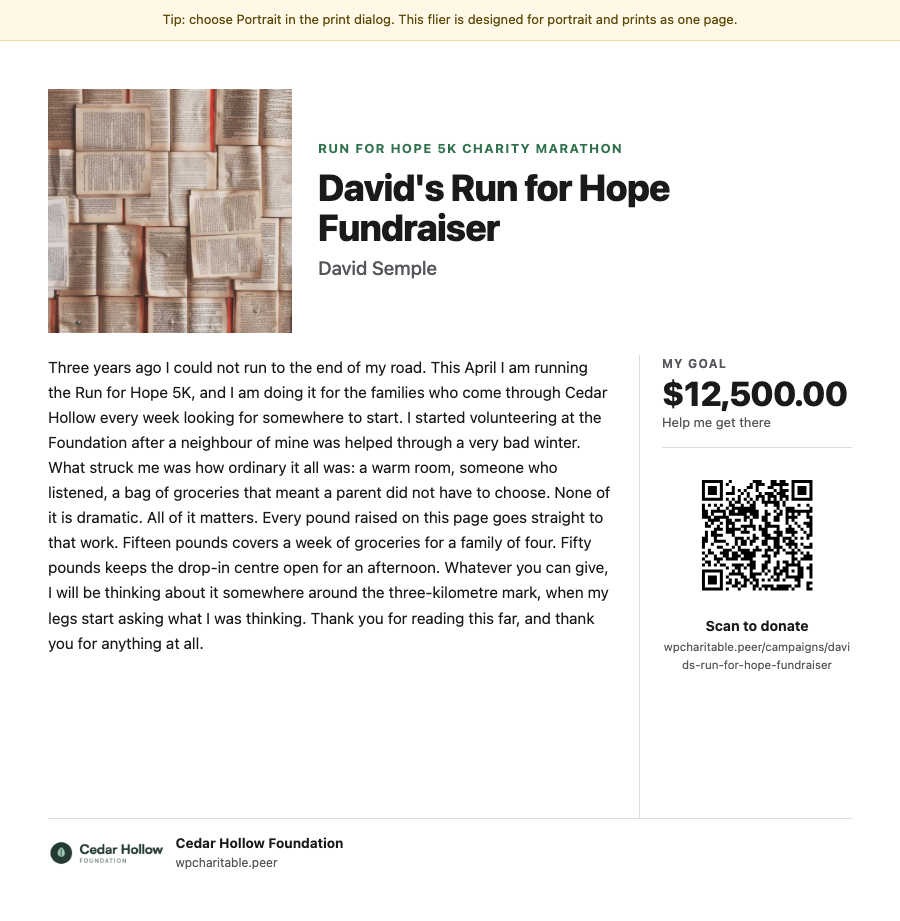
A lot of peer-to-peer fundraising happens away from a screen: at the finish line of a 5K, on a school noticeboard, in an office kitchen. Charitable Ambassadors 3.4.7 adds 2 printables, a fundraiser flier carrying each fundraiser’s own story and QR code, and a recruitment poster that signs new fundraisers up. Both open as a normal web page and print straight from the browser. Why this is important:

  • 🏁 A flier for every fundraiser: Each one carries that fundraiser’s own photo, story and goal, with a QR code that opens their page rather than your main campaign.
  • 📌 A poster that recruits: It shows “Now Recruiting” above your campaign name with a large QR code that opens your sign-up form, so someone can start fundraising without waiting on a link from you.
  • 🪄 No design tool needed: Both printables render as a normal web page and print from the browser, with no PDF plugin and no designer.
  • 📄 2 flier layouts: Hand out carries the full story for giving to friends and family, and Post up carries a short hook with 5 tear-off tabs for a noticeboard.
  • 🛡️ Off until you switch it on: Fliers stay off after the update until you enable them under Charitable » Ambassadors » Other » Fliers, and only the owner or an administrator can open one.

Check out our announcement here.

author avatar
Eric Daams
Improvement Payments

💸 Introducing Tiered Rates for Fee Relief: Match the Ask to the Gift!

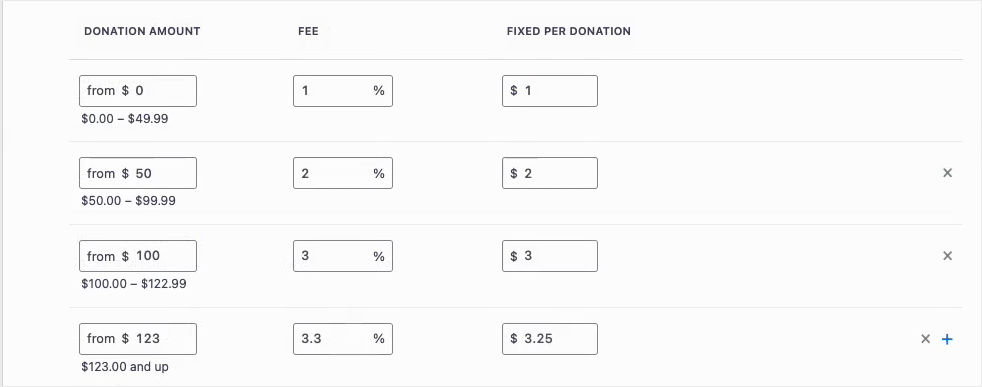
Fee Relief asks your donors one short question at checkout: would you like to cover the processing fee on this gift? Until now that question used a single rate for every donation on a gateway, so a $10 gift and a $500 gift were asked for the same percentage. Fee Relief 1.3.0 lets you set as many donation bands as you like, each carrying its own rate. Why this is important:

  • 🪙 Gentler on small gifts: A fixed transaction cost is a far bigger share of a $10 donation than a $500 one, so bands let you ask for less at the bottom.
  • 🎚️ As many bands as you need: Each band carries its own percentage and its own fixed amount, and the top band runs on with no upper limit.
  • 🛑 An optional ceiling: A Maximum fee field stops any donor being asked for more than a number you choose, however large the gift.
  • 🔌 Set per payment gateway: Stripe can run on four bands while Windcave and Payfast stay on a single rate, because bands belong to a gateway and not to your whole site.
  • 🛡️ Nothing changes until you say so: Your current rates stay exactly as they are until you switch Use Tiered Rates on under Charitable » Settings » Advanced » Fee Relief.

Check out our announcement here.

author avatar
Eric Daams
Donations Improvement

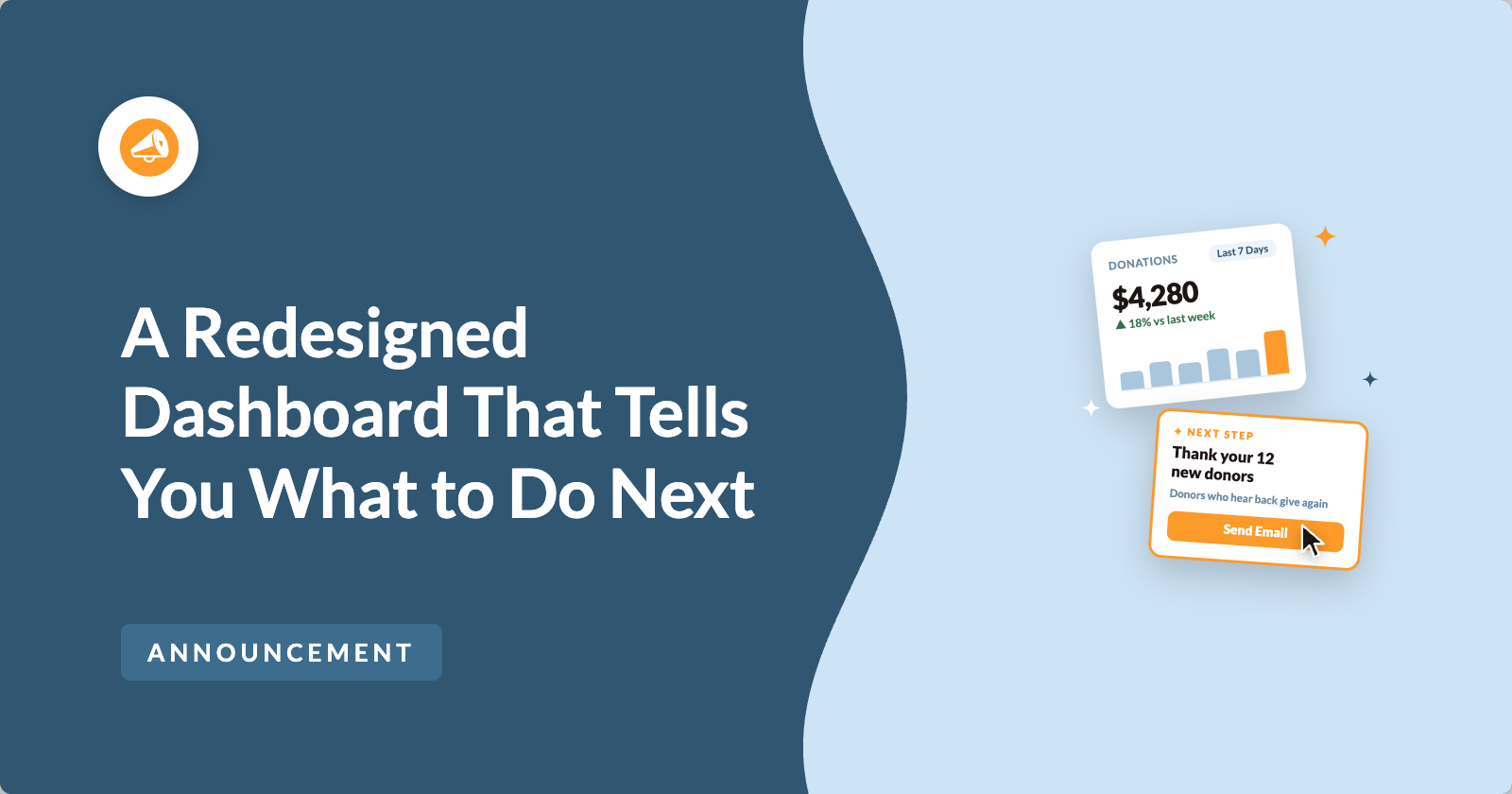
📊 Your Pro Dashboard Can Now Compare, Export, and Score!

Most fundraising dashboards only tell you how much you have raised. Charitable Pro 1.8.19 rebuilds the dashboard and the Reports Overview around the harder questions: whether anything is broken, whether this period beat the last one, and which single change would make the most difference today. Why this is important:

  • 📈 Every figure has a trend: Pick a period and the tiles and the chart move together, with each total shown against the previous period.
  • 🗓️ Charts that stay readable: Short ranges group donations day by day, while longer ranges group by week or month, so a full year reads as a curve instead of a flat line.
  • 🔀 Compare any 2 periods: Not just consecutive ones, so you can ask how this December did against last December. That matters because fundraising is seasonal.
  • 📤 Export the whole summary: Send the full overview out as CSV or PDF, ready for a board pack or a funder report.
  • 🎯 Score your setup for free: Have your fundraising setup scored, so the one change worth making next is the one you can see.

Check out our announcement here.

author avatar
Eric Daams
Feature New

🎟️ Introducing Charitable Events: Sell Tickets Inside Your Campaigns!

Most nonprofits sell event tickets in one tool and collect donations in another, which leaves two sets of reports and a manual match at the end of the year. Charitable Events brings both together, selling tickets through the same donation forms and payment gateways you already run in Charitable. Why this is important:

  • 🎟️ Every ticket is a donation: Ticket sales run through the gateway you already use and count toward the campaign goal, with everything managed under Charitable » Events.
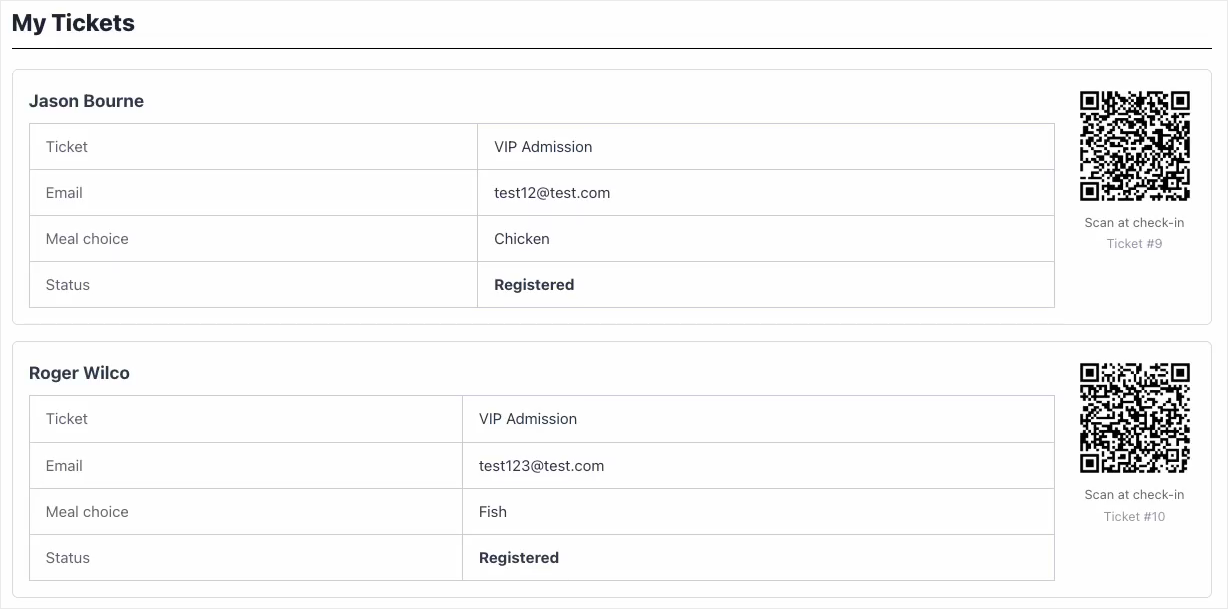
  • 📱 QR check-in from any phone: Each attendee gets their own QR code on the receipt, and volunteers scan at the door through a check-in link that needs no WordPress account.
  • 🧾 Receipts ready for tax time: Give each ticket type a fair market value, and Charitable puts the correct tax-deductible amount on every donor receipt.
  • 📋 Attendee details at checkout: Ask every guest for a meal choice, shirt size, or access needs, with a separate attendee record created for each ticket.
  • 🗓️ Blocks and calendars included: Three editor blocks plus Sugar Calendar and The Events Calendar support put your events where supporters already look.

Check out our announcement here.

author avatar
Eric Daams