
Fundraising for non-profits comes with real challenges. You deal with tight budgets and small teams that can’t handle big campaigns. Donors often give once and drift away.
To top that off, data is tough to manage safely, and new tools don’t always fit your old systems. Customization is hard too, along with getting clear reports and good tech help.
I know because I’ve lived it, working hands-on with groups just like yours.
With over 15 years helping nonprofits and companies raise funds, I’ve seen how monthly donations create steady support for your mission. They cut admin work, boost donor loyalty, and bring reliable income month after month. The right software makes this happen without stress.
This post reviews the best options for recurring donations in 2026. I share honest tips from experience: key features to pick, top tools like Charitable with their pros and cons, comparisons, best practices, and trends ahead.
Now there’s no one-size-fits-all solution, so let’s find what fits your nonprofit and helps you thrive.
What’s In This Guide
How to Choose Fundraising Software: Solve Your Top Pain Points
Listing problems alone doesn’t help, you need a path forward. I’ve merged pain points I know non-profits face with clear criteria here. My goal here is to help you pick software that fixes what’s hurting your nonprofit most. Each ties to real issues and what to look for.
- Ease for Small Teams: Look for simple setups and automation that will save time and labour. Skip tools needing full-time IT staff.
- Repeat Donor Tools: Check built-in emails and reminders for monthly gifts. You want an easy process for donors to move from one-time to recurring donations.
- Donor Dashboard: This allows donors to access a self-service zone to manage their donations and download receipts when they need.
- Secure Data Handling: Demand GDPR compliance to safeguard donor data. You also want data in formats that are easy to organize, edit, and export when you need.
- Seamless Integrations: Confirm links to WordPress, Mailchimp, or Stripe. Look for one-click connections, no custom code.
- Custom Options: Drag and drop visual builders are the way to go. It’s just so much easier to customize.
- Readymade Reports: Ready-made reports save time on taxes, help spot trends, and guide your next fundraising strategies.
- Reliable Support: Get a plugin or software that offers good support around the clock. When you face issues, you need a responsive team to help you sort it out fast.
Not sure if you should enable recurring donations? See Are Recurring Donations Right For My Non-Profit?
Top WordPress Plugins & Software for Recurring Donations
WordPress powers most nonprofit sites, so let’s start there. These three plugins shine for recurring gifts – easy setup, strong features. Then, two top non-WP options for broader needs. I picked these solutions based on real use, focusing on your pain points like retention and integrations.
| Plugin | Charitable | Give | WPForms | WP Simple Pay | Donorbox |
| Pricing | $99/yr | $349/yr | Free | $99.50/yr | $150/month |
| No Platform Fees | ✅ | ✅ | ✅ | ✅ | ❌ |
| WP Native | ✅ | ✅ | ✅ | ✅ | ❌ |
| Donor Dashboard | ✅ | ✅ | ❌ | ❌ | ✅ |
1. Charitable
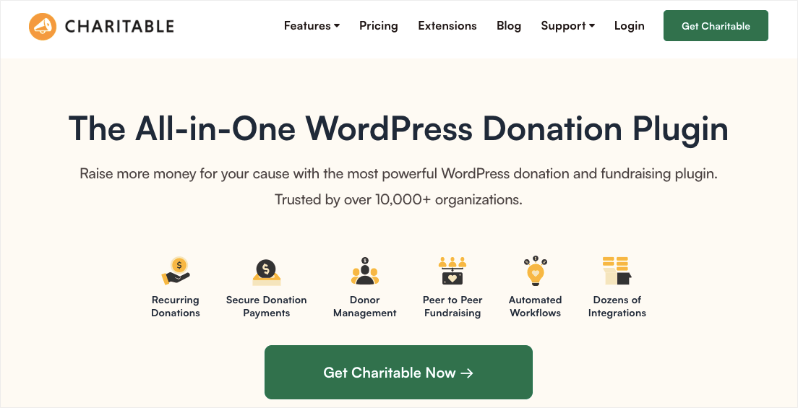
Charitable stands out as my top choice for accepting online donations, particularly for smaller to medium-sized organizations seeking simplicity and effectiveness. Here’s what I love about this plugin:
- Accept donations directly on your own website.
- Create unlimited campaigns and customize them with ease.
- Avoid platform fees on top of standard payment processor fees (e.g., Stripe/PayPal).
It’s designed specifically for WordPress users who want control over branding, pages, and donor experience.
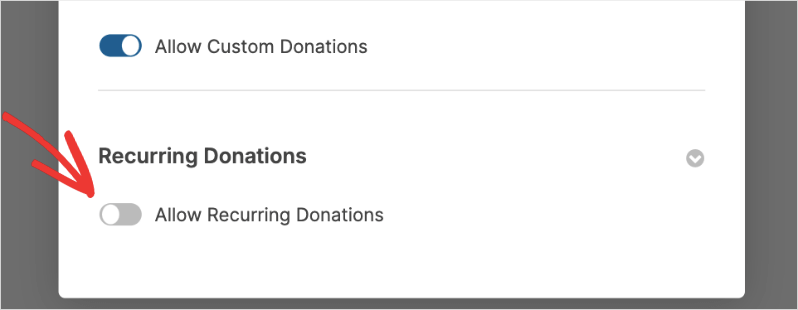
The recurring donation feature transforms this plugin into a comprehensive solution for automated giving. All you have to do is click a button to enable recurring donations on your campaign.
Then you can add suggested amounts, making it easier for the donor to choose a repeat donation.
When donors see clear, uncluttered choices for one-time or recurring contributions, it reduces decision fatigue and encourages regular giving.
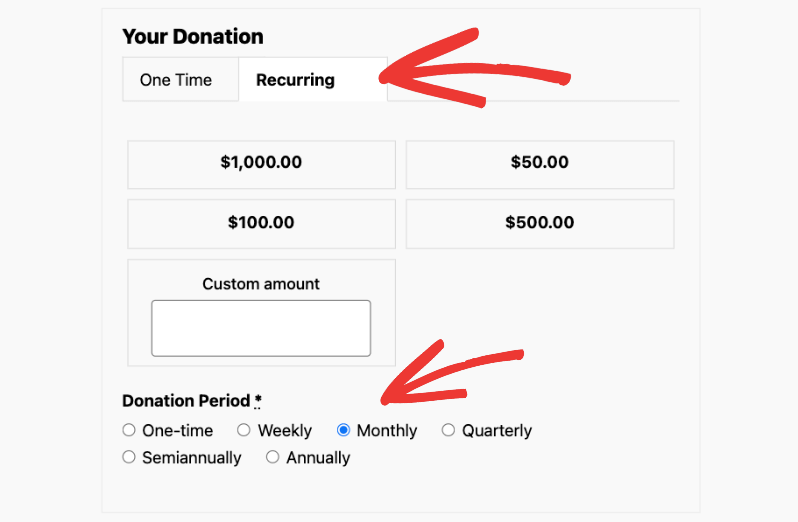
Once the donor selects their contribution and schedule, the rest is automated. Charitable will handle charging their payment method when their recurring payment comes up.
If you enable the donor dashboard feature, the donor can log in to their own dashboard. Here, they can manage their contribution. They can adjust their amount and frequency. The best part is that they can view their payments and download their receipts any time they need.
There’s a receipt button right next to the green “paid” button.
That means, no more emails asking you for their receipt. So this slashes admin time by a significant amount.
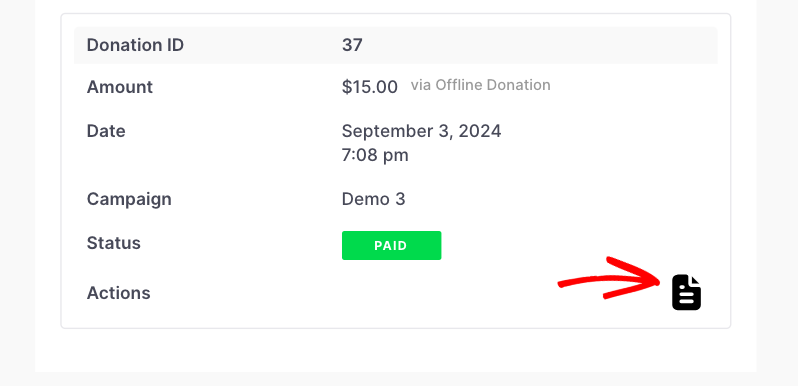
Added to this, Charitable takes a straightforward approach to donation management. When a contribution is successful, a donation record is automatically created. This contains all the details of the donor and the donation. All donation records are neatly organized for you and can be exported with a few clicks.
The plugin comes with essential tools for recurring donations, including:
- Customizable templates
- Visual drag-and-drop builder
- Campaign updates
- Automatic donation receipts
- Donor profiles
- Donation records
- Exportable Data
- Detailed reporting
What’s particularly impressive is how it handles recurring payments without overwhelming users with unnecessary complexity.
The plugin integrates seamlessly with popular payment gateways like PayPal, Stripe, Square, and more. It also offers solid documentation to get answers you need. The support team is known for quick, helpful responses – a crucial factor when dealing with donation-related issues.
Charitable Pricing
Charitable offers a free version with basic functionality, while their premium plans start at $69/year. Recurring Donations are available in the Plus plan that costs $99 per year.
The pricing is transparent, with no hidden transaction fees beyond your payment processor’s charges. This makes it particularly attractive for organizations just starting their recurring donation programs.
2. WPForms
WPForms excels as a versatile form builder that doubles as a straightforward tool for recurring donations on WordPress sites. It’s ideal for nonprofits wanting quick, customizable payment forms without a full fundraising suite. Here’s why it fits recurring needs:
- Accept recurring payments directly via drag-and-drop forms on your site.
- Create one-time or subscription options (weekly, monthly, yearly) with Stripe integration.
- No platform fees – just Stripe’s standard rates.
- Perfect for WordPress users embedding forms anywhere, keeping your branding intact.
The recurring payments feature shines with its simplicity.
WPForms allows you to create forms configured to accept recurring payments on all license levels.
This means you can use the free or any paid version of WPForms to connect it with Stripe and take recurring payments.
WPForms comes with a recurring donations template to build your form in under 5 minutes.
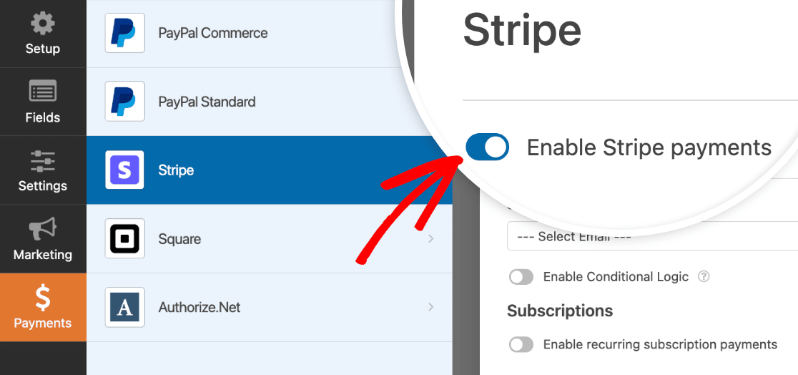
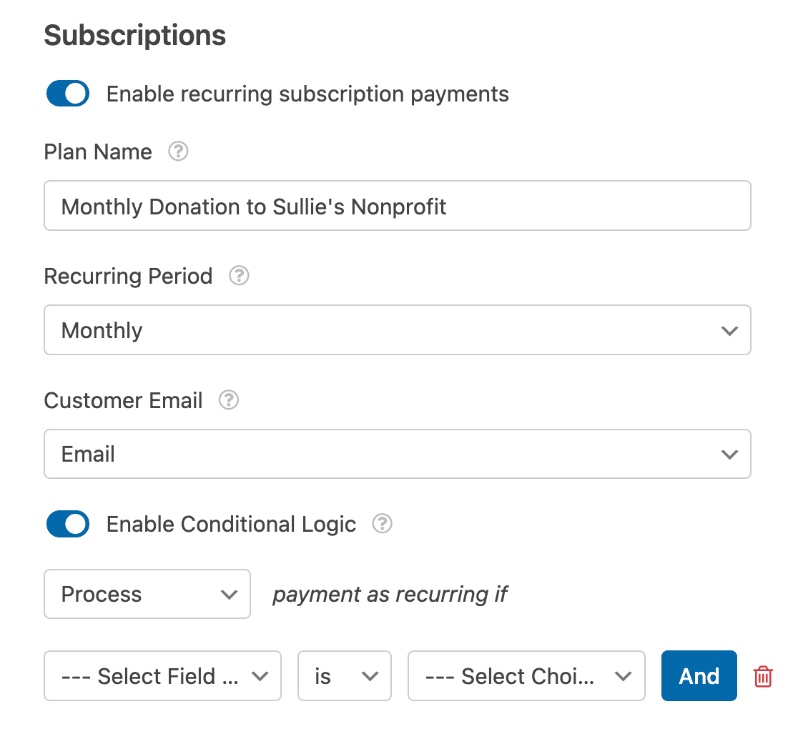
Then you can enable Stripe and “Enable recurring subscription payments” in settings. You’ll need to set a plan name, billing interval, and customer email for auto-notices.
Next, you can also use conditional logic to process recurring only if selected. Test in Stripe test mode first. Here’s a sneakpeek of what the settings looks like in WPForms:
It’s so easy to use, you’ll never have to touch any coding.
Donors pick their amount and schedule – WPForms handles subscriptions automatically through Stripe.
What I really like about this plugin is that you can view all payments, track earnings, and export data in WPForms » Payments dashboard. No donor dashboard, but receipts go out instantly.
Core tools for recurring donations include:
- Customizable fields (Google/Apple Pay support)
- Conditional logic for one-time vs. recurring
- Payment summaries and exports
- Test mode for safe setup
- Mobile-optimized forms
It integrates tightly with Stripe (credit cards, wallets) and offers solid docs plus email support. Pro/Elite tiers add advanced logic and lower fees.
Follow this tutorial to set it up: How to Accept Recurring Payments in WordPress
WPForms Pricing
There’s a lite version for free. The premium plugin starts at $49.50/year (nonprofit discount available).
Integrations extend to popular email marketing platforms and analytics tools, while the form management system provides essential donor data tracking and basic reporting functionalities.
Security measures include comprehensive GDPR compliance tools, robust spam protection, and secure payment processing through the Stripe payment gateway.
Entry management and basic reporting come standard, though organizations seeking detailed donation-specific analytics might find the features somewhat limited compared to specialized fundraising platforms.
3. Give

While GiveWP remains popular thanks to its free plan and high download numbers, it earned that early buzz when options were few. Many still rave about it, and it does handle basic recurring donations well on WordPress sites. That’s why it’s on this list, popularity and solid functionality for the price.
You can give donors flexible recurring options through thoughtful features. The “Donor’s Choice” lets them pick their own frequency and amount, while “Admin’s Choice” sets preset periods for you.
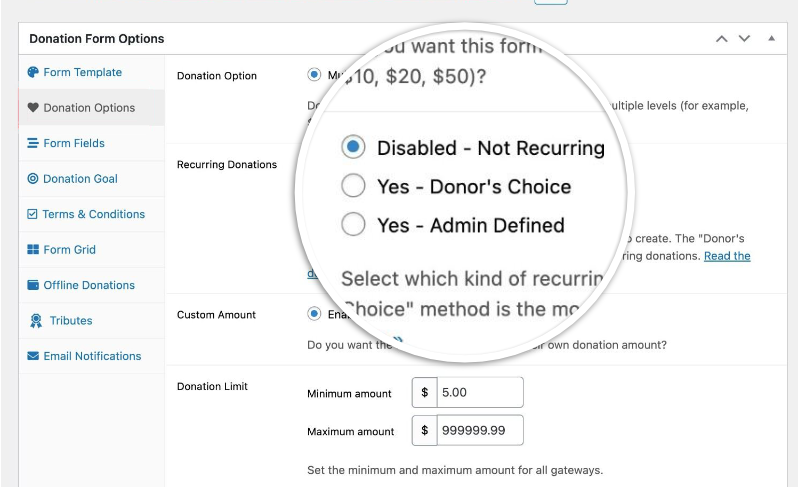
Everything operates smoothly in your WordPress dashboard, where subscription records stay up to date alongside other fundraising data. Custom revenue reports help you analyze performance and tweak campaigns for better results. Plus, six tailored emails keep recurring donors connected, notify them of charges, status changes, or new ways to engage.
Setup is simple: Enable the recurring add-on, add checkboxes to forms, and connect gateways like Stripe (cards/ACH), PayPal Standard/Pro, or Authorize.Net. Donors complete everything on your site without redirects.
Donors access a dashboard to view history, update cards, and download receipts easily. Exports make tax time straightforward.
However, times have changed since GiveWP first gained its popularity – newer tools now deliver more polish, fewer bugs, and much better value for your budget. I remember using it on a client’s site where we hit several frustrating glitches that slowed us down, ultimately leading us to make the switch to Charitable for a smoother experience.
What sealed the deal was discovering how pricey the recurring features really are: they’re locked behind the Plus plan at $349/year, with no free recurring option as WPForms offers.
Even the standalone add-on costs $149/year, and simple tasks like manual donation entries require even more expensive extras. Charitable, by contrast, bundles everything you need for just $99/year in its Plus plan – a real game-changer for affordability.
Give Pricing
The core plugin is available for free, but its features are limited. You can get recurring donations either by subscribing to the Plus plan at $349/year, or you can buy the individual recurring add-on at $149/year.
4. WP Simple Pay
WP Simple Pay keeps things ultra-simple for WordPress sites needing quick Stripe payments or donations, no shopping carts, no fuss. It’s perfect when you just want clean, professional forms for one-time or recurring gifts without campaigns or heavy donor management. Great for small nonprofits focused on fast setup and steady income.
Key features of this software include:
- Create embeddable donation buttons anywhere on your site.
- Accept one-time or recurring (daily, weekly, monthly, yearly) with automatic billing.
- Seamless Stripe integration for cards, ACH, SEPA, Afterpay/Klarna – mobile-friendly.
- Donors pick amounts or choose from suggestions; collect basic info without overload.
- Instant email notifications, WordPress dashboard for payments, and auto subscription management.
- Customize receipts/emails; recover Stripe fees from donors. No monthly fees – just processor costs.
Recurring shines in the free Lite version now (huge 2026 update). Toggle opt-in for repeat payments, set flexible schedules, add free trials or installments. Users manage their own subscriptions via email link, no admin chasing failed cards.
Boost retention with default opt-ins, win-back cancel emails, and setup fees. All PCI-compliant, SCA-ready, on-site checkouts.
WP Simple Pay Pricing
Free Lite handles one-time + basic recurring donations. Pro from $49.50/year adds trials, advanced fields, and priority support.
WP Simple Pay nails simplicity for Stripe-only recurring donations. Pairs well with fuller plugins like Charitable if you need donor tools later.
5. Donorbox

Donorbox offers fast, embeddable donation forms for WordPress or any site, with strong recurring tools that convert one-time gifts into steady support. It’s popular for quick setup and low barriers. It’s ideal for nonprofits adding monthly giving without overhauling their site.
Key features of this software include:
- Custom forms with 8 intervals: daily, weekly, bi-weekly, monthly (1st/15th), quarterly, annual. Set defaults or suggestions to boost uptake.
- One-click recurring upsell for one-time donors, with personalized messages. (Available only in Premium)
- Auto donor portals: Login to manage plans, update cards, and view history.
- CRM dashboard tracks upgrades, cancellations, and failed payments (with smart retries).
- 40+ currencies, cards, PayPal, Apple/Google Pay, ACH/SEPA. Embed anywhere or host on Donorbox pages.
Setup takes minutes: Build form, toggle recurring, embed code. Notifications alert on changes; segment recurring donors for targeted emails.
You’ll get reports that show lifetime value and retention rates. SSL-secured, fraud monitoring included.
Donorbox Pricing
Donorbox is incredibly expensive, which puts it out of reach of smaller organizations. It’s free for basic, with fees between 2.95% and 3.95%. Premium starts at $150 per month (that’s $1800 per year) + fees between 1.75% and 2%.
Recurring Donations Software Outside of WordPress
1. Bloomerang
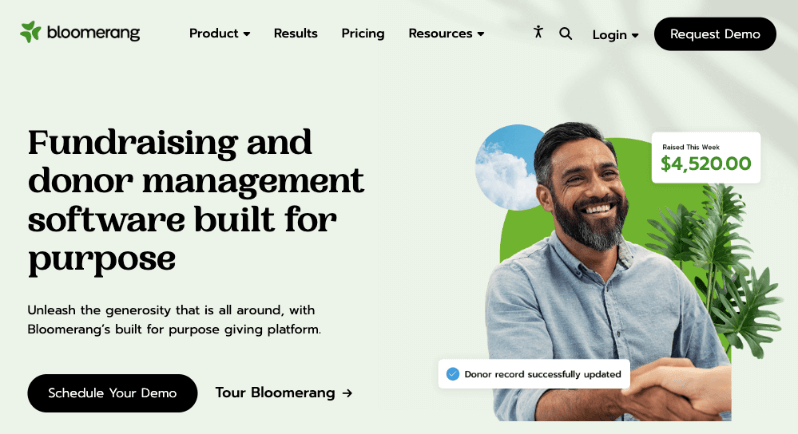
I love this non-profit software for donor-focused teams. Recurring lives in personalized pipelines with engagement scores and auto-emails that nudge renewals. Dashboards show lifetime value clearly. I’ve worked with Qgiv, too, which is now a part of Bloomerang. Donor profiles, auto-emails, and real-time churn reports help spot trends fast. I’ve used them to tweak campaigns and hold revenue steady.
Pros: Boosts repeats through smart emails; great exports.
Cons: Starts at $480 per year.
2. Givebutter

Free-first platform that’s exploded lately. Recurring pairs with peer-to-peer and branded pages. I’ve seen teams use it for social campaigns where monthly opt-ins spike.
Pros: No/low fees, Zapier for 1,000+ apps.
Cons: Best for registered nonprofits only; lighter non-profit CRM. Your donors will be asked to leave a tip with their contribution. It’s optional, but the request will appear on all your campaigns.
That’s the list of the Best NonProfit Fundraising Software for Recurring Donations.
If you’re looking for great deals for non-profits on tools & software, head to Best Non-Profit Deals & Discounts »
My Personal Experience and Recommendation
After testing all these fundraising tools hands-on with clients – from quick WP setups to full cloud CRM software solutions – Charitable comes out on top for most nonprofits chasing recurring donations.
I’ve switched teams from GiveWP and Donorbox to Charitable because it just works better for WordPress users like you.
Here’s why it’s the clear winner:
- Most affordable pricing plans
- No platform fees eat into gifts
- Recurring lives in campaigns with one-click enable
- Donors pick amounts/frequency, manage everything in their dashboard
- Automated receipts and emails
- Robust donation management software
- You get organized records/exports free
- Create manual donation records as you need
- Drag-and-drop keeps it simple for small teams, while scaling for growth.
Other solutions shine in spots – WPForms for free recurring donations (The free plan doesn’t include entry management).
WPForms brings something unique to the table – the ability to seamlessly blend donation capabilities with sophisticated form building. This makes it particularly valuable if you’re looking to integrate donations into a broader data collection strategy.
WP Simple Pay Pro takes a different approach, focusing exclusively on Stripe integration and simplified recurring payments. It’s remarkably effective for organizations that want to start accepting recurring donations quickly without complex setup processes.
You can get started with Charitable right now with a 14-day money-back guarantee.
Get Charitable today and start your free recurring donations trial. Unlock steady funding for your mission in minutes.
Recurring Donations FAQs
What exactly are recurring donations?
Donors give automatically on a schedule they pick – monthly, weekly, quarterly. You charge their card or bank account without asking each time. This turns one-time $50 gifts into $600 yearly lifelines.
Why do they beat one-time donations?
Predictable cash flow lets you plan hires, programs, and even payroll. Admin tasks drop because there’s no chasing one-time donations. Nonprofits live or die by steady funds.
How do I convince donors to go recurring?
Make it optional with checkboxes (“Make monthly?”). Suggest amounts ($10/month helps feed a child). Share impact: “Your $25/mo buys 10 meals every month.” Email nurtures post-gift. I’ve doubled uptake with simple prompts.
What about failed payments or cancellations?
Smart tools retry failed cards 3x automatically. If you enable a donor portal, donors can update their info themselves, so there are no emails to you. If you choose the right software, it can also let you send win-back messages on cancel: “Pause instead?” This cuts churn 30% from experience.
How does Charitable compare to GiveWP pricing?
Charitable bundles recurring for $99 (Plus), while GiveWP charges $349 (Plus) or $149 standalone. Manual entries? Free in Charitable. That’s why I switched clients, huge savings for the same power.
Not convinced yet? See reviews from real users.
Real Reviews and Testimonials From Charitable Users
Read testimonials from non-profits and users just like you who have loved their experience when they switched to Charitable. To see more about what our users have to say, head to our Testimonials page. Or better yet, you can check them out on the WordPress.org Reviews page too!
@heidimaria

I tried “Give” before this plugin but I really couldn’t figure it out and found it frustrating. I didn’t experience any of the issues I had with Give with Charitable. I needed some help setting it up and Eric was amazingly helpful. He answered all my questions and helped me get it all working – and I’m a bit of a noob so I had a bunch of questions for him. When I got my first donation I was elated. Thanks Eric for the awesome plugin!
I tried the plugin ‘Give’ first, but I just couldn’t get it to work, it would freeze my WP dashboard. I found this plugin which has the same feature that I could add campaigns with a specific donation option that I can add to my pages. Overall a great plugin and free! When I feel I need to take my donations to the next level, there is a paid upgrade available as well. Thanks!
I stumbled upon this plugin while doing an extensive search for donation plugins on the WordPress directory. I was initially hesitant, but decided to give it a try. I found it very easy to setup, configure settings, and customize the CSS styles to my liking. Would like to see some minor improvements, but I’m sure the developers will work it out in future releases. Well done!
This plugin is fabulous! My client’s non-profit cannot afford more fees… and this plugin is free… with no additional fees. Plus, when I noticed a weird little glitch in the Chrome browser on a Mac, they fixed it right away. My thanks to the developers for a great plugin and for really fabulous support.
We’ve tried some of the other donation management systems, but they were way too expensive and, as a small org, we didn’t need all the features we were paying for. Charitable Pro is just right for us. Everything works so well right out of the box, integrates perfectly with our WordPress site, and is so user friendly. Also, support is responsive & effective.
Stay Connected for More Nonprofit Resources
For more tutorials and videos tailored to nonprofits, subscribe to our YouTube channel. We regularly publish expert tips, step-by-step guides on migrations like this GiveWP to Charitable switch, fundraising strategies, and practical resources to help your organization succeed.
🗞️ Get weekly tips and exclusive guides in your inbox
Join our newsletter →
🎥 Watch step-by-step tutorials and success stories
Subscribe to our YouTube channel →
👩🏽💻 Connect with our community and get daily nonprofit insights
Follow us on LinkedIn →
🥳 Fun reels and non-profit insights
Follow us on Instagram →
👀 Insightful & fun videos to help you grow your cause
Follow us on TikTok→
🌎 Subscribe and follow for general fundraiser tips
Get Fundraiser Tips on TikTok →
That’s it! I hope you found this guide helpful!





Leave a Reply