
Ihre Spendenseite ist eine der wichtigsten Seiten auf der Website Ihrer gemeinnützigen Organisation. Hier wird aus Interesse eine Handlung – hier entscheidet ein Besucher, Spender zu werden. Doch viele Organisationen investieren enormen Aufwand, um Traffic auf eine schlecht gestaltete, verwirrende oder nicht vertrauenswürdige Spendenseite zu lenken.
Die gute Nachricht? Sie brauchen kein riesiges Budget oder ein Designteam, um eine Spendenseite zu erstellen, die konvertiert. Sie müssen nur verstehen, was Spender motiviert und alle Hindernisse aus dem Weg räumen, die zwischen ihnen und ihrer Spende stehen.
In diesem Leitfaden führe ich Sie durch die wesentlichen Elemente einer hochkonvertierenden Spendenseite, zeige Ihnen Beispiele aus der Praxis, die funktionieren, und erkläre Ihnen, wie Sie jedes Element mit Charitable – dem Spenden-Plugin Nr. 1 für WordPress – implementieren.
Was Sie in diesem Leitfaden finden
- Was macht eine Spendenseite erfolgreich?
- 1. Beginnen Sie mit einer starken, emotional ansprechenden Überschrift
- 2. Verwenden Sie ein Hero-Bild oder -Video, das eine emotionale Verbindung schafft
- 3. Schreiben Sie überzeugende, spenderzentrierte Texte
- 4. Gestalten Sie intelligente Spendenbetragsoptionen
- 5. Bieten Sie Optionen für wiederkehrende Spenden an
- 6. Schaffen Sie Vertrauen durch soziale Beweise und Glaubwürdigkeitssignale
- 7. Vereinfachen Sie Ihr Spendenformular
- 8. Bieten Sie mehrere Zahlungsmethoden an
- 9. Gehen Sie proaktiv auf Bedenken von Spendern ein
- 10. Formulieren Sie einen klaren, überzeugenden Call to Action
- 11. Optimieren Sie Ihre Dankesseite und Ihre Bestätigungs-E-Mail
- 12. Entfernen Sie Ablenkungen
- So erstellen Sie Ihre Spendenseite mit Charitable
- Testen, messen und verbessern
- FAQs zu hochkonvertierenden Spendenseiten
Wenn Sie Ihre Spendenseite noch nicht eingerichtet haben, folgen Sie unserer Schritt-für-Schritt-Anleitung unter So erstellen Sie eine Spendenseite. Wenn Sie Videos bevorzugen, sehen Sie sich hier unser YouTube-Tutorial an:
Was macht eine Spendenseite erfolgreich?
Bevor wir ins Detail gehen, ist es hilfreich, die Psychologie des Online-Gebens zu verstehen. Wenn jemand auf Ihrer Spendenseite landet, stellt er sich eine Reihe von Fragen – oft unbewusst:
- Ist diese Sache meine Unterstützung wert?
- Kann ich dieser Organisation mein Geld anvertrauen?
- Wird meine Spende wirklich etwas bewirken?
- Ist dieser Vorgang schnell und einfach?
Eine hochkonvertierende Spendenseite beantwortet alle vier Fragen mit einem selbstbewussten „Ja“. Sie erzählt eine überzeugende Geschichte, schafft Glaubwürdigkeit, zeigt die Wirkung klar auf und macht den Spendevorgang so reibungslos wie möglich.
Möchten Sie eine einfache Möglichkeit, optimierte Seiten zu erstellen?
Mit Charitable ist die Erstellung einer hochkonvertierenden Spendenseite einfach – wählen Sie einfach eine unserer vorgefertigten, optimierten Vorlagen aus, passen Sie sie mit Ihren Inhalten an und veröffentlichen Sie sie. Alle wesentlichen Elemente wie Fortschrittsbalken und vorgeschlagene Spendenbeträge sind direkt im Builder integriert, um Vertrauen zu schaffen, die Wirkung zu demonstrieren und den Spendevorgang zu vereinfachen.
Noch kein Charitable Pro-Benutzer? Melden Sie sich noch heute an und erhalten Sie bis zu 50 % Rabatt auf Ihren Plan. Wir sind zuversichtlich, dass Sie es lieben werden, mit Charitable Spenden zu sammeln. Wenn Charitable aus irgendeinem Grund nicht das Richtige für Sie ist, erstatten wir Ihnen den Kaufbetrag im Rahmen unserer 14-tägigen Geld-zurück-Garantie zurück. Holen Sie sich jetzt Charitable Pro »
Lassen Sie uns nun genau aufschlüsseln, wie Sie eine Spendenseite erstellen, die auf Konversion optimiert ist.
1. Beginnen Sie mit einer starken, emotional ansprechenden Überschrift
Ihre Überschrift ist das Erste, was ein Spender liest. Sie gibt den Ton für alles an, was folgt. Eine schwache oder generische Überschrift wie „Heute spenden“ verschwendet diesen erstklassigen Platz. Stattdessen sollte Ihre Überschrift sofort die Transformation kommunizieren, die ihre Spende ermöglicht.
Schwache Überschrift: „Unterstützen Sie unsere Organisation“
Starke Überschrift: „Ihr Geschenk gibt einem Kind ein Leben lang sauberes Wasser“
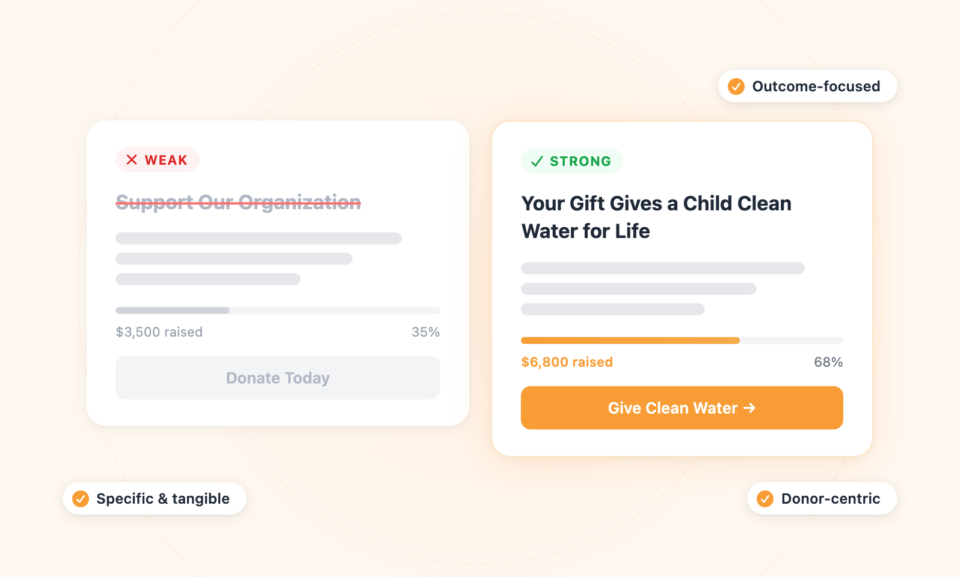
Die besten Überschriften sind spezifisch, ergebnisorientiert und menschlich. Sie versetzen den Spender in die Lage, die Wirkung greifbar zu machen. Wenn Sie Ihre Überschrift mit einer konkreten Zahl oder einem Zeitrahmen verknüpfen können, umso besser.
2. Verwenden Sie ein Hero-Bild oder -Video, das eine emotionale Verbindung schafft
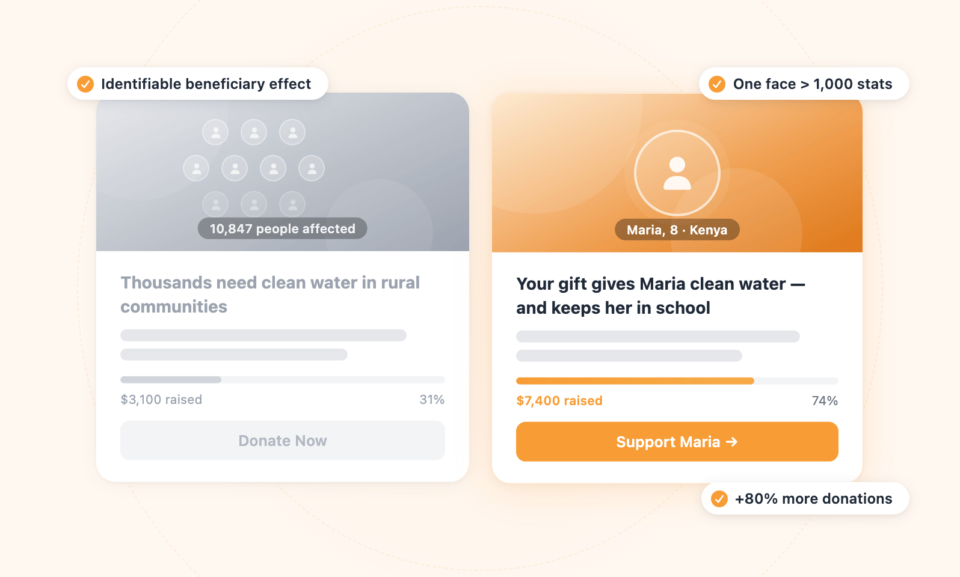
Menschen sind darauf programmiert, auf Gesichter und Geschichten zu reagieren. Ein aussagekräftiges Foto oder ein kurzes Video am oberen Rand Ihrer Spendenseite kann mehr bewirken als Absätze von Text. Der Schlüssel ist Authentizität. Stockfotos von glücklichen Freiwilligen bewegen die Menschen nicht so sehr wie ein echtes Bild von jemandem, dessen Leben Ihre Organisation berührt hat.
Wenn Sie ein Video verwenden, halten Sie es unter 90 Sekunden. Beginnen Sie mit dem Problem, stellen Sie einen echten Begünstigten vor, zeigen Sie die Lösung, die Ihre Organisation anbietet, und schließen Sie mit einem klaren Aufruf zum Handeln ab. Videos haben gezeigt, dass sie die Konversionsraten auf Spendenseiten um bis zu 80 % erhöhen, wenn sie gut gemacht sind.
Konzentrieren Sie sich bei Bildern auf eine einzelne Person und nicht auf eine Menschenmenge.
Es gibt ein Prinzip namens „Identifiable Victim Effect“ – Menschen spenden großzügiger an eine einzelne, identifizierbare Person als an Statistiken, die Tausende repräsentieren. Ein Gesicht ist wirkungsvoller als hundert Zahlen.
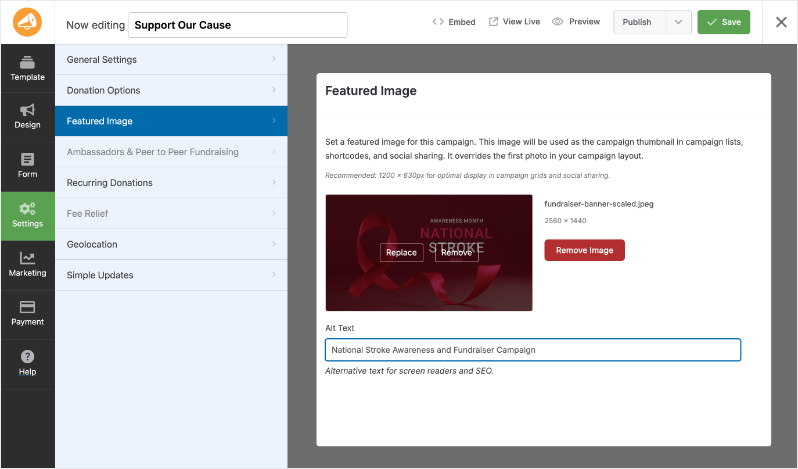
Nebenbemerkung: Wenn Sie Charitable verwenden, können Sie Ihrer Kampagne mit einem Klick ein hervorgehobenes Bild hinzufügen. Dieses Bild wird als Kampagnen-Thumbnail in Kampagnenlisten, Shortcodes und beim Social Sharing verwendet.
3. Schreiben Sie überzeugende, spenderzentrierte Texte
Der Text auf Ihrer Spendenseite sollte zwei Dinge tun: zum Handeln inspirieren und Zweifel ausräumen. Hier erfahren Sie, wie Sie einen Text schreiben, der beides erreicht.
Führen Sie die Wirkung an, nicht den Bedarf
Viele gemeinnützige Organisationen machen den Fehler, damit zu beginnen, wie verzweifelt sie Spenden benötigen. Während Spenden-Dringlichkeit wirksam sein kann, wirkt die Betonung des Organisationsbedarfs eigennützig. Führen Sie stattdessen an, was die Spende des Spenders bewirken wird.
Bedarfsorientiert (schwächer): „Wir brauchen Ihre Hilfe, um unsere Türen offen zu halten und unsere wichtigen Programme fortzusetzen.“
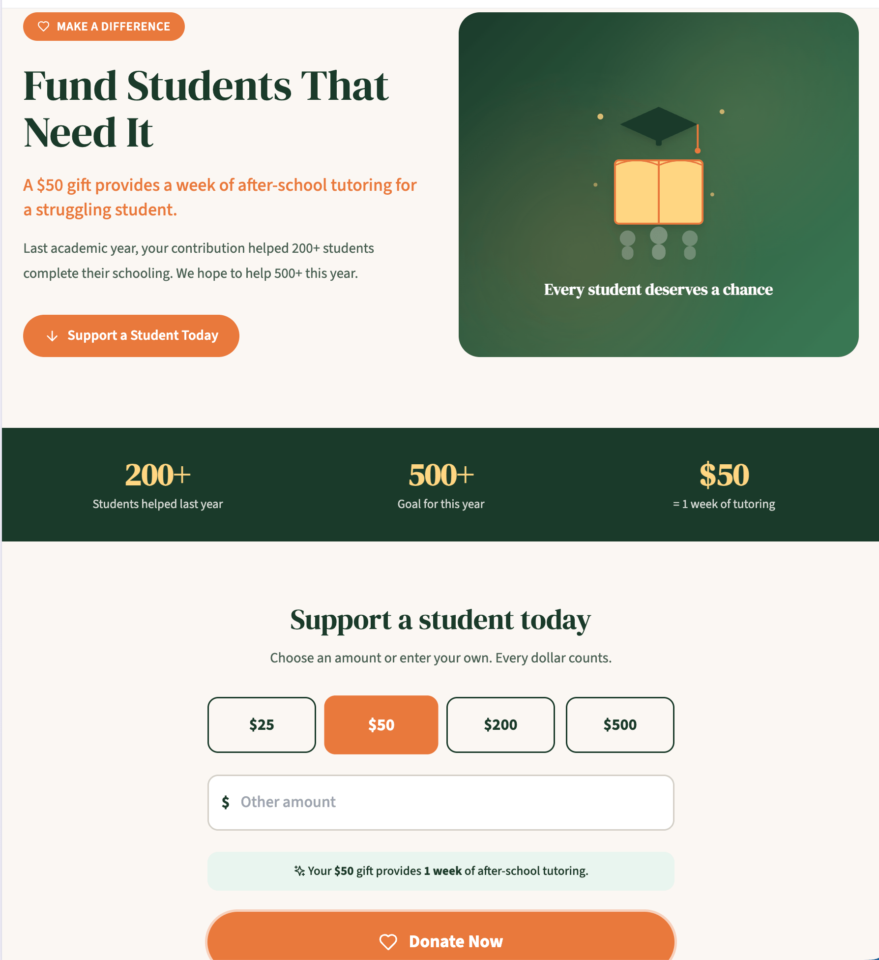
Wirkungsorientiert (stärker): „Eine Spende von 50 US-Dollar ermöglicht eine Woche Nachhilfe für einen benachteiligten Schüler.“
Sehen Sie sich diese Beispiel-Fundraising-Seite mit überzeugenden Texten an:
Verwenden Sie „Sie“ öfter als „Wir“
Wenn die organisationsbezogenen Pronomen die spenderbezogenen überwiegen, haben Sie noch Arbeit vor sich. Spender möchten sich als Helden der Geschichte fühlen, nicht als passive Unterstützer der Arbeit Ihrer Organisation.
Seien Sie spezifisch bezüglich der Wirkung
Vage Aussagen wie „Ihre Spende hilft Bedürftigen“ motivieren nicht zum Spenden. Spezifische, konkrete Wirkungsangaben tun dies. Nehmen Sie sich die Zeit, genau zu berechnen, was verschiedene Spendenbeträge bewirken, und kommunizieren Sie dies klar auf Ihrer Seite.
4. Gestalten Sie intelligente Spendenbetragsoptionen
Die Spendenbeträge, die Sie anzeigen, haben einen erheblichen psychologischen Einfluss darauf, wie viel Spender geben. Dies ist einer der mächtigsten und am häufigsten übersehenen Hebel zur Konversionssteigerung auf jeder Spendenseite.
Nutzen Sie vorgeschlagene Beträge strategisch
Die meisten Spender haben keinen bestimmten Betrag im Sinn, wenn sie auf Ihrer Seite ankommen. Die von Ihnen vorgeschlagenen Beträge verankern ihre Erwartungen. Forschungen zeigen durchweg, dass die Anzeige höherer vorgeschlagener Beträge zu höheren durchschnittlichen Spenden führt, solange die Beträge nicht so hoch sind, dass sie unerreichbar erscheinen.
Ein häufiger Fehler ist, den standardmäßig ausgewählten Betrag zu niedrig anzusetzen. Wenn Ihr niedrigster vorgeschlagener Betrag 10 $ beträgt und dieser vorausgewählt ist, werden viele Spender diesen Betrag wählen, auch wenn sie mehr gegeben hätten. Erwägen Sie stattdessen, einen Betrag aus der mittleren Spanne vorauszuwählen.
Verknüpfen Sie Beträge mit spezifischen Ergebnissen
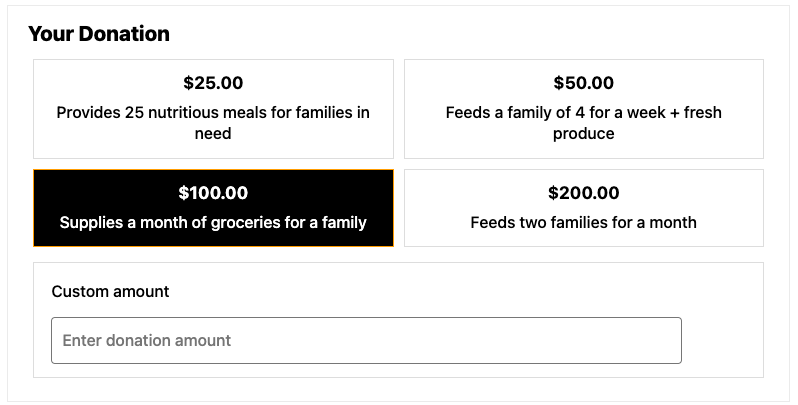
Verbinden Sie jede Spendenhöhe mit einem greifbaren Ergebnis, anstatt nur Zahlen anzuzeigen:
- 25 $ ernähren eine Familie für eine Woche
- 50 $ stellen Schulmaterial für ein Kind für ein Jahr bereit
- 100 $ sponsern einen Monat Berufsausbildung für einen Erwachsenen
- 250 $ finanzieren ein volles Stipendium für ein Semester
Dieser Ansatz, oft als „Gesamtkataloge“ oder „Wirkungsleitern“ bezeichnet, verwandelt eine Finanztransaktion in eine bedeutungsvolle Handlung. Er hilft Spendern auch, die Höhe der Wirkung, die sie erzielen möchten, selbst auszuwählen, anstatt das Gefühl zu haben, nur eine willkürliche Zahl zu wählen.
Fügen Sie immer eine Option für benutzerdefinierte Beträge hinzu
Manche Spender möchten einen bestimmten Betrag spenden, vielleicht eine wiederkehrende Spende, die sie budgetiert haben, oder einen Betrag mit persönlicher Bedeutung. Fügen Sie neben Ihren vorgeschlagenen Stufen immer ein Feld für einen benutzerdefinierten Spendenbetrag hinzu.
Mit Charitable können Sie ganz einfach vorgeschlagene Spendenbeträge konfigurieren und jeder Stufe benutzerdefinierte Beschreibungen hinzufügen, um sofort ein ansprechendes und personalisiertes Spenden-Erlebnis zu schaffen.
5. Bieten Sie Optionen für wiederkehrende Spenden an
Sehen Sie, wie Charitable wiederkehrende Spenden zum Kinderspiel macht »
Zeigen Sie die jährliche Auswirkung monatlicher Spenden
Helfen Sie Spendern, die kumulative Auswirkung wiederkehrender Spenden zu verstehen. Ein Spender, der 25 $ einmal spendet, leistet einen bedeutsamen Beitrag. Ein Spender, der 25 $ pro Monat spendet, trägt 300 $ pro Jahr bei. Das ist eine dramatisch größere Auswirkung. Machen Sie diese Rechnung auf Ihrer Seite sichtbar.
Zum Beispiel: „Eine monatliche Spende von 25 $ versorgt 12 Familien im Laufe eines Jahres mit sauberem Wasser.“ Diese Formulierung lässt die monatliche Verpflichtung bedeutsamer und lohnenswerter erscheinen.
Sie können auch Jahresabrechnungen und Berichte an Ihre wiederkehrenden Spender senden, damit diese wissen, dass ihr Geld viele Meilensteine erreicht hat.
6. Schaffen Sie Vertrauen durch soziale Beweise und Glaubwürdigkeitssignale
Erstspender gehen ins Ungewisse. Sie geben Geld an eine Organisation, die sie vielleicht gerade erst entdeckt haben, im Vertrauen darauf, dass es effektiv eingesetzt wird. Ihre Spendenseite muss dieses Vertrauen aktiv aufbauen, nicht voraussetzen.
Bewertungen und Akkreditierungen von Drittanbietern anzeigen
Logos von Überwachungsorganisationen wie Charity Navigator, GuideStar (jetzt Candid) oder der Better Business Bureau’s Wise Giving Alliance dienen als starke Vertrauenssignale. Wenn Ihre Organisation Bewertungen oder Zertifizierungen von diesen Stellen erhalten hat, zeigen Sie diese prominent auf Ihrer Spendenseite an.
Sie können auch Vertrauensabzeichen von Ihren Zahlungsanbietern wie PayPal und Stripe anzeigen.
Spender-Testimonials und Geschichten anzeigen
Zitate von zufriedenen Spendern, insbesondere solche, die erklären, warum sie spenden, können überraschend wirksam sein. Sie reduzieren Angst und soziale Unsicherheit, indem sie zeigen, dass andere, ähnlich wie der potenzielle Spender, bereits die gleiche Entscheidung getroffen und sich damit gut gefühlt haben.
Noch wirkungsvoller sind Testimonials von Leistungsempfängern. Ein kurzes Zitat von jemandem, dessen Leben durch die Arbeit Ihrer Organisation verändert wurde, ist mehr wert als fast alles andere, was Sie auf Ihrer Spendenseite platzieren können.
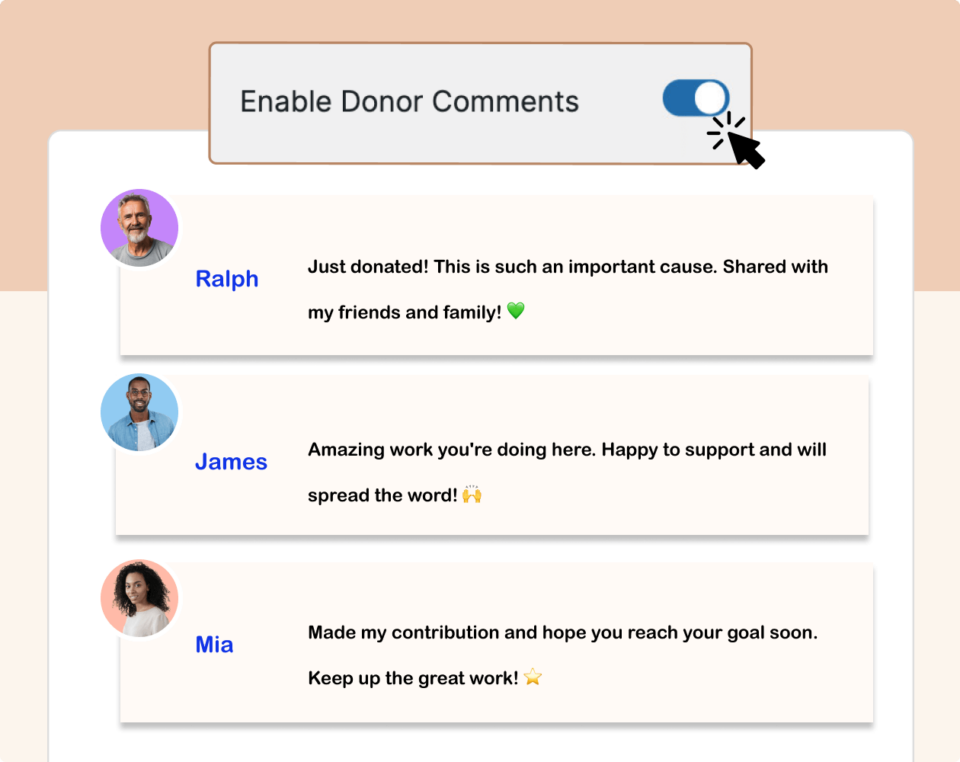
Um dies effektiv zu tun, können Sie auch Spenderkommentare aktivieren. Dies ist eine der einfachsten Möglichkeiten, Spender-Testimonials und Nachrichten zu sammeln, ohne zusätzlichen Verwaltungsaufwand.
Spenderzähler oder Ziel-Fortschrittsbalken anzeigen
Zu zeigen, dass andere bereits gespendet haben, schafft sozialen Beweis und FOMO (Fear Of Missing Out). Ein Spenden-Thermometer oder Fortschrittsbalken erfüllt einen doppelten Zweck: Es zeigt Dynamik und erzeugt Dringlichkeit.
Spender möchten Teil von etwas sein, das bereits erfolgreich ist, und sie möchten nicht die Person sein, die ein Ziel nicht erreicht hat.
Charitable bietet integrierte Funktionen zur Zielverfolgung und Fortschrittsbalken, die Sie ohne Programmieraufwand zu jeder Kampagnenseite hinzufügen können.
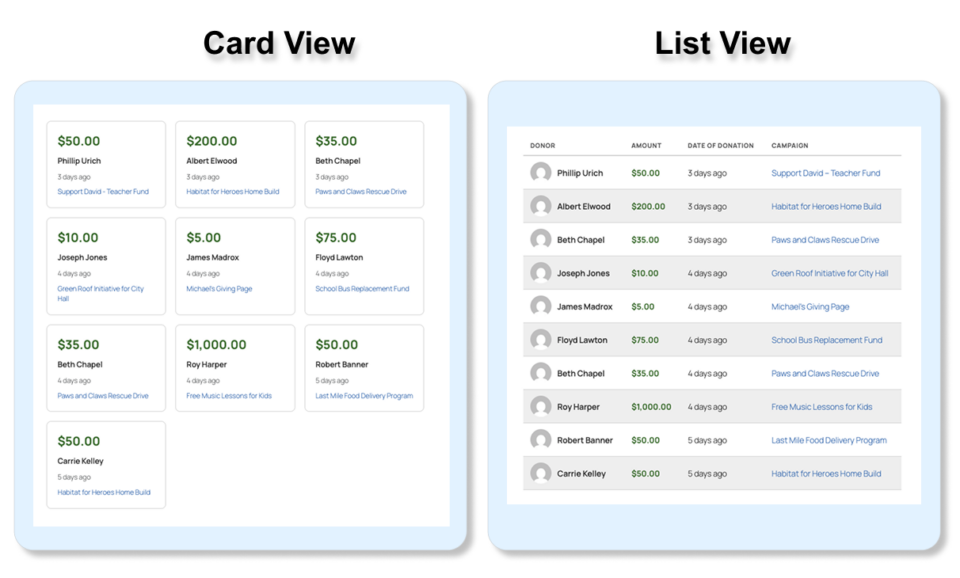
Es enthält auch einen Live-Spenden-Feed, der neue Spenden anzeigt, sobald sie eingehen. Sie können wählen, ob Sie ihn in einer Karten- oder Listenansicht anzeigen möchten. Dies ermutigt andere zum Spenden, indem es Vertrauen und Zuversicht aufbaut, dass Menschen Ihre Sache unterstützen.
Finanzielle Transparenz kommunizieren
Eine kurze Aussage darüber, wie Spenden verwendet werden, z. B. „90 Cent von jedem Dollar fließen direkt in die Programme“, kann die Konversionsraten sinnvoll erhöhen. Spender möchten wissen, dass ihr Geld effizient eingesetzt wird. Wenn Sie starke Finanzkennzahlen haben, scheuen Sie sich nicht, diese mitzuteilen.
7. Vereinfachen Sie Ihr Spendenformular
Jedes zusätzliche Feld in Ihrem Spendenformular ist ein potenzieller Abbruchpunkt. Forschungen aus dem gemeinnützigen Sektor zeigen durchweg, dass kürzere Formulare höhere Konversionsraten erzielen. Hier ist, was Sie tatsächlich benötigen:
- Spendensumme
- Vor- und Nachname
- E-Mail-Adresse
- Zahlungsinformationen
Das ist alles. Alles andere – Telefonnummer, Postanschrift, Arbeitgeberinformationen, wie sie von Ihnen erfahren haben – kann später gesammelt werden, nachdem die Spende gesichert ist. Jedes Feld, das Sie Ihrem Formular hinzufügen, reduziert Ihre Konversionsrate. Seien Sie rücksichtslos, wenn es darum geht, es kurz zu halten.
Verwenden Sie ein einseitiges Design
Mehrstufige Spendenprozesse führen bei jedem Übergang zu Abbrüchen. Sofern Ihr Zahlungsabwickler nicht mehrere Seiten benötigt, halten Sie alles auf einer einzigen Seite. Wenn ein mehrstufiger Prozess unvermeidlich ist, verwenden Sie eine Fortschrittsanzeige, um Spendern zu zeigen, wie nah sie dem Abschluss sind.
Machen Sie das Formular mobilfreundlich
Mehr als 60 % des Traffics auf gemeinnützigen Websites stammen mittlerweile von mobilen Geräten, dennoch sind viele Spendenformulare immer noch hauptsächlich für Desktops optimiert. Testen Sie Ihr Spendenformular auf mehreren Geräten und Bildschirmgrößen. Stellen Sie sicher, dass Schaltflächen groß genug zum einfachen Antippen sind, der Text ohne Zoomen lesbar ist und die Eingabe von Zahlungen so reibungslos wie möglich ist.
Charitable ist auf mobile Reaktionsfähigkeit ausgelegt und gewährleistet ein nahtloses Spenden-Erlebnis auf allen Geräten.
8. Bieten Sie mehrere Zahlungsmethoden an
Zahlungsreibung ist einer der häufigsten und am einfachsten zu behebenden Gründe, warum Spender ein Spendenformular verlassen. Wenn jemand spenden möchte, aber seine bevorzugte Zahlungsmethode nicht verwenden kann, wird er oft gehen, anstatt sich anzupassen. Mindestens sollte Ihre Spendenseite Folgendes akzeptieren:
- Wichtige Kredit- und Debitkarten (Visa, Mastercard, American Express)
- PayPal
- Apple Pay und Google Pay (auf Mobilgeräten zunehmend erwartet)
- Banküberweisungen für größere Spenden
Charitable integriert sich mit Stripe, PayPal und anderen beliebten Zahlungs-Gateways, wodurch Spender die Flexibilität haben, so zu bezahlen, wie sie es bevorzugen.
Alle verfügbaren Zahlungs-Gateway-Optionen in Charitable anzeigen »
9. Gehen Sie proaktiv auf Bedenken von Spendern ein
Viele potenzielle Spender zögern nicht, weil sie nicht spenden wollen, sondern weil sie unbeantwortete Fragen haben. Die direkte Beantwortung dieser Bedenken auf Ihrer Spendenseite kann eine erhebliche Quelle für Abbrüche beseitigen.
Häufige Bedenken von Spendern sind:
- Ist das sicher? – Zeigen Sie SSL-Zertifikatsinformationen und Zahlungssicherheits-Badges in der Nähe des Formulars an.
- Erhalt ich eine Quittung? – Beachten Sie, dass eine steuerliche Quittung sofort an ihre E-Mail-Adresse gesendet wird.
- Kann ich eine wiederkehrende Spende stornieren? – Beruhigen Sie Spender, dass sie wiederkehrende Spenden jederzeit stornieren oder ändern können.
- Wie werden meine Informationen verwendet? – Fügen Sie eine kurze Datenschutzerklärung oder einen Link zu Ihrer Datenschutzrichtlinie hinzu.
Diese Zusicherungen müssen nicht lang sein. Ein oder zwei Sätze in der Nähe des Zahlungsformulars reichen oft aus, um Zögern zu neutralisieren und Spender voranzubringen.
Möchten Sie erfahren, wie Sie Ihre Quittungen automatisieren können? Schauen Sie sich unseren Schritt-für-Schritt-Leitfaden hier an: Spendenquittungen in Minuten automatisieren »
10. Formulieren Sie einen klaren, überzeugenden Call to Action
Ihr Spenden-Button ist das wichtigste Element auf der Seite. Dennoch verwenden viele Organisationen generische, uninspirierte Texte wie „Senden“ oder „Spenden“. Dies ist eine verpasste Gelegenheit.
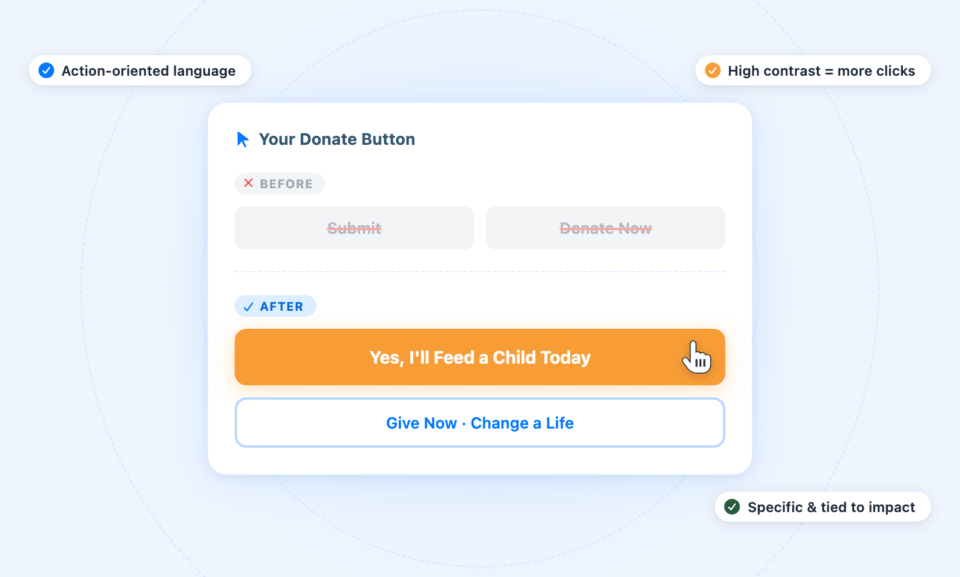
Der effektivste Text für Spenden-Buttons ist spezifisch, handlungsorientiert und an die Wirkung gebunden. Erwägen Sie Formulierungen wie:
- „Ja, ich werde heute ein Kind ernähren“
- „Jetzt spenden und Leben verändern“
- „Meine Spende tätigen“
- „Zugang zu sauberem Wasser unterstützen“
Die Farbe Ihres Buttons ist ebenfalls wichtig. Er sollte einen starken Kontrast zum Seitenhintergrund aufweisen und visuell als primäre Aktion hervorstechen. Orange, Grün und Rot haben sich als gut funktionierend erwiesen, aber das Wichtigste sind Kontrast und Sichtbarkeit.
11. Optimieren Sie Ihre Dankesseite und Ihre Bestätigungs-E-Mail
Viele gemeinnützige Organisationen stecken enorm viel Arbeit in ihre Spendenseite, behandeln aber die Erfahrung nach der Spende als nachträglichen Gedanken. Das ist ein Fehler. Der Moment unmittelbar nach einer Spende ist der, in dem die Begeisterung des Spenders am größten ist. Es ist eine goldene Gelegenheit, die Beziehung zu vertiefen.
Ihre Dankesseite sollte mehr tun, als die Transaktion zu bestätigen. Sie sollte:
- Echte, spezifische Dankbarkeit ausdrücken
- Die Wirkung des Geschenks des Spenders bekräftigen
- Zur weiteren Beteiligung einladen (Folgen in sozialen Medien, Anmeldung für E-Mail-Updates, Teilen der Kampagne)
- Eine Spendenquittung oder klare Anweisungen zur Erlangung einer solchen bereitstellen
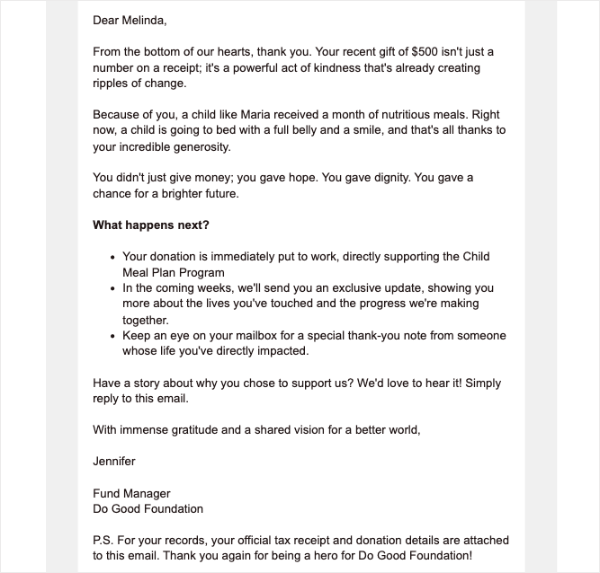
Ihre Bestätigungs-E-Mail sollte innerhalb weniger Minuten eintreffen und die Wärme und Spezifität Ihrer Dankesseite widerspiegeln. Diese E-Mail ist oft die erste Kommunikation, nach der Ihr neuer Spender sucht. Lassen Sie sie zählen.
Hier ist ein Beispiel. Ihre E-Mail könnte viel kürzer sein, aber eine herzliche, aufrichtige Botschaft zu vermitteln, ist sehr wirkungsvoll:
12. Entfernen Sie Ablenkungen
Eines der wirkungsvollsten Dinge, die Sie tun können, um die Konversionsraten Ihrer Spendenseite zu verbessern, ist, alles zu entfernen, was nicht direkt die Spende unterstützt. Dazu gehören:
- Navigationsmenüs: Erwägen Sie die Verwendung einer vereinfachten Kopfzeile ohne Ihre vollständige Navigation auf Ihrer Spendenseite. Jeder Link ist eine Ausfahrt.
- Seitenleisten: Widget-Seitenleisten, aktuelle Beiträge und Kategorielisten lenken die Aufmerksamkeit vom Spendenformular ab.
- Pop-ups oder Banner: Wenn Sie nicht möchten, dass sie während des Checkouts erscheinen, gehören sie nicht auf Ihre Spendenseite.
- Übermäßige Links: Jeder Link, den Sie hinzufügen, ist eine Gelegenheit für einen Spender, wegzuklicken, bevor er seine Spende abschließt.
Betrachten Sie Ihre Spendenseite wie eine Landingpage: fokussiert, zielgerichtet und mit einem einzigen Konversionsziel. Alles auf der Seite sollte diesem Ziel dienen oder entfernt werden.
So erstellen Sie Ihre Spendenseite mit Charitable
Charitable macht es einfach, professionelle, hochkonvertierende Spendenseiten direkt in WordPress zu erstellen – ohne Code, ohne Drittanbieterplattformen und ohne laufende Abonnementgebühren für die Grundfunktionalität.
Das macht Charitable anders:
- Über 1 Million Downloads: Gemeinnützige Organisationen weltweit vertrauen darauf, dass Charitable ihre Spendenaktionen unterstützt. Eine solche Verbreitung geschieht nicht zufällig.
- Exklusiv für gemeinnützige Organisationen entwickelt: Jede Vorlage, jedes Element, jede Designentscheidung wurde mit einem Ziel getroffen: die Finanzierung Ihrer Sache zu ermöglichen.
- Lebt innerhalb von WordPress: Verwalten Sie Kampagnen direkt neben Ihrer Website. Keine Logins zu jonglieren, keine Daten, die auf der Plattform eines anderen leben.
- Optimiert für Spenden, nicht nur für Ästhetik: Vorlagen und Seitenelemente sind speziell dafür entwickelt, Reibungsverluste zu reduzieren und Spender zum Spenden zu bewegen.
- Kostengünstig im Design: Mehr von jedem eingenommenen Dollar fließt in Ihre Mission, nicht in Ihre Softwarerechnung.
Die Zahlen lügen nicht. Über eine Million Downloads bedeuten über eine Million Gründe, warum sich andere gemeinnützige Organisationen für Charitable gegenüber Alternativen entschieden haben. Ihre Spendenseite ist oft das Letzte, was einen Besucher von einer Spende abhält – stellen Sie sicher, dass sie genauso hart arbeitet wie Sie.
Hier ist eine kurze Übersicht, wie Sie loslegen können:
Besuchen Sie wpcharitable.com und melden Sie sich für ein Konto an. Dann können Sie das Plugin auf der Registerkarte "Downloads" in Ihrem Konto herunterladen.
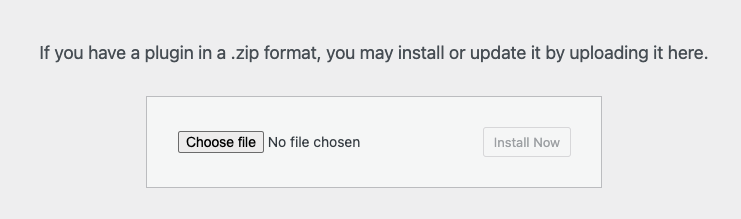
Gehen Sie zu Ihrer WordPress-Site und laden Sie das Plugin in WordPress hoch, indem Sie zu Plugins → Neu hinzufügen → Plugin hochladen navigieren, dann die Plugin-ZIP-Datei auswählen und auf Jetzt installieren klicken.
Erstellen Sie eine neue Kampagne, indem Sie zu Charitable → Neu hinzufügen navigieren. Dann können Sie eine Vorlage auswählen und den Drag-and-Drop-Builder öffnen. Wenn Sie mit Charitable beginnen, empfehle ich Ihnen, diese Anleitung zu lesen: Erste Schritte und So erstellen Sie Ihre erste Kampagne »
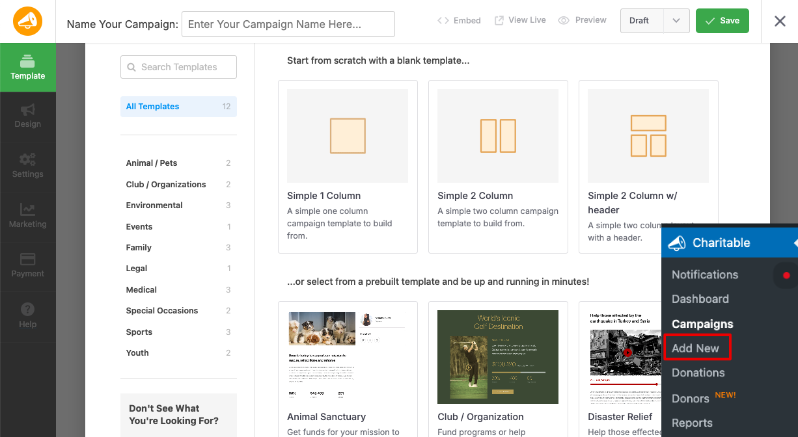
Jetzt können Sie Ihre Kampagnendetails hinzufügen, einschließlich Titel, Beschreibung, Beitragsbild und Spendenziel. Der Builder ist so einfach zu bedienen. Sie können Elemente per Drag & Drop verschieben, wo immer sie erscheinen sollen. Sie können den Text und die Bilder ersetzen und alles andere anpassen, was Sie benötigen.
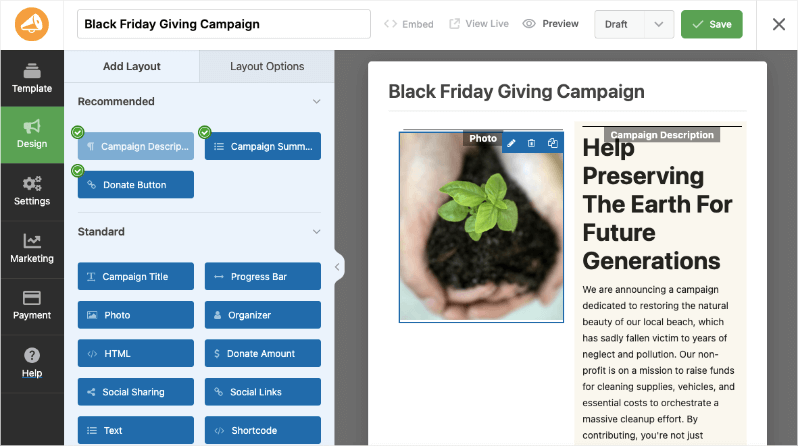
Sie können Abschnitte hinzufügen oder anpassen, die Ihre Geschichte erzählen, die Wirkung hervorheben und soziale Beweise einbeziehen.
Dies hilft, potenzielle Spender zu binden und Transparenz über die Ziele und Erfolge Ihrer Kampagne zu schaffen.
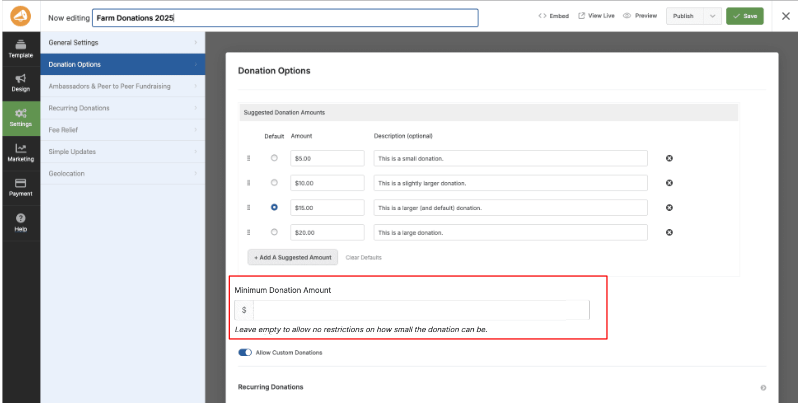
Als Nächstes können Sie unter der Registerkarte Einstellungen Ihre Spendenoptionen konfigurieren, vorgeschlagene Beträge festlegen, Wirkungsbeschreibungen hinzufügen und, falls gewünscht, wiederkehrende Spenden aktivieren. Sie können sogar einen Mindestspendenbetrag festlegen.
Jetzt können Sie unter der Registerkarte "Zahlung" ein Zahlungsgateway verbinden. Sie können aus Stripe, PayPal, Square und mehr wählen. Sehen Sie, wie Sie Zahlungsgateways einrichten »
Jetzt müssen Sie nur noch Ihre Kampagnenseite in der Vorschau anzeigen und veröffentlichen.
Charitable enthält auch integrierte Tools für die Spenderverwaltung, E-Mail-Benachrichtigungen, Spendenberichte und Integrationen mit beliebten E-Mail-Marketingplattformen – alles, was Sie brauchen, um nicht nur Spenden zu sammeln, sondern auch dauerhafte Spenderbeziehungen aufzubauen.
Sie können Charitable noch heute risikofrei mit unserer 14-tägigen Geld-zurück-Garantie ausprobieren.
Testen, messen und verbessern
Der Aufbau einer großartigen Spendenseite ist keine einmalige Aufgabe; es ist ein fortlaufender Prozess des Testens und Verfeinerns. Sobald Ihre Seite live ist, verfolgen Sie diese wichtigen Kennzahlen, um Verbesserungsmöglichkeiten zu identifizieren:
- Konversionsrate: Welcher Prozentsatz der Seitenbesucher schließt eine Spende ab?
- Durchschnittliche Spendenhöhe: Entspricht sie Ihren vorgeschlagenen Beträgen, oder tendieren die Spender zum niedrigsten Betrag?
- Rate der wiederkehrenden Spender: Welcher Prozentsatz der Spender entscheidet sich für eine monatliche Spende?
- Abbruchrate des Formulars: An welchem Punkt im Prozess brechen die Spender ab?
- Traffic sources: Welche Kanäle bringen die meisten Spender und welche haben die höchsten Konversionsraten?
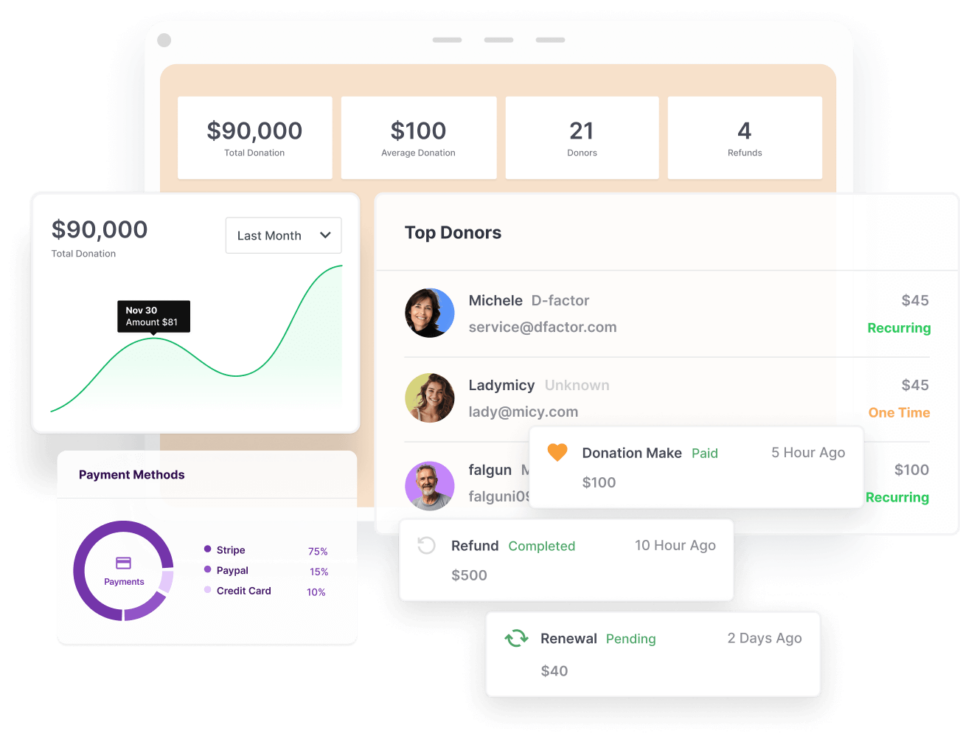
Charitable verfügt über integrierte Berichte und Analysen, sodass dies für Sie erledigt ist. Sie müssen diese Berichte lediglich unter Charitable → Berichte. aufrufen. Sie können sie nach Bedarf anzeigen und exportieren.
Tipp: Nutzen Sie A/B-Tests, um mit verschiedenen Schlagzeilen, Bildern, Spendenbeträgen, Schaltflächentexten und Seitenlayouts zu experimentieren. Selbst kleine Änderungen können erhebliche Auswirkungen auf die Konversionsraten haben. Die erfolgreichsten Non-Profit-Fundraiser gehen ihre Spendenseiten mit der gleichen analytischen Denkweise an, die sie auch bei jeder anderen geschäftskritischen Herausforderung anwenden würden.
Abschließende Gedanken
Eine hochkonvertierende Spendenseite beruht nicht auf Manipulation oder psychologischen Tricks – es geht darum, den Wert des Gebens klar zu kommunizieren, unnötige Hürden abzubauen und es jemandem, der etwas bewirken möchte, so einfach wie möglich zu machen.
Jedes Element, das wir in diesem Leitfaden behandelt haben – die Schlagzeile, die Bilder, der Text, die vorgeschlagenen Beträge, die Vertrauenssignale, das Formularlayout, die Zahlungsoptionen – dient diesem einen Ziel: großzügigen Menschen dabei zu helfen, ihre Gabe abzuschließen.
Mit den richtigen Werkzeugen und einem durchdachten Ansatz kann jede Non-Profit-Organisation, unabhängig von Größe oder Budget, eine Spendenseite erstellen, die wirklich konvertiert. Charitable bietet Ihnen alles, was Sie brauchen, um diese Seite auf WordPress zu erstellen, unterstützt von einer Plattform, der Tausende von Non-Profit-Organisationen weltweit vertrauen.
Bereit, loszulegen? Laden Sie Charitable noch heute herunter und erstellen Sie eine Spendenseite, die Besucher zu Spendern und Spender zu lebenslangen Unterstützern macht.
FAQs zu hochkonvertierenden Spendenseiten
Welche Elemente sind für eine hochkonvertierende Spendenseite unerlässlich?
Zu den wesentlichen Elementen gehören eine starke, emotional ansprechende Schlagzeile, überzeugende Bilder oder Videos, klare Wirkungsdarstellungen, durchdacht gestaltete Spendenoptionen und Vertrauenssignale wie externe Akkreditierungen oder Testimonials.
Wie sollte ich das Spendenformular für maximale Konversion gestalten?
Halten Sie Ihr Spendenformular einfach und prägnant. Fordern Sie nur wesentliche Informationen an, wie z. B. den Spendenbetrag, den Namen des Spenders, die E-Mail-Adresse und die Zahlungsdaten. Vermeiden Sie unnötige Felder, um den Abbruch des Formulars zu minimieren.
Warum ist Storytelling auf einer Spendenseite wichtig?
Storytelling schafft eine emotionale Verbindung zu Spendern, indem es reale Begünstigte und die Auswirkungen ihrer Spende hervorhebt. Es hilft, die Spende von einer finanziellen Transaktion zu einem sinnvollen Beitrag zu machen.
Wie kann ich vorgeschlagene Spendenbeträge effektiv nutzen?
Vorgeschlagene Beträge sollten strategisch festgelegt werden, um das Spenderverhalten zu lenken. Verknüpfen Sie jeden vorgeschlagenen Betrag mit einem spezifischen, greifbaren Ergebnis, damit Spender die Auswirkungen ihres Beitrags visualisieren können.
Welche Rolle spielt Social Proof bei der Erhöhung von Spenden?
Social Proof, wie z. B. die Anzeige aktueller Spenden, Spender-Testimonials oder Fortschrittsbalken, kann das Vertrauen stärken und Dringlichkeit erzeugen, indem es Spendern zeigt, dass andere beitragen und etwas bewirken.
Wie wirkt sich das Anbieten mehrerer Zahlungsoptionen auf die Konversionsraten aus?
Das Anbieten mehrerer Zahlungsoptionen reduziert Reibungsverluste, indem es Spendern ermöglicht, ihre bevorzugte Methode zu wählen, was die Abschlussraten auf Spendenseiten erheblich verbessern kann.
Welchen Einfluss hat ein überzeugender Call to Action (CTA) auf Spenden?
Ein überzeugender CTA leitet Spender durch die Verwendung handlungsorientierter Sprache, die mit der Wirkung verbunden ist, zur Vollendung ihres Beitrags und macht deutlich, was ihre Spende bewirken wird.
Wie oft sollte ich den Inhalt meiner Spendenseite aktualisieren?
Regelmäßige Aktualisierungen Ihrer Spendenseite halten sie frisch und relevant. Aktualisieren Sie Inhalte, um aktuelle Kampagnen, Erfolgsgeschichten und Änderungen der Spendenwirkung oder der Organisationsziele widerzuspiegeln.
Kann ich verschiedene Seitenelemente testen, um die Konversionen zu verbessern?
Ja, A/B-Tests verschiedener Elemente wie Schlagzeilen, Bilder, Schaltflächentexte und vorgeschlagene Beträge können Einblicke geben, was zu höheren Konversionen führt, und es Ihnen ermöglichen, Ihre Seite kontinuierlich zu optimieren.
Was sollte ich in die Dankesnachricht nach einer Spende aufnehmen?
Die Dankesnachricht sollte aufrichtige Dankbarkeit ausdrücken, die Wirkung der Spende bekräftigen und Spender einladen, sich über soziale Medien oder Newsletter weiter mit Ihrer Organisation zu engagieren.
Was ist Charitable und wie hilft es gemeinnützigen Organisationen?
Charitable ist ein WordPress-Plugin, das speziell für gemeinnützige Organisationen entwickelt wurde, um einfach professionelle, hochkonvertierende Spendenseiten zu erstellen. Es bietet vorgefertigte Vorlagen und einen benutzerfreundlichen Drag-and-Drop-Builder, um den Prozess zu optimieren, ohne dass Code oder Drittanbieterplattformen erforderlich sind.
Benötige ich technische Kenntnisse, um Charitable zu nutzen?
Es sind keine technischen Kenntnisse erforderlich. Charitable ist intuitiv gestaltet und ermöglicht es jedem, Spendenseiten einzurichten und anzupassen, indem Vorlagen ausgewählt und der Drag-and-Drop-Builder verwendet wird.
Kann Charitable wiederkehrende Spenden verarbeiten?
Ja, Charitable unterstützt wiederkehrende Spenden. Sie können Spendenoptionen einfach konfigurieren, um wiederkehrende Spenden einzuschließen, sodass Spender Ihre Anliegen kontinuierlich unterstützen können.
Welche Zahlungs-Gateways unterstützt Charitable?
Charitable lässt sich in beliebte Zahlungs-Gateways wie Stripe, PayPal und Square integrieren und bietet Spendern flexible Optionen für den Abschluss ihrer Transaktionen.
Wie stelle ich sicher, dass meine Spendenseite mobilfreundlich ist?
Die Vorlagen von Charitable sind responsiv gestaltet, sodass Ihre Spendenseiten auf Mobilgeräten und Tablets gut aussehen und funktionieren.
Kann ich benutzerdefinierte Spendenbeträge hinzufügen?
Ja, Charitable ermöglicht es Ihnen, sowohl vorgeschlagene Spendenbeträge als auch eine benutzerdefinierte Betragsoption einzuschließen, wodurch Spender die Flexibilität haben, jeden von ihnen gewählten Betrag zu spenden.
Wie helfen die Analysen von Charitable bei der Verbesserung der Spendenwerbung?
Charitable enthält integrierte Berichte und Analysen, die Ihnen helfen, wichtige Kennzahlen wie Konversionsraten, durchschnittliche Spendenbeträge und Traffic-Quellen zu verfolgen. Diese Daten ermöglichen es Ihnen, fundierte Entscheidungen zur Optimierung und Verbesserung Ihrer Spendenseiten zu treffen.
Gibt es eine Testversion oder eine Rückerstattungsrichtlinie für Charitable?
Charitable bietet eine 14-tägige Geld-zurück-Garantie, mit der Sie die Plattform risikofrei ausprobieren und sicherstellen können, dass sie den Anforderungen Ihrer Organisation entspricht.
Kann ich Charitable mit E-Mail-Marketing-Plattformen integrieren?
Ja, Charitable kann mit beliebten E-Mail-Marketing-Plattformen integriert werden, sodass Sie die Kommunikation verwalten und Beziehungen zu Ihren Spendern effektiv aufbauen können.
Wie fange ich mit Charitable an?
Sie können Charitable aus dem WordPress-Plugin-Verzeichnis oder aus Ihrem wpcharitable.com-Konto herunterladen. Befolgen Sie die einfachen Installationsschritte, um Ihre erste Kampagne einzurichten und Ihre Spendenseite zu erstellen.
Charitable hat über 1 Million Downloads!
Millionen vertrauen auf Charitable für erfolgreiche Spendenkampagnen. Probieren Sie Charitable noch heute risikofrei aus.
✅ 14-tägige Geld-zurück-Garantie
✅ Transparente Preisgestaltung
✅ Einrichtung ohne Code
Bleiben Sie verbunden für weitere Ressourcen für gemeinnützige Organisationen
Für weitere Tutorials und Videos, die auf gemeinnützige Organisationen zugeschnitten sind, abonnieren Sie unseren YouTube-Kanal. Wir veröffentlichen regelmäßig Expertentipps, Schritt-für-Schritt-Anleitungen zu Online-Spenden, Fundraising-Strategien und praktische Ressourcen, die Ihrer Organisation zum Erfolg verhelfen.
🗞️ Erhalten Sie wöchentliche Tipps und exklusive Anleitungen in Ihrem Posteingang
Melden Sie sich für unseren Newsletter an →
🎥 Sehen Sie sich Schritt-für-Schritt-Tutorials und Erfolgsgeschichten an
Abonnieren Sie unseren YouTube-Kanal →
👩🏽💻 Vernetzen Sie sich mit unserer Community und erhalten Sie tägliche Einblicke in gemeinnützige Organisationen
Folgen Sie uns auf LinkedIn →
🥳 Lustige Reels und Einblicke in gemeinnützige Organisationen
Folgen Sie uns auf Instagram →
👀 Aufschlussreiche & unterhaltsame Videos, die Ihnen helfen, Ihre Sache voranzubringen
Folgen Sie uns auf TikTok→
🌎 Abonnieren und folgen Sie uns für allgemeine Fundraising-Tipps
Holen Sie sich Fundraising-Tipps auf TikTok →
Leistungsstarke Fundraising-Ressourcen
⬇️ Laden Sie bewährte Strategien, Kampagnenideen und Experten-Tools herunter
Holen Sie sich das Fundraising-Kit →
💸 Holen Sie sich kostenlose Fundraising-Ressourcen
Besuchen Sie den Charitable Fundraising Hub →
🤔 Haben Sie Fragen zu Charitable?
Charitable FAQs →
🏎️ Probieren Sie Charitable aus
Erstellen Sie Ihre Charitable Demo →
Verstehen Sie Begriffe und Jargon von gemeinnützigen Organisationen
Glossar für gemeinnützige Organisationen→
% Suchen Sie nach Angeboten und Rabatten für gemeinnützige Organisationen?
Beste Angebote und Rabatte für gemeinnützige Organisationen →





Hinterlassen Sie eine Antwort