
Die Leitung einer gemeinnützigen Organisation ist schon schwierig genug, ohne dass man sich mit Tabellenkalkulationen und Haftnotizen herumschlagen muss, um seine Spender im Auge zu behalten. Wenn Sie jemals Spenderinformationen verloren haben oder in einem entscheidenden Moment Schwierigkeiten hatten, wichtige Details zu finden, wissen Sie genau, wovon ich spreche. Hier kommt eine gute Spenderdatenbank ins Spiel. Sie dient als Gedächtnis und persönlicher Assistent Ihrer Organisation in einem.
Heute sehen wir uns die beste Lösung für das Spender-Management an, die Ihr Leben einfacher machen kann. Wir überspringen den technischen Jargon und konzentrieren uns auf das, was wirklich zählt: Ihnen helfen, bessere Beziehungen zu Ihren Spendern aufzubauen.
Tauchen wir ein und entdecken wir, wie die richtige Spenderdatenbank Ihre Spendenwerbung von stressig zu erfolgreich verwandeln kann, ohne dass Ihr Budget gesprengt wird.
Benötigen Sie eine Spenderdatenbank?
Viele gemeinnützige Organisationen beginnen mit einfachen Werkzeugen wie Tabellenkalkulationen oder grundlegenden Kontaktlisten. Und obwohl diese funktionieren, wenn Sie gerade erst anfangen, können sie schnell überwältigend werden, wenn Ihre Spenderbasis wächst.
Sie benötigen eine Spenderdatenbank, wenn Sie sich in folgender Situation wiederfinden:
- Sie verbringen Stunden mit der manuellen Eingabe von Spendedaten
- Wichtige Spenderinformationen sind über verschiedene Dateien und Plattformen verstreut
- Sie können Spendenmuster oder Spenderpräferenzen nicht einfach verfolgen
- Dankesschreiben verzögern sich, weil Informationen schwer zu finden sind
- Ihr Team hat Schwierigkeiten, Spenderaktualisierungen und Notizen zu teilen
- Jahresend-Steuerbescheinigungen dauern Tage (oder Wochen) zur Vorbereitung
Eine gute Spenderdatenbank dient nicht nur der Speicherung von Kontaktinformationen. Es geht darum, Ihre täglichen Abläufe reibungsloser und Ihre Spenderbeziehungen stärker zu gestalten. Hier ist, was sie leisten kann:
- Zeit sparen: Spenden automatisch erfassen und Spenderprofile erstellen
- Fehler reduzieren: Keine doppelten Einträge oder fehlenden Informationen mehr
- Bessere Beziehungen aufbauen: Jede Interaktion und Präferenz verfolgen
- Intelligentere Entscheidungen treffen: Muster bei Spenden und Engagement erkennen
- Als Team arbeiten: Informationen einfach im gesamten Unternehmen teilen
Die Frage ist nicht wirklich „Brauchen Sie eine Spenderdatenbank?“, sondern eher „Können Sie es sich leisten, keine zu haben?“ Selbst kleine gemeinnützige Organisationen können von dem richtigen System profitieren. Wenn man die gesparte Zeit, die gewonnenen Spender und die verbesserten Beziehungen bedenkt, zahlt sich eine gute Spenderdatenbank oft von selbst aus.
Dennoch wollen wir uns ansehen, was eine gute Spenderdatenbank-Software haben sollte.
Worauf Sie bei einer guten Spenderdatenbank-Lösung achten sollten
Bevor wir uns spezifischen Optionen zuwenden, klären wir, was eine Spenderdatenbank zu einer lohnenden Investition macht. Hier ist Ihre Checkliste mit wesentlichen Funktionen:
✓ Einfach zu erlernen und täglich zu verwenden
✓ Automatische Spendenverfolgung
✓ Schnelle Erstellung und Aktualisierung von Spenderprofilen
✓ Einfache Berichterstattung und Datenexport
✓ E-Mail- und Website-Integration
✓ Sichere Datenspeicherung
✓ Zuverlässiger Kundensupport
✓ Raum für Wachstum mit Ihrer Organisation
✓ Passt in Ihr Budget
✓ Funktioniert mit Ihren vorhandenen Tools
Denken Sie daran: Die beste Lösung ist nicht diejenige mit den meisten Funktionen – es ist diejenige, die Ihr Team tatsächlich jeden Tag nutzen wird.
Nun werfen wir einen Blick auf die Top-Option, die diese Kriterien erfüllt.
Die beste Spenderdatenbank-Lösung für WordPress-Websites
Wenn Sie bereits WordPress für die Website Ihrer gemeinnützigen Organisation nutzen, gibt es gute Nachrichten: Sie können diese in eine leistungsstarke Spenderverwaltungszentrale verwandeln mit Charitable. Es lässt sich nahtlos in Ihre bestehende Website integrieren und ist daher für viele Organisationen eine natürliche Wahl.
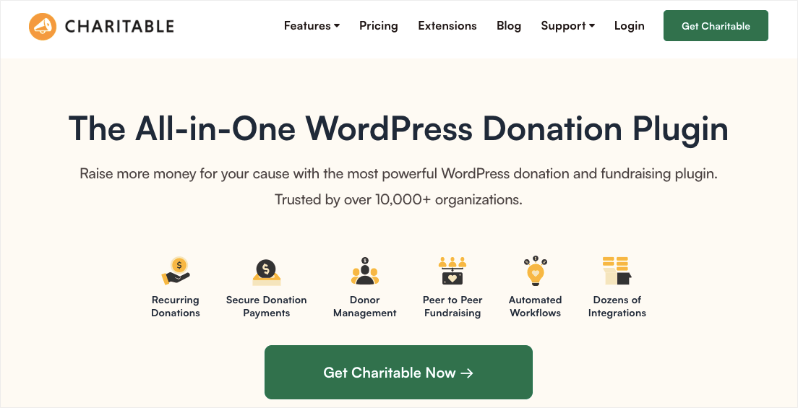
Da es speziell für WordPress entwickelt wurde, lässt es sich nahtlos in Ihre bestehende Website und andere Tools, die Sie möglicherweise verwenden, integrieren.
Nutzen Sie kein WordPress? Dann sollten Sie Gründe, warum Non-Profits WordPress nutzen sollten lesen.
Das Besondere an Charitable ist, wie es die Schwerstarbeit für Sie erledigt. Jedes Mal, wenn jemand spendet, erstellt oder aktualisiert das System automatisch dessen Spenderprofil, sendet eine Dankes-E-Mail und erstellt eine Spendenquittung.
Keine manuelle Dateneingabe mehr, keine vergessenen Nachfassaktionen mehr und kein Ertrinken in Tabellenkalkulationen mehr. Sie haben ein zusätzliches Teammitglied, das rund um die Uhr arbeitet, damit Sie gut schlafen können.
Die wahre Magie geschieht in den Spenderprofilen. Jedes Profil erzählt die vollständige Geschichte der Reise Ihres Spenders – von seinem ersten Geschenk bis zu seiner letzten Interaktion. Sie können seine Spendenhistorie, Vorlieben und Engagementmuster an einem Ort sehen.
Müssen Sie bestimmte Informationen finden? Intelligente Filter helfen Ihnen, Ihre Spenderdatenbank in Sekundenschnelle zu sortieren und zu durchsuchen, egal ob Sie nach Top-Spendern, aktuellen Spenden oder bestimmten Kampagnen suchen. Sie können Ihre Daten auch mit nur 2 Klicks exportieren, sodass Sie diese Informationen für Buchhaltungs-, Steuerzwecke und mit anderen Drittanbieter-Tools verwenden können.
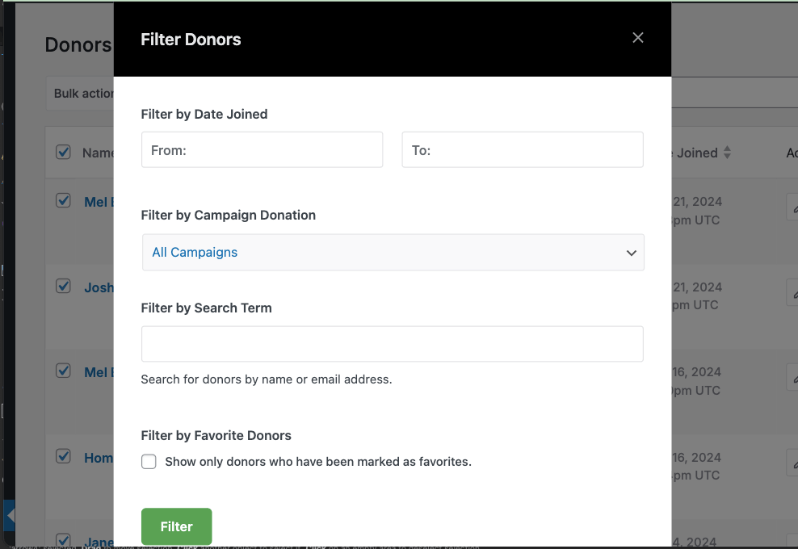
Aber Charitable sammelt nicht nur Daten – es sorgt dafür, dass diese Daten für Sie arbeiten. Das System generiert klare, umsetzbare Berichte, die Ihnen helfen, Spendenmuster zu verstehen und Chancen zu erkennen.
Sie können Spendentrends verfolgen, den Erfolg von Kampagnen überwachen und Wachstumsbereiche identifizieren, ohne dass Sie einen Abschluss in Datenanalyse benötigen. Außerdem können Sie, wenn die Steuersaison naht, alle erforderlichen Berichte generieren mit nur wenigen Klicks.
Das Beste daran ist, dass Charitable mit Ihrer Organisation wächst. Beginnen Sie mit den grundlegenden Funktionen, die Sie heute benötigen, und fügen Sie dann weitere Funktionen hinzu, wenn Ihre gemeinnützige Organisation wächst.
Funktionen der Spenderdatenbank von Charitable
Die Spenderdatenbank von Charitable ist ziemlich umfassend. Ich werde hier die wichtigsten Funktionen überprüfen, von denen ich glaube, dass sie jeder gemeinnützigen Organisation zugutekommen.
Zentralisierte Spenderdatenbank
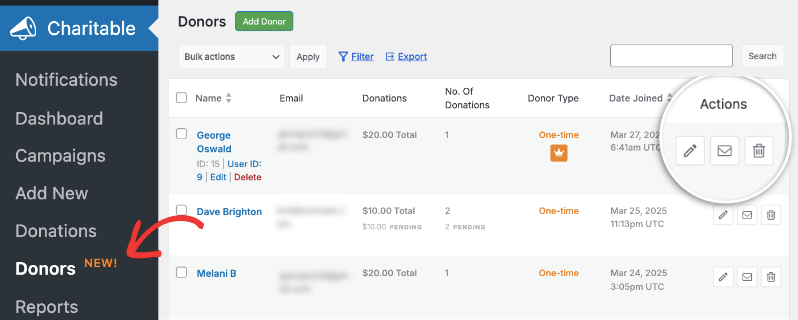
Wenn Sie die Spenderdatenbank von Charitable öffnen, sehen Sie eine übersichtliche, organisierte Anzeige all Ihrer Spender. Alle wesentlichen Informationen sind in deren Spenderprofil enthalten, wie z. B. Name, E-Mail-Adresse, Gesamtzahl der Spenden, Häufigkeit der Beiträge und das Beitrittsdatum. So haben Sie alle benötigten Informationen griffbereit!
Im Haupt-Dashboard sehen Sie nicht nur eine Liste von Spendern, sondern können auch schnell erkennen, wie viel sie gespendet haben, wie oft und ob es sich um einmalige oder wiederkehrende Spender handelt. Sie können auch Aktionen ausführen, um das Spenderprofil zu bearbeiten, per E-Mail zu kontaktieren oder zu löschen. für jedes Spenderprofil.
Individuelle Spenderprofile
Charitable erstellt jedes Mal ein neues Spenderprofil, wenn jemand zu Ihrer Sache beiträgt. Wenn sie zuvor beigetragen haben, wird ihr bestehendes Profil aktualisiert.
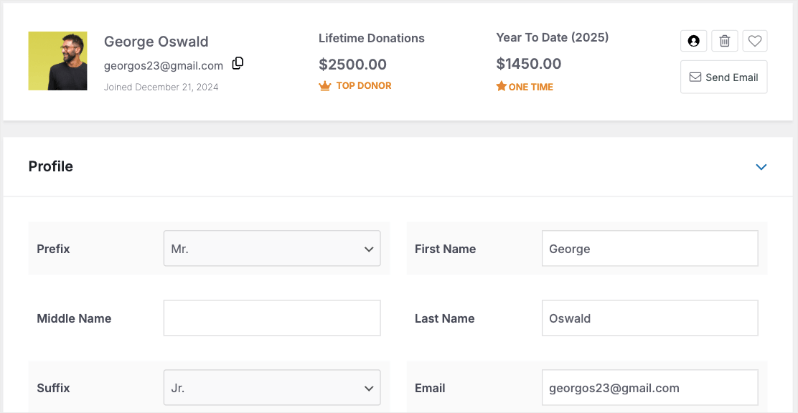
Jetzt ist der Zugriff auf das Profil eines Spenders so einfach. Alles, was Sie tun müssen, ist, auf ihren Namen oder das Stiftsymbol im Haupt-Dashboard zu klicken.
Sie gelangen zum Profil, wo Sie eine Übersicht wie ihre lebenslangen Spenden, Spenden im laufenden Jahr, Name, E-Mail-Adresse usw. sehen können.
Schnellaktionsschaltflächen ermöglichen es Ihnen, Benutzereinstellungen anzupassen, Spender als Favoriten zu markieren, E-Mails zu senden oder deren Datensätze zu verwalten.
Sie können ihre Profildetails bearbeiten und sogar benutzerdefinierte Tags und Felder hinzufügen.
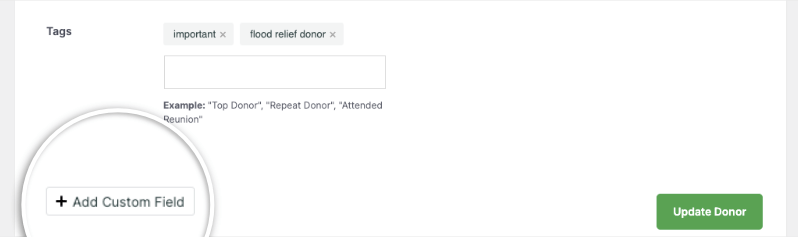
Ich habe zum Beispiel das Tag-System verwendet, um diesen Spender als "wichtig" und "Fluthilfe" zu kategorisieren. Auf diese Weise weiß ich, wenn wir in Zukunft Fluthilfekampagnen haben, dass dieser Spender ein Herz für diese Sache hat und wahrscheinlich spenden wird. Es wäre also eine gute Idee, ihnen eine E-Mail darüber zu senden.
Die Funktion für benutzerdefinierte Felder ermöglicht es Ihnen, Spenderprofile an Ihre spezifischen Anforderungen anzupassen.
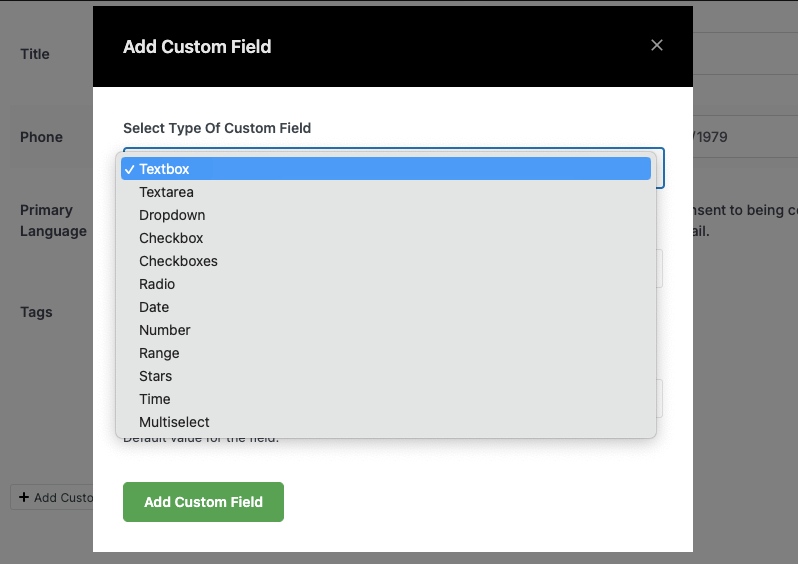
Sie können verschiedene Feldtypen hinzufügen, darunter:
- Textfelder für zusätzliche Notizen
- Kontrollkästchen für Präferenzen
- Dropdown-Menüs zur Kategorisierung
- Datumsfelder für wichtige Meilensteine
- Bereichsauswahlen für Engagement-Level
- Sternebewertungen zur Priorisierung von Spendern
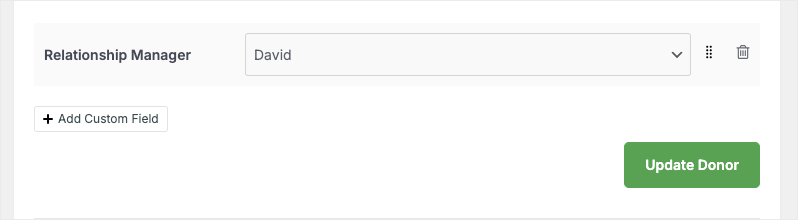
Ich habe ein Feld für den Beziehungsmanager für meine Organisation hinzugefügt. Auf diese Weise wissen wir sofort, wer mit dem Spender in Kontakt treten muss oder sich um auftretende Probleme kümmert.
Neues Spenderprofil hinzufügen
Was ich liebe, ist, dass ich bei Bedarf einen neuen Spender hinzufügen kann.
Wenn Spender also Offline-Spenden oder Spenden über eine andere Plattform tätigen, erstelle ich hier einfach neue Spendenaufzeichnungen. Auf diese Weise sind alle meine Daten zentralisiert und ich kann sie am Jahresende für Steuerzwecke exportieren.
Charitable ermöglicht Ihnen dies auf zwei Arten:
- Manuelles Erstellen eines Spenderprofils
- Hinzufügen eines Spendenbelegs und das Spenderprofil wird automatisch erstellt
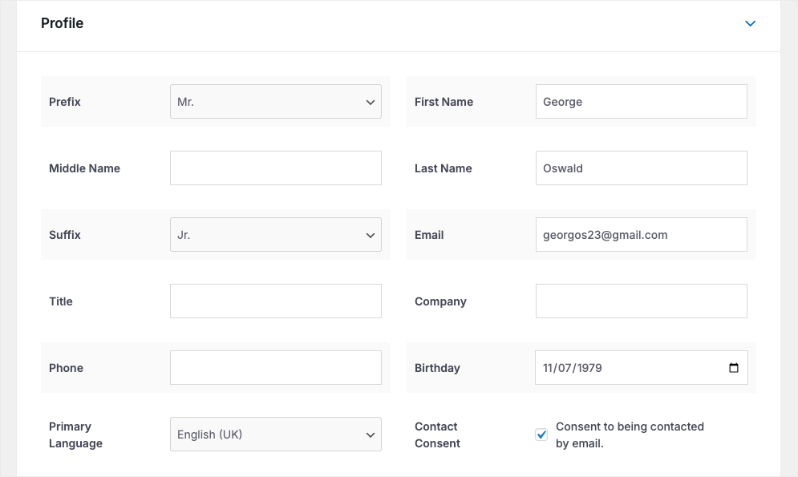
Um ein Spenderprofil zu erstellen, können Sie zum Tab Charitable » Spender gehen und dann Spender hinzufügen wählen.

Dies öffnet ein leeres Spenderprofil, das Sie ausfüllen können. Sie können alle Details eingeben, die Sie über diesen Spender haben, einschließlich Name, Kontaktinformationen, Geburtstag, Kontaktzustimmung und mehr.
Alternativ können Sie auch einen Spendenbeleg für eine anderswo erhaltene Spende erstellen. Diese Methode verwende ich öfter. Dies ist zugänglich unter dem Tab Charitable » Spenden, so:

Dann gebe ich einfach den erhaltenen Betrag, für welche Kampagne und von wem ein. Ich kann entweder die neuen Spenderdetails manuell ausfüllen. Falls sie bereits im System vorhanden sind, kann ich ihren Namen aus einem Dropdown-Menü auswählen.
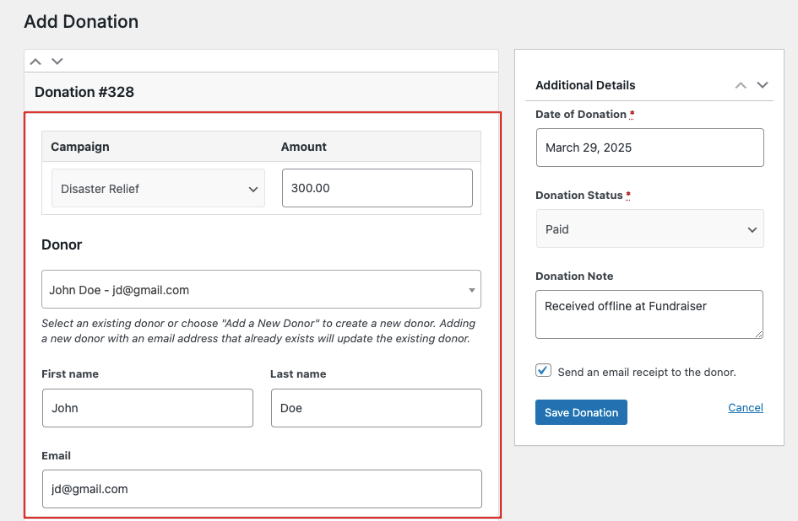
Sobald ich diesen Spendenbeleg speichere, wird automatisch ein Profil für neue Spender erstellt.
Erweiterte Spenderdetails
Charitable geht noch einen Schritt weiter und bietet Ihnen einen ganzen Bereich, der der Historie und Aktivität des Spenders gewidmet ist.
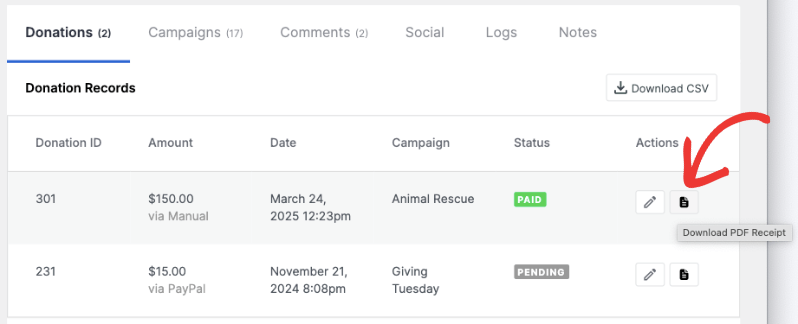
Spenden: Zeigt die Spendengeschichte des Spenders an. Sie erhalten eine chronologische Aufzeichnung aller Beiträge, einschließlich Spendenbeträgen, Daten, zugehörigen Kampagnen und Zahlungsstatus. Sie können den Beleg hier bearbeiten oder die PDF-Quittung herunterladen.
Kampagnen: Zeigt alle Kampagnen an, die mit dem Spender verbunden sind, unabhängig davon, ob er sie erstellt oder daran teilgenommen hat. Sie können sehen, wie Spender auf verschiedene Initiativen reagiert haben.
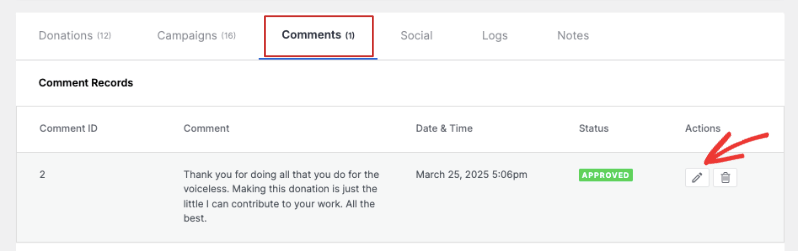
Kommentare: Jede Nachricht, die dieser Spender zu verschiedenen Kampagnen hinterlässt, wird hier angezeigt.
Social Media Integration: Sie können verschiedene Social-Media-Profile des Spenders hinzufügen, darunter Facebook, Instagram und X (ehemals Twitter), YouTube, WhatsApp und mehr.
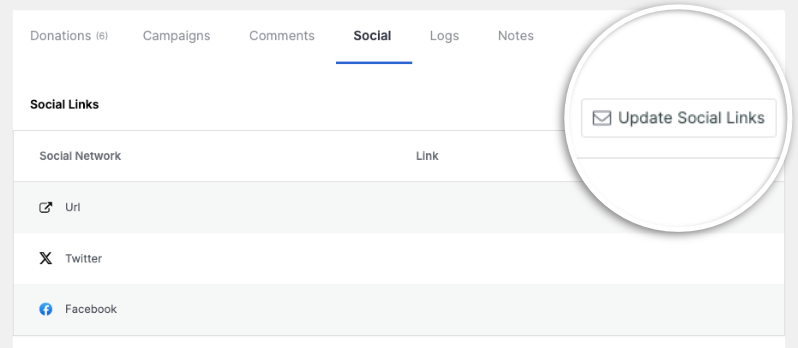
Aktivitätsprotokolle: Bietet Ihnen eine detaillierte Aufzeichnung aller Änderungen, die am Spenderprofil vorgenommen wurden.
Notizen: Ein Bereich zum Speichern wichtiger Informationen über Ihre Spenderbeziehungen.
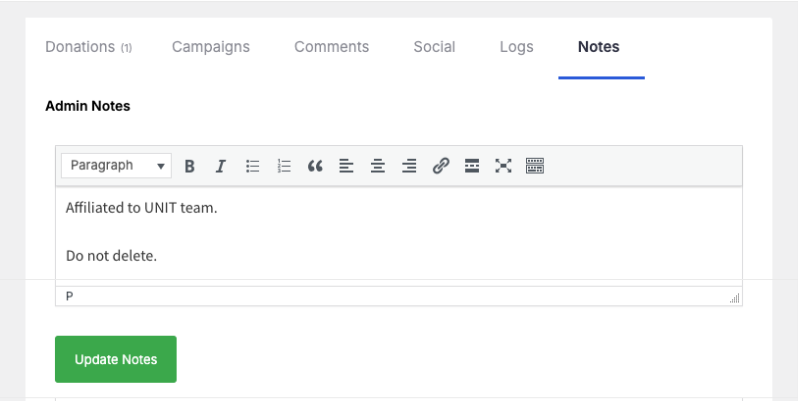
Insgesamt sind die Spenderprofile so umfassend, dass Sie alles, was Sie über einen Spender wissen müssen, unter einem Dach erfahren können.
Aufschlussreiche Spenderberichte
Charitable erstellt Berichte für Sie, die Sie nach Bedarf anzeigen, filtern und exportieren können.
Sie können einen speziellen Tab Spender anzeigen, der Ihre Berichte in Top-Spender, Erstspender und wiederkehrende Spender unterteilt.
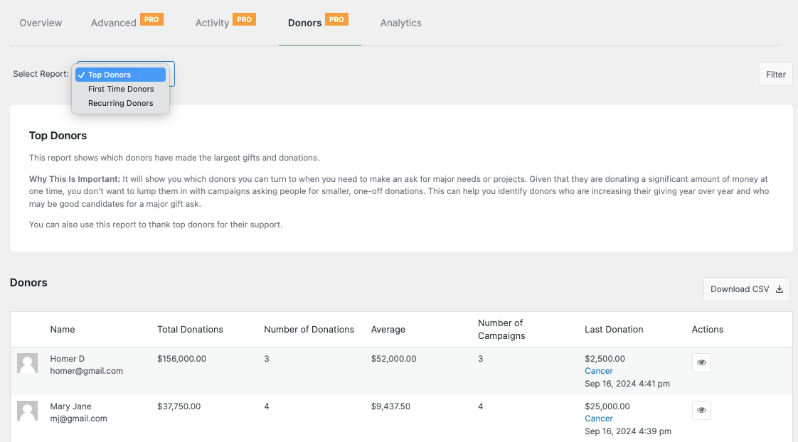
Sie können ihre gesamten Spenden, den Durchschnitt, die letzten Spenden, die von ihnen unterstützten Kampagnen und mehr sehen.
Erfahren Sie mehr über Charitable Fundraising Reports »
Was zeichnet Charitable aus?
Von den verschiedenen Spenderdatenbanklösungen, die ich ausprobiert habe, war dies nicht nur die am einfachsten zu bedienende, sondern auch die umfassendste. Ganz zu schweigen davon, dass Charitable bei weitem die erschwinglichste Lösung für Non-Profits ist. Sie haben einen Lite-Plan kostenlos und die Premium-Version beginnt bei 69 US-Dollar pro Jahr. Das sind also etwa 5 US-Dollar pro Monat, was ein Schnäppchen ist.
Sehen Sie den Unterschied zwischen Lite und Pro »
Hier sind einige Highlights, die diese Lösung auszeichnen:
- Lebe in Ihrem Dashboard: Keine zusätzlichen Logins oder neuen Systeme, die Sie lernen müssen. Es funktioniert nahtlos mit WordPress.
- Baut sich selbst auf: Erstellt neue Spendenaufzeichnungen und aktualisiert die Spenderprofile automatisch, wenn Spenden eingehen
- Spart Zeit: Kümmert sich um den Versand von Quittungen, die Dateneingabe und die Erstellung von Berichten
- Geben Sie Spendern Zahlungsoptionen: Sie können Zahlungen über Stripe, PayPal, Square und viele mehr akzeptieren.
- Wächst mit Ihnen: Fügen Sie Funktionen hinzu, wenn Ihre Organisation wächst
Hauptfunktionen, die Sie lieben werden
Hier sind meine Lieblingsfunktionen, die für meine Non-Profit-Organisation Wunder gewirkt haben, daher bin ich ziemlich zuversichtlich, dass Sie sie auch lieben werden:
- Automatische Spenderprofile
- Leicht lesbare Berichte
- Intelligente Suche und Filterung
- Schneller Datenexport
- Spender-Login-Zugang
- Benutzerdefinierte Felder für Ihre Bedürfnisse
- Integration von Marketing-Tools
- Automatisierung von Quittungen
Erhalten Sie eine vollständige Übersicht über die Spenderdatenbank von Charitable »
Wie bekomme ich die Spenderdatenbank von Charitable?
Die Spenderdatenbank und das Spenderverwaltungssystem sind in allen Plänen von Charitable verfügbar. Sie können die Website besuchen und einen Plan auswählen, der Ihren Bedürfnissen entspricht.
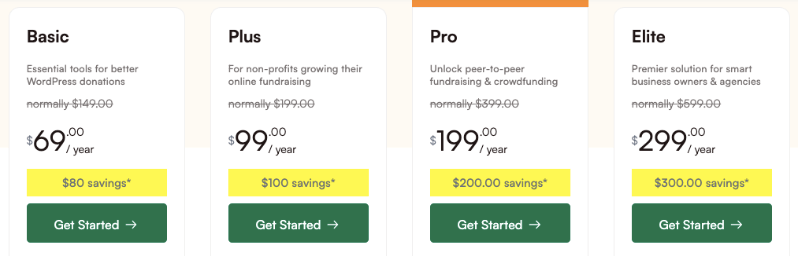
Es gibt 4 verfügbare Pläne: Basic, Plus, Pro und Elite.
Die Preise beginnen bei 69 US-Dollar pro Jahr, dem niedrigsten Preis, den ich auf dem Markt erlebt habe. Das entspricht 5,75 US-Dollar pro Monat, was ein Schnäppchen ist im Vergleich zu anderen Lösungen, die über 150 US-Dollar pro Monat verlangen!
Wenn Sie sich für eine Spenderdatenbanklösung entscheiden, ist es wichtig, ein System zu wählen, das Ihre tägliche Arbeit erleichtert und nicht verkompliziert.
Ich liebe es, dass Charitable so leistungsstark, aber gleichzeitig einfach zu bedienen und für alle erschwinglich ist.
Eine vollständige Schritt-für-Schritt-Anleitung zur Einrichtung finden Sie in unseren Leitfäden:
Als Nächstes beantworte ich auch einige häufig gestellte Fragen.
FAQs zur Spenderdatenbank für Non-Profits
Was ist eine Spenderdatenbank?
Eine Spenderdatenbank ist die zentrale Anlaufstelle Ihrer Organisation für die Verwaltung von Spenderinformationen, die Verfolgung von Beiträgen und die Pflege von Beziehungen. Stellen Sie sie sich als das Gedächtnis Ihrer Non-Profit-Organisation vor – sie speichert alles, von Kontaktdaten bis zur Spendenhistorie, an einem organisierten Ort.
Wie hilft eine Spenderdatenbank meiner Non-Profit-Organisation?
Anstatt Tabellenkalkulationen und Haftnotizen zu jonglieren, automatisiert eine Spenderdatenbank Ihre täglichen Aufgaben. Sie erfasst Spenden, sendet Dankes-E-Mails, generiert Berichte und hilft Ihnen, Spendenmuster zu verstehen. Das bedeutet mehr Zeit für das, was wichtig ist: den Aufbau von Spenderbeziehungen.
Welche Informationen kann ich in der Spenderdatenbank speichern?
Alles über Ihre Spender ist hier gespeichert – Kontaktinformationen, Spendenhistorie, Kommunikationspräferenzen und Beziehungshinweise. Sie können sogar benutzerdefinierte Felder hinzufügen, um spezifische Details zu verfolgen, die für Ihre Organisation wichtig sind. Es ist vollständig an Ihre Bedürfnisse anpassbar.
Wie einfach ist die Bedienung?
Die Benutzeroberfläche ist für den täglichen Gebrauch konzipiert, nicht für technische Experten. Die meisten Aufgaben erfordern nur wenige Klicks, und alles ist intuitiv organisiert. Außerdem haben Sie Zugriff auf Tutorials und Support, wenn Sie Hilfe benötigen.
Welche Spenderberichte kann ich generieren?
Von einfachen Spendenübersichten bis hin zu detaillierten Kampagnenanalysen können Sie Berichte erstellen, die Ihnen tatsächlich etwas Nützliches sagen. Charitable erstellt automatisch Berichte über Top-Spender, wiederkehrende Spender und einmalige Spender. Sie können Spenderbindung, Kampagnenerfolg und Spendertrends verfolgen – alles, ohne ein Datenwissenschaftler sein zu müssen.
Können meine Spender auf ihre Informationen zugreifen?
Ja, Sie können das Spender-Dashboard aktivieren, das es Spendern ermöglicht, sich in ihr Spenderportal einzuloggen. Sie können ihre Spendenhistorie einsehen, Kontaktdaten aktualisieren, wiederkehrende Spenden verwalten und Steuerbelege herunterladen. Diese Self-Service-Funktion spart Ihrem Team Zeit und befähigt gleichzeitig die Spender.
Lässt sich Charitable mit anderen Tools integrieren?
Ja, Ihre Spenderdatenbank funktioniert nahtlos mit über 5000 Marketing-Tools, E-Mail-Plattformen, Zahlungsabwicklern, Buchhaltungssoftware und Website-Buildern. Das bedeutet weniger manuelle Arbeit und weniger Kopfschmerzen während der Steuersaison.
Was sind beliebte Alternativen zu Charitable?
Ja, es gibt mehrere Optionen, darunter Bloomerang, DonorPerfect und Kindful. Jede hat ihre eigenen Stärken, aber sie sind in der Regel mit höheren monatlichen Kosten verbunden, beginnend bei 99–199 pro Monat.
Welche Art von Unterstützung ist bei Charitable verfügbar?
Mit Charitable sind Sie nie allein. Sie bieten Kundenservice, Online-Ressourcen und Dokumentation, wann immer Sie sie brauchen. Das Ziel ist es, Ihnen zum Erfolg zu verhelfen, nicht nur Software bereitzustellen.
Wie schneidet Charitable im Vergleich zu anderen Lösungen ab?
Während andere Plattformen eigenständige Systeme sind, integriert sich Charitable direkt in WordPress. Das macht es kostengünstiger (69/Jahr gegenüber 199+/Monat) und einfacher zu verwalten, wenn Sie bereits WordPress verwenden. Es bietet ähnliche Kernfunktionen ohne die Komplexität auf Unternehmensebene.
Gibt es kostenlose Lösungen für Spenderdatenbanken?
Kostenlose Lösungen wie Tabellenkalkulationen oder einfache CRMs existieren, aber ihnen fehlen oft Automatisierungsfunktionen, Spenderportale und integrierte Zahlungsabwicklung. Sie können für sehr kleine Organisationen funktionieren, werden aber mit zunehmendem Wachstum einschränkend.
Das ist alles! Ich hoffe, Sie haben diesen umfassenden Leitfaden zur besten Spenderdatenbanklösung genossen. Sind Sie bereit, Ihre eigene leistungsstarke Spenderdatenbank zu erhalten?





Hinterlassen Sie eine Antwort