Charitable Blog

Everything you need to know about Charitable and our team.

Create Better Fundraisers with New Templates, Builder Tools, and Improved Security

Create Better Fundraisers with New Templates, Builder Tools, and Improved Security

Last updated on

  • By

We’re rolling out exciting new updates in Charitable Pro that make creating and customizing campaigns easier than ever.

From fresh, ready-to-use templates for schools, churches, and holiday fundraisers to a brand-new List Block that helps you organize and present campaign details beautifully—this update is all about helping you launch impactful campaigns faster and with more creativity.

Introducing Charitable Pro 1.8.8.9 with new features and improved security that make it easier to craft campaigns that inspire support.

Let’s take a closer look at what’s new in this release and how these updates can help you create more effective fundraising campaigns.

New Campaign Templates

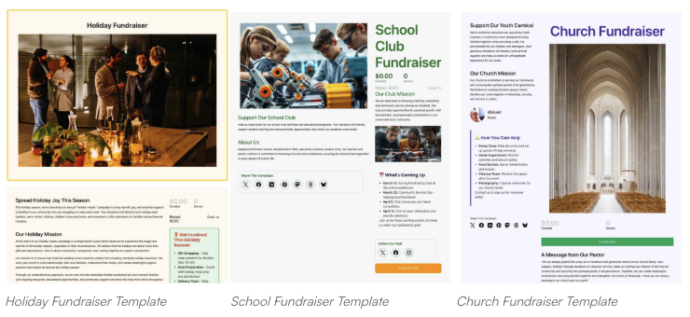
We’ve added three new campaign templates to help you create beautiful, effective fundraisers in just a few clicks.

Each one is designed with a specific audience and purpose in mind, so you can launch faster and connect better with your supporters.
Holiday Fundraiser Template
School Fundraiser Template
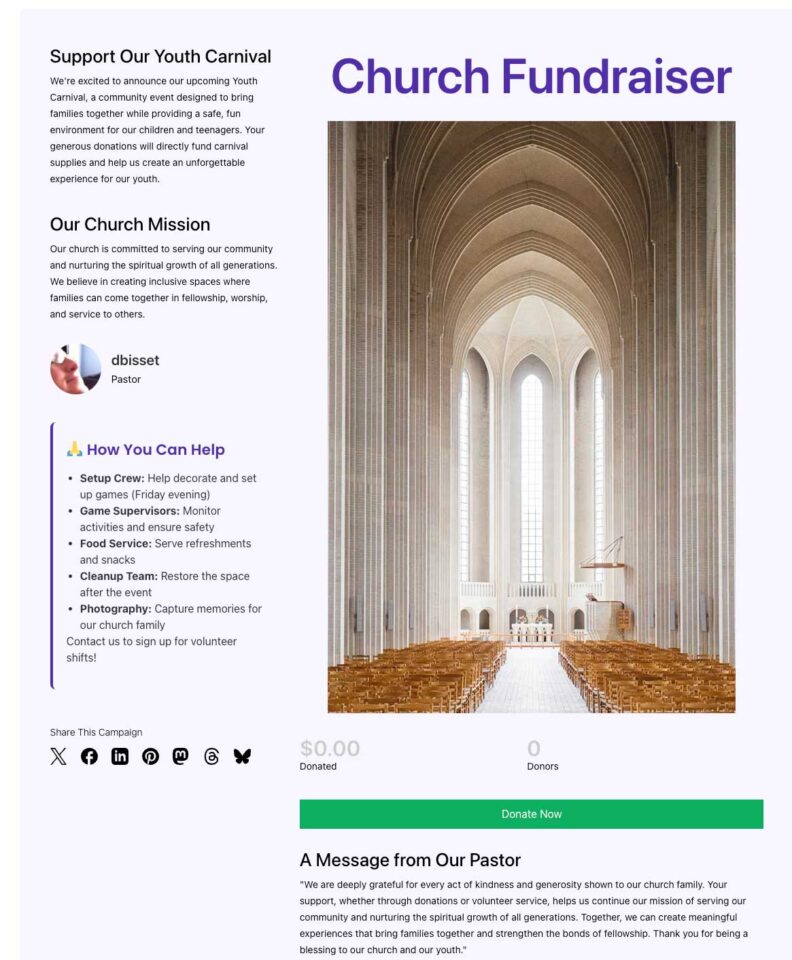
Church Fundraiser Template

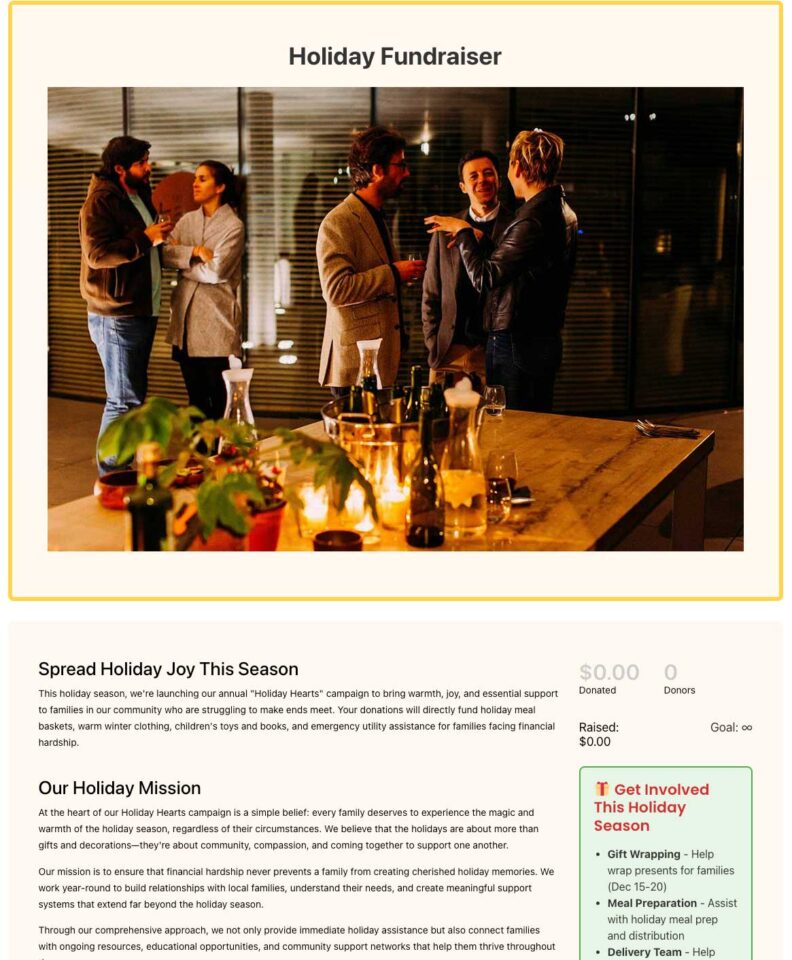
Holiday Fundraiser Template

Make the most of the giving season with a festive template built for holiday appeals. Ideal for year-end giving, toy drives, or food pantry fundraisers, it helps you capture the warmth and generosity of the season while keeping your goals front and center.

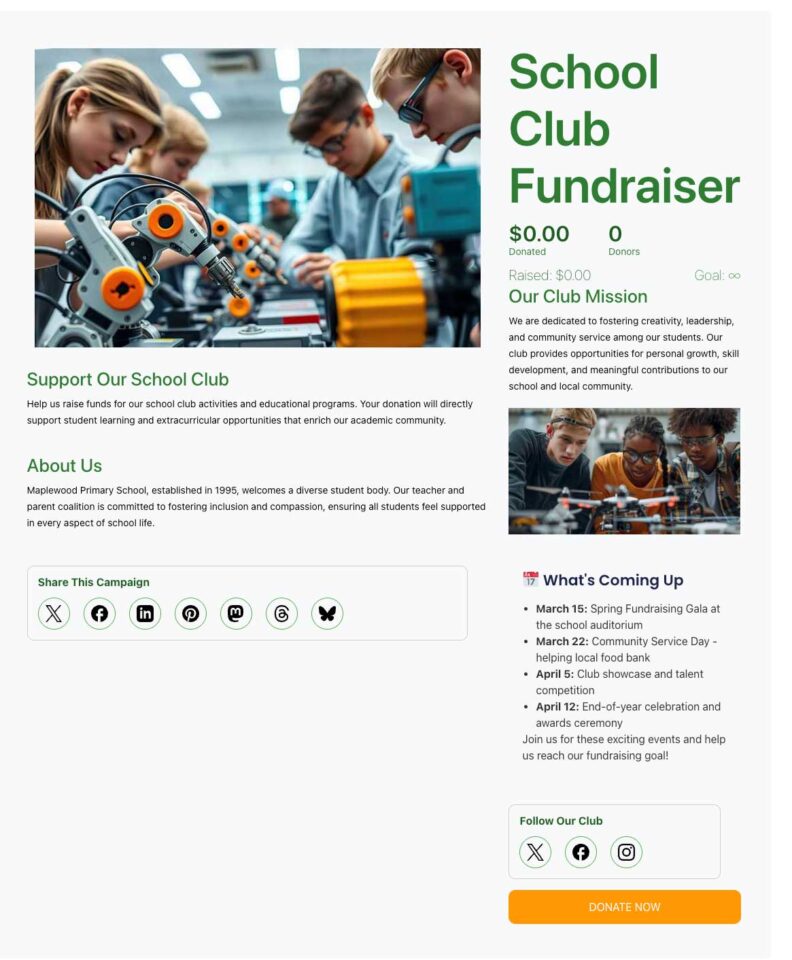
School Fundraiser Template

Quickly launch your next PTA drive, sports team fundraiser, or back-to-school campaign. This template rallies parents, faculty, and the local community around a clear, school-focused goal—perfect for funding playground upgrades, classroom technology, or student trips.

Church Fundraiser Template

Perfect for your congregation’s next big project, whether it’s a building fund, mission trip, or outreach program. The layout helps communicate your ministry’s goals and build trust with your community. It’s also great for managing ongoing tithes and offerings digitally.

New Campaign Block: Lists

We’re excited to introduce the new List Block, a simple yet powerful way to organize and highlight information on your campaign pages.

With flexible styles and customization options, this block makes it easy to break down your goals, donation perks, or sponsorship levels—no coding required.
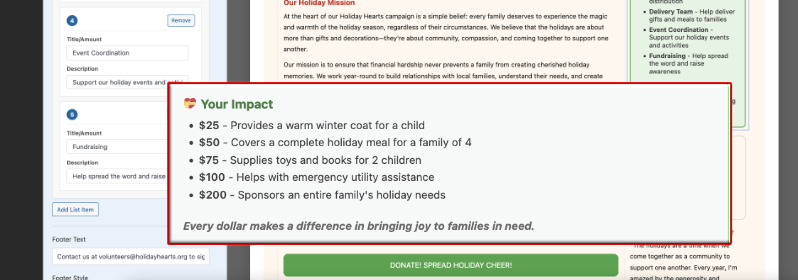
List block in charitable

Here’s why we added this feature for you — The List Block lets you grab attention instantly with a colorful headline (emoji support included), add unlimited items to detail exactly what matters most, and choose from three distinct layout styles. You can also include a footer for extra context or a call-to-action, making your lists even more effective.
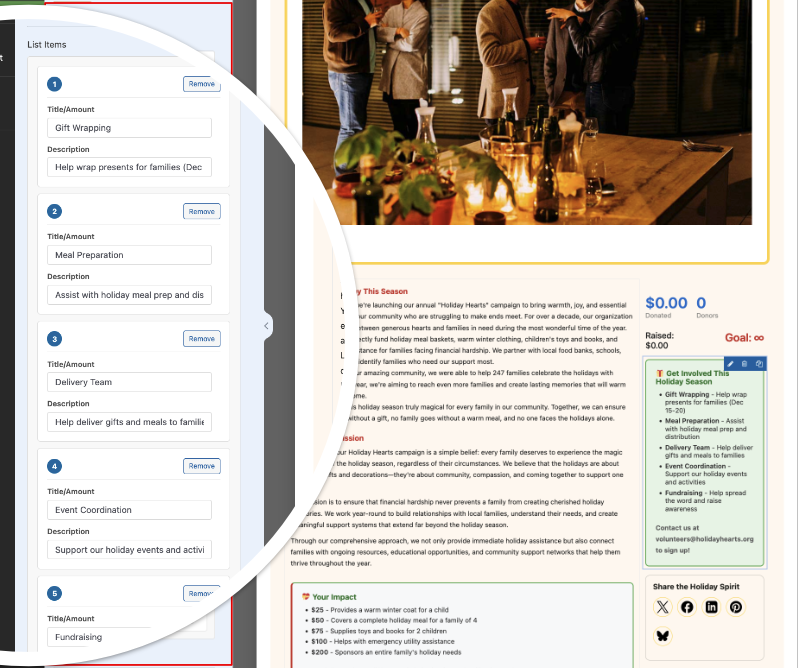
List customization

If you’re looking to make your campaigns more visually engaging and informative, the List Block helps you do it—all while streamlining the setup process.

Security Enhancements for Smarter Campaign Protection

We’ve added two new security features to help protect your fundraising campaigns and keep spam out.

You’ll see better filters and smarter checks to block suspicious donations, so you don’t have to worry about bad actors slipping through. We’ll keep improving these protections and stay alert for new threats, making sure you can spend less time on headaches—and more time helping your cause.

Global Minimum Donation Setting

We’ve heard from many of you about a recent spike in spam $1 donations and unwanted attacks on your campaigns. To eliminate that, Charitable Pro now comes with stronger security tools to keep your fundraisers safe and your donation records clean.

Why would fraudsters send $1 donations and how does it affect you?

They do this as part of a practice called “card testing.” They use donation forms to test whether stolen or fake credit card numbers are still active and can be used for transactions. By sending small amounts, they check if the card goes through without raising alarms. If the small donation succeeds, they know the card is valid and may attempt larger fraudulent purchases later.

Nonprofits and donation platforms are often targeted because donation forms typically require less detailed information compared to online stores, making them easier to test cards on. These fake donations can cause problems like chargebacks, fees, and damage to your payment processor reputation. Setting a minimum donation amount (like $2 or more) helps reduce this spam by making it less profitable and more difficult for bots to test cards with small amounts.

Now Charitable makes it easy to set a minimum donation amount for all your campaigns at once. Just head to Settings » Security to pick your default minimum. Charitable automatically turns it on and sets it to $2—no more manual setup for every campaign, and no more $1 spam.
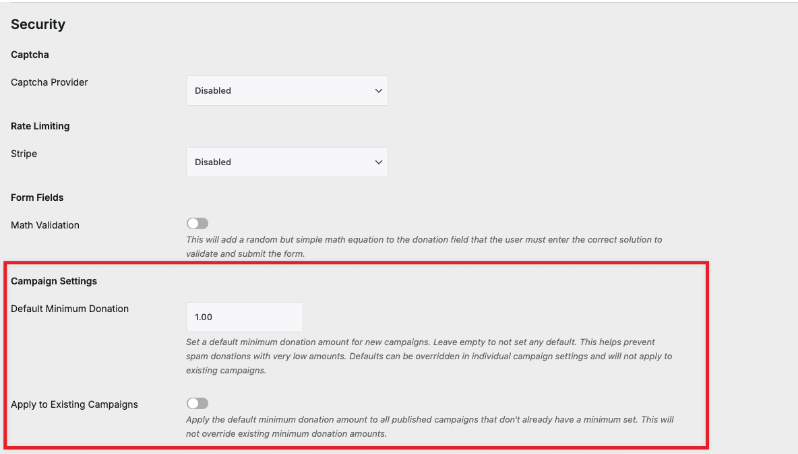
campaign settings global minimum amount

Already running campaigns? You can update them individually or flip a switch to apply the new minimum to all at once.

Want something different for a specific campaign? You can override the minimum inside the campaign builder. Here, you set any minimum amount—like $20 for a special project—while all other campaigns use your default.

Learn how to set minimum donation amounts for individual campaigns here »

Advanced Email Validation

Stop fake donors before they reach your campaign. Turn on email validation and decide exactly which domains, patterns, or keywords you want to block.
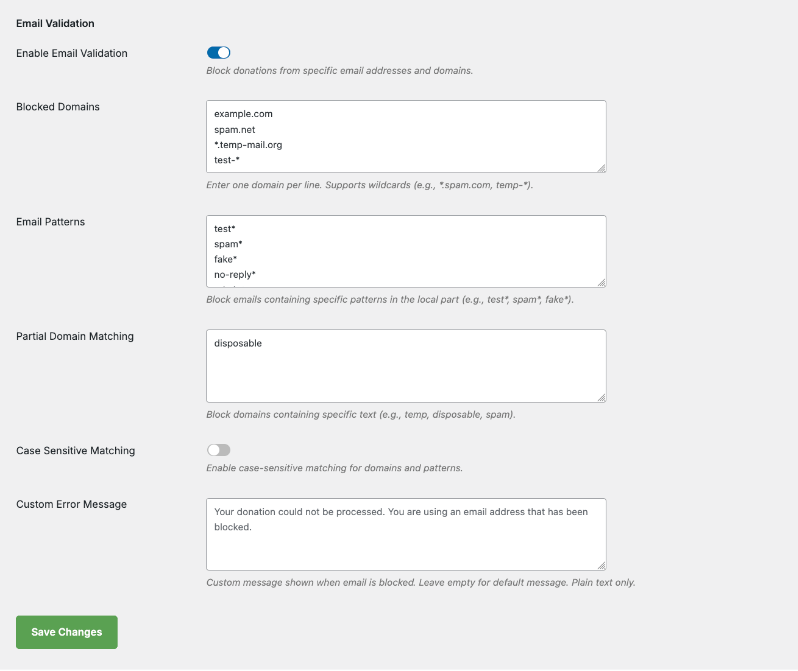
email validation settings

You can even block emails that match part of a domain name, so if you’re seeing spam from a specific group of domains, you can block them all at once.

For example, blocking “spamdomain” will block emails like [email protected][email protected], or [email protected].

There’s also a toggle for case sensitivity, so you can choose whether to block “SpamDomain.com” differently from “spamdomain.com” depending on your preference.

Plus, you can add your own custom error message that donors will see if their email is blocked. For instance: “Your donation could not be processed. You are using an email address that has been blocked.”

This way, donors understand why their donation didn’t go through and can take steps to use a different email address if needed.

New Dashboard and Onboarding

A few weeks ago, we rolled out a fresh dashboard and onboarding experience for Charitable Lite users—giving you a clear view of your campaign stats, smarter navigation, and step-by-step help right inside WordPress.

Now, these features are available in Charitable Pro too! We’ve made it so much easier to access everything right off the bat—from instant donation reports and trend graphs to quick access support and a handy Getting Started Checklist—all in one place.
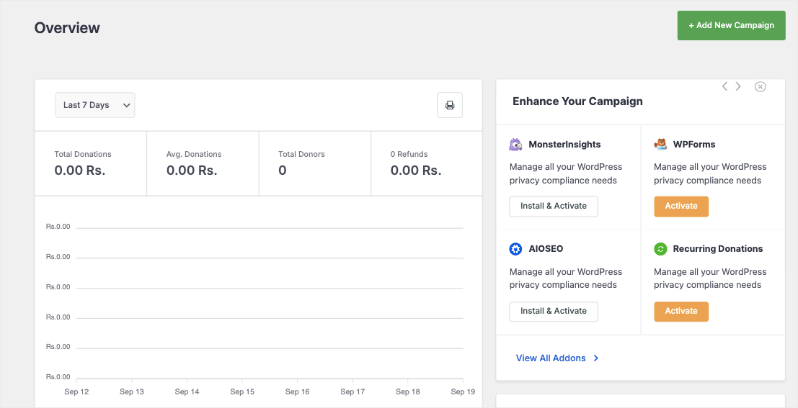
New lite dashboard overview

Want the full scoop? Read all about it here.

We hope these new features help you run smoother, safer, and more successful fundraisers. They’re designed to save you time, reduce hassle, and protect your campaigns from spam and abuse—so you can focus on making an impact.

Ready to Try Everything Out?

These features are available right now in the latest version of Charitable Pro. Simply update to the latest version of Charitable.

Not yet a Charitable Pro user? Sign up today and get up to 50% off on your plan. We’re confident you’ll love raising funds with Charitable. If for any reason Charitable is not the right fit for you, we’ll refund your purchase with our 14-day money back guarantee

We’d love to hear how you’re using these new features! Stay connected with us:

Your feedback keeps Charitable moving forward. Let’s keep building better fundraising tools—together.

author avatar
David Bisset Project Manager
David is the project manager of Charitable since 2022. David works with several non-profits (one operated by his wife) along with managing and developing features, support, and marketing for Charitable. Has been with WordPress since 2006 and has been lead organizer of multiple conferences, events, and meetups.

Disclosure: Our content is reader-supported. This means if you click on some of our links, then we may earn a commission. We only recommend products that we believe will add value to our readers.

Leave a Reply

Your email address will not be published. Required fields are marked *

Get free tips and resources right in your inbox, along with 60,000+ others

Join our Newsletter

We won’t spam you. We only send an email when we think it will genuinely help you. Unsubscribe at any time!

Featured Video:

Watch more videos on our YouTube channel.

What's New In Charitable

🔔 Subscribe to get our latest updates
📧 Subscribe to Emails

Email Subscription

Join our Newsletter

We won’t spam you. We only send an email when we think it will genuinely help you. Unsubscribe at any time!

Integration New

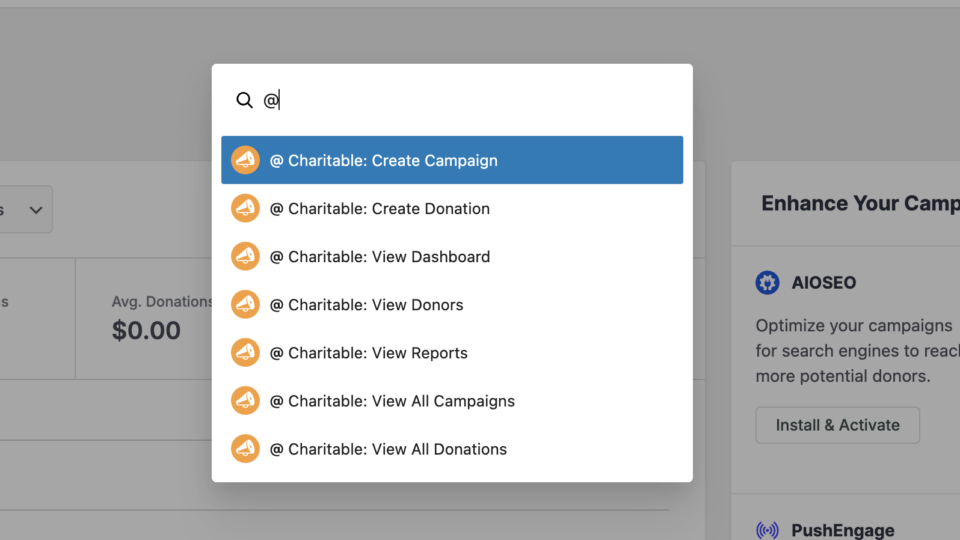
WordPress Command Palette Integration

Take your fundraising workflow to the next level. Speed up your site management and stay in your creative flow with our new WordPress Command Palette integration.

Supercharge Your Workflow
Navigate your fundraising dashboard faster than ever.

The Ultimate Keyboard Shortcut Hit Cmd + K (or Ctrl + K) to launch the Command Palette and manage your campaigns instantly.

⚡ Instant Navigation: Jump directly to your Campaigns, Donations, or Settings from anywhere in the editor.

➕ Quick Create: Start a new fundraising campaign or add a manual donation with a single command.

Efficiency Redefined
The tools you need, exactly when you need them.

⚙️ Contextual Actions: See relevant Charitable commands based on whether you’re editing a page or viewing your reports.

🚀 Seamless Integration: Built directly into the WordPress core experience for a lightweight, native feel.

author avatar
David Bisset Project Manager
David is the project manager of Charitable since 2022. David works with several non-profits (one operated by his wife) along with managing and developing features, support, and marketing for Charitable. Has been with WordPress since 2006 and has been lead organizer of multiple conferences, events, and meetups.
Improvement New Security

📣 New Security Features

We’ve introduced a suite of new security tools to give you total control over who accesses your forms, plus a new way to tidy up your database.

Advanced Security Suite

Layered protection: Cloudflare, ReCAPTCHA, IP Controls, and Rate Limiting.

We have overhauled our security settings to stop bots without blocking real donors.

  • 🤖 Flexible Protection: Choose between Google reCAPTCHA v3 or the privacy-first Cloudflare Turnstile to block bots invisible.

  • 🚦 Rate limiting: Stop spam floods by limiting how many submissions an IP address can make in a set timeframe.

  • 🛑 Total control: Use the new IP Blacklist to block bad actors instantly, or the IP Whitelist to let your team bypass checks during testing.

The Clean Donation Tool

Go from “Testing” to “Live” in seconds.

Finished setting up your site and need to get rid of all those test transactions?

  • 🧹 Sweep it clean: Bulk delete test donations and donor records with a single click.

  • 📉 Accurate reporting: Ensure your revenue stats are 100% accurate for launch day.

  • ⚙️ Reset sequences: Automatically resets sequential invoice numbering.

author avatar
David Bisset Project Manager
David is the project manager of Charitable since 2022. David works with several non-profits (one operated by his wife) along with managing and developing features, support, and marketing for Charitable. Has been with WordPress since 2006 and has been lead organizer of multiple conferences, events, and meetups.
donation form New

🏗️ Visual Donation Form Builder

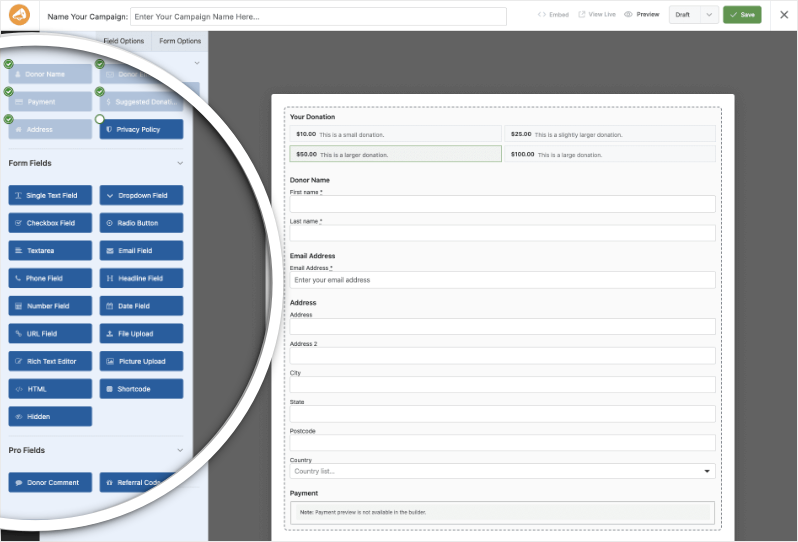
Building the perfect donation form just got easier. We have completely reimagined how you create forms with a new drag-and-drop interface.

Design Visually, in Real-Time

No coding, no guessing. Just point, click, and build.

Say goodbye to confusing settings pages. You can now edit your form and see exactly what your donors will see, instantly.

  • 🖱️ Drag & Drop: Easily add fields like names, addresses, or file uploads by dragging them exactly where you want them.

  • 🎨 Customize everything: Click any field to tweak labels, placeholders, and requirement settings on the fly.

  • 👁️ Live preview: See your changes immediately as you make them—ensure your form flows perfectly before you hit publish.

Flexible & Powerful

Works with all your existing campaigns.

  • 🧩 Deep customization: Add custom HTML, shortcodes, or CSS classes for advanced branding.

  • ⚙️ Smart fields: Collect exactly what you need with support for dropdowns, checkboxes, dates, and hidden fields.

author avatar
David Bisset Project Manager
David is the project manager of Charitable since 2022. David works with several non-profits (one operated by his wife) along with managing and developing features, support, and marketing for Charitable. Has been with WordPress since 2006 and has been lead organizer of multiple conferences, events, and meetups.
Leaderboards New

🏆 Donor Leaderboards!

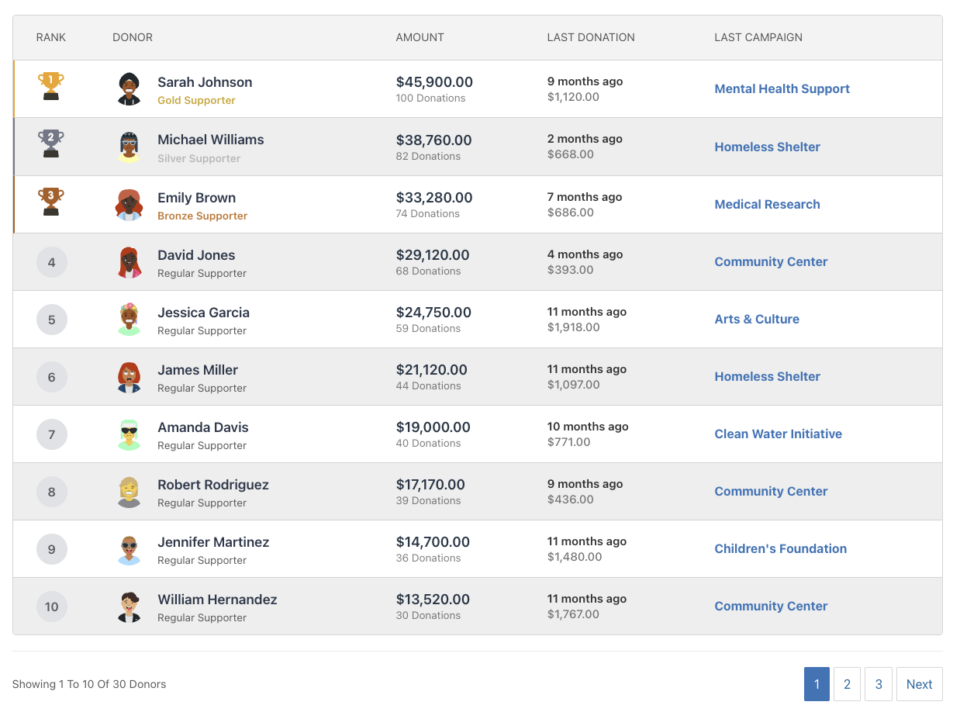
Turn your fundraising into a community event. Recognize your most generous supporters and inspire friendly competition with our new leaderboard tools.

Gamify Your Fundraising

Celebrate your top donors and encourage others to climb the ranks.

Create a public “Hall of Fame” to give your donors the recognition they deserve.

  • 🎨 Two stunning layouts: Choose the List View for a clean, data-rich table or the Card View for a modern, visual grid with avatars.

  • 🥇 Automatic highlights: The top 3 supporters get special Trophy and Crown icons to make them stand out.

  • 🧩 Place it anywhere: Add it to any page using the new Gutenberg Block, or drop it directly into your campaign using the Visual Builder.

Total Customization

You decide what to show and what to hide.

  • ⚙️ Flexible data: Choose to display or hide donation amounts, donor counts, or avatars.

  • 🔄 Lifetime stats: Works seamlessly with Recurring Donations to show a donor’s all-time total impact.

author avatar
David Bisset Project Manager
David is the project manager of Charitable since 2022. David works with several non-profits (one operated by his wife) along with managing and developing features, support, and marketing for Charitable. Has been with WordPress since 2006 and has been lead organizer of multiple conferences, events, and meetups.
Improvement New templates

🎨 New Templates & List Builder

Launch faster and design better. We’ve added three professional campaign templates and a versatile new content block to help you tell your story.

3 New Campaign Templates

Ready-to-use designs for specific fundraising needs.

Don’t start from scratch. Pick a template tailored to your cause and launch in minutes.

  • 🎄 Holiday Fundraiser: A warm, festive design perfect for year-end giving, toy drives, or food pantries.

  • 🎓 School Fundraiser: Built for PTAs and sports teams. clearly highlights goals like playground upgrades or classroom tech.

  • Church Fundraiser: A trustworthy layout designed for building funds, mission trips, and tithes.

The New “List” Block

Organize your campaign details without writing code.

Make your campaign pages easier to scan and more visually engaging with our new builder block.

  • 📝 Flexible layouts: Choose from 3 distinct styles to display sponsorship levels, donation perks, or project goals.

  • 🎨 Rich customization: Add colorful headlines, support for emojis, and unlimited list items.

  • 👣 Smart footers: Include a built-in footer for extra context or a final Call to Action.

author avatar
David Bisset Project Manager
David is the project manager of Charitable since 2022. David works with several non-profits (one operated by his wife) along with managing and developing features, support, and marketing for Charitable. Has been with WordPress since 2006 and has been lead organizer of multiple conferences, events, and meetups.