NEWSLETTER CONNECT

Turn one-time donors into ongoing supporters with your newsletter list.

Charitable Newsletter Connect allows you to automatically add donors to your email newsletter list.


More and more non-profits are discovering the importance of email marketing. It is an affordable and immediate way to connect with supporters in a personal way.

And it’s effective: For every 1000 fundraising emails delivered, non-profits raise $44. Donors who give in response to fundraising emails donate $68 on average. source

Simply put, it’s something you can’t ignore.

Charitable Newsletter Connect allows you to automatically add donors to your email newsletter list. The plugin integrates seamlessly with MailChimp, Campaign Monitor, MailerLite, ActiveCampaign, Mailster and MailPoet (including version 3).

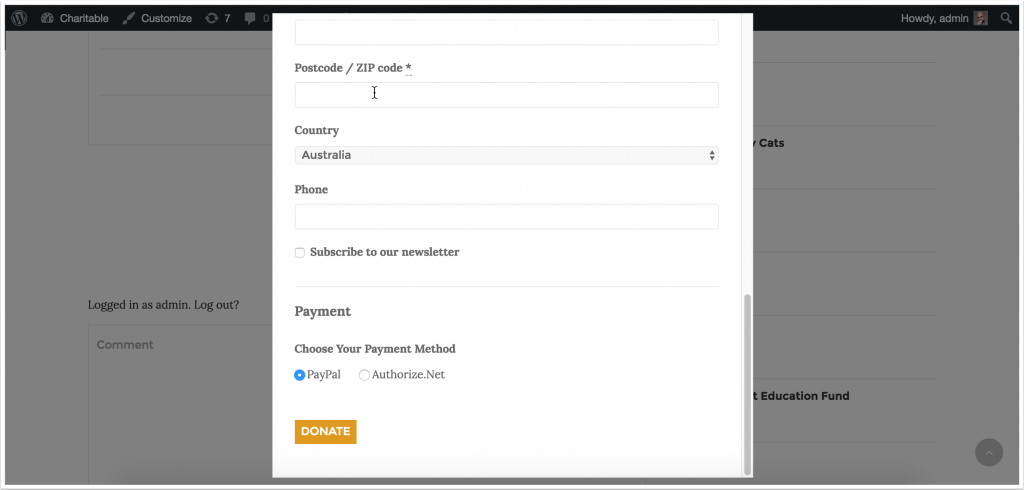
the-finished-product

Newsletter Connect allows you to enable one or more providers. You can set a default list, opt-in mode and label that is used for all campaigns, but you can also override this on a per-campaign basis. It’s even possible to have donors subscribed to multiple lists when they donate.
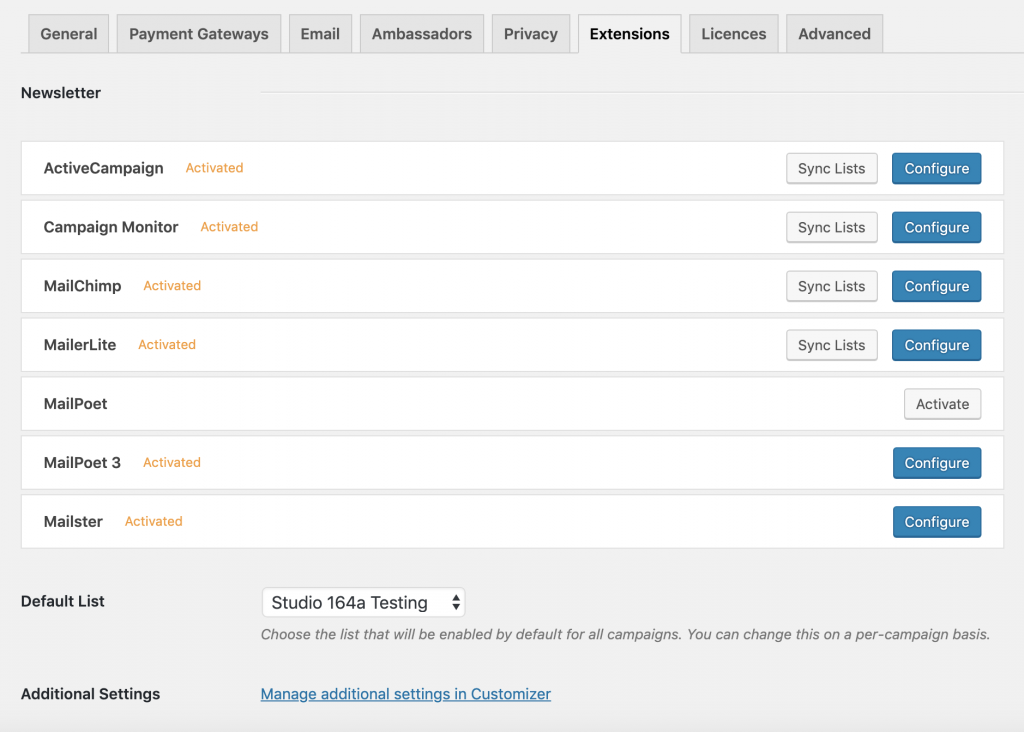
Newsletter settings - Charitable

Integrated with Contact Consent

Newsletter Connect integrates with Charitable’s core Contact Consent feature, allowing you to have donors automatically added to your mailing list when they give their consent to be contacted.
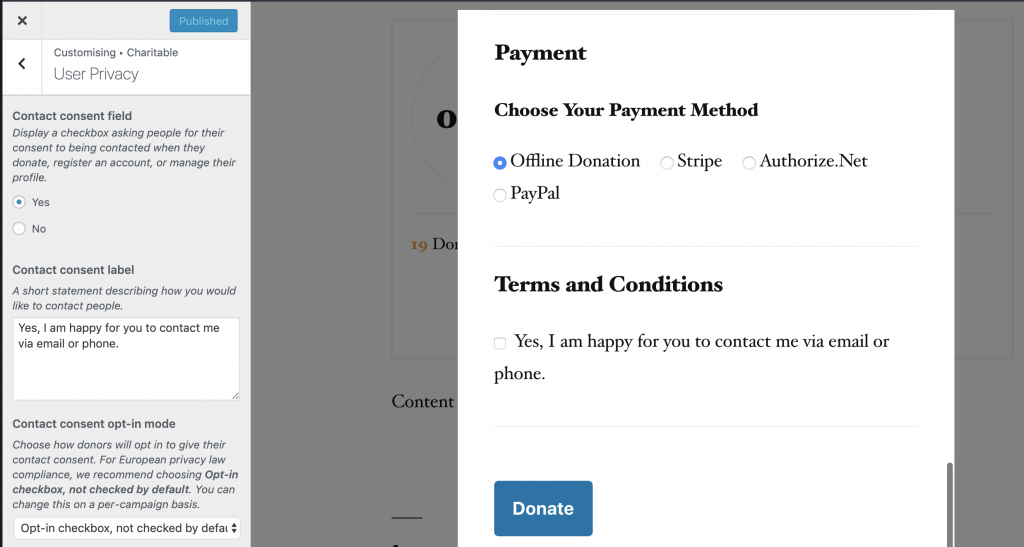
On the other hand, when donors withdraw their consent to be contacted, Newsletter Connect handles this seamlessly, automatically unsubscribing the users from any newsletter lists they are on.

Powerful field mapping

All the email marketing providers that Charitable supports allow you to create your own custom fields (or merge fields, as they are called in MailChimp). With Newsletter Connect, you can map these fields to the fields in your Charitable donation forms, allowing you to easily populate the subscriber information in your email marketing with information entered by donors in your donation form.
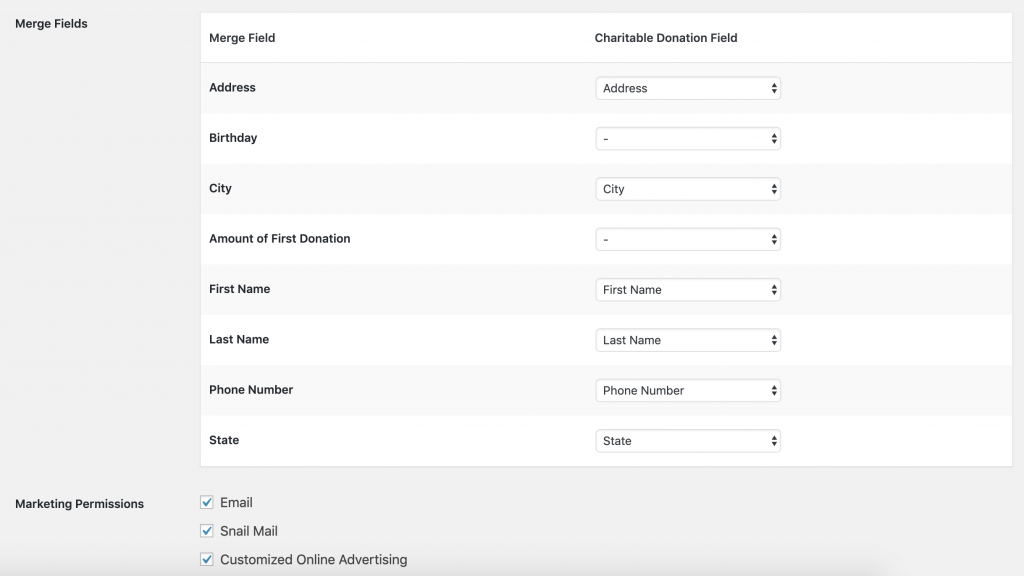
MailChimp merge field mapper

As a result, you can easily segment your newsletter list based on the information you’re collecting in your donation forms.

Any fields added to your donation form with the Donation Fields API are automatically available for mapping.

Supported email marketing providers

MailChimp

MailChimp’s affordable pricing and excellent reputation have made it the go-to hosted email marketing provider for more than 12 million people.

Just add your MailChimp API Key to your Charitable settings and you’re ready to start adding donors to your MailChimp list automatically.

Campaign Monitor

Campaign Monitor is one of the most popular email marketing providers around, with robust marketing automation features and highly rated 24/7 support.

All you need to connect Campaign Monitor to Charitable is your API key and Client ID.

MailerLite

MailerLite is an affordable alternative to MailChimp and Campaign Monitor, with advanced features like automation, popup & landing page builders and 24/7 support baked into every plan — even the free one.

Get up and running with MailerLite and Charitable in minutes with your MailerLite API key.

ActiveCampaign

ActiveCampaign is an email marketing provider with a focus on powerful marketing automation, sales and user messaging features.

MailPoet

MailPoet allows you to create and send newsletters or autoresponders straight from your WordPress dashboard — no 3rd-party hosted service is required. We love seeing other WordPress plugins created with such love.

MailPoet and Charitable are automatically connected when you have Charitable Newsletter Connect and MailPoet installed. No configuration necessary!

Charitable works with both the current version of MailPoet as well as the upcoming MailPoet 3.

Mailster

Mailster is another WordPress newsletter plugin that allows you to create campaigns, manage subscribers and set up powerful autoresponders in your WordPress dashboard. Everything is intuitive and easy to use. With Mailster, there are no recurring fees; it’s a once-off purchase of $49, which gives you access to lifetime plugin updates.

Mailster and Charitable work together automatically when you have Newsletter Connect and Mailster activated. You don’t need to do anything to get it configured.


Don’t use MailChimp, Campaign Monitor, MailerLite, ActiveCampaign, Mailster or MailPoet?

We’re planning to add support for more email marketing services. Let us know which provider you use.

Minimum Requirements

  • PHP 5.3+

More

Frequently Asked Questions

See the list below for our most frequently asked questions. If your question is not listed here, please contact us.

What's New In Charitable

🔔 Subscribe to get our latest updates
📧 Subscribe to Emails

Email Subscription

Join our Newsletter

We won’t spam you. We only send an email when we think it will genuinely help you. Unsubscribe at any time!

Integration New

👉🏻 New Divi Integration In Charitable Pro

Bring the power of Charitable directly into your favorite page builder and maintain total creative control with our brand-new Divi integration.

The Ultimate Design Experience

No more switching back and forth or relying on complex shortcodes. Use dedicated Divi modules to build, style, and launch high-converting donation pages without ever leaving the Divi Builder.

⚡ Native Divi Modules: Effortlessly drag and drop your donation forms, progress bars, and campaign details exactly where you want them.

⚙️ Visual Customization: Tweak colors, fonts, and spacing using Divi’s familiar design settings to ensure your fundraiser matches your brand perfectly.

🚀 Live Visual Editing: See your changes in real-time. What you see in the builder is exactly what your donors will see, ensuring a seamless giving experience every time.

donation form New

👉🏻 New Campaign Selector For Donation Forms

Take your campaign management to the next level. Find the perfect fundraiser for any page and stay in your creative flow with our new Campaign Selector integration.

The Ultimate Selection Tool

No more hunting for IDs or creating one page for every donation form. Use the new Campaign Selector to allow users to switch to a campaign with no code.

⚡ Instant Search: Quickly find any campaign leaving your page or post.

⚙️ Editor Agnostic: Whether you’re using the Block Editor, Elementor, or WPBakery, selecting your campaigns is now a unified experience.

🚀 Real-Time Previews: See exactly which campaign you’ve selected instantly, ensuring your donors always see the right cause.

Integration New

WordPress Command Palette Integration

Take your fundraising workflow to the next level. Speed up your site management and stay in your creative flow with our new WordPress Command Palette integration.

Supercharge Your Workflow
Navigate your fundraising dashboard faster than ever.

The Ultimate Keyboard Shortcut Hit Cmd + K (or Ctrl + K) to launch the Command Palette and manage your campaigns instantly.

⚡ Instant Navigation: Jump directly to your Campaigns, Donations, or Settings from anywhere in the editor.

➕ Quick Create: Start a new fundraising campaign or add a manual donation with a single command.

Efficiency Redefined
The tools you need, exactly when you need them.

⚙️ Contextual Actions: See relevant Charitable commands based on whether you’re editing a page or viewing your reports.

🚀 Seamless Integration: Built directly into the WordPress core experience for a lightweight, native feel.

Improvement New Security

📣 New Security Features

We’ve introduced a suite of new security tools to give you total control over who accesses your forms, plus a new way to tidy up your database.

Advanced Security Suite

Layered protection: Cloudflare, ReCAPTCHA, IP Controls, and Rate Limiting.

We have overhauled our security settings to stop bots without blocking real donors.

  • 🤖 Flexible Protection: Choose between Google reCAPTCHA v3 or the privacy-first Cloudflare Turnstile to block bots invisible.

  • 🚦 Rate limiting: Stop spam floods by limiting how many submissions an IP address can make in a set timeframe.

  • 🛑 Total control: Use the new IP Blacklist to block bad actors instantly, or the IP Whitelist to let your team bypass checks during testing.

The Clean Donation Tool

Go from “Testing” to “Live” in seconds.

Finished setting up your site and need to get rid of all those test transactions?

  • 🧹 Sweep it clean: Bulk delete test donations and donor records with a single click.

  • 📉 Accurate reporting: Ensure your revenue stats are 100% accurate for launch day.

  • ⚙️ Reset sequences: Automatically resets sequential invoice numbering.

donation form New

🏗️ Visual Donation Form Builder

Building the perfect donation form just got easier. We have completely reimagined how you create forms with a new drag-and-drop interface.

Design Visually, in Real-Time

No coding, no guessing. Just point, click, and build.

Say goodbye to confusing settings pages. You can now edit your form and see exactly what your donors will see, instantly.

  • 🖱️ Drag & Drop: Easily add fields like names, addresses, or file uploads by dragging them exactly where you want them.

  • 🎨 Customize everything: Click any field to tweak labels, placeholders, and requirement settings on the fly.

  • 👁️ Live preview: See your changes immediately as you make them—ensure your form flows perfectly before you hit publish.

Flexible & Powerful

Works with all your existing campaigns.

  • 🧩 Deep customization: Add custom HTML, shortcodes, or CSS classes for advanced branding.

  • ⚙️ Smart fields: Collect exactly what you need with support for dropdowns, checkboxes, dates, and hidden fields.