
¿Le gustaría enviar los datos de sus donaciones de Charitable a su CRM, herramienta de correo electrónico, hoja de cálculo o aplicación de chat en el momento en que se produce una donación? Zapier conecta Charitable con miles de aplicaciones, por lo que las nuevas donaciones, las renovaciones recurrentes, los registros de donantes y los hitos de las campañas pueden iniciar un flujo de trabajo en cualquier servicio que ya utilice.
Esta guía le guiará a través de los pasos para conectar Charitable con Zapier y crear su primer Zap.
Nota: La integración de Zapier de Charitable requiere Charitable Pro y el complemento Automation Connect (plan Pro o superior).
Antes de empezar, asegúrese de que Charitable Pro esté instalado y activado en su sitio.
Generación de una clave API
La integración de Zapier se ofrece a través del complemento Charitable Automation Connect. Consulte Instalación de extensiones para ver los pasos generales de instalación si aún no lo ha activado.
Zapier se conecta a su sitio Charitable utilizando una clave API, una cadena larga y única que demuestra que Zapier tiene permiso para leer los datos de sus donaciones y escuchar eventos. Cada clave pertenece a un usuario de WordPress, y puede tener varias claves activas al mismo tiempo, con una clave por integración.
Desde el administrador de WordPress, vaya a Charitable » Automation y cambie a la pestaña API Keys.
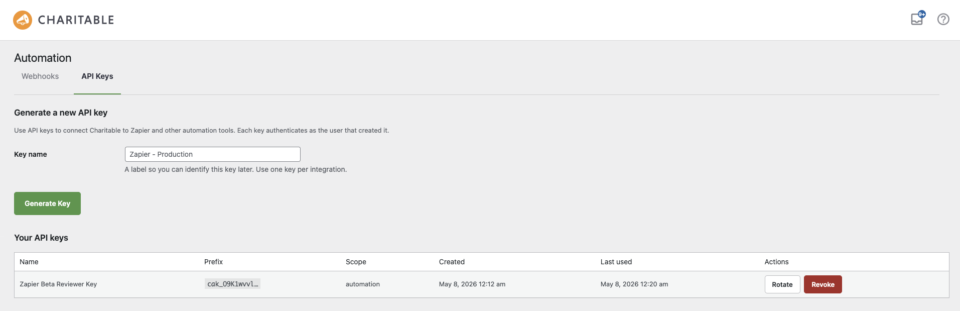
En el campo Key name en la parte superior de la página, escriba una etiqueta que explique dónde se utilizará la clave; por ejemplo, "Zapier production" o "Zapier – reviewer". La etiqueta es solo para uso interno, nunca se comparte con Zapier ni es visible para los donantes. Cuando esté listo, haga clic en Generate Key.
La nueva clave aparece en la tabla Your API keys de abajo, y el valor completo en texto plano se muestra una vez en la parte superior de la página.
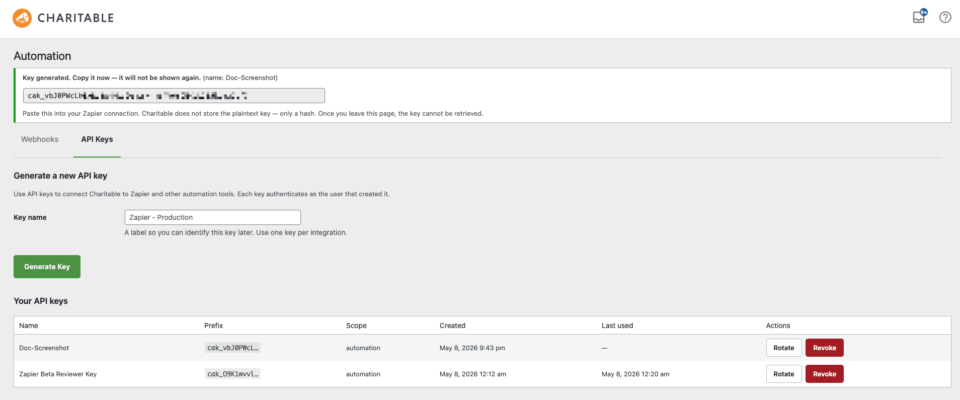
Nota: Asegúrese de copiar la clave inmediatamente. El valor en texto plano solo se muestra una vez y no se puede recuperar más tarde. Si la pierde, genere una nueva clave y actualice Zapier con el nuevo valor.
Conectar Charitable con Zapier
Con su clave API en mano, el siguiente paso ocurre dentro de Zapier.
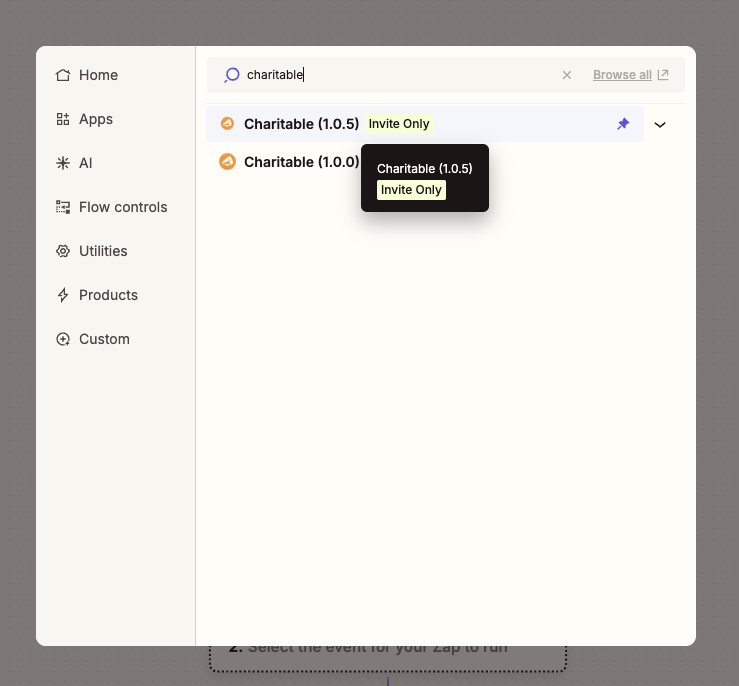
Desde el editor de Zap, busque Charitable en el selector de aplicaciones y selecciónelo. Zapier le pedirá dos datos.
- Site URL – la dirección de su sitio Charitable, por ejemplo
https://example.org. No incluya una barra inclinada al final. Zapier añade el resto de la ruta automáticamente. - API Key – pegue la cadena
cak_…que generó en el paso anterior.
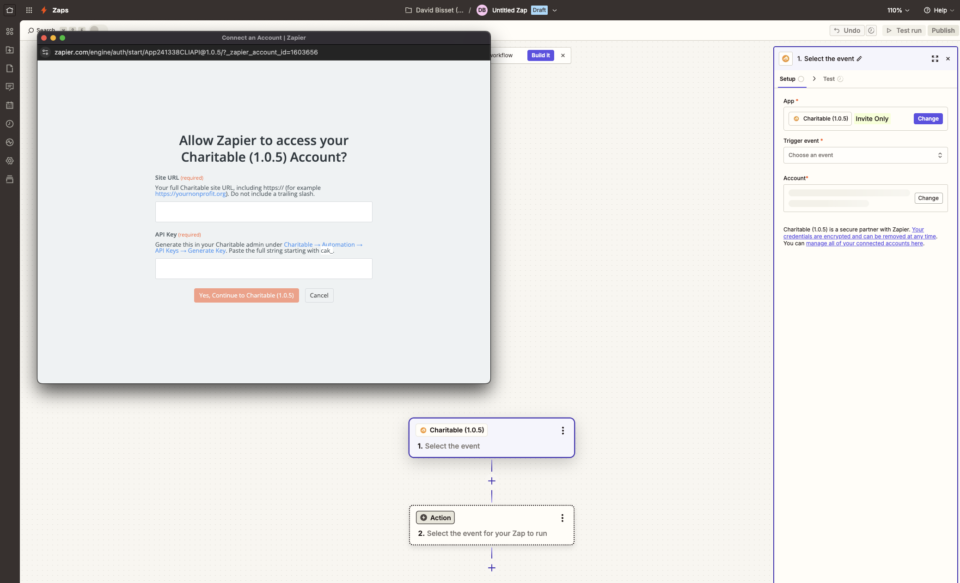
Después de confirmar, Zapier envía una solicitud de prueba a su sitio. Una confirmación de éxito en verde significa que la conexión funciona y Zapier ahora puede ver sus donaciones, donantes y campañas.
Nota: Si su sitio aplica SSL, la URL del sitio debe comenzar con https://. Una discrepancia entre el esquema de la URL y la configuración real del sitio es la causa más común de fallos en la conexión.
Eventos desencadenantes
Un disparador es algo que ocurre en tu sitio de Charitable y que inicia un Zap. Charitable proporciona diez eventos de disparador.
- Nueva donación – se activa en el momento en que se crea una nueva fila de donación en tu sitio, independientemente del estado del pago. Elige esta opción cuando quieras registrar cada intento, incluidos los pendientes.
- Donación completada – se activa cuando una pasarela de pago marca una donación como completada. Elige esta opción para secuencias de agradecimiento y recibos posteriores a la donación.
- Donación reembolsada – se activa cuando una donación se reembolsa, total o parcialmente. Útil para la conciliación contable y los flujos de trabajo de relación con el donante.
- Nueva suscripción recurrente – se activa cuando un donante establece un nuevo plan de donación recurrente. Elige esta opción para incorporar a los donantes recurrentes a una lista de CRM separada.
- Donación recurrente renovada – se activa cada vez que un cargo de donación recurrente se realiza con éxito. Elige esta opción para correos electrónicos de reconocimiento de renovación o para registrar cada renovación en el CRM.
- Suscripción recurrente cancelada – se activa cuando se cancela un plan recurrente, ya sea por el donante o por un administrador. Elige esta opción para campañas de recuperación y para actualizar las etapas del ciclo de vida del CRM.
- Pago recurrente fallido – se activa cuando falla un cargo recurrente programado. Elige esta opción para flujos de trabajo de cobro y alertas de recuperación de donantes.
- Objetivo de campaña alcanzado – se activa la primera vez que las donaciones de una campaña superan su objetivo. El evento se registra una vez por campaña, por lo que nunca se repite. Elige esta opción para mensajes de celebración a tu equipo o junta directiva.
- Campaña finalizada – se activa cuando una campaña alcanza su fecha de finalización. Elige esta opción para activar informes de fin de campaña y comunicaciones de cierre.
- Donante por primera vez – se activa cuando se registra la primera donación completada de un donante. Elige esta opción para secuencias de bienvenida y gestión de donantes por primera vez.
Todos los disparadores se activan instantáneamente en el momento en que ocurre el evento en tu sitio; no hay retraso de sondeo. Cada disparador también se puede limitar a una campaña específica en el editor de Zap, por lo que el Zap solo se ejecuta para esa campaña. Para filtros más avanzados (por pasarela de pago, importe de donación, correo electrónico del donante o cualquier otro campo de datos), añade un paso de Filtrar por Zapier justo después del disparador.
Pasos de acción y búsqueda
Una acción es algo que Zapier hace en tu sitio de Charitable al final de un Zap. Una búsqueda es una acción que busca datos y los introduce en pasos posteriores. Charitable proporciona dos de cada.
- Crear donante (acción) – añade un nuevo registro de donante a Charitable. Si ya existe un donante con el mismo correo electrónico, se devuelve el registro existente en su lugar, por lo que este paso se puede usar repetidamente sin crear duplicados.
- Actualizar donante (acción) – actualiza un donante existente por correo electrónico o ID de donante. Solo se cambian los campos que proporcionas; todo lo demás permanece igual.
- Buscar donante por correo electrónico (buscar): busca un donante de Charitable por correo electrónico y devuelve su registro completo. El Zap se puede configurar para detenerse o continuar cuando no se encuentra ninguna coincidencia.
- Buscar campaña (buscar): busca una campaña por slug o ID y devuelve el registro completo, incluido el total de donaciones actual y el objetivo.
Creación y prueba de su primer Zap
La forma más rápida de confirmar que la integración funciona de principio a fin es crear un Zap pequeño y observar cómo se activa.
Desde el editor de Zap, selecciona Nueva donación como desencadenador y elige tu cuenta de Charitable conectada. Zapier extraerá una donación real reciente de tu sitio para que puedas mapear los campos contra la forma de datos real, no contra muestras sintéticas.
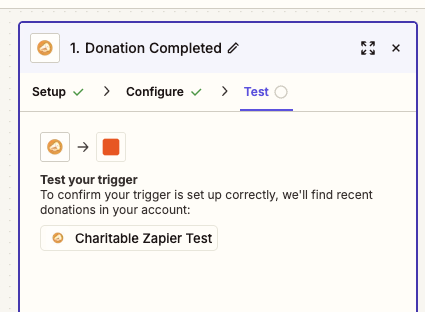
Para el paso de acción, elige cualquier servicio que ya utilices: Email by Zapier, Slack, Google Sheets o tu CRM. Mapea el nombre del donante y el importe de la donación en los campos de la acción, y luego publica el Zap.
Una vez que el Zap esté activado, haz una pequeña donación de prueba en tu sitio. Una donación de 1 $ a través de tu método de pago habitual funciona bien. En unos segundos, Zapier recibe el evento y la acción se ejecuta.
Si algo no se activa como se esperaba, la pestaña Historial de Zap en Zapier muestra la carga útil exacta que envió Charitable y cualquier error del paso de acción, lo que facilita la detección de un mapeo de campo faltante o un valor mal nombrado.
Solución de problemas
Zapier informa “Error de autenticación” al guardar la conexión
Esto significa que Zapier recibió un error HTTP de tu sitio. Confirma que la clave API es la cadena completa cak_…, es más larga que la mayoría de las claves cortas a las que podrías estar acostumbrado. La URL del sitio debe apuntar a la raíz de la instalación de WordPress, no a un subdirectorio ni a un dominio CDN. Si tu sitio aplica SSL, la URL debe comenzar con https://.
Mi Zap no se activa cuando se realiza una donación
Primero, confirma que el Zap está publicado y activado en el panel de control de Zap. Los Zaps en estado de borrador no reciben eventos. Si está publicado, abre la pestaña Historial de Zap en Zapier: los eventos que envió Charitable aparecerán allí con su carga útil completa. Si no aparece nada en el historial, es posible que tu sitio esté bloqueando las llamadas HTTPS salientes; las causas comunes son plugins de seguridad agresivos, firewalls de solicitudes o entornos de staging donde el tráfico saliente está restringido.
La pantalla de configuración del desencadenador muestra muestras sintéticas en lugar de mis donaciones reales
La configuración del desencadenador extrae tus tres registros coincidentes más recientes para que puedas mapear los campos contra formas reales. Si solo aparecen muestras sintéticas, tu sitio aún no tiene registros recientes de ese tipo. Haz una pequeña donación de prueba y luego haz clic en Buscar registros nuevos en el editor de Zap para actualizar la lista.
Cambié mi clave API y ahora nada funciona
Las claves de API están vinculadas a la conexión de Zapier, no a Zaps individuales. Cuando regeneras una clave, cada Zap con la clave antigua deja de recibir eventos. La solución más rápida es abrir la lista de conexiones de Zapier, editar la conexión de Charitable existente y pegar el nuevo valor cak_… , lo que actualiza todos los Zaps que utilizan esa conexión a la vez.
¡Eso es todo! Charitable ahora está conectado a Zapier y puedes dirigir eventos de donaciones, donantes y campañas a cualquiera de los miles de aplicaciones que Zapier admite. A continuación, consulta Filtrar Zaps de Charitable por Campaña para delimitar Zaps individuales y la Referencia de Campos de Zapier de Charitable para obtener la lista completa de campos que envía cada desencadenador.
Preguntas frecuentes
¿Puedo tener más de una cuenta de Zapier conectada al mismo tiempo?
Sí. Cada conexión de Zapier utiliza una clave de API, y puedes generar tantas claves como necesites desde Charitable » Automatización » Claves de API. Una clave separada por integración facilita la revocación del acceso para una sola herramienta sin interrumpir las demás.
¿Los desencadenadores se activan para las donaciones realizadas antes de que instalara el complemento?
No. Los desencadenadores solo se activan en eventos que ocurren después de que un Zap se publica y está escuchando. Para migrar datos históricos, expórtalos desde Charitable » Donaciones e impórtalos directamente en tu aplicación de destino.
¿Ve Zapier los detalles de la tarjeta de pago de mis donantes?
No. Charitable nunca almacena números de tarjeta, y los datos que recibe Zapier solo contienen campos de perfil del donante, importes de donaciones, detalles de la campaña e identificadores de transacciones de la pasarela.
¿Puedo usar Zapier en una red multisitio?
Sí, pero cada sitio de la red necesita su propia licencia de Charitable Pro, el complemento Automation Connect y una clave de API. Las conexiones de Zapier son por sitio, no por red.
¿Cómo revoco una clave sin romperlo todo?
En la tabla Tus claves de API en la pestaña Charitable » Automatización » Claves de API, cada clave tiene una acción Revocar a nivel de fila. Revocar una clave tiene efecto inmediato y detiene todos los Zaps que utilizan esa clave. Genera un reemplazo primero, actualiza la conexión de Zapier y luego revoca la antigua para evitar interrupciones.



