
¿Quieres que un Zap se active solo para donaciones a tu campaña de fin de año, o solo cuando un donante usa Stripe? Los Zaps de Charitable se pueden acotar a una campaña individual directamente en el paso del disparador, y cualquier otra condición –pasarela de pago, importe de la donación, paÃs del donante– se puede añadir con un paso de Filtro por Zapier.
Esta guÃa te guiará a través de los pasos para filtrar los Zaps de Charitable para que se ejecuten solo para las donaciones y campañas que te importan.
Nota: La integración de Zapier de Charitable requiere Charitable Pro 1.8.14+ y el complemento Automation Connect 2.1.0+ (plan Pro o superior).
Antes de empezar, asegúrate de haber conectado Charitable a Zapier.
Filtrar por campaña
Cada disparador de Charitable tiene un desplegable incorporado de Filtrar por campaña directamente en el paso del disparador. La lista se extrae en tiempo real de tu sitio, por lo que las campañas que ves en el desplegable coinciden con lo que está publicado en WordPress ahora mismo.
En el editor de Zap, abre el paso del disparador y continúa después de la autenticación hasta la etapa de configuración. El desplegable aparece en la pestaña Configurar.
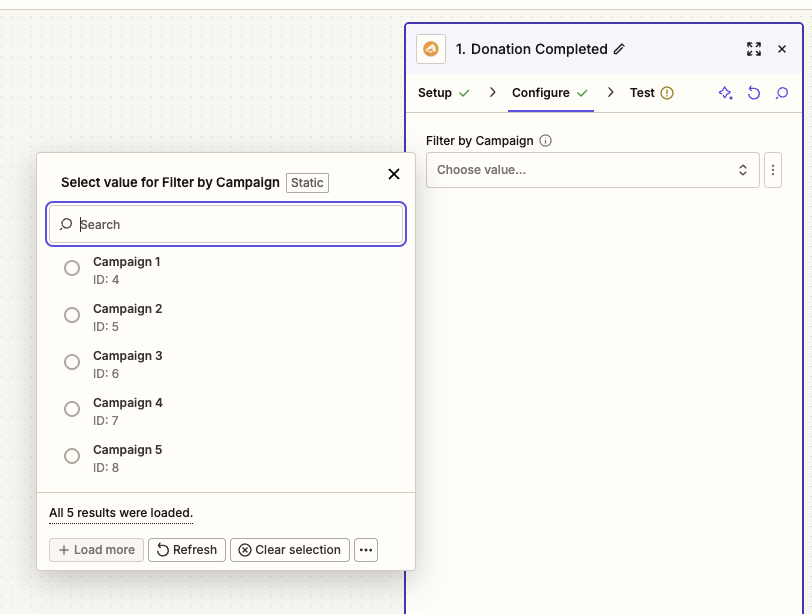
- Deja el campo en blanco – el disparador se activa para donaciones a cualquier campaña de tu sitio. Elige esto si quieres que el Zap gestione cada donación independientemente de a qué campaña se haya hecho.
- Selecciona una sola campaña – el disparador se activa solo para donaciones a esa única campaña. Elige esto para flujos de trabajo especÃficos de campaña, como una secuencia de agradecimiento dedicada para una petición de fin de año.
Nota: El desplegable de campañas refleja lo que hay en tu sitio en el momento en que se abre el desplegable. Si publicas una nueva campaña más tarde, edita el Zap y vuelve a abrir el desplegable para verlo aparecer.
Filtrar por otros campos con Filtro por Zapier
El disparador solo filtra por campaña. Para filtrar por cualquier otra cosa –pasarela de pago, importe de la donación, paÃs del donante, consentimiento del boletÃn del donante, comentario del donante, ID del recaudador de fondos o cualquier otro campo– añade un paso de Filtro por Zapier inmediatamente después del disparador de Charitable.
En el editor de Zap, haz clic en el signo más entre el disparador y la acción y elige Filtro por Zapier. Elige el evento Solo continuar si.
La regla de filtro tiene tres partes:
- Campo – elige cualquier campo de la carga útil del disparador (donation_gateway, total, country, etc.).
- Condición – elige una comparación (Existe, Es igual a, Contiene, Mayor que, etc.).
- Valor – escribe el valor con el que comparar.
Algunas reglas de filtro de ejemplo:
- Solo donaciones de Stripe – Campo:
donation_gateway· Condición:(Texto) Coincide exactamente· Valor:stripe - Solo donaciones de 100 € o más – Campo:
total· Condición:(Número) Mayor o igual que· Valor:100 - Solo donantes que aceptaron el boletÃn – Campo:
newsletter_opt_in· Condición:(Número) Coincide exactamente· Valor:1 - Solo donantes de EE. UU. · Campo:
country· Condición:(Texto) Coincide exactamente· Valor:US
Cuando la regla del filtro se cumple, el resto de la Zap se ejecuta. Cuando falla, la Zap se detiene en el paso del filtro y no se ejecuta ninguna acción. Puede ver los resultados del filtro en la pestaña Historial de Zaps.
Para obtener la lista completa de campos disponibles para filtrar, consulte la Referencia de campos de Zapier para Charitable.
Combinar múltiples filtros
Un único Paso de filtro de Zapier puede contener varias reglas a la vez. Utilice el grupo Y para requerir que todas las reglas se cumplan, o el grupo O para que se cumpla cuando coincida cualquiera de las reglas.
Por ejemplo, "activar la Zap solo para donaciones de Stripe de 100 € o más para la Campaña de fin de año" combina:
- Filtro del desencadenador: Filtrar por campaña =
Campaña de fin de año - Regla de filtro de Zapier 1 (Y):
donation_gatewaycoincide exactamente constripe - Regla de filtro de Zapier 2 (Y):
totalmayor o igual que100
El filtro de campaña se realiza en su sitio de Charitable antes de que el evento salga, por lo que es la capa más eficiente. El paso Filtrar por Zapier se ejecuta en los servidores de Zapier justo después, por lo que añade una pequeña tarea por cada Zap filtrada a su uso mensual de tareas.
Probar tu filtro
La forma más rápida de confirmar que un filtro funciona es hacer una donación de prueba que coincida con las reglas y otra que no.
Haga una pequeña donación de prueba que coincida con su filtro; por ejemplo, una donación de 1 € a la Campaña de fin de año utilizando Stripe. En unos segundos, la Zap debería ejecutarse de principio a fin y el paso de acción se completará.
Ahora haga una segunda donación de prueba que debería ser excluida; por ejemplo, la misma donación de 1 € a una campaña diferente. Abra la pestaña Historial de Zaps en Zapier. La segunda donación debería aparecer con un estado de Filtrada o No se cumplió el filtro, y no debería haberse ejecutado ningún paso de acción.
Si una donación que debería haber sido filtrada aún ejecutó el paso de acción, revise el tipo de comparación. Los campos numéricos como total y newsletter_opt_in necesitan una comparación basada en números; los campos de texto como donation_gateway y country necesitan una comparación de texto.
¡Eso es todo! Sus Zaps de Charitable ahora se activan solo para las campañas y condiciones que le interesan. A continuación, consulte la Referencia de campos de Zapier para Charitable para obtener la lista completa de campos que envía cada desencadenador, y la guía de Filtro de Zapier de Zapier para lógica de filtros avanzada.
Preguntas frecuentes
¿El filtro de campaña ralentiza el desencadenador?
No. El filtro de campaña se ejecuta en su sitio de Charitable antes de que el evento se envíe a Zapier, por lo que los eventos filtrados nunca salen de su servidor. Eso lo hace más eficiente que un filtro del lado de Zapier, tanto para la latencia de la Zap como para su uso mensual de tareas.
¿Puedo filtrar por varias campañas a la vez en el paso del desencadenador?
El desplegable "Filtrar por campaña" integrado en el disparador acepta una sola campaña. Para dirigirse a varias campañas a la vez, deja el filtro del disparador en blanco y añade un paso de Filtrar por Zapier usando la condición (Texto) Dentro con una lista de IDs de campaña separados por comas en el campo de valor.
¿Dónde encuentro el ID de una campaña para usarlo en un paso de Filtrar por Zapier?
El campo campaign_id forma parte de la carga útil de cada disparador, por lo que puedes seleccionarlo en el desplegable de campos al crear la regla de filtro. Para buscar el ID de una campaña específica fuera de Zapier, edita la campaña en WordPress y comprueba la URL: el parámetro de cadena de consulta post= es el ID de la campaña.
Un paso de Filtrar por Zapier cuenta como una tarea. ¿El filtro de campaña del disparador también cuenta?
No. Los eventos filtrados en el lado de Charitable nunca entran en Zapier y, por lo tanto, nunca cuentan como tareas. Solo lo hacen los eventos que llegan realmente a un paso de Filtrar por Zapier.
¿Aún aparecerá un Zap filtrado en mi Historial de Zaps?
Sí: los resultados de Filtrar por Zapier (tanto los que pasan como los filtrados) aparecen en el Historial de Zaps para que puedas auditar qué se ejecutó y qué no. El filtrado de campañas a nivel de disparador no aparece en el Historial de Zaps porque el evento nunca llegó a Zapier en primer lugar.



