

Heute veröffentlichen wir Charitable 1.5, die erste Hauptversion von 2017. Dies ist ein Meilenstein-Update für Charitable, da es lang ersehnte Funktionen hinzufügt und viele Aspekte von Charitable verbessert – sowohl oberflächlich als auch unter der Haube.
Lesen Sie unten, um zu erfahren, was es Neues gibt.
Mitwirkende
Zuerst möchte ich den Personen danken, die Änderungen in dieser Version vorgenommen haben. In keiner bestimmten Reihenfolge: Jeroen Sormani, Rafe Colton, Kathy Darling, Nick Ciske, B. Scott und dsoares. Vielen Dank an alle!
Natürlich ist Code nicht der einzige Weg, wie Sie zu Charitable beitragen können. An alle, die einen Kommentar zu einem Problem hinterlassen, einen Fehler gemeldet oder beim Übersetzen von Charitable geholfen haben, vielen Dank!
Top 9 neue Funktionen in Charitable 1.5
69 Probleme wurden in dieser Version geschlossen (das sind etwas mehr als 23 % aller jemals für Charitable gemeldeten Probleme) und ein guter Teil davon waren neue Funktionen. Ich werde neun der wichtigsten neuen Funktionen unten behandeln, aber für einen vollständigen Überblick über alles Neue lesen Sie die Changelog.
Spenden im WordPress-Dashboard erstellen und bearbeiten
Von allen neuen Funktionen in Charitable 1.5 wurde diese am häufigsten angefordert. Sie können jetzt neue Spenden direkt von Ihrem WordPress-Dashboard aus hinzufügen.
Bestehende Spenden können mit derselben Oberfläche bearbeitet werden.
Für weitere Informationen lesen Sie die detaillierte Dokumentation.
Spendenquittungen (und andere E-Mails) vom Dashboard erneut senden
Hatten Sie jemals einen Spender, der seine Spendenquittung verloren hat?
Sie können nun ganz einfach die Quittung eines Spenders über das WordPress-Dashboard erneut senden. Gehen Sie einfach zur Spende, wählen Sie die E-Mail im Bereich „Spendenaktionen“ aus, die Sie erneut senden möchten, und klicken Sie auf die Schaltfläche „E-Mail erneut senden“.
Lesen Sie die Dokumentation für eine Schritt-für-Schritt-Anleitung zum erneuten Senden von E-Mails.
Nebenbei bemerkt, ist die Meta-Box „Spendenaktionen“ eine neue Ergänzung in Version 1.5. Derzeit wird sie ausschließlich zum erneuten Senden von E-Mails verwendet, aber wir erwarten, in Zukunft weitere Optionen hinzuzufügen.
Fügen Sie Ihr Spendenformular zu einer Seite hinzu
Eine weitere beliebte Anfrage war nach einer einfachen Möglichkeit, ein Spendenformular in eine Seite einzubetten. Dies ist nun mit dem Shortcode [charitable_donation_form] möglich:
[charitable_donation_form campaign_id=123]
Ziemlich einfach, oder? Wenn Sie weitere Details benötigen, lesen Sie die Dokumentation.
Neue E-Mails für Offline-Spenden
Ein seit langem bestehendes Problem für einige Charitable-Benutzer war das Fehlen eines guten E-Mail-Benachrichtigungssystems für Offline-Spenden. Die Quittung und die Admin-Benachrichtigung für Spenden werden nur gesendet, wenn eine Spende als „Bezahlt“ markiert wird, was für jedes Gateway außer „Offline“ automatisch geschieht.
Offline-Spenden bleiben „Ausstehend“, bis sie von einem Administrator als „Bezahlt“ markiert wurden.
Rafe Colton löste dieses Problem, indem er zwei neue E-Mails einführte: die Offline-Spendenquittung und die Offline-Spendenbenachrichtigung. Diese E-Mails werden nur für ausstehende Offline-Spenden gesendet. In der Spendenquittung können Sie auch die Offline-Zahlungsanweisungen anzeigen, damit Ihr Spender weiß, wie er seine Spende abschließen kann.
Klicken Sie hier für weitere Details zu den E-Mails.
Sehen Sie wichtige Kampagneninformationen auf einen Blick
Die Kampagnen-Tabelle im WordPress-Dashboard wurde neu gestaltet, um auf Kampagnen zugeschnitten zu sein. Auf einen Blick sehen Sie nun, wie viel eine Kampagne eingebracht hat, wann sie endet und, wenn sie abgeschlossen ist, ob sie erfolgreich war.
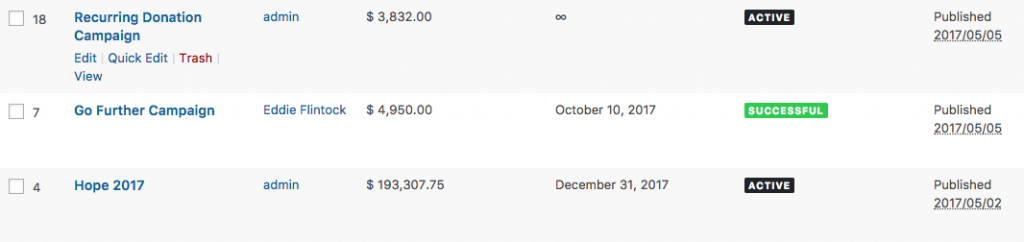
Sie sehen auch die Kampagnen-ID in der linken Spalte, was praktisch ist, wenn Sie die ID einer bestimmten Kampagne in einem Shortcode wie [charitable_donation_form], [charitable_donors] oder [campaigns] benötigen, die alle campaign-Parameter akzeptieren.
Zeigen Sie Spender mit einem Shortcode überall an
Sie können nun eine Liste Ihrer Spender mit dem Shortcode [charitable_donors] überall auf Ihrer Website anzeigen. Der Shortcode ermöglicht es Ihnen, Spender für alle Kampagnen oder eine bestimmte Kampagne anzuzeigen, und Sie können auch steuern, was für jeden Spender angezeigt wird. Standardmäßig werden der Avatar (oder Gravatar), der Name und der gespendete Betrag des Spenders angezeigt:

Erweiterte Spenderkonten mit E-Mail-Verifizierung
Seit Version 1.4 enthält Charitable den Shortcode [charitable_my_donations], der Spendern eine einfache Möglichkeit bietet, ihre Spendenhistorie einzusehen.
Aber es gab ein Problem: Es wurden nur Spenden angezeigt, die Sie getätigt haben, während Sie angemeldet waren. Wenn Sie Spenden getätigt haben, ohne angemeldet zu sein, aber mit derselben E-Mail-Adresse wie Ihr Konto, wurden diese nicht angezeigt.
Um dies zu beheben, haben wir einen grundlegenden E-Mail-Verifizierungsprozess für registrierte Benutzer eingerichtet, der sicherstellt, dass sie Zugriff auf die E-Mail-Adresse haben, mit der sie sich registriert haben, bevor alle mit dieser E-Mail verknüpften Spenden angezeigt werden. Die Bestätigung Ihrer E-Mail-Adresse ist ein schneller und einfacher Prozess – klicken Sie einfach auf einen Link und Sie sind fertig.
Fügen Sie einen Abmelde-Link mit einem Shortcode hinzu
Charitable enthielt schon immer Anmelde-, Registrierungs- und Profilformulare. In Version 1.4 haben wir auch einen Prozess zum Zurücksetzen des Passworts hinzugefügt. Aber ein fehlendes Teil war eine integrierte Möglichkeit, einen Abmelde-Link hinzuzufügen.
Glücklicherweise gibt es jetzt einen einfachen Shortcode dafür:
[charitable_logout]
Lesen Sie die Dokumentation für weitere Details zur Verwendung des Abmelde-Shortcodes.
Nutzen Sie Varnish Cache mit Charitable voll aus
Varnish ist ein beliebter Caching-Mechanismus, der von großen Web-Hosts wie WP Engine und SiteGround verwendet wird. Möglicherweise verwenden Sie ihn, ohne es zu wissen. Und er hat Ihnen möglicherweise Kopfschmerzen mit Charitable bereitet.
Das Hauptproblem, auf das wir bei Varnish gestoßen sind, war, dass es Benutzersitzungen daran hindern konnte, wie erwartet zu funktionieren. Ein besonders unangenehmer Nebeneffekt davon war, dass Spender unmittelbar nach der Spende eine Meldung „Sie haben keinen Zugriff auf diese Spendenquittung“ erhielten. Kaum der Eindruck, den Sie bei Spendern hinterlassen möchten.
Charitable 1.5 löst dieses Problem, indem Inhalte dynamisch (über AJAX) geladen werden, wenn wir feststellen, dass Benutzersitzungen nicht funktionieren. Das bedeutet, dass Sie jetzt Varnish voll ausnutzen können, um Ihre Website zu beschleunigen, ohne die Spendererfahrung negativ zu beeinträchtigen.
Updates für Entwickler
Nicht alle Änderungen sind für den Benutzer sichtbar, und Charitable 1.5 enthält eine Reihe von Verbesserungen, die das Leben von Entwicklern erleichtern und neue Möglichkeiten für den Aufbau von Online-Fundraising-Erlebnissen mit Charitable eröffnen sollen.
Registrieren Sie neue Spendenfelder mit der Donation Fields API
Vor dieser Veröffentlichung mussten Sie, wenn Sie ein neues Feld zu Ihrem Spendenformular hinzufügen und den Wert in E-Mails, Admin-Metadaten und Spendenexporten anzeigen wollten, fünf separate Hooks mit einer anderen Funktion für jeden verwenden. Abgesehen davon, dass es mühsam war, ließ dies viel Raum für Fehler, insbesondere für weniger erfahrene Benutzer, die benutzerdefinierte Felder mit wenig oder keiner Entwicklungskenntnis hinzugefügt haben.
In Charitable 1.5 können Sie ein neues Spendenfeld in einer einzigen Funktion registrieren, die auf dem init Hook aufgerufen wird:
function ed_charitable_register_new_donation_field() {
    $field = new Charitable_Donation_Field( 'national_id_number', array(
        'label'          => __( 'National ID Number', 'charitable' );
        'data_type'      => 'user',
        'donation_form'  => array(
            'show_after' => 'phone',
            'required'   => false,
        ),
        'admin_form'     => array(
            'show_after' => 'phone',
            'required'   => false,
        ),
        'show_in_meta'   => true,
        'show_in_export' => true,
        'email_tag'      => array(
            'description' => __( 'The donor\'s national ID number' , 'charitable' ),
        )
    ) );

    charitable()->donation_fields()->register_field( $field );
}

add_action( 'init', 'ed_charitable_register_new_donation_field' );
Sehen Sie sich den vollständigen, stark kommentierten Code für eine detaillierte Übersicht über alle verfügbaren Optionen an.
Erhalten Sie ganz einfach Spender- & Spendenanzahlen mit Charitable_Query-Klassen
Die Klasse Charitable_Query ist die Grundlage sowohl für Charitable_Donations_Query als auch für Charitable_Donor_Query, die es Ihnen ermöglichen, Sammlungen von Spenden und Spendern zu erhalten. Aber manchmal müssen Sie nicht die gesamte Sammlung abrufen; Sie benötigen nur die Anzahl der Ergebnisse.
Wir haben eine neue Option zu Charitable_Query hinzugefügt , mit der Sie ganz einfach die Anzahl abrufen können. Setzen Sie einfach output auf count und formulieren Sie den Rest Ihrer Abfrage wie gewohnt. Hier ist zum Beispiel eine Abfrage, die die Anzahl der Spenden abruft, die vom Spender mit der ID 123 an die Kampagne mit der ID 4 getätigt wurden:
$query = new Charitable_Donations_Query( array(
    'campaign' => 4,
    'donor_id' => 123,
    'output' => 'count'
) );
$query->count();
Klicken Sie hier für weitere Beispiele.
Neue E-Mail-Felder mit der E-Mail-Felder-API hinzufügen
Wir haben ein großes Performance-Problem entdeckt, das damit zusammenhängt, wie E-Mail-Felder zuvor eingerichtet wurden. Daher haben wir die Gelegenheit genutzt, die Funktionsweise von E-Mail-Feldern komplett zu überarbeiten. Dies hat das Performance-Problem behoben (Einstellungsseiten, die zuvor über 15 Sekunden zum Laden benötigten, laden nun in weniger als einer Sekunde) und auch eine flexiblere Möglichkeit zum Hinzufügen und Bearbeiten von E-Mail-Feldern eröffnet.
function ed_charitable_email_campaign_field_callback( $value, $args, $email ) {
    $campaign = $email->get_campaign();
    return $campaign->get( 'some_field' );
}

function ed_charitable_add_email_campaign_field( $fields ) {
    $fields['some_field'] = array(
        'description' => 'A description of this field',
        'preview'     => 'Placeholder value',
        'callback'    => 'ed_charitable_email_campaign_field_callback',
    );

    return $fields;
}

add_filter( 'charitable_email_campaign_fields', 'ed_charitable_add_email_campaign_field' );
Klicken Sie hier für die vollständige Dokumentation.
Mindestspendenbetrag festlegen
Sie können jetzt einen Mindestspendenbetrag für alle Kampagnen mit dem charitable_minimum_donation_amount-Filter festlegen. Um beispielsweise einen Mindestspendenbetrag von 2 $ festzulegen:
function ed_charitable_set_minimum_donation_amount() {
    return 2;
 }

add_filter( 'charitable_minimum_donation_amount', 'ed_charitable_set_minimum_donation_amount' );
Detaillierte Doc-Kommentare für Hooks & Filter
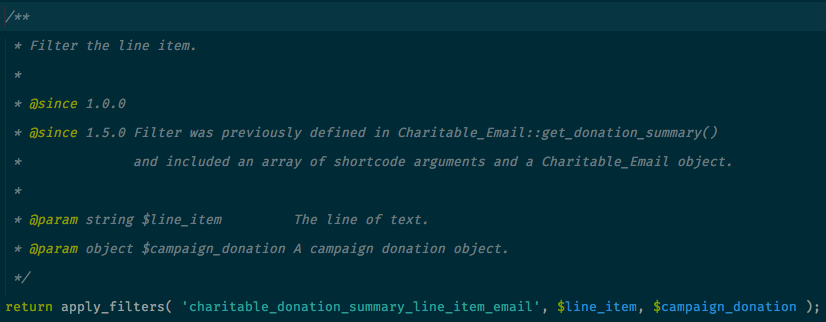
Wir waren schon immer ziemlich rigoros, was Inline-Dokumentation angeht, aber mit dieser Version haben wir das wirklich auf die nächste Stufe gehoben. Viele Action- und Filter-Hooks enthalten jetzt detaillierte Doc-Kommentare, die zeigen, wann der Hook eingeführt wurde und welche Parameter er sendet. Hier ist ein Beispiel:
Weitere Änderungen:
- Ein Autoloader wurde hinzugefügt. Danke an Kathy Darling dafür!
- Legen Sie mit dem
charitable_campaign_can_receive_donations-Filter fest, ob eine Kampagne Spenden erhalten kann. - Verwenden Sie den
charitable_monetary_amount-Filter für eine detaillierte Steuerung der Anzeige von Geldbeträgen. - Die Formularansicht-API wurde hinzugefügt. Diese trennt, wie Formulare gerendert werden, von der Art und Weise, wie sie eingerichtet werden. Sie verbessert auch die Leistung.
- Die Endpunkt-API wurde hinzugefügt, mit der Sie neue Endpunkte über Charitable registrieren können.
Was denkst du?
Wie Sie sehen können, ist dies ein enormes Update für Charitable. Es hat viel länger gedauert, als ich gehofft hatte, aber ich bin unglaublich stolz auf die erzielten Verbesserungen. Viele dieser Probleme waren seit langem ein Dorn im Auge der Benutzer, und es ist großartig, endlich eine solide Lösung für diese Probleme gefunden zu haben.
Wenn Sie dies noch nicht getan haben, aktualisieren Sie Charitable noch heute über Ihr Dashboard und sagen Sie uns, was Sie denken. Die meisten dieser Verbesserungen sind aus Benutzerfeedback entstanden, und wie immer möchten wir hören, was Sie von diesen Updates halten.
Teilen Sie Ihre Gedanken in den Kommentaren unten!






Hinterlassen Sie eine Antwort